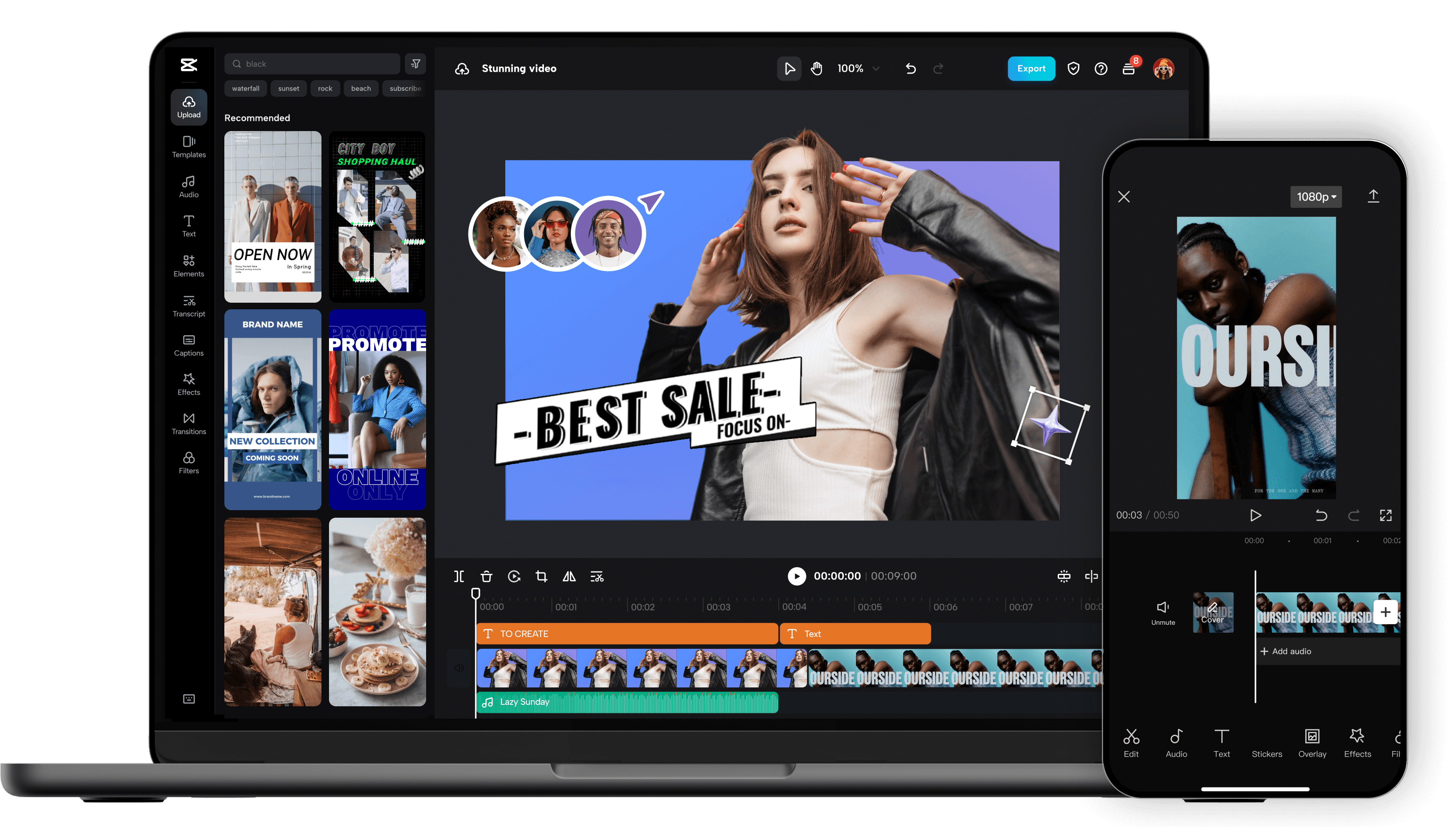
Unleash your creativity and transform your videos with CapCut AI Video Editor, the ultimate all-in-one mobile editing suite designed for creators, influencers, and anyone looking to make their content shine. Whether you're a seasoned pro or just starting out, CapCut's intuitive interface and powerful AI-driven features make professional-quality video editing accessible to everyone, right from your smartphone. Experience the Magic of AI-Powered Editing: CapCut's intelligent AI tools take the heavy lifting out of video production. Effortlessly remove backgrounds with a single tap, creating seamless green-screen effects or isolating subjects for dynamic visual storytelling. Our advanced auto-captions feature transcribes your audio with remarkable accuracy, saving you hours of manual work and making your videos more accessible to a wider audience. Dive into a world of creative possibilities with AI text-to-video , allowing you to generate stunning visuals from simple text prompts. Need to clean up your audio? CapCut's AI audio enhancer intelligently refines your sound, reducing background noise and boosting clarity for a professional finish. Edit Like a Pro, Effortlessly: Beyond its AI prowess, CapCut offers a comprehensive suite of traditional editing tools. Trim, split, merge, and reorder your clips with precision. Enhance your visuals with a vast library of filters, effects, and transitions that will captivate your viewers. Add personality and polish with a wide selection of royalty-free music, sound effects, and voiceovers . Experiment with keyframe animation to bring your elements to life with smooth, dynamic movement. Fine-tune your footage with color correction and adjustment tools to achieve the perfect mood and aesthetic. Elevate Your Content with Premium Features: CapCut empowers you to create engaging and professional content for all your favorite platforms. Speed ramping allows for dramatic slow-motion or exhilarating fast-forward effects. Chroma keying (green screen) opens up endless possibilities for background replacement. Utilize picture-in-picture to layer videos and create dynamic compositions. Explore strobe effects, zoom effects, and motion blur to add visual flair and keep your audience hooked. Why Choose CapCut AI Video Editor? User-Friendly Interface: Designed for ease of use, making complex editing simple. Powerful AI Tools: Automate tedious tasks and unlock new creative avenues with intelligent features. Extensive Feature Set: From basic cuts to advanced effects, CapCut has everything you need. Vast Asset Library: Access a wealth of music, effects, and templates to enhance your videos. No Watermarks (Free Version): Create and export your videos without unwanted branding. Regular Updates: Benefit from continuous improvements and new features. Cross-Platform Sync (with Pro): Seamlessly work across devices. Perfect for Social Media: Optimize your videos for TikTok, Instagram Reels, YouTube Shorts, and more. Who is CapCut for? Social Media Influencers: Create captivating content that drives engagement. Content Creators: Produce professional-looking videos for YouTube, Twitch, and other platforms. Small Business Owners: Craft compelling promotional videos to showcase your products and services. Educators: Develop engaging video lessons and presentations. Hobbyists & Enthusiasts: Bring your passion projects to life with stunning visuals. Anyone! If you have a story to tell, CapCut is your tool. Download CapCut AI Video Editor today and experience the future of mobile video editing. Transform ordinary moments into extraordinary stories. Join millions of creators worldwide and discover how easy it is to make your videos stand out. Your next viral video starts here!

JoggAI is an innovative AI video generator designed to help users create compelling video ads with realistic AI avatars quickly and efficiently. It solves the problem of time-consuming and expensive video production by leveraging artificial intelligence to automate the creation of engaging visual content. This tool is ideal for marketers, small businesses, content creators, and social media managers seeking to enhance their advertising efforts with professional-quality videos without requiring extensive technical skills or resources. JoggAI streamlines the video creation process, making it accessible to anyone looking to improve their brand messaging and drive conversions through dynamic video content. Key Features of JoggAI Transforms text scripts into fully produced videos. Offers a diverse library of lifelike AI avatars. Provides customizable video templates for various ad formats. Includes a user-friendly interface for easy video editing. Supports multiple aspect ratios for different platforms. Allows users to select background music and voiceovers. Enables rapid iteration and experimentation with different video variations. Offers a range of video styles and tones to match brand identity. Provides options for adding text overlays and visual effects. Facilitates quick content creation for social media, websites, and advertising campaigns. Why People Use JoggAI Individuals and businesses utilize JoggAI to overcome the traditional barriers associated with video production. Historically, creating high-quality video ads required significant investment in equipment, skilled personnel, and time. JoggAI democratizes this process, enabling users to generate professional-looking videos in minutes, regardless of their prior experience. The platformΓÇÖs AI-powered automation significantly reduces production time and costs, allowing for faster campaign deployment and increased marketing agility. Unlike manual video editing, JoggAI offers a streamlined workflow that simplifies complex tasks, making it easier to experiment with different creative concepts and optimize video performance. The ability to quickly produce multiple video variations is a key advantage, enabling A/B testing and data-driven improvements to maximize campaign effectiveness. Popular Use Cases Social Media Marketing: Creating engaging video ads for platforms like Facebook, Instagram, TikTok, and LinkedIn. Digital Advertising: Generating compelling video creatives for Google Ads, YouTube Ads, and other online advertising channels. Product Demonstrations: Showcasing product features and benefits through concise and visually appealing video demonstrations. Explainer Videos: Simplifying complex concepts and processes with easy-to-understand animated explainer videos. Educational Content: Developing engaging video lessons and tutorials for online learning platforms. Brand Awareness Campaigns: Building brand recognition and establishing a consistent visual identity through branded video content. Promotional Offers: Announcing special offers, discounts, and promotions with eye-catching video ads. Internal Communications: Creating engaging video updates and announcements for employees. Real Estate Marketing: Showcasing property listings with virtual tours and video walkthroughs. E-commerce Product Ads: Generating dynamic video ads that highlight key product features and drive sales. Benefits of JoggAI Reduced Video Production Costs: Eliminates the need for expensive equipment, professional videographers, and editing software. Faster Content Creation: Significantly accelerates the video production process, enabling rapid campaign deployment. Increased Marketing Agility: Allows for quick iteration and experimentation with different video variations. Enhanced Brand Messaging: Enables the creation of visually appealing and engaging videos that effectively communicate brand values. Improved Audience Engagement: Captures audience attention with realistic AI avatars and dynamic video content. Scalable Video Production: Facilitates the creation of a large volume of video ads to support multiple campaigns. Simplified Video Editing: Provides a user-friendly interface that requires no prior video editing experience. Data-Driven Optimization: Enables A/B testing and performance tracking to maximize campaign effectiveness. Consistent Brand Identity: Ensures a consistent visual style across all video content. Wider Reach and Impact: Expands marketing reach and increases brand awareness through compelling video ads.
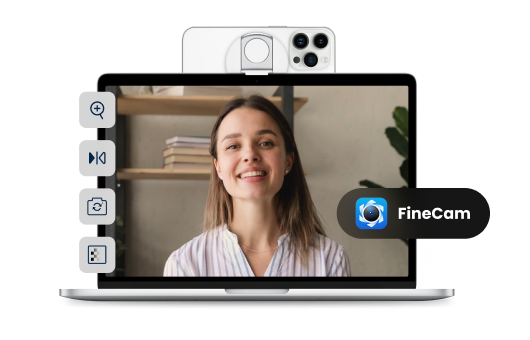
Fineshare is an innovative AI-powered audio and video creation platform designed to help users generate professional-quality content quickly and efficiently by leveraging artificial intelligence, text-to-speech technology, and automated video creation workflows . Fineshare addresses the challenges of time-consuming and expensive content production, particularly for audio and video assets. It utilizes advanced AI algorithms to transform text into realistic speech and facilitates the creation of visually engaging videos, streamlining the content creation process. This platform is ideal for content creators, marketers, educators, and businesses seeking to produce high-quality audio and video content without the need for extensive technical expertise or significant financial investment in traditional production methods. ItΓÇÖs a valuable resource for anyone looking to enhance their content strategy with compelling multimedia experiences. Key Features of Fineshare Text-to-speech conversion with a diverse range of AI voices. Support for multiple languages for global content creation. AI-powered video generation from text prompts. Customizable video templates and styles. User-friendly interface for easy navigation and operation. Ability to clone voices for consistent branding. Options for adjusting speech speed and pitch. High-quality audio output for professional results. Integration of background music and sound effects. Cloud-based platform accessible from any device. Why People Use Fineshare Individuals and organizations utilize Fineshare to overcome the hurdles associated with traditional audio and video production. Creating compelling content often requires specialized skills, expensive equipment, and significant time investment. Fineshare democratizes content creation by providing an accessible, affordable, and efficient alternative. The platform empowers users to bypass the complexities of recording studios, voice actors, and video editing software. By automating key aspects of the production process, Fineshare significantly reduces turnaround times and costs, allowing creators to focus on their core message and creative vision. ItΓÇÖs particularly beneficial for those who need to produce a high volume of content regularly, such as marketing campaigns, educational materials, or podcast episodes. The platformΓÇÖs ease of use makes it suitable for users with varying levels of technical expertise, fostering a more inclusive and streamlined content creation workflow. Popular Use Cases Marketing and Advertising: Generating voiceovers for video ads, promotional content, and social media campaigns. E-learning and Training: Creating engaging narrations for online courses, tutorials, and training materials. Podcast Production: Producing high-quality audio introductions, outros, and segments for podcasts. YouTube Content Creation: Developing voiceovers for explainer videos, reviews, and entertainment content. Audiobook Creation: Converting written manuscripts into professional-sounding audiobooks. Accessibility Solutions: Providing text-to-speech functionality for websites and applications to enhance accessibility. Internal Communications: Creating engaging video announcements and training materials for employees. Personal Projects: Generating voiceovers for personal videos, presentations, and creative endeavors. Content Localization: Adapting content for different languages and regions with AI-powered voiceovers. Social Media Content: Quickly producing short-form video content with AI voices for platforms like TikTok and Instagram Reels. Benefits of Fineshare Reduced Production Costs: Eliminates the need for expensive recording studios, voice actors, and video editors. Increased Efficiency: Automates key aspects of the content creation process, saving valuable time and resources. Enhanced Content Quality: Delivers professional-sounding audio and visually appealing videos. Scalability: Enables the rapid production of large volumes of content to meet growing demands. Accessibility: Empowers users with varying levels of technical expertise to create high-quality content. Brand Consistency: Allows for voice cloning to maintain a consistent brand identity across all content. Global Reach: Supports multiple languages, facilitating content localization and expansion into new markets. Creative Freedom: Provides a wide range of voices, styles, and customization options to bring creative visions to life. Improved Engagement: Captures audience attention with compelling audio and video experiences. Streamlined Workflow: Integrates seamlessly into existing content creation workflows, simplifying the production process.

Eromantic AI stands as the leading AI Porn Generator, providing users with the capability to design their dream virtual companion and generate explicit content. This cutting-edge platform empowers individuals to bring their most intimate fantasies to life, offering a powerful tool for creating personalized adult-oriented visuals. Eromantic AI leverages advanced generative artificial intelligence to produce high-quality, customized pornographic images based on user specifications. It is a premier destination for those seeking to visualize and interact with their ideal digital partners in an uncensored environment. Focused on user control and creative freedom, Eromantic AI allows for detailed customization of virtual companions and scenes, ensuring that the generated content precisely matches your desires. The platformΓÇÖs intuitive interface makes the process of creating AI porn accessible to everyone, regardless of technical expertise. With its commitment to providing a seamless and high-fidelity generation experience, Eromantic AI is continuously advancing the capabilities of AI in adult entertainment. Explore endless possibilities for digital intimacy and visual fantasy fulfillment with a tool designed to transform your imagination into explicit digital reality.

Evoke AI, under the brand XXX AIs, is a pioneering platform dedicated to generating uncensored AI videos and high-quality 4K images instantly. This tool empowers users to visualize their most explicit fantasies with unprecedented detail and realism, offering a straightforward interface for creating adult-oriented visual content. By leveraging advanced artificial intelligence, Evoke AI provides a powerful solution for digital artists, content creators, and individuals looking to explore the boundaries of AI-generated adult media. The focus on instant creation and high-resolution output makes it a leading choice in the realm of AI pornography and fantasy fulfillment. Evoke AI stands out due to its commitment to providing uncensored access and superior image quality. Users can generate a wide array of scenes and characters, transforming textual prompts into vivid, detailed videos and still images without limitations. The platform's efficiency ensures that your creations are ready in moments, allowing for rapid iteration and creative exploration. For those seeking to produce explicit AI-generated visual content with ease and high fidelity, Evoke AI offers a robust and user-friendly experience, pushing the envelope of what's possible in digital adult entertainment.

Masonry is an innovative AI-powered image and video generation platform that empowers users to visually compare outputs from multiple artificial intelligence models using a single text prompt. It addresses the challenge of navigating the rapidly expanding landscape of AI art generation tools, offering a centralized hub for experimentation and discovery. This platform is designed for artists, designers, marketers, and anyone seeking to leverage AI image generation and AI video generation to create compelling visual content. It streamlines the creative workflow by eliminating the need to individually test prompts across numerous platforms, saving valuable time and resources. Key Features of Masonry Compares outputs from multiple AI models simultaneously. Offers a visual canvas for side-by-side image and video comparisons. Supports text-to-image generation. Supports text-to-video generation. Allows users to explore diverse AI art styles. Provides a unified interface for accessing various AI models. Enables prompt experimentation and refinement. Facilitates the discovery of optimal AI models for specific creative needs. Offers a user-friendly interface for both beginners and experienced AI artists. Supports high-resolution image and video outputs. Why People Use Masonry Users adopt Masonry to overcome the complexities and inefficiencies of working with multiple, disparate AI art generation tools. Traditionally, creating visuals with AI required submitting the same prompt to each platform ΓÇô Midjourney, Stable Diffusion, DALL-E 2, and others ΓÇô and manually comparing the results. This process is time-consuming and can be frustrating when seeking a specific aesthetic or style. Masonry consolidates this process, presenting outputs from various models in a unified, easily comparable format. This allows users to quickly identify the best model for their project, refine their prompts, and accelerate their creative workflow. The platformΓÇÖs comparative approach fosters a deeper understanding of each modelΓÇÖs strengths and weaknesses, ultimately leading to higher-quality and more targeted AI-generated content. Popular Use Cases Graphic Design: Designers utilize Masonry to rapidly prototype visual concepts and explore different artistic styles for branding, marketing materials, and web design. Marketing & Advertising: Marketing teams leverage the platform to generate diverse ad creatives, social media content, and campaign visuals, optimizing for engagement and brand consistency. Content Creation: Bloggers, YouTubers, and social media influencers employ Masonry to create unique thumbnails, illustrations, and video assets to enhance their content. Artistic Exploration: Artists and hobbyists use the platform to experiment with AI art generation, discover new styles, and push the boundaries of their creativity. Video Production: Filmmakers and video editors utilize Masonry to generate storyboards, concept art, and short video clips for pre-production and post-production workflows. E-commerce: Online retailers use Masonry to create product mockups, lifestyle imagery, and visually appealing marketing materials. Architectural Visualization: Architects and designers can quickly generate visualizations of building designs and interior spaces. Game Development: Game developers use Masonry to create concept art, textures, and promotional materials for their games. Benefits of Masonry Time Savings: Significantly reduces the time spent testing prompts across multiple AI models. Enhanced Creativity: Facilitates experimentation and discovery of new artistic styles and techniques. Improved Output Quality: Enables users to select the optimal AI model for their specific creative needs, resulting in higher-quality visuals. Streamlined Workflow: Consolidates the AI art generation process into a single, user-friendly platform. Cost-Effectiveness: Reduces the need for expensive subscriptions to multiple AI art generation tools. Increased Efficiency: Accelerates the creative process, allowing users to produce more content in less time. Simplified Comparison: Provides a clear and concise visual comparison of AI model outputs. Greater Control: Empowers users to refine their prompts and achieve desired results with greater precision. Accessibility: Offers a user-friendly interface suitable for both beginners and experienced AI artists. Broad Model Support: Supports a wide range of popular AI image and video generation models.

Adobe Podcast is your all-in-one AI-powered solution for creating professional-quality audio content, whether you're a seasoned podcaster, a budding content creator, or a business looking to enhance your audio presence. Gone are the days of struggling with complex audio editing software and expensive studio equipment. Adobe Podcast leverages cutting-edge artificial intelligence to simplify and elevate your audio production process, making it accessible to everyone. At its core, Adobe Podcast offers a suite of intuitive tools designed to transform your raw recordings into polished masterpieces. The flagship feature, AI Denoise , is a game-changer. Say goodbye to distracting background noise, hums, and echoes. With just a few clicks, Adobe Podcast intelligently identifies and removes unwanted audio artifacts, leaving you with crystal-clear vocals that sound like they were recorded in a professional studio. This isn't just about making your audio sound better; it's about making your message heard clearly and effectively. But Adobe Podcast doesn't stop at noise reduction. The AI Speech Enhancement feature goes even further, automatically improving the clarity, richness, and presence of your voice. It intelligently adjusts levels, adds warmth, and ensures your voice stands out, making your spoken word more engaging and impactful. Imagine your interviews sounding richer, your narrations more captivating, and your podcasts more professional ΓÇô all without extensive audio engineering knowledge. For those who need to fine-tune their recordings, Adobe Podcast provides a user-friendly editing interface. Easily trim, cut, and arrange your audio segments. Add background music, sound effects, or other audio elements to enhance your content. The intuitive timeline makes it simple to visualize and manipulate your audio, allowing for precise edits and seamless transitions. Even if you're new to audio editing, you'll find yourself mastering the basics in no time. Adobe Podcast also understands the importance of consistency and branding. You can easily manage your audio assets, apply custom presets, and ensure a consistent sound across all your episodes or audio projects. This is crucial for building a recognizable brand identity and maintaining a professional image. Beyond the core editing features, Adobe Podcast is designed to streamline your entire workflow. Upload your audio files directly, work on them within the platform, and export them in a variety of formats suitable for all major podcasting platforms, websites, and social media channels. This end-to-end solution saves you time and effort, allowing you to focus on what you do best: creating compelling content. Whether you're looking to start a podcast from scratch, improve the audio quality of your existing podcast, create engaging audio for marketing videos, record clear voiceovers, or even produce professional-sounding audio for online courses, Adobe Podcast is the ultimate tool for the job. It democratizes professional audio production, empowering creators of all levels to achieve exceptional results. Experience the future of audio creation and elevate your content with the intelligent power of Adobe Podcast. Get started today and hear the difference AI can make.
GlobalGPT is a groundbreaking free AI tools platform, presenting itself as an all-in-one AI powerhouse that provides access to a diverse array of leading artificial intelligence models. This comprehensive hub integrates popular AI capabilities such as ChatGPT Online, advanced AI Writing Tools, and powerful AI Image & Video Generators, making it a versatile resource for content creators, developers, and everyday users. It offers a unique opportunity to interact with top-tier AIs like GPT4, Claude, Gemini, Perplexity, Midjourney, and Kling, all from a single, convenient interface. By centralizing access to these formidable AI tools, GlobalGPT democratizes the use of cutting-edge artificial intelligence, allowing users to experiment with various models for text generation, creative image and video production, and intelligent conversational assistance. It's designed to unleash creativity and enhance productivity, providing a cost-effective solution for leveraging the full spectrum of modern AI capabilities without requiring multiple subscriptions.

DarLink AI offers a free AI girlfriend generator, allowing users to meet their personalized AI companion for chat, photos, and video interactions. This platform is designed to provide a comprehensive and intimate virtual relationship experience, combining advanced conversational AI with realistic visual and auditory elements. DarLink AI aims to create AI girlfriends that are not just responsive but also deeply personal, adapting to individual preferences and fostering engaging digital connections. It's an excellent resource for anyone looking to explore the future of virtual companionship with a focus on realism and customization. At DarLink AI, the emphasis is on creating a truly personalized AI girlfriend experience that feels authentic and fulfilling. Users can customize their companions extensively, defining personality traits, appearances, and communication styles. The inclusion of photos and video capabilities significantly enhances the immersion, making interactions more lifelike and visually engaging. DarLink AI ensures that your ideal AI girlfriend is always available, ready to chat, share images, and engage in video conversations, offering a complete and dynamic solution for digital romance and companionship. Experience a new dimension of connection tailored just for you.

DreamGF.ai is an innovative online platform that empowers users to create and interact with their personalized AI girlfriends. This advanced AI generator offers extensive customization options, allowing you to define your virtual companion's appearance, personality, and conversational style to perfectly match your preferences. Engage in captivating, lifelike chats and receive unique AI-generated selfies, providing an immersive and tailored digital companionship experience. DreamGF.ai is designed for individuals seeking a unique form of interaction, whether for friendship, romance, or simply exploring the possibilities of AI companionship in a private and judgment-free space. This platform leverages cutting-edge artificial intelligence to ensure highly responsive and engaging interactions. Your AI girlfriend learns and adapts from your conversations, continually refining her responses and visuals to align with your evolving desires. With its focus on realistic communication and personalized visual content, DreamGF.ai stands out as a leading destination for exploring digital intimacy and personalized AI relationships. Discover a new frontier of connection and bring your ideal AI partner to life.

Swipey AI offers an unparalleled experience in NSFW AI chat, voice, and video companionship, allowing users to create deeply personalized AI fantasies. This platform distinguishes itself by featuring realistic AI characters often based on verified models, bringing a new level of authenticity and immersion to virtual interactions. Whether you're seeking engaging conversations, explicit roleplay, or a visually stunning digital companion, Swipey AI provides a robust and uncensored environment for exploring your desires. Its cutting-edge AI technology ensures responsive and dynamic interactions, making every engagement feel uniquely personal and boundary-pushing. Dive into a world where your fantasies become a digital reality with Swipey AI's diverse range of realistic AI characters. The platform is continuously updated with new features and models, enhancing the user experience and ensuring fresh content. With options for voice and video interactions alongside text chat, Swipey AI is designed to deliver a comprehensive and intimate virtual companionship. Explore the limits of AI interaction with companions that are always available and tailored to your preferences, providing an unmatched experience in adult AI entertainment.

Swipey AI offers an unparalleled experience in NSFW AI chat, voice, and video companionship, allowing users to create deeply personalized AI fantasies. This platform distinguishes itself by featuring realistic AI characters often based on verified models, bringing a new level of authenticity and immersion to virtual interactions. Whether you're seeking engaging conversations, explicit roleplay, or a visually stunning digital companion, Swipey AI provides a robust and uncensored environment for exploring your desires. Its cutting-edge AI technology ensures responsive and dynamic interactions, making every engagement feel uniquely personal and boundary-pushing. Dive into a world where your fantasies become a digital reality with Swipey AI's diverse range of realistic AI characters. The platform is continuously updated with new features and models, enhancing the user experience and ensuring fresh content. With options for voice and video interactions alongside text chat, Swipey AI is designed to deliver a comprehensive and intimate virtual companionship. Explore the limits of AI interaction with companions that are always available and tailored to your preferences, providing an unmatched experience in adult AI entertainment.

GoLove AI presents itself as the best AI girlfriend simulator, offering realistic chats, photos, and video conversations with over 200 diverse AI girls. This free AI girlfriend app is designed to provide a comprehensive and highly immersive virtual companionship experience, catering to a wide array of preferences and fantasies. GoLove AI leverages advanced AI technology to ensure that interactions are lifelike and engaging, blurring the lines between digital and real connection. It's a powerful tool for those seeking a dynamic and visually rich AI relationship, offering unparalleled variety and personalization. At GoLove AI, users can explore a vast selection of AI girlfriends, each with unique personalities and appearances, ensuring there's a perfect match for every individual. The integration of realistic photos and video conversations significantly enhances the immersion, making interactions feel more authentic and personal. GoLove AI is committed to delivering an accessible yet sophisticated virtual companion experience, with options for free interaction alongside premium features. Dive into a world of digital romance and companionship, where your ideal AI girlfriend is just a tap away, ready for engaging chats and stunning visuals.

GoLove AI presents itself as the best AI girlfriend simulator, offering realistic chats, photos, and video conversations with over 200 diverse AI girls. This free AI girlfriend app is designed to provide a comprehensive and highly immersive virtual companionship experience, catering to a wide array of preferences and fantasies. GoLove AI leverages advanced AI technology to ensure that interactions are lifelike and engaging, blurring the lines between digital and real connection. It's a powerful tool for those seeking a dynamic and visually rich AI relationship, offering unparalleled variety and personalization. At GoLove AI, users can explore a vast selection of AI girlfriends, each with unique personalities and appearances, ensuring there's a perfect match for every individual. The integration of realistic photos and video conversations significantly enhances the immersion, making interactions feel more authentic and personal. GoLove AI is committed to delivering an accessible yet sophisticated virtual companion experience, with options for free interaction alongside premium features. Dive into a world of digital romance and companionship, where your ideal AI girlfriend is just a tap away, ready for engaging chats and stunning visuals.

Casablanca is an innovative AI-powered video conferencing tool designed to enhance user engagement and professionalism during virtual meetings by simulating natural eye contact. The tool addresses the common challenge of maintaining connection and building rapport in remote communication, where itΓÇÖs difficult to replicate the non-verbal cues present in in-person interactions. Casablanca leverages artificial intelligence and subtle image manipulation to adjust a userΓÇÖs webcam feed, creating the impression of direct eye contact with other participants, even when the user is looking at notes or other on-screen content. This is particularly valuable for professionals, educators, and anyone who spends significant time in video calls and seeks to improve their virtual presence . It offers a solution for those seeking to improve remote communication , online meetings , and video conferencing etiquette . Key Features of Casablanca Subtle eye contact correction in real-time. Compatibility with popular video conferencing platforms. Adjustable intensity of the eye contact effect. Automatic face detection and tracking. User-friendly interface for easy setup and control. Option to disable the effect when not desired. Low system resource usage for minimal performance impact. Available as a downloadable application for desktop use. Why People Use Casablanca Individuals and organizations utilize Casablanca to overcome the limitations of traditional video conferencing, where maintaining consistent eye contact is often difficult. Unlike simply looking directly at the camera, which can feel unnatural and disrupt workflow, Casablanca subtly adjusts the userΓÇÖs gaze, creating a more engaging and authentic experience for those on the receiving end. This leads to improved communication, stronger rapport, and increased confidence during virtual interactions. The tool allows users to present themselves more effectively without the cognitive load of constantly focusing on the camera, resulting in a more natural and productive meeting experience. ItΓÇÖs a significant improvement over relying on conscious effort to maintain eye contact, which can be tiring and distracting. Popular Use Cases Sales Professionals: Enhance client relationships and build trust during virtual presentations and meetings. Educators: Improve student engagement and create a more personal learning environment in online classes. Remote Teams: Foster stronger connections and collaboration among team members working remotely. Customer Support Representatives: Build rapport and provide more empathetic support during video calls. Public Speakers: Deliver more impactful presentations and connect with audiences on a deeper level. Job Interviewees: Project confidence and make a positive impression during virtual interviews. Online Coaches & Consultants: Establish a stronger connection with clients during virtual coaching sessions. Healthcare Professionals: Improve patient communication and build trust during telehealth appointments. Benefits of Casablanca Increased Engagement: Captures and maintains the attention of meeting participants. Enhanced Professionalism: Projects a confident and polished image during virtual interactions. Improved Communication: Facilitates clearer and more effective communication. Stronger Rapport: Builds trust and connection with others. Reduced Cognitive Load: Allows users to focus on content rather than constantly monitoring eye contact. Greater Authenticity: Creates a more natural and engaging virtual presence. Boosted Confidence: Empowers users to present themselves more effectively. Seamless Integration: Works with existing video conferencing tools without requiring significant changes to workflow.

Fathom AI Notetaker: Revolutionize your meetings with Fathom AI Notetaker, the intelligent meeting assistant that automatically records, transcribes, and summarizes your calls. Say goodbye to manual note-taking and hello to crystal-clear meeting summaries delivered in real-time. Fathom AI Notetaker seamlessly integrates with your favorite video conferencing platforms like Zoom, Google Meet, and Microsoft Teams, capturing every important detail without interruption. Our advanced AI technology ensures highly accurate transcriptions, so you can focus on the conversation, not on scribbling notes. Instantly generate concise summaries highlighting key decisions, action items, and discussion points, making follow-ups a breeze. Share insights effortlessly with your team, ensuring everyone stays aligned and productive. Fathom AI Notetaker empowers you to reclaim your time, enhance collaboration, and never miss a crucial detail again. Boost your team's efficiency and unlock the full potential of your meetings with this indispensable AI-powered solution. Try Fathom AI Notetaker today and experience the future of meeting intelligence.
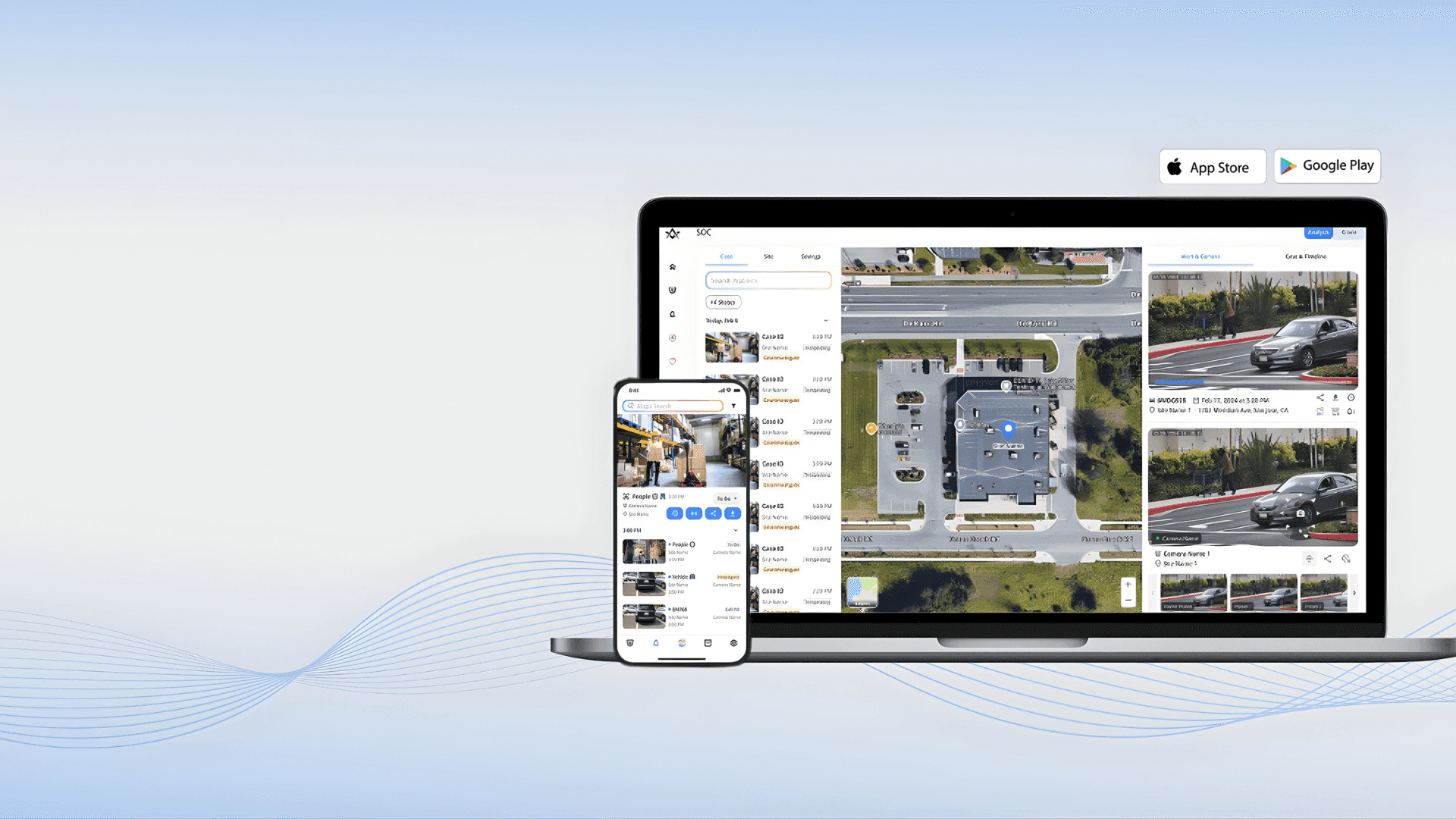
Alpha Vision is a powerful AI-driven visual intelligence and computer vision platform designed to analyze, interpret, and generate insights from images and videos. By leveraging deep learning, computer vision, and artificial intelligence , Alpha Vision helps businesses, developers, and creators understand visual data faster and more accurately . Alpha Vision is widely searched by users looking for AI vision tools, computer vision software, image recognition AI, and video analysis platforms that automate visual processing and decision-making. Key Features of Alpha Vision AI-powered image and video analysis Computer vision for object detection and recognition Facial recognition and visual pattern analysis Real-time visual data processing Automated tagging, classification, and labeling Integration with apps, APIs, and cloud platforms High-accuracy visual insights using deep learning models Why People Use Alpha Vision Alpha Vision enables users to extract meaningful insights from visual data without manual analysis . It reduces human effort, improves accuracy, and allows organizations to scale visual intelligence across operations . Businesses, researchers, and developers use Alpha Vision to automate monitoring, improve security, enhance user experiences, and gain visual insights from large datasets. Popular Use Cases Image recognition and classification Video surveillance and security analysis Facial recognition systems Medical imaging and diagnostics Retail analytics and customer behavior tracking Autonomous systems and smart automation AI-powered visual search engines Benefits of Alpha Vision Faster and more accurate visual analysis Automates complex image and video processing Reduces manual effort and operational costs Scalable solution for enterprise and startups Ideal for security, healthcare, retail, and AI research

Krater.ai is a comprehensive AI content creation platform that empowers users to generate high-quality AI images, videos, and text from a single, unified interface. It addresses the challenge of fragmented workflows and the need for diverse content creation tools by offering an all-in-one solution. Utilizing advanced artificial intelligence and machine learning algorithms , Krater.ai is designed for marketers, content creators, social media managers, and businesses seeking to streamline their content production process and enhance their creative output. This platform is a valuable resource for anyone looking to leverage AI for content generation and improve their overall content strategy. Key Features of Krater.ai Generates original AI images from text prompts. Creates AI-powered videos from scripts or text. Offers a variety of text generation tools, including copywriting and article writing. Provides a user-friendly interface for easy navigation and content creation. Includes AI-driven tools for photo enhancement and upscaling. Supports multiple video aspect ratios for various social media platforms. Allows for the creation of AI avatars and talking head videos. Offers a library of pre-designed templates for faster content creation. Provides options for customizing generated content with different styles and parameters. Enables users to create product demo videos with AI. Why People Use Krater.ai Individuals and teams adopt Krater.ai to overcome the limitations of traditional content creation methods. Historically, producing diverse content ΓÇô images, videos, and written material ΓÇô required multiple specialized tools and significant time investment. Krater.ai consolidates these functionalities into a single platform, dramatically reducing the time and resources needed for content production. The platformΓÇÖs AI algorithms ensure consistent quality and scalability, allowing users to generate a high volume of content without compromising on creativity or brand consistency. Unlike manual content creation, Krater.ai offers rapid prototyping and iteration, enabling users to quickly test different ideas and refine their messaging. This streamlined approach empowers users to focus on strategy and impact, rather than being bogged down in the technicalities of content creation. Popular Use Cases Social Media Marketing: Generating engaging visuals and captions for platforms like Instagram, Facebook, and Twitter. Content Marketing: Creating blog posts, articles, and website copy with AI assistance. E-commerce: Producing product images and videos for online stores. Advertising: Developing compelling ad creatives for various marketing campaigns. Educational Content: Generating visuals and scripts for online courses and presentations. Video Production: Creating explainer videos, promotional videos, and short-form video content. Personal Branding: Developing a consistent visual identity and content strategy for individuals. Real Estate: Generating virtual tours and property visualizations. Startup Marketing: Quickly creating marketing materials with limited resources. Internal Communications: Producing engaging visuals for company newsletters and presentations. Benefits of Krater.ai Increased Content Output: Generate more content in less time, accelerating marketing and communication efforts. Reduced Content Creation Costs: Eliminate the need for expensive design software, stock photos, and video production services. Enhanced Brand Consistency: Maintain a consistent visual style and messaging across all content channels. Improved Content Quality: Leverage AI algorithms to create high-quality, engaging content. Streamlined Workflow: Consolidate multiple content creation tools into a single, user-friendly platform. Faster Prototyping: Quickly test different content ideas and refine messaging. Greater Creative Freedom: Explore new creative possibilities with AI-powered tools. Scalable Content Production: Easily scale content creation efforts to meet growing demands. Accessibility for Non-Designers: Empower individuals without design experience to create professional-quality content. Time Savings: Automate repetitive tasks and free up valuable time for strategic initiatives.

EveningHoney.AI offers dreamy AI girlfriends and companions, designed to be real, romantic, and always available for chat, videos, and calls. This platform creates a highly immersive virtual relationship experience, blending advanced conversational AI with rich multimedia interactions. EveningHoney.AI focuses on crafting personalized companions that genuinely connect with users, providing a sense of intimacy and presence that goes beyond traditional chatbots. It's a premier destination for those seeking a deeply engaging and emotionally resonant AI companionship, available whenever you need it. At EveningHoney.AI, every AI girlfriend is designed to offer a unique and compelling digital romance. Users can customize their companions extensively, from personality traits to visual appearance, ensuring a truly personalized connection. The integration of videos and calls, alongside text chat, significantly enhances the realism and immersion, making interactions feel more lifelike and personal. EveningHoney.AI is committed to delivering a sophisticated and accessible virtual companion experience, with options for free interaction alongside premium features. Dive into a world of digital intimacy where your ideal AI girlfriend is always there, ready for engaging conversations and romantic moments.

Klyra AI is an innovative AI-powered content creation platform designed to empower users to generate diverse content formats ΓÇô text, images, videos, and voice ΓÇô from a single, unified interface. Klyra AI addresses the challenges of fragmented content creation workflows, where users often rely on multiple tools for different content types. It leverages the power of artificial intelligence and machine learning to streamline the entire creative process, from ideation to final production. This platform is ideal for marketers, content creators, social media managers, and businesses seeking to scale their content output efficiently. It provides a solution for those looking to enhance their AI content generation , AI video creation , and AI image generation capabilities. Klyra AI distinguishes itself by offering a comprehensive suite of tools within one platform, eliminating the need to switch between applications and simplifying complex creative tasks. ItΓÇÖs designed to democratize content creation, making sophisticated AI tools accessible to users of all skill levels. Key Features of Klyra AI Generates long-form articles and blog posts from text prompts. Creates original images from text descriptions using AI image generation. Produces engaging videos from scripts or text prompts. Offers AI voice cloning and text-to-speech capabilities. Provides a user-friendly drag-and-drop interface for video editing. Includes a built-in AI scriptwriter for video content. Allows for the creation of marketing copy, including ad headlines and descriptions. Supports multiple video aspect ratios for various platforms. Offers a library of royalty-free music and sound effects. Enables users to customize AI-generated content with branding elements. Why People Use Klyra AI Users adopt Klyra AI to overcome the bottlenecks and inefficiencies associated with traditional content creation methods. Manually creating high-quality content across multiple formats is time-consuming, resource-intensive, and often requires specialized skills. Klyra AI automates many of these processes, significantly reducing the time and effort required to produce compelling content. The platformΓÇÖs integrated approach eliminates the friction of switching between different tools, fostering a more fluid and productive workflow. By leveraging AI, Klyra AI enables users to scale their content creation efforts without compromising on quality or creativity. ItΓÇÖs a valuable asset for businesses and individuals seeking to establish a strong online presence and engage their audience with fresh, innovative content. Popular Use Cases Social Media Marketing: Generating engaging visuals and captions for platforms like Instagram, Facebook, and TikTok. Blog Content Creation: Producing well-researched and SEO-optimized blog posts on a variety of topics. Video Marketing: Creating promotional videos, explainer videos, and social media video content. Advertising: Generating compelling ad copy and visuals for online advertising campaigns. E-learning: Developing educational videos and voiceovers for online courses and training materials. Product Demonstrations: Producing visually appealing product demo videos. Content Repurposing: Transforming existing content into different formats (e.g., turning a blog post into a video script). Personal Branding: Creating professional-looking videos and images for personal websites and social media profiles. Podcast Production: Generating scripts and voiceovers for podcast episodes. Internal Communications: Developing engaging video content for employee training and updates. Benefits of Klyra AI Increased Content Output: Generate more content in less time, accelerating marketing and communication efforts. Reduced Content Creation Costs: Minimize reliance on expensive freelancers or agencies. Enhanced Content Quality: Leverage AI to produce polished, professional-looking content. Streamlined Workflow: Simplify the content creation process with an all-in-one platform. Improved Brand Consistency: Maintain a consistent brand voice and visual style across all content formats. Greater Creative Flexibility: Experiment with different content ideas and formats with ease. Expanded Reach: Create content optimized for various platforms and audiences. Time Savings: Automate repetitive tasks and focus on strategic content planning. Accessibility: Empower users of all skill levels to create high-quality content. Scalability: Easily scale content creation efforts to meet growing business needs.

Generor is an innovative AI content creation and management platform designed to help users centralize, organize, and streamline all their AI-generated content . It addresses the growing challenge of managing outputs from various AI tools, offering a unified workspace for text and image creation. Generor leverages artificial intelligence, machine learning, and cloud-based storage to provide a comprehensive solution for individuals and teams seeking to maximize their AI-driven content workflows. This platform is particularly valuable for content creators, marketers, designers, and businesses looking to scale their content production with the power of AI. Key Features of Generor Generates text content using integrated AI models. Creates images from text prompts with AI image generation. Provides a centralized dashboard for all AI creations. Offers organization tools like folders and tagging. Enables version control for tracking content iterations. Supports collaboration features for team workflows. Allows for easy export of generated content. Offers a search function to quickly locate specific creations. Provides usage statistics and analytics. Integrates with various AI generation APIs. Why People Use Generor Individuals and organizations are increasingly adopting AI tools for content creation, but this often results in fragmented workflows and difficulty managing the sheer volume of generated assets. Generor solves this problem by providing a single source of truth for all AI creations. Unlike relying on individual AI tools and scattered files, Generor offers a unified system for organization, tracking, and access. This centralized approach significantly reduces time spent searching for content, managing versions, and ensuring consistency. The platform empowers users to focus on creative strategy and refinement, rather than administrative overhead, ultimately boosting productivity and accelerating content production cycles. It moves beyond simply generating content with AI to managing an entire AI-powered content ecosystem. Popular Use Cases Social Media Management: Generating captions, post ideas, and accompanying images for various social media platforms. Blog Content Creation: Drafting blog posts, outlines, and generating relevant images to enhance articles. Marketing Campaign Development: Creating ad copy, email newsletters, and marketing materials with AI assistance. E-commerce Product Descriptions: Generating compelling and informative product descriptions for online stores. Graphic Design & Visual Content: Producing unique images for presentations, websites, and marketing collateral. Content Repurposing: Adapting existing content into different formats (e.g., turning a blog post into a social media series). Brainstorming & Idea Generation: Utilizing AI to explore new concepts and generate creative ideas. Scriptwriting & Storytelling: Developing scripts for videos, podcasts, or other narrative content. Educational Material Creation: Generating quizzes, summaries, and learning resources. Personal Productivity: Assisting with writing tasks, note-taking, and organization. Benefits of Generor Increased Productivity: Streamlines content creation workflows, saving users significant time and effort. Improved Organization: Centralizes all AI-generated content in a single, easily navigable platform. Enhanced Collaboration: Facilitates teamwork and shared access to AI-powered assets. Greater Control: Provides version control and tracking capabilities for managing content iterations. Simplified Content Management: Eliminates the need to switch between multiple AI tools and file locations. Scalable Content Production: Enables users to efficiently generate and manage large volumes of content. Reduced Errors & Inconsistencies: Promotes consistency and accuracy through centralized control. Faster Time-to-Market: Accelerates content production cycles, allowing for quicker deployment of marketing materials and other content. Cost Savings: Optimizes resource allocation by streamlining workflows and reducing manual effort. Creative Empowerment: Frees up users to focus on strategic thinking and creative refinement.

Magai is a comprehensive AI platform offering access to over 50 different artificial intelligence apps in a single subscription, designed to help users streamline workflows and boost productivity by consolidating diverse AI capabilities. Magai addresses the challenge of fragmented AI toolsets and escalating subscription costs. It provides a unified hub for accessing a wide range of AI-powered applications, eliminating the need for multiple accounts and interfaces. The platform leverages machine learning, natural language processing, and computer vision to deliver solutions for content creation, image editing, coding, and data analysis. Magai is intended for individuals, businesses, and professionals seeking an affordable and efficient way to integrate AI into their daily operations and unlock new levels of creative and analytical potential. Users looking for AI tools , AI platforms , and AI productivity solutions will find significant value in MagaiΓÇÖs all-in-one approach. Key Features of Magai Access to 50+ AI applications within a single platform. Integrated suite of tools for content generation and writing. AI-powered image generation and editing capabilities. Coding assistance tools for developers. Data analysis and visualization features. Streamlined interface for easy navigation between applications. Regular updates and additions of new AI tools. Centralized billing and account management. Facilitates experimentation with diverse AI technologies. Offers a cost-effective alternative to individual AI subscriptions. Why People Use Magai Individuals and organizations are increasingly adopting AI to enhance efficiency and innovation. However, the proliferation of specialized AI tools often leads to complex subscription management and fragmented workflows. Magai offers a solution by consolidating these tools into a single, accessible platform. Users choose Magai to simplify their AI toolkit, reduce costs, and unlock the potential of multiple AI technologies without the administrative overhead of managing numerous subscriptions. The platform empowers users to move seamlessly between different AI applications, fostering creativity and accelerating project completion. Compared to traditional methods of relying on individual AI tools, Magai provides a unified and streamlined experience, saving valuable time and resources. Popular Use Cases Content Marketing: Generating blog posts, articles, social media content, and marketing copy using AI writing tools. Graphic Design: Creating images, illustrations, and visual assets for marketing materials and presentations with AI image generators. Software Development: Utilizing AI coding assistants to write, debug, and optimize code. Data Analysis: Analyzing datasets, identifying trends, and creating visualizations with AI-powered data analysis tools. E-commerce: Generating product descriptions, optimizing listings, and personalizing customer experiences with AI. Education: Assisting with research, writing, and learning through AI-powered tools. Personal Productivity: Automating tasks, managing schedules, and improving organization with AI assistants. Social Media Management: Creating engaging content and scheduling posts with AI-driven social media tools. Customer Service: Improving response times and resolving customer inquiries with AI chatbots. Research and Development: Accelerating research processes and discovering new insights with AI-powered analysis tools. Benefits of Magai Cost Savings: Reduces expenses by providing access to multiple AI tools for the price of one subscription. Increased Productivity: Streamlines workflows and accelerates project completion by consolidating AI capabilities. Enhanced Creativity: Fosters innovation by enabling users to experiment with a diverse range of AI technologies. Simplified Management: Eliminates the complexity of managing multiple AI subscriptions and accounts. Improved Efficiency: Automates tasks and optimizes processes with AI-powered tools. Greater Accessibility: Makes advanced AI technologies accessible to a wider range of users and businesses. Time Savings: Reduces the time spent searching for and learning new AI tools. Unified Experience: Provides a consistent and intuitive interface for accessing all AI applications. Scalability: Easily adapts to changing needs and growing demands. Continuous Innovation: Benefits from regular updates and additions of new AI tools and features.

All Voice Lab is an advanced AI-powered audio platform that enables creators, businesses, and developers to generate and manipulate high-quality voice content with ease. It specializes in lifelike text-to-speech (TTS) , voice cloning , voice altering , and multilingual voice localization using cutting-edge AI models and expressive speech synthesis. :contentReference[oaicite:0] All Voice Lab uses its proprietary MaskGCT AI model , which delivers natural, emotionally expressive speech with realistic tone, rhythm, and pitch. The platform supports multiple languages and flexible workflows, making it suitable for narration, video voiceovers, media localization, audiobooks, gaming, marketing, accessibility, and more. :contentReference[oaicite:1] Key Features of All Voice Lab Text-to-Speech (TTS) ΓÇô Convert written text into natural, human-like speech with control over tone, pacing, and emotion. :contentReference[oaicite:2] Voice Cloning ΓÇô Create high-fidelity digital replicas of real voices using short audio samples. :contentReference[oaicite:3] Voice Changer ΓÇô Instantly transform or enhance recorded voices for professional quality audio. :contentReference[oaicite:4] Video Translation & Dubbing ΓÇô Translate and dub videos into other languages with synced voiceovers and multilingual support. :contentReference[oaicite:5] Emotion & Style Control ΓÇô Adjust emotional tone and speaking style to match the desired message and audience. :contentReference[oaicite:6] Multilingual Support ΓÇô Produce voice content in multiple major languages, including English, French, German, Chinese, Japanese, and Korean. :contentReference[oaicite:7] API Integration ΓÇô Developers can integrate voice AI into apps, workflows, and automation pipelines using APIs. :contentReference[oaicite:8] Collaboration Tools ΓÇô Support for teams with shared projects, roles, and version tracking for large-scale audio production. :contentReference[oaicite:9] Why Use All Voice Lab? All Voice Lab helps users produce professional voice content more efficiently , reducing the need for traditional voice recording sessions while maintaining natural sound quality. It is ideal for content creators, marketers, educators, publishers, media producers, game developers, and accessibility projects. :contentReference[oaicite:10] By combining realistic AI voice technology with flexible customization and automation, the platform enables faster, more scalable production of narration, dubbing, audiobooks, and voiceovers. :contentReference[oaicite:11] How It Works Upload or Enter Text ΓÇô Start with a script, document, or text prompt. Choose Voice and Language ΓÇô Select from expressive AI voices with adjustable tone and style. Generate or Clone ΓÇô Use TTS or upload an audio sample to clone a voice. Customize & Edit ΓÇô Adjust speed, pitch, emotion, and other parameters. Export & Use ΓÇô Download voiceovers or integrate them via API into your project. Use Cases Audiobook Narration & Production Video Voiceovers and Localization Podcasts and Marketing Audio In-Game Character Voices Training and Educational Content Accessibility & Assistive Technologies Automated Text-to-Audio Workflows :contentReference[oaicite:12] Frequently Asked Questions (FAQ) What is All Voice Lab used for? All Voice Lab is used to generate realistic AI voice content, including speech from text, voice cloning, voice transformation, and video dubbing across multiple languages. :contentReference[oaicite:13] Does All Voice Lab support multiple languages? Yes. The platform supports major languages such as English, French, German, Chinese, Japanese, and Korean, with expressive and natural audio output. :contentReference[oaicite:14] Can I clone my own voice with All Voice Lab? Yes. All Voice Lab lets you create a high-fidelity clone of your voice using a short sample. :contentReference[oaicite:15] Is All Voice Lab free to use? All Voice Lab offers a free trial and freemium access, with extended features available via paid plans. :contentReference[oaicite:16] Can I use All Voice Lab in my apps or workflows? Yes. The platform includes APIs and integration options for developers to embed voice generation into applications and automated systems. :contentReference[oaicite:17] What makes All Voice Lab different from other AI voice tools? All Voice Lab focuses on emotionally expressive, customizable speech synthesis with multilingual support, voice cloning, and scalable workflows for creators and enterprises. :contentReference[oaicite:18] All Voice Lab is a comprehensive AI voice generation platform designed to bring text and audio to life with natural, expressive, and customizable voices. Whether you need lifelike narration, professional voiceovers, multilingual dubbing, or custom voice cloning, All Voice Lab offers powerful tools that streamline audio workflows and empower creative projects. :contentReference[oaicite:19]

Fontjoy is an AI-powered font pairing tool that helps designers and creatives discover harmonious and aesthetically pleasing font combinations with ease. It addresses the challenge of selecting fonts that complement each other, a process that can be time-consuming and require significant design expertise. Fontjoy utilizes machine learning algorithms to analyze font characteristics and generate pairings based on principles of visual balance and readability. This tool is particularly valuable for graphic designers, web developers, marketers, and anyone involved in visual communication who seeks to elevate their projects through thoughtful typography. It streamlines the font selection process, offering inspiration and ensuring visually appealing results. Key Features of Fontjoy Generates font pairings using AI algorithms. Allows users to filter fonts by category (serif, sans-serif, display, handwriting, monospace). Provides real-time previews of font combinations. Offers adjustable font weights and styles within pairings. Enables users to lock specific fonts to refine pairings. Supports searching for fonts by name. Allows users to create and save custom font collections. Provides a color palette generator to complement font pairings. Offers a history of generated pairings for revisiting options. Displays font information, including designer and licensing details. Why People Use Fontjoy Individuals and professionals utilize Fontjoy to overcome the complexities of font pairing. Traditionally, selecting fonts that work well together relied heavily on design intuition and experience. This process could be subjective, time-intensive, and prone to inconsistencies. Fontjoy offers a data-driven approach, leveraging artificial intelligence to suggest pairings that adhere to established design principles. This not only saves time but also introduces users to font combinations they might not have considered otherwise. The tool democratizes good design, making it accessible to those without extensive typography knowledge. By automating the initial stages of font selection, Fontjoy allows users to focus on the broader creative aspects of their projects, enhancing overall efficiency and design quality. ItΓÇÖs a valuable resource for maintaining brand consistency and creating visually engaging content across various platforms. Popular Use Cases Web Design: Designers use Fontjoy to quickly establish a cohesive typographic hierarchy for websites, ensuring readability and visual appeal. Graphic Design: Professionals employ the tool for creating marketing materials, logos, and branding assets, streamlining the font selection process for diverse projects. Marketing & Advertising: Marketers leverage Fontjoy to develop visually compelling advertisements and social media graphics that capture attention and reinforce brand identity. Content Creation: Bloggers, writers, and content creators utilize the tool to enhance the visual presentation of their work, improving readability and engagement. Presentation Design: Individuals creating presentations use Fontjoy to select font pairings that are both professional and visually engaging, enhancing the impact of their message. UI/UX Design: Designers working on user interfaces use Fontjoy to ensure that fonts are legible, accessible, and contribute to a positive user experience. Book Cover Design: Authors and designers use Fontjoy to create visually appealing book covers that attract readers and reflect the genre and tone of the book. Educational Materials: Educators use Fontjoy to create visually engaging learning materials, improving student comprehension and retention. Personal Projects: Hobbyists and individuals undertaking personal design projects use Fontjoy to explore different font combinations and enhance their creative endeavors. Brand Guideline Development: Companies use Fontjoy to establish and document consistent font pairings as part of their brand guidelines. Benefits of Fontjoy Saves Time: Significantly reduces the time spent searching for and evaluating font combinations. Enhances Design Quality: Provides access to aesthetically pleasing and well-balanced font pairings. Inspires Creativity: Introduces users to new font combinations they may not have considered. Improves Readability: Helps select fonts that are legible and easy to read across various mediums. Maintains Brand Consistency: Facilitates the selection of fonts that align with brand guidelines. Democratizes Design: Makes good typography accessible to users of all skill levels. Streamlines Workflow: Integrates seamlessly into the design process, simplifying font selection. Offers Versatility: Supports a wide range of design projects, from web design to print materials. Provides a Data-Driven Approach: Leverages AI to suggest pairings based on design principles. Facilitates Exploration: Allows users to experiment with different font combinations and refine their choices.

Khroma is an AI-powered color palette generator that assists designers and creatives in discovering and utilizing harmonious color schemes tailored to their individual preferences. It addresses the challenge of initial creative block when starting a design project, specifically the difficulty of selecting a suitable color palette. Khroma leverages machine learning and neural networks to learn a userΓÇÖs aesthetic tastes and generate an endless supply of unique and personalized color combinations. This tool is designed for graphic designers, web developers, interior designers, artists, and anyone seeking inspiration for color schemes in their projects. Key Features of Khroma Generates infinite, personalized color palettes based on user preferences. Utilizes a neural network trained on a vast database of colors. Allows users to rate color combinations to refine the AIΓÇÖs understanding of their taste. Offers palette previews in various contexts, including typography and gradients. Enables users to test palettes with custom images to visualize real-world applications. Provides a simple and intuitive interface for exploring and saving color schemes. Allows users to lock specific colors within a palette to maintain consistency. Offers the ability to export palettes in multiple formats for use in design software. Facilitates the discovery of unexpected and inspiring color combinations. Stores user preferences for consistent palette generation over time. Why People Use Khroma Individuals and professionals often struggle with the initial stages of design, particularly when it comes to color selection. Traditionally, designers rely on pre-made palettes, color theory principles, or extensive trial and error to find suitable color combinations. These methods can be time-consuming, limiting, and may not always align with a specific projectΓÇÖs aesthetic goals. Khroma streamlines this process by employing artificial intelligence to learn a userΓÇÖs individual color preferences. By training a neural network on colors a user likes, Khroma eliminates the guesswork and provides a continuous stream of harmonious palettes. This results in significant time savings, reduces creative frustration, and expands the possibilities for unique and personalized designs. Unlike generic palette generators, Khroma adapts to the user, becoming more accurate and insightful with each interaction. The toolΓÇÖs ability to preview palettes in realistic contexts further enhances its value, allowing users to confidently apply color schemes to their projects. Popular Use Cases Graphic Design: Generating color palettes for logos, branding materials, marketing collateral, and illustrations. Web Development: Creating color schemes for websites, user interfaces, and digital products. Interior Design: Discovering harmonious color combinations for room decor, furniture selection, and architectural projects. Fashion Design: Inspiring color palettes for clothing lines, accessories, and textile patterns. Art & Illustration: Providing a starting point for paintings, drawings, and digital artwork. Marketing & Advertising: Developing visually appealing color schemes for campaigns and promotional materials. User Interface (UI) Design: Creating accessible and aesthetically pleasing color palettes for mobile and web applications. Brand Identity Development: Establishing a consistent and memorable color palette for a brandΓÇÖs visual identity. Content Creation: Selecting color schemes for social media graphics, presentations, and blog posts. Personal Projects: Assisting individuals with color selection for home decor, DIY projects, and personal artwork. Benefits of Khroma Enhanced Creativity: Khroma inspires new ideas and expands the possibilities for color exploration. Time Savings: The AI-powered palette generation significantly reduces the time spent on color selection. Personalized Results: Palettes are tailored to individual preferences, ensuring aesthetic alignment. Improved Design Quality: Harmonious color combinations enhance the visual appeal and effectiveness of designs. Reduced Creative Block: Khroma overcomes the ΓÇ£blank pageΓÇ¥ problem by providing a constant source of inspiration. Increased Efficiency: Streamlined workflow allows designers to focus on other aspects of their projects. Consistent Branding: Facilitates the creation of a cohesive and recognizable brand identity through consistent color usage. Accessibility: The tool is free to use, making it accessible to a wide range of users. Versatility: Applicable to a diverse range of design disciplines and creative projects. Continuous Learning: The AI adapts and improves its palette generation based on user feedback.

Musho is an innovative AI-powered note-taking and knowledge management tool designed to help users capture, connect, and synthesize information more effectively. It addresses the challenges of information overload and fragmented knowledge by leveraging artificial intelligence to organize and enrich user notes. This tool is particularly valuable for students, researchers, writers, and anyone seeking to improve their personal knowledge base and productivity. Musho utilizes advanced natural language processing and machine learning algorithms to transform unstructured notes into a dynamic, interconnected network of ideas. Musho distinguishes itself from traditional note-taking applications by focusing on the relationships between notes, rather than simply storing them as isolated documents. The platform employs AI to automatically identify key concepts, suggest connections, and facilitate the discovery of insights that might otherwise remain hidden. This approach fosters a more holistic understanding of complex topics and empowers users to build a robust, evolving knowledge graph. The core functionality centers around intelligent organization, semantic search, and AI-driven summarization, making it a powerful asset for anyone dealing with large volumes of information. Key Features of Musho Captures notes in a freeform, markdown-based editor. Automatically identifies and tags key concepts within notes. Suggests connections between notes based on semantic similarity. Visualizes knowledge as an interconnected graph. Offers AI-powered summarization of notes and connected concepts. Enables bidirectional linking between notes. Supports embedding of various media types, including images and links. Provides a distraction-free writing environment. Facilitates the creation of nested notes for hierarchical organization. Offers a daily note feature for journaling and capturing daily thoughts. Allows for customizable themes and appearance settings. Supports keyboard shortcuts for efficient navigation and editing. Provides export options for notes in various formats. Why People Use Musho Individuals and professionals are increasingly seeking solutions to manage the ever-growing influx of information. Traditional note-taking methods often fall short, leading to disorganized collections of notes that are difficult to navigate and synthesize. Musho offers a compelling alternative by automating the process of knowledge organization and discovery. Unlike linear note-taking apps, MushoΓÇÖs graph-based approach mirrors the way the human brain naturally connects ideas, fostering deeper understanding and retention. The platformΓÇÖs AI-powered features significantly reduce the time and effort required to build and maintain a personal knowledge base. Users can spend less time organizing and more time thinking, creating, and learning. MushoΓÇÖs ability to surface hidden connections and insights empowers users to generate new ideas and solve complex problems more effectively. It moves beyond simple information storage to become a true cognitive assistant, enhancing both individual and collaborative knowledge work. Popular Use Cases Students: Organizing lecture notes, research papers, and study materials for improved comprehension and exam preparation. Researchers: Building a comprehensive knowledge base of research findings, identifying gaps in knowledge, and generating new hypotheses. Writers: Developing and structuring complex narratives, brainstorming ideas, and managing research for writing projects. Software Developers: Documenting code, tracking project requirements, and managing technical knowledge. Legal Professionals: Organizing case files, legal precedents, and research materials for efficient case preparation. Project Managers: Capturing meeting notes, tracking action items, and managing project documentation. Personal Knowledge Management: Building a lifelong learning repository, tracking personal interests, and journaling. Content Creators: Researching topics, outlining content, and organizing ideas for blog posts, articles, and videos. Consultants: Capturing client information, documenting project deliverables, and building a knowledge base of best practices. Entrepreneurs: Brainstorming business ideas, developing business plans, and tracking market research. Benefits of Musho Enhanced Knowledge Retention: The graph-based structure and AI-powered connections promote deeper understanding and long-term retention of information. Increased Productivity: Automated organization and intelligent search features save time and effort, allowing users to focus on higher-level tasks. Improved Creativity: Discovering unexpected connections between ideas sparks new insights and fosters creative problem-solving. Streamlined Research: Efficiently gather, organize, and synthesize research materials for faster and more effective research. Reduced Information Overload: Effectively manage large volumes of information and avoid feeling overwhelmed. Centralized Knowledge Base: Create a single source of truth for all your notes, ideas, and research. Enhanced Collaboration: Share notes and knowledge graphs with others for collaborative learning and problem-solving. Better Decision-Making: Access a comprehensive and interconnected knowledge base to inform better decisions. Simplified Note-Taking: The intuitive interface and markdown-based editor make note-taking quick and easy. Dynamic Knowledge Growth: The platform evolves with your thinking, continuously adapting and expanding your knowledge base. Improved Organization: Automatically categorize and connect notes, eliminating the need for manual filing and tagging. Effortless Summarization: Quickly grasp the key takeaways from notes and connected concepts with AI-powered summarization.

Visual Electric is an innovative AI image generator designed to empower creatives with a spatially intuitive and non-linear workflow for visual exploration and development. It addresses the limitations of traditional text-to-image tools by offering an infinite canvas environment that mirrors the organic nature of the creative process. Utilizing generative AI , Visual Electric allows users to rapidly prototype, remix, and iterate on visual ideas, making it ideal for designers, artists, and anyone involved in visual storytelling. This tool solves the problem of rigid, linear workflows in AI image generation. Existing solutions often require precise prompting and offer limited flexibility for exploring variations and branching out ideas. Visual Electric provides a more fluid and intuitive experience, enabling users to visually organize and manipulate generated images in a way that closely resembles traditional creative methods like mood boards and sketching. ItΓÇÖs particularly valuable for those seeking to overcome creative blocks, explore multiple concepts simultaneously, and refine visual ideas through spatial arrangement and iterative refinement. Key Features of Visual Electric Generates images from text prompts. Offers an infinite canvas for spatial organization of images. Allows for remixing and combining of generated images. Enables exploration of variations through iterative prompting. Provides a visually intuitive interface for creative workflows. Supports image uploads for use as starting points or inspiration. Facilitates branching out of ideas with multiple image streams. Offers real-time image generation and updates. Allows for easy duplication and modification of existing images. Provides a collaborative workspace for team projects. Why People Use Visual Electric Individuals and teams are adopting Visual Electric to overcome the constraints of conventional AI image generation tools. Traditional methods often require a precise understanding of prompting techniques and can be frustrating when attempting to explore a wide range of visual concepts. Visual Electric offers a more natural and intuitive approach, mirroring the way creatives typically work ΓÇô by gathering inspiration, sketching ideas, and iteratively refining concepts. The platformΓÇÖs infinite canvas allows users to visually map out their creative process, branching out from initial ideas and exploring variations without being limited by a linear sequence of prompts. This spatial organization fosters serendipitous discoveries and allows for a more holistic understanding of the visual landscape. Compared to manually creating mood boards or iterating on designs in traditional software, Visual Electric significantly accelerates the creative workflow, enabling faster prototyping and more efficient exploration of visual possibilities. ItΓÇÖs a tool designed to augment, not replace, the creative mind. Popular Use Cases Graphic Design: Rapidly prototyping logo concepts, exploring color palettes, and generating visual assets for branding projects. UI/UX Design: Creating mood boards, visualizing user interface elements, and iterating on design layouts. Illustration: Developing character designs, exploring different art styles, and generating visual concepts for illustrations. Storyboarding: Quickly visualizing scenes and compositions for film, animation, and comics. Marketing & Advertising: Generating visual content for social media campaigns, website banners, and marketing materials. Fashion Design: Exploring textile patterns, visualizing garment designs, and creating mood boards for collections. Architectural Visualization: Generating conceptual renderings and exploring different design options. Game Development: Creating concept art, texture variations, and visual assets for game environments. Creative Writing: Visualizing scenes and characters to inspire and enhance storytelling. Art Education: Teaching visual design principles and exploring the possibilities of AI-assisted creativity. Benefits of Visual Electric Accelerated Creative Workflow: Significantly reduces the time spent on initial concept development and visual exploration. Enhanced Creative Exploration: Facilitates the discovery of unexpected ideas and visual possibilities through spatial arrangement and iterative refinement. Improved Visual Communication: Enables clear and effective communication of visual concepts to clients and collaborators. Increased Design Iteration: Allows for rapid prototyping and experimentation with different design variations. Intuitive User Experience: Provides a visually intuitive interface that requires minimal training and is accessible to users of all skill levels. Streamlined Collaboration: Offers a collaborative workspace for teams to share ideas, provide feedback, and co-create visual content. Overcoming Creative Blocks: Provides a stimulating environment for generating new ideas and breaking through creative barriers. Spatial Organization of Ideas: The infinite canvas allows for a more holistic and organized approach to visual thinking. Seamless Remixing and Combination: Easily combine and modify generated images to create unique and compelling visuals. Empowered Creative Control: Offers a greater degree of control over the creative process compared to traditional text-to-image tools.
Visily is an innovative AI-powered flowchart and diagramming tool designed to help users visualize and document complex processes, systems, and ideas with ease . It addresses the challenges of traditional diagramming software ΓÇô often complex, time-consuming, and requiring significant manual effort ΓÇô by automating much of the creation process through artificial intelligence. Visily is intended for a broad audience, including project managers, business analysts, developers, educators, and anyone who needs to communicate information visually. It excels in AI diagram generation , flowchart creation , and process mapping , offering a streamlined alternative to conventional methods. Key Features of Visily Generates flowcharts and diagrams from text prompts. Supports a wide range of diagram types, including flowcharts, mind maps, and network diagrams. Offers an intuitive drag-and-drop interface for manual editing and customization. Provides AI-powered suggestions for diagram elements and connections. Allows for real-time collaboration with team members. Enables exporting diagrams in various formats, such as PNG, JPG, and SVG. Features a built-in library of pre-designed templates. Supports version history for tracking changes and reverting to previous versions. Offers customizable styling options for branding and visual consistency. Integrates with popular productivity tools. Provides a user-friendly interface for both beginners and experienced diagrammers. Includes AI-assisted layout and formatting. Facilitates the creation of interactive diagrams with clickable elements. Allows for embedding diagrams in websites and presentations. Offers a dedicated workspace for organizing and managing diagrams. Why People Use Visily Individuals and teams adopt Visily to overcome the limitations of traditional diagramming methods. Creating diagrams manually can be a tedious and time-consuming process, often requiring specialized skills and software proficiency. Visily simplifies this process by leveraging the power of AI to automatically generate diagrams from simple text descriptions. This significantly reduces the time and effort required to visualize complex information, allowing users to focus on the content and insights rather than the technical aspects of diagram creation. Compared to conventional flowchart software, Visily offers a more intuitive and accessible experience. The AI-powered features assist users in structuring their thoughts and creating clear, concise diagrams, even without prior diagramming experience. This makes it an ideal solution for brainstorming, project planning, process documentation, and communication across various teams and departments. The ability to quickly iterate on diagrams and collaborate in real-time further enhances productivity and ensures everyone is on the same page. Visily empowers users to transform abstract ideas into tangible visual representations, fostering better understanding and collaboration. Popular Use Cases Software Development: Documenting system architecture, workflows, and algorithms. Developers can use Visily to map out complex code structures and processes, aiding in debugging and maintenance. Project Management: Creating project timelines, Gantt charts, and workflow diagrams to track progress and manage resources. Business Analysis: Mapping business processes, identifying bottlenecks, and designing solutions for improvement. Visily helps analysts visualize current state and future state processes. Education: Illustrating concepts, explaining complex topics, and creating visual aids for presentations. Educators can use Visily to engage students and enhance learning. Marketing & Sales: Visualizing customer journeys, sales funnels, and marketing campaigns. Human Resources: Mapping organizational charts, onboarding processes, and employee workflows. Customer Support: Creating troubleshooting guides and documenting support processes. Data Science: Visualizing data flows, machine learning pipelines, and algorithm logic. Content Creation: Storyboarding videos, outlining articles, and planning presentations. Personal Productivity: Brainstorming ideas, organizing thoughts, and planning tasks. Process Improvement: Identifying inefficiencies and streamlining workflows in any industry. System Design: Modeling complex systems and their interactions. Benefits of Visily Increased Productivity: Automates diagram creation, saving users significant time and effort. Improved Clarity: Transforms complex information into easily understandable visual representations. Enhanced Collaboration: Facilitates real-time collaboration and shared understanding among team members. Reduced Errors: AI-powered suggestions and automated layout minimize the risk of errors and inconsistencies. Streamlined Communication: Provides a clear and concise way to communicate ideas and processes. Greater Accessibility: Makes diagramming accessible to users of all skill levels. Faster Iteration: Enables quick and easy modifications to diagrams, allowing for rapid prototyping and refinement. Better Documentation: Creates professional-looking diagrams for documentation and reporting purposes. Simplified Process Mapping: Simplifies the process of mapping and analyzing complex workflows. Enhanced Problem Solving: Facilitates the identification of bottlenecks and areas for improvement. Improved Decision Making: Provides a clear visual overview of information, supporting informed decision-making. Increased Engagement: Visual diagrams are more engaging and memorable than text-based descriptions. Cost-Effective Solution: Offers a free plan and affordable paid options, making it accessible to individuals and organizations of all sizes. Versatile Application: Suitable for a wide range of industries and use cases. Modern Interface: Provides a clean and intuitive user experience.

 Android
 IOS
IOS Mini Tools
 Software
 Web
Web