Updated for 2025

12 Best AI Tools for UI & UX Design

The landscape of Digital Product Design has reached a massive turning point. In 2025, Artificial Intelligence is no longer just a futuristic concept; it is the fundamental engine driving the modern UI/UX workflow. Gone are the days of spending hours on repetitive tasks like manual wireframing, tedious asset resizing, or guesswork in user behavior. Today, the most successful designers are leveraging AI to bridge the gap between creative intuition and data-driven precision.

From generative UI that builds high-fidelity mockups in seconds to predictive heatmaps that reveal user attention before a single line of code is written, AI is empowering designers to focus on what truly matters: solving complex problems and crafting delightful user experiences. Whether you are a seasoned product designer at a tech giant or a freelance UI artist looking to stay competitive, mastering the right tech stack is essential. This curated list explores the 12 best AI tools for UI/UX design in 2025, categorized by their ability to streamline your research, automate your visual design, and revolutionize your prototyping process.

Editor's Choice
Visily & Galileo AI

Best balance of speed and fidelity.

Curated Tool List

Visily

Freemium
  • Best for: Wireframing, Non-designers
  • Free Plan: Yes (Generous)

Visily uses advanced AI to convert screenshots of existing apps or hand-drawn sketches into fully editable, high-fidelity wireframes. It's the ultimate tool for product managers and founders who need to visualize ideas fast without learning complex design software. The 'Magic Theme' feature lets you apply consistent branding across all screens instantly.

Uizard

Free
  • Best for: Rapid Prototyping, Mobile Apps
  • Free Plan: Limited

Uizard enables you to design mobile apps, websites, and desktop software in minutes. Its standout 'Autodesigner' feature generates multi-screen interactive mockups from simple text prompts. You can also upload a photo of a whiteboard sketch, and Uizard will transform it into a clickable digital prototype in seconds.

Galileo AI

Subscription
  • Best for: High-Fidelity UI, Figma Users
  • Free Plan: No

Galileo AI serves as a professional interface design copilot. Trained on thousands of top-tier user interface designs, it turns text descriptions into high-fidelity designs that are fully editable in Figma. It's perfect for quickly generating layout variations or breaking through creative blocks on complex dashboards.

Midjourney Video

Free
  • Best for: Visual Assets, Moodboards
  • Free Plan: No

Though primarily an art generator, Midjourney has become a staple for UI designers needing unique assets. Use it to generate photorealistic backgrounds, abstract textures, 3D icons, or entire UI concept art for mood boards. Version 6 excels at understanding text rendering, making it even more useful for conceptual layout exploration.

Relume

Freemium
  • Best for: Sitemaps, Site Structure
  • Free Plan: Yes

Relume is the industry standard for AI-driven site architecture. It allows you to generate sitemaps and wireframes in minutes, not hours. By focusing on the structural 'content-first' approach, it helps agencies and freelancers lock in the UX strategy before moving to visual design. It exports cleanly to both Figma and Webflow.

Motiff

Free
  • Best for: UI Design Systems
  • Free Plan: Beta Access

Motiff is an AI-native design tool that aims to replace traditional workflows. Its 'AI Toolbox' can automatically tidy up messy frames, generate design systems from inconsistent files, and even replicate standard UI components. It's built for efficiency at scale, reducing the tedious 'pixel pushing' tasks.

Khroma

Free
  • Best for: Color Inspiration
  • Free Plan: Yes

Khroma solves the 'blank page' problem for color palettes. By training a personalized neural network on colors you like, it generates infinite, harmonious color combinations tailored to your taste. You can view these palettes as typography, gradients, or custom images to see how they perform in real-world scenarios.

Magician

Subscription
  • Best for: Figma Utility
  • Free Plan: Limited

Magician lives inside Figma as a plugin that automates the small but time-consuming tasks. Need an icon? Just type 'search icon'. Need dummy text that actually relates to your app? It writes it for you. It keeps you in the flow state by bringing assets directly to your canvas.

Musho

Freemium
  • Best for: Landing Pages
  • Free Plan: Yes

Musho turns prompts into nearly-finished landing pages directly in Figma. It's essentially ChatGPT for visual layouts. With a single prompt like 'modern SaaS pricing page for a coffee startup', Musho generates a layered, responsive, and auto-layout ready design that you can actually use.

Fontjoy

Free
  • Best for: Typography
  • Free Plan: Yes

Typography pairing is an art that takes years to master—or seconds with Fontjoy. Using deep learning to analyze font vectors, it generates high-contrast, legible, and aesthetically pleasing pairings. You can lock a font you like and let the AI find perfect matches for headings or body text.

ChatSpot

Free
  • Best for: Content & Copy
  • Free Plan: Yes

Great UI needs great copy. ChatSpot helps designers generate specialized marketing copy and headlines for their interfaces. Instead of using 'Lorem Ipsum', use ChatSpot to generate realistic content that helps stakeholders visualize the final product's value proposition.

Visual Electric

Freemium
  • Best for: Creative Moodboarding
  • Free Plan: Limited

Visual Electric is the first AI image generator designed specifically for creatives. Its interface is an infinite canvas, allowing you to branch out ideas, remix existing images, and explore variations spatially. It's much better for the messy, non-linear creative process than a simple chat box.

The Perfect AI Design Workflow

Don't just pick one tool. The most effective designers combine these tools into a pipeline that accelerates every stage of the product cycle.

1. Research & Moodboarding

Start by defining your visual direction. Use Visual Electric or Midjourney to generate 20+ variations of "Dark mode dashboards" or "Neo-brutalist landing pages". Save the best ones to a board.

Tip: Use Khroma here to lock in a color palette that matches your generated vibe.

2. Wireframing & Structure

Move to structure. Use Relume to generate your sitemap and low-fidelity wireframes in Figma. Alternatively, sketch your idea on paper and use Visily or Uizard to turn it into a digital structure instantly.

3. High-Fidelity & Assets

Apply your visual style. Use Galileo AI to generate specific components you are missing. Use Magician to fill in icons and copy. Finally, export everything to code or developer handoff.

Best Free Options

1

Visily

Their free plan is incredibly generous, allowing unlimited viewers and enough screens for most personal projects.

2

Khroma

100% free with no limits. Essential for color generation.

Pro Tips for Designers

Always treat AI output as a first draft. The magic happens in the refinement.

Naming layers is boring. Let Motiff or Figma plugins handle that cleanup for you before handoff.

Don't use Lorem Ipsum. Use AI to generate real, relevant copy—it changes how stakeholders view your design.

Frequently Asked Questions

Can AI replace designers?

No. AI tools are assistants. They handle repetitive setup and variations, but lack strategic empathy and deep UX context.

Best for beginners?

Uizard and Visily are the most accessible. They prioritize drag-and-drop simplicity over complex vector editing.

Are these tools free?

Many operate on a Freemium model. Tools like Khroma and Fontjoy are completely free utilities, while powerful generators often require a subscription.

UI/UX Design Fundamentals in the AI Era: A Theoretical Perspective

UI/UX design is often misunderstood as a visual craft—colors, layouts, and animations. In reality, UI/UX is a decision science rooted in psychology, cognition, systems thinking, and problem-solving. The rise of AI tools has not changed this foundation; it has only changed how fast and how widely these principles can be applied.

This article explains UI/UX design from a theoretical and fundamental standpoint, while clarifying where AI fits—and where it does not.

Understanding the Difference Between UI and UX

User Experience (UX) and User Interface (UI) are not interchangeable terms.

UX (User Experience) concerns:

  • User intent and motivation
  • Cognitive effort required to complete tasks
  • Emotional response to system behavior
  • Efficiency, clarity, and trust

UI (User Interface) concerns:

  • Visual structure
  • Typography and color
  • Interactive elements (buttons, inputs)
  • Visual communication of system logic

UX defines what problem is being solved and why.
UI defines how that solution is visually and interactively delivered.

UI/UX as a System, Not Screens

A common mistake is treating UI/UX as a collection of screens. In reality, UI/UX is a system of constraints and decisions that governs how users move, think, and act.

  • Limited human attention
  • Memory constraints
  • Habitual behavior
  • Environmental context (mobile, low bandwidth, distractions)

Screens are merely outputs of prior reasoning.

Cognitive Foundations of UX Design

1. Cognitive Load

Human working memory is limited. When interfaces demand too much thinking, users disengage. A system that feels “simple” is usually the result of intelligent omission, not lack of functionality.

  • Reduce unnecessary options
  • Break complex flows into steps
  • Reveal information progressively
  • Prioritize over completeness

2. Mental Models

Users bring pre-existing expectations shaped by prior products. Violating these expectations increases cognitive effort. UX design should align with mental models unless there is a compelling reason not to.

3. Decision Fatigue & Choice Architecture

More choices do not mean better usability. Excessive options increase decision time, anxiety, and drop-off rates. Effective design highlights one primary action and de-emphasizes others. This is not manipulation; it is decision assistance.

Information Architecture: The Invisible Backbone

Information Architecture (IA) defines how content and functionality are organized. Good IA ensures that users understand where they are, know where they can go, and can predict outcomes. If users need instructions to navigate, the architecture has failed.

Visual Hierarchy and Interface Clarity

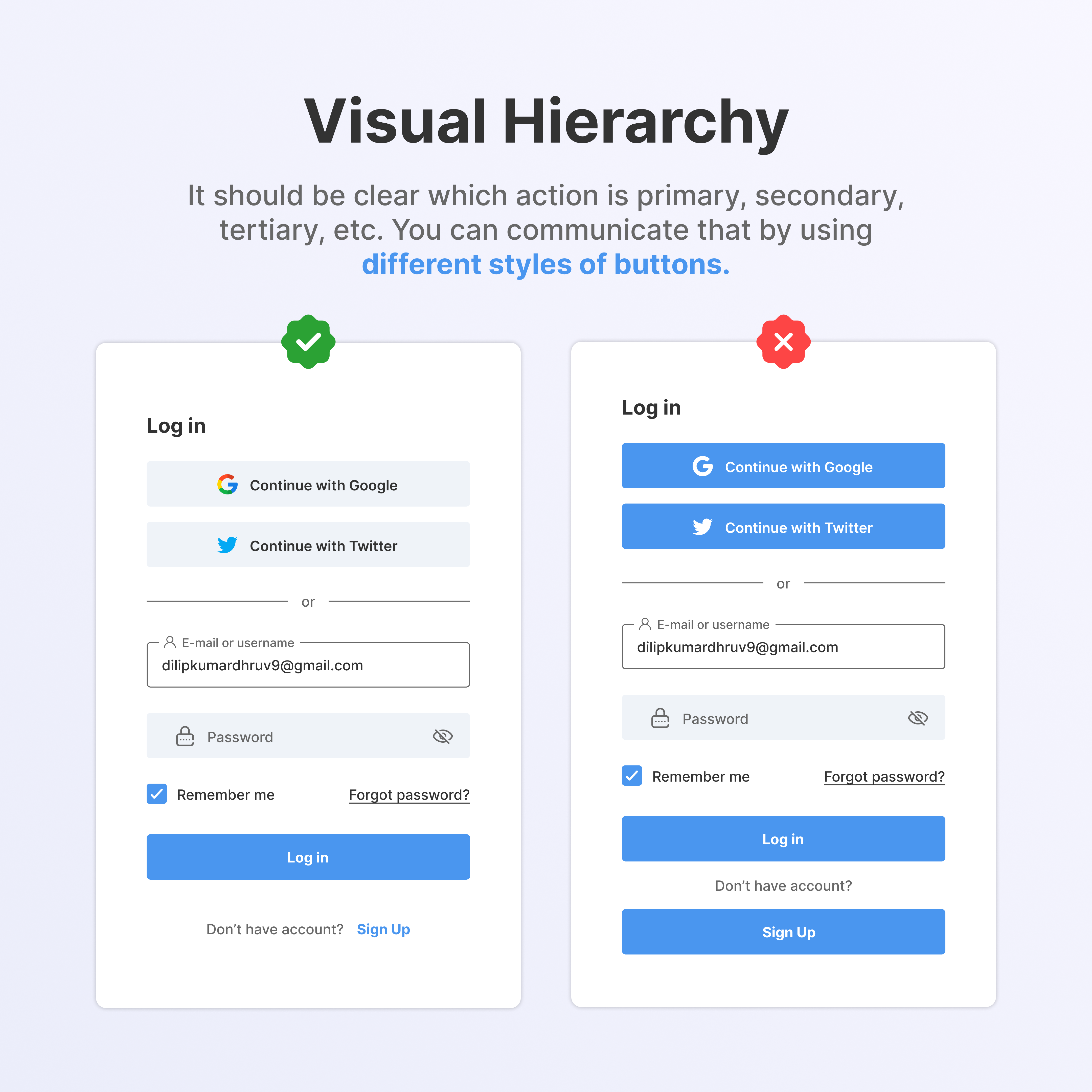
Visual hierarchy directs attention and reduces interpretation effort. The eye should naturally flow from primary intent → secondary context → supporting detail.

UI Design Example 1UI Design Example 2Typography HierarchyVisual Hierarchy

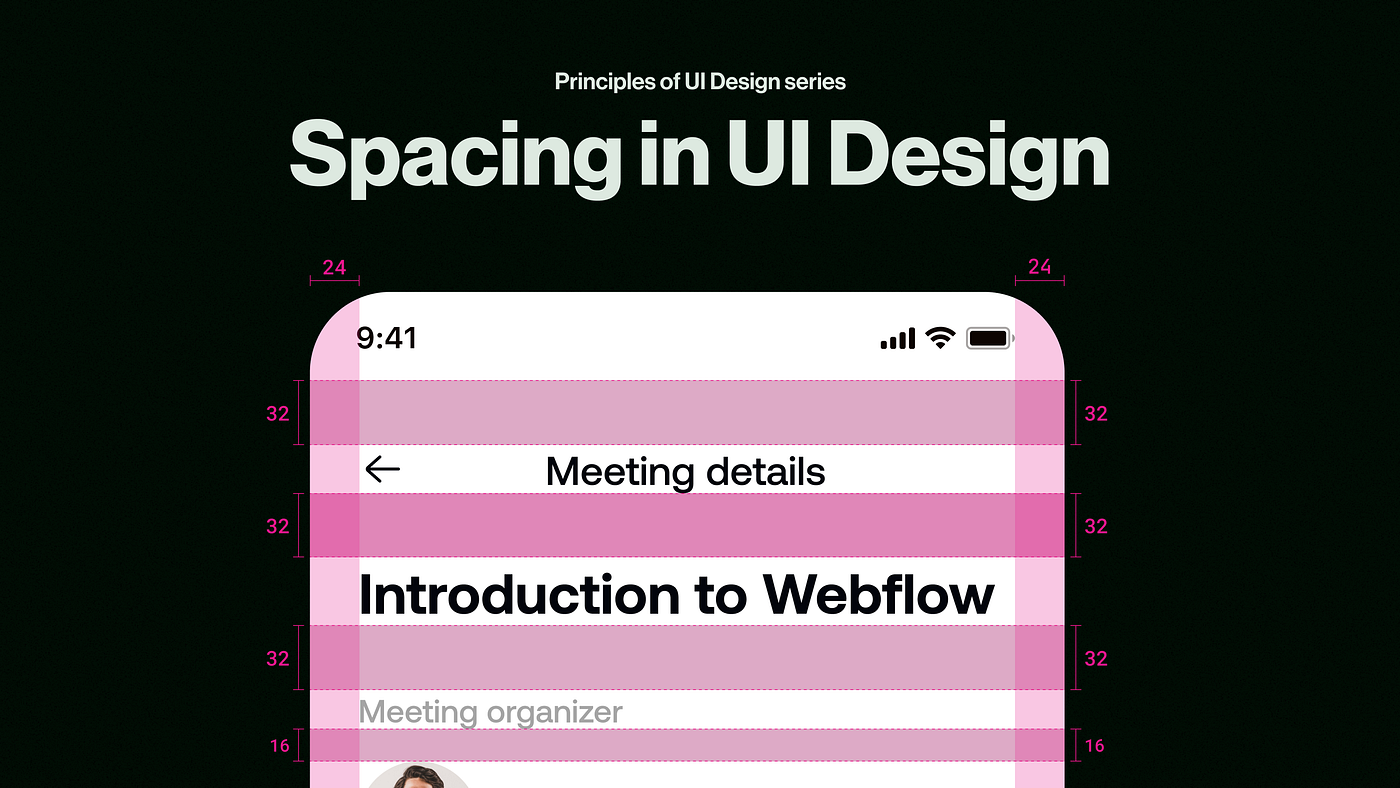
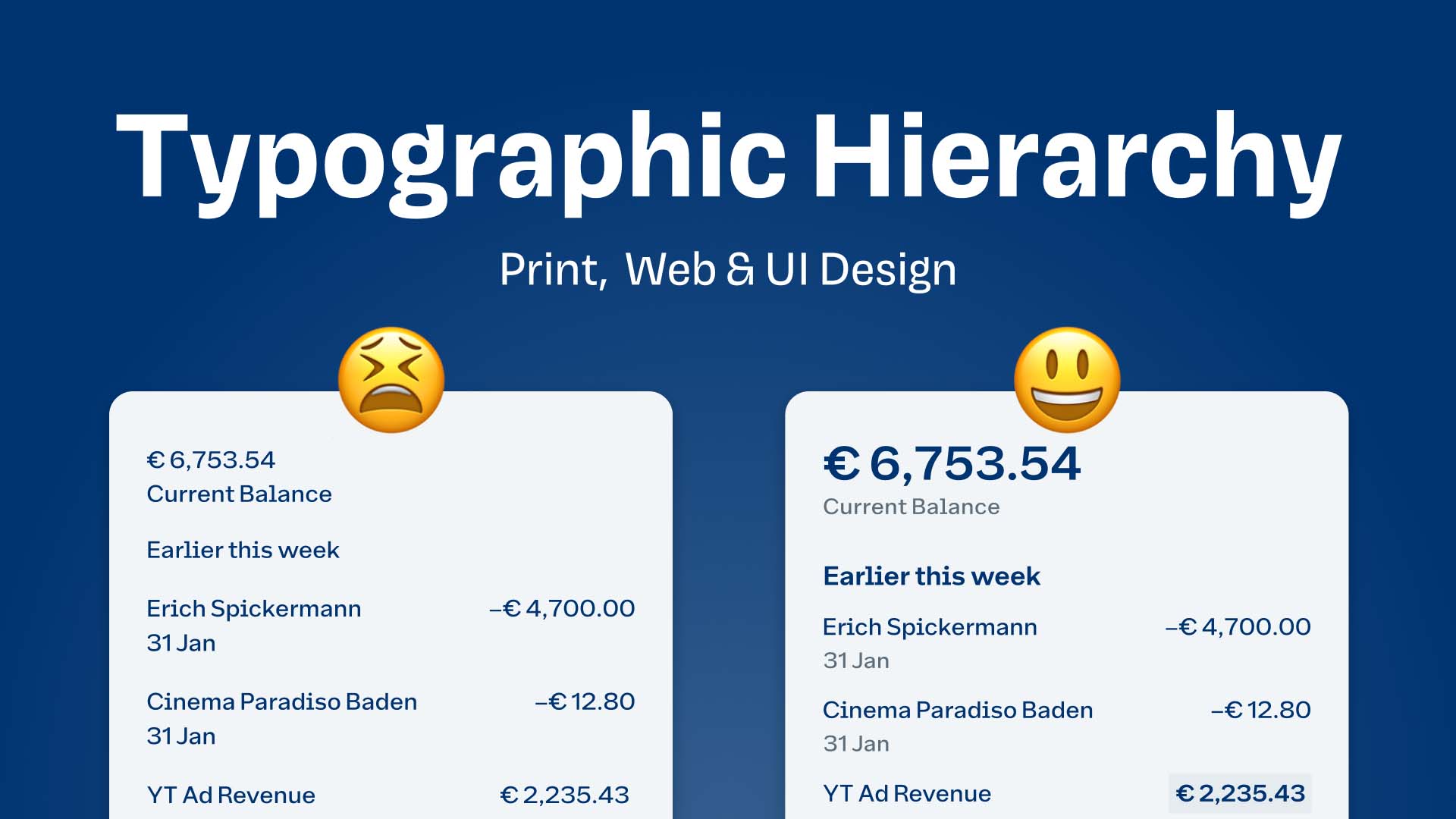
Hierarchy is established through size, contrast, weight, spacing, and position. Design that requires conscious interpretation increases friction.

Typography as a UX Tool

Typography is not aesthetic decoration; it is functional infrastructure. It improves scanning, establishes hierarchy, and communicates tone. Readable text is a baseline requirement, not an option.

Interaction Design and Feedback Loops

Every user action must produce feedback (visual, temporal, or informational). A lack of feedback creates uncertainty, which erodes trust. Microinteractions reinforce clarity without distracting.

Error Handling as a UX Responsibility

Users will make mistakes. Systems must anticipate this. Effective error handling prevents errors when possible, explains issues clearly, and offers recovery paths. Errors are not user failures; they are design responsibilities.

Where AI Fits in UI/UX Design

AI tools accelerate workflows, but they do not replace judgment. AI excels at exploration and iteration, not final decision-making. Tools like Figma and ChatGPT enhance productivity, but they rely on the designer’s understanding of fundamentals.

"Without theory, AI output becomes visually impressive but strategically shallow."

Design Maturity: From Aesthetics to Strategy

UI/UX maturity progresses through stages:

1
Visual decoration
2
Usability optimization
3
Experience-led product thinking
4
System-level design integrated with business goals

True expertise lies in Stage 4, where UX informs product direction, not just execution.

Conclusion

UI/UX design is not about making interfaces look good. It is about making systems understandable, predictable, and humane.

Strong UI/UX is invisible.

Weak UI/UX is immediately felt.

If you master the fundamentals, tools will follow naturally.

Explore More Topics

Explore Ai Tools

ChatGPT

ChatGPT is an advanced AI-powered chatbot developed using cutting-edge natural language processing (NLP) and machine learning technology. It is designed to understand human language, generate intelligent responses, and assist users with a wide range of tasks such as content creation, coding, marketing, education, customer support, and business automation. ChatGPT helps individuals and businesses save time, boost productivity, and improve decision-making by delivering accurate, human-like conversations in real time. Whether you are a student, developer, content creator, marketer, entrepreneur, or business owner, ChatGPT adapts to your needs and provides personalized, high-quality responses instantly. --- Key Features of ChatGPT - Human-like conversations with contextual understanding - Content writing and copywriting (blogs, captions, emails, ads) - Coding assistance for multiple programming languages - SEO optimization and keyword research support - AI-powered learning and study assistance - Business automation and customer support chatbot - Creative writing and idea generation - Multilingual support for global users --- Why Use ChatGPT? ChatGPT stands out as one of the most powerful AI chat tools available today because it combines speed, accuracy, creativity, and scalability in one platform. It helps users automate repetitive tasks, generate high-quality content, answer complex questions, and brainstorm innovative ideas—all without technical expertise. From writing SEO-rich articles to building AI workflows, ChatGPT empowers users to work smarter, not harder. --- Use Cases of ChatGPT - Digital marketing and SEO content creation - YouTube scripts, reels, and shorts captions - App and website development assistance - Educational support and homework help - Customer service and AI chatbots - Startup ideation and business planning --- ChatGPT is transforming the way people interact with artificial intelligence. With its powerful AI capabilities, user-friendly experience, and wide range of applications, ChatGPT is an essential tool for anyone looking to leverage AI for productivity, creativity, and growth. If you are searching for the best AI chatbot, ChatGPT is a reliable and scalable solution.

Ai Chatbots
ChatGPT
Visit Website
0
4.0

Grok

Grok is an advanced AI-powered assistant developed by xAI, designed to deliver fast, intelligent, and context-aware responses with a focus on real-time information and deep reasoning. Built to understand complex questions and provide direct, useful answers, Grok helps users stay informed, productive, and ahead of trends. Grok is tightly integrated with X (formerly Twitter), enabling it to analyze live discussions, trending topics, and public data to generate timely insights. It is ideal for users who need up-to-date information, research support, content creation, and analytical thinking in one AI tool. --- Key Features of Grok - Real-time data awareness and trend analysis - Conversational AI with strong reasoning abilities - Research assistance and information synthesis - Content writing and idea generation - Data interpretation and analytical support - Integration with live social and public information - Productivity-focused AI responses - Scalable usage for individuals and professionals --- Why Use Grok? Grok stands out by offering timely insights and unfiltered understanding of public data. Unlike traditional AI tools, it focuses on current events, trending conversations, and real-world signals to help users make informed decisions quickly. Whether you are a researcher, journalist, marketer, developer, or content creator, Grok provides clarity, speed, and relevance when working with live information. --- Use Cases of Grok - Real-time news and trend analysis - Market and audience research - Social media content planning - Opinion and data-driven writing - Technology and industry insights - Productivity and decision support --- Grok brings a fresh approach to AI-driven conversations and research by combining reasoning with real-time awareness. Its ability to interpret live data and trending topics makes it a valuable tool for users who need current insights and fast analysis. If you are looking for an AI assistant focused on real-time information and intelligent reasoning, Grok is a strong and practical choice.

Ai Chatbots
Grok
Visit Website
0
4.0

Nano Banana Pro / Gemini 3 Pro Image Generation

Nano Banana Pro is a premium AI image generation platform powered by Gemini 3 Pro???level multimodal intelligence, delivering enterprise-grade visual creation for professionals, businesses, and advanced creators. Built to leverage cutting-edge generative AI research associated with Google Gemini 3 Pro, Nano Banana Pro focuses on superior image fidelity, deeper prompt understanding, and consistent, production-ready outputs. Designed for users who require accuracy, realism, and control, Nano Banana Pro transforms detailed text prompts into high-resolution images with exceptional compositional balance, lighting realism, and contextual awareness. It is optimized for professional workflows where visual quality directly impacts brand value, engagement, and conversion. Gemini 3 Pro???Level Visual Intelligence Nano Banana Pro utilizes advanced multimodal reasoning inspired by Gemini 3 Pro, enabling it to understand complex instructions, layered concepts, and abstract creative intent. This results in images that are not only visually appealing but also semantically accurate???objects, environments, and styles align closely with user intent. Ultra-High Quality & Consistency Unlike standard image generators, Nano Banana Pro emphasizes consistency across multiple generations. This makes it ideal for branding, campaigns, storytelling, game development, and product visuals where maintaining a unified visual identity is critical. Key quality improvements include: Accurate anatomy and object proportions Realistic textures and lighting Reduced visual artifacts and distortions Strong coherence across variations and batches Professional Speed & Scalable Output Nano Banana Pro is optimized for fast generation without sacrificing quality. Whether generating a single hero image or producing large volumes of creative assets, the platform scales efficiently to meet professional demands, making it suitable for agencies, startups, and enterprises. Advanced Creative Control With detailed prompt handling, Nano Banana Pro allows users to fine-tune: Art styles and aesthetics Mood, tone, and color grading Camera angles and composition Photorealistic or stylized outputs This level of control empowers designers and marketers to iterate quickly while maintaining creative precision. Built for Business & Advanced Creators Nano Banana Pro is tailored for high-value use cases such as: Marketing and advertising creatives Brand visuals and product mockups Game assets and concept art Editorial illustrations and thumbnails UI/UX visual exploration By reducing dependency on traditional design pipelines, Nano Banana Pro accelerates production timelines and lowers creative costs. Why Nano Banana Pro with Gemini 3 Pro Image Generation Gemini 3 Pro???level multimodal understanding Enterprise-grade image quality and consistency Fast, scalable, and reliable generation Ideal for commercial, creative, and professional use Advanced control with simple natural-language prompts Nano Banana Pro represents a premium tier of AI image generation???where Gemini 3 Pro intelligence meets professional visual production???helping users convert ideas into polished, high-impact images with speed and confidence.

Ai Image generator
Nano Banana Pro / Gemini 3 Pro Image Generation
Visit Website
2
4.0