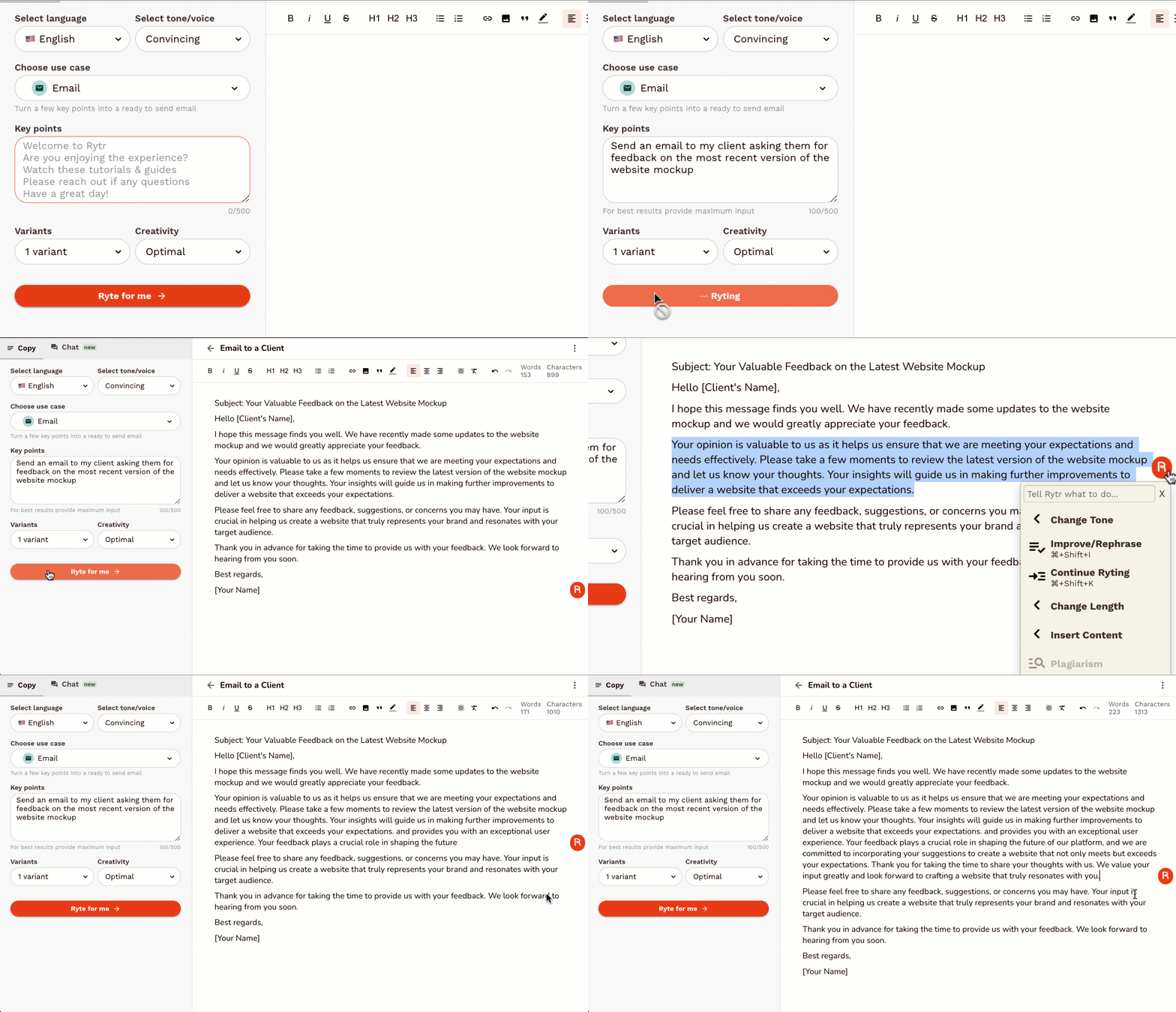
Unlock the future of scientific discovery with Elicit, the revolutionary AI-powered research assistant designed to accelerate your workflow and deepen your understanding. Tired of endless hours sifting through mountains of academic papers, struggling to synthesize complex information, and facing writer's block when articulating your findings? Elicit is here to transform your research process from mundane to masterful. Elicit goes beyond simple keyword searches. Our advanced AI understands the nuances of scientific language, allowing you to ask research questions in natural language and receive concise, relevant summaries of key findings from thousands of relevant papers. Imagine asking, "What are the most effective non-pharmacological interventions for managing chronic pain in older adults?" and getting a curated list of studies, their methodologies, outcomes, and even the limitations of their findings, all presented in an organized and easily digestible format. Streamline your literature review with unparalleled efficiency. Elicit's intelligent algorithms can identify, extract, and synthesize crucial information, including study designs, participant demographics, intervention details, outcome measures, and statistical results. This means less time spent manually reading and more time spent critically analyzing and building upon existing knowledge. Our intuitive interface allows you to compare findings across studies, identify research gaps, and discover emerging trends with unprecedented ease. But Elicit isn't just about finding information; it's about generating insights. Our AI can help you brainstorm research ideas, generate hypotheses, and even assist in outlining your research papers, grant proposals, and presentations. Overcome the dreaded blank page syndrome with AI-generated starting points that are grounded in a comprehensive understanding of the scientific landscape. Elicit acts as your tireless research partner, always ready to explore new avenues and connect disparate pieces of information. For researchers, academics, students, and anyone pushing the boundaries of knowledge, Elicit is an indispensable tool. Enhance your productivity, improve the quality of your research, and accelerate your journey from question to publication. Say goodbye to research bottlenecks and hello to a more efficient, insightful, and inspired research experience. Key Features: Natural Language Research Questions: Ask your questions in plain English and get AI-powered answers. Automated Literature Synthesis: Elicit automatically extracts and summarizes key information from relevant papers. Identify Research Gaps: Discover areas where more research is needed. Compare Study Findings: Easily see how different studies converge or diverge. Brainstorming & Hypothesis Generation: Get AI assistance to spark new research ideas. Outline & Writing Support: Leverage AI to structure and begin writing your research documents. Vast Paper Database: Access and analyze a comprehensive collection of scientific literature. Intuitive User Interface: Designed for ease of use and maximum research impact. Transform your research today with Elicit: AI for Scientific Research.

Granola – AI-Powered Meeting Notes & Productivity Assistant Granola is an advanced AI meeting notes and productivity tool designed to help professionals capture, organize, and understand meetings effortlessly . By using artificial intelligence, speech recognition, and natural language processing , Granola turns conversations into structured notes, summaries, and action items without interrupting your workflow. Granola is commonly searched by users looking for AI meeting notes tools, meeting summarizer AI, note-taking assistants, and productivity software that work quietly in the background while meetings happen. What Is Granola? Granola is an AI-powered note-taking assistant built for modern work environments. It listens to meetings, processes conversations in real time, and produces clean, readable notes that highlight key points, decisions, and next steps. Unlike traditional meeting recorders, Granola focuses on clarity and usefulness , helping teams and individuals quickly understand what matters without rewatching or replaying meetings. Key Features of Granola AI-generated meeting notes and summaries Automatic extraction of key points and action items Real-time or post-meeting processing Works across online meetings and discussions Clean, structured, and readable output Searchable meeting history and notes Minimal and distraction-free workflow Secure handling of meeting data Why People Use Granola Meetings often result in lost details and forgotten action items . Granola solves this by ensuring every important discussion is captured accurately and summarized clearly. Professionals use Granola to stay focused during meetings , reduce manual note-taking, and ensure nothing important is missed . Teams benefit from better alignment, faster follow-ups, and improved accountability. Popular Use Cases Business and team meetings Client calls and discussions Project planning and reviews Product and strategy meetings Interviews and research conversations Daily stand-ups and retrospectives Benefits of Granola Saves time spent on manual note-taking Improves meeting clarity and follow-up Keeps teams aligned and informed Reduces the need to record or replay meetings Helps capture decisions and next steps accurately Suitable for individuals and teams Who Should Use Granola? Professionals and business users Startup teams and enterprises Product managers and project managers Sales and customer success teams Consultants and freelancers Students and researchers attending discussions Frequently Asked Questions (FAQ) What does Granola do? Granola uses AI to automatically generate structured notes and summaries from meetings and conversations. Does Granola record meetings? Granola focuses on note generation and summarization , helping users capture insights without relying on full recordings. Can Granola identify action items? Yes. Granola highlights important points, decisions, and action items discussed during meetings. Is Granola suitable for remote meetings? Yes. Granola works well with online and virtual meetings commonly used by remote teams. Does Granola replace manual note-taking? Yes. Granola significantly reduces or eliminates the need for manual note-taking during meetings. Is meeting data secure in Granola? Granola is built with privacy and security in mind to ensure meeting information is handled safely. Granola, AI Meeting Notes, Meeting Summarizer AI, AI Note Taking Tool, Productivity Assistant, Meeting Productivity Software, AI Work Assistant
Comet – AI-Powered Web Browser & Intelligent Research Assistant by Perplexity.ai Comet is an advanced AI-powered web browser and intelligent assistant developed by Perplexity to transform how users access information, interact online, and automate tasks within the browser. Unlike traditional browsers, Comet embeds artificial intelligence directly into the browsing experience , allowing users to search, summarize, automate tasks, and work more efficiently without switching between multiple apps . :contentReference[oaicite:0] Comet works across Mac, Windows, and Android platforms , offering a unified interface where AI assists with research, summarization, automation, and workflow management. The browser integrates Perplexity’s AI capabilities to act as a personal thinking partner and digital assistant while you surf the web. :contentReference[oaicite:1] What Is Comet? Comet is a Chromium-based AI browser that combines the power of a modern web browser with a built-in AI assistant . It’s designed to help users get things done faster by understanding context, summarizing web content, automating processes, and facilitating smarter online interactions—all within a single environment. :contentReference[oaicite:2] The AI assistant can access the content of your open tabs, interpret it, and help answer questions or perform tasks without manually switching between tools. It also learns from your workflow to provide contextual suggestions and personalized assistance . :contentReference[oaicite:3] Key Features of Comet AI-Powered Browsing and Search Comet combines intelligent search with browsing, enabling users to ask questions, get summaries, and explore information in a human-like way. :contentReference[oaicite:4] Built-In AI Assistant The Comet Assistant lives in the browser and provides real-time summaries, contextual answers, research support, and task recommendations . :contentReference[oaicite:5] Task Automation Advanced AI can automate routine tasks like scheduling meetings, drafting emails, comparing information, filling forms, and more. :contentReference[oaicite:6] Integrated Workflow Tools Comet supports workspace management, tab organization, and productivity tools to reduce distractions and maintain focus. :contentReference[oaicite:7] Personalized Recommendations The browser learns user behavior to suggest relevant articles, products, and insights tailored to your interests. :contentReference[oaicite:8] Multimodal Research Support AI can summarize long articles, extract key points, and help users digest complex information quickly. :contentReference[oaicite:9] Cross-Platform Compatibility Available on desktop and Android , with ongoing enhancements and expanding features for mobile users. :contentReference[oaicite:10] Why People Use Comet Users turn to Comet because it goes beyond traditional browsing —its AI assistant can instantly summarize web pages, automate workflows, assist with complex queries, and help manage tasks that would normally take multiple apps or steps. This results in boosted productivity, faster research, and streamlined workflows . :contentReference[oaicite:11] Whether you are a student, professional, researcher, or everyday browser , Comet helps you work smarter by reducing manual effort and improving focus. :contentReference[oaicite:12] Popular Use Cases AI-assisted research and long-form content summarization Automated email drafting, scheduling, and task management Intelligent search and information discovery Workflow and tab organization for productivity Shopping comparisons and online tasks automation Personalized content recommendations and suggestions :contentReference[oaicite:13] Benefits of Using Comet Smarter browsing with built-in AI Faster research, summarization, and task execution Reduced context switching between apps Personalized suggestions based on workflow Cross-platform support (desktop & mobile) AI assistance for both casual users and professionals :contentReference[oaicite:14] Frequently Asked Questions (FAQ) What is Comet? Comet is an AI-powered web browser that includes an intelligent assistant to help users browse, search, summarize, and automate tasks directly within the browser. :contentReference[oaicite:15] Is Comet free? Yes — Comet has a free tier available to users, and it can be downloaded for supported devices with built-in AI search and assistance. :contentReference[oaicite:16] Which platforms support Comet? Comet is available on Mac, Windows, and Android , with features expanding over time. :contentReference[oaicite:17] Can Comet automate tasks? Yes. Comet’s AI can help automate routine online tasks such as scheduling, drafting emails, and filling forms when permitted by the user. :contentReference[oaicite:18] Does Comet replace traditional browsers? Comet combines traditional browsing features with AI tools, and it supports standard browser functions (like extensions and bookmarks) while adding built-in AI capabilities. :contentReference[oaicite:19] Is my data safe with Comet? Comet includes privacy features and local data handling options designed to protect user information, though users should always review privacy settings and policies for any browser. :contentReference[oaicite:20] Comet, Comet AI Browser, AI-Powered Browser, Perplexity Comet, AI Assistant Browser, Intelligent Browser AI, AI Search Browser, Automated Web Tasks

Flux LoRA – Efficient AI Model Fine-Tuning with Low-Rank Adaptation Flux LoRA is a powerful approach that combines the Flux machine learning framework with LoRA (Low-Rank Adaptation) to enable efficient, scalable, and cost-effective fine-tuning of large AI models . It is widely used by developers, researchers, and AI engineers who want to customize pretrained models without the heavy computational cost of full model retraining. Flux LoRA is especially popular in areas like text-to-image generation, large language models (LLMs), computer vision, and multimodal AI , where training entire models from scratch is expensive and time-consuming. What Is Flux LoRA? Flux LoRA leverages Low-Rank Adaptation , a modern fine-tuning technique where small trainable matrices are injected into a pretrained model , while the original model weights remain frozen. Instead of updating billions of parameters, LoRA updates only a small number of low-rank parameters , drastically reducing memory usage and training time. The Flux framework provides a flexible and high-performance environment for building and experimenting with neural networks, making Flux LoRA a preferred choice for research-grade and production-ready AI workflows . How Flux LoRA Works A large pretrained AI model is loaded (text, image, or multimodal). LoRA layers are added to selected model components (such as attention layers). Only LoRA parameters are trained on new or custom data. The base model remains unchanged, preserving its original knowledge. The resulting LoRA weights can be saved, shared, or merged for deployment. This approach allows fast adaptation with minimal resources , even on consumer-grade GPUs. Key Features of Flux LoRA Lightweight fine-tuning of large AI models Extremely low GPU and memory requirements Faster training compared to full fine-tuning Maintains original pretrained model quality Easy sharing and reuse of LoRA weights Supports experimentation and rapid iteration Ideal for domain-specific AI customization Why Developers Use Flux LoRA Traditional fine-tuning requires massive computational resources , making it impractical for individuals or small teams. Flux LoRA solves this by allowing developers to adapt models efficiently , enabling innovation without high infrastructure costs. It is widely used in open-source AI communities , research labs, and startups to build custom AI solutions faster and cheaper. Popular Use Cases Text-to-image and image style customization Fine-tuning large language models for niche domains Custom AI assistants and chatbots Vision models for specific object detection tasks Multimodal AI adaptation Rapid AI prototyping and experimentation Personalized generative AI workflows Benefits of Flux LoRA Reduces training costs dramatically Enables fine-tuning on limited hardware Preserves pretrained model intelligence Faster development and deployment cycles Scalable for research and production use Encourages experimentation and innovation Who Should Use Flux LoRA? AI developers and engineers Machine learning researchers Startup teams building AI products Open-source contributors Creators customizing generative AI Anyone with limited GPU resources Frequently Asked Questions (FAQ) ❓ What does LoRA stand for? LoRA stands for Low-Rank Adaptation , a technique that fine-tunes large AI models by training only a small set of additional parameters instead of updating the full model. ❓ Is Flux LoRA better than full fine-tuning? For most use cases, yes. Flux LoRA is faster, cheaper, and more memory-efficient than full fine-tuning while still achieving strong performance. ❓ Can Flux LoRA be used with image generation models? Yes. Flux LoRA is commonly used in text-to-image and image generation models to apply styles, characters, or domain-specific visual behavior. ❓ Do I need a high-end GPU to use Flux LoRA? No. One of the biggest advantages of Flux LoRA is that it can run on low to mid-range GPUs , making it accessible to more users. ❓ Are LoRA models reusable? Yes. LoRA weights are lightweight and portable , making them easy to share, reuse, and combine with other models. ❓ Is Flux LoRA suitable for production use? Yes. Flux LoRA is suitable for both research and production environments , especially when scalability and efficiency are required. Flux LoRA, LoRA Fine-Tuning, Low-Rank Adaptation AI, Flux Machine Learning, AI Model Fine-Tuning, Custom AI Models, Efficient AI Training, LoRA AI Models

Meta AI is an advanced artificial intelligence assistant and generative AI platform developed to enhance communication, creativity, and productivity across MetaΓÇÖs ecosystem. Powered by large language models, machine learning, and multimodal AI , Meta AI helps users generate content, answer questions, create images, and automate everyday tasks seamlessly. Meta AI is frequently searched by users looking for AI chat assistants, generative AI tools, social media AI, and smart virtual assistants integrated into messaging and digital platforms. Key Features of Meta AI AI-powered conversational assistant Text, image, and multimodal content generation Real-time answers and smart recommendations Image creation and visual assistance Integrated across Meta platforms (chat and social apps) Context-aware responses and personalization Continuous learning with AI models Why People Use Meta AI Meta AI allows users to interact naturally with AI inside familiar platforms , reducing the need for separate tools. It helps users create content, discover information, and get assistance instantly while chatting or browsing. Creators, businesses, and everyday users rely on Meta AI to boost engagement, creativity, and productivity within digital conversations. Popular Use Cases AI chat and virtual assistance Content creation for social media Image generation and visual ideas Quick research and information discovery Product recommendations and discovery AI-enhanced messaging experiences Benefits of Meta AI Seamless AI assistance inside social platforms Faster content creation and idea generation Improved user engagement and interaction Easy-to-use conversational interface Ideal for creators, businesses, and daily users

Cabina.AI: Your All-in-One AI Chat Workspace for Enhanced Productivity Discover Cabina.AI, the groundbreaking AI assistant platform designed to be your ultimate AI chat workspace. This innovative solution seamlessly integrates a wide array of artificial intelligence tools into a single, cohesive environment, revolutionizing how you work and interact with technology. Cabina.AI is engineered to streamline your workflows, boost productivity, and deliver intelligent assistance for a vast range of tasks, catering to both individual users and collaborative teams. Experience the power of a centralized hub for all your AI-powered needs, enabling effortless content generation, insightful data analysis, efficient routine automation, and much more, all within an intuitive and integrated ecosystem that makes sophisticated AI accessible for everyday use. Unlock Your Potential with a Versatile AI Assistant Cabina.AI proudly positions itself as the "Best AI chat workspace for your needs," a testament to its dedication to providing a versatile and user-friendly experience that adapts to your unique requirements. Whether you're a creative professional looking to generate compelling content, a marketer aiming to optimize campaigns, a developer seeking to accelerate coding, or an individual aiming to enhance personal efficiency, Cabina.AI offers a comprehensive suite of tools. Supercharge your output and unlock new levels of creativity and efficiency by leveraging the power of AI in a single, integrated platform. Accessible AI Power for Every Budget We believe that powerful AI tools should be accessible to everyone. That's why Cabina.AI offers a flexible "Free + from $4.99/mo" pricing model. Start with essential AI capabilities without any upfront cost and experience the transformative benefits of our platform. As your needs evolve and grow, you can seamlessly upgrade to access more advanced features and higher usage limits, ensuring you always have the right AI power at your fingertips, without breaking the bank. This approach makes sophisticated AI manageable and cost-effective for a wide range of users and businesses. Foster a Smarter Way of Working with Cabina.AI Embrace a more intelligent future of work with Cabina.AI. By consolidating diverse AI tools into one powerful platform, we empower you to overcome complex challenges, automate mundane tasks, and focus on what truly matters. Our intuitive interface and integrated ecosystem simplify the process of harnessing AI, making it an indispensable partner in your daily endeavors. Join the growing community of innovators and professionals who are transforming their productivity and creativity with Cabina.AI, the ultimate AI chat workspace designed for your success.
Virsay is an advanced AI-powered customer support assistant designed to revolutionize how businesses interact with their clientele. This sophisticated platform leverages artificial intelligence to provide seamless, efficient, and intelligent support, drastically reducing response times and improving overall customer satisfaction. By automating routine inquiries and complex problem-solving processes, Virsay frees up human agents to focus on more critical tasks, thereby optimizing operational efficiency and enhancing the quality of customer service. Businesses seeking to provide round-the-clock support, manage high volumes of customer interactions, and deliver consistent, accurate information will find Virsay to be an indispensable tool. It integrates effortlessly into existing customer service ecosystems, offering a scalable solution that grows with your business needs. With Virsay, companies can ensure their customers always receive prompt and helpful responses, leading to stronger customer loyalty and a superior brand experience. Embrace the power of AI to transform your customer support into a strategic advantage.
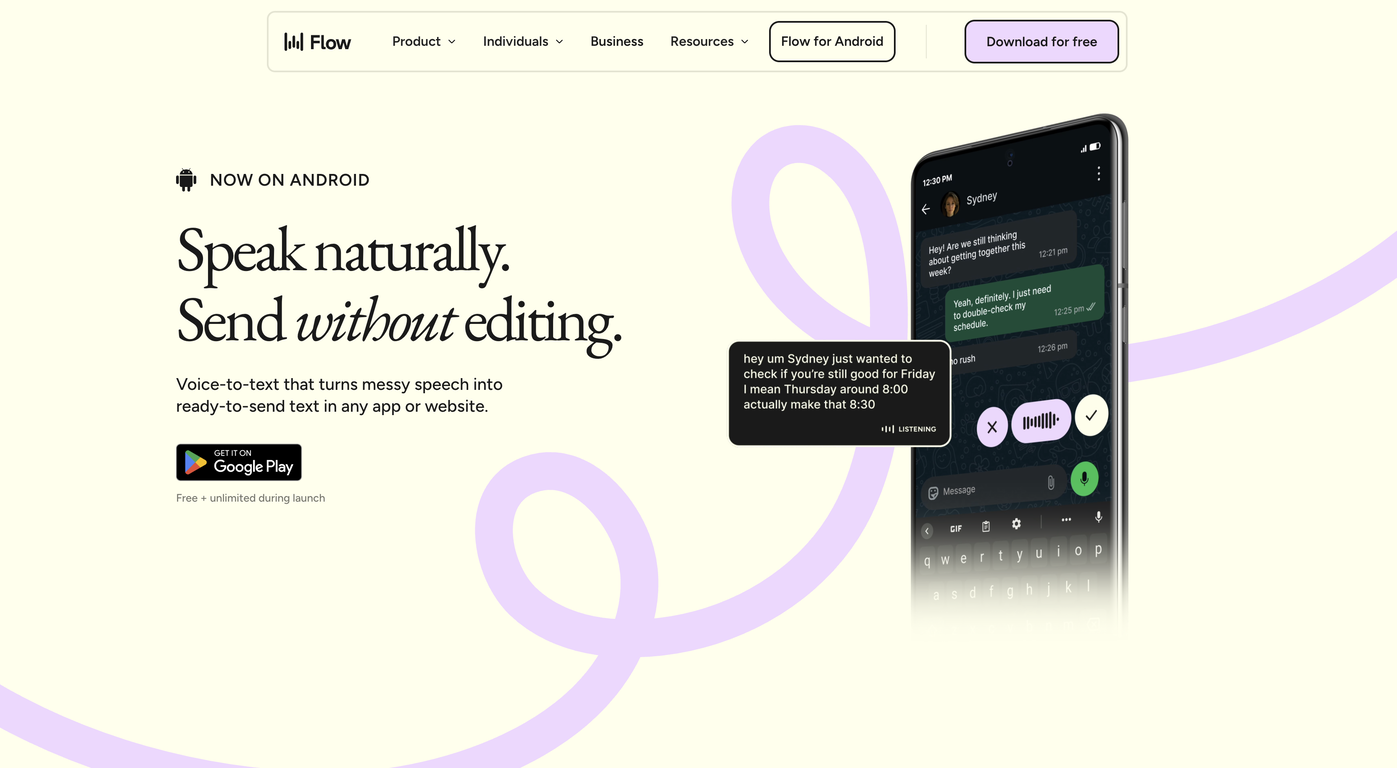
Wispr Flow – AI Voice Dictation & Productivity Tool Wispr Flow is an advanced AI-powered voice dictation and productivity tool designed to help users write, communicate, and work faster using their voice . By combining speech recognition, natural language processing, and real-time AI transcription , Wispr Flow allows users to convert spoken words into accurate, well-structured text across apps and workflows. Wispr Flow is commonly searched by users looking for AI voice typing tools, speech-to-text software, voice productivity apps, and AI dictation solutions that improve efficiency and reduce manual typing. What Is Wispr Flow? Wispr Flow is an AI-driven voice interface that enables hands-free writing and seamless voice-to-text conversion . It works across emails, documents, notes, chats, and productivity tools, allowing users to think and speak naturally while AI handles transcription and formatting . Unlike traditional dictation tools, Wispr Flow focuses on speed, accuracy, and workflow integration , making it ideal for professionals who want to maintain focus without switching between tools. Key Features of Wispr Flow Real-time AI-powered speech-to-text High-accuracy voice recognition Natural language understanding for better formatting Works across multiple apps and platforms Supports emails, documents, notes, and messaging Voice commands for editing and navigation Low-latency transcription for fast workflows Secure and privacy-focused processing Why People Use Wispr Flow Typing can slow down thinking and reduce productivity. Wispr Flow allows users to capture ideas at the speed of thought , helping them write faster, reduce fatigue, and stay focused. Professionals, creators, and knowledge workers use Wispr Flow to draft content, reply to messages, write reports, and take notes without breaking their workflow. Popular Use Cases Writing emails and professional messages Drafting documents, articles, and notes Meeting notes and quick idea capture Productivity workflows and task management Hands-free writing for multitasking Accessibility and ergonomic writing support Benefits of Wispr Flow Significantly faster than manual typing Improves productivity and focus Reduces physical strain and fatigue Enables natural and fluid writing Works seamlessly across daily tools Suitable for beginners and professionals Who Should Use Wispr Flow? Professionals and business users Writers, bloggers, and content creators Developers and technical teams Students and researchers People who prefer voice-first workflows Users seeking accessibility-friendly tools Frequently Asked Questions (FAQ) What does Wispr Flow do? Wispr Flow converts spoken voice into accurate text in real time, helping users write and communicate faster using AI-powered dictation. Is Wispr Flow better than traditional dictation tools? Yes. Wispr Flow is optimized for speed, accuracy, and workflow integration , making it more efficient than basic speech-to-text tools. Can Wispr Flow be used across different applications? Yes. Wispr Flow is designed to work across emails, documents, chats, and productivity platforms. Does Wispr Flow support long-form writing? Yes. It is suitable for both short messages and long-form content such as articles, reports, and notes. Is Wispr Flow useful for accessibility? Yes. Wispr Flow supports hands-free writing and reduces the need for typing, making it useful for accessibility and ergonomic use cases. Is voice data secure in Wispr Flow? Wispr Flow is built with privacy and security in mind, ensuring safe handling of voice and text data. Wispr Flow, AI Voice Dictation, Speech to Text AI, Voice Typing Tool, AI Productivity Tool, Voice Writing Software, AI Transcription Tool

Adobe Podcast is your all-in-one AI-powered solution for creating professional-quality audio content, whether you're a seasoned podcaster, a budding content creator, or a business looking to enhance your audio presence. Gone are the days of struggling with complex audio editing software and expensive studio equipment. Adobe Podcast leverages cutting-edge artificial intelligence to simplify and elevate your audio production process, making it accessible to everyone. At its core, Adobe Podcast offers a suite of intuitive tools designed to transform your raw recordings into polished masterpieces. The flagship feature, AI Denoise , is a game-changer. Say goodbye to distracting background noise, hums, and echoes. With just a few clicks, Adobe Podcast intelligently identifies and removes unwanted audio artifacts, leaving you with crystal-clear vocals that sound like they were recorded in a professional studio. This isn't just about making your audio sound better; it's about making your message heard clearly and effectively. But Adobe Podcast doesn't stop at noise reduction. The AI Speech Enhancement feature goes even further, automatically improving the clarity, richness, and presence of your voice. It intelligently adjusts levels, adds warmth, and ensures your voice stands out, making your spoken word more engaging and impactful. Imagine your interviews sounding richer, your narrations more captivating, and your podcasts more professional ΓÇô all without extensive audio engineering knowledge. For those who need to fine-tune their recordings, Adobe Podcast provides a user-friendly editing interface. Easily trim, cut, and arrange your audio segments. Add background music, sound effects, or other audio elements to enhance your content. The intuitive timeline makes it simple to visualize and manipulate your audio, allowing for precise edits and seamless transitions. Even if you're new to audio editing, you'll find yourself mastering the basics in no time. Adobe Podcast also understands the importance of consistency and branding. You can easily manage your audio assets, apply custom presets, and ensure a consistent sound across all your episodes or audio projects. This is crucial for building a recognizable brand identity and maintaining a professional image. Beyond the core editing features, Adobe Podcast is designed to streamline your entire workflow. Upload your audio files directly, work on them within the platform, and export them in a variety of formats suitable for all major podcasting platforms, websites, and social media channels. This end-to-end solution saves you time and effort, allowing you to focus on what you do best: creating compelling content. Whether you're looking to start a podcast from scratch, improve the audio quality of your existing podcast, create engaging audio for marketing videos, record clear voiceovers, or even produce professional-sounding audio for online courses, Adobe Podcast is the ultimate tool for the job. It democratizes professional audio production, empowering creators of all levels to achieve exceptional results. Experience the future of audio creation and elevate your content with the intelligent power of Adobe Podcast. Get started today and hear the difference AI can make.

Mitra - AI Phone Assistant App is a revolutionary mobile application designed to empower users with an artificial intelligence capable of making phone calls and engaging in natural conversations on their behalf. Available on the App Store, Mitra acts as your personal AI delegate, handling tasks that require direct phone interaction, from scheduling appointments and making reservations to gathering information or screening calls. This innovative tool frees up your time and reduces the cognitive load of managing various phone-based communications, ensuring that important calls are made accurately and efficiently without your direct involvement. Leveraging advanced speech recognition and natural language understanding, Mitra is engineered to navigate complex conversations, understand context, and respond appropriately, making it an invaluable asset for busy individuals. Whether you need to confirm details, follow up on inquiries, or simply avoid unwanted calls, Mitra provides a seamless and intelligent solution. Its user-friendly interface allows for easy setup of call parameters, offering a new level of convenience and automation in personal and professional communication management.

Kimi Slides is a cutting-edge AI-powered slide and presentation generator designed to help users create professional-looking presentations in seconds without manual designing. By using artificial intelligence and smart design templates , Kimi Slides turns your ideas, text, or outlines into visually appealing, structured, and engaging slides . Kimi Slides is frequently searched by users looking for fast presentation creation, AI slide tools, and automated design assistants that simplify the process of building presentations for work, school, and creative projects. Key Features of Kimi Slides AI-generated presentation slides from prompts or text Smart layout, color scheme, and template suggestions Automatic formatting and design consistency Charts, infographics, and visual elements Export options (PowerPoint, PDF, Google Slides compatible) Customizable themes and styles Real-time editing and collaboration tools Why People Use Kimi Slides Traditional presentation design can be time-consuming and requires design skills . Kimi Slides allows users to focus on content while AI handles the visual structure and layout . Whether youΓÇÖre preparing a business pitch, lecture, report, or project summary, Kimi Slides speeds up the process and ensures professional-quality output . Popular Use Cases Business pitch decks and investor presentations Educational lectures and class slides Marketing reports and strategy briefs Project proposals and team updates Training modules and workshops Visual storytelling and client presentations Benefits of Kimi Slides Saves hours of manual slide design Produces consistent, professional-quality visuals Easy to use for beginners and experts Enhances clarity and audience engagement Supports quick revisions and collaborative editing
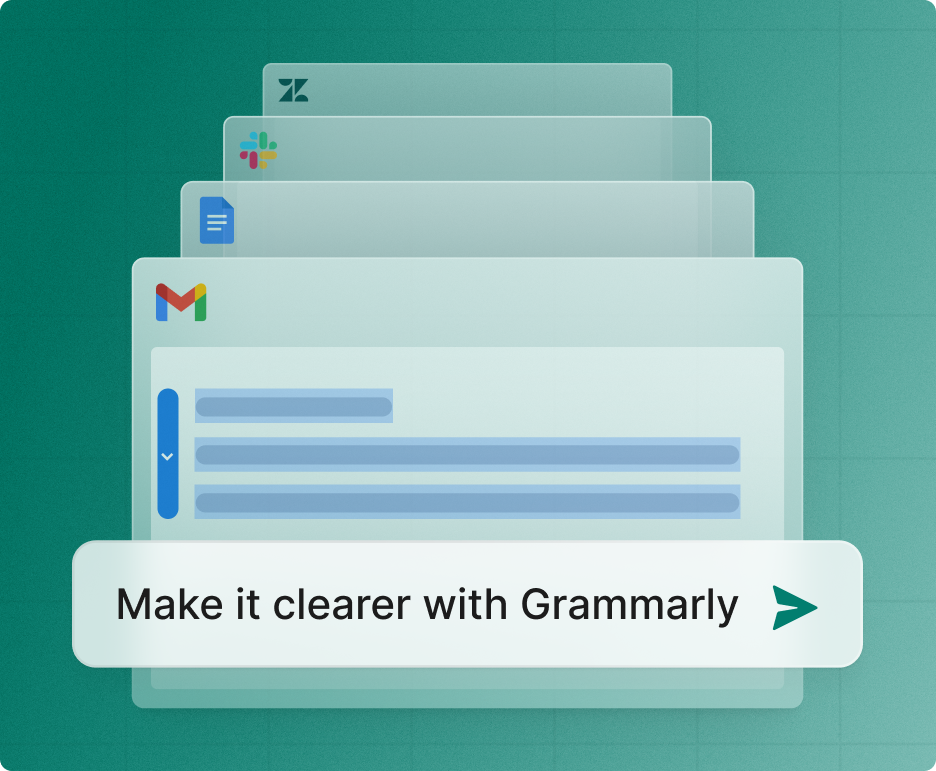
In the fast-evolving landscape of 2025, Grammarly has transitioned from a simple spell-checker into a sophisticated AI-powered writing partner . For students, it is no longer just about fixing a "their" or "there" mistake; it is about refining arguments, ensuring academic integrity, and mastering the tone of professional communication. Below is a comprehensive breakdown of Grammarly's core aspects, optimized to show why it remains the top choice for academic success. 1. Core Grammar and Mechanics At its foundation, Grammarly uses advanced Natural Language Processing (NLP) to provide real-time corrections. Unlike standard word processor tools, GrammarlyΓÇÖs 2025 engine understands the nuances of English syntax. It identifies: Contextual Spelling: Catching errors that are spelled correctly but used wrongly (e.g., "affect" vs. "effect"). Advanced Punctuation: Ensuring comma usage follows complex grammatical rules, which is vital for high-level essay writing. Subject-Verb Agreement: Detecting subtle mismatches that often occur in long, complex academic sentences. 2. Generative AI and "GrammarlyGO" The 2025 version of Grammarly features an integrated generative AI assistant. For students, this is a game-changer for beating writer's block . Drafting & Outlining: You can prompt the AI to "Create an outline for a 1,000-word essay on renewable energy," providing a structural head start. Paraphrasing: If a sentence feels clunky, the AI offers multiple "re-write" options to improve flow without changing the original meaning. 3. Academic Integrity: Plagiarism & AI Detection With the rise of AI in the classroom, maintaining academic honesty is more critical than ever. Plagiarism Checker: Grammarly Pro (formerly Premium) scans billions of web pages and ProQuestΓÇÖs academic databases to ensure your work is original and properly cited. Authorship Features: A new feature for 2025, Grammarly Authorship , helps students categorize their text sources. It can distinguish between what you typed manually and what was assisted by AI, allowing for full transparency with instructors. 4. Strategic Tone and Clarity Adjustments Writing an email to a professor requires a different "voice" than a lab report or a creative story. Tone Detector: Grammarly analyzes your word choice to tell you if you sound "confident," "tentative," or "formal." Full-Sentence Rewrites: This feature identifies wordy or "fluffy" sentences and suggests concise alternatives. In academic writing, where clarity is king, this helps students stay within word counts while maximizing impact. 5. Seamless Platform Integration One of GrammarlyΓÇÖs greatest strengths in 2025 is its ubiquity. It lives wherever you write: Browser Extensions: Works instantly in Google Docs, Canva, and Gmail. Desktop Apps: Integrates directly with Microsoft Word and Apple Pages. Mobile Keyboard: Ensures that even your quick emails and Discord messages are professional and error-free. Grammarly Free vs. Pro: 2025 Comparison | Feature | Grammarly Free | Grammarly Pro | | --- | --- | --- | | Spelling & Grammar | Basic corrections | Advanced & nuanced checks | | Tone Detection | Detects tone only | Suggests tone adjustments | | Generative AI | 100 prompts/month | 2,000 prompts/month | | Plagiarism Checker | Not included | Included (Billions of sources) | | Full-Sentence Rewrites | Not included | Unlimited clarity rewrites | Conclusion In 2025, Grammarly is more than a tool; it's a writing coach . By providing deep explanations for every suggestion, it doesn't just fix your mistakesΓÇöit teaches you how to become a better writer over time. Whether you are drafting a thesis or applying for your first internship, Grammarly ensures your ideas are heard clearly and professionally.

Fathom AI Notetaker: Revolutionize your meetings with Fathom AI Notetaker, the intelligent meeting assistant that automatically records, transcribes, and summarizes your calls. Say goodbye to manual note-taking and hello to crystal-clear meeting summaries delivered in real-time. Fathom AI Notetaker seamlessly integrates with your favorite video conferencing platforms like Zoom, Google Meet, and Microsoft Teams, capturing every important detail without interruption. Our advanced AI technology ensures highly accurate transcriptions, so you can focus on the conversation, not on scribbling notes. Instantly generate concise summaries highlighting key decisions, action items, and discussion points, making follow-ups a breeze. Share insights effortlessly with your team, ensuring everyone stays aligned and productive. Fathom AI Notetaker empowers you to reclaim your time, enhance collaboration, and never miss a crucial detail again. Boost your team's efficiency and unlock the full potential of your meetings with this indispensable AI-powered solution. Try Fathom AI Notetaker today and experience the future of meeting intelligence.

Mica AI is an innovative artificial intelligence tool designed to significantly streamline the post-call process for sales teams by transforming raw sales calls into concise, personalized deal summaries. This powerful platform leverages advanced natural language processing and machine learning to extract critical information, action items, and key discussion points from conversations. By automating the laborious task of manual note-taking and summary creation, Mica AI empowers sales professionals to save valuable time, ensure accuracy in reporting, and focus more on building client relationships and closing deals. The core value proposition of Mica AI lies in its ability to not only summarize but to personalize these summaries, tailoring them to specific deal requirements and CRM systems. This intelligent automation ensures that every sales interaction is meticulously documented, making follow-ups more effective and pipeline management more efficient. Ultimately, Mica AI acts as a smart assistant, enhancing productivity, improving data integrity within sales operations, and providing a competitive edge by enabling faster, more informed decision-making for sales representatives and managers alike.

Unlock Peak Productivity with Clockwise: The AI-Powered Time Management Calendar That Works for You Tired of back-to-back meetings eating into your focus time? Struggling to find blocks for deep work, personal appointments, or even just a breather? Introducing Clockwise, the revolutionary AI-powered time management calendar designed to intelligently optimize your schedule and reclaim your workday. Clockwise goes beyond a traditional calendar. It's your personal AI assistant, meticulously analyzing your existing schedule, team availability, and work preferences to proactively find the best times for everything that matters. Forget the tedious back-and-forth of scheduling ΓÇô Clockwise automates the process, ensuring your calendar works for you, not against you. Key Features That Will Transform Your Time Management: Smart Scheduling: Clockwise automatically finds ideal meeting times that minimize disruption to your focus blocks and respect everyone's availability. It understands that productive work requires uninterrupted concentration. Automatic Rescheduling: Unexpected meetings or urgent tasks? Clockwise intelligently shifts your existing calendar events to make space, all while informing attendees of any changes in a clear and concise manner. Focus Time Optimization: Protect your most valuable asset ΓÇô your time. Clockwise actively carves out dedicated focus time blocks, shielding you from unnecessary interruptions and allowing you to dive deep into important projects. Team Coordination Made Easy: Coordinating with your team has never been simpler. Clockwise helps you find common availability for group meetings effortlessly, reducing scheduling conflicts and saving valuable collective time. Personalized Preferences: Tailor Clockwise to your unique workflow. Set your preferred meeting lengths, buffer times between appointments, and even designate specific "no-meeting" days. Seamless Integration: Clockwise integrates effortlessly with your existing calendar (Google Calendar, Outlook Calendar, etc.), providing a smooth and intuitive user experience from day one. Actionable Insights: Gain a deeper understanding of how you spend your time. Clockwise provides insights into meeting density, focus time utilization, and potential scheduling inefficiencies, empowering you to make data-driven improvements. Stop Wasting Time on Scheduling. Start Achieving More. Clockwise is more than just a calendar; it's a commitment to a more efficient, less stressful, and ultimately more productive workday. Whether you're a busy professional, a student juggling multiple commitments, or a team striving for better collaboration, Clockwise provides the intelligent tools you need to master your time. Experience the future of time management. Try Clockwise today and discover how AI can transform your productivity, reduce meeting fatigue, and help you achieve your goals with less effort and more focus.

Needle is an innovative AI-powered knowledge threading platform designed to revolutionize how individuals and teams discover, connect, and utilize information across diverse data sources. It acts as a central hub, intelligently sifting through vast amounts of unstructured and structured data ΓÇô from documents and emails to databases and web content ΓÇô to extract relevant insights and weave them into coherent knowledge threads. This powerful tool eliminates the fragmentation of information, making it effortlessly accessible and understandable, thereby significantly boosting research efficiency, decision-making, and collaborative productivity within any organization. The platformΓÇÖs core strength lies in its advanced AI algorithms that not only find information but also understand its context and relationships, presenting users with a holistic view of complex topics. Needle empowers users to quickly identify key trends, uncover hidden connections, and generate new perspectives from their collective knowledge base. With its "Free + from $49/mo" pricing model, it offers accessibility to a broad audience, from individual researchers to large enterprises, making sophisticated knowledge discovery a reality for everyone seeking to unlock the full potential of their data.

Musho is an innovative AI-powered note-taking and knowledge management tool designed to help users capture, connect, and synthesize information more effectively. It addresses the challenges of information overload and fragmented knowledge by leveraging artificial intelligence to organize and enrich user notes. This tool is particularly valuable for students, researchers, writers, and anyone seeking to improve their personal knowledge base and productivity. Musho utilizes advanced natural language processing and machine learning algorithms to transform unstructured notes into a dynamic, interconnected network of ideas. Musho distinguishes itself from traditional note-taking applications by focusing on the relationships between notes, rather than simply storing them as isolated documents. The platform employs AI to automatically identify key concepts, suggest connections, and facilitate the discovery of insights that might otherwise remain hidden. This approach fosters a more holistic understanding of complex topics and empowers users to build a robust, evolving knowledge graph. The core functionality centers around intelligent organization, semantic search, and AI-driven summarization, making it a powerful asset for anyone dealing with large volumes of information. Key Features of Musho Captures notes in a freeform, markdown-based editor. Automatically identifies and tags key concepts within notes. Suggests connections between notes based on semantic similarity. Visualizes knowledge as an interconnected graph. Offers AI-powered summarization of notes and connected concepts. Enables bidirectional linking between notes. Supports embedding of various media types, including images and links. Provides a distraction-free writing environment. Facilitates the creation of nested notes for hierarchical organization. Offers a daily note feature for journaling and capturing daily thoughts. Allows for customizable themes and appearance settings. Supports keyboard shortcuts for efficient navigation and editing. Provides export options for notes in various formats. Why People Use Musho Individuals and professionals are increasingly seeking solutions to manage the ever-growing influx of information. Traditional note-taking methods often fall short, leading to disorganized collections of notes that are difficult to navigate and synthesize. Musho offers a compelling alternative by automating the process of knowledge organization and discovery. Unlike linear note-taking apps, MushoΓÇÖs graph-based approach mirrors the way the human brain naturally connects ideas, fostering deeper understanding and retention. The platformΓÇÖs AI-powered features significantly reduce the time and effort required to build and maintain a personal knowledge base. Users can spend less time organizing and more time thinking, creating, and learning. MushoΓÇÖs ability to surface hidden connections and insights empowers users to generate new ideas and solve complex problems more effectively. It moves beyond simple information storage to become a true cognitive assistant, enhancing both individual and collaborative knowledge work. Popular Use Cases Students: Organizing lecture notes, research papers, and study materials for improved comprehension and exam preparation. Researchers: Building a comprehensive knowledge base of research findings, identifying gaps in knowledge, and generating new hypotheses. Writers: Developing and structuring complex narratives, brainstorming ideas, and managing research for writing projects. Software Developers: Documenting code, tracking project requirements, and managing technical knowledge. Legal Professionals: Organizing case files, legal precedents, and research materials for efficient case preparation. Project Managers: Capturing meeting notes, tracking action items, and managing project documentation. Personal Knowledge Management: Building a lifelong learning repository, tracking personal interests, and journaling. Content Creators: Researching topics, outlining content, and organizing ideas for blog posts, articles, and videos. Consultants: Capturing client information, documenting project deliverables, and building a knowledge base of best practices. Entrepreneurs: Brainstorming business ideas, developing business plans, and tracking market research. Benefits of Musho Enhanced Knowledge Retention: The graph-based structure and AI-powered connections promote deeper understanding and long-term retention of information. Increased Productivity: Automated organization and intelligent search features save time and effort, allowing users to focus on higher-level tasks. Improved Creativity: Discovering unexpected connections between ideas sparks new insights and fosters creative problem-solving. Streamlined Research: Efficiently gather, organize, and synthesize research materials for faster and more effective research. Reduced Information Overload: Effectively manage large volumes of information and avoid feeling overwhelmed. Centralized Knowledge Base: Create a single source of truth for all your notes, ideas, and research. Enhanced Collaboration: Share notes and knowledge graphs with others for collaborative learning and problem-solving. Better Decision-Making: Access a comprehensive and interconnected knowledge base to inform better decisions. Simplified Note-Taking: The intuitive interface and markdown-based editor make note-taking quick and easy. Dynamic Knowledge Growth: The platform evolves with your thinking, continuously adapting and expanding your knowledge base. Improved Organization: Automatically categorize and connect notes, eliminating the need for manual filing and tagging. Effortless Summarization: Quickly grasp the key takeaways from notes and connected concepts with AI-powered summarization.

Unlock the power of computational intelligence with Wolfram Alpha, the revolutionary engine that delivers answers and insights using Wolfram's groundbreaking technology and comprehensive knowledge base. Trusted by millions of students, educators, researchers, and professionals worldwide, Wolfram Alpha goes beyond simple search to provide precise, data-driven results for a vast array of subjects. Whether you're tackling complex mathematical equations, exploring scientific concepts, analyzing nutritional data, or delving into a multitude of other domains, Wolfram Alpha offers the definitive computational knowledge engine. Experience the difference of intelligent computation. Input your query ΓÇô from a simple math problem to an intricate scientific question ΓÇô and Wolfram Alpha will process it using its vast repository of curated data and powerful algorithms. Get step-by-step solutions for algebra, calculus, differential equations, and more. Visualize data, plot functions, and explore mathematical concepts with interactive tools. Dive into physics, chemistry, biology, and engineering with access to real-world data, formulas, and simulations. Understand the nutritional content of foods, analyze historical trends, or even get quick facts on geography and current events. Wolfram Alpha is more than just a tool; it's your personal computational expert. Its intuitive interface and rich, dynamic output make learning and problem-solving more efficient and engaging than ever before. From homework help and exam preparation to advanced research and professional analysis, Wolfram Alpha empowers you to compute, analyze, and understand. Discover the answers you need, the insights you crave, and the computational power to achieve your goals. Transform your queries into knowledge with Wolfram Alpha. Get accurate, reliable, and comprehensive computational intelligence at your fingertips. Explore math, science, nutrition, and beyond with the world's leading computational knowledge engine.

The Chrome Web Store is GoogleΓÇÖs official marketplace for browser extensions and themes created for the Google Chrome browser. It serves as a central hub where users can discover, install, manage, and update tools that extend ChromeΓÇÖs functionality and personalize the browsing experience. As of 2025, the Chrome Web Store has grown into a large-scale ecosystem supporting millions of users and developers worldwide. It plays a critical role in transforming Chrome from a basic web browser into a powerful platform for productivity, creativity, security, and AI-driven workflows. What Is the Chrome Web Store? The Chrome Web Store is an online platform maintained by Google that hosts: Browser extensions Chrome themes Web-based productivity tools Extensions available on the store can modify website behavior, automate repetitive tasks, enhance security, assist with content creation, or integrate advanced technologies such as artificial intelligence directly into the browser. Users can browse extensions by category, popularity, ratings, or featured recommendations, making it easy to find tools that suit specific needs. Evolution of the Chrome Web Store Initially launched as a simple extension directory, the Chrome Web Store has evolved significantly over the years. In recent updates, Google has improved: Search and discovery features Extension review and moderation systems Developer policies and transparency requirements The most notable change in recent years has been the rapid adoption of AI-powered extensions , which now dominate many of the most popular categories. AI-Powered Extensions in 2025 Artificial intelligence has become a major driver of growth in the Chrome Web Store. AI extensions enable users to perform advanced tasks directly within the browser without switching tools. Common AI-powered use cases include: Web page summarization and content analysis Writing assistance, grammar correction, and rewriting Research and note-taking automation Code generation and debugging support Language translation and learning These extensions turn the browser into an intelligent assistant, improving efficiency for professionals, students, and creators. Key Categories in the Chrome Web Store The Chrome Web Store organizes extensions into several major categories: Productivity Includes tools for task management, tab organization, meeting transcription, time tracking, and workflow optimization. Security and Privacy Features ad blockers, tracker blockers, password managers, VPN extensions, and phishing protection tools. Developer Tools Provides debugging utilities, performance monitors, API testers, and code inspection tools for web developers. Shopping and Finance Includes price trackers, coupon finders, cashback tools, and deal comparison extensions. Education and Learning Offers language learning tools, study assistants, note-taking extensions, and exam preparation aids. Personalization and Themes Allows users to customize the look and feel of the Chrome browser with visual themes and layouts. Chrome Web Store for Developers The Chrome Web Store also serves as a distribution and monetization platform for developers. Developers can publish extensions and reach a global audience with minimal infrastructure requirements. Monetization options include: Free extensions with premium features Subscription-based models One-time purchases Google provides analytics, performance insights, and policy guidelines to help developers maintain high-quality extensions and improve user trust. Security, Privacy, and Trust Security remains a key focus area for the Chrome Web Store. While Google actively reviews and removes malicious extensions, users must also take responsibility for managing their installed tools. Best practices for users include: Reviewing extension permissions before installation Installing extensions from trusted developers Removing unused or outdated extensions Keeping extensions updated Google continues to strengthen its extension policies to ensure transparency around data collection and usage. User Experience and Interface Improvements Recent updates to the Chrome Web Store interface have focused on: Clearer permission information Better categorization and filtering Highlighting trusted and featured extensions Improved mobile and desktop usability These improvements aim to help users make informed decisions while browsing the store. Importance of the Chrome Web Store in the Modern Web The Chrome Web Store plays a vital role in how people interact with the internet today. For many users, Chrome extensions are essential tools for: Remote work and collaboration Online learning and research Digital marketing and content creation Secure and efficient browsing By enabling deep customization and automation, the Chrome Web Store has become a foundational part of the modern web ecosystem. Future Outlook Looking ahead, the Chrome Web Store is expected to continue evolving with: Deeper integration of on-device AI models Smarter permission and security systems Greater support for enterprise and professional users More personalized extension recommendations As browsers increasingly function as digital workspaces, the Chrome Web Store will remain a central platform for innovation and user empowerment. The Chrome Web Store is more than an extension marketplaceΓÇöit is a critical ecosystem that enhances how millions of people use the web every day. With its growing focus on AI, productivity, security, and developer innovation, the Chrome Web Store continues to shape the future of browser-based experiences in 2025 and beyond.

Motiff is an innovative AI-powered design tool that streamlines the design process and empowers designers to focus on creativity rather than repetitive tasks. It addresses the challenges of maintaining consistency, scaling designs, and managing complex projects by automating common workflows and leveraging the power of artificial intelligence to enhance efficiency. This tool is particularly valuable for UI/UX designers, product teams, and design systems managers seeking to accelerate their workflow and improve design quality. Motiff offers a new approach to design, moving beyond traditional methods to an AI-native experience. Key Features of Motiff Automated frame cleanup and organization. AI-powered design system generation from existing files. Automatic component detection and replication. Intelligent layout suggestions and adjustments. Version control and collaboration features. Seamless integration with existing design workflows. Ability to create and maintain consistent design languages. Automated documentation of design components. Real-time collaboration capabilities for design teams. AI-driven style guide creation and enforcement. Component variant generation. Automated responsive resizing. Why People Use Motiff Motiff is utilized by design professionals who are looking to overcome the limitations of traditional design tools and processes. Historically, maintaining design consistency across large projects has been a manual and time-consuming effort, often requiring meticulous attention to detail and significant overhead. Similarly, building and scaling design systems from scratch can be a complex undertaking. Motiff automates these processes, significantly reducing the time and effort required to achieve high-quality, consistent designs. The toolΓÇÖs AI capabilities allow designers to focus on higher-level creative tasks, such as user research, ideation, and prototyping, rather than getting bogged down in repetitive pixel-perfect adjustments. By automating tasks like frame organization, component detection, and style guide creation, Motiff enables teams to iterate faster, reduce errors, and deliver more polished designs. It offers a scalable solution for organizations of all sizes, from startups to large enterprises, looking to improve their design efficiency and maintain brand consistency. Popular Use Cases Rapid Prototyping: Quickly generate and iterate on design concepts using AI-powered layout suggestions and component replication. Design System Creation & Maintenance: Automatically build and maintain comprehensive design systems from existing design files, ensuring consistency across all products. UI Component Library Management: Efficiently manage and update UI component libraries, reducing redundancy and improving reusability. Website Redesign: Streamline the redesign of websites by automatically identifying and replicating existing UI elements. Mobile App Design: Accelerate the design process for mobile applications with AI-powered responsive resizing and layout adjustments. Large-Scale Design Projects: Maintain consistency and efficiency across large-scale design projects with automated frame cleanup and organization. Design Audit & Cleanup: Quickly identify and fix inconsistencies in existing design files, improving overall design quality. Brand Consistency Enforcement: Ensure brand consistency across all design assets with AI-driven style guide creation and enforcement. Collaboration on Design Projects: Facilitate seamless collaboration among design teams with real-time editing and version control features. Creating Design Documentation: Automatically generate documentation for design components and styles, improving communication and knowledge sharing. Benefits of Motiff Increased Design Efficiency: Automate repetitive tasks and streamline workflows, allowing designers to focus on creative problem-solving. Improved Design Consistency: Maintain a consistent design language across all products and platforms, enhancing brand recognition and user experience. Reduced Design Debt: Identify and fix inconsistencies in existing design files, reducing technical debt and improving maintainability. Faster Iteration Cycles: Accelerate the design process with AI-powered layout suggestions and component replication, enabling faster iteration and experimentation. Enhanced Collaboration: Facilitate seamless collaboration among design teams with real-time editing and version control features. Scalable Design Systems: Build and maintain scalable design systems that can adapt to evolving business needs. Simplified Design Documentation: Automatically generate documentation for design components and styles, improving communication and knowledge sharing. Reduced Manual Effort: Minimize the need for manual pixel-perfect adjustments, freeing up designers to focus on higher-level tasks. Improved Design Quality: Enhance the overall quality of designs with AI-powered suggestions and automated cleanup features. Cost Savings: Reduce design costs by automating tasks and improving efficiency.

Magician is an innovative AI-powered design tool that empowers users to create stunning visuals and presentations with remarkable ease and speed. It addresses the challenge of time-consuming and often expensive design processes, making professional-quality design accessible to everyone, regardless of their skill level. Magician leverages the power of generative AI to transform simple text prompts into fully realized designs, streamlining the creative workflow for marketers, entrepreneurs, and anyone needing compelling visual content. This tool is particularly valuable for individuals and teams seeking to enhance their content creation , marketing materials , and presentation design without relying on traditional graphic design expertise or extensive software knowledge. Key Features of Magician Transforms text prompts into visually appealing slides and designs. Offers a vast library of customizable design templates. Provides AI-powered image generation capabilities. Enables users to rebrand designs with custom logos and brand colors. Facilitates collaborative design projects with team sharing features. Supports various export formats, including PPTX and PNG. Allows for quick iteration and refinement of designs based on feedback. Integrates with popular presentation platforms. Offers AI-driven layout suggestions for optimal visual hierarchy. Provides a user-friendly interface for intuitive design creation. Why People Use Magician Individuals and organizations adopt Magician to drastically reduce the time and resources required for design tasks. Traditional design workflows often involve lengthy back-and-forth communication with designers, multiple revisions, and significant costs. Magician bypasses these bottlenecks by enabling users to generate high-quality designs directly from their ideas, expressed in simple text. This AI-driven approach democratizes design, empowering anyone to create professional-looking materials without needing specialized skills. The toolΓÇÖs efficiency is particularly beneficial for fast-paced environments where rapid content creation is crucial, such as marketing campaigns, sales presentations, and internal communications. By automating many of the tedious aspects of design, Magician allows users to focus on strategy and messaging, ultimately improving overall productivity and impact. ItΓÇÖs a shift from designing to directing design, making the process more accessible and agile. Popular Use Cases Marketing Teams: Creating social media graphics, ad banners, and marketing presentations quickly and efficiently. Sales Professionals: Developing compelling sales decks and pitch presentations to close deals. Entrepreneurs & Startups: Designing branding materials, investor presentations, and website visuals on a budget. Educators & Trainers: Building engaging educational presentations and course materials. Content Creators: Generating visually appealing content for blogs, articles, and newsletters. Internal Communications: Crafting informative and visually consistent internal presentations and reports. Product Managers: Developing product demo presentations and marketing collateral. Small Business Owners: Creating professional-looking marketing materials without hiring a designer. Remote Teams: Collaborating on design projects seamlessly, regardless of location. Event Planners: Designing event presentations, promotional materials, and signage. Benefits of Magician Increased Productivity: Significantly reduces the time spent on design tasks, allowing users to focus on other priorities. Cost Savings: Eliminates the need for expensive design software or external design services. Enhanced Creativity: Facilitates rapid experimentation and iteration, leading to more innovative designs. Improved Brand Consistency: Ensures that all designs adhere to brand guidelines with customizable templates and branding features. Greater Accessibility: Empowers anyone, regardless of design skills, to create professional-quality visuals. Streamlined Workflow: Simplifies the design process, making it more efficient and collaborative. Faster Time-to-Market: Enables quicker creation of marketing materials and presentations, accelerating campaign launches. Scalable Design Solutions: Provides a flexible solution that can adapt to changing design needs and volumes. Data-Driven Design: Leverages AI to suggest optimal layouts and visual elements for maximum impact. Empowered Teams: Enables teams to take ownership of their design needs, reducing reliance on specialized resources.

Fontjoy is an AI-powered font pairing tool that helps designers and creatives discover harmonious and aesthetically pleasing font combinations with ease. It addresses the challenge of selecting fonts that complement each other, a process that can be time-consuming and require significant design expertise. Fontjoy utilizes machine learning algorithms to analyze font characteristics and generate pairings based on principles of visual balance and readability. This tool is particularly valuable for graphic designers, web developers, marketers, and anyone involved in visual communication who seeks to elevate their projects through thoughtful typography. It streamlines the font selection process, offering inspiration and ensuring visually appealing results. Key Features of Fontjoy Generates font pairings using AI algorithms. Allows users to filter fonts by category (serif, sans-serif, display, handwriting, monospace). Provides real-time previews of font combinations. Offers adjustable font weights and styles within pairings. Enables users to lock specific fonts to refine pairings. Supports searching for fonts by name. Allows users to create and save custom font collections. Provides a color palette generator to complement font pairings. Offers a history of generated pairings for revisiting options. Displays font information, including designer and licensing details. Why People Use Fontjoy Individuals and professionals utilize Fontjoy to overcome the complexities of font pairing. Traditionally, selecting fonts that work well together relied heavily on design intuition and experience. This process could be subjective, time-intensive, and prone to inconsistencies. Fontjoy offers a data-driven approach, leveraging artificial intelligence to suggest pairings that adhere to established design principles. This not only saves time but also introduces users to font combinations they might not have considered otherwise. The tool democratizes good design, making it accessible to those without extensive typography knowledge. By automating the initial stages of font selection, Fontjoy allows users to focus on the broader creative aspects of their projects, enhancing overall efficiency and design quality. ItΓÇÖs a valuable resource for maintaining brand consistency and creating visually engaging content across various platforms. Popular Use Cases Web Design: Designers use Fontjoy to quickly establish a cohesive typographic hierarchy for websites, ensuring readability and visual appeal. Graphic Design: Professionals employ the tool for creating marketing materials, logos, and branding assets, streamlining the font selection process for diverse projects. Marketing & Advertising: Marketers leverage Fontjoy to develop visually compelling advertisements and social media graphics that capture attention and reinforce brand identity. Content Creation: Bloggers, writers, and content creators utilize the tool to enhance the visual presentation of their work, improving readability and engagement. Presentation Design: Individuals creating presentations use Fontjoy to select font pairings that are both professional and visually engaging, enhancing the impact of their message. UI/UX Design: Designers working on user interfaces use Fontjoy to ensure that fonts are legible, accessible, and contribute to a positive user experience. Book Cover Design: Authors and designers use Fontjoy to create visually appealing book covers that attract readers and reflect the genre and tone of the book. Educational Materials: Educators use Fontjoy to create visually engaging learning materials, improving student comprehension and retention. Personal Projects: Hobbyists and individuals undertaking personal design projects use Fontjoy to explore different font combinations and enhance their creative endeavors. Brand Guideline Development: Companies use Fontjoy to establish and document consistent font pairings as part of their brand guidelines. Benefits of Fontjoy Saves Time: Significantly reduces the time spent searching for and evaluating font combinations. Enhances Design Quality: Provides access to aesthetically pleasing and well-balanced font pairings. Inspires Creativity: Introduces users to new font combinations they may not have considered. Improves Readability: Helps select fonts that are legible and easy to read across various mediums. Maintains Brand Consistency: Facilitates the selection of fonts that align with brand guidelines. Democratizes Design: Makes good typography accessible to users of all skill levels. Streamlines Workflow: Integrates seamlessly into the design process, simplifying font selection. Offers Versatility: Supports a wide range of design projects, from web design to print materials. Provides a Data-Driven Approach: Leverages AI to suggest pairings based on design principles. Facilitates Exploration: Allows users to experiment with different font combinations and refine their choices.

 Android
 IOS
IOS Mini Tools
 Software
 Web
Web