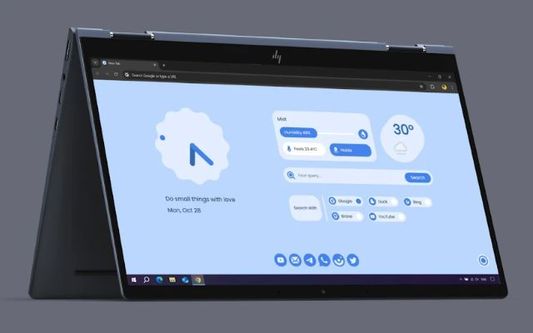
MYNT: Material You New Tab is a customizable browser extension that transforms the new tab page into a personalized dashboard, inspired by GoogleΓÇÖs Material You design language. It addresses the need for a more functional and aesthetically pleasing browser home page, moving beyond the standard blank page or basic search bar. This tool leverages user preference settings and dynamic data integration to create a tailored browsing experience. It is designed for anyone seeking to enhance their browserΓÇÖs usability and visual appeal, particularly those familiar with or appreciative of the Material You aesthetic. It falls into the category of browser extensions and personalization tools . Key Features of MYNT: Material You New Tab Dynamic theme customization with user-defined colors and curated palettes. Personalized greeting displaying a custom name or message. Integrated search functionality supporting multiple search engines. Live weather updates for a specified location. Analog and digital clock display options. Quick access shortcuts to popular Google apps and services. Integrated AI tools button for launching AI platforms. Built-in to-do list and bookmark management features. Customizable wallpaper options, including daily random image refresh. Multi-language support with over 29 languages available. Why People Use MYNT: Material You New Tab Users adopt MYNT: Material You New Tab to overcome the limitations of a standard new tab page. Traditionally, the new tab page serves as a basic launchpad, often lacking personalization and useful information. MYNT transforms this space into a dynamic hub, providing instant access to frequently used tools, information, and services. This eliminates the need to navigate to separate websites for simple tasks like checking the weather, managing to-do lists, or accessing favorite apps. The extensionΓÇÖs customization options allow users to create a visually appealing and highly functional workspace tailored to their individual needs, significantly improving browsing efficiency and overall user experience. It offers a streamlined alternative to manually configuring multiple extensions to achieve similar functionality. Popular Use Cases Students: Utilizing the to-do list and quick access to Google Docs for efficient study and assignment management. Professionals: Leveraging the integrated search, weather updates, and app shortcuts to stay informed and productive throughout the workday. Remote Workers: Creating a personalized home office environment within their browser, with quick access to communication tools like Gmail and WhatsApp. Tech Enthusiasts: Customizing the theme and layout to match their preferred aesthetic and exploring the integration with AI tools. Multilingual Users: Benefitting from the extensive language support for a comfortable and accessible browsing experience. General Internet Users: Enhancing their daily browsing experience with a visually appealing and functionally rich new tab page. Benefits of MYNT: Material You New Tab Increased Productivity: Streamlined access to essential tools and information reduces time spent navigating between websites. Enhanced Customization: Dynamic themes and personalization options allow users to create a unique and visually appealing browsing experience. Improved Organization: Integrated to-do lists and bookmark management features help users stay organized and focused. Simplified Workflow: Quick access to frequently used apps and services streamlines daily tasks. Real-time Information: Live weather updates provide instant access to current conditions. Seamless Integration: The extension integrates smoothly with popular Google services and AI platforms. Accessibility: Multi-language support ensures a comfortable experience for a diverse user base. Aesthetically Pleasing Design: The Material You inspired design provides a modern and visually engaging interface.

Vizard.ai is an innovative AI video generation platform that transforms text prompts into engaging, professional-quality videos. It addresses the challenge of video content creation by providing a streamlined, AI-driven solution for businesses, marketers, and content creators. Utilizing advanced artificial intelligence and deep learning models , Vizard.ai automates the traditionally complex and time-consuming process of video production. This tool is designed for anyone seeking to quickly and affordably produce videos for marketing, social media, training, or internal communications, without requiring prior video editing experience. It is a powerful resource for AI video generation , text-to-video , and content creation . Key Features of Vizard.ai Converts text prompts into fully produced videos. Offers a library of AI avatars to represent speakers in videos. Provides a range of customizable video templates. Supports multiple languages for voiceovers and text. Allows users to upload custom scripts for video narration. Enables the selection of different video styles and tones. Offers background music options to enhance video engagement. Provides options for adding text overlays and visual elements. Facilitates video editing and customization within the platform. Supports various video resolutions and aspect ratios. Includes a user-friendly interface for easy navigation. Allows for the creation of short-form video content optimized for social media. Offers a collaborative workspace for team projects. Provides options for branding videos with logos and colors. Integrates with other marketing and content creation tools. Why People Use Vizard.ai Vizard.ai is utilized by individuals and organizations looking to overcome the barriers to video content creation. Traditionally, producing high-quality videos required significant investment in equipment, software, and skilled personnel. It also demanded substantial time for scripting, filming, editing, and post-production. Vizard.ai democratizes video creation by offering an accessible, cost-effective alternative. The platformΓÇÖs AI-powered automation significantly reduces the time and resources needed to produce videos. Users can generate compelling video content in minutes, simply by providing a text prompt. This speed and efficiency are particularly valuable for businesses that need to rapidly create marketing materials, social media updates, or training videos. Furthermore, Vizard.aiΓÇÖs ability to generate videos in multiple languages expands its reach to a global audience, making it a versatile solution for international organizations. The platformΓÇÖs ease of use also empowers individuals without video editing expertise to create professional-looking videos, fostering creativity and innovation. Popular Use Cases Marketing and Advertising: Creating engaging video ads, promotional videos, and product demos for social media and websites. Social Media Content Creation: Generating short-form videos for platforms like TikTok, Instagram Reels, and YouTube Shorts to increase brand awareness and engagement. Employee Training and Onboarding: Developing informative and engaging training videos for new hires and existing employees. Educational Content: Producing educational videos for online courses, tutorials, and presentations. Internal Communications: Creating video updates and announcements for company-wide distribution. Explainer Videos: Developing concise and visually appealing videos to explain complex concepts or products. Personal Branding: Individuals can use Vizard.ai to create videos for their personal websites, LinkedIn profiles, or other professional platforms. News and Journalism: Quickly generating video summaries of news articles or events. Real Estate: Creating virtual tours and property showcases. E-commerce: Producing product videos to highlight features and benefits. Customer Support: Developing video tutorials to address common customer questions and issues. Sales Enablement: Equipping sales teams with compelling video content to support their outreach efforts. Benefits of Vizard.ai Increased Content Velocity: Enables rapid video creation, allowing users to publish content more frequently. Reduced Production Costs: Eliminates the need for expensive equipment, software, and personnel. Enhanced Engagement: Creates visually appealing and engaging videos that capture audience attention. Improved Brand Consistency: Allows users to maintain a consistent brand identity across all video content. Wider Reach: Supports multiple languages, expanding the potential audience for videos. Simplified Workflow: Streamlines the video creation process, making it accessible to users of all skill levels. Greater Scalability: Enables businesses to scale their video content production efforts without significant investment. Increased ROI: Drives better results from video marketing campaigns through increased engagement and conversions. Time Savings: Automates many of the time-consuming tasks associated with video production. Accessibility: Empowers individuals without video editing experience to create professional-quality videos. Versatility: Supports a wide range of video use cases across various industries. Innovation: Leverages cutting-edge AI technology to deliver a unique and powerful video creation experience.

Invideo AI is an innovative AI-powered video generation platform designed to empower users to create high-quality videos, particularly AI YouTube Shorts , from text prompts with remarkable speed and ease. This tool addresses the significant challenge of video content creation, which traditionally requires substantial time, resources, and expertise in video editing. Invideo AI leverages the power of artificial intelligence to automate much of the video creation process, from scriptwriting and visual selection to editing and music integration. It is intended for a broad audience, including marketers, content creators, social media managers, educators, and businesses looking to enhance their video marketing efforts without extensive video production skills. The platform democratizes video creation, making it accessible to anyone with a story to tell. Invideo AI stands out in the AI video generator landscape by focusing on simplifying the creation of engaging short-form video content, specifically tailored for platforms like YouTube Shorts, TikTok, and Instagram Reels. ItΓÇÖs a solution for those seeking to rapidly produce visually appealing videos to boost their online presence and audience engagement. Key Features of Invideo AI Transforms text prompts into fully-fledged videos. Offers a library of pre-made templates optimized for various platforms. Provides access to millions of royalty-free media assets, including stock footage and images. Includes an AI script writer to assist with content creation. Features AI voiceovers in multiple languages and accents. Allows for custom branding with logos, colors, and fonts. Offers automatic video resizing for different social media platforms. Provides a user-friendly drag-and-drop editor for fine-tuning videos. Supports text-to-speech functionality with customizable voice options. Enables the creation of videos in various aspect ratios. Includes AI-powered background music generation. Offers the ability to clone existing videos for quick repurposing. Why People Use Invideo AI Individuals and organizations utilize Invideo AI to overcome the hurdles associated with traditional video production. Creating videos from scratch often involves significant time investment in scripting, filming, editing, and sourcing media assets. Invideo AI drastically reduces this time commitment by automating many of these processes. Users can simply input a text prompt, and the AI will generate a complete video, complete with visuals, music, and voiceover. Compared to manual video editing, Invideo AI offers a level of efficiency and scalability that is difficult to achieve otherwise. It allows users to produce a high volume of video content quickly and cost-effectively, making it ideal for social media marketing campaigns, educational content, and internal communications. The platformΓÇÖs intuitive interface also makes it accessible to users without prior video editing experience, empowering them to create professional-looking videos with minimal effort. Popular Use Cases Social Media Marketing: Generating engaging short-form videos for platforms like YouTube Shorts, TikTok, Instagram Reels, and Facebook. Content Marketing: Creating promotional videos for blog posts, articles, and other content assets. Educational Videos: Developing concise and visually appealing educational content for online courses and tutorials. Product Demos: Showcasing product features and benefits through short, informative videos. Explainer Videos: Simplifying complex concepts with animated explainer videos. Internal Communications: Creating engaging videos for employee training, announcements, and updates. Personal Branding: Building a personal brand through consistent video content creation. Real Estate Marketing: Producing virtual tours and property highlight videos. Event Promotion: Creating promotional videos for upcoming events and conferences. Podcast Promotion: Generating short video clips to promote podcast episodes. E-commerce Product Videos: Showcasing products in action to drive sales. Benefits of Invideo AI Increased Content Output: Enables users to create a significantly higher volume of video content in less time. Reduced Production Costs: Eliminates the need for expensive video equipment, software, and professional video editors. Enhanced Engagement: Helps users capture audience attention with visually appealing and engaging videos. Improved Brand Awareness: Facilitates consistent video content creation, leading to increased brand visibility and recognition. Simplified Video Creation: Empowers users with limited video editing experience to create professional-quality videos. Faster Time-to-Market: Accelerates the video creation process, allowing users to quickly respond to market trends and opportunities. Greater Scalability: Enables businesses to scale their video marketing efforts without significant resource constraints. Increased ROI: Drives higher engagement and conversions through compelling video content. Accessibility: Makes video creation accessible to a wider range of users and organizations. Creative Freedom: Offers a wide range of templates, media assets, and customization options to unleash creativity. Consistent Branding: Ensures consistent brand messaging and visual identity across all video content. Data-Driven Insights: Provides analytics to track video performance and optimize content strategy.

Creatify.ai is an innovative AI-powered video ad platform designed to help users generate high-converting video advertisements quickly and efficiently. This tool addresses the challenges of time-consuming and expensive video ad creation by automating key aspects of the process, from scriptwriting and avatar selection to voiceovers and visual production. It leverages artificial intelligence to transform product information into engaging video content, significantly reducing the resources needed for ad campaigns. Creatify.ai is ideal for marketers, social media managers, e-commerce businesses, and content creators seeking to scale their advertising efforts and improve return on investment. ItΓÇÖs a powerful solution for anyone looking to streamline AI video generation and AI advertising workflows. Key Features of Creatify.ai Transforms product pages into complete video ads. Generates scripts tailored for advertising purposes. Offers a library of over 700+ realistic AI avatars. Supports a ΓÇ£Bring Your Own AvatarΓÇ¥ feature for brand consistency. Provides AI-powered text-to-video and image-to-video capabilities. Includes multilingual voiceovers in various accents. Enables batch ad creation for A/B testing and scalability. Offers customizable looks and styles for avatars and visuals. Facilitates the creation of UGC (User Generated Content) style videos. Supports multiple aspect ratios for different social media platforms. Why People Use Creatify.ai Users adopt Creatify.ai to overcome the traditional bottlenecks associated with video ad production. Historically, creating compelling video ads required significant investment in professional videographers, scriptwriters, actors, and editing software. This process was often slow, costly, and iterative. Creatify.ai dramatically simplifies this workflow by automating many of these tasks. The platform empowers users to quickly generate numerous ad variations, test different messaging, and optimize campaigns for maximum performance. This speed and efficiency are particularly valuable in fast-paced marketing environments where agility is crucial. By reducing production time and costs, Creatify.ai allows businesses to allocate resources more effectively and focus on strategic initiatives. It provides a scalable solution for content creation, enabling businesses to maintain a consistent flow of fresh, engaging advertising material. Popular Use Cases E-commerce Product Promotion: Generating video ads directly from product pages to drive sales. Social Media Advertising: Creating engaging video content for platforms like Facebook, Instagram, TikTok, and YouTube. UGC-Style Ad Creation: Producing authentic-looking video ads that resonate with target audiences. Brand Storytelling: Developing short-form videos that communicate brand values and messaging. A/B Testing of Ad Creatives: Rapidly generating multiple ad variations to identify the most effective messaging and visuals. Influencer Marketing Support: Providing influencers with easy-to-create video content for promotional campaigns. Local Business Advertising: Creating targeted video ads for local audiences and specific promotions. Affiliate Marketing: Generating video ads to promote affiliate products and drive conversions. Educational Content Promotion: Creating short, engaging videos to promote online courses and educational resources. Real Estate Marketing: Showcasing properties with dynamic video tours and promotional content. Benefits of Creatify.ai Reduced Production Costs: Significantly lowers the expenses associated with traditional video ad creation. Faster Time to Market: Enables rapid generation of video ads, accelerating campaign launches. Increased Ad Engagement: Creates visually appealing and engaging video content that captures audience attention. Improved Conversion Rates: Helps optimize ad messaging and visuals for higher conversion rates. Scalable Content Creation: Allows businesses to easily scale their video ad production efforts. Enhanced Brand Consistency: Offers customizable avatars and styles to maintain brand identity. Data-Driven Optimization: Facilitates A/B testing and data analysis for continuous improvement. Simplified Workflow: Streamlines the video ad creation process, making it accessible to users of all skill levels. Expanded Reach: Enables businesses to target a wider audience with compelling video content. Greater Creative Control: Provides users with the tools to customize and refine their video ads.

Creatify is an innovative AI video ad generator that empowers users to quickly produce user-generated content (UGC)-style video advertisements from a simple product link. It addresses the challenge of creating engaging and effective ad creatives at scale, particularly for e-commerce businesses and marketers. By leveraging artificial intelligence and a library of over 1,000 lifelike AI avatars, Creatify automates the video creation process, significantly reducing the time and resources traditionally required for ad production. This tool is designed for social media marketers, e-commerce store owners, and advertising professionals seeking to enhance their ad campaigns with compelling video content. Key Features of Creatify Generates video ads from any product link. Offers a library of 1000+ lifelike AI avatars. Produces 5-10 ready-to-run video ad variations per product. Automates the video creation process. Creates UGC-style video ads. Supports rapid ad production and testing. Provides a user-friendly interface for quick ad generation. Enables scalable video ad creation for multiple products. Offers customizable ad scripts and visuals. Facilitates A/B testing of different ad variations. Why People Use Creatify Individuals and teams utilize Creatify to overcome the bottlenecks associated with traditional video ad creation. Manually producing high-quality video ads often involves scripting, filming, editing, and voiceover work ΓÇô a process that can be both time-consuming and expensive. Creatify streamlines this process by automating the majority of these steps. Users simply input a product link, and the AI generates multiple ad variations featuring realistic AI avatars, eliminating the need for physical actors, studios, or complex editing software. This results in significant time savings , reduced production costs, and the ability to rapidly test and iterate on ad creatives to optimize campaign performance. The platformΓÇÖs focus on UGC-style videos also taps into a proven advertising strategy known for its authenticity and higher conversion rates. Popular Use Cases E-commerce Product Promotion: Generating video ads for products listed on Shopify, WooCommerce, and other e-commerce platforms. Social Media Marketing: Creating engaging video content for platforms like TikTok, Instagram, Facebook, and YouTube. Affiliate Marketing: Producing video ads to promote affiliate products and drive conversions. Dropshipping Businesses: Quickly generating ad creatives for dropshipped products without the need for inventory or product photography. Small Business Advertising: Enabling small businesses with limited marketing budgets to create professional-looking video ads. Testing Ad Creatives: Rapidly generating multiple ad variations for A/B testing and optimization. New Product Launches: Creating initial ad campaigns to generate awareness and excitement for new product releases. Seasonal Promotions: Quickly adapting ad creatives for seasonal sales and promotions. Influencer Marketing Support: Providing influencers with ready-made video ads to promote products. Content Repurposing: Transforming product information into engaging video content for various marketing channels. Benefits of Creatify Increased Ad Production Speed: Dramatically reduces the time required to create video ads, enabling faster campaign launches. Reduced Advertising Costs: Eliminates the need for expensive video production resources, such as actors, studios, and editors. Enhanced Ad Engagement: Leverages UGC-style videos and realistic AI avatars to create more authentic and engaging ad content. Improved Conversion Rates: Drives higher conversion rates through compelling video ads that resonate with target audiences. Scalable Ad Creation: Enables businesses to easily scale their video ad production to accommodate a growing product catalog. Simplified Ad Testing: Facilitates A/B testing of different ad variations to optimize campaign performance. Greater Creative Flexibility: Offers customizable ad scripts and visuals to tailor ads to specific brand guidelines. Accessibility for All Businesses: Empowers businesses of all sizes to create professional-quality video ads, regardless of their marketing budget. Streamlined Workflow: Automates the video creation process, freeing up marketing teams to focus on other strategic initiatives. Consistent Brand Messaging: Ensures consistent brand messaging across all video ad campaigns.

Haiper Ai is an innovative AI video generation platform that transforms text prompts and ideas into fully-produced videos, streamlining content creation for diverse applications. It addresses the challenges of traditional video production ΓÇô high costs, time constraints, and the need for specialized skills ΓÇô by leveraging artificial intelligence to automate the entire process. This tool is designed for marketers, content creators, social media managers, educators, and businesses seeking to produce engaging video content efficiently. It utilizes advanced artificial intelligence , machine learning , and natural language processing to deliver high-quality video outputs. Key Features of Haiper Ai Transforms text prompts into complete videos. Offers a library of AI-generated avatars for video spokespeople. Provides a range of video styles and aspect ratios. Includes a scriptwriting assistant to refine video narratives. Allows for voiceovers with AI-generated voices. Offers automatic video resizing for different platforms. Provides a royalty-free music library for background audio. Enables the creation of videos in multiple languages. Features a user-friendly interface for easy navigation. Supports the generation of videos from images. Offers a storyboard preview before final rendering. Allows for custom branding with logos and watermarks. Provides options for controlling video pacing and transitions. Includes a text-to-speech functionality for voiceovers. Offers a variety of video templates for quick starts. Why People Use Haiper Ai Individuals and organizations are increasingly turning to Haiper Ai to overcome the limitations of conventional video production methods. Traditionally, creating videos required significant investment in equipment, software, and skilled personnel ΓÇô including videographers, editors, and voice actors. This process could be time-consuming, expensive, and often inaccessible to those without specialized expertise. Haiper Ai democratizes video creation by offering a cost-effective, time-efficient, and user-friendly alternative. The platformΓÇÖs AI-driven automation significantly reduces the time required to produce a video, from script development to final rendering. Users can generate professional-looking videos in minutes, simply by providing a text prompt. This speed and efficiency are particularly valuable for businesses that need to create a high volume of video content for marketing, social media, or internal communications. Furthermore, Haiper AiΓÇÖs ability to generate videos in multiple languages expands its reach and accessibility, making it a powerful tool for global audiences. The platformΓÇÖs focus on simplicity ensures that even users with no prior video editing experience can create compelling visual content. Popular Use Cases Social Media Marketing: Creating engaging short-form videos for platforms like TikTok, Instagram Reels, and YouTube Shorts. Content Marketing: Producing explainer videos, product demos, and educational content for websites and blogs. E-learning and Training: Developing instructional videos and training materials for online courses and employee development programs. Internal Communications: Creating company announcements, employee onboarding videos, and internal training modules. Real Estate Marketing: Generating virtual tours and property highlight videos. E-commerce Product Promotion: Showcasing products with dynamic video ads and demonstrations. News and Journalism: Quickly creating visual summaries of news stories and events. Personal Branding: Developing introductory videos and personal highlight reels for professional networking. Educational Content Creation: Teachers and educators can create engaging learning materials. Storytelling and Animation: Bringing narratives to life with AI-generated visuals and voiceovers. Advertising Campaigns: Producing cost-effective video ads for various platforms. Presentations and Pitches: Enhancing presentations with dynamic video elements. Benefits of Haiper Ai Reduced Video Production Costs: Eliminates the need for expensive equipment, software, and personnel. Increased Content Velocity: Enables rapid video creation, allowing users to produce more content in less time. Enhanced Engagement: Creates visually appealing and engaging videos that capture audience attention. Simplified Workflow: Streamlines the video creation process, making it accessible to users of all skill levels. Scalable Video Production: Allows businesses to easily scale their video content creation efforts to meet growing demands. Improved Brand Consistency: Enables the creation of branded videos with consistent visual elements and messaging. Expanded Reach: Facilitates the creation of videos in multiple languages, expanding audience reach. Greater Creative Control: Offers a range of customization options, allowing users to tailor videos to their specific needs. Time Savings: Automates many of the time-consuming tasks associated with traditional video production. Accessibility: Empowers individuals and organizations without video production expertise to create professional-quality videos. Innovation: Leverages cutting-edge AI technology to deliver unique and compelling video experiences. Versatility: Supports a wide range of video formats and styles, catering to diverse content needs.

Vidyo.ai is an AI-powered video repurposing platform designed to help content creators and marketing teams transform long-form video content into a multitude of engaging formats for various social media channels and content platforms. It addresses the challenge of maximizing the reach and impact of video content by automating the tedious process of manual editing and adaptation. Vidyo.ai leverages artificial intelligence, machine learning, and natural language processing to intelligently identify key moments, generate compelling captions, and create diverse content variations. This tool is particularly valuable for marketers, social media managers, content creators, educators, and businesses looking to amplify their video marketing efforts and build a stronger online presence. It streamlines content creation, saving significant time and resources while ensuring consistent brand messaging across all platforms. Key Features of Vidyo.ai Automatically generates short, viral-ready clips from long-form videos. Creates blog posts and articles summarizing video content. Generates show notes with timestamps for podcast or video descriptions. Produces engaging captions optimized for different social media platforms. Offers customizable templates for consistent branding. Provides a scheduling feature for automated content distribution. Identifies key moments and highlights within videos using AI. Supports multiple aspect ratios for various social media channels. Allows for easy editing and customization of generated content. Offers a user-friendly interface for streamlined workflow. Enables the creation of video summaries for quick content consumption. Facilitates the repurposing of webinars, interviews, and presentations. Why People Use Vidyo.ai Vidyo.ai is utilized by individuals and teams seeking to overcome the limitations of traditional video marketing. Manually repurposing video content is a time-consuming and resource-intensive process, often requiring significant editing skills and a deep understanding of each platformΓÇÖs specifications. Vidyo.ai automates this process, drastically reducing the time and effort required to create a diverse range of content from a single source video. Users choose Vidyo.ai to increase content output, improve engagement rates, and expand their reach without the need for extensive manual work. The platformΓÇÖs AI-driven capabilities ensure that the generated content is not only efficient to produce but also optimized for maximum impact, leading to increased brand visibility and audience growth. It allows content creators to focus on strategy and creativity, rather than getting bogged down in repetitive editing tasks. Popular Use Cases Social Media Marketing: Generating short-form video clips for TikTok, Instagram Reels, YouTube Shorts, and other platforms. Content Marketing: Transforming webinars and presentations into blog posts, articles, and show notes. Podcast Promotion: Creating video snippets and audiograms to promote podcast episodes on social media. Educational Content: Repurposing lectures and tutorials into bite-sized learning modules. Internal Communications: Summarizing company meetings and training sessions for employees. Sales Enablement: Creating short, impactful video clips for sales teams to share with prospects. Personal Branding: Building authority and expanding reach for individual thought leaders and influencers. Event Promotion: Generating highlight reels and promotional videos from conferences and events. News and Journalism: Creating concise video summaries of news reports and interviews. E-commerce Marketing: Showcasing product demonstrations and customer testimonials in short-form video content. Benefits of Vidyo.ai Increased Content Output: Significantly expands the volume of content produced from a single video source. Enhanced Brand Consistency: Maintains a unified brand message across all platforms through customizable templates. Improved Engagement Rates: Creates compelling and optimized content that captures audience attention. Expanded Reach: Maximizes the visibility of video content by distributing it across multiple channels. Time and Cost Savings: Automates the repurposing process, reducing the need for manual editing and labor. Streamlined Workflow: Simplifies content creation and distribution with a user-friendly interface. Data-Driven Insights: Provides analytics to track content performance and optimize future strategies. Greater Content Variety: Enables the creation of diverse content formats, catering to different audience preferences. Enhanced SEO: Generates blog posts and show notes that improve search engine rankings. Increased Audience Growth: Attracts new followers and subscribers through engaging and shareable content. Improved Content Accessibility: Provides captions and transcripts for wider audience reach. Efficient Resource Allocation: Frees up marketing teams to focus on higher-level strategic initiatives.

Howie.ai is an innovative AI scheduling assistant that simplifies meeting arrangements by operating directly within existing email workflows. It solves the pervasive problem of inefficient calendar management and the endless back-and-forth required to find mutually agreeable meeting times. Leveraging natural language processing (NLP) and machine learning (ML) , Howie.ai automates the scheduling process, freeing up valuable time for professionals and teams. This tool is designed for anyone who regularly schedules meetings, including sales professionals, executives, project managers, and administrative assistants, seeking to optimize their time and improve productivity through AI-powered calendar solutions . Key Features of Howie.ai Schedules meetings via email by simply CC'ing Howie. Automatically coordinates meeting times across multiple participants. Integrates seamlessly with existing email providers. Offers customizable scheduling preferences, such as meeting duration and location. Generates Zoom meeting links automatically. Manages team calendars and availability. Reschedules meetings based on email requests. Provides 24/7 availability for scheduling requests. Learns user preferences over time to improve scheduling accuracy. Supports plain English requests for scheduling and rescheduling. Why People Use Howie.ai Individuals and organizations adopt Howie.ai to overcome the inefficiencies of traditional scheduling methods. Manually coordinating calendars often involves numerous email exchanges, leading to delays and frustration. Howie.ai eliminates this friction by automating the entire process. Unlike conventional scheduling tools that require users to adopt new platforms or interfaces, Howie.ai operates within the familiar environment of email, minimizing disruption and maximizing user adoption. The toolΓÇÖs ability to handle complex scheduling requests with minimal input significantly reduces administrative overhead, allowing users to focus on more strategic tasks. It offers a substantial improvement in time management and productivity compared to manual scheduling or less intelligent automated systems. Popular Use Cases Sales Teams: Streamlining the scheduling of demos and follow-up meetings with potential clients, increasing sales efficiency. Recruiting: Coordinating interview schedules with candidates and hiring managers, accelerating the recruitment process. Customer Success: Simplifying the arrangement of onboarding calls and regular check-ins with customers, improving customer satisfaction. Executive Assistants: Managing the complex calendars of busy executives, ensuring efficient use of their time. Project Management: Coordinating project meetings and team updates, keeping projects on track. Freelancers & Consultants: Automating client meeting scheduling, allowing more time for billable work. Real Estate Agents: Scheduling property viewings and client meetings efficiently. Healthcare Professionals: Managing patient appointments and follow-up consultations. Benefits of Howie.ai Increased Productivity: Automates a time-consuming task, freeing up valuable time for more important activities. Reduced Administrative Overhead: Minimizes the need for manual calendar management and coordination. Improved Responsiveness: Enables faster scheduling and rescheduling of meetings, enhancing communication. Enhanced Professionalism: Presents a polished and efficient image to clients and colleagues. Seamless Integration: Works within existing email workflows, requiring no new software or training. Minimized Scheduling Conflicts: Accurately identifies and avoids scheduling conflicts, ensuring smooth meetings. Simplified Team Coordination: Facilitates easy scheduling across multiple team members. Greater Flexibility: Adapts to changing schedules and preferences with ease. Reduced No-Shows: Automated reminders and confirmations can help reduce missed appointments. Improved Time Management: Empowers users to take control of their calendars and prioritize their time effectively.

Invideo AI is an innovative AI video generator that empowers users to create high-quality, professional videos quickly and easily, transforming text prompts into compelling visual content. It addresses the challenge of video creation ΓÇô traditionally a time-consuming and resource-intensive process ΓÇô by leveraging artificial intelligence to automate key stages of production. This tool is designed for marketers, content creators, educators, and businesses seeking to enhance their video marketing strategies and content output without requiring extensive video editing expertise. ItΓÇÖs a powerful solution for anyone looking to streamline video creation and maximize their reach through engaging visual storytelling, utilizing AI video generation , text-to-video technology , and automated video editing . Key Features of Invideo AI Transforms text prompts into fully-formed videos. Offers a library of pre-made templates for various video types. Provides access to a vast stock library of media assets, including footage, images, and music. Supports multiple video aspect ratios for different platforms. Includes AI-powered voiceover generation in multiple languages and accents. Allows for custom branding with logos, colors, and fonts. Offers automated video resizing for social media platforms. Provides a user-friendly drag-and-drop interface for editing. Enables the creation of videos from articles or blog posts via URL input. Features AI script generation to assist with content creation. Supports collaboration features for team projects. Offers real-time preview of video edits. Provides options for adding text animations and transitions. Allows for direct publishing to social media platforms. Includes advanced editing features like keyframing and color correction. Why People Use Invideo AI Individuals and organizations are increasingly turning to Invideo AI to overcome the hurdles associated with traditional video production. Creating videos from scratch often requires significant time, technical skills, and financial investment in equipment and personnel. Invideo AI democratizes video creation by making it accessible to anyone, regardless of their experience level. The platform significantly reduces the time and effort required to produce professional-looking videos, allowing users to focus on their core message and creative vision. Unlike manual video editing, which can be a complex and iterative process, Invideo AI automates many of the tedious tasks, such as finding stock footage, adding music, and creating transitions. This results in faster turnaround times, increased productivity, and a more efficient workflow. The platformΓÇÖs ability to generate videos from text prompts is particularly valuable for content creators who need to produce a high volume of video content quickly and consistently. It allows for rapid prototyping and experimentation with different video concepts, ultimately leading to more engaging and effective video marketing campaigns. Popular Use Cases Social Media Marketing: Creating short, attention-grabbing videos for platforms like TikTok, Instagram, Facebook, and YouTube. Content Marketing: Producing engaging video content for blog posts, articles, and website landing pages. Educational Videos: Developing instructional videos, tutorials, and online courses. Product Demos: Showcasing product features and benefits through visually appealing video demonstrations. Explainer Videos: Simplifying complex concepts and processes with clear and concise animated explainers. Promotional Videos: Creating compelling advertisements and promotional content for businesses. Internal Communications: Developing engaging videos for employee training, announcements, and updates. Real Estate Marketing: Producing virtual tours and property showcases. Event Highlights: Creating recap videos of conferences, webinars, and other events. Personal Branding: Building a professional online presence with high-quality video content. News and Journalism: Quickly creating visual summaries of news stories and current events. Podcast Promotion: Generating video clips to promote podcast episodes on social media. E-commerce Product Videos: Showcasing products in action to drive sales. Benefits of Invideo AI Increased Efficiency: Significantly reduces the time and effort required to create videos. Cost Savings: Eliminates the need for expensive video production equipment and personnel. Enhanced Creativity: Empowers users to experiment with different video concepts and styles. Improved Engagement: Creates visually appealing videos that capture audience attention. Scalable Content Creation: Enables the production of a high volume of video content quickly and easily. Accessibility: Makes video creation accessible to users of all skill levels. Brand Consistency: Ensures consistent branding across all video content. Wider Reach: Facilitates the creation of videos optimized for different platforms and audiences. Faster Turnaround Times: Accelerates the video production process from concept to completion. Simplified Workflow: Streamlines the video creation process with an intuitive interface. Data-Driven Insights: Provides analytics to track video performance and optimize content. Greater Flexibility: Allows for easy editing and customization of video content. Professional Results: Delivers high-quality videos that meet professional standards. Expanded Content Strategy: Enables businesses to incorporate video into their overall content marketing strategy. Competitive Advantage: Helps businesses stand out from the competition with engaging video content.

HubSpot CRM is a comprehensive customer relationship management (CRM) platform designed to help businesses of all sizes manage their sales, marketing, and customer service efforts. It addresses the challenge of fragmented customer data by centralizing information and leveraging artificial intelligence to provide actionable insights. This tool is particularly valuable for sales teams, marketing professionals, and customer support representatives seeking to improve efficiency and build stronger customer relationships. ItΓÇÖs a leading solution for free CRM software , sales automation , and marketing automation . HubSpot CRM distinguishes itself by offering a robust suite of features completely free of charge, eliminating the barriers to entry often associated with CRM systems. The platform utilizes AI to automate tasks, personalize interactions, and predict customer behavior, enabling users to focus on strategic initiatives. By consolidating customer data, HubSpot CRM provides a 360-degree view of each customer, fostering more informed decision-making and improved customer experiences. ItΓÇÖs a powerful tool for businesses looking to streamline their operations and drive revenue growth through effective customer data management and relationship building . Key Features of HubSpot CRM Centralized customer data management. Contact and company profiles with detailed activity timelines. Deal tracking and sales pipeline management. Task management and scheduling. Email tracking and notifications. Website activity tracking. AI-powered insights and recommendations. Reporting dashboards and analytics. Integration with other HubSpot tools (Marketing Hub, Sales Hub, Service Hub). Customizable properties and fields. Lead scoring and prioritization. Automated data enrichment. Meeting scheduling tools. Document management and tracking. Mobile CRM access. Why People Use HubSpot CRM Businesses adopt HubSpot CRM to overcome the limitations of managing customer interactions across disparate systems. Traditionally, sales, marketing, and customer service teams often operate in silos, leading to inconsistent messaging and missed opportunities. HubSpot CRM solves this problem by providing a unified platform where all customer data is accessible to authorized personnel. This centralized approach fosters collaboration, improves communication, and ensures a consistent customer experience. Compared to manual methods like spreadsheets or basic contact lists, HubSpot CRM offers significant advantages in terms of scalability, accuracy, and efficiency. The platform automates repetitive tasks, reduces data entry errors, and provides real-time insights into customer behavior. This allows teams to focus on building relationships, closing deals, and providing exceptional customer service. The AI-driven features further enhance productivity by identifying high-potential leads and suggesting optimal engagement strategies. Ultimately, HubSpot CRM empowers businesses to grow faster and more sustainably by maximizing the value of their customer relationships. Popular Use Cases Sales Teams: Managing leads, tracking deals, automating follow-ups, and forecasting sales revenue. Marketing Professionals: Segmenting audiences, personalizing email campaigns, tracking website activity, and measuring marketing ROI. Customer Service Representatives: Resolving customer issues, tracking support tickets, and providing personalized support experiences. Small Businesses: Establishing a centralized customer database and streamlining sales and marketing processes. Startups: Building a scalable CRM foundation without significant upfront investment. Real Estate Agents: Managing client interactions, tracking property listings, and automating communication. Consulting Firms: Tracking client engagements, managing project timelines, and delivering personalized services. Non-Profit Organizations: Managing donor relationships, tracking fundraising campaigns, and reporting on impact. E-commerce Businesses: Integrating with e-commerce platforms to track customer purchases and personalize marketing efforts. Educational Institutions: Managing student inquiries, tracking application statuses, and improving student engagement. Benefits of HubSpot CRM Improved Customer Relationships: A 360-degree view of each customer enables more personalized and effective interactions. Increased Sales Productivity: Automation features streamline sales processes and free up sales representatives to focus on closing deals. Enhanced Marketing Effectiveness: Segmentation and personalization tools improve campaign performance and generate higher-quality leads. Better Customer Service: Centralized support tickets and detailed customer histories enable faster and more efficient issue resolution. Data-Driven Decision Making: Reporting dashboards and analytics provide valuable insights into customer behavior and business performance. Streamlined Operations: A unified platform eliminates data silos and improves collaboration between teams. Scalability: The platform can adapt to the evolving needs of growing businesses. Cost Savings: The free version provides a robust set of features without requiring a significant financial investment. Increased Revenue: By improving customer relationships and streamlining processes, HubSpot CRM can contribute to increased revenue growth. Enhanced Team Collaboration: Shared access to customer data fosters better communication and coordination between teams. Improved Lead Management: Effective lead scoring and prioritization ensure that sales teams focus on the most promising prospects. Greater Visibility into Sales Pipeline: Deal tracking and pipeline management tools provide a clear overview of sales progress. Simplified Reporting: Customizable reports and dashboards make it easy to track key performance indicators (KPIs). Better Customer Segmentation: Targeted marketing campaigns based on customer demographics and behavior. Increased Customer Loyalty: Personalized experiences and proactive support build stronger customer relationships.

I Don't Care About Cookies is a browser extension designed to automatically manage and dismiss cookie consent pop-ups, enhancing user privacy and streamlining the browsing experience. It addresses the pervasive issue of disruptive cookie banners that appear on nearly every website, requiring repetitive user interaction. The extension utilizes automated responses to cookie policies, accepting necessary cookies where required for website functionality, and blocking or hiding intrusive banners otherwise. This tool is primarily for internet users who value their time and privacy and seek a solution to avoid the constant interruption of cookie consent requests. It falls into the category of privacy tools and browser extensions , offering a practical solution for cookie management and consent automation . Key Features of I Don't Care About Cookies Automatically dismisses cookie consent pop-ups. Accepts necessary cookies to ensure website functionality. Blocks or hides unwanted cookie banners. Operates seamlessly in the background without requiring manual intervention. Supports a wide range of websites and cookie policies. Offers a customizable approach to cookie handling. Does not delete existing cookies, focusing solely on consent management. Requires minimal configuration for immediate use. Lightweight and designed for efficient browser performance. Regularly updated to adapt to evolving cookie policies. Why People Use I Don't Care About Cookies Users adopt I Don't Care About Cookies to reclaim control over their browsing experience and minimize interruptions. Traditional methods of dealing with cookie banners involve manually reviewing and accepting or rejecting cookies on each website visited ΓÇô a time-consuming and frustrating process. This extension automates this process, significantly reducing the effort required to maintain online privacy. Unlike simply blocking all cookies, which can break website functionality, this tool intelligently handles consent, ensuring a smooth and uninterrupted browsing experience. It provides a balance between privacy protection and website usability, offering a more efficient alternative to manual cookie management. The extension is particularly valuable for users who frequently browse a large number of websites or prioritize a clean and uncluttered online environment. Popular Use Cases General Web Browsing: Streamlining the browsing experience for everyday internet users by eliminating cookie consent pop-ups. Privacy-Conscious Users: Protecting user privacy by automating cookie consent decisions and minimizing tracking. Frequent Website Visitors: Saving time and effort for individuals who visit numerous websites daily. Anonymous Browsing: Enhancing anonymity by automatically accepting only necessary cookies. Automated Web Scraping: Facilitating web scraping tasks by automatically handling cookie consent requirements. Researchers & Data Analysts: Simplifying data collection by automating consent acceptance for research purposes. Users with Cookie Deletion Habits: Complementing automatic cookie deletion by preventing re-prompting for consent. International Users: Addressing the varying cookie consent regulations across different regions. Users of Privacy-Focused Browsers: Enhancing the privacy features of browsers like Brave or Tor. Individuals Seeking a Cleaner Online Experience: Reducing visual clutter and improving website readability. Benefits of I Don't Care About Cookies Increased Efficiency: Saves significant time by automating cookie consent management. Enhanced Privacy: Minimizes tracking by automatically handling cookie preferences. Improved Browsing Experience: Eliminates disruptive cookie banners for a cleaner online environment. Seamless Integration: Works seamlessly in the background without requiring constant attention. Reduced Frustration: Removes the annoyance of repeatedly accepting or rejecting cookies. Website Compatibility: Ensures website functionality by accepting necessary cookies. Simplified Cookie Management: Offers a user-friendly solution for handling cookie consent. Greater Control: Empowers users to take control of their online privacy. Consistent Experience: Provides a consistent approach to cookie handling across all websites. Lightweight Performance: Minimizes browser resource usage for optimal performance.

Designs.ai is a comprehensive AI-powered design platform that empowers users to create professional-quality visual content quickly and efficiently. It addresses the challenge of time-consuming and often expensive design processes by leveraging artificial intelligence to automate key aspects of graphic design, video creation, and branding. This tool is designed for businesses, marketers, entrepreneurs, and content creators seeking to streamline their design workflows and produce compelling visuals without requiring extensive design expertise. ItΓÇÖs a valuable resource for anyone exploring AI design tools , logo generators , and automated content creation solutions. Key Features of Designs.ai Generates logos using AI-powered algorithms. Creates videos from text and media assets with AI automation. Offers an AI speech generator for voiceovers and audio content. Provides AI-driven graphic design tools for various marketing materials. Includes customizable templates for social media, presentations, and ads. Enables brand kit creation and management for consistent branding. Facilitates the design of marketing materials like flyers and posters. Supports the creation of infographics and data visualizations. Offers a design automation feature for repetitive design tasks. Provides a user-friendly interface for easy navigation and design editing. Why People Use Designs.ai Designs.ai is utilized by individuals and organizations looking to overcome the limitations of traditional design methods. Historically, creating professional-grade designs required hiring skilled designers or investing significant time in learning complex design software. Designs.ai democratizes the design process, making it accessible to users with varying levels of design experience. The platformΓÇÖs AI algorithms significantly reduce the time and effort required to produce high-quality visuals, allowing users to focus on other critical aspects of their business or creative projects. It offers a scalable solution for generating a large volume of visual content, which is particularly beneficial for marketing campaigns and social media strategies. The platformΓÇÖs emphasis on brand consistency ensures a unified and professional look across all marketing channels. Popular Use Cases Small Business Branding: Creating a professional logo and brand identity for a new business. Social Media Marketing: Generating engaging visuals for social media posts and campaigns. Content Creation: Producing eye-catching graphics and videos for blog posts and articles. Marketing Campaigns: Designing promotional materials such as flyers, posters, and advertisements. Startup Pitch Decks: Developing visually appealing presentations for investors and stakeholders. Educational Materials: Creating infographics and visual aids for educational purposes. E-commerce Product Promotion: Designing product mockups and promotional graphics for online stores. Internal Communications: Developing visually engaging presentations and reports for internal teams. Event Promotion: Creating event flyers, social media graphics, and promotional videos. Personal Branding: Designing a logo and visual identity for personal websites and social media profiles. Benefits of Designs.ai Increased Efficiency: Significantly reduces the time required to create professional designs. Cost Savings: Eliminates the need to hire expensive designers or purchase costly design software. Enhanced Brand Consistency: Ensures a unified and professional look across all marketing materials. Improved Visual Appeal: Creates visually engaging content that captures attention and drives results. Accessibility for Non-Designers: Empowers users with limited design experience to create professional-quality visuals. Scalability: Enables the rapid generation of a large volume of visual content. Creative Exploration: Facilitates experimentation with different design concepts and styles. Streamlined Workflow: Simplifies the design process and integrates seamlessly into existing workflows. Automated Design Tasks: Automates repetitive design tasks, freeing up time for more strategic initiatives. Professional Results: Delivers high-quality designs that meet professional standards.

Sender.net is an AI-powered email and SMS marketing platform designed to help businesses of all sizes streamline their communication and grow their customer base. It solves the problem of complex and expensive marketing automation by providing an affordable, user-friendly solution with robust features. The platform utilizes artificial intelligence to enhance email deliverability, personalize content, and optimize campaign performance. Sender.net is ideal for small businesses, entrepreneurs, marketing teams, and anyone looking to leverage the power of email and SMS marketing without a steep learning curve or significant financial investment. It is a valuable tool for those seeking email marketing automation , SMS marketing solutions , and affordable marketing platforms . Key Features of Sender.net Drag-and-drop email builder for creating visually appealing emails. Responsive and customizable email templates. Signup forms and popups for lead generation. Automated workflows for welcome sequences, abandoned cart recovery, and win-back campaigns. Audience segmentation and contact management. Detailed analytics to track email opens, clicks, and conversions. SMS marketing capabilities for multi-channel communication. Integration with popular platforms like WordPress, WooCommerce, and Shopify. A/B testing functionality to optimize campaign performance. Dedicated IP address option for enhanced deliverability. Transactional email support for automated notifications. Contact scoring to identify and prioritize engaged subscribers. Why People Use Sender.net Businesses and marketers choose Sender.net because it simplifies the often-complex world of email and SMS marketing. Traditional email marketing often requires significant technical expertise, expensive software, and dedicated resources. Sender.net democratizes access to these powerful tools, offering a platform that is both intuitive and feature-rich. Users can quickly create professional-looking emails and automated workflows without needing coding skills or extensive marketing knowledge. The platformΓÇÖs affordability, particularly its generous free plan, makes it accessible to startups and small businesses with limited budgets. By automating key marketing tasks, Sender.net frees up valuable time and resources, allowing users to focus on other critical aspects of their business. The platformΓÇÖs focus on deliverability and analytics ensures that marketing efforts are effective and yield measurable results. Popular Use Cases E-commerce: Sending abandoned cart emails, promotional offers, and order confirmations. Small Businesses: Building email lists, nurturing leads, and promoting products or services. Marketing Agencies: Managing email campaigns for multiple clients. Bloggers & Content Creators: Building an audience and promoting new content. Non-profit Organizations: Communicating with donors and volunteers. Event Promotion: Sending event invitations, reminders, and follow-up emails. Real Estate: Nurturing leads with property listings and market updates. Retail: Promoting sales, discounts, and new arrivals. Customer Onboarding: Guiding new customers through product setup and usage. Lead Magnet Delivery: Automatically delivering ebooks, webinars, or other valuable content in exchange for email addresses. Benefits of Sender.net Increased Efficiency: Automate repetitive tasks like sending welcome emails and follow-ups. Improved Deliverability: Ensure emails reach the inbox, not the spam folder. Enhanced Customer Engagement: Personalize messages and deliver relevant content. Higher Conversion Rates: Drive more sales and leads through targeted campaigns. Reduced Marketing Costs: Access powerful tools at an affordable price point. Simplified Workflow: Manage all email and SMS marketing activities in one place. Data-Driven Insights: Track campaign performance and make informed decisions. Scalable Solution: Grow your marketing efforts as your business expands. User-Friendly Interface: Easy to learn and use, even for beginners. Strong ROI: Maximize the return on your marketing investment. Multi-Channel Reach: Connect with customers via both email and SMS. Time Savings: Focus on strategic initiatives instead of manual tasks.

Shortwave is an innovative AI-powered email assistant designed to help users reclaim control of their inbox and significantly improve email management efficiency. It addresses the common problem of email overload and the time-consuming nature of routine email tasks by leveraging artificial intelligence to automate organization, scheduling, writing, and searching. This tool is particularly valuable for professionals, entrepreneurs, and anyone who spends a significant portion of their day managing email correspondence. It offers a new approach to email, moving beyond traditional inbox structures to a more intelligent and proactive system. Key Features of Shortwave Automates email organization and prioritization. Provides AI-powered email summarization. Offers intelligent email scheduling capabilities. Enables users to draft emails with AI assistance. Facilitates quick and accurate email searching using natural language. Supports collaborative email management within teams. Allows for the creation of automated email workflows. Integrates with existing email providers like Gmail and Outlook. Offers a unified inbox for managing multiple email accounts. Provides customizable email templates for frequent responses. Includes advanced filtering options to reduce inbox clutter. Features a ΓÇ£Shortwave AgentΓÇ¥ for complex email tasks. Why People Use Shortwave Individuals and teams adopt Shortwave to overcome the inefficiencies inherent in traditional email management. Manually sorting, prioritizing, and responding to emails can consume a substantial amount of time and mental energy. Shortwave streamlines this process by employing artificial intelligence to automate repetitive tasks, allowing users to focus on more strategic and impactful work. Unlike conventional email clients that rely on folders and labels created and maintained by the user, Shortwave dynamically organizes emails based on their content and context. This intelligent organization reduces the time spent searching for important messages and ensures that critical information doesnΓÇÖt get lost in the shuffle. The AI-driven features provide a significant advantage in terms of both speed and accuracy, ultimately boosting productivity and reducing stress associated with email overload. Popular Use Cases Sales Teams: Automating follow-up emails, prioritizing leads, and summarizing customer communications. Customer Support: Quickly triaging support requests, drafting responses to common inquiries, and organizing tickets. Project Management: Keeping project-related emails organized, scheduling meetings, and sharing updates with team members. Executives & Managers: Prioritizing important emails, summarizing lengthy threads, and delegating tasks efficiently. Entrepreneurs & Small Business Owners: Managing all aspects of email communication, from customer inquiries to vendor negotiations. Marketing Professionals: Organizing campaign-related emails, tracking responses, and analyzing engagement metrics. Recruiters: Screening resumes, scheduling interviews, and communicating with candidates. Personal Productivity: Managing personal emails, scheduling appointments, and staying organized. Legal Professionals: Organizing case-related emails, searching for specific information, and maintaining confidentiality. Researchers: Managing research correspondence, organizing data, and collaborating with colleagues. Benefits of Shortwave Increased Productivity: Automating email tasks frees up valuable time for more important work. Improved Organization: Intelligent email organization ensures that important messages are easily accessible. Reduced Stress: Eliminating email overload and streamlining communication reduces stress and improves well-being. Enhanced Collaboration: Collaborative features facilitate seamless communication within teams. Faster Response Times: AI-powered drafting and summarization enable quicker responses to emails. Better Prioritization: Intelligent prioritization ensures that critical emails are addressed promptly. Simplified Workflow: Automated workflows streamline email processes and reduce manual effort. Improved Accuracy: AI-powered search and summarization provide accurate and reliable information. Greater Control: Users regain control of their inbox and manage email communication more effectively. Enhanced Communication: Clear and concise email communication improves understanding and collaboration. Time Savings: Significant reduction in time spent managing email, allowing for focus on core responsibilities. Streamlined Processes: Automation of routine tasks creates more efficient and effective email workflows.

Canva Logo Generator is an AI-powered logo maker that empowers users to create professional logos quickly and easily by leveraging the power of artificial intelligence. It addresses the challenge of logo design accessibility, particularly for individuals and businesses lacking extensive design experience or the budget for professional graphic designers. The tool utilizes advanced AI algorithms to translate user input into visually appealing and brand-consistent logo options. It is designed for entrepreneurs, small business owners, marketers, and anyone needing a logo for branding, marketing materials, or online presence. This tool falls into the broader category of AI logo design tools , offering a streamlined alternative to traditional logo creation processes. Key Features of Canva Logo Generator Generates logo options based on text prompts. Offers a variety of logo styles and aesthetics. Allows customization of generated logos, including colors, fonts, and layouts. Provides access to a vast library of design elements and icons. Enables logo downloads in multiple formats (PNG, JPG, SVG, PDF). Facilitates brand kit creation for consistent branding. Offers integration with other Canva design tools. Provides options for resizing logos for different platforms. Allows users to experiment with different logo concepts rapidly. Supports multiple language inputs for logo brief descriptions. Why People Use Canva Logo Generator Individuals and businesses frequently turn to Canva Logo Generator to overcome the hurdles associated with traditional logo design. Historically, creating a logo required hiring a professional graphic designer, which could be a significant expense, especially for startups and small businesses. Alternatively, attempting to design a logo oneself using complex design software demanded considerable time, skill, and effort. Canva Logo Generator simplifies this process dramatically. By inputting a brief description of their brand and desired aesthetic, users can instantly generate a range of logo options. The AI algorithms handle the complex design work, presenting users with ready-to-customize designs. This significantly reduces the time and cost associated with logo creation, while still delivering professional-quality results. The toolΓÇÖs ease of use makes it accessible to individuals with no prior design experience, democratizing the logo design process and empowering more people to establish a strong brand identity. ItΓÇÖs a solution for those seeking a quick, affordable, and user-friendly way to obtain a unique and effective logo. Popular Use Cases Startups and New Businesses: Creating a logo for a new company with limited resources. Small Business Branding: Developing a professional logo to enhance brand recognition. Social Media Marketing: Designing logos for social media profiles and marketing campaigns. Event Branding: Generating logos for specific events, conferences, or workshops. Personal Branding: Creating a logo for personal websites, portfolios, or online profiles. Content Creators: Developing a logo for YouTube channels, podcasts, or blogs. Marketing Agencies: Quickly prototyping logo concepts for client presentations. E-commerce Businesses: Designing logos for online stores and product branding. Non-profit Organizations: Creating a logo to represent the organization's mission and values. Side Hustles & Freelancers: Establishing a visual identity for independent projects. Benefits of Canva Logo Generator Cost-Effectiveness: Eliminates the need for expensive professional design services. Time Savings: Generates logo options in seconds, significantly reducing design time. Ease of Use: Requires no prior design experience, making it accessible to everyone. Brand Consistency: Facilitates the creation of a cohesive brand identity through customizable templates and brand kits. Versatility: Offers a wide range of logo styles and customization options to suit diverse needs. High-Quality Results: Produces professional-looking logos suitable for various applications. Scalability: Enables rapid logo creation for multiple projects or brands. Creative Exploration: Encourages experimentation with different logo concepts and designs. Accessibility: Available online, allowing users to create logos from anywhere with an internet connection. Simplified Branding: Streamlines the branding process, making it easier to establish a strong visual identity.

Revid.Ai is an AI-powered video creation platform designed to help users generate short-form video content for social media platforms by automating scriptwriting, voiceovers, and video editing. Revid.Ai addresses the challenge of consistently producing engaging short-form videos, a task often hindered by time constraints, creative blocks, and the need for specialized editing skills. It leverages artificial intelligence to streamline the entire video creation process, from initial concept to final output. The platform is particularly useful for social media marketers, content creators, and businesses looking to enhance their online presence with frequent, high-quality video posts. It focuses on platforms like TikTok, Instagram Reels, and YouTube Shorts, offering tools specifically tailored to their formats and best practices. This platform aims to democratize video creation, making it accessible to individuals and teams without extensive video production experience. By automating key aspects of the process, Revid.Ai enables users to focus on strategy and content messaging, rather than technical execution. The toolΓÇÖs core functionality revolves around transforming text prompts or audio files into visually appealing and shareable videos, significantly reducing the time and resources required for video marketing. Key Features of Revid.Ai Generates video scripts based on user input. Provides a library of pre-designed video templates. Offers AI-powered voiceover generation in multiple languages and accents. Automatically adds captions to videos. Allows users to upload their own video clips and images. Supports various aspect ratios optimized for different social media platforms. Enables text-to-video conversion. Facilitates audio-to-video conversion. Offers a range of visual styles and branding options. Provides a user-friendly drag-and-drop interface. Why People Use Revid.Ai Users adopt Revid.Ai to overcome the hurdles associated with traditional video creation workflows. Manually scripting, filming, editing, and adding voiceovers can be incredibly time-consuming and require specialized expertise. Revid.Ai offers a faster, more efficient alternative, allowing users to produce a higher volume of video content with fewer resources. The platformΓÇÖs AI-driven automation significantly reduces the learning curve for video editing, making it accessible to individuals without prior experience. This is particularly valuable for small businesses and solopreneurs who may not have the budget to hire professional video editors. By simplifying the creation process, Revid.Ai empowers users to consistently engage their audience with fresh, visually appealing video content, ultimately driving brand awareness and growth. The speed and ease of use are primary drivers for adoption, allowing for rapid content iteration and testing. Popular Use Cases Social Media Marketing: Creating engaging Reels, TikToks, and Shorts to promote brands, products, or services. Content Marketing: Repurposing blog posts or articles into short-form video summaries. Educational Content: Developing concise video tutorials or explainers. Product Demonstrations: Showcasing product features and benefits in a visually appealing format. Personal Branding: Building a personal brand through consistent video content creation. Internal Communications: Creating short videos for employee training or announcements. Promotional Videos: Generating quick promotional clips for sales and marketing campaigns. Quote Videos: Transforming inspirational quotes into visually engaging video content. Storytelling: Crafting short narratives to connect with audiences on an emotional level. Podcast Promotion: Creating video snippets to promote podcast episodes on social media. Benefits of Revid.Ai Increased Content Output: Enables users to create a higher volume of video content in less time. Reduced Production Costs: Eliminates the need for expensive video editing software and professional services. Enhanced Brand Consistency: Provides customizable templates and branding options to maintain a consistent visual identity. Improved Audience Engagement: Facilitates the creation of visually appealing and shareable videos that capture attention. Simplified Workflow: Streamlines the video creation process, making it accessible to users of all skill levels. Faster Time-to-Market: Allows users to quickly create and publish videos, capitalizing on trending topics and opportunities. Expanded Reach: Enables users to effectively leverage the power of short-form video on popular social media platforms. Greater Creative Control: Offers a range of customization options to tailor videos to specific needs and preferences. Accessibility: Provides AI-powered voiceovers and captions to make videos more inclusive and accessible. Efficiency: Automates repetitive tasks, freeing up users to focus on strategic content planning.

PixVerse is an innovative AI video generation platform that empowers users to create professional-quality videos from text prompts, images, and video clips. It addresses the challenge of expensive and time-consuming traditional video production by leveraging artificial intelligence to automate the creation process. PixVerse is designed for content creators, marketers, educators, and businesses seeking to produce engaging video content efficiently. The platform utilizes advanced text-to-video AI , image-to-video AI , and video-to-video AI technologies to streamline video creation workflows. Key Features of PixVerse Generates videos from text prompts with customizable styles. Transforms still images into dynamic videos. Creates new videos by remixing existing video clips. Offers a range of video styles, including 3D animation, cinematic, and cartoon. Provides control over video length and aspect ratio. Allows users to upload their own assets, such as logos and music. Includes a user-friendly interface for easy video editing. Supports multiple video resolutions for various platforms. Offers a library of royalty-free music and sound effects. Enables users to create videos in multiple languages. Provides a collaborative workspace for team projects. Features AI-powered script generation assistance. Offers advanced editing tools for fine-tuning video content. Allows for the creation of looping videos. Supports the generation of videos for social media platforms. Why People Use PixVerse Individuals and organizations are increasingly turning to PixVerse to overcome the limitations of conventional video production. Traditional video creation often requires significant investment in equipment, software, and skilled personnel. It can also be a lengthy process, involving storyboarding, filming, editing, and post-production. PixVerse drastically reduces these barriers by offering an accessible and affordable solution. The platformΓÇÖs AI-driven approach allows users to generate high-quality videos in a fraction of the time, without needing extensive technical expertise. This is particularly valuable for businesses that need to produce a large volume of video content for marketing or internal communications. Content creators benefit from the ability to quickly prototype ideas and experiment with different visual styles. Educators can create engaging learning materials without the constraints of traditional video production workflows. Ultimately, PixVerse democratizes video creation, making it accessible to anyone with a story to tell. Popular Use Cases Social Media Marketing: Creating short, attention-grabbing videos for platforms like TikTok, Instagram, and Facebook. Content Marketing: Producing explainer videos, product demos, and promotional content for websites and blogs. Educational Videos: Developing engaging learning materials for online courses and presentations. Internal Communications: Creating training videos, company announcements, and employee onboarding materials. E-commerce Product Videos: Showcasing products with dynamic visuals and compelling narratives. Animated Storytelling: Bringing stories to life with AI-generated animation. Personal Projects: Creating personalized videos for birthdays, anniversaries, or other special occasions. Real Estate Marketing: Generating virtual tours and property showcases. Event Promotion: Creating promotional videos for conferences, webinars, and other events. News and Journalism: Visualizing data and creating engaging news segments. Artistic Expression: Exploring creative possibilities with AI-generated visuals. YouTube Content Creation: Producing videos for various niches, including tutorials, reviews, and entertainment. Advertising Campaigns: Developing visually appealing advertisements for online and offline channels. Presentations and Pitch Decks: Enhancing presentations with dynamic video elements. Prototyping and Storyboarding: Quickly visualizing video concepts and ideas. Benefits of PixVerse Reduced Production Costs: Eliminates the need for expensive equipment, software, and personnel. Faster Turnaround Times: Generates videos in minutes, compared to days or weeks with traditional methods. Increased Content Output: Enables users to create a higher volume of video content. Enhanced Creativity: Provides access to a wide range of video styles and effects. Improved Engagement: Creates visually appealing videos that capture audience attention. Simplified Workflow: Streamlines the video creation process with an intuitive interface. Accessibility: Makes video creation accessible to users with limited technical skills. Scalability: Allows businesses to easily scale their video production efforts. Customization: Offers control over video length, aspect ratio, and visual style. Versatility: Supports a wide range of video use cases across various industries. Innovation: Leverages cutting-edge AI technology to deliver exceptional results. Efficiency: Automates repetitive tasks, freeing up time for more strategic initiatives. Professional Quality: Produces videos that meet professional standards. Experimentation: Facilitates rapid prototyping and experimentation with different video concepts. Brand Consistency: Allows users to maintain brand consistency across all video content.

Factors.ai is an AI-powered sales intelligence platform that helps revenue teams uncover insights and personalize outreach to increase deal win rates. It addresses the challenge of inefficient sales prospecting and generic communication by leveraging artificial intelligence to analyze company data and provide actionable insights. This tool is designed for sales development representatives (SDRs), account executives (AEs), and sales leaders looking to improve their sales effectiveness and close more deals. It is a valuable resource for those seeking sales intelligence , lead enrichment , and personalized sales outreach solutions. Key Features of Factors.ai Provides AI-powered company insights. Offers real-time data on technology adoption. Identifies key decision-makers within organizations. Delivers insights into company events and triggers. Integrates with popular CRM and sales engagement platforms. Offers a browser extension for on-the-go insights. Analyzes company websites to extract relevant information. Provides data on funding rounds and financial health. Offers insights into employee headcount growth. Identifies companies using specific keywords or technologies. Delivers insights on company priorities and initiatives. Provides competitive intelligence data. Offers customizable alerts for important company updates. Enables users to build targeted prospect lists. Provides data enrichment for existing leads and contacts. Why People Use Factors.ai Professionals utilize Factors.ai to overcome the limitations of traditional sales prospecting methods, which often rely on outdated data and generic messaging. Manually researching companies and identifying key decision-makers is a time-consuming and often inaccurate process. Factors.ai automates this process, delivering accurate and up-to-date information directly to sales professionals. This allows them to focus on building relationships and closing deals, rather than spending hours on research. The platformΓÇÖs ability to identify companies actively seeking solutions like theirs, based on technology adoption and company events, significantly improves the quality of leads and increases the likelihood of successful outreach. By providing a deeper understanding of potential customers, Factors.ai empowers sales teams to personalize their communication and demonstrate genuine value, leading to higher engagement rates and improved conversion rates. It moves sales engagement from reactive to proactive, enabling teams to anticipate customer needs and position themselves as trusted advisors. Popular Use Cases Targeted Account-Based Marketing (ABM): Identifying ideal customer profiles and key stakeholders within target accounts for highly personalized outreach. Sales Prospecting: Discovering new leads based on specific criteria, such as technology adoption, funding rounds, or company growth. Trigger Event Marketing: Capitalizing on company events, such as new funding, expansions, or technology implementations, to initiate timely and relevant conversations. Competitive Intelligence: Monitoring competitor activity and identifying opportunities to differentiate offerings. Lead Enrichment: Enhancing existing lead data with accurate and up-to-date information, improving data quality and segmentation. Sales Qualification: Quickly assessing the potential of leads based on their companyΓÇÖs characteristics and needs. Personalized Outreach: Crafting tailored messaging that resonates with individual prospects based on their companyΓÇÖs specific challenges and priorities. Identifying Technology Needs: Pinpointing companies actively searching for solutions similar to those offered, based on their technology stack. Expanding into New Markets: Identifying potential customers in new geographic regions or industries. Improving Win Rates: Providing sales teams with the insights they need to close more deals. Benefits of Factors.ai Increased Sales Productivity: Automates research tasks, freeing up sales professionals to focus on engaging with prospects. Improved Lead Quality: Identifies high-potential leads based on accurate and up-to-date data. Enhanced Sales Personalization: Enables sales teams to tailor their messaging to resonate with individual prospects. Higher Engagement Rates: Increases the likelihood of prospects responding to outreach. Shorter Sales Cycles: Accelerates the sales process by providing quick access to critical information. Greater Deal Win Rates: Improves the chances of closing deals by providing sales teams with a competitive advantage. Better Data-Driven Decisions: Empowers sales leaders to make informed decisions based on accurate insights. Streamlined Sales Process: Integrates seamlessly with existing CRM and sales engagement tools. Reduced Research Time: Significantly decreases the time spent on manual company research. Proactive Sales Engagement: Enables sales teams to anticipate customer needs and initiate timely conversations. Competitive Advantage: Provides insights into competitor activity and market trends. Improved Sales Forecasting: Offers a more accurate view of the sales pipeline. Increased Revenue: Ultimately contributes to increased revenue by improving sales effectiveness. Enhanced Customer Understanding: Delivers a deeper understanding of potential customersΓÇÖ businesses and challenges. Scalable Sales Intelligence: Provides a scalable solution for growing sales teams.

Wawplus for WhatsApp is a versatile Chrome extension designed to enhance the WhatsApp Web experience with a suite of productivity and convenience features. It addresses the limitations of the standard WhatsApp Web interface by offering tools for automated replies, message scheduling, bulk messaging, and advanced contact management. Utilizing artificial intelligence and automation , Wawplus streamlines communication workflows for individuals and businesses alike. This tool is particularly valuable for sales teams, customer support representatives, marketers, and anyone who relies heavily on WhatsApp for professional communication. ItΓÇÖs a solution for those seeking to improve efficiency and organization within their WhatsApp interactions, offering features beyond the native capabilities of the platform. Key Features of Wawplus for WhatsApp Automated replies to incoming WhatsApp messages. Message scheduling for sending messages at a later, specified time. Bulk message sending to multiple contacts simultaneously. Contact filtering and segmentation based on specific criteria. Auto-replies based on keyword triggers. Message templates for frequently sent responses. WhatsApp Web status viewer without revealing online status. Direct message sending to any WhatsApp number without needing to save it as a contact. Customizable auto-reply settings for different scenarios. Ability to create and manage groups efficiently. Integration with Google Sheets for importing and exporting contacts. Automatic WhatsApp message translator. Image and video downloading from WhatsApp chats. Ability to clear WhatsApp chat history selectively. Option to hide chat previews for privacy. Why People Use Wawplus for WhatsApp Individuals and businesses utilize Wawplus for WhatsApp to overcome the limitations of manual WhatsApp Web usage. Traditional WhatsApp communication requires constant monitoring and immediate responses, which can be time-consuming and inefficient. Wawplus automates repetitive tasks, allowing users to focus on more strategic activities. The extension significantly reduces response times, ensuring prompt communication with clients and colleagues, even outside of regular working hours. Unlike manual methods, Wawplus enables users to manage a large volume of contacts and messages with ease, improving overall productivity. ItΓÇÖs particularly useful for businesses needing to provide quick customer support or run marketing campaigns via WhatsApp. The ability to schedule messages and use templates ensures consistent and professional communication, while features like contact filtering and bulk messaging streamline outreach efforts. Wawplus offers a scalable solution for managing WhatsApp communications, adapting to growing business needs without requiring additional resources. Popular Use Cases Sales & Marketing: Automating follow-up messages to leads, sending promotional offers to targeted customer segments, and managing sales inquiries efficiently. Customer Support: Providing instant responses to frequently asked questions, scheduling support calls, and managing customer complaints effectively. Small Business Owners: Handling customer inquiries, providing updates on orders, and building relationships with clients. Social Media Managers: Managing WhatsApp channels for brand promotion, running contests, and engaging with followers. Recruiters: Screening candidates, scheduling interviews, and sending job offers via WhatsApp. Event Organizers: Sending event reminders, providing logistical information, and managing attendee inquiries. Personal Use: Scheduling birthday greetings, sending reminders to friends and family, and managing personal contacts. Real Estate Agents: Following up with potential buyers, scheduling property viewings, and providing information on listings. E-commerce Businesses: Sending order confirmations, tracking updates, and providing customer support for online purchases. Educational Institutions: Communicating with students, sending announcements, and providing course updates. Benefits of Wawplus for WhatsApp Increased Productivity: Automate repetitive tasks and free up time for more important activities. Improved Customer Service: Provide faster and more efficient responses to customer inquiries. Enhanced Lead Generation: Streamline outreach efforts and nurture leads effectively. Better Time Management: Schedule messages and automate responses to maintain consistent communication. Scalable Communication: Manage a large volume of contacts and messages without being overwhelmed. Professional Communication: Use message templates and automated replies to ensure consistent branding. Reduced Response Times: Ensure prompt communication with clients and colleagues, even outside of working hours. Streamlined Workflow: Integrate WhatsApp communication with other tools and platforms. Improved Organization: Filter and segment contacts for targeted messaging. Enhanced Privacy: Hide chat previews and manage online status discreetly. Cost-Effective Solution: Automate tasks that would otherwise require manual labor or dedicated staff. Greater Efficiency: Optimize WhatsApp communication for maximum impact. Simplified Contact Management: Easily import, export, and manage contacts within WhatsApp Web. Increased Engagement: Send timely and relevant messages to keep customers and prospects engaged. Improved Brand Reputation: Provide professional and responsive communication that builds trust and loyalty.

Gan.ai is an innovative AI video generator that transforms static images into engaging, talking-head videos. It addresses the challenge of creating professional-looking video content without the need for expensive equipment, actors, or extensive video editing skills. Utilizing advanced artificial intelligence and generative AI technology, Gan.ai empowers individuals and businesses to produce compelling videos for marketing, training, social media, and various other applications. This tool is particularly valuable for content creators, marketers, educators, and businesses seeking scalable and cost-effective video solutions. Key Features of Gan.ai Generates talking-head videos from a single image. Offers a diverse library of pre-built AI avatars. Supports customizable voiceovers with multiple languages and accents. Provides a user-friendly interface for easy video creation. Allows users to upload their own images for avatar creation. Enables text-to-speech functionality for automated voice generation. Offers video editing capabilities, including background customization. Supports various video resolutions and aspect ratios. Provides options for controlling lip-sync accuracy. Facilitates the creation of explainer videos, promotional content, and more. Allows for the cloning of voices to create personalized videos. Offers API access for integration with other platforms. Includes a range of pre-designed video templates. Provides options for adjusting avatar expressions and movements. Supports the creation of videos in multiple languages. Why People Use Gan.ai Gan.ai is utilized by individuals and organizations seeking to streamline video production and reduce associated costs. Traditionally, creating talking-head videos required significant investment in professional video equipment, studio time, and talent. This process could be time-consuming and expensive, particularly for businesses needing to produce a high volume of video content. Gan.ai disrupts this traditional model by offering an accessible and affordable alternative. The platform leverages the power of AI video generation to automate much of the video creation process, allowing users to generate high-quality videos in minutes. This drastically reduces production time and eliminates the need for specialized skills. The ability to create videos from a single image and customize them with AI-generated voiceovers and backgrounds makes Gan.ai a versatile tool for a wide range of applications. Users appreciate the platformΓÇÖs simplicity and scalability, enabling them to produce consistent, engaging video content without the complexities of traditional video production workflows. Popular Use Cases Marketing and Advertising: Creating engaging promotional videos for social media, websites, and email campaigns. E-learning and Training: Developing instructional videos with virtual instructors for online courses and employee training programs. Sales and Customer Support: Generating personalized video messages for sales outreach and customer support interactions. Social Media Content Creation: Producing short-form videos for platforms like TikTok, Instagram, and YouTube. Product Demonstrations: Showcasing product features and benefits through engaging video presentations. Internal Communications: Delivering company updates and announcements via video messages from virtual spokespersons. Personalized Video Greetings: Creating customized video greetings for birthdays, holidays, and special occasions. Virtual Presentations: Delivering presentations with a dynamic virtual presenter. Content Localization: Adapting video content for different languages and regions using AI-generated voiceovers. Real Estate Marketing: Creating virtual tours and property showcases with a talking-head guide. News and Journalism: Generating video summaries of news articles and events with AI-powered presenters. Educational Content: Developing engaging educational videos for students of all ages. Benefits of Gan.ai Reduced Video Production Costs: Eliminates the need for expensive equipment, actors, and studio time. Increased Efficiency: Streamlines the video creation process, allowing users to generate videos in minutes. Scalability: Enables the production of a high volume of video content without compromising quality. Accessibility: Makes video creation accessible to individuals and businesses without specialized skills. Enhanced Engagement: Creates engaging and dynamic videos that capture audience attention. Improved Brand Consistency: Ensures consistent messaging and branding across all video content. Personalization: Allows for the creation of personalized video messages tailored to specific audiences. Global Reach: Supports multiple languages and accents, enabling content localization. Creative Flexibility: Offers a wide range of customization options, including avatars, voiceovers, and backgrounds. Time Savings: Frees up valuable time and resources by automating the video creation process. Innovation: Leverages cutting-edge AI technology to deliver a unique and powerful video generation solution. Versatility: Suitable for a wide range of applications, from marketing and training to social media and personal use. Ease of Use: Provides a user-friendly interface that requires no prior video editing experience. Rapid Prototyping: Allows for quick creation of video prototypes for testing and feedback. Increased ROI: Delivers a high return on investment by reducing video production costs and increasing engagement.

PixVerse is a groundbreaking AI video generation platform that empowers users to create professional-quality videos from simple text prompts. It addresses the challenge of expensive and time-consuming traditional video production by leveraging artificial intelligence to automate the entire process. PixVerse is designed for content creators, marketers, educators, and businesses seeking to produce engaging video content efficiently and affordably. The platform utilizes advanced text-to-video AI technology, enabling anyone to transform their ideas into visually compelling videos without requiring prior video editing experience or specialized skills. PixVerse distinguishes itself through its commitment to accessibility and creative control. Unlike many existing AI video tools, PixVerse is entirely free to use, removing financial barriers to entry. It focuses on providing a user-friendly interface coupled with powerful AI capabilities, allowing users to generate diverse video styles and formats. The platformΓÇÖs core functionality revolves around understanding natural language prompts and translating them into coherent and visually appealing video sequences. This makes it a valuable asset for anyone looking to enhance their content strategy with dynamic video content. The platformΓÇÖs development is driven by a strong community focus, with ongoing updates and improvements based on user feedback. PixVerse aims to democratize video creation, making it possible for individuals and organizations of all sizes to harness the power of video marketing and communication. It represents a significant advancement in AI-powered video generation , offering a compelling alternative to traditional video production workflows. Key Features of PixVerse Generates videos from text prompts. Offers a variety of video styles, including cinematic, animated, and realistic. Provides customizable aspect ratios for different platforms. Allows users to select video durations. Supports multiple languages for text prompts and generated videos. Enables users to create videos without watermarks. Offers a user-friendly interface for easy navigation. Provides a community platform for sharing and discovering videos. Includes a built-in video editor for basic adjustments. Supports high-resolution video output. Offers a constantly expanding library of AI models. Allows for the creation of looping videos. Provides options for controlling video pacing and transitions. Facilitates the generation of videos for various social media platforms. Enables users to refine video outputs through iterative prompting. Why People Use PixVerse Individuals and organizations are increasingly turning to PixVerse to streamline their video creation process. Traditional video production often involves significant costs associated with equipment, software, and skilled personnel. It can also be incredibly time-consuming, requiring extensive planning, filming, and editing. PixVerse eliminates these barriers by offering a fast, affordable, and accessible solution. The platformΓÇÖs AI-driven approach allows users to generate high-quality videos in a matter of minutes, compared to the days or weeks it might take using conventional methods. This speed and efficiency are particularly valuable for marketers who need to quickly create content for social media campaigns, educators who want to enhance their online courses, and businesses that require engaging video presentations. PixVerse empowers users to focus on their creative vision rather than getting bogged down in the technical complexities of video production. The ability to generate videos directly from text also opens up new possibilities for content creation, allowing users to quickly prototype ideas and experiment with different visual styles. Popular Use Cases Social Media Marketing: Creating engaging short-form videos for platforms like TikTok, Instagram, and Facebook. Content Marketing: Producing explainer videos, product demos, and promotional content for websites and blogs. Educational Videos: Developing instructional videos, lectures, and presentations for online courses and training materials. Internal Communications: Generating videos for employee onboarding, company updates, and internal training programs. Personal Projects: Creating personalized videos for birthdays, anniversaries, or other special occasions. Storytelling: Visualizing narratives and bringing stories to life through AI-generated video sequences. Prototyping and Storyboarding: Quickly creating visual representations of video ideas for pre-production planning. Advertising: Generating compelling video ads for online and offline campaigns. Real Estate: Creating virtual tours and property showcases. E-commerce: Producing product videos to enhance online store listings. News and Journalism: Visualizing news stories and creating short-form video reports. Artistic Expression: Exploring creative video concepts and generating unique visual art pieces. Benefits of PixVerse Reduced Production Costs: Eliminates the need for expensive video equipment, software, and personnel. Increased Efficiency: Generates videos in minutes, saving significant time and effort. Enhanced Creativity: Empowers users to explore a wide range of video styles and formats. Improved Engagement: Creates visually appealing videos that capture audience attention. Greater Accessibility: Makes video creation accessible to users of all skill levels. Scalable Content Creation: Enables users to quickly produce a large volume of video content. Simplified Workflow: Streamlines the video production process from concept to completion. Cost-Effective Marketing: Provides an affordable solution for video marketing campaigns. Rapid Prototyping: Allows for quick visualization and iteration of video ideas. Expanded Content Options: Enables users to incorporate video into their content strategy more easily. Community Support: Benefits from a vibrant community of users and developers. Continuous Improvement: Receives regular updates and enhancements based on user feedback. Free to Use: Offers a completely free platform with no hidden costs or subscriptions. Watermark-Free Videos: Generates videos without any intrusive watermarks. Versatile Application: Suitable for a wide range of industries and use cases.

Gemini is a powerful AI model developed by Google designed to deliver intelligent, accurate, and context-aware responses across text, images, code, and data. Built with advanced artificial intelligence, natural language processing (NLP), and multimodal capabilities , Gemini helps users enhance productivity, creativity, learning, and decision-making. Gemini is deeply integrated with Google Search, Workspace, and developer tools , making it a reliable AI assistant for content creation, research, coding, marketing, education, and business automation . It is designed to understand complex queries and provide fast, high-quality results at scale. Key Features of Gemini Advanced conversational AI with deep contextual understanding Multimodal AI support (text, images, code, and data) AI-powered writing, editing, and summarization Coding assistance and software development support Real-time research and AI-enhanced search experience Integration with Google products and services Enterprise-ready AI for business and productivity Scalable AI solutions for developers and teams Why Use Gemini? Gemini stands out as a next-generation AI assistant because it combines GoogleΓÇÖs vast knowledge infrastructure with cutting-edge AI models. It helps users analyze information faster, create high-quality content, and automate workflows with precision and reliability. Whether you are a student, marketer, developer, researcher, or business owner , Gemini adapts to your workflow and delivers smarter insights with minimal effort. Use Cases of Gemini AI-powered search and research Content writing and SEO optimization Code generation and debugging Educational assistance and study support Business intelligence and data analysis Marketing strategy and campaign planning Productivity enhancement using AI tools Gemini represents the future of Google-powered artificial intelligence , combining accuracy, scalability, and multimodal intelligence in one platform. With its deep integration into GoogleΓÇÖs ecosystem and strong AI capabilities, Gemini is becoming a go-to solution for users looking to leverage AI-driven search, content creation, and productivity tools . If you are searching for a powerful Google AI assistant , Gemini is a smart and reliable choice.

Grok is an advanced AI-powered assistant developed by xAI, designed to deliver fast, intelligent, and context-aware responses with a focus on real-time information and deep reasoning . Built to understand complex questions and provide direct, useful answers, Grok helps users stay informed, productive, and ahead of trends. Grok is tightly integrated with X (formerly Twitter) , enabling it to analyze live discussions, trending topics, and public data to generate timely insights. It is ideal for users who need up-to-date information, research support, content creation, and analytical thinking in one AI tool. Key Features of Grok Real-time data awareness and trend analysis Conversational AI with strong reasoning abilities Research assistance and information synthesis Content writing and idea generation Data interpretation and analytical support Integration with live social and public information Productivity-focused AI responses Scalable usage for individuals and professionals Why Use Grok? Grok stands out by offering timely insights and unfiltered understanding of public data . Unlike traditional AI tools, it focuses on current events, trending conversations, and real-world signals to help users make informed decisions quickly. Whether you are a researcher, journalist, marketer, developer, or content creator , Grok provides clarity, speed, and relevance when working with live information. Use Cases of Grok Real-time news and trend analysis Market and audience research Social media content planning Opinion and data-driven writing Technology and industry insights Productivity and decision support Grok brings a fresh approach to AI-driven conversations and research by combining reasoning with real-time awareness. Its ability to interpret live data and trending topics makes it a valuable tool for users who need current insights and fast analysis . If you are looking for an AI assistant focused on real-time information and intelligent reasoning , Grok is a strong and practical choice.

Perplexity is an AI-powered answer engine that delivers concise, sourced responses to user queries, transforming how information is discovered and utilized online. It addresses the challenge of sifting through numerous search results by providing direct answers with clear citations, saving users valuable time and effort. Perplexity leverages the power of large language models (LLMs) and a sophisticated search infrastructure to offer a more efficient and trustworthy alternative to traditional search engines. This tool is designed for researchers, students, professionals, and anyone seeking quick, reliable answers to complex questions. It excels in AI-powered research , information retrieval , and knowledge discovery . Key Features of Perplexity Provides direct answers to questions, rather than lists of links. Cites sources directly within the answer, enhancing transparency and trust. Offers a conversational interface for follow-up questions and refined searches. Allows users to specify focus areas for more targeted results. Includes a ΓÇ£CopilotΓÇ¥ mode for guided research and exploration. Supports image uploads for visual question answering. Offers a Pro subscription for increased daily queries and faster response times. Provides options to share and export search results. Integrates with various data sources for comprehensive information gathering. Features a mobile app for on-the-go access. Allows users to upload files (PDFs, etc.) to ask questions about their content. Offers a writing feature to generate content based on research. Why People Use Perplexity Individuals and organizations are increasingly turning to Perplexity as a solution to information overload. Traditional search engines often require users to navigate through numerous websites to find the specific information they need, a process that can be time-consuming and frustrating. Perplexity streamlines this process by delivering concise, well-sourced answers directly, eliminating the need for extensive manual research. The toolΓÇÖs ability to cite its sources builds trust and allows users to verify the information provided. Unlike conventional search, Perplexity functions more like an AI research assistant , proactively synthesizing information and presenting it in an easily digestible format. This is particularly valuable for tasks requiring in-depth understanding and critical analysis. The conversational nature of the platform allows for iterative refinement of queries, leading to more accurate and relevant results. Perplexity empowers users to quickly grasp complex topics, make informed decisions, and accelerate their learning process. Popular Use Cases Academic Research: Students and researchers can quickly gather information for papers, projects, and literature reviews, with readily available source citations. Professional Analysis: Business professionals can use Perplexity to analyze market trends, competitor information, and industry reports. Content Creation: Writers and marketers can leverage the tool for research, fact-checking, and generating ideas for blog posts, articles, and social media content. Technical Troubleshooting: Developers and IT professionals can find solutions to technical problems and understand complex code snippets. News and Current Events: Users can stay informed about current events with concise summaries and diverse perspectives. Medical Information (General): Individuals can access general medical information, though it should not be used as a substitute for professional medical advice. Legal Research (Preliminary): Legal professionals can conduct preliminary research on case law and legal concepts. Travel Planning: Users can research destinations, attractions, and travel requirements. Product Research: Consumers can compare products, read reviews, and make informed purchasing decisions. Summarizing Documents: Quickly understand the key takeaways from lengthy articles or reports. Learning New Topics: Gain a foundational understanding of unfamiliar subjects through concise explanations. Code Explanation: Understand the functionality of code snippets in various programming languages. Benefits of Perplexity Increased Efficiency: Significantly reduces the time spent on information gathering and research. Improved Accuracy: Provides answers based on credible sources, minimizing the risk of misinformation. Enhanced Understanding: Presents information in a clear and concise manner, facilitating comprehension. Streamlined Workflow: Integrates seamlessly into existing research and learning processes. Greater Transparency: Offers full source citations, allowing users to verify information and explore further. Facilitated Learning: Empowers users to quickly grasp new concepts and expand their knowledge base. Better Decision-Making: Provides access to reliable information, supporting informed decision-making. Reduced Information Overload: Filters out irrelevant information, focusing on the most pertinent details. Conversational Exploration: Enables iterative refinement of queries for more precise results. Accessibility: Available on multiple platforms, including web and mobile, for convenient access. Time Savings: Eliminates the need to manually sift through numerous search results. Source Verification: Allows users to easily check the origin and validity of information.

Claude is a sophisticated AI chatbot engineered to deliver safe, helpful, and honest responses through advanced conversational AI. It addresses the need for a reliable and ethically grounded AI assistant capable of handling complex tasks with nuance and understanding. Claude utilizes cutting-edge natural language processing and machine learning to provide comprehensive support for a diverse range of users, including professionals, researchers, and creative individuals. This tool is particularly valuable for those seeking an AI companion that prioritizes responsible AI practices alongside powerful functionality. Key Features of Claude Engages in natural and fluid conversational interactions. Processes and understands extensive text inputs. Generates creative text formats, including poems, code, scripts, musical pieces, email, letters, etc. Answers questions in a comprehensive and informative way, even if they are open ended, challenging, or strange. Summarizes lengthy documents and extracts key information. Translates languages with accuracy and context. Analyzes data and identifies patterns. Supports research tasks by providing relevant insights and information. Offers a focus on safety and ethical considerations in AI responses. Provides a user-friendly interface for seamless interaction. Why People Use Claude Individuals and organizations are increasingly turning to Claude as a superior alternative to traditional methods of information processing and content creation. Unlike manual research or brainstorming, Claude delivers rapid results and scales effortlessly to handle large volumes of data. It surpasses basic search engines by offering synthesized insights and contextual understanding, rather than simply listing links. The toolΓÇÖs ability to understand complex prompts and generate nuanced responses makes it a valuable asset for tasks requiring critical thinking and creative problem-solving. Users choose Claude for its commitment to providing trustworthy and harmless AI interactions, a crucial differentiator in a rapidly evolving landscape of AI technologies. It streamlines workflows, enhances productivity, and empowers users to achieve more with less effort. Popular Use Cases Content Creation: Assisting writers, marketers, and journalists in drafting articles, blog posts, social media content, and marketing copy. Customer Support: Providing instant and accurate responses to customer inquiries, resolving issues, and improving customer satisfaction. Research & Analysis: Summarizing research papers, extracting key findings, and identifying trends in large datasets for academics and analysts. Coding Assistance: Generating code snippets, debugging programs, and explaining complex coding concepts for developers. Legal Professionals: Reviewing contracts, summarizing legal documents, and assisting with legal research. Education: Providing students with personalized learning support, answering questions, and assisting with homework assignments. Business Strategy: Brainstorming ideas, analyzing market trends, and developing business plans for entrepreneurs and executives. Personal Productivity: Managing schedules, writing emails, and organizing information for individuals seeking to improve their daily efficiency. Creative Writing: Generating story ideas, developing characters, and crafting compelling narratives for authors and screenwriters. Translation Services: Accurately translating text between multiple languages for global communication. Benefits of Claude Enhanced Productivity: Automates repetitive tasks and accelerates workflows, freeing up valuable time for more strategic initiatives. Improved Accuracy: Delivers reliable and well-informed responses, minimizing errors and ensuring data integrity. Scalable Solutions: Handles large volumes of data and complex requests without compromising performance. Creative Inspiration: Sparks new ideas and provides fresh perspectives, fostering innovation and creativity. Simplified Complexity: Breaks down complex information into easily digestible formats, enhancing understanding and knowledge retention. Ethical AI Interactions: Prioritizes safety, honesty, and responsible AI practices, building trust and mitigating potential risks. Accessible Assistance: Provides on-demand support and guidance, empowering users to overcome challenges and achieve their goals. Streamlined Communication: Facilitates clear and concise communication, improving collaboration and reducing misunderstandings. Data-Driven Insights: Uncovers hidden patterns and trends in data, enabling informed decision-making. Cost-Effective Solutions: Reduces the need for manual labor and specialized expertise, lowering operational costs.

LogoAI is an AI-powered logo and brand identity design platform that empowers users to create professional logos, comprehensive brand guidelines, and engaging social media content through the power of artificial intelligence. It addresses the challenge of expensive and time-consuming traditional design processes, offering a streamlined and affordable solution for businesses and individuals seeking a strong brand presence. LogoAI utilizes advanced algorithms to generate unique logo concepts based on user input, catering to entrepreneurs, small businesses, and marketers who need visually appealing branding materials. This tool is particularly relevant for those searching for AI logo makers , brand identity generators , and logo design services that leverage artificial intelligence . Key Features of LogoAI Generates logo designs based on company name, industry, and design preferences. Provides a wide range of logo variations and customization options. Creates complete brand guidelines including color palettes, typography, and icon usage. Offers social media content generation tailored to the brand identity. Allows downloading of logo files in various formats (SVG, PNG, JPG). Facilitates the creation of brand style guides for consistent visual communication. Provides mockups of logos on various products and marketing materials. Enables the design of business card templates aligned with the brand identity. Offers a platform for creating letterhead designs. Supports multiple logo concepts and revisions. Why People Use LogoAI Individuals and businesses often face significant hurdles when establishing a brand identity. Traditional logo design can be costly, requiring substantial investment in professional designers and lengthy revision cycles. LogoAI offers a compelling alternative by democratizing the design process. It allows users to quickly generate a multitude of logo options, experiment with different styles, and refine their vision without the need for extensive design expertise or a large budget. The platformΓÇÖs AI algorithms analyze user preferences and industry trends to deliver relevant and visually appealing designs, significantly reducing the time and effort required to create a professional brand identity. Unlike manual design processes, LogoAI provides instant results and iterative improvements, enabling users to explore numerous possibilities and arrive at a final design efficiently. This is particularly valuable for startups and small businesses that need to establish a brand quickly and cost-effectively. Popular Use Cases Startups: Creating a professional logo and brand identity on a limited budget. Small Businesses: Refreshing an existing brand or developing a new one for expansion. Entrepreneurs: Designing a logo for a new venture or side project. Marketing Agencies: Generating logo concepts for client presentations and initial branding explorations. Freelancers: Developing a personal brand identity to showcase their skills and services. E-commerce Businesses: Creating a visually appealing logo for online stores and product branding. Content Creators: Designing a logo for their channel, podcast, or blog. Event Organizers: Developing a logo for conferences, workshops, or festivals. Non-profit Organizations: Establishing a recognizable brand identity to promote their mission. Personal Branding: Individuals seeking to create a professional visual identity for networking and career advancement. Benefits of LogoAI Cost Savings: Significantly reduces the expense associated with traditional logo design services. Time Efficiency: Accelerates the branding process, delivering logo concepts and brand guidelines in minutes. Design Versatility: Offers a wide range of logo styles and customization options to suit diverse preferences. Brand Consistency: Ensures a cohesive brand identity across all marketing materials and platforms. Professional Quality: Generates high-resolution logo files suitable for both print and digital use. Simplified Brand Management: Provides a centralized platform for managing brand assets and guidelines. Increased Brand Recognition: Helps businesses establish a memorable and impactful brand identity. Enhanced Marketing Effectiveness: Supports consistent branding across all marketing channels, improving brand recall. Accessibility: Empowers users without design experience to create professional-looking logos. Scalability: Allows businesses to easily adapt their brand identity as they grow and evolve.

Kera ai is a free AI-powered video generator that transforms text prompts and ideas into fully-formed, engaging video content. It addresses the challenge of video creation for individuals and businesses lacking the time, resources, or technical expertise for traditional video editing. Utilizing artificial intelligence and machine learning algorithms , Kera ai automates the entire video production process, from script generation to visual selection and sequencing. This tool is designed for YouTubers, social media marketers, influencers, small business owners , and anyone seeking to create professional-quality videos quickly and affordably. ItΓÇÖs a valuable resource for those looking to leverage AI video creation for content marketing, social media engagement, and brand storytelling. Key Features of Kera ai Generates videos from text prompts. Offers a completely free usage model. Automates script writing based on user input. Selects relevant visuals to accompany the script. Arranges visuals and text into a cohesive video sequence. Requires no prior video editing experience. Provides a quick turnaround for video creation. Suitable for various video formats, including social media shorts. Simplifies the video production workflow. Enables rapid content creation for marketing purposes. Why People Use Kera ai Individuals and businesses increasingly rely on video content to capture attention and convey messages effectively. However, traditional video production can be time-consuming, expensive, and require specialized skills. Kera ai offers a streamlined alternative, empowering users to create compelling videos without the complexities of manual editing. By automating the core elements of video creation, it significantly reduces the time and effort required to produce high-quality content. Unlike conventional methods that involve storyboarding, filming, editing, and adding visual effects, Kera ai handles these processes automatically, allowing users to focus on their core message and creative vision. This accessibility makes professional video creation attainable for a wider audience, fostering greater content output and engagement. The platformΓÇÖs efficiency allows for rapid iteration and experimentation with different video concepts, ultimately enhancing marketing campaigns and brand presence. Popular Use Cases Social Media Marketing: Creating short, engaging videos for platforms like TikTok, Instagram Reels, and YouTube Shorts to increase brand awareness and follower engagement. Content Marketing: Producing explainer videos, product demonstrations, and thought leadership content for websites and blogs to attract and educate potential customers. YouTube Channel Growth: Generating consistent video content for YouTube channels to build an audience and monetize content. Small Business Promotion: Developing promotional videos for products and services to reach a wider customer base. Educational Content: Creating instructional videos and tutorials for online courses and educational platforms. Influencer Marketing: Producing visually appealing videos for influencer campaigns to promote brands and products. Internal Communications: Developing engaging videos for employee training and company announcements. Personal Projects: Creating videos for personal use, such as birthday greetings, travel vlogs, or family memories. Rapid Prototyping: Quickly visualizing video concepts for presentations or pitches. Advertising Campaigns: Generating video ads for online platforms to drive traffic and conversions. Benefits of Kera ai Increased Efficiency: Significantly reduces the time and effort required to create videos compared to traditional methods. Cost Savings: Eliminates the need for expensive video editing software, equipment, and professional video editors. Accessibility: Empowers users with no prior video editing experience to create professional-quality videos. Enhanced Creativity: Facilitates rapid experimentation with different video concepts and ideas. Improved Content Output: Enables the creation of a higher volume of video content for marketing and engagement purposes. Greater Brand Consistency: Helps maintain a consistent brand image across all video content. Wider Reach: Allows businesses and individuals to reach a broader audience through engaging video content. Simplified Workflow: Streamlines the video production process, from script generation to final output. Faster Time-to-Market: Accelerates the launch of video campaigns and marketing initiatives. Democratization of Video Creation: Makes professional video creation accessible to everyone, regardless of budget or technical skills.

Buster: Captcha Solver is an AI-powered browser extension designed to automatically solve CAPTCHAs, eliminating the frustrating need for manual input and streamlining online experiences. It addresses the common problem of website access being blocked by CAPTCHAs, which are designed to differentiate between human users and bots. Buster leverages artificial intelligence and machine learning to accurately identify and solve various CAPTCHA types, offering a seamless experience for users. This tool is particularly useful for individuals who frequently encounter CAPTCHAs, developers automating web tasks, and anyone seeking to improve their online efficiency. It falls into the category of captcha solving tools and browser automation extensions . Key Features of Buster: Captcha Solver Automatically solves a wide range of CAPTCHA types. Integrates seamlessly with the Google Chrome browser. Offers a user-friendly interface with minimal configuration required. Supports image, text, and audio CAPTCHAs. Bypasses CAPTCHAs on various websites and platforms. Reduces time spent manually solving CAPTCHAs. Improves efficiency for repetitive online tasks. Operates autonomously in the background. Provides a simple on/off toggle for easy control. Requires no manual intervention once configured. Why People Use Buster: Captcha Solver Users adopt Buster: Captcha Solver to overcome the significant hurdle that CAPTCHAs present in numerous online activities. Traditionally, encountering a CAPTCHA requires a user to manually decipher distorted text, identify objects in images, or complete other tasks designed to verify their humanity. This process is not only time-consuming but also prone to errors, especially for individuals with visual impairments. Buster automates this process, offering a substantial improvement in efficiency and user experience. Compared to manually solving CAPTCHAs, Buster provides a near-instantaneous solution, allowing users to continue their online tasks without interruption. For developers and those involved in web scraping or automation, Buster is invaluable, as it enables scripts and bots to access websites that are otherwise protected by CAPTCHAs. The extensionΓÇÖs ability to consistently and accurately solve CAPTCHAs makes it a reliable tool for maintaining workflow continuity and maximizing productivity. It eliminates the bottleneck created by these security measures, allowing for smoother and faster online interactions. Popular Use Cases Web Scraping: Automating data extraction from websites protected by CAPTCHAs. Automation Scripts: Enabling bots and scripts to bypass CAPTCHA challenges during automated tasks. Account Creation: Streamlining the process of creating multiple online accounts. Form Submission: Automatically submitting forms that require CAPTCHA verification. Market Research: Gathering data from websites with CAPTCHA protection for market analysis. Social Media Management: Automating tasks on social media platforms that utilize CAPTCHAs. SEO Tasks: Performing SEO-related tasks, such as keyword research and link building, more efficiently. Online Gaming: Bypassing CAPTCHAs in online games to maintain uninterrupted gameplay. Data Analysis: Facilitating data collection and analysis from web sources. Testing and Development: Automating testing processes that involve CAPTCHA verification. Benefits of Buster: Captcha Solver Increased Efficiency: Significantly reduces the time spent solving CAPTCHAs, allowing users to complete tasks faster. Improved Productivity: Enables uninterrupted workflow for tasks involving frequent CAPTCHA challenges. Enhanced Automation: Facilitates the automation of web-based tasks that were previously hindered by CAPTCHAs. Reduced Frustration: Eliminates the annoyance and difficulty associated with manually solving CAPTCHAs. Seamless Integration: Works seamlessly with the Google Chrome browser without requiring complex setup. Reliable Performance: Provides consistent and accurate CAPTCHA solving capabilities. Cost-Effective Solution: Offers a free solution for bypassing CAPTCHAs, eliminating the need for paid services. Accessibility: Improves accessibility for users who may have difficulty solving CAPTCHAs manually. Time Savings: Frees up valuable time that would otherwise be spent on repetitive CAPTCHA solving. Workflow Optimization: Streamlines online processes and optimizes overall workflow efficiency.

 Android
 IOS
IOS Mini Tools
 Software
 Web
Web