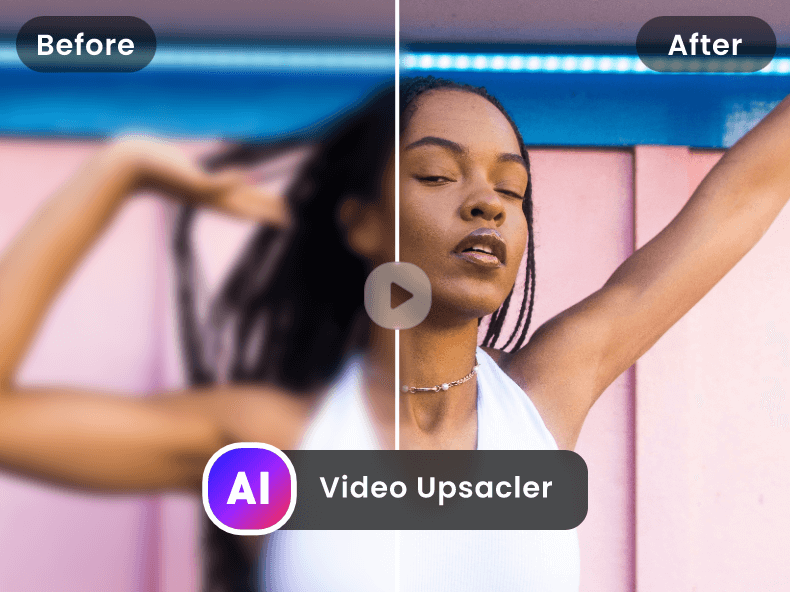
Free AI Video Upscaler is a web-based application that enhances the resolution of videos using artificial intelligence, transforming low-quality footage into high-definition visuals. It addresses the common problem of blurry or pixelated videos, offering a solution for improving video clarity without requiring complex software or extensive technical expertise. The tool utilizes deep learning algorithms to intelligently upscale video content, making it suitable for a wide range of users seeking to improve their video quality. It is a valuable resource for anyone looking for an AI video enhancer , video upscaling , or video quality improvement solution. Key Features of Free AI Video Upscaler Upscales video resolution up to 4K. Supports various video formats. Offers a user-friendly, web-based interface. Utilizes AI algorithms for intelligent upscaling. Provides fast processing speeds. Allows users to enhance video quality without watermarks. Requires no software download or installation. Offers batch processing capabilities for multiple files. Enhances details and reduces noise in videos. Provides a simple upload and download process. Why People Use Free AI Video Upscaler Individuals and professionals alike often find themselves with video footage that lacks the desired clarity. This can stem from older recordings, low-resolution source material, or the need to repurpose content for higher-resolution displays. Traditionally, improving video quality involved expensive software, significant processing power, and a steep learning curve. Free AI Video Upscaler simplifies this process dramatically. By leveraging the power of artificial intelligence , the tool automatically analyzes and enhances video footage, restoring details and reducing artifacts. This results in a noticeably sharper and more visually appealing final product. Users can avoid the time-consuming and often unsatisfactory results of manual editing techniques. The platformΓÇÖs accessibility and ease of use make it a compelling alternative to traditional video editing workflows, offering a quick and effective solution for video enhancement and resolution upscaling . It empowers users to breathe new life into existing video content, making it suitable for modern viewing platforms and applications. Popular Use Cases Restoring Old Family Videos: Individuals can improve the quality of cherished memories captured on older cameras or formats. Enhancing Surveillance Footage: Security professionals can clarify blurry security camera recordings for better identification and analysis. Improving Online Course Videos: Educators can enhance the visual quality of their online learning materials for a more engaging student experience. Preparing Videos for Social Media: Content creators can upscale videos to meet the resolution requirements of platforms like YouTube, TikTok, and Instagram. Revitalizing Archived Footage: Filmmakers and archivists can restore and preserve historical video content. Upscaling Gameplay Recordings: Gamers can improve the quality of their gameplay videos for streaming or sharing. Enhancing Drone Footage: Aerial videographers can clarify footage captured by drones, often limited by camera resolution or distance. Improving Video Conferencing Recordings: Professionals can enhance the quality of recordings from video conferences and webinars. Preparing Videos for Presentations: Users can upscale videos to ensure clear visibility during presentations and meetings. Enhancing Low-Resolution Stock Footage: Video editors can improve the quality of stock footage for use in projects. Benefits of Free AI Video Upscaler Enhanced Video Clarity: Users experience a significant improvement in video sharpness and detail. Time Savings: The automated AI-powered process eliminates the need for manual editing, saving valuable time and effort. Cost-Effectiveness: As a free tool, it provides a budget-friendly solution for video enhancement. Ease of Use: The intuitive web interface requires no technical expertise or software installation. Improved Visual Appeal: Enhanced videos are more engaging and professional-looking. Wider Compatibility: Upscaled videos are suitable for a broader range of devices and platforms. Preservation of Memories: Old or damaged videos can be restored and enjoyed for years to come. Increased Content Value: Improved video quality can enhance the perceived value of content. Accessibility: The web-based nature of the tool allows access from any device with an internet connection. No Watermarks: Enhanced videos are delivered without any intrusive watermarks.
Dadan is an AI-powered online video creation platform designed to simplify the process of recording, editing, and sharing professional-quality videos. It addresses the challenges of creating engaging and informative video content for various purposes, including education, training, and internal communications. Dadan leverages artificial intelligence to automate tasks like transcription, captioning, and summarization, making video production accessible to a wider audience. This tool is particularly valuable for educators, trainers, remote teams, and content creators seeking efficient video creation and management solutions . Key Features of Dadan Flexible recording options for screen, webcam, or combined recordings in up to 4K resolution. Web-based video editing tools for trimming, cutting, blurring, adding text, and stitching clips. AI-powered automatic generation of video chapters for improved navigation. Automatic transcription services to convert speech to text. Multilingual caption generation supporting over 30 languages. AI-driven video summarization for concise content overviews. Interactive elements such as quizzes, polls, forms, and feedback fields. Secure video hosting with custom link and public profile sharing options. Timestamped feedback collection from viewers and team members. Integrations with popular platforms like Dropbox, Slack, LinkedIn, YouTube, and Google Classroom. Multi-platform support for Windows, macOS, Chrome, and Edge browsers. Why People Use Dadan Individuals and organizations utilize Dadan to overcome the complexities and time constraints associated with traditional video production workflows. Historically, creating professional videos required specialized software, extensive editing skills, and significant time investment. Dadan streamlines this process by offering an all-in-one, web-based platform with AI-powered automation. This allows users to focus on content creation rather than technical intricacies. The platformΓÇÖs emphasis on asynchronous communication also addresses the need for flexible knowledge sharing in remote and hybrid work environments, reducing reliance on live meetings and improving information retention. Dadan empowers users to create and distribute impactful video content efficiently and effectively. Popular Use Cases Educational Institutions: Creating online courses, lecture recordings, and student tutorials. Corporate Training: Developing employee onboarding materials, product demonstrations, and internal knowledge base videos. Software Companies: Producing software tutorials, feature walkthroughs, and customer support videos. Marketing Teams: Generating product demos, explainer videos, and social media content. Internal Communications: Sharing company updates, announcements, and training materials with employees. Remote Teams: Facilitating asynchronous communication, project updates, and team meetings. Customer Support: Providing visual guides and troubleshooting assistance to customers. Content Creators: Producing engaging video content for platforms like YouTube and LinkedIn. Benefits of Dadan Increased Efficiency: Significantly reduces the time and effort required to create and edit videos. Enhanced Collaboration: Facilitates seamless video sharing and feedback collection among team members. Improved Accessibility: Multilingual captions and transcriptions broaden the reach of video content. Greater Engagement: Interactive elements encourage viewer participation and knowledge retention. Simplified Knowledge Sharing: Enables clear and concise communication of complex information. Reduced Meeting Fatigue: Provides an alternative to live meetings for asynchronous updates and training. Centralized Video Management: Offers a unified platform for recording, editing, hosting, and analyzing video content. Scalable Content Creation: Empowers organizations to produce a high volume of video content without compromising quality. Data-Driven Insights: Analytics provide valuable data on viewer engagement and content performance. Cost-Effective Solution: Eliminates the need for expensive video editing software and specialized expertise.


Free AI Video Upscaler is a web-based application that enhances the resolution of videos using artificial intelligence, transforming low-quality footage into high-definition visuals. It addresses the common problem of blurry or pixelated videos, offering a solution for improving video clarity without requiring complex software or extensive technical expertise. The tool utilizes deep learning algorithms to intelligently upscale video content, making it suitable for a wide range of users seeking to improve their video quality. It is a valuable resource for anyone looking for an AI video enhancer , video upscaling , or video quality improvement solution. Key Features of Free AI Video Upscaler Upscales video resolution up to 4K. Supports various video formats. Offers a user-friendly, web-based interface. Utilizes AI algorithms for intelligent upscaling. Provides fast processing speeds. Allows users to enhance video quality without watermarks. Requires no software download or installation. Offers batch processing capabilities for multiple files. Enhances details and reduces noise in videos. Provides a simple upload and download process. Why People Use Free AI Video Upscaler Individuals and professionals alike often find themselves with video footage that lacks the desired clarity. This can stem from older recordings, low-resolution source material, or the need to repurpose content for higher-resolution displays. Traditionally, improving video quality involved expensive software, significant processing power, and a steep learning curve. Free AI Video Upscaler simplifies this process dramatically. By leveraging the power of artificial intelligence , the tool automatically analyzes and enhances video footage, restoring details and reducing artifacts. This results in a noticeably sharper and more visually appealing final product. Users can avoid the time-consuming and often unsatisfactory results of manual editing techniques. The platformΓÇÖs accessibility and ease of use make it a compelling alternative to traditional video editing workflows, offering a quick and effective solution for video enhancement and resolution upscaling . It empowers users to breathe new life into existing video content, making it suitable for modern viewing platforms and applications. Popular Use Cases Restoring Old Family Videos: Individuals can improve the quality of cherished memories captured on older cameras or formats. Enhancing Surveillance Footage: Security professionals can clarify blurry security camera recordings for better identification and analysis. Improving Online Course Videos: Educators can enhance the visual quality of their online learning materials for a more engaging student experience. Preparing Videos for Social Media: Content creators can upscale videos to meet the resolution requirements of platforms like YouTube, TikTok, and Instagram. Revitalizing Archived Footage: Filmmakers and archivists can restore and preserve historical video content. Upscaling Gameplay Recordings: Gamers can improve the quality of their gameplay videos for streaming or sharing. Enhancing Drone Footage: Aerial videographers can clarify footage captured by drones, often limited by camera resolution or distance. Improving Video Conferencing Recordings: Professionals can enhance the quality of recordings from video conferences and webinars. Preparing Videos for Presentations: Users can upscale videos to ensure clear visibility during presentations and meetings. Enhancing Low-Resolution Stock Footage: Video editors can improve the quality of stock footage for use in projects. Benefits of Free AI Video Upscaler Enhanced Video Clarity: Users experience a significant improvement in video sharpness and detail. Time Savings: The automated AI-powered process eliminates the need for manual editing, saving valuable time and effort. Cost-Effectiveness: As a free tool, it provides a budget-friendly solution for video enhancement. Ease of Use: The intuitive web interface requires no technical expertise or software installation. Improved Visual Appeal: Enhanced videos are more engaging and professional-looking. Wider Compatibility: Upscaled videos are suitable for a broader range of devices and platforms. Preservation of Memories: Old or damaged videos can be restored and enjoyed for years to come. Increased Content Value: Improved video quality can enhance the perceived value of content. Accessibility: The web-based nature of the tool allows access from any device with an internet connection. No Watermarks: Enhanced videos are delivered without any intrusive watermarks.

Dadan is an AI-powered online video creation platform designed to simplify the process of recording, editing, and sharing professional-quality videos. It addresses the challenges of creating engaging and informative video content for various purposes, including education, training, and internal communications. Dadan leverages artificial intelligence to automate tasks like transcription, captioning, and summarization, making video production accessible to a wider audience. This tool is particularly valuable for educators, trainers, remote teams, and content creators seeking efficient video creation and management solutions . Key Features of Dadan Flexible recording options for screen, webcam, or combined recordings in up to 4K resolution. Web-based video editing tools for trimming, cutting, blurring, adding text, and stitching clips. AI-powered automatic generation of video chapters for improved navigation. Automatic transcription services to convert speech to text. Multilingual caption generation supporting over 30 languages. AI-driven video summarization for concise content overviews. Interactive elements such as quizzes, polls, forms, and feedback fields. Secure video hosting with custom link and public profile sharing options. Timestamped feedback collection from viewers and team members. Integrations with popular platforms like Dropbox, Slack, LinkedIn, YouTube, and Google Classroom. Multi-platform support for Windows, macOS, Chrome, and Edge browsers. Why People Use Dadan Individuals and organizations utilize Dadan to overcome the complexities and time constraints associated with traditional video production workflows. Historically, creating professional videos required specialized software, extensive editing skills, and significant time investment. Dadan streamlines this process by offering an all-in-one, web-based platform with AI-powered automation. This allows users to focus on content creation rather than technical intricacies. The platformΓÇÖs emphasis on asynchronous communication also addresses the need for flexible knowledge sharing in remote and hybrid work environments, reducing reliance on live meetings and improving information retention. Dadan empowers users to create and distribute impactful video content efficiently and effectively. Popular Use Cases Educational Institutions: Creating online courses, lecture recordings, and student tutorials. Corporate Training: Developing employee onboarding materials, product demonstrations, and internal knowledge base videos. Software Companies: Producing software tutorials, feature walkthroughs, and customer support videos. Marketing Teams: Generating product demos, explainer videos, and social media content. Internal Communications: Sharing company updates, announcements, and training materials with employees. Remote Teams: Facilitating asynchronous communication, project updates, and team meetings. Customer Support: Providing visual guides and troubleshooting assistance to customers. Content Creators: Producing engaging video content for platforms like YouTube and LinkedIn. Benefits of Dadan Increased Efficiency: Significantly reduces the time and effort required to create and edit videos. Enhanced Collaboration: Facilitates seamless video sharing and feedback collection among team members. Improved Accessibility: Multilingual captions and transcriptions broaden the reach of video content. Greater Engagement: Interactive elements encourage viewer participation and knowledge retention. Simplified Knowledge Sharing: Enables clear and concise communication of complex information. Reduced Meeting Fatigue: Provides an alternative to live meetings for asynchronous updates and training. Centralized Video Management: Offers a unified platform for recording, editing, hosting, and analyzing video content. Scalable Content Creation: Empowers organizations to produce a high volume of video content without compromising quality. Data-Driven Insights: Analytics provide valuable data on viewer engagement and content performance. Cost-Effective Solution: Eliminates the need for expensive video editing software and specialized expertise.

D-ID Creative Reality Studio is an innovative AI video generation platform that enables users to create professional-quality videos featuring lifelike talking avatars directly from text or audio inputs. D-ID addresses the challenge of video content creation by offering a streamlined solution that eliminates the need for expensive equipment, actors, or complex video editing skills. It leverages the power of artificial intelligence , specifically deep learning and generative AI , to animate still images and bring them to life with realistic lip-syncing and expressive movements. This tool is designed for a broad audience, including marketers, educators, content creators, corporate communicators, and anyone seeking to enhance their video content with engaging and personalized visuals. Users searching for AI avatar generators, talking head videos, text-to-speech animation, or realistic AI presenters will find D-ID a powerful and accessible solution. The platformΓÇÖs core functionality centers around transforming static images into dynamic, speaking avatars, offering a novel approach to video production and communication. D-ID empowers users to create compelling video content quickly and efficiently, opening up new possibilities for storytelling, training, and audience engagement. Key Features of D-ID Creative Reality Studio Generates videos from still images and text prompts. Offers a library of pre-made digital avatars. Supports custom avatar uploads. Provides realistic lip-syncing and facial expressions. Enables text-to-speech functionality with multiple voice options. Supports multiple languages for text and voiceovers. Allows for script editing and timing adjustments. Offers API access for integration with other applications. Provides options for background customization. Facilitates the creation of presenter videos. Enables the generation of short-form video content for social media. Supports video download in various resolutions. Why People Use D-ID Creative Reality Studio Individuals and organizations utilize D-ID Creative Reality Studio to overcome the limitations and costs associated with traditional video production. Creating high-quality video content often requires significant investment in equipment, personnel, and post-production editing. D-ID offers a compelling alternative by automating much of this process, allowing users to generate engaging videos quickly and affordably. Compared to traditional methods, D-ID significantly reduces time-to-market for video content. Instead of days or weeks spent on filming and editing, users can create professional-looking videos in minutes. The platform also enhances accessibility by enabling anyone, regardless of technical expertise, to produce compelling video content. Furthermore, D-ID provides a scalable solution for businesses needing to create large volumes of personalized video messages or training materials, offering a level of efficiency and cost-effectiveness that is difficult to achieve with conventional video production techniques. Popular Use Cases Marketing and Advertising: Creating engaging product demos, explainer videos, and social media advertisements featuring virtual brand ambassadors. Corporate Training: Developing interactive training modules with virtual instructors and personalized learning experiences. E-learning and Education: Producing educational videos with animated presenters to enhance student engagement and comprehension. Customer Support: Generating personalized video responses to customer inquiries, improving customer satisfaction and reducing support costs. Internal Communications: Delivering company updates and announcements through engaging videos featuring virtual spokespeople. Social Media Content Creation: Producing short-form videos for platforms like TikTok, Instagram, and YouTube to increase brand awareness and engagement. Personalized Video Messages: Creating customized video greetings, invitations, or thank-you notes for clients, partners, or friends. Virtual Presenters: Utilizing AI avatars to deliver presentations and webinars, freeing up human presenters for other tasks. Localization of Video Content: Easily adapting video content for different languages and regions by utilizing the platformΓÇÖs multilingual capabilities. Accessibility Solutions: Providing video content with visual representations for individuals with hearing impairments. Benefits of D-ID Creative Reality Studio Reduced Video Production Costs: Eliminates the need for expensive equipment, actors, and video editing services. Increased Content Velocity: Enables rapid creation of video content, accelerating marketing campaigns and communication efforts. Enhanced Engagement: Captures audience attention with lifelike talking avatars and dynamic video presentations. Improved Accessibility: Makes video content more accessible to a wider audience through multilingual support and visual representations. Scalable Video Creation: Facilitates the production of large volumes of personalized video content efficiently. Simplified Video Editing: Streamlines the video creation process, requiring minimal technical expertise. Greater Creative Control: Offers customization options for avatars, backgrounds, and voiceovers, allowing users to tailor videos to their specific needs. Consistent Brand Messaging: Ensures consistent brand representation through the use of virtual brand ambassadors. Increased ROI on Video Marketing: Drives higher engagement and conversion rates with compelling video content. Innovative Communication: Provides a unique and memorable way to communicate with audiences.