Pine Script Wizard AI is a cutting-edge AI-powered code generation tool designed specifically for TradingView Pine Script developers, traders, and algorithmic strategists . Using an advanced ChatGPT-based prompt engine fine-tuned for Pine Script coding , this intuitive platform instantly transforms plain-language trading ideas into ready-to-use Pine Script strategies and indicators , saving hours of manual coding and debugging. With Pine Script Wizard AI, users can: Generate optimized Pine Script strategy code within seconds simply by describing their entry, exit, and indicator logic. Produce accurate, clean and TradingView-ready scripts tailored to specific market conditions and technical setups. Customize parameters and trading rules — from SMA/EMA crossovers to RSI filters and stop-loss/take-profit logic — without writing a single line of syntax. Quickly copy the generated code into the TradingView Pine Editor for backtesting, refinement, and live deployment. Whether you’re a seasoned Pine Script coder or a trader with no programming experience, Pine Script Wizard AI accelerates strategy creation, enhances automation workflows, and makes it easier to build custom TradingView tools with AI-assisted precision. Learn more and start generating high-quality Pine Script today at https://www.pinescriptwizard.com/ .

Flux LoRA – Efficient AI Model Fine-Tuning with Low-Rank Adaptation Flux LoRA is a powerful approach that combines the Flux machine learning framework with LoRA (Low-Rank Adaptation) to enable efficient, scalable, and cost-effective fine-tuning of large AI models . It is widely used by developers, researchers, and AI engineers who want to customize pretrained models without the heavy computational cost of full model retraining. Flux LoRA is especially popular in areas like text-to-image generation, large language models (LLMs), computer vision, and multimodal AI , where training entire models from scratch is expensive and time-consuming. What Is Flux LoRA? Flux LoRA leverages Low-Rank Adaptation , a modern fine-tuning technique where small trainable matrices are injected into a pretrained model , while the original model weights remain frozen. Instead of updating billions of parameters, LoRA updates only a small number of low-rank parameters , drastically reducing memory usage and training time. The Flux framework provides a flexible and high-performance environment for building and experimenting with neural networks, making Flux LoRA a preferred choice for research-grade and production-ready AI workflows . How Flux LoRA Works A large pretrained AI model is loaded (text, image, or multimodal). LoRA layers are added to selected model components (such as attention layers). Only LoRA parameters are trained on new or custom data. The base model remains unchanged, preserving its original knowledge. The resulting LoRA weights can be saved, shared, or merged for deployment. This approach allows fast adaptation with minimal resources , even on consumer-grade GPUs. Key Features of Flux LoRA Lightweight fine-tuning of large AI models Extremely low GPU and memory requirements Faster training compared to full fine-tuning Maintains original pretrained model quality Easy sharing and reuse of LoRA weights Supports experimentation and rapid iteration Ideal for domain-specific AI customization Why Developers Use Flux LoRA Traditional fine-tuning requires massive computational resources , making it impractical for individuals or small teams. Flux LoRA solves this by allowing developers to adapt models efficiently , enabling innovation without high infrastructure costs. It is widely used in open-source AI communities , research labs, and startups to build custom AI solutions faster and cheaper. Popular Use Cases Text-to-image and image style customization Fine-tuning large language models for niche domains Custom AI assistants and chatbots Vision models for specific object detection tasks Multimodal AI adaptation Rapid AI prototyping and experimentation Personalized generative AI workflows Benefits of Flux LoRA Reduces training costs dramatically Enables fine-tuning on limited hardware Preserves pretrained model intelligence Faster development and deployment cycles Scalable for research and production use Encourages experimentation and innovation Who Should Use Flux LoRA? AI developers and engineers Machine learning researchers Startup teams building AI products Open-source contributors Creators customizing generative AI Anyone with limited GPU resources Frequently Asked Questions (FAQ) ❓ What does LoRA stand for? LoRA stands for Low-Rank Adaptation , a technique that fine-tunes large AI models by training only a small set of additional parameters instead of updating the full model. ❓ Is Flux LoRA better than full fine-tuning? For most use cases, yes. Flux LoRA is faster, cheaper, and more memory-efficient than full fine-tuning while still achieving strong performance. ❓ Can Flux LoRA be used with image generation models? Yes. Flux LoRA is commonly used in text-to-image and image generation models to apply styles, characters, or domain-specific visual behavior. ❓ Do I need a high-end GPU to use Flux LoRA? No. One of the biggest advantages of Flux LoRA is that it can run on low to mid-range GPUs , making it accessible to more users. ❓ Are LoRA models reusable? Yes. LoRA weights are lightweight and portable , making them easy to share, reuse, and combine with other models. ❓ Is Flux LoRA suitable for production use? Yes. Flux LoRA is suitable for both research and production environments , especially when scalability and efficiency are required. Flux LoRA, LoRA Fine-Tuning, Low-Rank Adaptation AI, Flux Machine Learning, AI Model Fine-Tuning, Custom AI Models, Efficient AI Training, LoRA AI Models

Beatoven.ai: The Leading AI Background Music Generator for Content Creators Introduction to Beatoven.ai Beatoven.ai stands as a premier AI-powered music generation platform specifically designed for content creators, filmmakers, game developers, and digital marketers. With over 2 million creators using the platform to generate more than 15 million unique tracks, Beatoven.ai has established itself as the go-to solution for professionals and amateurs alike seeking professional-grade background music without expensive licensing fees or hiring requirements. The Beatoven.ai Difference Beatoven.ai distinguishes itself through its intuitive interface and powerful proprietary maestro AI model. Rather than offering limited pre-made tracks, Beatoven.ai enables creators to generate truly original compositions tailored to their specific creative needs. The platform's deep learning algorithms understand context, emotion, and musical nuance, producing music that feels professionally composed while remaining entirely original and royalty-free. Core Technology and Features Maestro AI Model : Beatoven.ai's proprietary maestro AI technology represents years of research and development in music composition and generation. The model understands harmonic progressions, melodic phrasing, emotional arcs, and instrumentation choices, enabling generation of music that rivals professional composers in quality and authenticity. Intuitive Music Generation : Users describe their desired background music in simple terms, and the AI translates these descriptions into actual compositions. This natural language understanding makes professional music creation accessible to non-musicians, democratizing composition for creators everywhere. Multiple Content Types : Beatoven.ai supports music generation for YouTube videos, podcasts, games, short films, trailers, AI art projects, social media content, audiobooks, advertisements, and livestreams. This versatility makes it suitable for virtually any creative endeavor. Parameter Customization : While the AI understands natural language descriptions, users can also fine-tune music through specific parameters including mood, genre, instrumentation, tempo, and track length. This hybrid approach balances ease-of-use with professional control. Royalty-Free Guarantee : All music generated by Beatoven.ai is original and completely royalty-free. Creators can monetize their content freely without copyright concerns, licensing fees, or legal complications. Professional Quality Output : The generated music meets professional broadcasting and commercial release standards, suitable for films, advertisements, and high-profile content without sounding artificial or generic. Real-World Applications Video Content Creation : YouTubers and video creators use Beatoven.ai for intro music, background scoring, and outro tracks. With 2 million+ creators on the platform, it has become the trusted solution for video creators seeking unique, copyright-free music. The ability to generate unique music for every video while maintaining consistent branding helps channels achieve professional presentation and monetize content safely. Podcast Production : Podcasters use Beatoven.ai for intro music, episode transitions, and background ambiance during conversations. The customizable nature allows podcast creators to evolve their audio branding as their show develops and builds an audience. Game Development : Game developers employ Beatoven.ai for ambient gameplay music, boss battle themes, exploration soundtracks, and emotional story moments. The variety ensures players experience fresh music throughout extended gaming sessions. Film and Short Form Productions : Filmmakers and video production companies use Beatoven.ai for rough cut scoring, final soundtrack generation, and quick iteration. The speed of generation accelerates post-production timelines significantly. Advertising and Commercial Content : Advertising agencies use Beatoven.ai to create unique, branded music for commercials and marketing campaigns, ensuring their advertisements stand out with distinctive audio identities. Social Media Content : TikTok creators and Instagram influencers use Beatoven.ai for short-form video content, ensuring fresh, copyright-free music for every post without copyright strike risks. Educational and Online Courses : Online educators use Beatoven.ai for course intros, lesson transitions, and background music during instructional videos, enhancing the learning experience professionally. Advantages of Beatoven.ai Cost Effectiveness : Beatoven.ai eliminates expensive licensing fees and composer hiring costs. The subscription model provides access to unlimited music generation at a fraction of traditional music licensing costs. Speed of Production : Generating complete musical compositions in minutes instead of weeks dramatically accelerates project timelines. Creators can iterate quickly, adjusting parameters until achieving perfect results. No Copyright Issues : All generated music is original and royalty-free, eliminating copyright strikes, DMCA takedowns, and licensing complications. Creators can confidently monetize content across all platforms. Unlimited Originality : The AI generates infinite unique compositions, ensuring creators never run out of fresh music. Each track is completely original while maintaining thematic consistency if desired. Professional Quality : The maestro AI produces music rivaling professional compositions in technical excellence and emotional expression. Audio quality meets professional standards suitable for commercial release. Massive Creator Community : With 2 million+ active creators, Beatoven.ai has become an established ecosystem where creators share tips, success stories, and best practices. Community support and regular platform updates ensure continuous improvement. Technical Excellence Beatoven.ai exports music in multiple high-quality formats including MP3 and WAV. The audio quality meets professional broadcasting standards and streaming platform requirements. The cloud-based infrastructure ensures reliability and accessibility from any internet-connected device. Democratizing Music Production Beatoven.ai represents the democratization of professional music production, proving that artificial intelligence can augment human creativity rather than replace it. By removing barriers to professional music creation, the platform enables creators globally to achieve professional presentation standards previously requiring significant investment. Conclusion Beatoven.ai empowers creators worldwide to produce professional-quality, original, royalty-free background music without expensive hiring or complex licensing. Whether for independent YouTube creators, professional film studios, game developers, or podcasters, Beatoven.ai delivers unmatched combination of ease-of-use, quality, originality, affordability, and professional presentation. With 2 million+ creators already trusting Beatoven.ai for their background music needs, the platform continues proving itself essential for modern content creation across all platforms and mediums.
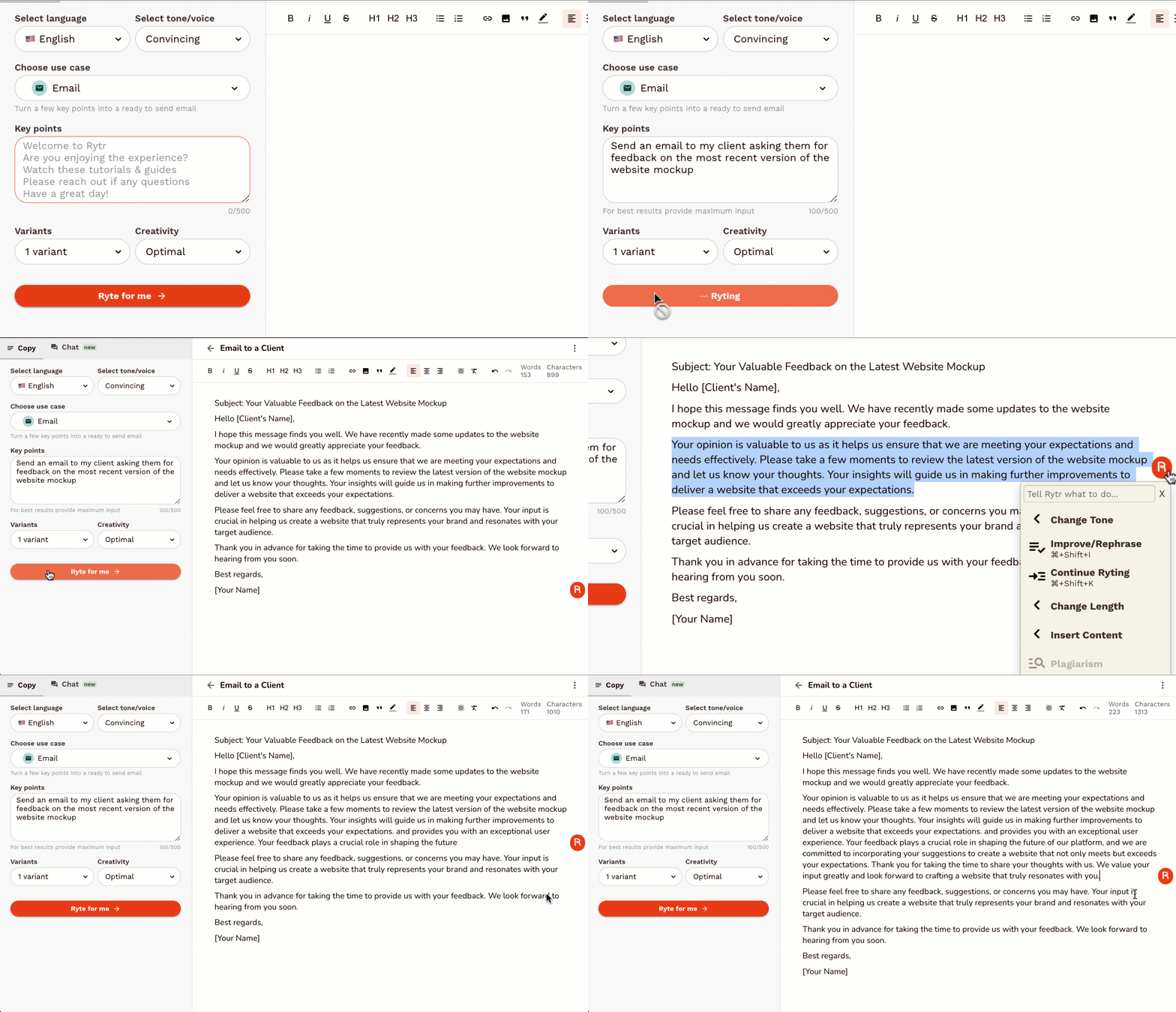
Rytr is an AI-powered writing assistant designed to help users generate high-quality, short-form content quickly and efficiently . It addresses the challenge of content creation by automating the writing process, leveraging artificial intelligence to produce compelling copy for various marketing and communication needs. This tool is ideal for marketers, entrepreneurs, bloggers, social media managers, and anyone requiring fast and effective content generation . Rytr streamlines the writing workflow, offering a solution for overcoming writerΓÇÖs block and scaling content output. Key Features of Rytr Generates content in 40+ use cases. Offers 20+ tones of voice to tailor content style. Supports 30+ languages for global content creation. Includes a built-in plagiarism checker. Provides a user-friendly interface for easy navigation. Offers various output variants for diverse content options. Features a magic command functionality for specific content requests. Allows users to define content length and creativity levels. Integrates with SEO tools to optimize content for search engines. Provides a Chrome extension for writing directly within other applications. Why People Use Rytr Individuals and businesses utilize Rytr to overcome the time-consuming and often challenging process of writing compelling content. Traditional content creation methods often require significant time investment, research, and editing. Rytr drastically reduces this effort by automating the initial drafting process, allowing users to focus on refining and optimizing the generated text. The toolΓÇÖs ability to produce multiple variations of content ensures users can quickly explore different angles and find the most effective messaging. Unlike manual writing, Rytr provides consistent quality and speed, making it a valuable asset for maintaining a strong online presence and engaging target audiences. It empowers users to scale their content creation efforts without compromising on quality or originality. Popular Use Cases Social Media Marketing: Generating engaging captions, posts, and ad copy for platforms like Facebook, Instagram, Twitter, and LinkedIn. Digital Advertising: Creating compelling ad headlines and descriptions for Google Ads, Facebook Ads, and other advertising platforms. Email Marketing: Drafting persuasive email subject lines, body copy, and call-to-actions for marketing campaigns. Product Descriptions: Writing detailed and attractive product descriptions for e-commerce stores and online marketplaces. Blog Content: Generating ideas, outlines, and introductory paragraphs for blog posts. Website Copy: Crafting concise and impactful website headlines, taglines, and call-to-action buttons. Video Scriptwriting: Developing short scripts for explainer videos, social media videos, and advertisements. Business Idea Generation: Brainstorming business names, taglines, and value propositions. Content Summarization: Condensing lengthy articles or documents into concise summaries. Creative Writing: Assisting with brainstorming and drafting short stories, poems, and other creative content. Benefits of Rytr Increased Productivity: Significantly reduces the time spent on writing tasks, allowing users to focus on other critical business activities. Enhanced Content Quality: Generates well-written, grammatically correct, and engaging content that captures audience attention. Cost Savings: Eliminates the need to hire expensive copywriters or content agencies for short-form content creation. Improved Marketing Results: Creates compelling marketing copy that drives conversions, increases brand awareness, and generates leads. Overcome WriterΓÇÖs Block: Provides a constant source of inspiration and ideas, helping users overcome creative hurdles. Scalable Content Creation: Enables businesses to quickly and easily scale their content output to meet growing demands. Versatile Application: Suitable for a wide range of content types and industries, offering a flexible solution for diverse needs. Accessibility and Convenience: Available as a web application and Chrome extension, providing access from any device. Multilingual Support: Facilitates content creation for global audiences with support for over 30 languages. Originality Assurance: Includes a built-in plagiarism checker to ensure content is unique and original.

Unlock the future of scientific discovery with Elicit, the revolutionary AI-powered research assistant designed to accelerate your workflow and deepen your understanding. Tired of endless hours sifting through mountains of academic papers, struggling to synthesize complex information, and facing writer's block when articulating your findings? Elicit is here to transform your research process from mundane to masterful. Elicit goes beyond simple keyword searches. Our advanced AI understands the nuances of scientific language, allowing you to ask research questions in natural language and receive concise, relevant summaries of key findings from thousands of relevant papers. Imagine asking, "What are the most effective non-pharmacological interventions for managing chronic pain in older adults?" and getting a curated list of studies, their methodologies, outcomes, and even the limitations of their findings, all presented in an organized and easily digestible format. Streamline your literature review with unparalleled efficiency. Elicit's intelligent algorithms can identify, extract, and synthesize crucial information, including study designs, participant demographics, intervention details, outcome measures, and statistical results. This means less time spent manually reading and more time spent critically analyzing and building upon existing knowledge. Our intuitive interface allows you to compare findings across studies, identify research gaps, and discover emerging trends with unprecedented ease. But Elicit isn't just about finding information; it's about generating insights. Our AI can help you brainstorm research ideas, generate hypotheses, and even assist in outlining your research papers, grant proposals, and presentations. Overcome the dreaded blank page syndrome with AI-generated starting points that are grounded in a comprehensive understanding of the scientific landscape. Elicit acts as your tireless research partner, always ready to explore new avenues and connect disparate pieces of information. For researchers, academics, students, and anyone pushing the boundaries of knowledge, Elicit is an indispensable tool. Enhance your productivity, improve the quality of your research, and accelerate your journey from question to publication. Say goodbye to research bottlenecks and hello to a more efficient, insightful, and inspired research experience. Key Features: Natural Language Research Questions: Ask your questions in plain English and get AI-powered answers. Automated Literature Synthesis: Elicit automatically extracts and summarizes key information from relevant papers. Identify Research Gaps: Discover areas where more research is needed. Compare Study Findings: Easily see how different studies converge or diverge. Brainstorming & Hypothesis Generation: Get AI assistance to spark new research ideas. Outline & Writing Support: Leverage AI to structure and begin writing your research documents. Vast Paper Database: Access and analyze a comprehensive collection of scientific literature. Intuitive User Interface: Designed for ease of use and maximum research impact. Transform your research today with Elicit: AI for Scientific Research.

Granola – AI-Powered Meeting Notes & Productivity Assistant Granola is an advanced AI meeting notes and productivity tool designed to help professionals capture, organize, and understand meetings effortlessly . By using artificial intelligence, speech recognition, and natural language processing , Granola turns conversations into structured notes, summaries, and action items without interrupting your workflow. Granola is commonly searched by users looking for AI meeting notes tools, meeting summarizer AI, note-taking assistants, and productivity software that work quietly in the background while meetings happen. What Is Granola? Granola is an AI-powered note-taking assistant built for modern work environments. It listens to meetings, processes conversations in real time, and produces clean, readable notes that highlight key points, decisions, and next steps. Unlike traditional meeting recorders, Granola focuses on clarity and usefulness , helping teams and individuals quickly understand what matters without rewatching or replaying meetings. Key Features of Granola AI-generated meeting notes and summaries Automatic extraction of key points and action items Real-time or post-meeting processing Works across online meetings and discussions Clean, structured, and readable output Searchable meeting history and notes Minimal and distraction-free workflow Secure handling of meeting data Why People Use Granola Meetings often result in lost details and forgotten action items . Granola solves this by ensuring every important discussion is captured accurately and summarized clearly. Professionals use Granola to stay focused during meetings , reduce manual note-taking, and ensure nothing important is missed . Teams benefit from better alignment, faster follow-ups, and improved accountability. Popular Use Cases Business and team meetings Client calls and discussions Project planning and reviews Product and strategy meetings Interviews and research conversations Daily stand-ups and retrospectives Benefits of Granola Saves time spent on manual note-taking Improves meeting clarity and follow-up Keeps teams aligned and informed Reduces the need to record or replay meetings Helps capture decisions and next steps accurately Suitable for individuals and teams Who Should Use Granola? Professionals and business users Startup teams and enterprises Product managers and project managers Sales and customer success teams Consultants and freelancers Students and researchers attending discussions Frequently Asked Questions (FAQ) What does Granola do? Granola uses AI to automatically generate structured notes and summaries from meetings and conversations. Does Granola record meetings? Granola focuses on note generation and summarization , helping users capture insights without relying on full recordings. Can Granola identify action items? Yes. Granola highlights important points, decisions, and action items discussed during meetings. Is Granola suitable for remote meetings? Yes. Granola works well with online and virtual meetings commonly used by remote teams. Does Granola replace manual note-taking? Yes. Granola significantly reduces or eliminates the need for manual note-taking during meetings. Is meeting data secure in Granola? Granola is built with privacy and security in mind to ensure meeting information is handled safely. Granola, AI Meeting Notes, Meeting Summarizer AI, AI Note Taking Tool, Productivity Assistant, Meeting Productivity Software, AI Work Assistant

The Chrome Web Store is GoogleΓÇÖs official marketplace for browser extensions and themes created for the Google Chrome browser. It serves as a central hub where users can discover, install, manage, and update tools that extend ChromeΓÇÖs functionality and personalize the browsing experience. As of 2025, the Chrome Web Store has grown into a large-scale ecosystem supporting millions of users and developers worldwide. It plays a critical role in transforming Chrome from a basic web browser into a powerful platform for productivity, creativity, security, and AI-driven workflows. What Is the Chrome Web Store? The Chrome Web Store is an online platform maintained by Google that hosts: Browser extensions Chrome themes Web-based productivity tools Extensions available on the store can modify website behavior, automate repetitive tasks, enhance security, assist with content creation, or integrate advanced technologies such as artificial intelligence directly into the browser. Users can browse extensions by category, popularity, ratings, or featured recommendations, making it easy to find tools that suit specific needs. Evolution of the Chrome Web Store Initially launched as a simple extension directory, the Chrome Web Store has evolved significantly over the years. In recent updates, Google has improved: Search and discovery features Extension review and moderation systems Developer policies and transparency requirements The most notable change in recent years has been the rapid adoption of AI-powered extensions , which now dominate many of the most popular categories. AI-Powered Extensions in 2025 Artificial intelligence has become a major driver of growth in the Chrome Web Store. AI extensions enable users to perform advanced tasks directly within the browser without switching tools. Common AI-powered use cases include: Web page summarization and content analysis Writing assistance, grammar correction, and rewriting Research and note-taking automation Code generation and debugging support Language translation and learning These extensions turn the browser into an intelligent assistant, improving efficiency for professionals, students, and creators. Key Categories in the Chrome Web Store The Chrome Web Store organizes extensions into several major categories: Productivity Includes tools for task management, tab organization, meeting transcription, time tracking, and workflow optimization. Security and Privacy Features ad blockers, tracker blockers, password managers, VPN extensions, and phishing protection tools. Developer Tools Provides debugging utilities, performance monitors, API testers, and code inspection tools for web developers. Shopping and Finance Includes price trackers, coupon finders, cashback tools, and deal comparison extensions. Education and Learning Offers language learning tools, study assistants, note-taking extensions, and exam preparation aids. Personalization and Themes Allows users to customize the look and feel of the Chrome browser with visual themes and layouts. Chrome Web Store for Developers The Chrome Web Store also serves as a distribution and monetization platform for developers. Developers can publish extensions and reach a global audience with minimal infrastructure requirements. Monetization options include: Free extensions with premium features Subscription-based models One-time purchases Google provides analytics, performance insights, and policy guidelines to help developers maintain high-quality extensions and improve user trust. Security, Privacy, and Trust Security remains a key focus area for the Chrome Web Store. While Google actively reviews and removes malicious extensions, users must also take responsibility for managing their installed tools. Best practices for users include: Reviewing extension permissions before installation Installing extensions from trusted developers Removing unused or outdated extensions Keeping extensions updated Google continues to strengthen its extension policies to ensure transparency around data collection and usage. User Experience and Interface Improvements Recent updates to the Chrome Web Store interface have focused on: Clearer permission information Better categorization and filtering Highlighting trusted and featured extensions Improved mobile and desktop usability These improvements aim to help users make informed decisions while browsing the store. Importance of the Chrome Web Store in the Modern Web The Chrome Web Store plays a vital role in how people interact with the internet today. For many users, Chrome extensions are essential tools for: Remote work and collaboration Online learning and research Digital marketing and content creation Secure and efficient browsing By enabling deep customization and automation, the Chrome Web Store has become a foundational part of the modern web ecosystem. Future Outlook Looking ahead, the Chrome Web Store is expected to continue evolving with: Deeper integration of on-device AI models Smarter permission and security systems Greater support for enterprise and professional users More personalized extension recommendations As browsers increasingly function as digital workspaces, the Chrome Web Store will remain a central platform for innovation and user empowerment. The Chrome Web Store is more than an extension marketplaceΓÇöit is a critical ecosystem that enhances how millions of people use the web every day. With its growing focus on AI, productivity, security, and developer innovation, the Chrome Web Store continues to shape the future of browser-based experiences in 2025 and beyond.

 Android
 IOS
IOS Mini Tools
 Software
 Web
Web