Android
 IOS
IOS Mini Tools
 Software
 Web
WebTop matches

Adcreative.ai
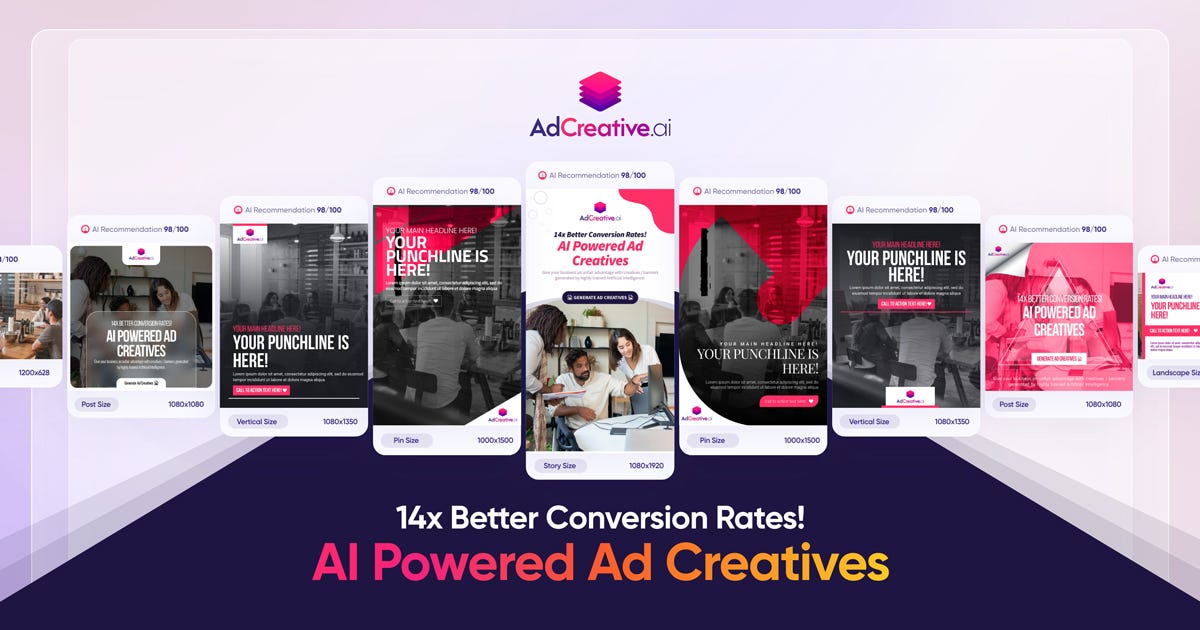
AdCreative.ai is an advanced AI-powered marketing platform that helps users generate high-conversion creatives, ad copy, and visual assets instantly. Leveraging artificial intelligence and data-driven design principles, AdCreative.ai creates compelling ad variations optimized for performance on platforms like Facebook, Instagram, TikTok, Google, and YouTube . AdCreative.ai is widely used by marketers, business owners, performance teams, and advertisers who want to boost engagement, reduce design time, and maximize ROI through intelligent creative automation . What Is AdCreative.ai? AdCreative.ai is an AI creative generation tool that produces multiple versions of ad visuals, headlines, captions, and marketing banners based on input prompts, product descriptions, target audience insights, and campaign goals. Instead of spending hours designing creatives manually, users can generate performance-focused assets in minutes . Key Features of AdCreative.ai AI-generated ad visuals and creatives Automated headline and caption writing Conversion-focused design templates Multiple ad variants for A/B testing Style and brand asset consistency Integration with ad platforms (Meta, Google, TikTok, etc.) Data-driven optimization and predictive insights Export in multiple formats ready for ad platforms Why People Use AdCreative.ai Manual creative design and copywriting can be time-intensive and costly. AdCreative.ai automates both visual and text components of advertising , allowing users to focus on strategy and campaign optimization rather than repetitive design work. Marketers use AdCreative.ai to produce more ad variants quickly, improve click-through rates, and increase conversion outcomes . Popular Use Cases Facebook and Instagram ad creatives TikTok and YouTube video thumbnails and banners Google Display Network visuals E-commerce product ad creatives Seasonal and promotional campaigns A/B testing of ads at scale Benefits of AdCreative.ai Save time on design and copywriting Generate more variations for testing Improve campaign performance with AI insights Maintain brand consistency across creatives Suitable for teams and solo marketers Faster ad deployment and iteration Who Should Use AdCreative.ai? Digital marketers and advertisers E-commerce store owners Social media managers Performance marketing teams Freelancers and agencies Entrepreneurs running paid campaigns Frequently Asked Questions What does AdCreative.ai do? AdCreative.ai uses AI to automatically generate high-conversion ad creatives and marketing assets including visuals, headlines, and captions. Can AdCreative.ai create ads for multiple platforms? Yes, AdCreative.ai supports creative generation for platforms like Facebook, Instagram, Google, TikTok, and YouTube . Do I need design skills to use AdCreative.ai? No. AdCreative.ai generates professional designs without requiring manual graphic design expertise. Can I export creatives directly to ad platforms? Most tools allow export in ad-ready formats , but platform integration options may vary. Does AdCreative.ai help with A/B testing? Yes. AdCreative.ai can generate multiple ad variants for testing and optimization. AdCreative.ai, AI Ad Creative Generator, AI Marketing Tool, AI Ad Design, Automated Ad Creator, Ad Copy AI, Performance-Driven Creative Tool
Visit Website
AdCreative.ai is an advanced AI-powered marketing platform that helps users generate high-conversion creatives, ad copy, and visual assets instantly. Leveraging artificial intelligence and data-driven design principles, AdCreative.ai creates compelling ad variations optimized for performance on platforms like Facebook, Instagram, TikTok, Google, and YouTube . AdCreative.ai is widely used by marketers, business owners, performance teams, and advertisers who want to boost engagement, reduce design time, and maximize ROI through intelligent creative automation . What Is AdCreative.ai? AdCreative.ai is an AI creative generation tool that produces multiple versions of ad visuals, headlines, captions, and marketing banners based on input prompts, product descriptions, target audience insights, and campaign goals. Instead of spending hours designing creatives manually, users can generate performance-focused assets in minutes . Key Features of AdCreative.ai AI-generated ad visuals and creatives Automated headline and caption writing Conversion-focused design templates Multiple ad variants for A/B testing Style and brand asset consistency Integration with ad platforms (Meta, Google, TikTok, etc.) Data-driven optimization and predictive insights Export in multiple formats ready for ad platforms Why People Use AdCreative.ai Manual creative design and copywriting can be time-intensive and costly. AdCreative.ai automates both visual and text components of advertising , allowing users to focus on strategy and campaign optimization rather than repetitive design work. Marketers use AdCreative.ai to produce more ad variants quickly, improve click-through rates, and increase conversion outcomes . Popular Use Cases Facebook and Instagram ad creatives TikTok and YouTube video thumbnails and banners Google Display Network visuals E-commerce product ad creatives Seasonal and promotional campaigns A/B testing of ads at scale Benefits of AdCreative.ai Save time on design and copywriting Generate more variations for testing Improve campaign performance with AI insights Maintain brand consistency across creatives Suitable for teams and solo marketers Faster ad deployment and iteration Who Should Use AdCreative.ai? Digital marketers and advertisers E-commerce store owners Social media managers Performance marketing teams Freelancers and agencies Entrepreneurs running paid campaigns Frequently Asked Questions What does AdCreative.ai do? AdCreative.ai uses AI to automatically generate high-conversion ad creatives and marketing assets including visuals, headlines, and captions. Can AdCreative.ai create ads for multiple platforms? Yes, AdCreative.ai supports creative generation for platforms like Facebook, Instagram, Google, TikTok, and YouTube . Do I need design skills to use AdCreative.ai? No. AdCreative.ai generates professional designs without requiring manual graphic design expertise. Can I export creatives directly to ad platforms? Most tools allow export in ad-ready formats , but platform integration options may vary. Does AdCreative.ai help with A/B testing? Yes. AdCreative.ai can generate multiple ad variants for testing and optimization. AdCreative.ai, AI Ad Creative Generator, AI Marketing Tool, AI Ad Design, Automated Ad Creator, Ad Copy AI, Performance-Driven Creative Tool
0

Replicate
Replicate Run and Deploy AI Models in the Cloud Replicate is a powerful AI model hosting and deployment platform that allows developers, startups, and businesses to run, test, and integrate machine learning models using simple APIs. It removes the complexity of setting up infrastructure, GPUs, and environments by providing instant access to advanced AI models in the cloud. Replicate is widely searched by users looking for AI model APIs, machine learning deployment platforms, open-source AI models, image generation APIs, and AI inference tools. What Is Replicate? Replicate is a cloud-based platform that lets users run open-source and community-built AI models with minimal setup. Instead of downloading models, managing dependencies, or configuring hardware, users can access AI models directly through APIs. The platform supports a wide range of AI use cases including image generation, video processing, speech, text, vision, audio, and multimodal AI models. Key Features of Replicate Cloud-based AI model execution Simple REST APIs for running models GPU-powered inference without setup Access to popular open-source AI models Scalable and production-ready infrastructure Versioned models for consistent results Image, video, text, and audio model support Types of AI Models Available on Replicate Image generation and enhancement models Video generation and processing models Speech recognition and audio models Text generation and language models Multimodal AI models Community-contributed custom models Why People Use Replicate Running AI models locally requires powerful hardware, technical expertise, and time-consuming setup. Replicate eliminates these challenges by offering ready-to-use AI models in the cloud. Developers use Replicate to prototype faster, deploy AI features into applications, test new models, automate workflows, and scale AI workloads without managing infrastructure. Popular Use Cases AI-powered image and video generation Integrating AI features into apps and websites Prototyping machine learning ideas Running open-source AI models at scale Creative AI projects and automation Research and experimentation Benefits of Replicate No need for GPUs or servers Faster AI development and deployment Pay-as-you-go pricing model Access to cutting-edge open-source AI models Easy integration into existing products Suitable for individuals and enterprises Who Should Use Replicate? Software developers and engineers AI researchers and ML practitioners Startups building AI-powered products Content creators using AI generation Businesses integrating AI APIs Students learning AI deployment Frequently Asked Questions What does Replicate do? Replicate allows users to run and deploy AI models in the cloud using simple APIs without managing infrastructure. Does Replicate host open-source models? Yes, Replicate focuses on hosting and running open-source and community-built AI models. Do I need a GPU to use Replicate? No, Replicate provides GPU-powered infrastructure, so users do not need their own hardware. Can I use Replicate for production applications? Yes, Replicate supports scalable and production-ready AI inference. What types of AI models are supported? Replicate supports image, video, audio, text, and multimodal AI models. Is Replicate beginner-friendly? Yes, Replicate offers simple APIs and documentation that make it accessible to beginners. SEO Keywords Replicate, AI model hosting, AI model API, machine learning deployment, run AI models online, AI inference platform, open source AI models