Mubert represents a revolutionary AI music generation platform that democratizes music creation for content creators, streamers, filmmakers, and musicians worldwide. By leveraging sophisticated artificial intelligence and machine learning technologies, Mubert generates original, royalty-free music compositions on-demand, eliminating the time-consuming and expensive process of traditional music licensing or hiring professional composers. The Mubert Advantage Mubert's unique position in the AI music space stems from its focus on flexibility and accessibility. Rather than limiting users to pre-made choices, Mubert empowers creators to generate truly personalized music that perfectly matches their creative vision. The platform's intelligent algorithms learn from millions of music patterns to produce compositions that feel authentic and professional while maintaining complete originality. Core Features and Capabilities Flexible Music Generation : Mubert's core strength lies in its ability to generate music that adapts to diverse creative needs. Whether creators need energetic tracks for gaming, ambient soundscapes for meditation content, or dynamic compositions for action videos, Mubert delivers custom-tailored results. Multiple Subscription Plans : Mubert's tiered pricing structure makes professional music generation accessible to everyone. The free plan provides 25 soundtracks monthly—perfect for casual creators. Paid plans ($11.69/month and higher) unlock 500+ track generations, offering exceptional value for professional creators managing multiple projects. Royalty-Free Music : All Mubert-generated compositions are original and royalty-free, giving creators complete freedom to monetize content without copyright concerns or licensing complications. This is particularly valuable for content creators on platforms like YouTube, Twitch, and streaming services. Adaptive Music for Livestreams : Mubert's livestream integration allows creators to generate continuous background music during broadcasts. This feature is particularly valuable for gaming streamers, musicians, and content creators who maintain consistent live presence across multiple platforms. Seamless Integration : Mubert integrates smoothly with popular platforms and tools, allowing creators to incorporate generated music directly into their workflows without complicated conversion processes or file management issues. API Access for Developers : Advanced users and developers can leverage Mubert's API to integrate music generation directly into applications, creating dynamic, personalized audio experiences at scale. Real-World Applications Gaming and Streaming : Gamers and Twitch streamers use Mubert for continuous, non-repetitive background music during gaming sessions. The variety ensures viewers never hear the same track twice, maintaining engagement and freshness throughout extended broadcasts. YouTube Content Creation : YouTubers use Mubert for intro music, background scoring, and transition audio. The ability to generate unique music for every video while maintaining consistent branding helps channels stand out and reduces copyright strike risks. Podcast Production : Podcasters leverage Mubert for intro music, chapter transitions, and background ambiance. The customizable nature allows podcast creators to evolve their audio brand as their show develops and grows. Film and Animation : Independent filmmakers and animators use Mubert for scoring rough cuts, creating placeholder audio during editing, and generating final soundtracks. The speed of generation allows rapid iteration and creative exploration. Advertising and Marketing : Advertising agencies and brands use Mubert to create unique, branded music for commercials, social media ads, and marketing campaigns. Custom-generated music gives brands distinctive audio branding that differentiates them from competitors. Virtual Events and Webinars : Event organizers and conference producers use Mubert for background music during virtual events, webinars, and presentations, creating professional atmosphere and enhancing attendee experience. Meditation and Wellness Content : Meditation app developers and wellness content creators use Mubert's ambient and relaxing music options for meditation guides, sleep audio, and yoga videos. Advantages of Mubert Cost Efficiency : Compared to hiring composers, licensing music from traditional libraries, or subscribing to expensive stock music services, Mubert is remarkably affordable. The subscription model provides unlimited access to music generation, making professional soundtracks accessible to creators of all budget levels. Speed and Convenience : Generating complete music compositions in seconds eliminates weeks of composition time or days spent searching licensing libraries. Creators can adjust parameters and regenerate until achieving the perfect result. Copyright and Licensing Freedom : All Mubert-generated music is original and royalty-free, eliminating copyright strikes, DMCA takedowns, licensing fees, and complex legal agreements. Creators can confidently monetize content without legal risks. Variety and Uniqueness : The AI generates infinite variations, ensuring creators never run out of fresh music. Each generated track is unique, yet maintains thematic and tonal consistency if desired. Quality Consistency : Mubert consistently produces professional-grade audio suitable for commercial release and broadcast. The AI's training on high-quality music samples ensures generated compositions rival professionally-produced music. Community and Support : Mubert maintains an active community of creators sharing tips, configurations, and success stories. The platform provides responsive customer support and regular updates expanding capabilities. Technical Specifications Mubert exports music in multiple high-quality formats including MP3 and WAV. Audio quality meets professional streaming and broadcasting standards. The platform's cloud-based infrastructure ensures reliability and accessibility from any device with internet connection. The Future of Music Creation Mubert exemplifies how artificial intelligence transforms creative industries by removing barriers to professional music production. Rather than replacing human musicians, Mubert augments creator capabilities, allowing focus on conceptual and strategic work while technology handles audio production. Conclusion Mubert empowers creators worldwide to produce professional-quality, royalty-free music without expensive hiring or complex licensing. Whether for independent content creators just starting out, professional productions managing large portfolios, or gaming streamers maintaining consistent presence, Mubert delivers unmatched flexibility, affordability, and convenience, making it an essential tool for modern content production across all platforms and mediums.

Pine Script Wizard AI is a cutting-edge AI-powered code generation tool designed specifically for TradingView Pine Script developers, traders, and algorithmic strategists . Using an advanced ChatGPT-based prompt engine fine-tuned for Pine Script coding , this intuitive platform instantly transforms plain-language trading ideas into ready-to-use Pine Script strategies and indicators , saving hours of manual coding and debugging. With Pine Script Wizard AI, users can: Generate optimized Pine Script strategy code within seconds simply by describing their entry, exit, and indicator logic. Produce accurate, clean and TradingView-ready scripts tailored to specific market conditions and technical setups. Customize parameters and trading rules — from SMA/EMA crossovers to RSI filters and stop-loss/take-profit logic — without writing a single line of syntax. Quickly copy the generated code into the TradingView Pine Editor for backtesting, refinement, and live deployment. Whether you’re a seasoned Pine Script coder or a trader with no programming experience, Pine Script Wizard AI accelerates strategy creation, enhances automation workflows, and makes it easier to build custom TradingView tools with AI-assisted precision. Learn more and start generating high-quality Pine Script today at https://www.pinescriptwizard.com/ .

Kvistly is an innovative AI-powered platform designed to revolutionize how organizations create and utilize quizzes for training, team building, and engagement. Leveraging cutting-edge artificial intelligence, Kvistly makes it incredibly simple to generate dynamic and interactive quizzes tailored to specific learning objectives or team dynamics. This tool is invaluable for HR professionals, trainers, educators, and team leaders who seek to enhance knowledge retention, foster collaboration, and boost overall engagement in a fun and effective manner. With Kvistly, you can transform mundane training sessions into lively, interactive experiences, or turn team meetings into engaging challenges that strengthen bonds and encourage participation. The AI-driven quiz generation ensures relevance and quality, saving significant time in content creation. Beyond just quizzing, Kvistly provides insights into participant performance and engagement, helping organizations refine their strategies for better outcomes. Elevate your training programs and team activities with Kvistly's intelligent and engaging quiz solutions.

Meta AI is an advanced artificial intelligence assistant and generative AI platform developed to enhance communication, creativity, and productivity across MetaΓÇÖs ecosystem. Powered by large language models, machine learning, and multimodal AI , Meta AI helps users generate content, answer questions, create images, and automate everyday tasks seamlessly. Meta AI is frequently searched by users looking for AI chat assistants, generative AI tools, social media AI, and smart virtual assistants integrated into messaging and digital platforms. Key Features of Meta AI AI-powered conversational assistant Text, image, and multimodal content generation Real-time answers and smart recommendations Image creation and visual assistance Integrated across Meta platforms (chat and social apps) Context-aware responses and personalization Continuous learning with AI models Why People Use Meta AI Meta AI allows users to interact naturally with AI inside familiar platforms , reducing the need for separate tools. It helps users create content, discover information, and get assistance instantly while chatting or browsing. Creators, businesses, and everyday users rely on Meta AI to boost engagement, creativity, and productivity within digital conversations. Popular Use Cases AI chat and virtual assistance Content creation for social media Image generation and visual ideas Quick research and information discovery Product recommendations and discovery AI-enhanced messaging experiences Benefits of Meta AI Seamless AI assistance inside social platforms Faster content creation and idea generation Improved user engagement and interaction Easy-to-use conversational interface Ideal for creators, businesses, and daily users

Magicley AI is a comprehensive AI platform and AI Chat hub designed to streamline workflows and enhance productivity by providing access to a diverse range of artificial intelligence tools in a single, unified interface. Magicley AI addresses the challenge of navigating a fragmented landscape of individual AI applications. It solves the problem of needing multiple subscriptions and learning curves for different AI tasks. By consolidating various AI functionalities, Magicley AI empowers users to accomplish more with less effort. The platform leverages advanced machine learning and natural language processing to deliver intelligent solutions for content creation, brainstorming, and information retrieval. It is intended for professionals, marketers, content creators, and anyone seeking to integrate AI into their daily routines to improve efficiency and unlock new possibilities. Users looking for AI productivity tools , AI chatbots , and AI content creation will find value in this platform. Key Features of Magicley AI Provides an all-in-one AI platform with a centralized hub. Offers an intelligent AI chat assistant for conversational interactions. Enables text generation for various content formats. Supports image generation from text prompts. Facilitates brainstorming and idea generation. Allows for quick access to a variety of AI tools. Offers a user-friendly interface for simplified AI integration. Provides a free tier for initial exploration and basic usage. Supports multiple AI models and functionalities. Streamlines AI workflows for increased efficiency. Why People Use Magicley AI Individuals and teams adopt Magicley AI to simplify their interaction with artificial intelligence. Traditionally, accessing and utilizing different AI capabilities required navigating multiple platforms, each with its own interface and subscription model. This process was often time-consuming and complex. Magicley AI offers a unified solution, eliminating the need to switch between applications and manage numerous accounts. The platformΓÇÖs centralized hub provides a seamless experience, allowing users to quickly access and leverage the power of AI for a wide range of tasks. This results in significant time savings, increased productivity, and a more streamlined workflow. The platformΓÇÖs accessibility makes advanced AI technologies available to a broader audience, regardless of their technical expertise. Popular Use Cases Content Marketing: Generating blog posts, social media captions, and marketing copy. Customer Service: Utilizing the AI chatbot for instant responses to customer inquiries. Brainstorming & Ideation: Exploring new ideas and concepts with the assistance of the AI assistant. Graphic Design: Creating visual content for presentations, websites, and social media. Research & Information Gathering: Quickly summarizing articles and extracting key insights. Email Marketing: Drafting compelling email campaigns and subject lines. Educational Purposes: Assisting students with research, writing, and learning. Personal Productivity: Managing tasks, scheduling appointments, and organizing information. Startup Founders: Rapidly prototyping ideas and creating marketing materials. Small Business Owners: Automating repetitive tasks and improving customer engagement. Benefits of Magicley AI Increased Productivity: Streamlines AI workflows, allowing users to accomplish more in less time. Simplified AI Access: Provides a centralized hub for various AI tools, eliminating the need for multiple subscriptions. Enhanced Creativity: Facilitates brainstorming and idea generation, unlocking new creative possibilities. Improved Content Quality: Assists in creating high-quality, engaging content for various platforms. Cost-Effectiveness: Offers a free tier and affordable premium plans, making AI accessible to a wider audience. Time Savings: Automates repetitive tasks, freeing up valuable time for more strategic initiatives. User-Friendly Interface: Simplifies AI integration, making it easy for users of all technical levels to leverage its power. Versatile Application: Supports a wide range of use cases across multiple industries and disciplines. Rapid Prototyping: Enables quick experimentation and validation of ideas. Scalable Solutions: Adapts to growing needs and evolving requirements.

Generor is an innovative AI content creation and management platform designed to help users centralize, organize, and streamline all their AI-generated content . It addresses the growing challenge of managing outputs from various AI tools, offering a unified workspace for text and image creation. Generor leverages artificial intelligence, machine learning, and cloud-based storage to provide a comprehensive solution for individuals and teams seeking to maximize their AI-driven content workflows. This platform is particularly valuable for content creators, marketers, designers, and businesses looking to scale their content production with the power of AI. Key Features of Generor Generates text content using integrated AI models. Creates images from text prompts with AI image generation. Provides a centralized dashboard for all AI creations. Offers organization tools like folders and tagging. Enables version control for tracking content iterations. Supports collaboration features for team workflows. Allows for easy export of generated content. Offers a search function to quickly locate specific creations. Provides usage statistics and analytics. Integrates with various AI generation APIs. Why People Use Generor Individuals and organizations are increasingly adopting AI tools for content creation, but this often results in fragmented workflows and difficulty managing the sheer volume of generated assets. Generor solves this problem by providing a single source of truth for all AI creations. Unlike relying on individual AI tools and scattered files, Generor offers a unified system for organization, tracking, and access. This centralized approach significantly reduces time spent searching for content, managing versions, and ensuring consistency. The platform empowers users to focus on creative strategy and refinement, rather than administrative overhead, ultimately boosting productivity and accelerating content production cycles. It moves beyond simply generating content with AI to managing an entire AI-powered content ecosystem. Popular Use Cases Social Media Management: Generating captions, post ideas, and accompanying images for various social media platforms. Blog Content Creation: Drafting blog posts, outlines, and generating relevant images to enhance articles. Marketing Campaign Development: Creating ad copy, email newsletters, and marketing materials with AI assistance. E-commerce Product Descriptions: Generating compelling and informative product descriptions for online stores. Graphic Design & Visual Content: Producing unique images for presentations, websites, and marketing collateral. Content Repurposing: Adapting existing content into different formats (e.g., turning a blog post into a social media series). Brainstorming & Idea Generation: Utilizing AI to explore new concepts and generate creative ideas. Scriptwriting & Storytelling: Developing scripts for videos, podcasts, or other narrative content. Educational Material Creation: Generating quizzes, summaries, and learning resources. Personal Productivity: Assisting with writing tasks, note-taking, and organization. Benefits of Generor Increased Productivity: Streamlines content creation workflows, saving users significant time and effort. Improved Organization: Centralizes all AI-generated content in a single, easily navigable platform. Enhanced Collaboration: Facilitates teamwork and shared access to AI-powered assets. Greater Control: Provides version control and tracking capabilities for managing content iterations. Simplified Content Management: Eliminates the need to switch between multiple AI tools and file locations. Scalable Content Production: Enables users to efficiently generate and manage large volumes of content. Reduced Errors & Inconsistencies: Promotes consistency and accuracy through centralized control. Faster Time-to-Market: Accelerates content production cycles, allowing for quicker deployment of marketing materials and other content. Cost Savings: Optimizes resource allocation by streamlining workflows and reducing manual effort. Creative Empowerment: Frees up users to focus on strategic thinking and creative refinement.
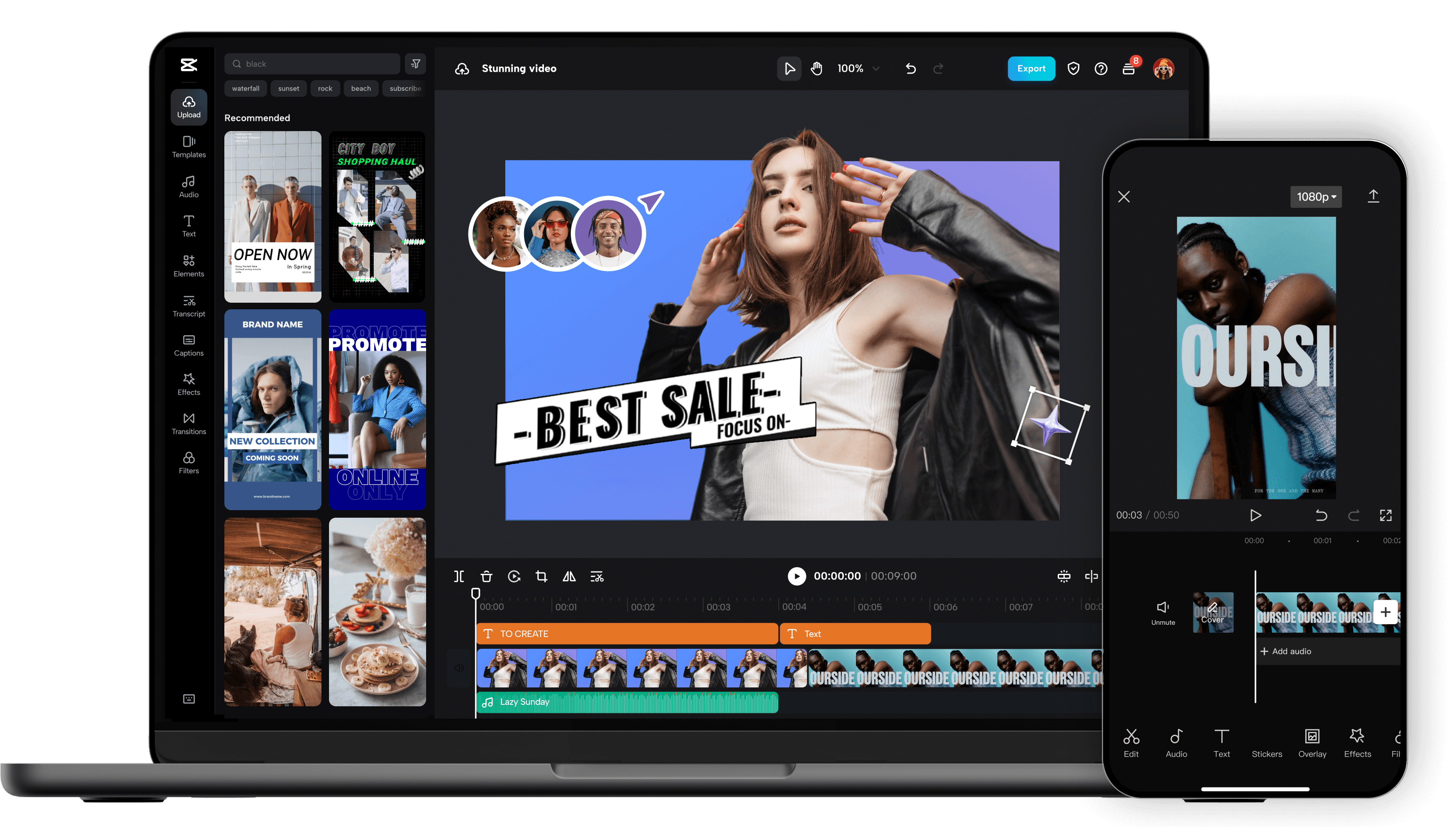
Unleash your creativity and transform your videos with CapCut AI Video Editor, the ultimate all-in-one mobile editing suite designed for creators, influencers, and anyone looking to make their content shine. Whether you're a seasoned pro or just starting out, CapCut's intuitive interface and powerful AI-driven features make professional-quality video editing accessible to everyone, right from your smartphone. Experience the Magic of AI-Powered Editing: CapCut's intelligent AI tools take the heavy lifting out of video production. Effortlessly remove backgrounds with a single tap, creating seamless green-screen effects or isolating subjects for dynamic visual storytelling. Our advanced auto-captions feature transcribes your audio with remarkable accuracy, saving you hours of manual work and making your videos more accessible to a wider audience. Dive into a world of creative possibilities with AI text-to-video , allowing you to generate stunning visuals from simple text prompts. Need to clean up your audio? CapCut's AI audio enhancer intelligently refines your sound, reducing background noise and boosting clarity for a professional finish. Edit Like a Pro, Effortlessly: Beyond its AI prowess, CapCut offers a comprehensive suite of traditional editing tools. Trim, split, merge, and reorder your clips with precision. Enhance your visuals with a vast library of filters, effects, and transitions that will captivate your viewers. Add personality and polish with a wide selection of royalty-free music, sound effects, and voiceovers . Experiment with keyframe animation to bring your elements to life with smooth, dynamic movement. Fine-tune your footage with color correction and adjustment tools to achieve the perfect mood and aesthetic. Elevate Your Content with Premium Features: CapCut empowers you to create engaging and professional content for all your favorite platforms. Speed ramping allows for dramatic slow-motion or exhilarating fast-forward effects. Chroma keying (green screen) opens up endless possibilities for background replacement. Utilize picture-in-picture to layer videos and create dynamic compositions. Explore strobe effects, zoom effects, and motion blur to add visual flair and keep your audience hooked. Why Choose CapCut AI Video Editor? User-Friendly Interface: Designed for ease of use, making complex editing simple. Powerful AI Tools: Automate tedious tasks and unlock new creative avenues with intelligent features. Extensive Feature Set: From basic cuts to advanced effects, CapCut has everything you need. Vast Asset Library: Access a wealth of music, effects, and templates to enhance your videos. No Watermarks (Free Version): Create and export your videos without unwanted branding. Regular Updates: Benefit from continuous improvements and new features. Cross-Platform Sync (with Pro): Seamlessly work across devices. Perfect for Social Media: Optimize your videos for TikTok, Instagram Reels, YouTube Shorts, and more. Who is CapCut for? Social Media Influencers: Create captivating content that drives engagement. Content Creators: Produce professional-looking videos for YouTube, Twitch, and other platforms. Small Business Owners: Craft compelling promotional videos to showcase your products and services. Educators: Develop engaging video lessons and presentations. Hobbyists & Enthusiasts: Bring your passion projects to life with stunning visuals. Anyone! If you have a story to tell, CapCut is your tool. Download CapCut AI Video Editor today and experience the future of mobile video editing. Transform ordinary moments into extraordinary stories. Join millions of creators worldwide and discover how easy it is to make your videos stand out. Your next viral video starts here!

Khroma is an AI-powered color palette generator that assists designers and creatives in discovering and utilizing harmonious color schemes tailored to their individual preferences. It addresses the challenge of initial creative block when starting a design project, specifically the difficulty of selecting a suitable color palette. Khroma leverages machine learning and neural networks to learn a userΓÇÖs aesthetic tastes and generate an endless supply of unique and personalized color combinations. This tool is designed for graphic designers, web developers, interior designers, artists, and anyone seeking inspiration for color schemes in their projects. Key Features of Khroma Generates infinite, personalized color palettes based on user preferences. Utilizes a neural network trained on a vast database of colors. Allows users to rate color combinations to refine the AIΓÇÖs understanding of their taste. Offers palette previews in various contexts, including typography and gradients. Enables users to test palettes with custom images to visualize real-world applications. Provides a simple and intuitive interface for exploring and saving color schemes. Allows users to lock specific colors within a palette to maintain consistency. Offers the ability to export palettes in multiple formats for use in design software. Facilitates the discovery of unexpected and inspiring color combinations. Stores user preferences for consistent palette generation over time. Why People Use Khroma Individuals and professionals often struggle with the initial stages of design, particularly when it comes to color selection. Traditionally, designers rely on pre-made palettes, color theory principles, or extensive trial and error to find suitable color combinations. These methods can be time-consuming, limiting, and may not always align with a specific projectΓÇÖs aesthetic goals. Khroma streamlines this process by employing artificial intelligence to learn a userΓÇÖs individual color preferences. By training a neural network on colors a user likes, Khroma eliminates the guesswork and provides a continuous stream of harmonious palettes. This results in significant time savings, reduces creative frustration, and expands the possibilities for unique and personalized designs. Unlike generic palette generators, Khroma adapts to the user, becoming more accurate and insightful with each interaction. The toolΓÇÖs ability to preview palettes in realistic contexts further enhances its value, allowing users to confidently apply color schemes to their projects. Popular Use Cases Graphic Design: Generating color palettes for logos, branding materials, marketing collateral, and illustrations. Web Development: Creating color schemes for websites, user interfaces, and digital products. Interior Design: Discovering harmonious color combinations for room decor, furniture selection, and architectural projects. Fashion Design: Inspiring color palettes for clothing lines, accessories, and textile patterns. Art & Illustration: Providing a starting point for paintings, drawings, and digital artwork. Marketing & Advertising: Developing visually appealing color schemes for campaigns and promotional materials. User Interface (UI) Design: Creating accessible and aesthetically pleasing color palettes for mobile and web applications. Brand Identity Development: Establishing a consistent and memorable color palette for a brandΓÇÖs visual identity. Content Creation: Selecting color schemes for social media graphics, presentations, and blog posts. Personal Projects: Assisting individuals with color selection for home decor, DIY projects, and personal artwork. Benefits of Khroma Enhanced Creativity: Khroma inspires new ideas and expands the possibilities for color exploration. Time Savings: The AI-powered palette generation significantly reduces the time spent on color selection. Personalized Results: Palettes are tailored to individual preferences, ensuring aesthetic alignment. Improved Design Quality: Harmonious color combinations enhance the visual appeal and effectiveness of designs. Reduced Creative Block: Khroma overcomes the ΓÇ£blank pageΓÇ¥ problem by providing a constant source of inspiration. Increased Efficiency: Streamlined workflow allows designers to focus on other aspects of their projects. Consistent Branding: Facilitates the creation of a cohesive and recognizable brand identity through consistent color usage. Accessibility: The tool is free to use, making it accessible to a wide range of users. Versatility: Applicable to a diverse range of design disciplines and creative projects. Continuous Learning: The AI adapts and improves its palette generation based on user feedback.

Flux LoRA – Efficient AI Model Fine-Tuning with Low-Rank Adaptation Flux LoRA is a powerful approach that combines the Flux machine learning framework with LoRA (Low-Rank Adaptation) to enable efficient, scalable, and cost-effective fine-tuning of large AI models . It is widely used by developers, researchers, and AI engineers who want to customize pretrained models without the heavy computational cost of full model retraining. Flux LoRA is especially popular in areas like text-to-image generation, large language models (LLMs), computer vision, and multimodal AI , where training entire models from scratch is expensive and time-consuming. What Is Flux LoRA? Flux LoRA leverages Low-Rank Adaptation , a modern fine-tuning technique where small trainable matrices are injected into a pretrained model , while the original model weights remain frozen. Instead of updating billions of parameters, LoRA updates only a small number of low-rank parameters , drastically reducing memory usage and training time. The Flux framework provides a flexible and high-performance environment for building and experimenting with neural networks, making Flux LoRA a preferred choice for research-grade and production-ready AI workflows . How Flux LoRA Works A large pretrained AI model is loaded (text, image, or multimodal). LoRA layers are added to selected model components (such as attention layers). Only LoRA parameters are trained on new or custom data. The base model remains unchanged, preserving its original knowledge. The resulting LoRA weights can be saved, shared, or merged for deployment. This approach allows fast adaptation with minimal resources , even on consumer-grade GPUs. Key Features of Flux LoRA Lightweight fine-tuning of large AI models Extremely low GPU and memory requirements Faster training compared to full fine-tuning Maintains original pretrained model quality Easy sharing and reuse of LoRA weights Supports experimentation and rapid iteration Ideal for domain-specific AI customization Why Developers Use Flux LoRA Traditional fine-tuning requires massive computational resources , making it impractical for individuals or small teams. Flux LoRA solves this by allowing developers to adapt models efficiently , enabling innovation without high infrastructure costs. It is widely used in open-source AI communities , research labs, and startups to build custom AI solutions faster and cheaper. Popular Use Cases Text-to-image and image style customization Fine-tuning large language models for niche domains Custom AI assistants and chatbots Vision models for specific object detection tasks Multimodal AI adaptation Rapid AI prototyping and experimentation Personalized generative AI workflows Benefits of Flux LoRA Reduces training costs dramatically Enables fine-tuning on limited hardware Preserves pretrained model intelligence Faster development and deployment cycles Scalable for research and production use Encourages experimentation and innovation Who Should Use Flux LoRA? AI developers and engineers Machine learning researchers Startup teams building AI products Open-source contributors Creators customizing generative AI Anyone with limited GPU resources Frequently Asked Questions (FAQ) ❓ What does LoRA stand for? LoRA stands for Low-Rank Adaptation , a technique that fine-tunes large AI models by training only a small set of additional parameters instead of updating the full model. ❓ Is Flux LoRA better than full fine-tuning? For most use cases, yes. Flux LoRA is faster, cheaper, and more memory-efficient than full fine-tuning while still achieving strong performance. ❓ Can Flux LoRA be used with image generation models? Yes. Flux LoRA is commonly used in text-to-image and image generation models to apply styles, characters, or domain-specific visual behavior. ❓ Do I need a high-end GPU to use Flux LoRA? No. One of the biggest advantages of Flux LoRA is that it can run on low to mid-range GPUs , making it accessible to more users. ❓ Are LoRA models reusable? Yes. LoRA weights are lightweight and portable , making them easy to share, reuse, and combine with other models. ❓ Is Flux LoRA suitable for production use? Yes. Flux LoRA is suitable for both research and production environments , especially when scalability and efficiency are required. Flux LoRA, LoRA Fine-Tuning, Low-Rank Adaptation AI, Flux Machine Learning, AI Model Fine-Tuning, Custom AI Models, Efficient AI Training, LoRA AI Models

Cabina.AI: Your All-in-One AI Chat Workspace for Enhanced Productivity Discover Cabina.AI, the groundbreaking AI assistant platform designed to be your ultimate AI chat workspace. This innovative solution seamlessly integrates a wide array of artificial intelligence tools into a single, cohesive environment, revolutionizing how you work and interact with technology. Cabina.AI is engineered to streamline your workflows, boost productivity, and deliver intelligent assistance for a vast range of tasks, catering to both individual users and collaborative teams. Experience the power of a centralized hub for all your AI-powered needs, enabling effortless content generation, insightful data analysis, efficient routine automation, and much more, all within an intuitive and integrated ecosystem that makes sophisticated AI accessible for everyday use. Unlock Your Potential with a Versatile AI Assistant Cabina.AI proudly positions itself as the "Best AI chat workspace for your needs," a testament to its dedication to providing a versatile and user-friendly experience that adapts to your unique requirements. Whether you're a creative professional looking to generate compelling content, a marketer aiming to optimize campaigns, a developer seeking to accelerate coding, or an individual aiming to enhance personal efficiency, Cabina.AI offers a comprehensive suite of tools. Supercharge your output and unlock new levels of creativity and efficiency by leveraging the power of AI in a single, integrated platform. Accessible AI Power for Every Budget We believe that powerful AI tools should be accessible to everyone. That's why Cabina.AI offers a flexible "Free + from $4.99/mo" pricing model. Start with essential AI capabilities without any upfront cost and experience the transformative benefits of our platform. As your needs evolve and grow, you can seamlessly upgrade to access more advanced features and higher usage limits, ensuring you always have the right AI power at your fingertips, without breaking the bank. This approach makes sophisticated AI manageable and cost-effective for a wide range of users and businesses. Foster a Smarter Way of Working with Cabina.AI Embrace a more intelligent future of work with Cabina.AI. By consolidating diverse AI tools into one powerful platform, we empower you to overcome complex challenges, automate mundane tasks, and focus on what truly matters. Our intuitive interface and integrated ecosystem simplify the process of harnessing AI, making it an indispensable partner in your daily endeavors. Join the growing community of innovators and professionals who are transforming their productivity and creativity with Cabina.AI, the ultimate AI chat workspace designed for your success.
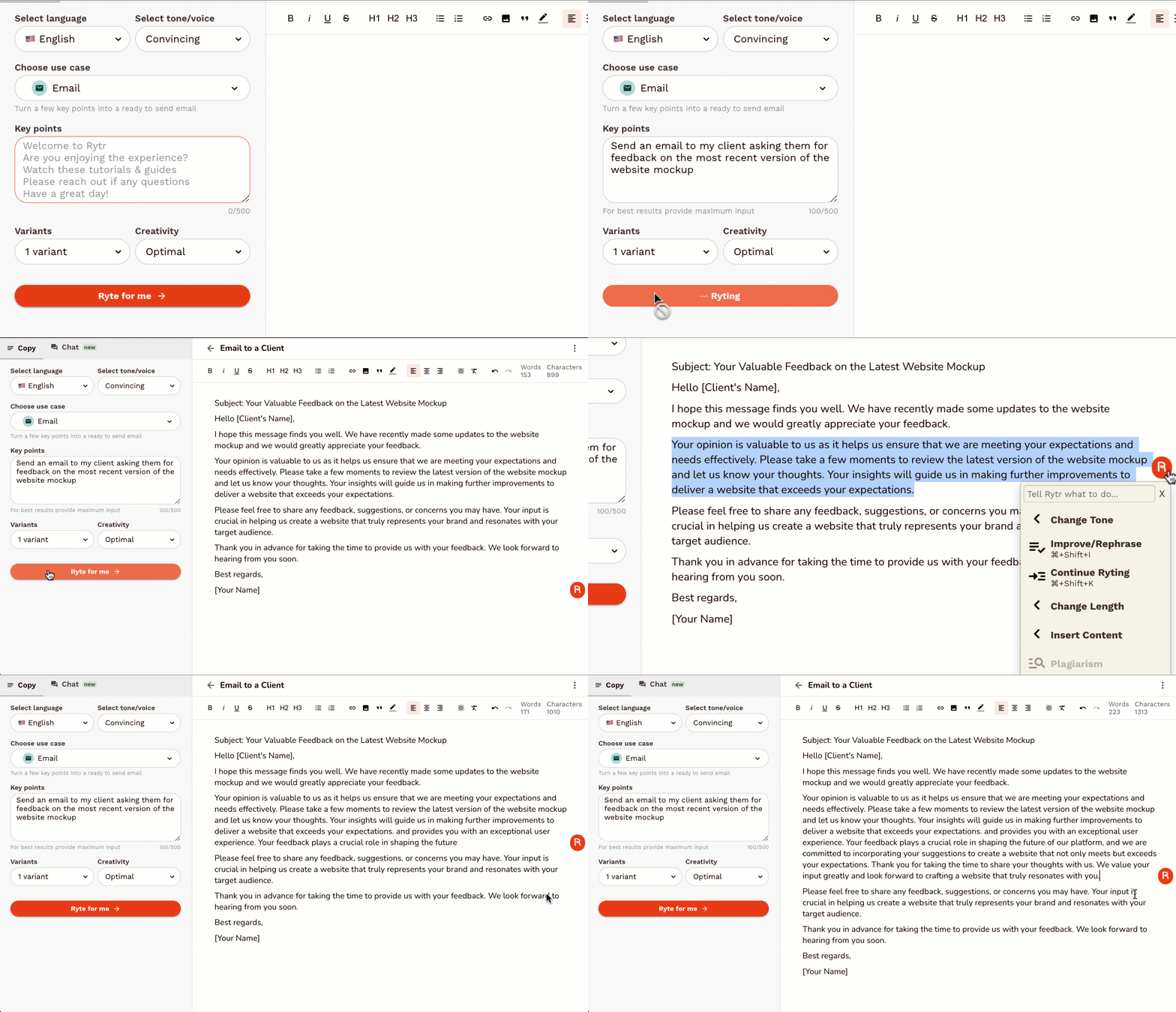
Rytr is an AI-powered writing assistant designed to help users generate high-quality, short-form content quickly and efficiently . It addresses the challenge of content creation by automating the writing process, leveraging artificial intelligence to produce compelling copy for various marketing and communication needs. This tool is ideal for marketers, entrepreneurs, bloggers, social media managers, and anyone requiring fast and effective content generation . Rytr streamlines the writing workflow, offering a solution for overcoming writerΓÇÖs block and scaling content output. Key Features of Rytr Generates content in 40+ use cases. Offers 20+ tones of voice to tailor content style. Supports 30+ languages for global content creation. Includes a built-in plagiarism checker. Provides a user-friendly interface for easy navigation. Offers various output variants for diverse content options. Features a magic command functionality for specific content requests. Allows users to define content length and creativity levels. Integrates with SEO tools to optimize content for search engines. Provides a Chrome extension for writing directly within other applications. Why People Use Rytr Individuals and businesses utilize Rytr to overcome the time-consuming and often challenging process of writing compelling content. Traditional content creation methods often require significant time investment, research, and editing. Rytr drastically reduces this effort by automating the initial drafting process, allowing users to focus on refining and optimizing the generated text. The toolΓÇÖs ability to produce multiple variations of content ensures users can quickly explore different angles and find the most effective messaging. Unlike manual writing, Rytr provides consistent quality and speed, making it a valuable asset for maintaining a strong online presence and engaging target audiences. It empowers users to scale their content creation efforts without compromising on quality or originality. Popular Use Cases Social Media Marketing: Generating engaging captions, posts, and ad copy for platforms like Facebook, Instagram, Twitter, and LinkedIn. Digital Advertising: Creating compelling ad headlines and descriptions for Google Ads, Facebook Ads, and other advertising platforms. Email Marketing: Drafting persuasive email subject lines, body copy, and call-to-actions for marketing campaigns. Product Descriptions: Writing detailed and attractive product descriptions for e-commerce stores and online marketplaces. Blog Content: Generating ideas, outlines, and introductory paragraphs for blog posts. Website Copy: Crafting concise and impactful website headlines, taglines, and call-to-action buttons. Video Scriptwriting: Developing short scripts for explainer videos, social media videos, and advertisements. Business Idea Generation: Brainstorming business names, taglines, and value propositions. Content Summarization: Condensing lengthy articles or documents into concise summaries. Creative Writing: Assisting with brainstorming and drafting short stories, poems, and other creative content. Benefits of Rytr Increased Productivity: Significantly reduces the time spent on writing tasks, allowing users to focus on other critical business activities. Enhanced Content Quality: Generates well-written, grammatically correct, and engaging content that captures audience attention. Cost Savings: Eliminates the need to hire expensive copywriters or content agencies for short-form content creation. Improved Marketing Results: Creates compelling marketing copy that drives conversions, increases brand awareness, and generates leads. Overcome WriterΓÇÖs Block: Provides a constant source of inspiration and ideas, helping users overcome creative hurdles. Scalable Content Creation: Enables businesses to quickly and easily scale their content output to meet growing demands. Versatile Application: Suitable for a wide range of content types and industries, offering a flexible solution for diverse needs. Accessibility and Convenience: Available as a web application and Chrome extension, providing access from any device. Multilingual Support: Facilitates content creation for global audiences with support for over 30 languages. Originality Assurance: Includes a built-in plagiarism checker to ensure content is unique and original.

Visual Electric is an innovative AI image generator designed to empower creatives with a spatially intuitive and non-linear workflow for visual exploration and development. It addresses the limitations of traditional text-to-image tools by offering an infinite canvas environment that mirrors the organic nature of the creative process. Utilizing generative AI , Visual Electric allows users to rapidly prototype, remix, and iterate on visual ideas, making it ideal for designers, artists, and anyone involved in visual storytelling. This tool solves the problem of rigid, linear workflows in AI image generation. Existing solutions often require precise prompting and offer limited flexibility for exploring variations and branching out ideas. Visual Electric provides a more fluid and intuitive experience, enabling users to visually organize and manipulate generated images in a way that closely resembles traditional creative methods like mood boards and sketching. ItΓÇÖs particularly valuable for those seeking to overcome creative blocks, explore multiple concepts simultaneously, and refine visual ideas through spatial arrangement and iterative refinement. Key Features of Visual Electric Generates images from text prompts. Offers an infinite canvas for spatial organization of images. Allows for remixing and combining of generated images. Enables exploration of variations through iterative prompting. Provides a visually intuitive interface for creative workflows. Supports image uploads for use as starting points or inspiration. Facilitates branching out of ideas with multiple image streams. Offers real-time image generation and updates. Allows for easy duplication and modification of existing images. Provides a collaborative workspace for team projects. Why People Use Visual Electric Individuals and teams are adopting Visual Electric to overcome the constraints of conventional AI image generation tools. Traditional methods often require a precise understanding of prompting techniques and can be frustrating when attempting to explore a wide range of visual concepts. Visual Electric offers a more natural and intuitive approach, mirroring the way creatives typically work ΓÇô by gathering inspiration, sketching ideas, and iteratively refining concepts. The platformΓÇÖs infinite canvas allows users to visually map out their creative process, branching out from initial ideas and exploring variations without being limited by a linear sequence of prompts. This spatial organization fosters serendipitous discoveries and allows for a more holistic understanding of the visual landscape. Compared to manually creating mood boards or iterating on designs in traditional software, Visual Electric significantly accelerates the creative workflow, enabling faster prototyping and more efficient exploration of visual possibilities. ItΓÇÖs a tool designed to augment, not replace, the creative mind. Popular Use Cases Graphic Design: Rapidly prototyping logo concepts, exploring color palettes, and generating visual assets for branding projects. UI/UX Design: Creating mood boards, visualizing user interface elements, and iterating on design layouts. Illustration: Developing character designs, exploring different art styles, and generating visual concepts for illustrations. Storyboarding: Quickly visualizing scenes and compositions for film, animation, and comics. Marketing & Advertising: Generating visual content for social media campaigns, website banners, and marketing materials. Fashion Design: Exploring textile patterns, visualizing garment designs, and creating mood boards for collections. Architectural Visualization: Generating conceptual renderings and exploring different design options. Game Development: Creating concept art, texture variations, and visual assets for game environments. Creative Writing: Visualizing scenes and characters to inspire and enhance storytelling. Art Education: Teaching visual design principles and exploring the possibilities of AI-assisted creativity. Benefits of Visual Electric Accelerated Creative Workflow: Significantly reduces the time spent on initial concept development and visual exploration. Enhanced Creative Exploration: Facilitates the discovery of unexpected ideas and visual possibilities through spatial arrangement and iterative refinement. Improved Visual Communication: Enables clear and effective communication of visual concepts to clients and collaborators. Increased Design Iteration: Allows for rapid prototyping and experimentation with different design variations. Intuitive User Experience: Provides a visually intuitive interface that requires minimal training and is accessible to users of all skill levels. Streamlined Collaboration: Offers a collaborative workspace for teams to share ideas, provide feedback, and co-create visual content. Overcoming Creative Blocks: Provides a stimulating environment for generating new ideas and breaking through creative barriers. Spatial Organization of Ideas: The infinite canvas allows for a more holistic and organized approach to visual thinking. Seamless Remixing and Combination: Easily combine and modify generated images to create unique and compelling visuals. Empowered Creative Control: Offers a greater degree of control over the creative process compared to traditional text-to-image tools.

Runway is at the forefront of a revolutionary movement, harnessing the power of Artificial Intelligence to build sophisticated simulations of the world around us. Imagine a digital twin of reality, a dynamic, interactive environment where complex phenomena can be explored, understood, and even manipulated. Runway is making this vision a tangible reality, offering a suite of cutting-edge AI tools designed to unlock unprecedented levels of insight and creative potential. At its core, Runway empowers creators, researchers, and developers with the ability to generate, edit, and manipulate visual content in ways previously confined to science fiction. From photorealistic scene generation and character animation to sophisticated visual effects and the creation of entirely novel digital assets, their AI models are pushing the boundaries of what's possible. This isn't just about generating static images; it's about creating living, breathing digital environments that respond and evolve. For filmmakers and visual artists, Runway provides tools that dramatically accelerate and enhance the creative process. Tedious tasks like rotoscoping, background removal, and complex compositing can be handled with AI, freeing up artists to focus on storytelling and artistic vision. Furthermore, their generative AI capabilities allow for the creation of unique textures, environments, and even entire virtual sets, opening up new avenues for artistic expression and reducing production costs and timelines. Researchers and scientists also stand to benefit immensely from Runway's advancements. The ability to simulate complex systems, from fluid dynamics and material science to ecological models and urban planning, can lead to faster breakthroughs and more informed decision-making. By creating accurate and adaptable digital representations of real-world processes, Runway facilitates experimentation, hypothesis testing, and the optimization of solutions without the constraints or risks of physical-world trials. The platform's commitment to accessibility means that these powerful AI simulation tools are not solely the domain of large corporations or research institutions. Runway is democratizing access to advanced AI, providing intuitive interfaces and powerful APIs that allow individuals and smaller teams to leverage these transformative technologies. Whether you're an independent game developer building immersive worlds, a student exploring scientific concepts, or a marketer creating engaging campaigns, Runway offers the tools to bring your ideas to life with unparalleled realism and efficiency. Runway's vision extends beyond mere replication; it's about augmenting human creativity and understanding. By enabling the simulation of the world, they are not just building AI; they are building a new frontier for innovation, exploration, and artistic expression. Dive into the future of digital creation and scientific discovery with Runway, where AI meets reality.

Unlock the future of scientific discovery with Elicit, the revolutionary AI-powered research assistant designed to accelerate your workflow and deepen your understanding. Tired of endless hours sifting through mountains of academic papers, struggling to synthesize complex information, and facing writer's block when articulating your findings? Elicit is here to transform your research process from mundane to masterful. Elicit goes beyond simple keyword searches. Our advanced AI understands the nuances of scientific language, allowing you to ask research questions in natural language and receive concise, relevant summaries of key findings from thousands of relevant papers. Imagine asking, "What are the most effective non-pharmacological interventions for managing chronic pain in older adults?" and getting a curated list of studies, their methodologies, outcomes, and even the limitations of their findings, all presented in an organized and easily digestible format. Streamline your literature review with unparalleled efficiency. Elicit's intelligent algorithms can identify, extract, and synthesize crucial information, including study designs, participant demographics, intervention details, outcome measures, and statistical results. This means less time spent manually reading and more time spent critically analyzing and building upon existing knowledge. Our intuitive interface allows you to compare findings across studies, identify research gaps, and discover emerging trends with unprecedented ease. But Elicit isn't just about finding information; it's about generating insights. Our AI can help you brainstorm research ideas, generate hypotheses, and even assist in outlining your research papers, grant proposals, and presentations. Overcome the dreaded blank page syndrome with AI-generated starting points that are grounded in a comprehensive understanding of the scientific landscape. Elicit acts as your tireless research partner, always ready to explore new avenues and connect disparate pieces of information. For researchers, academics, students, and anyone pushing the boundaries of knowledge, Elicit is an indispensable tool. Enhance your productivity, improve the quality of your research, and accelerate your journey from question to publication. Say goodbye to research bottlenecks and hello to a more efficient, insightful, and inspired research experience. Key Features: Natural Language Research Questions: Ask your questions in plain English and get AI-powered answers. Automated Literature Synthesis: Elicit automatically extracts and summarizes key information from relevant papers. Identify Research Gaps: Discover areas where more research is needed. Compare Study Findings: Easily see how different studies converge or diverge. Brainstorming & Hypothesis Generation: Get AI assistance to spark new research ideas. Outline & Writing Support: Leverage AI to structure and begin writing your research documents. Vast Paper Database: Access and analyze a comprehensive collection of scientific literature. Intuitive User Interface: Designed for ease of use and maximum research impact. Transform your research today with Elicit: AI for Scientific Research.

Magai is a comprehensive AI platform offering access to over 50 different artificial intelligence apps in a single subscription, designed to help users streamline workflows and boost productivity by consolidating diverse AI capabilities. Magai addresses the challenge of fragmented AI toolsets and escalating subscription costs. It provides a unified hub for accessing a wide range of AI-powered applications, eliminating the need for multiple accounts and interfaces. The platform leverages machine learning, natural language processing, and computer vision to deliver solutions for content creation, image editing, coding, and data analysis. Magai is intended for individuals, businesses, and professionals seeking an affordable and efficient way to integrate AI into their daily operations and unlock new levels of creative and analytical potential. Users looking for AI tools , AI platforms , and AI productivity solutions will find significant value in MagaiΓÇÖs all-in-one approach. Key Features of Magai Access to 50+ AI applications within a single platform. Integrated suite of tools for content generation and writing. AI-powered image generation and editing capabilities. Coding assistance tools for developers. Data analysis and visualization features. Streamlined interface for easy navigation between applications. Regular updates and additions of new AI tools. Centralized billing and account management. Facilitates experimentation with diverse AI technologies. Offers a cost-effective alternative to individual AI subscriptions. Why People Use Magai Individuals and organizations are increasingly adopting AI to enhance efficiency and innovation. However, the proliferation of specialized AI tools often leads to complex subscription management and fragmented workflows. Magai offers a solution by consolidating these tools into a single, accessible platform. Users choose Magai to simplify their AI toolkit, reduce costs, and unlock the potential of multiple AI technologies without the administrative overhead of managing numerous subscriptions. The platform empowers users to move seamlessly between different AI applications, fostering creativity and accelerating project completion. Compared to traditional methods of relying on individual AI tools, Magai provides a unified and streamlined experience, saving valuable time and resources. Popular Use Cases Content Marketing: Generating blog posts, articles, social media content, and marketing copy using AI writing tools. Graphic Design: Creating images, illustrations, and visual assets for marketing materials and presentations with AI image generators. Software Development: Utilizing AI coding assistants to write, debug, and optimize code. Data Analysis: Analyzing datasets, identifying trends, and creating visualizations with AI-powered data analysis tools. E-commerce: Generating product descriptions, optimizing listings, and personalizing customer experiences with AI. Education: Assisting with research, writing, and learning through AI-powered tools. Personal Productivity: Automating tasks, managing schedules, and improving organization with AI assistants. Social Media Management: Creating engaging content and scheduling posts with AI-driven social media tools. Customer Service: Improving response times and resolving customer inquiries with AI chatbots. Research and Development: Accelerating research processes and discovering new insights with AI-powered analysis tools. Benefits of Magai Cost Savings: Reduces expenses by providing access to multiple AI tools for the price of one subscription. Increased Productivity: Streamlines workflows and accelerates project completion by consolidating AI capabilities. Enhanced Creativity: Fosters innovation by enabling users to experiment with a diverse range of AI technologies. Simplified Management: Eliminates the complexity of managing multiple AI subscriptions and accounts. Improved Efficiency: Automates tasks and optimizes processes with AI-powered tools. Greater Accessibility: Makes advanced AI technologies accessible to a wider range of users and businesses. Time Savings: Reduces the time spent searching for and learning new AI tools. Unified Experience: Provides a consistent and intuitive interface for accessing all AI applications. Scalability: Easily adapts to changing needs and growing demands. Continuous Innovation: Benefits from regular updates and additions of new AI tools and features.

Galileo AI is an innovative AI design tool that empowers users to generate stunning user interface (UI) designs from simple text prompts. It addresses the challenge of rapid prototyping and design iteration by automating the initial design phases, significantly reducing the time and resources required to create visually appealing and functional interfaces. Utilizing advanced artificial intelligence and natural language processing , Galileo AI translates user ideas into high-fidelity UI mockups, catering to designers, founders, and product teams seeking to accelerate their design workflows. This tool is particularly valuable for those exploring multiple design concepts or needing to quickly visualize their product ideas. Key Features of Galileo AI Generates UI designs from text descriptions. Offers a variety of design styles and themes. Allows users to refine designs through iterative prompting. Provides customizable design components and elements. Supports the creation of designs for web and mobile applications. Enables users to export designs in multiple formats. Facilitates rapid prototyping and concept exploration. Offers a user-friendly interface for easy navigation. Allows for the specification of desired platform (iOS, Android, Web). Provides options to define specific UI elements like buttons, forms, and navigation bars. Supports the generation of complete screen designs or individual components. Enables users to adjust the level of detail and complexity in generated designs. Why People Use Galileo AI Individuals and teams utilize Galileo AI to overcome the initial hurdles of the design process. Traditionally, creating UI designs requires significant time and expertise in design software. Galileo AI streamlines this process by allowing users to articulate their vision in natural language, which the AI then translates into a visual representation. This is particularly beneficial for startups and entrepreneurs who may not have dedicated design resources, or for established teams looking to accelerate their design cycles. The toolΓÇÖs ability to quickly generate multiple design variations fosters exploration and allows for faster iteration based on feedback. By automating the foundational aspects of UI design, Galileo AI frees up designers to focus on more complex tasks like user research, usability testing, and refining the overall user experience. It democratizes the design process, making it accessible to a wider range of users, regardless of their design background. Popular Use Cases Startup Prototyping: Quickly generate mockups for pitch decks and investor presentations. Web Application Design: Create initial designs for web-based software and platforms. Mobile App Design: Develop UI concepts for iOS and Android applications. UX/UI Exploration: Rapidly iterate on design ideas and explore different visual approaches. Design System Creation: Generate consistent UI components for building design systems. A/B Testing Mockups: Create variations of UI elements for A/B testing purposes. User Flow Visualization: Design screens representing different stages of a user flow. Concept Validation: Quickly visualize and validate product ideas with potential users. Educational Purposes: Students learning UI/UX design can use it to experiment with different concepts. Rapid Wireframing: Generate basic wireframes to outline the structure of an application. Generating Design Inspiration: Overcome creative blocks by exploring AI-generated design options. Creating Mockups for User Research: Quickly produce visuals for user interviews and testing. Benefits of Galileo AI Accelerated Design Workflow: Significantly reduces the time spent on initial design creation. Increased Design Iteration: Enables rapid exploration of multiple design concepts. Reduced Design Costs: Minimizes the need for extensive design resources. Enhanced Creativity: Inspires new design ideas and approaches. Improved Collaboration: Facilitates communication between designers, developers, and stakeholders. Democratized Design Access: Empowers non-designers to create professional-looking UI designs. Streamlined Prototyping: Simplifies the process of creating interactive prototypes. Faster Time to Market: Accelerates the product development lifecycle. Consistent Design Language: Helps maintain a consistent visual style across applications. Efficient Resource Allocation: Frees up designers to focus on higher-level tasks. Simplified Concept Validation: Allows for quick and easy validation of product ideas. Reduced Risk of Design Errors: AI-powered generation can minimize common design mistakes.

Blend AI is an innovative AI productivity platform that streamlines workflows by integrating multiple artificial intelligence tools into a single, unified interface. It addresses the challenge of managing numerous AI subscriptions and switching between different platforms, offering a centralized hub for diverse AI-powered tasks. Blend AI utilizes artificial intelligence to connect and orchestrate various AI models, providing a seamless experience for users seeking to enhance their productivity. This tool is designed for professionals, marketers, content creators, and anyone looking to leverage the power of AI without the complexity of managing multiple subscriptions and interfaces. Key Features of Blend AI Integrates a wide range of AI models and tools. Offers a unified dashboard for accessing all connected AI services. Provides a streamlined workflow for executing AI-powered tasks. Supports both text and image-based AI applications. Enables users to manage AI subscriptions in one place. Facilitates collaboration by sharing AI workflows and results. Allows for custom AI tool integrations via API. Offers a user-friendly interface for both beginners and advanced users. Provides detailed usage analytics for tracking AI consumption. Supports multiple user accounts for team collaboration. Why People Use Blend AI Individuals and teams adopt Blend AI to overcome the fragmentation inherent in the current AI landscape. Traditionally, users needing to perform diverse AI tasks ΓÇô such as generating text, editing images, or analyzing data ΓÇô would be required to subscribe to and navigate multiple, separate AI platforms. This process is time-consuming, costly, and often leads to context switching that diminishes productivity. Blend AI solves this problem by providing a single point of access to a curated collection of AI tools. This consolidation simplifies workflows, reduces administrative overhead, and allows users to focus on their core tasks rather than managing AI infrastructure. The platformΓÇÖs unified interface and streamlined processes result in significant time savings and increased efficiency, making it a valuable asset for anyone seeking to maximize the benefits of artificial intelligence. Popular Use Cases Content Creation: Marketing teams utilize Blend AI to generate blog posts, social media copy, and marketing materials using integrated AI writing tools. Image Editing & Generation: Graphic designers and content creators leverage AI-powered image editing and generation features for creating visuals. Data Analysis: Analysts and researchers employ Blend AI to analyze datasets and extract insights using integrated AI analytics tools. Social Media Management: Social media managers use Blend AI to schedule posts, generate captions, and analyze engagement metrics. Customer Support: Businesses integrate Blend AI with customer support platforms to automate responses and improve customer satisfaction. E-commerce: Online retailers use Blend AI to generate product descriptions, optimize listings, and personalize customer experiences. Academic Research: Students and researchers utilize Blend AI for literature reviews, data analysis, and report writing. Personal Productivity: Individuals use Blend AI to automate tasks, manage information, and enhance their daily workflows. Software Development: Developers use Blend AI to generate code snippets, debug programs, and automate testing processes. Translation Services: Professionals utilize Blend AI to translate documents and communications into multiple languages. Benefits of Blend AI Increased Productivity: Streamlined workflows and centralized access to AI tools significantly reduce the time required to complete tasks. Cost Savings: Consolidating AI subscriptions into a single platform can lower overall expenses. Simplified Management: A unified dashboard simplifies the management of AI tools and subscriptions. Enhanced Collaboration: Shared workflows and results facilitate teamwork and knowledge sharing. Improved Efficiency: Automated tasks and intelligent workflows free up users to focus on higher-value activities. Greater Flexibility: The ability to integrate custom AI tools via API provides greater control and customization. Reduced Complexity: A user-friendly interface makes AI accessible to users of all skill levels. Data-Driven Insights: Usage analytics provide valuable insights into AI consumption and performance. Scalability: The platform can easily scale to accommodate growing AI needs. Centralized Access: Provides a single source of truth for all AI-related activities, eliminating the need to switch between multiple applications.

Adobe Podcast is your all-in-one AI-powered solution for creating professional-quality audio content, whether you're a seasoned podcaster, a budding content creator, or a business looking to enhance your audio presence. Gone are the days of struggling with complex audio editing software and expensive studio equipment. Adobe Podcast leverages cutting-edge artificial intelligence to simplify and elevate your audio production process, making it accessible to everyone. At its core, Adobe Podcast offers a suite of intuitive tools designed to transform your raw recordings into polished masterpieces. The flagship feature, AI Denoise , is a game-changer. Say goodbye to distracting background noise, hums, and echoes. With just a few clicks, Adobe Podcast intelligently identifies and removes unwanted audio artifacts, leaving you with crystal-clear vocals that sound like they were recorded in a professional studio. This isn't just about making your audio sound better; it's about making your message heard clearly and effectively. But Adobe Podcast doesn't stop at noise reduction. The AI Speech Enhancement feature goes even further, automatically improving the clarity, richness, and presence of your voice. It intelligently adjusts levels, adds warmth, and ensures your voice stands out, making your spoken word more engaging and impactful. Imagine your interviews sounding richer, your narrations more captivating, and your podcasts more professional ΓÇô all without extensive audio engineering knowledge. For those who need to fine-tune their recordings, Adobe Podcast provides a user-friendly editing interface. Easily trim, cut, and arrange your audio segments. Add background music, sound effects, or other audio elements to enhance your content. The intuitive timeline makes it simple to visualize and manipulate your audio, allowing for precise edits and seamless transitions. Even if you're new to audio editing, you'll find yourself mastering the basics in no time. Adobe Podcast also understands the importance of consistency and branding. You can easily manage your audio assets, apply custom presets, and ensure a consistent sound across all your episodes or audio projects. This is crucial for building a recognizable brand identity and maintaining a professional image. Beyond the core editing features, Adobe Podcast is designed to streamline your entire workflow. Upload your audio files directly, work on them within the platform, and export them in a variety of formats suitable for all major podcasting platforms, websites, and social media channels. This end-to-end solution saves you time and effort, allowing you to focus on what you do best: creating compelling content. Whether you're looking to start a podcast from scratch, improve the audio quality of your existing podcast, create engaging audio for marketing videos, record clear voiceovers, or even produce professional-sounding audio for online courses, Adobe Podcast is the ultimate tool for the job. It democratizes professional audio production, empowering creators of all levels to achieve exceptional results. Experience the future of audio creation and elevate your content with the intelligent power of Adobe Podcast. Get started today and hear the difference AI can make.

Motiff is an innovative AI-powered design tool that streamlines the design process and empowers designers to focus on creativity rather than repetitive tasks. It addresses the challenges of maintaining consistency, scaling designs, and managing complex projects by automating common workflows and leveraging the power of artificial intelligence to enhance efficiency. This tool is particularly valuable for UI/UX designers, product teams, and design systems managers seeking to accelerate their workflow and improve design quality. Motiff offers a new approach to design, moving beyond traditional methods to an AI-native experience. Key Features of Motiff Automated frame cleanup and organization. AI-powered design system generation from existing files. Automatic component detection and replication. Intelligent layout suggestions and adjustments. Version control and collaboration features. Seamless integration with existing design workflows. Ability to create and maintain consistent design languages. Automated documentation of design components. Real-time collaboration capabilities for design teams. AI-driven style guide creation and enforcement. Component variant generation. Automated responsive resizing. Why People Use Motiff Motiff is utilized by design professionals who are looking to overcome the limitations of traditional design tools and processes. Historically, maintaining design consistency across large projects has been a manual and time-consuming effort, often requiring meticulous attention to detail and significant overhead. Similarly, building and scaling design systems from scratch can be a complex undertaking. Motiff automates these processes, significantly reducing the time and effort required to achieve high-quality, consistent designs. The toolΓÇÖs AI capabilities allow designers to focus on higher-level creative tasks, such as user research, ideation, and prototyping, rather than getting bogged down in repetitive pixel-perfect adjustments. By automating tasks like frame organization, component detection, and style guide creation, Motiff enables teams to iterate faster, reduce errors, and deliver more polished designs. It offers a scalable solution for organizations of all sizes, from startups to large enterprises, looking to improve their design efficiency and maintain brand consistency. Popular Use Cases Rapid Prototyping: Quickly generate and iterate on design concepts using AI-powered layout suggestions and component replication. Design System Creation & Maintenance: Automatically build and maintain comprehensive design systems from existing design files, ensuring consistency across all products. UI Component Library Management: Efficiently manage and update UI component libraries, reducing redundancy and improving reusability. Website Redesign: Streamline the redesign of websites by automatically identifying and replicating existing UI elements. Mobile App Design: Accelerate the design process for mobile applications with AI-powered responsive resizing and layout adjustments. Large-Scale Design Projects: Maintain consistency and efficiency across large-scale design projects with automated frame cleanup and organization. Design Audit & Cleanup: Quickly identify and fix inconsistencies in existing design files, improving overall design quality. Brand Consistency Enforcement: Ensure brand consistency across all design assets with AI-driven style guide creation and enforcement. Collaboration on Design Projects: Facilitate seamless collaboration among design teams with real-time editing and version control features. Creating Design Documentation: Automatically generate documentation for design components and styles, improving communication and knowledge sharing. Benefits of Motiff Increased Design Efficiency: Automate repetitive tasks and streamline workflows, allowing designers to focus on creative problem-solving. Improved Design Consistency: Maintain a consistent design language across all products and platforms, enhancing brand recognition and user experience. Reduced Design Debt: Identify and fix inconsistencies in existing design files, reducing technical debt and improving maintainability. Faster Iteration Cycles: Accelerate the design process with AI-powered layout suggestions and component replication, enabling faster iteration and experimentation. Enhanced Collaboration: Facilitate seamless collaboration among design teams with real-time editing and version control features. Scalable Design Systems: Build and maintain scalable design systems that can adapt to evolving business needs. Simplified Design Documentation: Automatically generate documentation for design components and styles, improving communication and knowledge sharing. Reduced Manual Effort: Minimize the need for manual pixel-perfect adjustments, freeing up designers to focus on higher-level tasks. Improved Design Quality: Enhance the overall quality of designs with AI-powered suggestions and automated cleanup features. Cost Savings: Reduce design costs by automating tasks and improving efficiency.

Alice - AI Automation App is an AI-powered personal assistant designed to help users automate tasks and boost productivity by leveraging artificial intelligence and intelligent automation workflows . It addresses the challenge of managing increasingly complex digital lives and repetitive tasks, offering a proactive solution for individuals seeking to streamline their routines and accomplish more. This tool is intended for anyone looking to enhance their personal productivity, from students and professionals to individuals simply wanting to simplify their daily lives. ItΓÇÖs a powerful solution for those seeking AI automation and productivity tools . Key Features of Alice - AI Automation App Automates tasks across multiple applications. Provides proactive reminders and notifications. Executes complex commands with natural language processing. Learns user behavior to optimize automation routines. Offers a user-friendly interface for creating and managing automations. Integrates seamlessly with smartphone operating systems. Supports a wide range of app integrations. Enables custom automation workflows tailored to individual needs. Provides a free tier for basic automation functionalities. Offers secure data handling and privacy protection. Why People Use Alice - AI Automation App Individuals utilize Alice - AI Automation App to reclaim valuable time and reduce the cognitive load associated with managing daily tasks. Traditional methods of task management often involve manual execution, leading to inefficiencies and potential errors. Alice offers a significant improvement by automating these processes, allowing users to focus on more important activities. Unlike simple reminder apps or to-do lists, Alice actively performs actions on the userΓÇÖs behalf, bridging the gap between intention and execution. This proactive approach to personal assistance results in increased efficiency, reduced stress, and a greater sense of control over oneΓÇÖs digital life. The applicationΓÇÖs core value lies in its ability to transform passive information into active outcomes, making it a powerful tool for anyone seeking to optimize their personal workflow. Popular Use Cases Students: Automating assignment reminders, scheduling study sessions, and managing research tasks. Professionals: Scheduling meetings, responding to emails, managing social media posts, and automating report generation. Busy Parents: Setting reminders for appointments, managing family calendars, and automating grocery lists. Travelers: Automating travel arrangements, setting flight alerts, and managing itineraries. Fitness Enthusiasts: Tracking workouts, setting fitness goals, and automating health reminders. Social Media Managers: Scheduling posts, monitoring engagement, and automating content curation. E-commerce Business Owners: Automating order tracking, customer support responses, and inventory updates. Personal Finance Management: Automating bill payments, tracking expenses, and setting budget alerts. Smart Home Integration: Controlling smart home devices through automated routines. Content Creators: Automating content distribution and engagement tasks. Benefits of Alice - AI Automation App Increased Productivity: Automate repetitive tasks and free up time for more important activities. Reduced Stress: Eliminate the mental burden of remembering and managing numerous tasks. Improved Efficiency: Streamline workflows and optimize daily routines. Enhanced Organization: Keep track of appointments, deadlines, and important information. Greater Control: Take command of your digital life and manage tasks proactively. Time Savings: Reclaim valuable time by automating time-consuming processes. Reduced Errors: Minimize the risk of human error through automated execution. Personalized Experience: Customize automation routines to fit individual needs and preferences. Seamless Integration: Integrate effortlessly with existing smartphone applications. Proactive Assistance: Receive timely reminders and notifications to stay on track.

Synthflow AI is an innovative AI-powered voice agent platform designed to help businesses automate phone calls and streamline communication by leveraging artificial intelligence, natural language processing, and machine learning . Synthflow AI addresses the challenges of repetitive phone-based tasks, inefficient lead qualification, and the need for scalable customer interaction solutions. It empowers users to create intelligent AI agents capable of handling a wide range of phone call scenarios without the need for extensive coding or technical expertise. This tool is particularly valuable for sales teams, customer support departments, and businesses seeking to improve operational efficiency and enhance customer engagement through AI-driven automation . ItΓÇÖs a solution for those looking to implement AI phone agents , automated call centers , and conversational AI into their workflows. Key Features of Synthflow AI Build AI agents without coding. Automate outbound and inbound phone calls. Utilize a visual flow builder for agent logic. Integrate with popular CRM and marketing tools. Customize agent voices and personalities. Analyze call data and agent performance. Implement natural language understanding (NLU). Utilize text-to-speech and speech-to-text technology. Create personalized call scripts. Manage and scale AI agents efficiently. Why People Use Synthflow AI Businesses and individuals are increasingly turning to Synthflow AI to overcome the limitations of traditional phone-based communication. Manually handling a high volume of calls is time-consuming, expensive, and prone to human error. Synthflow AI offers a scalable and cost-effective alternative, enabling users to automate repetitive tasks, qualify leads more efficiently, and provide consistent customer service. Unlike traditional Interactive Voice Response (IVR) systems, Synthflow AI leverages the power of AI and natural language processing to engage in more natural and dynamic conversations, resulting in improved customer experiences and higher conversion rates. The platformΓÇÖs no-code interface democratizes access to AI-powered automation , allowing users without programming skills to build and deploy sophisticated voice agents. Popular Use Cases Lead Qualification: Automating initial outreach to potential customers and qualifying leads based on predefined criteria. Appointment Scheduling: Allowing customers to book appointments directly through automated phone calls. Customer Support: Providing 24/7 support for common inquiries and resolving simple issues. Market Research: Conducting automated surveys and gathering customer feedback. Sales Outreach: Making personalized follow-up calls to prospects and nurturing leads. Order Confirmation: Automating order confirmations and providing shipping updates. Payment Reminders: Sending automated payment reminders to customers. Insurance Verification: Automating the process of verifying insurance coverage. Real Estate Lead Generation: Qualifying potential buyers and scheduling property viewings. Restaurant Reservations: Taking reservations and managing table availability. Benefits of Synthflow AI Increased Efficiency: Automate repetitive phone tasks, freeing up human agents to focus on more complex issues. Reduced Costs: Lower operational expenses by reducing the need for large call center teams. Improved Lead Qualification: Identify and prioritize high-potential leads more effectively. Enhanced Customer Experience: Provide 24/7 availability and personalized interactions. Scalability: Easily scale your communication efforts to meet changing business needs. Data-Driven Insights: Gain valuable insights into call data and agent performance. Faster Response Times: Provide instant responses to customer inquiries. Consistent Messaging: Ensure consistent branding and messaging across all phone interactions. Simplified Automation: Build and deploy AI agents without coding expertise. Greater Flexibility: Customize agent behavior and call flows to meet specific requirements.

Granola – AI-Powered Meeting Notes & Productivity Assistant Granola is an advanced AI meeting notes and productivity tool designed to help professionals capture, organize, and understand meetings effortlessly . By using artificial intelligence, speech recognition, and natural language processing , Granola turns conversations into structured notes, summaries, and action items without interrupting your workflow. Granola is commonly searched by users looking for AI meeting notes tools, meeting summarizer AI, note-taking assistants, and productivity software that work quietly in the background while meetings happen. What Is Granola? Granola is an AI-powered note-taking assistant built for modern work environments. It listens to meetings, processes conversations in real time, and produces clean, readable notes that highlight key points, decisions, and next steps. Unlike traditional meeting recorders, Granola focuses on clarity and usefulness , helping teams and individuals quickly understand what matters without rewatching or replaying meetings. Key Features of Granola AI-generated meeting notes and summaries Automatic extraction of key points and action items Real-time or post-meeting processing Works across online meetings and discussions Clean, structured, and readable output Searchable meeting history and notes Minimal and distraction-free workflow Secure handling of meeting data Why People Use Granola Meetings often result in lost details and forgotten action items . Granola solves this by ensuring every important discussion is captured accurately and summarized clearly. Professionals use Granola to stay focused during meetings , reduce manual note-taking, and ensure nothing important is missed . Teams benefit from better alignment, faster follow-ups, and improved accountability. Popular Use Cases Business and team meetings Client calls and discussions Project planning and reviews Product and strategy meetings Interviews and research conversations Daily stand-ups and retrospectives Benefits of Granola Saves time spent on manual note-taking Improves meeting clarity and follow-up Keeps teams aligned and informed Reduces the need to record or replay meetings Helps capture decisions and next steps accurately Suitable for individuals and teams Who Should Use Granola? Professionals and business users Startup teams and enterprises Product managers and project managers Sales and customer success teams Consultants and freelancers Students and researchers attending discussions Frequently Asked Questions (FAQ) What does Granola do? Granola uses AI to automatically generate structured notes and summaries from meetings and conversations. Does Granola record meetings? Granola focuses on note generation and summarization , helping users capture insights without relying on full recordings. Can Granola identify action items? Yes. Granola highlights important points, decisions, and action items discussed during meetings. Is Granola suitable for remote meetings? Yes. Granola works well with online and virtual meetings commonly used by remote teams. Does Granola replace manual note-taking? Yes. Granola significantly reduces or eliminates the need for manual note-taking during meetings. Is meeting data secure in Granola? Granola is built with privacy and security in mind to ensure meeting information is handled safely. Granola, AI Meeting Notes, Meeting Summarizer AI, AI Note Taking Tool, Productivity Assistant, Meeting Productivity Software, AI Work Assistant

Magician is an innovative AI-powered design tool that empowers users to create stunning visuals and presentations with remarkable ease and speed. It addresses the challenge of time-consuming and often expensive design processes, making professional-quality design accessible to everyone, regardless of their skill level. Magician leverages the power of generative AI to transform simple text prompts into fully realized designs, streamlining the creative workflow for marketers, entrepreneurs, and anyone needing compelling visual content. This tool is particularly valuable for individuals and teams seeking to enhance their content creation , marketing materials , and presentation design without relying on traditional graphic design expertise or extensive software knowledge. Key Features of Magician Transforms text prompts into visually appealing slides and designs. Offers a vast library of customizable design templates. Provides AI-powered image generation capabilities. Enables users to rebrand designs with custom logos and brand colors. Facilitates collaborative design projects with team sharing features. Supports various export formats, including PPTX and PNG. Allows for quick iteration and refinement of designs based on feedback. Integrates with popular presentation platforms. Offers AI-driven layout suggestions for optimal visual hierarchy. Provides a user-friendly interface for intuitive design creation. Why People Use Magician Individuals and organizations adopt Magician to drastically reduce the time and resources required for design tasks. Traditional design workflows often involve lengthy back-and-forth communication with designers, multiple revisions, and significant costs. Magician bypasses these bottlenecks by enabling users to generate high-quality designs directly from their ideas, expressed in simple text. This AI-driven approach democratizes design, empowering anyone to create professional-looking materials without needing specialized skills. The toolΓÇÖs efficiency is particularly beneficial for fast-paced environments where rapid content creation is crucial, such as marketing campaigns, sales presentations, and internal communications. By automating many of the tedious aspects of design, Magician allows users to focus on strategy and messaging, ultimately improving overall productivity and impact. ItΓÇÖs a shift from designing to directing design, making the process more accessible and agile. Popular Use Cases Marketing Teams: Creating social media graphics, ad banners, and marketing presentations quickly and efficiently. Sales Professionals: Developing compelling sales decks and pitch presentations to close deals. Entrepreneurs & Startups: Designing branding materials, investor presentations, and website visuals on a budget. Educators & Trainers: Building engaging educational presentations and course materials. Content Creators: Generating visually appealing content for blogs, articles, and newsletters. Internal Communications: Crafting informative and visually consistent internal presentations and reports. Product Managers: Developing product demo presentations and marketing collateral. Small Business Owners: Creating professional-looking marketing materials without hiring a designer. Remote Teams: Collaborating on design projects seamlessly, regardless of location. Event Planners: Designing event presentations, promotional materials, and signage. Benefits of Magician Increased Productivity: Significantly reduces the time spent on design tasks, allowing users to focus on other priorities. Cost Savings: Eliminates the need for expensive design software or external design services. Enhanced Creativity: Facilitates rapid experimentation and iteration, leading to more innovative designs. Improved Brand Consistency: Ensures that all designs adhere to brand guidelines with customizable templates and branding features. Greater Accessibility: Empowers anyone, regardless of design skills, to create professional-quality visuals. Streamlined Workflow: Simplifies the design process, making it more efficient and collaborative. Faster Time-to-Market: Enables quicker creation of marketing materials and presentations, accelerating campaign launches. Scalable Design Solutions: Provides a flexible solution that can adapt to changing design needs and volumes. Data-Driven Design: Leverages AI to suggest optimal layouts and visual elements for maximum impact. Empowered Teams: Enables teams to take ownership of their design needs, reducing reliance on specialized resources.

Insight7 is an AI-powered call analytics and coaching platform designed to help customer-facing teams improve performance and customer satisfaction by leveraging artificial intelligence and data-driven insights . Insight7 addresses the challenge of understanding and optimizing customer interactions at scale. Traditional methods of call review are time-consuming and often subjective. This platform solves this problem by automatically analyzing call recordings, identifying key themes, and providing actionable coaching recommendations. It utilizes AI-powered speech analytics to transform raw call data into strategic intelligence, benefiting sales, customer support, and customer success teams. The tool is particularly valuable for organizations seeking to enhance agent performance, improve customer experience, and drive revenue growth through better communication. ItΓÇÖs a powerful solution for businesses looking to implement AI in customer service and gain a competitive edge through data-driven insights. Key Features of Insight7 Analyzes 100% of customer calls using AI-powered speech analytics. Identifies key conversation drivers and customer sentiment. Provides automated quality assurance scoring. Offers AI-powered coaching recommendations for agents. Highlights top-performing agent behaviors. Tracks key performance indicators (KPIs) related to call quality. Generates reports on call trends and agent performance. Integrates with popular call center and CRM platforms. Offers customizable dashboards for visualizing call data. Provides real-time insights into live calls (depending on integration). Why People Use Insight7 Organizations adopt Insight7 to move beyond subjective call reviews and embrace a data-driven approach to improving customer interactions. Traditional quality assurance processes are often limited by sample sizes and human bias. Insight7 automates the analysis of every call, providing a comprehensive and objective view of team performance. This allows managers to identify coaching opportunities, optimize scripts, and ensure consistent service quality across the entire team. The platformΓÇÖs ability to extract actionable insights from call data saves significant time and resources compared to manual review processes, enabling teams to focus on strategic initiatives and deliver exceptional customer experiences. It empowers businesses to understand why calls are succeeding or failing, not just that they are. Popular Use Cases Sales Teams: Identifying successful sales techniques and replicating them across the team to increase conversion rates. Customer Support Teams: Pinpointing common customer pain points and improving agent responses to resolve issues more efficiently. Customer Success Teams: Understanding customer needs and proactively addressing concerns to improve retention rates. Call Centers: Monitoring agent adherence to compliance guidelines and ensuring consistent service quality. Training and Development: Identifying skill gaps and creating targeted training programs to improve agent performance. Product Development: Gathering customer feedback from call transcripts to inform product improvements. Marketing Teams: Analyzing customer language to refine messaging and improve campaign effectiveness. Financial Services: Ensuring compliance and identifying potential risks during customer interactions. Benefits of Insight7 Improved Agent Performance: Data-driven coaching recommendations help agents refine their skills and deliver better customer experiences. Increased Customer Satisfaction: By understanding customer needs and addressing pain points, businesses can improve satisfaction and loyalty. Reduced Call Handling Time: Identifying and eliminating inefficiencies in call flows can shorten call durations and improve agent productivity. Enhanced Service Quality: Consistent monitoring and coaching ensure that all agents adhere to best practices and deliver high-quality service. Data-Driven Decision Making: Actionable insights from call data empower managers to make informed decisions about training, scripting, and process improvements. Scalable Quality Assurance: Automated analysis allows businesses to scale their quality assurance efforts without adding significant overhead. Proactive Issue Resolution: Identifying emerging trends and customer concerns allows businesses to proactively address issues before they escalate. Greater Revenue Generation: Improved sales techniques and customer retention strategies can drive revenue growth.

Autocoder.cc is an innovative AI-powered web application builder that enables users to create fully functional web apps without writing a single line of code . It addresses the challenge of complex web development, making it accessible to individuals and businesses lacking traditional coding expertise. Autocoder.cc leverages artificial intelligence to automate the entire development process, from user interface (UI) creation to backend logic and database setup. This platform is designed for entrepreneurs, designers, marketers, and anyone with an idea for a web application but without the technical skills to build it themselves. ItΓÇÖs a powerful solution for rapid prototyping, MVP development, and streamlining the app creation lifecycle. Key Features of Autocoder.cc Generates complete web app code using AI. Creates responsive user interfaces with AI assistance. Automates backend development, including API creation. Designs and implements database schemas automatically. Allows users to describe app functionality in natural language. Provides a visual editor for refining AI-generated designs. Supports various data types and database structures. Enables deployment of web apps to different hosting platforms. Offers a free tier for experimentation and small projects. Facilitates collaboration on web app development projects. Provides version control for tracking changes to the application. Offers customizable templates to accelerate development. Why People Use Autocoder.cc Autocoder.cc empowers users to bypass the steep learning curve and time-consuming process of traditional web development. Historically, building web applications required significant investment in developer resources, specialized skills, and lengthy project timelines. Autocoder.cc drastically reduces these barriers by automating the core coding tasks. Users can simply describe their desired application functionality, and the AI engine generates the necessary code, significantly accelerating the development process. This allows individuals and businesses to quickly validate ideas, launch MVPs, and iterate on their applications with greater agility. The platformΓÇÖs intuitive interface and automated workflows make web app development accessible to a wider audience, fostering innovation and reducing reliance on scarce developer talent. ItΓÇÖs a shift from writing code to describing the application, making the process more intuitive and efficient. Popular Use Cases Startup MVP Development: Quickly build and launch a minimum viable product to test market demand. Internal Tool Creation: Develop custom internal tools for businesses to streamline operations and improve efficiency. Rapid Prototyping: Create interactive prototypes to visualize and refine web app concepts. Small Business Websites: Build functional websites with features like contact forms, user accounts, and data management. Educational Projects: Students can use Autocoder.cc to learn about web app development concepts without needing to code. Personal Portfolio Websites: Create dynamic online portfolios to showcase skills and projects. Data Collection Forms: Design and deploy custom forms for gathering data from users. Simple E-commerce Applications: Build basic online stores with product listings and shopping cart functionality. Event Registration Systems: Develop applications for managing event registrations and attendee information. Community Forums: Create online forums for discussions and knowledge sharing. Benefits of Autocoder.cc Accelerated Development: Significantly reduces the time required to build and launch web applications. Reduced Costs: Eliminates the need for expensive developer resources, lowering development costs. Increased Accessibility: Empowers non-technical users to create web apps without coding knowledge. Enhanced Agility: Enables rapid prototyping and iteration, allowing for faster adaptation to market feedback. Simplified Workflow: Streamlines the development process with automated code generation and intuitive tools. Improved Efficiency: Automates repetitive coding tasks, freeing up time for more strategic initiatives. Scalable Solutions: Provides a foundation for building web apps that can scale to meet growing demands. Greater Innovation: Fosters innovation by making web app development accessible to a wider range of individuals and businesses. Reduced Technical Debt: AI-generated code can be more consistent and maintainable than manually written code. Faster Time to Market: Enables quicker launch of web applications, providing a competitive advantage.

JoggAI is an innovative AI video generator designed to help users create compelling video ads with realistic AI avatars quickly and efficiently. It solves the problem of time-consuming and expensive video production by leveraging artificial intelligence to automate the creation of engaging visual content. This tool is ideal for marketers, small businesses, content creators, and social media managers seeking to enhance their advertising efforts with professional-quality videos without requiring extensive technical skills or resources. JoggAI streamlines the video creation process, making it accessible to anyone looking to improve their brand messaging and drive conversions through dynamic video content. Key Features of JoggAI Transforms text scripts into fully produced videos. Offers a diverse library of lifelike AI avatars. Provides customizable video templates for various ad formats. Includes a user-friendly interface for easy video editing. Supports multiple aspect ratios for different platforms. Allows users to select background music and voiceovers. Enables rapid iteration and experimentation with different video variations. Offers a range of video styles and tones to match brand identity. Provides options for adding text overlays and visual effects. Facilitates quick content creation for social media, websites, and advertising campaigns. Why People Use JoggAI Individuals and businesses utilize JoggAI to overcome the traditional barriers associated with video production. Historically, creating high-quality video ads required significant investment in equipment, skilled personnel, and time. JoggAI democratizes this process, enabling users to generate professional-looking videos in minutes, regardless of their prior experience. The platformΓÇÖs AI-powered automation significantly reduces production time and costs, allowing for faster campaign deployment and increased marketing agility. Unlike manual video editing, JoggAI offers a streamlined workflow that simplifies complex tasks, making it easier to experiment with different creative concepts and optimize video performance. The ability to quickly produce multiple video variations is a key advantage, enabling A/B testing and data-driven improvements to maximize campaign effectiveness. Popular Use Cases Social Media Marketing: Creating engaging video ads for platforms like Facebook, Instagram, TikTok, and LinkedIn. Digital Advertising: Generating compelling video creatives for Google Ads, YouTube Ads, and other online advertising channels. Product Demonstrations: Showcasing product features and benefits through concise and visually appealing video demonstrations. Explainer Videos: Simplifying complex concepts and processes with easy-to-understand animated explainer videos. Educational Content: Developing engaging video lessons and tutorials for online learning platforms. Brand Awareness Campaigns: Building brand recognition and establishing a consistent visual identity through branded video content. Promotional Offers: Announcing special offers, discounts, and promotions with eye-catching video ads. Internal Communications: Creating engaging video updates and announcements for employees. Real Estate Marketing: Showcasing property listings with virtual tours and video walkthroughs. E-commerce Product Ads: Generating dynamic video ads that highlight key product features and drive sales. Benefits of JoggAI Reduced Video Production Costs: Eliminates the need for expensive equipment, professional videographers, and editing software. Faster Content Creation: Significantly accelerates the video production process, enabling rapid campaign deployment. Increased Marketing Agility: Allows for quick iteration and experimentation with different video variations. Enhanced Brand Messaging: Enables the creation of visually appealing and engaging videos that effectively communicate brand values. Improved Audience Engagement: Captures audience attention with realistic AI avatars and dynamic video content. Scalable Video Production: Facilitates the creation of a large volume of video ads to support multiple campaigns. Simplified Video Editing: Provides a user-friendly interface that requires no prior video editing experience. Data-Driven Optimization: Enables A/B testing and performance tracking to maximize campaign effectiveness. Consistent Brand Identity: Ensures a consistent visual style across all video content. Wider Reach and Impact: Expands marketing reach and increases brand awareness through compelling video ads.
Visily is an innovative AI-powered flowchart and diagramming tool designed to help users visualize and document complex processes, systems, and ideas with ease . It addresses the challenges of traditional diagramming software ΓÇô often complex, time-consuming, and requiring significant manual effort ΓÇô by automating much of the creation process through artificial intelligence. Visily is intended for a broad audience, including project managers, business analysts, developers, educators, and anyone who needs to communicate information visually. It excels in AI diagram generation , flowchart creation , and process mapping , offering a streamlined alternative to conventional methods. Key Features of Visily Generates flowcharts and diagrams from text prompts. Supports a wide range of diagram types, including flowcharts, mind maps, and network diagrams. Offers an intuitive drag-and-drop interface for manual editing and customization. Provides AI-powered suggestions for diagram elements and connections. Allows for real-time collaboration with team members. Enables exporting diagrams in various formats, such as PNG, JPG, and SVG. Features a built-in library of pre-designed templates. Supports version history for tracking changes and reverting to previous versions. Offers customizable styling options for branding and visual consistency. Integrates with popular productivity tools. Provides a user-friendly interface for both beginners and experienced diagrammers. Includes AI-assisted layout and formatting. Facilitates the creation of interactive diagrams with clickable elements. Allows for embedding diagrams in websites and presentations. Offers a dedicated workspace for organizing and managing diagrams. Why People Use Visily Individuals and teams adopt Visily to overcome the limitations of traditional diagramming methods. Creating diagrams manually can be a tedious and time-consuming process, often requiring specialized skills and software proficiency. Visily simplifies this process by leveraging the power of AI to automatically generate diagrams from simple text descriptions. This significantly reduces the time and effort required to visualize complex information, allowing users to focus on the content and insights rather than the technical aspects of diagram creation. Compared to conventional flowchart software, Visily offers a more intuitive and accessible experience. The AI-powered features assist users in structuring their thoughts and creating clear, concise diagrams, even without prior diagramming experience. This makes it an ideal solution for brainstorming, project planning, process documentation, and communication across various teams and departments. The ability to quickly iterate on diagrams and collaborate in real-time further enhances productivity and ensures everyone is on the same page. Visily empowers users to transform abstract ideas into tangible visual representations, fostering better understanding and collaboration. Popular Use Cases Software Development: Documenting system architecture, workflows, and algorithms. Developers can use Visily to map out complex code structures and processes, aiding in debugging and maintenance. Project Management: Creating project timelines, Gantt charts, and workflow diagrams to track progress and manage resources. Business Analysis: Mapping business processes, identifying bottlenecks, and designing solutions for improvement. Visily helps analysts visualize current state and future state processes. Education: Illustrating concepts, explaining complex topics, and creating visual aids for presentations. Educators can use Visily to engage students and enhance learning. Marketing & Sales: Visualizing customer journeys, sales funnels, and marketing campaigns. Human Resources: Mapping organizational charts, onboarding processes, and employee workflows. Customer Support: Creating troubleshooting guides and documenting support processes. Data Science: Visualizing data flows, machine learning pipelines, and algorithm logic. Content Creation: Storyboarding videos, outlining articles, and planning presentations. Personal Productivity: Brainstorming ideas, organizing thoughts, and planning tasks. Process Improvement: Identifying inefficiencies and streamlining workflows in any industry. System Design: Modeling complex systems and their interactions. Benefits of Visily Increased Productivity: Automates diagram creation, saving users significant time and effort. Improved Clarity: Transforms complex information into easily understandable visual representations. Enhanced Collaboration: Facilitates real-time collaboration and shared understanding among team members. Reduced Errors: AI-powered suggestions and automated layout minimize the risk of errors and inconsistencies. Streamlined Communication: Provides a clear and concise way to communicate ideas and processes. Greater Accessibility: Makes diagramming accessible to users of all skill levels. Faster Iteration: Enables quick and easy modifications to diagrams, allowing for rapid prototyping and refinement. Better Documentation: Creates professional-looking diagrams for documentation and reporting purposes. Simplified Process Mapping: Simplifies the process of mapping and analyzing complex workflows. Enhanced Problem Solving: Facilitates the identification of bottlenecks and areas for improvement. Improved Decision Making: Provides a clear visual overview of information, supporting informed decision-making. Increased Engagement: Visual diagrams are more engaging and memorable than text-based descriptions. Cost-Effective Solution: Offers a free plan and affordable paid options, making it accessible to individuals and organizations of all sizes. Versatile Application: Suitable for a wide range of industries and use cases. Modern Interface: Provides a clean and intuitive user experience.

The Chrome Web Store is GoogleΓÇÖs official marketplace for browser extensions and themes created for the Google Chrome browser. It serves as a central hub where users can discover, install, manage, and update tools that extend ChromeΓÇÖs functionality and personalize the browsing experience. As of 2025, the Chrome Web Store has grown into a large-scale ecosystem supporting millions of users and developers worldwide. It plays a critical role in transforming Chrome from a basic web browser into a powerful platform for productivity, creativity, security, and AI-driven workflows. What Is the Chrome Web Store? The Chrome Web Store is an online platform maintained by Google that hosts: Browser extensions Chrome themes Web-based productivity tools Extensions available on the store can modify website behavior, automate repetitive tasks, enhance security, assist with content creation, or integrate advanced technologies such as artificial intelligence directly into the browser. Users can browse extensions by category, popularity, ratings, or featured recommendations, making it easy to find tools that suit specific needs. Evolution of the Chrome Web Store Initially launched as a simple extension directory, the Chrome Web Store has evolved significantly over the years. In recent updates, Google has improved: Search and discovery features Extension review and moderation systems Developer policies and transparency requirements The most notable change in recent years has been the rapid adoption of AI-powered extensions , which now dominate many of the most popular categories. AI-Powered Extensions in 2025 Artificial intelligence has become a major driver of growth in the Chrome Web Store. AI extensions enable users to perform advanced tasks directly within the browser without switching tools. Common AI-powered use cases include: Web page summarization and content analysis Writing assistance, grammar correction, and rewriting Research and note-taking automation Code generation and debugging support Language translation and learning These extensions turn the browser into an intelligent assistant, improving efficiency for professionals, students, and creators. Key Categories in the Chrome Web Store The Chrome Web Store organizes extensions into several major categories: Productivity Includes tools for task management, tab organization, meeting transcription, time tracking, and workflow optimization. Security and Privacy Features ad blockers, tracker blockers, password managers, VPN extensions, and phishing protection tools. Developer Tools Provides debugging utilities, performance monitors, API testers, and code inspection tools for web developers. Shopping and Finance Includes price trackers, coupon finders, cashback tools, and deal comparison extensions. Education and Learning Offers language learning tools, study assistants, note-taking extensions, and exam preparation aids. Personalization and Themes Allows users to customize the look and feel of the Chrome browser with visual themes and layouts. Chrome Web Store for Developers The Chrome Web Store also serves as a distribution and monetization platform for developers. Developers can publish extensions and reach a global audience with minimal infrastructure requirements. Monetization options include: Free extensions with premium features Subscription-based models One-time purchases Google provides analytics, performance insights, and policy guidelines to help developers maintain high-quality extensions and improve user trust. Security, Privacy, and Trust Security remains a key focus area for the Chrome Web Store. While Google actively reviews and removes malicious extensions, users must also take responsibility for managing their installed tools. Best practices for users include: Reviewing extension permissions before installation Installing extensions from trusted developers Removing unused or outdated extensions Keeping extensions updated Google continues to strengthen its extension policies to ensure transparency around data collection and usage. User Experience and Interface Improvements Recent updates to the Chrome Web Store interface have focused on: Clearer permission information Better categorization and filtering Highlighting trusted and featured extensions Improved mobile and desktop usability These improvements aim to help users make informed decisions while browsing the store. Importance of the Chrome Web Store in the Modern Web The Chrome Web Store plays a vital role in how people interact with the internet today. For many users, Chrome extensions are essential tools for: Remote work and collaboration Online learning and research Digital marketing and content creation Secure and efficient browsing By enabling deep customization and automation, the Chrome Web Store has become a foundational part of the modern web ecosystem. Future Outlook Looking ahead, the Chrome Web Store is expected to continue evolving with: Deeper integration of on-device AI models Smarter permission and security systems Greater support for enterprise and professional users More personalized extension recommendations As browsers increasingly function as digital workspaces, the Chrome Web Store will remain a central platform for innovation and user empowerment. The Chrome Web Store is more than an extension marketplaceΓÇöit is a critical ecosystem that enhances how millions of people use the web every day. With its growing focus on AI, productivity, security, and developer innovation, the Chrome Web Store continues to shape the future of browser-based experiences in 2025 and beyond.

 Android
 IOS
IOS Mini Tools
 Software
 Web
Web