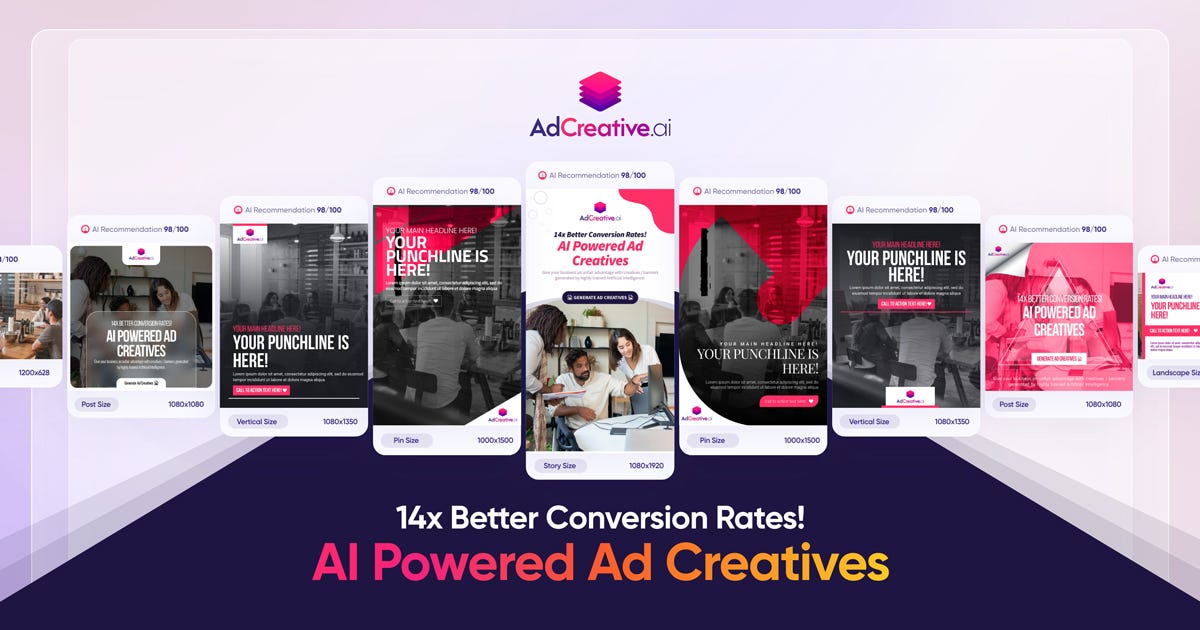
AdCreative.ai is an advanced AI-powered marketing platform that helps users generate high-conversion creatives, ad copy, and visual assets instantly. Leveraging artificial intelligence and data-driven design principles, AdCreative.ai creates compelling ad variations optimized for performance on platforms like Facebook, Instagram, TikTok, Google, and YouTube . AdCreative.ai is widely used by marketers, business owners, performance teams, and advertisers who want to boost engagement, reduce design time, and maximize ROI through intelligent creative automation . What Is AdCreative.ai? AdCreative.ai is an AI creative generation tool that produces multiple versions of ad visuals, headlines, captions, and marketing banners based on input prompts, product descriptions, target audience insights, and campaign goals. Instead of spending hours designing creatives manually, users can generate performance-focused assets in minutes . Key Features of AdCreative.ai AI-generated ad visuals and creatives Automated headline and caption writing Conversion-focused design templates Multiple ad variants for A/B testing Style and brand asset consistency Integration with ad platforms (Meta, Google, TikTok, etc.) Data-driven optimization and predictive insights Export in multiple formats ready for ad platforms Why People Use AdCreative.ai Manual creative design and copywriting can be time-intensive and costly. AdCreative.ai automates both visual and text components of advertising , allowing users to focus on strategy and campaign optimization rather than repetitive design work. Marketers use AdCreative.ai to produce more ad variants quickly, improve click-through rates, and increase conversion outcomes . Popular Use Cases Facebook and Instagram ad creatives TikTok and YouTube video thumbnails and banners Google Display Network visuals E-commerce product ad creatives Seasonal and promotional campaigns A/B testing of ads at scale Benefits of AdCreative.ai Save time on design and copywriting Generate more variations for testing Improve campaign performance with AI insights Maintain brand consistency across creatives Suitable for teams and solo marketers Faster ad deployment and iteration Who Should Use AdCreative.ai? Digital marketers and advertisers E-commerce store owners Social media managers Performance marketing teams Freelancers and agencies Entrepreneurs running paid campaigns Frequently Asked Questions What does AdCreative.ai do? AdCreative.ai uses AI to automatically generate high-conversion ad creatives and marketing assets including visuals, headlines, and captions. Can AdCreative.ai create ads for multiple platforms? Yes, AdCreative.ai supports creative generation for platforms like Facebook, Instagram, Google, TikTok, and YouTube . Do I need design skills to use AdCreative.ai? No. AdCreative.ai generates professional designs without requiring manual graphic design expertise. Can I export creatives directly to ad platforms? Most tools allow export in ad-ready formats , but platform integration options may vary. Does AdCreative.ai help with A/B testing? Yes. AdCreative.ai can generate multiple ad variants for testing and optimization. AdCreative.ai, AI Ad Creative Generator, AI Marketing Tool, AI Ad Design, Automated Ad Creator, Ad Copy AI, Performance-Driven Creative Tool

Solvely is an innovative suite of AI Study Tools designed to empower students with intelligent assistance for homework and exam preparation. This revolutionary platform leverages AI-powered photo analysis, allowing students to simply snap a picture of their assignment or question and receive instant, comprehensive solutions across various subjects. Solvely transforms the learning experience by providing immediate explanations and step-by-step guidance, making complex concepts easier to understand and master. Whether you're struggling with math problems, science equations, or literary analysis, Solvely offers on-demand support that complements traditional learning methods. It acts as a personal tutor available 24/7, helping students clarify doubts, verify answers, and deepen their understanding before exams. By integrating Solvely into their study routine, students can boost their academic performance, manage their homework more efficiently, and build greater confidence in their abilities across all academic disciplines.

Casablanca is an innovative AI-powered video conferencing tool designed to enhance user engagement and professionalism during virtual meetings by simulating natural eye contact. The tool addresses the common challenge of maintaining connection and building rapport in remote communication, where itΓÇÖs difficult to replicate the non-verbal cues present in in-person interactions. Casablanca leverages artificial intelligence and subtle image manipulation to adjust a userΓÇÖs webcam feed, creating the impression of direct eye contact with other participants, even when the user is looking at notes or other on-screen content. This is particularly valuable for professionals, educators, and anyone who spends significant time in video calls and seeks to improve their virtual presence . It offers a solution for those seeking to improve remote communication , online meetings , and video conferencing etiquette . Key Features of Casablanca Subtle eye contact correction in real-time. Compatibility with popular video conferencing platforms. Adjustable intensity of the eye contact effect. Automatic face detection and tracking. User-friendly interface for easy setup and control. Option to disable the effect when not desired. Low system resource usage for minimal performance impact. Available as a downloadable application for desktop use. Why People Use Casablanca Individuals and organizations utilize Casablanca to overcome the limitations of traditional video conferencing, where maintaining consistent eye contact is often difficult. Unlike simply looking directly at the camera, which can feel unnatural and disrupt workflow, Casablanca subtly adjusts the userΓÇÖs gaze, creating a more engaging and authentic experience for those on the receiving end. This leads to improved communication, stronger rapport, and increased confidence during virtual interactions. The tool allows users to present themselves more effectively without the cognitive load of constantly focusing on the camera, resulting in a more natural and productive meeting experience. ItΓÇÖs a significant improvement over relying on conscious effort to maintain eye contact, which can be tiring and distracting. Popular Use Cases Sales Professionals: Enhance client relationships and build trust during virtual presentations and meetings. Educators: Improve student engagement and create a more personal learning environment in online classes. Remote Teams: Foster stronger connections and collaboration among team members working remotely. Customer Support Representatives: Build rapport and provide more empathetic support during video calls. Public Speakers: Deliver more impactful presentations and connect with audiences on a deeper level. Job Interviewees: Project confidence and make a positive impression during virtual interviews. Online Coaches & Consultants: Establish a stronger connection with clients during virtual coaching sessions. Healthcare Professionals: Improve patient communication and build trust during telehealth appointments. Benefits of Casablanca Increased Engagement: Captures and maintains the attention of meeting participants. Enhanced Professionalism: Projects a confident and polished image during virtual interactions. Improved Communication: Facilitates clearer and more effective communication. Stronger Rapport: Builds trust and connection with others. Reduced Cognitive Load: Allows users to focus on content rather than constantly monitoring eye contact. Greater Authenticity: Creates a more natural and engaging virtual presence. Boosted Confidence: Empowers users to present themselves more effectively. Seamless Integration: Works with existing video conferencing tools without requiring significant changes to workflow.

Blend AI is an innovative AI productivity platform that streamlines workflows by integrating multiple artificial intelligence tools into a single, unified interface. It addresses the challenge of managing numerous AI subscriptions and switching between different platforms, offering a centralized hub for diverse AI-powered tasks. Blend AI utilizes artificial intelligence to connect and orchestrate various AI models, providing a seamless experience for users seeking to enhance their productivity. This tool is designed for professionals, marketers, content creators, and anyone looking to leverage the power of AI without the complexity of managing multiple subscriptions and interfaces. Key Features of Blend AI Integrates a wide range of AI models and tools. Offers a unified dashboard for accessing all connected AI services. Provides a streamlined workflow for executing AI-powered tasks. Supports both text and image-based AI applications. Enables users to manage AI subscriptions in one place. Facilitates collaboration by sharing AI workflows and results. Allows for custom AI tool integrations via API. Offers a user-friendly interface for both beginners and advanced users. Provides detailed usage analytics for tracking AI consumption. Supports multiple user accounts for team collaboration. Why People Use Blend AI Individuals and teams adopt Blend AI to overcome the fragmentation inherent in the current AI landscape. Traditionally, users needing to perform diverse AI tasks ΓÇô such as generating text, editing images, or analyzing data ΓÇô would be required to subscribe to and navigate multiple, separate AI platforms. This process is time-consuming, costly, and often leads to context switching that diminishes productivity. Blend AI solves this problem by providing a single point of access to a curated collection of AI tools. This consolidation simplifies workflows, reduces administrative overhead, and allows users to focus on their core tasks rather than managing AI infrastructure. The platformΓÇÖs unified interface and streamlined processes result in significant time savings and increased efficiency, making it a valuable asset for anyone seeking to maximize the benefits of artificial intelligence. Popular Use Cases Content Creation: Marketing teams utilize Blend AI to generate blog posts, social media copy, and marketing materials using integrated AI writing tools. Image Editing & Generation: Graphic designers and content creators leverage AI-powered image editing and generation features for creating visuals. Data Analysis: Analysts and researchers employ Blend AI to analyze datasets and extract insights using integrated AI analytics tools. Social Media Management: Social media managers use Blend AI to schedule posts, generate captions, and analyze engagement metrics. Customer Support: Businesses integrate Blend AI with customer support platforms to automate responses and improve customer satisfaction. E-commerce: Online retailers use Blend AI to generate product descriptions, optimize listings, and personalize customer experiences. Academic Research: Students and researchers utilize Blend AI for literature reviews, data analysis, and report writing. Personal Productivity: Individuals use Blend AI to automate tasks, manage information, and enhance their daily workflows. Software Development: Developers use Blend AI to generate code snippets, debug programs, and automate testing processes. Translation Services: Professionals utilize Blend AI to translate documents and communications into multiple languages. Benefits of Blend AI Increased Productivity: Streamlined workflows and centralized access to AI tools significantly reduce the time required to complete tasks. Cost Savings: Consolidating AI subscriptions into a single platform can lower overall expenses. Simplified Management: A unified dashboard simplifies the management of AI tools and subscriptions. Enhanced Collaboration: Shared workflows and results facilitate teamwork and knowledge sharing. Improved Efficiency: Automated tasks and intelligent workflows free up users to focus on higher-value activities. Greater Flexibility: The ability to integrate custom AI tools via API provides greater control and customization. Reduced Complexity: A user-friendly interface makes AI accessible to users of all skill levels. Data-Driven Insights: Usage analytics provide valuable insights into AI consumption and performance. Scalability: The platform can easily scale to accommodate growing AI needs. Centralized Access: Provides a single source of truth for all AI-related activities, eliminating the need to switch between multiple applications.

Flux LoRA – Efficient AI Model Fine-Tuning with Low-Rank Adaptation Flux LoRA is a powerful approach that combines the Flux machine learning framework with LoRA (Low-Rank Adaptation) to enable efficient, scalable, and cost-effective fine-tuning of large AI models . It is widely used by developers, researchers, and AI engineers who want to customize pretrained models without the heavy computational cost of full model retraining. Flux LoRA is especially popular in areas like text-to-image generation, large language models (LLMs), computer vision, and multimodal AI , where training entire models from scratch is expensive and time-consuming. What Is Flux LoRA? Flux LoRA leverages Low-Rank Adaptation , a modern fine-tuning technique where small trainable matrices are injected into a pretrained model , while the original model weights remain frozen. Instead of updating billions of parameters, LoRA updates only a small number of low-rank parameters , drastically reducing memory usage and training time. The Flux framework provides a flexible and high-performance environment for building and experimenting with neural networks, making Flux LoRA a preferred choice for research-grade and production-ready AI workflows . How Flux LoRA Works A large pretrained AI model is loaded (text, image, or multimodal). LoRA layers are added to selected model components (such as attention layers). Only LoRA parameters are trained on new or custom data. The base model remains unchanged, preserving its original knowledge. The resulting LoRA weights can be saved, shared, or merged for deployment. This approach allows fast adaptation with minimal resources , even on consumer-grade GPUs. Key Features of Flux LoRA Lightweight fine-tuning of large AI models Extremely low GPU and memory requirements Faster training compared to full fine-tuning Maintains original pretrained model quality Easy sharing and reuse of LoRA weights Supports experimentation and rapid iteration Ideal for domain-specific AI customization Why Developers Use Flux LoRA Traditional fine-tuning requires massive computational resources , making it impractical for individuals or small teams. Flux LoRA solves this by allowing developers to adapt models efficiently , enabling innovation without high infrastructure costs. It is widely used in open-source AI communities , research labs, and startups to build custom AI solutions faster and cheaper. Popular Use Cases Text-to-image and image style customization Fine-tuning large language models for niche domains Custom AI assistants and chatbots Vision models for specific object detection tasks Multimodal AI adaptation Rapid AI prototyping and experimentation Personalized generative AI workflows Benefits of Flux LoRA Reduces training costs dramatically Enables fine-tuning on limited hardware Preserves pretrained model intelligence Faster development and deployment cycles Scalable for research and production use Encourages experimentation and innovation Who Should Use Flux LoRA? AI developers and engineers Machine learning researchers Startup teams building AI products Open-source contributors Creators customizing generative AI Anyone with limited GPU resources Frequently Asked Questions (FAQ) ❓ What does LoRA stand for? LoRA stands for Low-Rank Adaptation , a technique that fine-tunes large AI models by training only a small set of additional parameters instead of updating the full model. ❓ Is Flux LoRA better than full fine-tuning? For most use cases, yes. Flux LoRA is faster, cheaper, and more memory-efficient than full fine-tuning while still achieving strong performance. ❓ Can Flux LoRA be used with image generation models? Yes. Flux LoRA is commonly used in text-to-image and image generation models to apply styles, characters, or domain-specific visual behavior. ❓ Do I need a high-end GPU to use Flux LoRA? No. One of the biggest advantages of Flux LoRA is that it can run on low to mid-range GPUs , making it accessible to more users. ❓ Are LoRA models reusable? Yes. LoRA weights are lightweight and portable , making them easy to share, reuse, and combine with other models. ❓ Is Flux LoRA suitable for production use? Yes. Flux LoRA is suitable for both research and production environments , especially when scalability and efficiency are required. Flux LoRA, LoRA Fine-Tuning, Low-Rank Adaptation AI, Flux Machine Learning, AI Model Fine-Tuning, Custom AI Models, Efficient AI Training, LoRA AI Models

Fontjoy is an AI-powered font pairing tool that helps designers and creatives discover harmonious and aesthetically pleasing font combinations with ease. It addresses the challenge of selecting fonts that complement each other, a process that can be time-consuming and require significant design expertise. Fontjoy utilizes machine learning algorithms to analyze font characteristics and generate pairings based on principles of visual balance and readability. This tool is particularly valuable for graphic designers, web developers, marketers, and anyone involved in visual communication who seeks to elevate their projects through thoughtful typography. It streamlines the font selection process, offering inspiration and ensuring visually appealing results. Key Features of Fontjoy Generates font pairings using AI algorithms. Allows users to filter fonts by category (serif, sans-serif, display, handwriting, monospace). Provides real-time previews of font combinations. Offers adjustable font weights and styles within pairings. Enables users to lock specific fonts to refine pairings. Supports searching for fonts by name. Allows users to create and save custom font collections. Provides a color palette generator to complement font pairings. Offers a history of generated pairings for revisiting options. Displays font information, including designer and licensing details. Why People Use Fontjoy Individuals and professionals utilize Fontjoy to overcome the complexities of font pairing. Traditionally, selecting fonts that work well together relied heavily on design intuition and experience. This process could be subjective, time-intensive, and prone to inconsistencies. Fontjoy offers a data-driven approach, leveraging artificial intelligence to suggest pairings that adhere to established design principles. This not only saves time but also introduces users to font combinations they might not have considered otherwise. The tool democratizes good design, making it accessible to those without extensive typography knowledge. By automating the initial stages of font selection, Fontjoy allows users to focus on the broader creative aspects of their projects, enhancing overall efficiency and design quality. ItΓÇÖs a valuable resource for maintaining brand consistency and creating visually engaging content across various platforms. Popular Use Cases Web Design: Designers use Fontjoy to quickly establish a cohesive typographic hierarchy for websites, ensuring readability and visual appeal. Graphic Design: Professionals employ the tool for creating marketing materials, logos, and branding assets, streamlining the font selection process for diverse projects. Marketing & Advertising: Marketers leverage Fontjoy to develop visually compelling advertisements and social media graphics that capture attention and reinforce brand identity. Content Creation: Bloggers, writers, and content creators utilize the tool to enhance the visual presentation of their work, improving readability and engagement. Presentation Design: Individuals creating presentations use Fontjoy to select font pairings that are both professional and visually engaging, enhancing the impact of their message. UI/UX Design: Designers working on user interfaces use Fontjoy to ensure that fonts are legible, accessible, and contribute to a positive user experience. Book Cover Design: Authors and designers use Fontjoy to create visually appealing book covers that attract readers and reflect the genre and tone of the book. Educational Materials: Educators use Fontjoy to create visually engaging learning materials, improving student comprehension and retention. Personal Projects: Hobbyists and individuals undertaking personal design projects use Fontjoy to explore different font combinations and enhance their creative endeavors. Brand Guideline Development: Companies use Fontjoy to establish and document consistent font pairings as part of their brand guidelines. Benefits of Fontjoy Saves Time: Significantly reduces the time spent searching for and evaluating font combinations. Enhances Design Quality: Provides access to aesthetically pleasing and well-balanced font pairings. Inspires Creativity: Introduces users to new font combinations they may not have considered. Improves Readability: Helps select fonts that are legible and easy to read across various mediums. Maintains Brand Consistency: Facilitates the selection of fonts that align with brand guidelines. Democratizes Design: Makes good typography accessible to users of all skill levels. Streamlines Workflow: Integrates seamlessly into the design process, simplifying font selection. Offers Versatility: Supports a wide range of design projects, from web design to print materials. Provides a Data-Driven Approach: Leverages AI to suggest pairings based on design principles. Facilitates Exploration: Allows users to experiment with different font combinations and refine their choices.
ChatSpot is an AI-powered chatbot designed to help users access and interact with data from various sources directly through conversational commands. It solves the problem of needing to navigate multiple applications and interfaces to retrieve information, streamlining workflows and boosting productivity. ChatSpot utilizes large language models (LLMs) and natural language processing (NLP) to understand user requests and deliver relevant responses. This tool is particularly valuable for professionals who frequently work with data across different platforms, including marketers, analysts, and business owners seeking AI-driven data analysis and automation . Key Features of ChatSpot Connects to various data sources including Google Analytics, Google Ads, Facebook Ads, and more. Allows users to ask questions in natural language to retrieve data insights. Generates reports and visualizations based on user queries. Provides data summaries and key performance indicators (KPIs). Offers the ability to perform data manipulation and calculations within the chat interface. Supports exporting data in various formats. Enables users to schedule reports and receive automated data updates. Integrates with popular spreadsheet applications like Google Sheets. Offers a user-friendly conversational interface for data interaction. Provides a Chrome extension for easy access to data within existing workflows. Why People Use ChatSpot Individuals and teams adopt ChatSpot to overcome the inefficiencies of traditional data analysis methods. Previously, extracting insights from multiple platforms required logging into each system, running separate reports, and manually consolidating the information. This process was time-consuming, prone to errors, and often delayed decision-making. ChatSpot centralizes data access, allowing users to query information from various sources using simple, natural language commands. This significantly reduces the time and effort required for data analysis, enabling faster, more informed decisions. The toolΓÇÖs conversational interface makes data exploration accessible to users without requiring advanced technical skills in data science or analytics. It empowers users to quickly understand key trends, identify opportunities, and optimize their strategies based on real-time data. Popular Use Cases Marketing Analytics: Marketers can use ChatSpot to quickly analyze campaign performance across Google Ads, Facebook Ads, and other platforms, identifying top-performing ads, tracking key metrics like cost-per-acquisition, and optimizing ad spend. E-commerce Reporting: E-commerce businesses can leverage ChatSpot to monitor sales data, track customer behavior, and identify product trends, enabling them to make data-driven decisions about inventory management and marketing promotions. SEO Performance Monitoring: SEO professionals can use ChatSpot to track website traffic, keyword rankings, and other SEO metrics, identifying areas for improvement and measuring the effectiveness of their SEO strategies. Social Media Analysis: Social media managers can utilize ChatSpot to analyze social media engagement, track follower growth, and identify trending topics, informing their content strategy and audience engagement efforts. Business Performance Tracking: Business owners and managers can use ChatSpot to monitor key business metrics, track progress towards goals, and identify areas where performance needs improvement. Financial Reporting: Financial analysts can use ChatSpot to quickly access and analyze financial data, generate reports, and identify trends, supporting informed investment decisions. Content Performance Analysis: Content creators can use ChatSpot to analyze the performance of their content, track engagement metrics, and identify topics that resonate with their audience. Customer Data Insights: Businesses can use ChatSpot to analyze customer data, identify customer segments, and personalize marketing messages, improving customer engagement and loyalty. Competitive Analysis: Marketers can use ChatSpot to gather and analyze data about competitors, identifying their strengths and weaknesses and informing their competitive strategies. Data-Driven Presentations: Professionals can use ChatSpot to quickly generate data summaries and visualizations for presentations, enhancing their ability to communicate insights effectively. Benefits of ChatSpot Increased Efficiency: ChatSpot streamlines data analysis by providing a single interface for accessing and querying information from multiple sources, saving users significant time and effort. Improved Decision-Making: By providing quick and easy access to data insights, ChatSpot empowers users to make more informed decisions based on real-time information. Enhanced Productivity: The toolΓÇÖs conversational interface and automated reporting capabilities free up users to focus on higher-value tasks, boosting overall productivity. Greater Data Accessibility: ChatSpot makes data analysis accessible to users without requiring advanced technical skills, democratizing data insights within organizations. Reduced Errors: Automating data retrieval and analysis minimizes the risk of human error, ensuring data accuracy and reliability. Scalable Data Analysis: ChatSpot can handle large volumes of data, making it suitable for businesses of all sizes. Simplified Reporting: The toolΓÇÖs automated reporting features simplify the process of generating reports and sharing insights with stakeholders. Proactive Insights: Scheduled reports and automated data updates ensure users stay informed about key trends and changes in their data. Seamless Integration: ChatSpot integrates with popular data sources and spreadsheet applications, streamlining workflows and maximizing compatibility. Cost-Effective Solution: As a free tool, ChatSpot provides a cost-effective way to access powerful data analysis capabilities without requiring significant investment.

Kvistly is an innovative AI-powered platform designed to revolutionize how organizations create and utilize quizzes for training, team building, and engagement. Leveraging cutting-edge artificial intelligence, Kvistly makes it incredibly simple to generate dynamic and interactive quizzes tailored to specific learning objectives or team dynamics. This tool is invaluable for HR professionals, trainers, educators, and team leaders who seek to enhance knowledge retention, foster collaboration, and boost overall engagement in a fun and effective manner. With Kvistly, you can transform mundane training sessions into lively, interactive experiences, or turn team meetings into engaging challenges that strengthen bonds and encourage participation. The AI-driven quiz generation ensures relevance and quality, saving significant time in content creation. Beyond just quizzing, Kvistly provides insights into participant performance and engagement, helping organizations refine their strategies for better outcomes. Elevate your training programs and team activities with Kvistly's intelligent and engaging quiz solutions.

Khroma is an AI-powered color palette generator that assists designers and creatives in discovering and utilizing harmonious color schemes tailored to their individual preferences. It addresses the challenge of initial creative block when starting a design project, specifically the difficulty of selecting a suitable color palette. Khroma leverages machine learning and neural networks to learn a userΓÇÖs aesthetic tastes and generate an endless supply of unique and personalized color combinations. This tool is designed for graphic designers, web developers, interior designers, artists, and anyone seeking inspiration for color schemes in their projects. Key Features of Khroma Generates infinite, personalized color palettes based on user preferences. Utilizes a neural network trained on a vast database of colors. Allows users to rate color combinations to refine the AIΓÇÖs understanding of their taste. Offers palette previews in various contexts, including typography and gradients. Enables users to test palettes with custom images to visualize real-world applications. Provides a simple and intuitive interface for exploring and saving color schemes. Allows users to lock specific colors within a palette to maintain consistency. Offers the ability to export palettes in multiple formats for use in design software. Facilitates the discovery of unexpected and inspiring color combinations. Stores user preferences for consistent palette generation over time. Why People Use Khroma Individuals and professionals often struggle with the initial stages of design, particularly when it comes to color selection. Traditionally, designers rely on pre-made palettes, color theory principles, or extensive trial and error to find suitable color combinations. These methods can be time-consuming, limiting, and may not always align with a specific projectΓÇÖs aesthetic goals. Khroma streamlines this process by employing artificial intelligence to learn a userΓÇÖs individual color preferences. By training a neural network on colors a user likes, Khroma eliminates the guesswork and provides a continuous stream of harmonious palettes. This results in significant time savings, reduces creative frustration, and expands the possibilities for unique and personalized designs. Unlike generic palette generators, Khroma adapts to the user, becoming more accurate and insightful with each interaction. The toolΓÇÖs ability to preview palettes in realistic contexts further enhances its value, allowing users to confidently apply color schemes to their projects. Popular Use Cases Graphic Design: Generating color palettes for logos, branding materials, marketing collateral, and illustrations. Web Development: Creating color schemes for websites, user interfaces, and digital products. Interior Design: Discovering harmonious color combinations for room decor, furniture selection, and architectural projects. Fashion Design: Inspiring color palettes for clothing lines, accessories, and textile patterns. Art & Illustration: Providing a starting point for paintings, drawings, and digital artwork. Marketing & Advertising: Developing visually appealing color schemes for campaigns and promotional materials. User Interface (UI) Design: Creating accessible and aesthetically pleasing color palettes for mobile and web applications. Brand Identity Development: Establishing a consistent and memorable color palette for a brandΓÇÖs visual identity. Content Creation: Selecting color schemes for social media graphics, presentations, and blog posts. Personal Projects: Assisting individuals with color selection for home decor, DIY projects, and personal artwork. Benefits of Khroma Enhanced Creativity: Khroma inspires new ideas and expands the possibilities for color exploration. Time Savings: The AI-powered palette generation significantly reduces the time spent on color selection. Personalized Results: Palettes are tailored to individual preferences, ensuring aesthetic alignment. Improved Design Quality: Harmonious color combinations enhance the visual appeal and effectiveness of designs. Reduced Creative Block: Khroma overcomes the ΓÇ£blank pageΓÇ¥ problem by providing a constant source of inspiration. Increased Efficiency: Streamlined workflow allows designers to focus on other aspects of their projects. Consistent Branding: Facilitates the creation of a cohesive and recognizable brand identity through consistent color usage. Accessibility: The tool is free to use, making it accessible to a wide range of users. Versatility: Applicable to a diverse range of design disciplines and creative projects. Continuous Learning: The AI adapts and improves its palette generation based on user feedback.

Visual Electric is an innovative AI image generator designed to empower creatives with a spatially intuitive and non-linear workflow for visual exploration and development. It addresses the limitations of traditional text-to-image tools by offering an infinite canvas environment that mirrors the organic nature of the creative process. Utilizing generative AI , Visual Electric allows users to rapidly prototype, remix, and iterate on visual ideas, making it ideal for designers, artists, and anyone involved in visual storytelling. This tool solves the problem of rigid, linear workflows in AI image generation. Existing solutions often require precise prompting and offer limited flexibility for exploring variations and branching out ideas. Visual Electric provides a more fluid and intuitive experience, enabling users to visually organize and manipulate generated images in a way that closely resembles traditional creative methods like mood boards and sketching. ItΓÇÖs particularly valuable for those seeking to overcome creative blocks, explore multiple concepts simultaneously, and refine visual ideas through spatial arrangement and iterative refinement. Key Features of Visual Electric Generates images from text prompts. Offers an infinite canvas for spatial organization of images. Allows for remixing and combining of generated images. Enables exploration of variations through iterative prompting. Provides a visually intuitive interface for creative workflows. Supports image uploads for use as starting points or inspiration. Facilitates branching out of ideas with multiple image streams. Offers real-time image generation and updates. Allows for easy duplication and modification of existing images. Provides a collaborative workspace for team projects. Why People Use Visual Electric Individuals and teams are adopting Visual Electric to overcome the constraints of conventional AI image generation tools. Traditional methods often require a precise understanding of prompting techniques and can be frustrating when attempting to explore a wide range of visual concepts. Visual Electric offers a more natural and intuitive approach, mirroring the way creatives typically work ΓÇô by gathering inspiration, sketching ideas, and iteratively refining concepts. The platformΓÇÖs infinite canvas allows users to visually map out their creative process, branching out from initial ideas and exploring variations without being limited by a linear sequence of prompts. This spatial organization fosters serendipitous discoveries and allows for a more holistic understanding of the visual landscape. Compared to manually creating mood boards or iterating on designs in traditional software, Visual Electric significantly accelerates the creative workflow, enabling faster prototyping and more efficient exploration of visual possibilities. ItΓÇÖs a tool designed to augment, not replace, the creative mind. Popular Use Cases Graphic Design: Rapidly prototyping logo concepts, exploring color palettes, and generating visual assets for branding projects. UI/UX Design: Creating mood boards, visualizing user interface elements, and iterating on design layouts. Illustration: Developing character designs, exploring different art styles, and generating visual concepts for illustrations. Storyboarding: Quickly visualizing scenes and compositions for film, animation, and comics. Marketing & Advertising: Generating visual content for social media campaigns, website banners, and marketing materials. Fashion Design: Exploring textile patterns, visualizing garment designs, and creating mood boards for collections. Architectural Visualization: Generating conceptual renderings and exploring different design options. Game Development: Creating concept art, texture variations, and visual assets for game environments. Creative Writing: Visualizing scenes and characters to inspire and enhance storytelling. Art Education: Teaching visual design principles and exploring the possibilities of AI-assisted creativity. Benefits of Visual Electric Accelerated Creative Workflow: Significantly reduces the time spent on initial concept development and visual exploration. Enhanced Creative Exploration: Facilitates the discovery of unexpected ideas and visual possibilities through spatial arrangement and iterative refinement. Improved Visual Communication: Enables clear and effective communication of visual concepts to clients and collaborators. Increased Design Iteration: Allows for rapid prototyping and experimentation with different design variations. Intuitive User Experience: Provides a visually intuitive interface that requires minimal training and is accessible to users of all skill levels. Streamlined Collaboration: Offers a collaborative workspace for teams to share ideas, provide feedback, and co-create visual content. Overcoming Creative Blocks: Provides a stimulating environment for generating new ideas and breaking through creative barriers. Spatial Organization of Ideas: The infinite canvas allows for a more holistic and organized approach to visual thinking. Seamless Remixing and Combination: Easily combine and modify generated images to create unique and compelling visuals. Empowered Creative Control: Offers a greater degree of control over the creative process compared to traditional text-to-image tools.

The Chrome Web Store is GoogleΓÇÖs official marketplace for browser extensions and themes created for the Google Chrome browser. It serves as a central hub where users can discover, install, manage, and update tools that extend ChromeΓÇÖs functionality and personalize the browsing experience. As of 2025, the Chrome Web Store has grown into a large-scale ecosystem supporting millions of users and developers worldwide. It plays a critical role in transforming Chrome from a basic web browser into a powerful platform for productivity, creativity, security, and AI-driven workflows. What Is the Chrome Web Store? The Chrome Web Store is an online platform maintained by Google that hosts: Browser extensions Chrome themes Web-based productivity tools Extensions available on the store can modify website behavior, automate repetitive tasks, enhance security, assist with content creation, or integrate advanced technologies such as artificial intelligence directly into the browser. Users can browse extensions by category, popularity, ratings, or featured recommendations, making it easy to find tools that suit specific needs. Evolution of the Chrome Web Store Initially launched as a simple extension directory, the Chrome Web Store has evolved significantly over the years. In recent updates, Google has improved: Search and discovery features Extension review and moderation systems Developer policies and transparency requirements The most notable change in recent years has been the rapid adoption of AI-powered extensions , which now dominate many of the most popular categories. AI-Powered Extensions in 2025 Artificial intelligence has become a major driver of growth in the Chrome Web Store. AI extensions enable users to perform advanced tasks directly within the browser without switching tools. Common AI-powered use cases include: Web page summarization and content analysis Writing assistance, grammar correction, and rewriting Research and note-taking automation Code generation and debugging support Language translation and learning These extensions turn the browser into an intelligent assistant, improving efficiency for professionals, students, and creators. Key Categories in the Chrome Web Store The Chrome Web Store organizes extensions into several major categories: Productivity Includes tools for task management, tab organization, meeting transcription, time tracking, and workflow optimization. Security and Privacy Features ad blockers, tracker blockers, password managers, VPN extensions, and phishing protection tools. Developer Tools Provides debugging utilities, performance monitors, API testers, and code inspection tools for web developers. Shopping and Finance Includes price trackers, coupon finders, cashback tools, and deal comparison extensions. Education and Learning Offers language learning tools, study assistants, note-taking extensions, and exam preparation aids. Personalization and Themes Allows users to customize the look and feel of the Chrome browser with visual themes and layouts. Chrome Web Store for Developers The Chrome Web Store also serves as a distribution and monetization platform for developers. Developers can publish extensions and reach a global audience with minimal infrastructure requirements. Monetization options include: Free extensions with premium features Subscription-based models One-time purchases Google provides analytics, performance insights, and policy guidelines to help developers maintain high-quality extensions and improve user trust. Security, Privacy, and Trust Security remains a key focus area for the Chrome Web Store. While Google actively reviews and removes malicious extensions, users must also take responsibility for managing their installed tools. Best practices for users include: Reviewing extension permissions before installation Installing extensions from trusted developers Removing unused or outdated extensions Keeping extensions updated Google continues to strengthen its extension policies to ensure transparency around data collection and usage. User Experience and Interface Improvements Recent updates to the Chrome Web Store interface have focused on: Clearer permission information Better categorization and filtering Highlighting trusted and featured extensions Improved mobile and desktop usability These improvements aim to help users make informed decisions while browsing the store. Importance of the Chrome Web Store in the Modern Web The Chrome Web Store plays a vital role in how people interact with the internet today. For many users, Chrome extensions are essential tools for: Remote work and collaboration Online learning and research Digital marketing and content creation Secure and efficient browsing By enabling deep customization and automation, the Chrome Web Store has become a foundational part of the modern web ecosystem. Future Outlook Looking ahead, the Chrome Web Store is expected to continue evolving with: Deeper integration of on-device AI models Smarter permission and security systems Greater support for enterprise and professional users More personalized extension recommendations As browsers increasingly function as digital workspaces, the Chrome Web Store will remain a central platform for innovation and user empowerment. The Chrome Web Store is more than an extension marketplaceΓÇöit is a critical ecosystem that enhances how millions of people use the web every day. With its growing focus on AI, productivity, security, and developer innovation, the Chrome Web Store continues to shape the future of browser-based experiences in 2025 and beyond.

 Android
 IOS
IOS Mini Tools
 Software
 Web
Web