AI Inspo | Image to Video GeneratorvsImageToClip.com
Side-by-side battle & analysis. Compare features, pricing, real community ratings, and pros & cons in 2026.

AI Inspo | Image to Video Generator
Turn your still images into captivating, dynamic videos in seconds with seamless AI-powered animation tools.

ImageToClip.com
Make any photo move with this dedicated AI image-to-video generator.
Quick Verdict & Takeaway
Head-to-head summary recommendation
Both AI Inspo | Image to Video Generator and ImageToClip.com provide high-performance solutions in the Image to Video ecosystem. Both platforms are top-rated in their respective categories.
Choose AI Inspo | Image to Video Generator if:
You need a mixed tool optimized for Image to 3D Video with IMAGE input formats.
Choose ImageToClip.com if:
You prefer a subscription platform geared towards Photo Animation with VIDEO output options.
Specification & Feature Matrix
Direct technical comparison between AI Inspo | Image to Video Generator and ImageToClip.com
| Feature / Spec | AI Inspo | Image to Video Generator | ImageToClip.com |
|---|---|---|
| Pricing Model | MIXED | SUBSCRIPTION |
| Starting Price | $7.9/mo | $3/mo |
| Category | Image to Video | Image to Video |
| Subcategory | Image to 3D Video | Photo Animation |
| Supported Inputs | IMAGE | IMAGE |
| Generated Outputs | VIDEO | VIDEO |
| User Rating | ★ 4.0 / 5.0 (0) | ★ 4.0 / 5.0 (0) |
| Verified Status | Unverified | Unverified |
Interface & UI Showcase
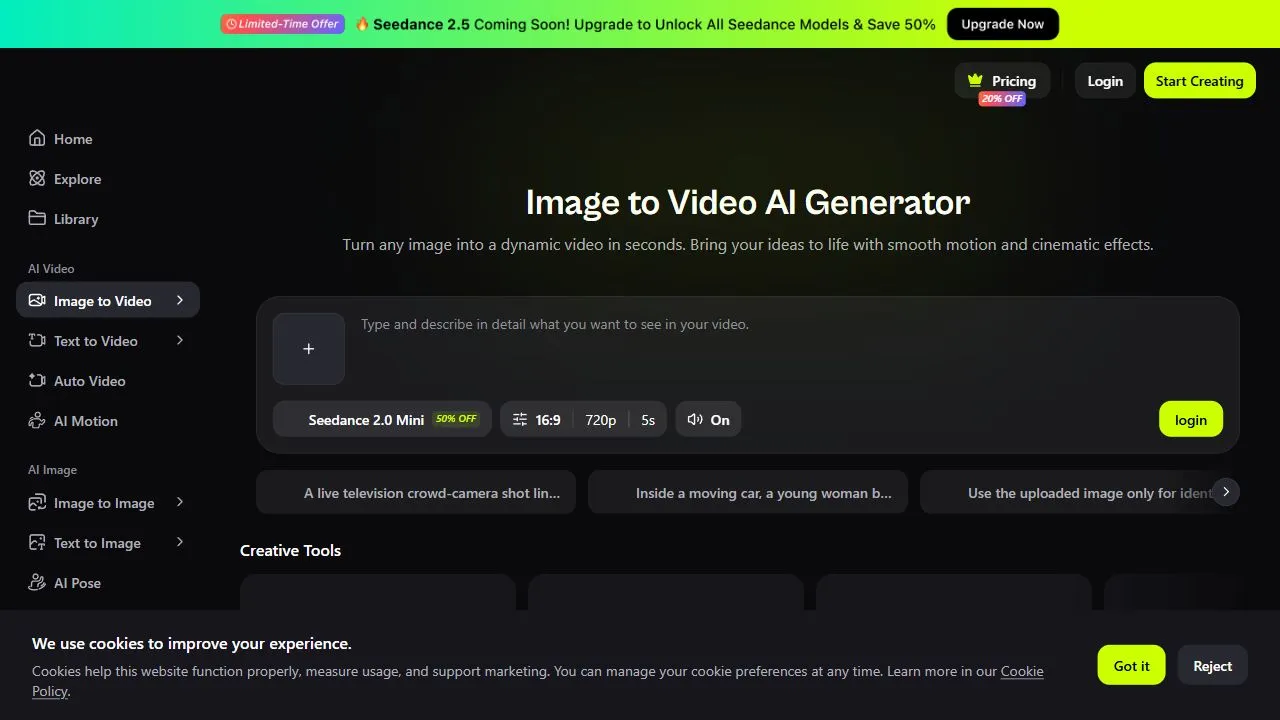
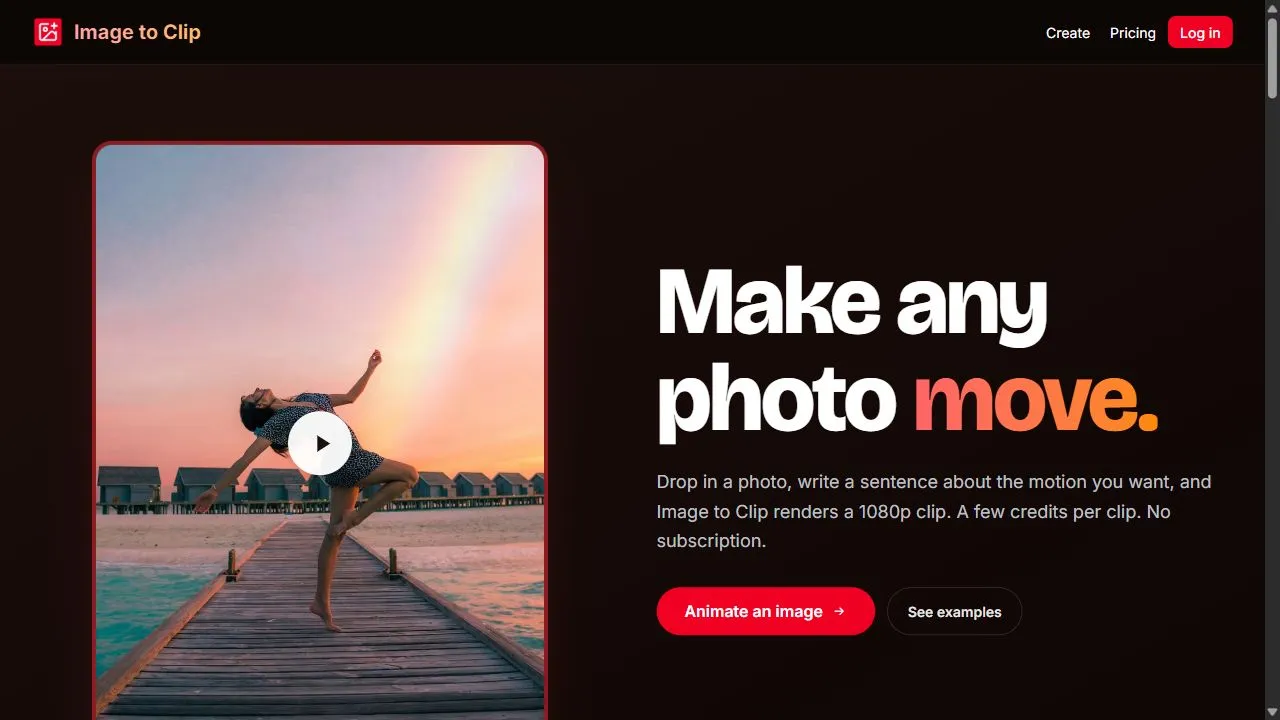
Visual previews and interface screenshots
AI Inspo | Image to Video Generator Interface
ImageToClip.com Interface
Pros & Cons Comparison
AI Inspo | Image to Video Generator Pros & Cons
Strengths
- Fast rendering speeds
- Highly realistic motion
- Simple interface
Limitations
- Video length limitations in lower tiers
ImageToClip.com Pros & Cons
Strengths
- Simple and direct
- Affordable starting price
Limitations
- Limited editing features
About AI Inspo | Image to Video Generator
AI Inspo | Image to Video Generator is an advanced AI-powered animation tool designed to transform static images into high-quality, dynamic videos by leveraging artificial intelligence, spatial depth analysis, and motion synthesis . The tool solves the common problem of static content fatigue in digital marketing, where still images often fail to capture attention in fast-paced social media environments. By automating the complex process of cinematography and motion graphics, it allows users to create cinematic visual assets without requiring a background in professional video editing or expensive hardware. The platform utilizes sophisticated AI models that analyze the visual composition and spatial depth of an uploaded image to determine how elements should realistically move. This ensures that the resulting animation is not a simple zoom or pan, but a contextually aware motion that respects the laws of physics and perspective. This technology is primarily built for content creators, social media managers, digital marketers, and graphic designers who need to scale their video production and increase audience engagement through automated image-to-video generation . By integrating intelligent workflows and neural networks , AI Inspo bridges the gap between traditional photography and modern video production. It enables the creation of eye-catching visual storytelling assets that would typically require hours of manual keyframing in professional software. This makes it an essential utility for anyone looking to implement AI-driven visual content strategies to improve click-through rates and viewer retention across various digital platforms. Key Features of AI Inspo | Image to Video Generator Automated conversion of static image files into fluid, high-definition video clips. Spatial depth analysis to ensure realistic movement and perspective shifts. Intelligent visual composition mapping to identify foreground and background elements. High-speed rendering engine for rapid generation of video assets. Context-aware motion synthesis that applies appropriate animation based on image content. Simplified user interface designed for streamlined image uploads and video exports. Support for various image resolutions to maintain visual fidelity in the final output. Seamless integration of atmospheric animations for subtle environmental movements. Optimized output formats suitable for immediate deployment on social media platforms. Why People Use AI Inspo | Image to Video Generator The primary motivation for using AI Inspo is the desire to overcome the steep learning curve and time intensity associated with traditional video editing. Manually animating a still image typically requires professional software such as Adobe After Effects or Premiere Pro, involving a tedious process of masking, layering, and manual keyframing. For most marketers and creators, the time required to produce a single high-quality animation is prohibitive. AI Inspo eliminates this barrier by automating the entire animation pipeline, reducing the production time from hours to seconds. Furthermore, the modern digital landscape is heavily skewed toward short-form video content. Platforms like TikTok, Instagram Reels, and YouTube Shorts prioritize dynamic movement over static imagery. Users turn to AI Inspo to stay competitive in these algorithms, knowing that video content generally achieves higher engagement rates and better reach than static posts. The ability to scale content production—turning an entire library of product photos or brand images into a series of engaging videos—provides a significant competitive advantage in terms of output volume and visual appeal. Accuracy and consistency are also driving factors. When relying on human editors, there is often a discrepancy in style or a high margin of error in spatial perspective. The AI models used by AI Inspo provide a consistent level of quality by applying mathematical precision to how objects move within a 3D-simulated space. This ensures that the final product looks professional and polished, regardless of the user's technical skill level. Popular Use Cases E-commerce and Product Marketing: Transforming static product photography into dynamic promotional videos to highlight features and increase conversion rates on landing pages. Social Media Management: Creating eye-catching "living photos" or cinemagraphs for Instagram and Pinterest to stop the scroll and increase user interaction. Digital Art and Illustration: Bringing concept art or digital paintings to life by adding subtle movements to clouds, water, or characters, enhancing the storytelling aspect of the art. Real Estate Marketing: Animating property photos to create virtual walkthrough-style clips that provide a more immersive feel than standard still shots. Corporate Presentations: Converting static slides or infographics into short, animated clips to maintain audience engagement during professional pitches or webinars. Content Publishing: Adding dynamic visual headers or interstitial videos to blog posts and online articles to improve the overall user experience and time-on-page. Ad Agency Campaigns: Rapidly prototyping video ad concepts from static mood boards to test visual directions before committing to full-scale video production. Benefits of AI Inspo | Image to Video Generator Exponential Increase in Production Speed: Drastically reduces the time between the conceptual image phase and the final video delivery, allowing for rapid content iteration. Enhanced Audience Engagement: Leverages the psychological preference for motion, leading to higher view durations and better interaction metrics on digital platforms. Democratization of Video Production: Enables individuals without technical video editing skills to produce professional-grade cinematic content. Significant Cost Reduction: Eliminates the need for expensive motion graphics designers or high-end editing software subscriptions for basic animation needs. Improved Visual Storytelling: Allows creators to add emotional depth and atmosphere to their imagery through subtle, realistic animations. Scalable Content Workflows: Provides the ability to transform large batches of static assets into video formats quickly, ensuring a consistent posting schedule. Professional Aesthetic Quality: Ensures high-resolution outputs with fluid transitions that align with modern cinematic standards. Reduced Resource Overhead: Operates via cloud-based AI, removing the need for powerful local hardware to render complex animations.
About ImageToClip.com
Opening Overview ImageToClip.com is a specialized AI image-to-video generator designed to transform static photographs into dynamic, high-quality video clips. By leveraging artificial intelligence and motion synthesis , the platform solves the common problem of static content fatigue, allowing users to breathe life into their imagery without requiring professional video editing skills or expensive software. This tool is specifically engineered for content creators, social media managers, and small business owners who need to produce eye-catching visual assets quickly and efficiently to maintain visibility in crowded digital spaces. The core functionality of ImageToClip.com centers on the seamless transition from a two-dimensional image to a fluid video output. Through the application of generative AI , the tool analyzes the components of an uploaded photograph and applies intelligent motion paths to create a sense of depth, movement, and realism. This automation eliminates the need for manual keyframing and complex timeline editing, making it an ideal solution for those looking to leverage automated video production to enhance their digital storytelling capabilities. In an era where short-form video dominates platforms such as TikTok, Instagram Reels, and YouTube Shorts, the ability to rapidly convert a library of static images into video assets is a significant competitive advantage. ImageToClip.com bridges the gap between professional animation studios and the average user, providing a streamlined workflow that prioritizes speed and output quality over technical complexity. By reducing the barrier to entry for video creation, it enables users to maintain a high frequency of posting while ensuring their content remains engaging and modern. Key Features of ImageToClip.com Automatic motion detection and application to uploaded static images. High-definition video rendering to ensure professional-grade visual clarity. Simplified image-to-video conversion pipeline requiring minimal user input. Optimized processing speeds for rapid content turnaround and deployment. Support for multiple image formats to ensure broad user compatibility. Intelligent scaling to maintain the original resolution and quality of the source image. Intuitive user interface designed for rapid onboarding and immediate execution. Cloud-based processing that removes the requirement for high-end local hardware. Why People Use ImageToClip.com The primary motivation for utilizing ImageToClip.com is the desire to overcome the technical and financial barriers associated with traditional video production. Historically, creating movement from a static image required a mastery of complex software such as Adobe After Effects, which involves tedious processes like masking, layering, and manually setting keyframes for every specific movement. For the vast majority of independent creators and small business owners, this learning curve is too steep and the time investment is impractical for daily content needs. ImageToClip.com replaces this manual labor with AI-driven automation . Instead of spending hours on a single clip, users upload an image and allow the AI to handle the complex calculations of motion, fluidity, and perspective. This shift not only saves an immense amount of time but also democratizes the ability to create high-engagement content. The accuracy of the AI-generated motion ensures that the resulting clips appear natural and intentional, rather than distorted or amateurish. Furthermore, the scalability offered by this tool is a key driver for its adoption. When a business needs to convert an entire catalog of product photos into a series of short promotional clips, performing this task manually would be an insurmountable project. ImageToClip.com allows for a streamlined, repeatable process that enables a high volume of content production without a corresponding increase in manpower or production budget. It transforms the way users approach visual assets by treating images not as final products, but as the starting point for dynamic video storytelling. Popular Use Cases E-commerce Product Showcases: Converting static product photography into short, looping video clips to increase click-through rates on product landing pages and online stores. Social Media Marketing: Creating dynamic Instagram Stories and TikToks from high-quality brand photography to capture attention in fast-scrolling social feeds. Real Estate Listings: Transforming static photos of properties into subtle, moving clips that provide a more immersive and inviting feel for potential buyers. Digital Advertising: Producing eye-catching ad creatives for Facebook and Google Display networks that utilize motion to interrupt the user's scroll and increase engagement. Personal Branding: Enabling influencers and public figures to turn their portrait photography into engaging video intros or background elements for their digital presence. Event Promotion: Turning event posters or invitation images into dynamic video teasers to drive higher registration and attendance rates. Educational Content: Creating visual aids for online courses by adding movement to diagrams or historical photographs to keep students engaged during lessons. Portfolio Enhancement: Allowing photographers and graphic designers to showcase their static work in a dynamic video format to attract more high-ticket clients. Benefits of ImageToClip.com Increased Audience Engagement: Dynamic video content consistently outperforms static images in terms of views, shares, and interactions across all major digital platforms. Drastic Reduction in Production Time: Users can move from a conceptual image to a finished video asset in seconds, bypassing the traditional editing cycle. Lowered Operational Costs: Eliminates the need to hire expensive motion graphics designers or outsource simple animation tasks to freelancers. Enhanced Visual Storytelling: Adds an emotional and cinematic layer to imagery through movement, making the brand narrative more compelling and memorable. Accessibility for Non-Designers: Empowers individuals without a creative or technical background to produce professional-looking visual assets with ease. Higher Conversion Rates: In digital marketing contexts, motion-based advertisements often lead to higher conversion rates compared to static imagery. Consistent Output Quality: The underlying AI ensures a standardized level of quality across all generated clips, helping users maintain brand consistency. Rapid Iteration Capability: Allows users to test multiple different images quickly to determine which visuals generate the most effective video clips for their target audience.
More AI Competitors to Compare
Image Animator AI
Image to Video
Hug AI
Image to Video

SnapTo3D
Image to Video

Motionleap
Image to Video

Seavid AI | Image to Video Generator
Image to Video
Deep NostalgiaAi
Image to Video
Frequently Asked Questions
Most questions answered in under 30 seconds — but if you still have one, write to us at contactgetaitool@gmail.com and we reply within a few hours.
Which is better in 2026, AI Inspo | Image to Video Generator or ImageToClip.com?
How does the pricing compare between AI Inspo | Image to Video Generator and ImageToClip.com?
Can I use AI Inspo | Image to Video Generator and ImageToClip.com for free?
What input and output formats do AI Inspo | Image to Video Generator and ImageToClip.com support?
What are the key advantages of AI Inspo | Image to Video Generator?
What are the key advantages of ImageToClip.com?
What are top alternative competitors to AI Inspo | Image to Video Generator and ImageToClip.com?
Ready to Choose Your AI Tool?
Try both platforms or explore thousands of other curated artificial intelligence tools on GetAiTools.
Tags & Core Competencies
Specific tags and feature capabilities