AI PPT MakervsTenorshare AI Diagrimo
Side-by-side battle & analysis. Compare features, pricing, real community ratings, and pros & cons in 2026.

AI PPT Maker
Turns ideas into professional PowerPoint presentations instantly using AI.

Tenorshare AI Diagrimo
Tenorshare AI Diagrimo is an innovative AI presentation maker that transforms lengthy text into visually engaging and professional presentations with ease.
Quick Verdict & Takeaway
Head-to-head summary recommendation
Both AI PPT Maker and Tenorshare AI Diagrimo provide high-performance solutions in the Ai Presentation ecosystem. Both platforms are top-rated in their respective categories.
Choose AI PPT Maker if:
You need a mixed tool optimized for PPT Generator with TEXT input formats.
Choose Tenorshare AI Diagrimo if:
You prefer a free platform geared towards Presentation with TEXT output options.
Specification & Feature Matrix
Direct technical comparison between AI PPT Maker and Tenorshare AI Diagrimo
| Feature / Spec | AI PPT Maker | Tenorshare AI Diagrimo |
|---|---|---|
| Pricing Model | MIXED | FREE |
| Starting Price | $3.9/mo | Free / Not Listed |
| Category | Ai Presentation | Ai Presentation |
| Subcategory | PPT Generator | Presentation |
| Supported Inputs | TEXT | TEXT |
| Generated Outputs | TEXT, IMAGE | TEXT |
| User Rating | ★ 4.0 / 5.0 (0) | ★ 4.0 / 5.0 (0) |
| Verified Status | Unverified | Unverified |
Interface & UI Showcase
Visual previews and interface screenshots
AI PPT Maker Interface
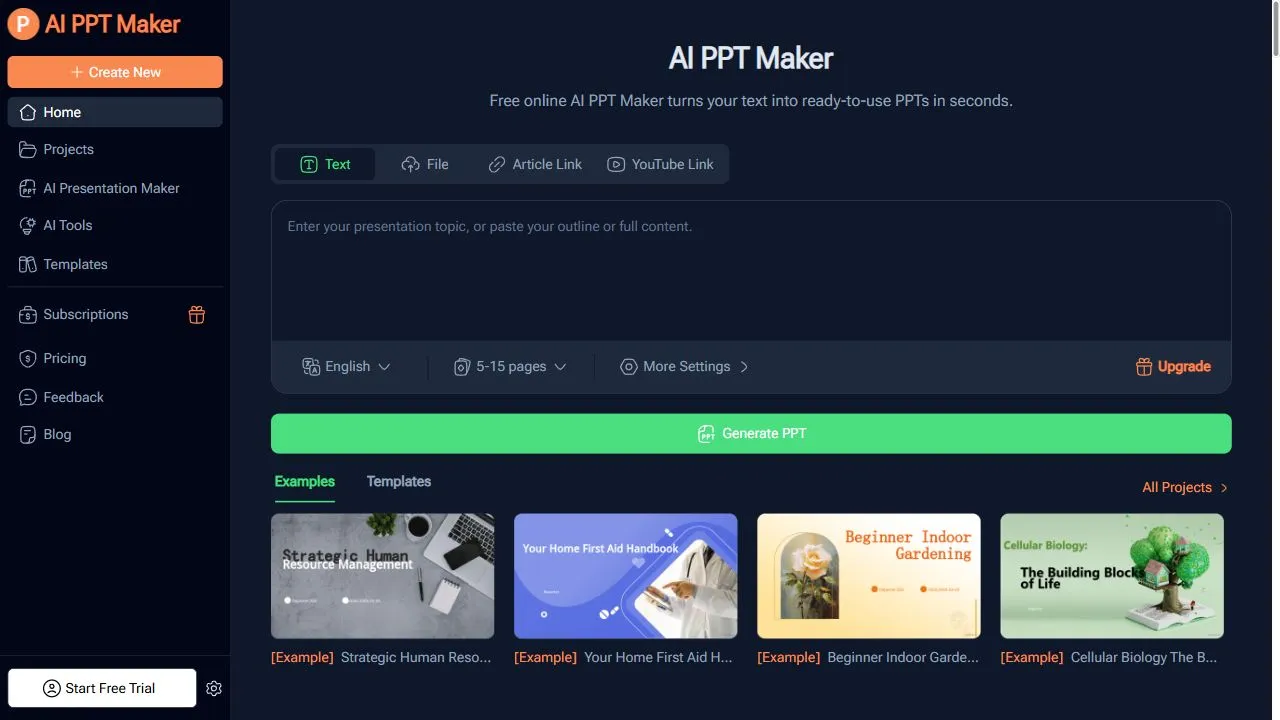

Tenorshare AI Diagrimo Interface


Pros & Cons Comparison
AI PPT Maker Pros & Cons
Strengths
- Extremely fast creation
- Simple to use
- Affordable entry point
Limitations
- Basic design variability
- Limited customization in free tier
Tenorshare AI Diagrimo Pros & Cons
Real Community Feedback
Verified user reviews from GetAiTools community
AI PPT Maker Reviews0
No community reviews yet for AI PPT Maker.
Tenorshare AI Diagrimo Reviews1
"Good experience so far."
About AI PPT Maker
AI PPT Maker is a powerful AI-powered presentation generator designed to help users transform conceptual ideas into professional slide decks by leveraging artificial intelligence, natural language processing, and automated design workflows . The tool eliminates the tedious process of manual slide creation by converting simple text prompts or detailed outlines into logically structured, visually appealing PowerPoint presentations in a matter of seconds. The primary problem this tool solves is the significant time and effort typically required to bridge the gap between a raw idea and a polished visual presentation. Many professionals and students struggle with "blank page syndrome" or lack the graphic design skills necessary to create slides that look modern and authoritative. By using advanced AI, AI PPT Maker automates the structuring of content, the selection of appropriate layouts, and the integration of visual elements, ensuring that the final output is both coherent and professional. This tool is specifically engineered for entrepreneurs, corporate executives, educators, and students who operate under tight deadlines and require high-quality visual aids without the overhead of traditional design software. By integrating AI-driven content organization , it allows users to focus on the core message of their presentation while the technology handles the aesthetic and structural execution, making it an essential asset for anyone looking to increase their productivity and communication impact. Key Features of AI PPT Maker Automated conversion of text-based prompts into full presentation decks. Intelligent content structuring that organizes ideas into a logical narrative flow. AI-driven layout selection to ensure visual balance and professional formatting. Rapid generation speeds that reduce creation time from hours to seconds. Natural language understanding to interpret complex themes and conceptual ideas. Integration of relevant imagery and text to support the primary narrative. Simplified user interface designed for immediate prompt-to-presentation workflows. Capability to generate a ready-to-present file based on minimal user input. Dynamic slide generation that adjusts content distribution across the deck. Why People Use AI PPT Maker The core motivation for using AI PPT Maker lies in the inefficiency of traditional presentation software. In a conventional workflow, a user must first outline their thoughts, research visual assets, manually create each slide, choose a consistent theme, and spend hours adjusting alignments and font sizes. This fragmented process is not only time-consuming but often leads to design inconsistencies that can undermine the credibility of the presenter. People turn to this AI solution to collapse these multiple stages into a single, streamlined operation. By utilizing a content-first approach, the tool allows the user to input the "what" (the information) and lets the AI handle the "how" (the design and structure). This shift is particularly valuable for those who possess the subject matter expertise but lack the design proficiency to execute a high-end visual deck. Furthermore, the ability to iterate quickly is a major driver for adoption. In fast-paced business environments, the ability to generate a first draft of a pitch deck or a summary presentation instantly allows for faster feedback loops and quicker pivots. Instead of spending an entire afternoon on a single version of a presentation, users can generate multiple variations and refine them, significantly increasing the scalability of their communication efforts. The transition from manual slide assembly to AI automation represents a move toward higher cognitive efficiency, where the human provides the strategic direction and the AI handles the repetitive execution. Popular Use Cases Startup Pitch Decks: Entrepreneurs use the tool to quickly turn a business concept into a professional deck for investor meetings, focusing on value propositions and market analysis. Educational Lectures: Teachers and professors convert complex lesson plans or textbook chapters into digestible slides for students, ensuring the flow of information is pedagogical. Corporate Quarterly Reviews: Managers transform raw data summaries and bullet points into polished executive presentations for stakeholder meetings. Webinar Outlines: Digital marketers and thought leaders use the tool to create visual backdrops for online workshops, ensuring the presentation remains engaging and structured. Internal Team Briefings: Project managers generate quick alignment decks to communicate project goals, timelines, and milestones to their teams. Academic Presentations: Students convert research papers or thesis summaries into visual presentations for classroom defenses or seminars. Sales Proposals: Sales professionals create tailored presentations for potential clients by inputting specific client pain points and proposed solutions. Training Modules: HR professionals develop onboarding or training slides by inputting company policies and procedural guidelines. Benefits of AI PPT Maker Drastic Reduction in Lead Time: The transition from idea to final slide deck happens in seconds, removing the bottleneck of manual design. Professional Visual Consistency: The AI ensures that themes, colors, and layouts are applied uniformly across all slides, maintaining a high corporate standard. Elimination of Design Friction: Users no longer need to master complex design software or spend time searching for the "perfect" template. Enhanced Content Logic: The AI helps in organizing thoughts into a coherent sequence, improving the overall narrative and readability of the presentation. Increased Creative Output: By automating the repetitive parts of slide creation, users can produce a higher volume of presentations without increasing their workload. Lowered Barrier to Entry: Non-designers can produce high-quality visual assets that compete with professionally designed decks. Improved Focus on Strategy: Presenters can spend more time refining their speaking points and strategy rather than worrying about pixel-perfect alignment. Rapid Prototyping of Ideas: The tool allows users to quickly visualize how a set of ideas looks in a presentation format, facilitating faster decision-making.
About Tenorshare AI Diagrimo
Tenorshare AI Diagrimo is an innovative AI presentation maker that transforms lengthy text into visually engaging and professional presentations with ease. It addresses the common challenge of creating compelling presentations from extensive documents or notes, a task often requiring significant time and design expertise. Utilizing advanced artificial intelligence and natural language processing (NLP) , Diagrimo automates the presentation design process, making it accessible to anyone, regardless of their design skills. This tool is particularly valuable for professionals, educators, students, and anyone who frequently needs to present information in a clear and impactful manner, offering a streamlined solution for AI-powered presentation generation . Key Features of Tenorshare AI Diagrimo Automatically generates presentation slides from uploaded text documents. Offers a variety of professionally designed presentation themes. Provides customizable slide layouts and design elements. Supports multiple export formats, including PPTX. Includes an AI-powered image search to enhance slides visually. Allows users to edit and refine generated content directly within the platform. Offers options to adjust the presentation's tone and style. Enables users to summarize long documents into concise presentation outlines. Provides a user-friendly interface for easy navigation and operation. Supports various input file types, including DOCX, PDF, and TXT. Why People Use Tenorshare AI Diagrimo Individuals and organizations utilize Tenorshare AI Diagrimo to significantly reduce the time and effort associated with presentation creation. Traditionally, building a presentation from scratch involves extensive research, content organization, and meticulous design work. Diagrimo streamlines this process by automating the initial stages of presentation development, allowing users to focus on refining the content and delivering a compelling message. The tool’s AI algorithms analyze the input text, identify key themes and arguments, and translate them into a structured presentation format. This is particularly beneficial for those who struggle with design or lack the time to create presentations manually. By leveraging AI, Diagrimo empowers users to produce high-quality, visually appealing presentations quickly and efficiently, improving overall productivity and communication effectiveness. It offers a scalable solution for generating numerous presentations without compromising on quality or consistency. Popular Use Cases Business Professionals: Creating presentations for client pitches, project updates, and internal meetings. Educators: Developing lecture slides and course materials from research papers or textbooks. Students: Preparing presentations for class projects and academic assignments. Marketing Teams: Generating presentations for marketing reports, campaign summaries, and sales pitches. Researchers: Presenting research findings and data analysis in a clear and concise format. Consultants: Developing client reports and presentations outlining recommendations and strategies. Project Managers: Creating project status updates and presentations for stakeholders. Content Creators: Transforming blog posts or articles into engaging presentation content. Training and Development: Building training materials and presentations for employee onboarding and skill development. Report Summarization: Quickly converting lengthy reports into digestible presentation formats for executive summaries. Benefits of Tenorshare AI Diagrimo Significant Time Savings: Reduces presentation creation time from hours to minutes. Enhanced Productivity: Allows users to focus on content refinement rather than design. Improved Presentation Quality: Generates visually appealing and professional-looking presentations. Increased Accessibility: Makes presentation creation accessible to users without design expertise. Streamlined Workflow: Automates the initial stages of presentation development. Consistent Branding: Ensures consistent design and formatting across all presentations. Effective Communication: Facilitates clear and impactful communication of information. Content Summarization: Condenses lengthy documents into concise and focused presentations. Visual Enhancement: Integrates relevant images to improve engagement and understanding. Easy Customization: Provides flexibility to tailor presentations to specific needs and preferences.
More AI Competitors to Compare

Kimi Slides
Ai Presentation

Grist
Ai Presentation
CopySlides
Ai Presentation

Raccoon AI
Ai Presentation
Plus AI for PowerPoint
Ai Presentation
Slides Bot
Ai Presentation
Frequently Asked Questions
Most questions answered in under 30 seconds — but if you still have one, write to us at contactgetaitool@gmail.com and we reply within a few hours.
Which is better in 2026, AI PPT Maker or Tenorshare AI Diagrimo?
How does the pricing compare between AI PPT Maker and Tenorshare AI Diagrimo?
Can I use AI PPT Maker and Tenorshare AI Diagrimo for free?
What input and output formats do AI PPT Maker and Tenorshare AI Diagrimo support?
What are the key advantages of AI PPT Maker?
What are the key advantages of Tenorshare AI Diagrimo?
What are top alternative competitors to AI PPT Maker and Tenorshare AI Diagrimo?
Ready to Choose Your AI Tool?
Try both platforms or explore thousands of other curated artificial intelligence tools on GetAiTools.
Tags & Core Competencies
Specific tags and feature capabilities