CluingvsTaskade
Side-by-side battle & analysis. Compare features, pricing, real community ratings, and pros & cons in 2026.

A collaborative knowledge platform for humans and AI agents to build, learn, and manage projects.
Taskade is a versatile AI-powered productivity and collaboration platform that empowers users to streamline workflows, enhance team coordination, and boost overall efficiency.
Quick Verdict & Takeaway
Head-to-head summary recommendation
Both Cluing and Taskade provide high-performance solutions in the Ai Productivity & Automation ecosystem. Both platforms are top-rated in their respective categories.
Choose Cluing if:
You need a mixed tool optimized for Ai Productivity & Automation with TEXT, OTHERS input formats.
Choose Taskade if:
You prefer a free platform geared towards Ai Productivity & Automation with TEXT output options.
Specification & Feature Matrix
Direct technical comparison between Cluing and Taskade
| Feature / Spec | Cluing | Taskade |
|---|---|---|
| Pricing Model | MIXED | FREE |
| Starting Price | $12/mo | Free / Not Listed |
| Category | Ai Productivity & Automation | Ai Productivity & Automation |
| Subcategory | Ai Productivity & Automation | Ai Productivity & Automation |
| Supported Inputs | TEXT, OTHERS | TEXT |
| Generated Outputs | TEXT, OTHERS | TEXT |
| User Rating | ★ 4.0 / 5.0 (0) | ★ 4.0 / 5.0 (0) |
| Verified Status | Unverified | Unverified |
Interface & UI Showcase
Visual previews and interface screenshots
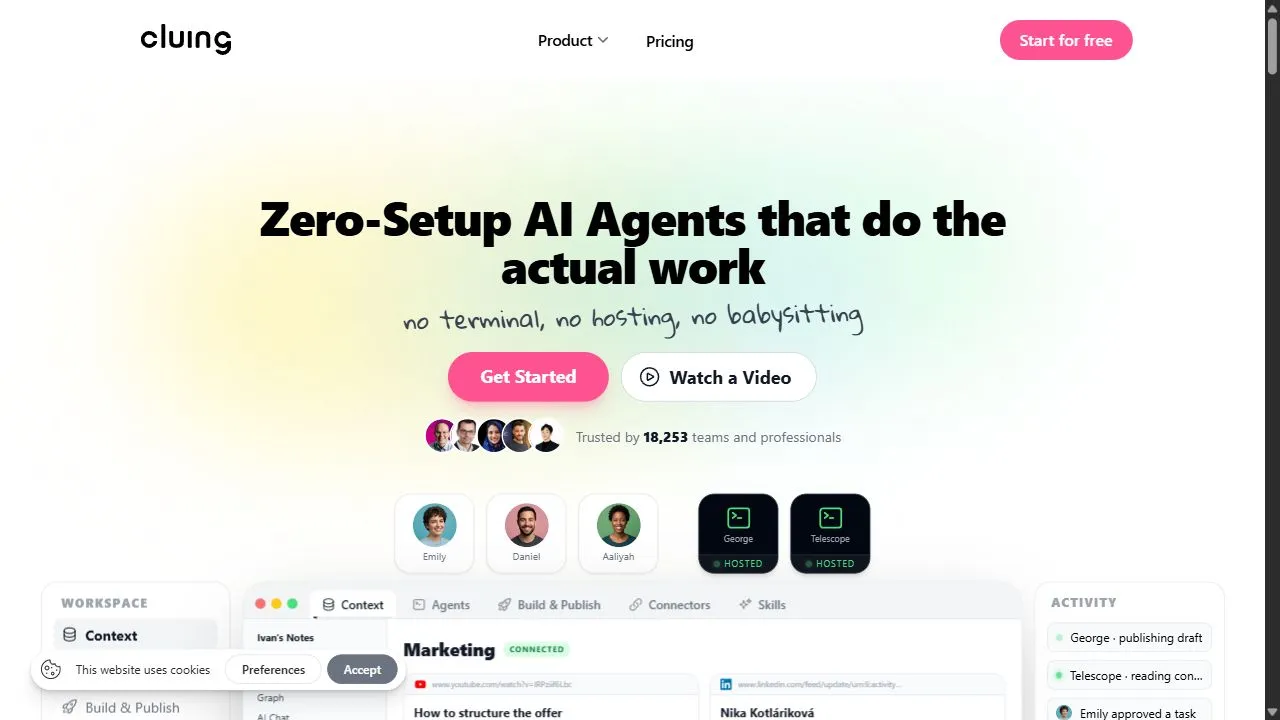
Cluing Interface
Taskade Interface

Video Walkthroughs & Demos
Watch official video demos and workflow tutorials
Taskade Demo
Pros & Cons Comparison
Cluing Pros & Cons
Strengths
- Strong support for AI agents
- Centralized knowledge base
- Enhances collaboration
Limitations
- Steep learning curve
- Requires significant setup
Taskade Pros & Cons
Real Community Feedback
Verified user reviews from GetAiTools community
Cluing Reviews0
No community reviews yet for Cluing.
Taskade Reviews1
"I think Taskade is a bit overhyped, but it’s still a decent product."
About Cluing
Cluing is a powerful AI-powered collaborative knowledge platform designed to help teams centralize information and orchestrate AI agents by leveraging artificial intelligence, automation, and intelligent workflows . It serves as a critical knowledge layer for the modern AI era, acting as a unified environment where human intelligence and autonomous AI agents collaborate to build, learn, and deploy products with significantly higher velocity. By transforming fragmented data into a structured, accessible ecosystem, it ensures that critical project intelligence is never siloed and remains available to all stakeholders. The tool solves the pervasive problem of knowledge fragmentation that occurs when teams use disparate tools for documentation, task management, and AI execution. In traditional setups, information is often trapped in static documents or individual chat threads, leaving AI agents without the necessary context to be truly effective. Cluing addresses this by creating a dynamic workspace that synthesizes information and project tasks, providing a "single source of truth" that both humans and AI agents can reference in real-time. This prevents the common pitfalls of misalignment and redundant effort that typically plague complex product development cycles. Designed primarily for product teams, software developers, and organizations integrating autonomous agents into their operational workflows, Cluing enables a seamless bridge between high-level human oversight and low-level AI execution. By providing a framework where agents can actually "learn" the context of a project, the platform allows organizations to scale their output without a linear increase in manual management. This makes it an essential tool for companies looking to transition from using AI as a simple chatbot to utilizing AI as a fully integrated, knowledgeable member of the production team. Key Features of Cluing Unified knowledge layer that centralizes all project-related information. Native support for AI agent collaboration and orchestration. Structured workspaces for synthesizing disparate data streams. Integrated project task management synced with knowledge assets. Frameworks for AI agents to build, learn, and store project context. Automated information synthesis to reduce manual documentation. Centralized ecosystem for human-AI hybrid workflows. Real-time accessibility of knowledge for autonomous systems. Tools for mapping connections between different information silos. Scalable environment for managing complex, agent-driven product shipments. Why People Use Cluing The core motivation for adopting Cluing lies in the fundamental shift toward AI-driven production. Traditional knowledge management tools, such as standard wikis or document folders, were designed for human consumption only. They are static, often outdated, and difficult for AI agents to navigate efficiently. When a company attempts to deploy AI agents to handle tasks, those agents often fail or hallucinate because they lack the specific, updated context of the project. People use Cluing to provide that missing context, creating a living knowledge base that serves as the "brain" for both the team and their AI tools. Compared to manual methods of knowledge sharing, which rely on endless meetings, long email threads, and manual hand-offs, Cluing offers an automated alternative. Instead of a human having to manually feed prompts and context to an AI agent every time a task is started, the agent can draw directly from the structured knowledge layer within the platform. This shift drastically reduces the time spent on "context switching" and manual briefing. Furthermore, the platform is used to achieve a level of scalability that is impossible with human-only teams. By empowering AI agents to act with clarity and precision, organizations can handle a higher volume of tasks and more complex project architectures without becoming bogged down in the administrative overhead of knowledge management. The ability to maintain a centralized, evolving ecosystem means that as a project grows in complexity, the intelligence supporting it grows proportionally. Popular Use Cases AI-Driven Software Development : Engineering teams use the platform to store technical specifications and architecture decisions, allowing AI coding agents to write and test code that is perfectly aligned with the project's actual requirements. Agile Product Management : Product managers utilize the workspace to synthesize customer feedback and market research into actionable tasks, which are then picked up and processed by AI agents for initial drafting or analysis. Enterprise Knowledge Synchronization : Large organizations use the tool to break down silos between different departments, ensuring that the marketing, product, and engineering teams are all operating from the same updated knowledge base. Autonomous Agent Training and Deployment : Companies deploying custom AI agents use Cluing as the primary ground-truth environment, giving their agents a structured place to learn the company's internal logic and operational standards. Rapid Prototyping and Shipping : Startup teams leverage the unified layer to move from idea to execution faster by automating the flow of information between strategic planning and technical implementation. Complex Workflow Automation : Operations teams use the platform to map out intricate business processes that require a combination of human approval and AI-driven execution. Benefits of Cluing Elimination of Knowledge Silos : By centralizing information in a unified layer, the platform ensures that critical data is not trapped in individual silos, promoting total transparency across the organization. Accelerated Product Delivery : The seamless collaboration between humans and AI agents reduces the friction of manual hand-offs, allowing teams to ship products and features at a much faster pace. Enhanced AI Accuracy : Because AI agents have access to a structured and synthesized knowledge base, the frequency of errors and hallucinations is reduced, leading to higher-quality AI outputs. Increased Operational Scalability : Organizations can expand their output and manage more complex projects without needing to proportionally increase their manual management staff. Reduced Administrative Burden : The automation of information synthesis frees human team members from the tedious task of maintaining static documentation. Improved Team Alignment : With a single source of truth accessible to everyone, the risk of misalignment between stakeholders and executors is minimized. Optimized Resource Allocation : Teams can focus their human intelligence on high-level strategy and creative problem solving while delegating the execution and knowledge retrieval to AI agents.
About Taskade
Taskade is a versatile AI-powered productivity and collaboration platform that empowers users to streamline workflows, enhance team coordination, and boost overall efficiency. It addresses the challenges of fragmented work, disorganized information, and inefficient project management by offering a unified workspace with integrated AI capabilities. Leveraging artificial intelligence , Taskade automates tasks, generates content, and provides intelligent suggestions to improve productivity. This tool is designed for individuals, remote teams, students, and businesses seeking a comprehensive solution for project planning, task management, and collaborative work. Key Features of Taskade AI-powered task creation and prioritization. Real-time collaborative editing and brainstorming. Automated workflow templates for various project types. AI writing assistant for content generation and summarization. Integrated video conferencing and chat functionality. Customizable project views including lists, boards, and mind maps. Seamless integration with popular tools like Slack and Google Workspace. Advanced search and filtering capabilities. Version history and task assignment features. AI-driven meeting agendas and note-taking assistance. Automated progress tracking and reporting. Secure data encryption and access controls. Why People Use Taskade Individuals and teams adopt Taskade to overcome the limitations of traditional, siloed productivity tools. Managing projects often involves juggling multiple applications for task lists, note-taking, communication, and file sharing, leading to wasted time and potential errors. Taskade consolidates these functions into a single, intuitive platform, fostering seamless collaboration and reducing context switching. The integration of AI further enhances efficiency by automating repetitive tasks, providing intelligent suggestions, and accelerating content creation. Unlike static project management software, Taskade’s flexible workspace adapts to diverse workflows, promoting creativity and agility. Users experience significant time savings, improved organization, and enhanced team alignment, ultimately leading to better project outcomes. Popular Use Cases Project Management: Teams utilize Taskade to plan, track, and manage projects of all sizes, from simple to-do lists to complex initiatives. Remote Team Collaboration: Distributed teams leverage Taskade’s real-time collaboration features to stay connected and productive, regardless of location. Meeting Management: Taskade facilitates efficient meeting planning, agenda creation, note-taking, and action item tracking. Brainstorming and Ideation: Individuals and teams use Taskade’s mind mapping and brainstorming tools to generate ideas and explore concepts. Content Creation: The AI writing assistant helps users draft outlines, generate content, and summarize information for reports, presentations, and marketing materials. Student Note-Taking and Study Groups: Students benefit from Taskade’s collaborative note-taking features and organizational tools for effective study sessions. Personal Productivity: Individuals use Taskade to manage personal tasks, goals, and projects, improving time management and focus. Agile Sprint Planning: Development teams can utilize Taskade for sprint planning, backlog management, and daily stand-ups. Event Planning: Taskade assists in organizing events, managing tasks, and coordinating with team members. Customer Onboarding: Businesses use Taskade to streamline customer onboarding processes and ensure a smooth experience. Benefits of Taskade Increased Productivity: Automation and AI-powered features significantly reduce the time spent on repetitive tasks, allowing users to focus on higher-value work. Improved Collaboration: Real-time collaboration and integrated communication tools foster seamless teamwork and enhance team alignment. Enhanced Organization: A unified workspace and flexible project views provide a clear overview of tasks, projects, and information. Streamlined Workflows: Customizable templates and automated workflows simplify complex processes and improve efficiency. Better Communication: Integrated chat and video conferencing facilitate clear and concise communication within teams. Reduced Errors: Centralized information and automated task management minimize the risk of errors and omissions. Greater Flexibility: Taskade adapts to diverse workflows and project types, providing a versatile solution for various needs. Faster Decision-Making: Real-time data and collaborative insights enable faster and more informed decision-making. Improved Project Outcomes: Enhanced organization, collaboration, and productivity contribute to successful project completion. Simplified Task Management: Intuitive task creation, assignment, and tracking features make task management effortless. Boosted Creativity: Brainstorming tools and mind mapping features stimulate creativity and innovation. Centralized Knowledge Base: Taskade serves as a central repository for all project-related information, ensuring easy access and knowledge sharing.
More AI Competitors to Compare
Trello AI(Automation)
Ai Productivity & Automation

Granola
Ai Productivity & Automation

Memorae
Ai Productivity & Automation

OnSpace.AI - No Code App Builder
Ai Productivity & Automation
First Book AI
Ai Productivity & Automation
Renamer.ai
Ai Productivity & Automation
Frequently Asked Questions
Most questions answered in under 30 seconds — but if you still have one, write to us at contactgetaitool@gmail.com and we reply within a few hours.
Which is better in 2026, Cluing or Taskade?
How does the pricing compare between Cluing and Taskade?
Can I use Cluing and Taskade for free?
What input and output formats do Cluing and Taskade support?
What are the key advantages of Cluing?
What are the key advantages of Taskade?
What are top alternative competitors to Cluing and Taskade?
Ready to Choose Your AI Tool?
Try both platforms or explore thousands of other curated artificial intelligence tools on GetAiTools.
Tags & Core Competencies
Specific tags and feature capabilities