FilentlyvsRenamer.ai
Side-by-side battle & analysis. Compare features, pricing, real community ratings, and pros & cons in 2026.

Filently
AI-powered filing assistant that organizes your Google Drive automatically.

Renamer.ai
Renamer.ai is an innovative AI-powered file renaming tool that streamlines digital asset management by intelligently bulk renaming and categorizing files.
Quick Verdict & Takeaway
Head-to-head summary recommendation
Both Filently and Renamer.ai provide high-performance solutions in the Ai Productivity & Automation ecosystem. Both platforms are top-rated in their respective categories.
Choose Filently if:
You need a mixed tool optimized for Ai Productivity & Automation with TEXT input formats.
Choose Renamer.ai if:
You prefer a free platform geared towards Ai Productivity & Automation with TEXT output options.
Specification & Feature Matrix
Direct technical comparison between Filently and Renamer.ai
| Feature / Spec | Filently | Renamer.ai |
|---|---|---|
| Pricing Model | MIXED | FREE |
| Starting Price | $6/mo | Free / Not Listed |
| Category | Ai Productivity & Automation | Ai Productivity & Automation |
| Subcategory | Ai Productivity & Automation | Ai Productivity & Automation |
| Supported Inputs | TEXT | TEXT |
| Generated Outputs | TEXT | TEXT |
| User Rating | ★ 4.0 / 5.0 (0) | ★ 4.0 / 5.0 (0) |
| Verified Status | Unverified | Unverified |
Interface & UI Showcase
Visual previews and interface screenshots
Filently Interface
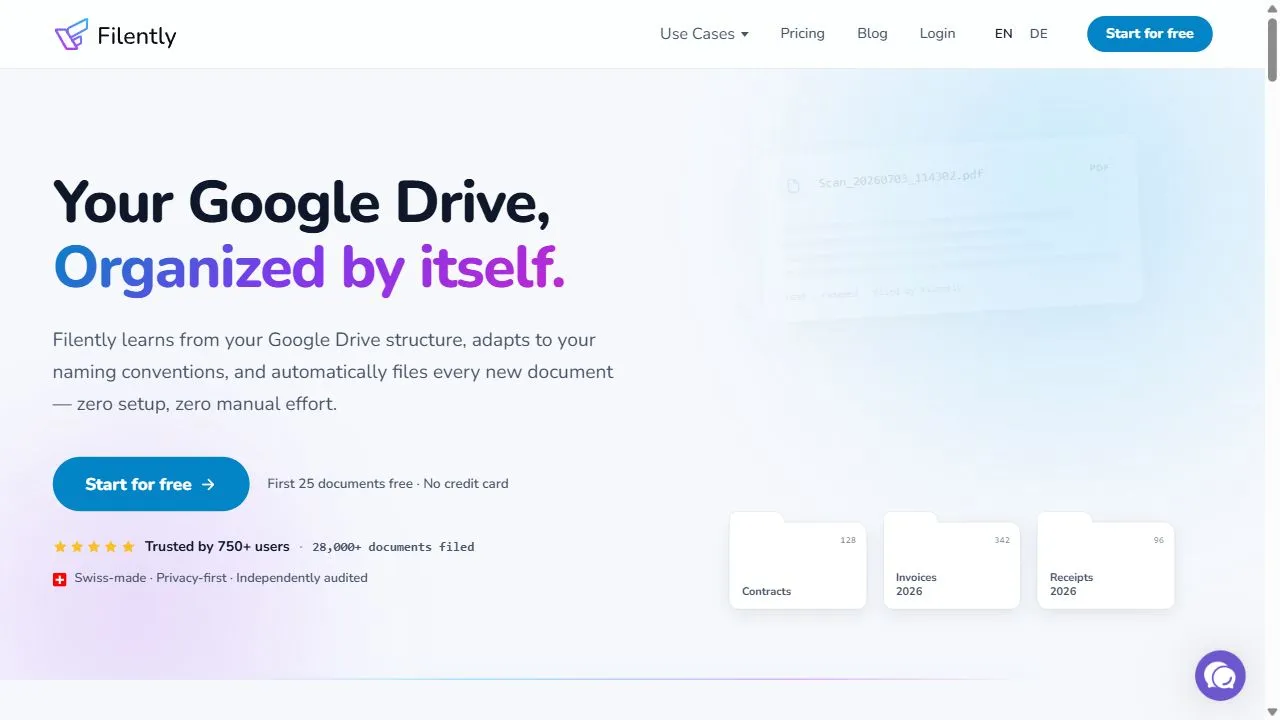
Renamer.ai Interface


Pros & Cons Comparison
Filently Pros & Cons
Strengths
- Automates file organization
- Reduces digital clutter
Limitations
- Limited to Google Drive integration
Renamer.ai Pros & Cons
Real Community Feedback
Verified user reviews from GetAiTools community
Filently Reviews0
No community reviews yet for Filently.
Renamer.ai Reviews2
"It’s quick, but the content quality drops with speed."
"Very good."
About Filently
Filently is a powerful AI-powered filing assistant designed to help users eliminate digital clutter and organize cloud storage by leveraging artificial intelligence, automation, and intelligent content analysis . By acting as a sophisticated filing layer specifically for Google Drive, the tool solves the pervasive problem of fragmented data and disorganized folder structures that typically plague professional and personal cloud environments. Instead of relying on the user to manually create folders and move files, Filently utilizes AI to understand the context and substance of every document, ensuring that information is stored logically and is instantly retrievable. The tool is primarily built for professionals, entrepreneurs, and businesses that rely heavily on Google Drive for their daily operations but struggle with the mounting chaos of hundreds or thousands of unsorted files. By employing machine learning algorithms to analyze the content within files, Filently automates the tedious process of categorization and labeling. This transformation converts a chaotic repository of documents into a structured, searchable library, significantly reducing the time spent on administrative upkeep and manual file searching. Through the integration of intelligent workflows, Filently operates as a background utility that maintains the health of a digital workspace. It addresses the common pain points of cloud storage, such as vaguely named files, duplicate uploads, and the lack of a consistent naming convention across teams. By automating these governance tasks, the tool allows users to shift their focus from the logistics of file management to the actual execution of their work, enhancing overall operational efficiency. Key Features of Filently Automatic categorization of documents based on content analysis. Intelligent labeling of files to improve searchability and grouping. Context-aware folder structure generation for logical organization. Automatic identification and flagging of duplicate files. Intelligent renaming of vaguely titled documents to reflect their actual content. Background synchronization to ensure the directory remains updated in real-time. Semantic grouping of related materials across different directories. Deep analysis of file metadata and text to determine optimal placement. Automated archiving of outdated or redundant information. Seamless integration with the Google Drive API for secure file access. Why People Use Filently The primary motivation for using Filently is the desire to escape the "digital hoarding" cycle common in modern cloud storage. In traditional manual filing systems, users are required to decide where a file belongs at the moment of creation or upload. Over time, this leads to inconsistency, where similar documents are scattered across multiple folders, or worse, dumped into a general "Miscellaneous" folder. As the volume of data grows, the manual effort required to maintain a clean system becomes unsustainable, leading to wasted productivity and increased stress. Filently replaces this manual burden with an autonomous system. Users leverage the tool because it removes the cognitive load associated with organization. Instead of spending hours every month auditing folders and renaming files, they allow the AI to handle the architectural layout of their Drive. This transition from a manual to an AI-driven approach ensures a level of consistency that is impossible to achieve by hand, especially in collaborative environments where multiple people are uploading files with different naming habits. Furthermore, the tool is used to solve the "search failure" problem. While Google Drive has a built-in search function, search is only effective if the file exists or is named something recognizable. Filently enhances the very foundation of the storage layer, meaning users can browse their files intuitively through a logical hierarchy created by AI, rather than relying solely on keywords that may have been forgotten or misapplied during the initial upload. Popular Use Cases Freelancers and Independent Contractors: Managing multiple clients with varying project requirements by automatically grouping contracts, invoices, and deliverables into client-specific AI-generated structures. Small Business Owners: Organizing a growing library of operational documents, tax records, and employee files without needing to hire a dedicated administrative assistant for data entry. Academic Researchers and Students: Sorting vast amounts of PDFs, research papers, and lecture notes into thematic categories based on the actual subject matter of the text. Marketing Agencies: Handling high volumes of creative assets and campaign briefs, ensuring that version histories and related assets are grouped together logically. Project Managers: Maintaining a clean workspace for cross-functional teams where documents from various departments are uploaded to a shared drive without a strict naming convention. Legal Professionals: Categorizing case files, evidence, and correspondence into a structured hierarchy that allows for rapid retrieval during critical deadlines. Content Creators: Organizing scripts, raw footage notes, and social media assets across multiple platforms and projects. Benefits of Filently Dramatic Reduction in Time Waste: Eliminates the hours spent searching for lost documents or manually dragging files into folders. Enhanced Mental Clarity: Reduces the anxiety and cognitive load associated with staring at a cluttered, disorganized digital workspace. Increased Operational Scalability: Allows a business to grow its volume of documentation without a corresponding increase in administrative overhead. Improved Data Integrity: Minimizes the risk of working on outdated versions of a document by identifying duplicates and grouping related files. Standardized Organizational Logic: Ensures that the filing system follows a consistent logic based on content, regardless of who uploaded the file. Optimized Storage Management: Helps users identify redundant data, leading to a leaner and more efficient use of cloud storage quotas. Seamless Onboarding: Enables new team members to find information quickly within a logically structured drive without needing a guided tour of the folder system. Higher Productivity Focus: Shifts the user's energy from "managing the tool" to "producing the work," maximizing the utility of the Google Drive ecosystem.
About Renamer.ai
Renamer.ai is an innovative AI-powered file renaming tool that streamlines digital asset management by intelligently bulk renaming and categorizing files. It addresses the common problem of disorganized and difficult-to-navigate file systems, a challenge faced by individuals and organizations alike. Leveraging artificial intelligence and machine learning , Renamer.ai analyzes file content to suggest relevant and consistent naming conventions, saving users significant time and effort. This tool is particularly valuable for photographers, videographers, designers, researchers, and anyone managing large volumes of digital files. Key Features of Renamer.ai Analyzes file content using AI to suggest relevant names. Supports bulk renaming of multiple files simultaneously. Offers customizable renaming rules and patterns. Identifies and extracts key information from file content. Provides a user-friendly interface for easy operation. Works with a wide range of file types, including images, documents, and videos. Allows for previewing changes before applying them. Enables renaming based on metadata such as date, size, and type. Offers options for replacing, adding, or removing parts of filenames. Provides a free plan for basic usage. Why People Use Renamer.ai Individuals and professionals often struggle with maintaining organized file systems, especially when dealing with large quantities of data. Traditional file renaming methods are often manual, time-consuming, and prone to errors. Renamer.ai offers a significant improvement by automating the process and utilizing AI to ensure accuracy and consistency. The platform eliminates the tedious task of individually renaming files, allowing users to focus on more important tasks. By intelligently analyzing file content, Renamer.ai suggests relevant names that reflect the file’s content, making it easier to search, sort, and retrieve files in the future. This results in increased productivity, reduced frustration, and a more efficient digital workflow. Unlike manual methods or basic renaming tools, Renamer.ai adapts to the content of the files, providing a dynamic and intelligent solution for file organization. Popular Use Cases Photographers: Quickly rename and organize large photo libraries based on event, date, or subject matter. Videographers: Efficiently manage video files for editing projects, ensuring consistent naming conventions for easy identification. Designers: Organize design assets, such as images, mockups, and prototypes, for streamlined project management. Researchers: Categorize and rename research documents, data sets, and reports for easy analysis and retrieval. Marketing Teams: Manage marketing materials, including images, videos, and presentations, for consistent branding and campaign organization. Legal Professionals: Organize legal documents, contracts, and case files for efficient access and compliance. Archivists: Digitize and organize historical documents, photographs, and recordings for preservation and accessibility. Students: Manage course materials, assignments, and research papers for effective study and organization. Content Creators: Organize raw footage, audio files, and project assets for streamlined content production. Small Businesses: Maintain organized records of invoices, receipts, and customer data for efficient business operations. Benefits of Renamer.ai Significant Time Savings: Automates the file renaming process, freeing up valuable time for other tasks. Improved File Organization: Creates a consistent and logical file structure for easy navigation and retrieval. Enhanced Productivity: Streamlines digital workflows and reduces the time spent searching for files. Reduced Errors: Minimizes the risk of human error associated with manual renaming. Increased Efficiency: Optimizes file management processes for greater overall efficiency. Simplified Collaboration: Facilitates seamless collaboration by ensuring consistent file naming conventions. Better Data Management: Improves data quality and accessibility for informed decision-making. Content-Aware Renaming: Leverages AI to understand file content and suggest relevant names. Customizable Rules: Allows users to tailor renaming rules to their specific needs and preferences. User-Friendly Interface: Provides an intuitive and easy-to-use platform for all skill levels.
More AI Competitors to Compare

Trello AI(Automation)
Ai Productivity & Automation

Granola
Ai Productivity & Automation
Memorae
Ai Productivity & Automation

OnSpace.AI - No Code App Builder
Ai Productivity & Automation

First Book AI
Ai Productivity & Automation

Bubbles Notetaker
Ai Productivity & Automation
Frequently Asked Questions
Most questions answered in under 30 seconds — but if you still have one, write to us at contactgetaitool@gmail.com and we reply within a few hours.
Which is better in 2026, Filently or Renamer.ai?
How does the pricing compare between Filently and Renamer.ai?
Can I use Filently and Renamer.ai for free?
What input and output formats do Filently and Renamer.ai support?
What are the key advantages of Filently?
What are the key advantages of Renamer.ai?
What are top alternative competitors to Filently and Renamer.ai?
Ready to Choose Your AI Tool?
Try both platforms or explore thousands of other curated artificial intelligence tools on GetAiTools.
Tags & Core Competencies
Specific tags and feature capabilities