HyprcorevsVexa
Side-by-side battle & analysis. Compare features, pricing, real community ratings, and pros & cons in 2026.

Hyprcore
A comprehensive macOS workspace for AI-powered dictation, meeting transcriptions, and structured note-taking.

Vexa
Vexa is a real-time meeting transcription API and assistant that empowers businesses to capture and analyze every detail of their conversations, eliminating the need for manual note-taking and improving meeting productivity.
Quick Verdict & Takeaway
Head-to-head summary recommendation
Both Hyprcore and Vexa provide high-performance solutions in the Productivity ecosystem. Both platforms are top-rated in their respective categories.
Choose Hyprcore if:
You need a mixed tool optimized for Notes with AUDIO, TEXT input formats.
Choose Vexa if:
You prefer a mixed platform geared towards Time Management with TEXT output options.
Specification & Feature Matrix
Direct technical comparison between Hyprcore and Vexa
| Feature / Spec | Hyprcore | Vexa |
|---|---|---|
| Pricing Model | MIXED | MIXED |
| Starting Price | $19.99/mo | $20/mo |
| Category | Productivity | Productivity |
| Subcategory | Notes | Time Management |
| Supported Inputs | AUDIO, TEXT | TEXT |
| Generated Outputs | TEXT | TEXT |
| User Rating | ★ 4.0 / 5.0 (0) | ★ 4.0 / 5.0 (0) |
| Verified Status | Unverified | Unverified |
Interface & UI Showcase
Visual previews and interface screenshots
Hyprcore Interface
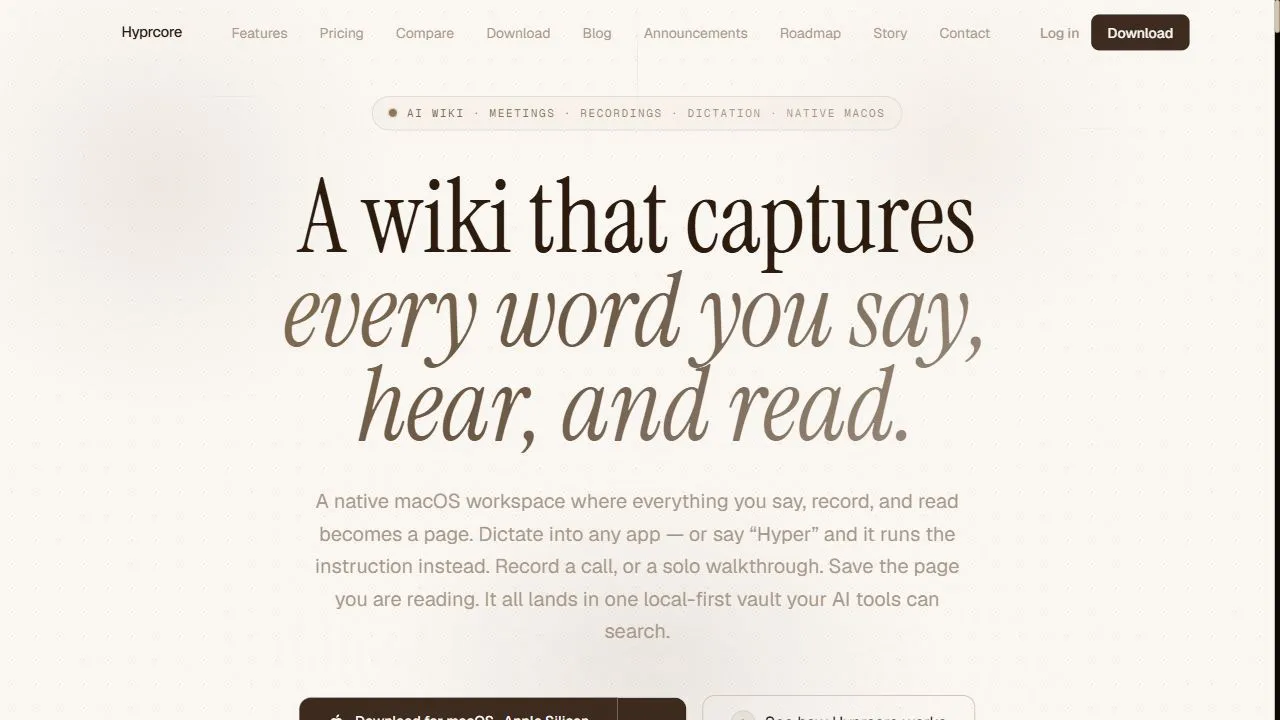
Vexa Interface

Pros & Cons Comparison
Hyprcore Pros & Cons
Strengths
- All-in-one productivity suite
- Superior macOS integration
- Efficient meeting synthesis
Limitations
- Mac exclusive
- Subscription cost
Vexa Pros & Cons
Real Community Feedback
Verified user reviews from GetAiTools community
Hyprcore Reviews0
No community reviews yet for Hyprcore.
Vexa Reviews1
"免费版本也还不错。"
About Hyprcore
Hyprcore is a powerful AI-powered macOS workspace designed to help users centralize productivity by leveraging artificial intelligence, automation, and intelligent workflows . By integrating dictation, meeting management, and structured note-taking into a single, cohesive ecosystem, the platform addresses the chronic problem of application fragmentation. Many professionals suffer from "context switching," where the constant movement between a voice recorder, a transcription service, a note-taking app, and a corporate wiki leads to decreased focus and lost information. Hyprcore eliminates this friction, providing a unified environment where ideas are captured and organized in real-time. The tool utilizes advanced artificial intelligence to bridge the gap between spoken thought and written documentation. Through sophisticated voice-to-text algorithms and AI-driven synthesis, Hyprcore does more than just transcribe words; it understands the context of conversations to help users distill complex meetings into actionable insights. This makes it an essential utility for macOS users who require a high-performance "digital brain" to index their professional and personal knowledge. Designed specifically for the Apple ecosystem, Hyprcore is built for executives, project managers, researchers, and knowledge workers who handle large volumes of information daily. By leveraging AI-powered transcription , intelligent indexing , and automated meeting synthesis , the platform ensures that no critical detail is overlooked, transforming raw audio and scattered notes into a structured, searchable corporate or personal knowledge base. Key Features of Hyprcore Integrated AI-powered dictation for high-accuracy voice-to-text conversion Automated meeting transcription and intelligent synthesis of key points Centralized note-taking system for organized thought capture Built-in functionality for creating and managing personal or corporate wikis Deep indexing of all stored data to ensure rapid searchability and retrieval Seamless native integration with the macOS operating system Ability to process audio inputs and convert them into structured text outputs Unified workspace interface to minimize application switching Intelligent summarization of long-form discussions into concise summaries Dynamic organization of information to support non-linear knowledge management Why People Use Hyprcore The primary motivation for adopting Hyprcore is the desire to eliminate the manual labor associated with information management. In a traditional workflow, capturing a meeting involves recording audio, uploading that audio to a third-party transcription service, manually editing the text for errors, and then copying relevant action items into a project management tool or a document. This linear process is time-consuming and prone to human error, often resulting in "information decay" where critical details are forgotten between the time of the meeting and the time of documentation. Users turn to Hyprcore to replace this fragmented approach with a streamlined, AI-driven pipeline. By utilizing AI to handle the synthesis of information, users can focus on the strategic elements of their work rather than the administrative burden of note-taking. The transition from manual transcription to AI-powered synthesis allows for a level of scalability that was previously impossible; a professional can manage ten meetings a day and still have a perfectly indexed, searchable record of every decision made. Furthermore, the platform appeals to those who value the "second brain" philosophy. Rather than storing information in isolated folders or disparate apps, Hyprcore allows users to build a living knowledge base. The integration of a wiki-style structure means that information is not just stored but is interconnected, allowing users to find patterns and links between different projects and meetings effortlessly. The macOS-native design ensures that the tool operates with the speed and fluidity expected by power users of the Apple ecosystem. Popular Use Cases Executive Leadership and Management : CEOs and managers use the tool to record high-level strategic meetings, using the AI synthesis feature to instantly generate action items and executive summaries for their teams. Project Management : Project leads employ Hyprcore to document brainstorming sessions and stakeholder requirements, converting spoken ideas directly into project wikis and technical documentation. Academic Research and Analysis : Researchers use the AI dictation feature to capture a stream of consciousness or observations while analyzing data, ensuring that intuitive leaps are documented without interrupting the flow of work. Content Creation and Scripting : Writers and creators use the platform to dictate outlines and rough drafts, leveraging the voice-to-text capabilities to move from an idea to a written structure faster than typing allows. Corporate Knowledge Management : Organizations use Hyprcore to build a centralized company wiki, where AI-transcribed meetings and notes serve as the primary source of truth for onboarding new employees and archiving institutional knowledge. Legal and Medical Documentation : Professionals in high-compliance fields use the tool to quickly dictate case notes or patient observations, ensuring a high degree of accuracy and rapid retrieval of records. Benefits of Hyprcore Significant Reduction in Cognitive Load : By centralizing multiple tools into one workspace, users experience less mental fatigue associated with switching between different software environments. Increased Information Retention : The AI-powered indexing ensures that every captured word is searchable, meaning users no longer waste time searching through hours of audio or pages of handwritten notes. Enhanced Productivity and Speed : The automation of transcription and synthesis drastically reduces the time spent on post-meeting administration, allowing professionals to move from discussion to execution immediately. Improved Documentation Quality : AI synthesis removes the bias and gaps often found in manual note-taking, providing a more objective and comprehensive record of discussions. Optimized Workflow Integration : Because it is designed specifically for macOS, the tool fits naturally into the user's existing hardware and software environment, offering a smoother experience than cross-platform alternatives. Scalable Knowledge Growth : The ability to turn notes into a wiki allows a user's personal or corporate knowledge base to grow organically, making the retrieval of old information as simple as a quick search query.
About Vexa
Vexa is a real-time meeting transcription API and assistant that empowers businesses to capture and analyze every detail of their conversations, eliminating the need for manual note-taking and improving meeting productivity. Vexa addresses the common problem of information loss and inefficient follow-up actions that often plague business meetings. It leverages artificial intelligence , specifically automatic speech recognition (ASR) and natural language processing (NLP) , to deliver highly accurate transcriptions with minimal latency. This tool is designed for businesses of all sizes, particularly those reliant on frequent meetings for project management, legal proceedings, sales calls, and internal communication. Professionals seeking to improve meeting efficiency, enhance record-keeping, and streamline post-meeting workflows will find Vexa to be an invaluable asset. It’s a powerful solution for anyone looking for accurate meeting transcripts , real-time transcription services , or an AI meeting assistant . Key Features of Vexa Provides real-time transcription for various platforms including Microsoft Teams, Google Meet, and custom WebSocket integrations. Offers high-accuracy speech-to-text conversion with low latency. Includes speaker identification to differentiate between participants. Automatically extracts action items from meeting conversations. Supports multiple languages for global teams. Delivers transcriptions in various formats for easy integration. Offers a robust API for developers to build custom applications. Provides secure and reliable data processing. Enables searchable transcripts for quick information retrieval. Facilitates automated documentation of meeting proceedings. Why People Use Vexa Individuals and organizations adopt Vexa to overcome the limitations of traditional meeting documentation methods. Manually taking notes during meetings is often disruptive, incomplete, and time-consuming. Vexa automates this process, allowing participants to fully engage in the conversation without the cognitive load of simultaneous note-taking. The resulting transcripts are not only more comprehensive but also readily searchable and shareable, fostering better collaboration and accountability. Unlike relying on memory or hastily scribbled notes, Vexa provides a verifiable record of discussions, decisions, and action items. This leads to significant time savings , improved accuracy , and enhanced productivity for teams. The API-first approach allows for seamless integration into existing workflows and custom applications, offering a scalable solution for growing businesses. Popular Use Cases Sales Teams: Transcribing sales calls for coaching, performance evaluation, and identifying key customer insights. Legal Professionals: Creating accurate records of client meetings, depositions, and court proceedings. Project Management: Documenting project meetings, tracking action items, and ensuring alignment among team members. Executive Teams: Capturing board meetings, strategic planning sessions, and leadership discussions. Customer Support: Analyzing customer support calls to identify trends, improve agent performance, and enhance customer satisfaction. Human Resources: Recording employee interviews, performance reviews, and training sessions. Research & Academia: Transcribing interviews, focus groups, and lectures for analysis and documentation. Healthcare: Documenting patient consultations (with appropriate privacy safeguards and compliance). Remote Teams: Facilitating clear communication and documentation for distributed workforces. Podcast Production: Generating transcripts for podcast episodes to improve accessibility and SEO. Benefits of Vexa Increased Productivity: Participants can focus on the conversation, not note-taking, leading to more productive meetings. Improved Accuracy: AI-powered transcription minimizes errors and ensures a comprehensive record of discussions. Enhanced Accountability: Clear documentation of decisions and action items promotes accountability and follow-through. Streamlined Workflows: Automated transcription and action item extraction save time and effort on post-meeting tasks. Better Collaboration: Easily shareable transcripts facilitate collaboration and knowledge sharing among team members. Reduced Costs: Eliminating the need for manual transcription services reduces operational expenses. Scalable Solution: The API-first approach allows businesses to scale their transcription needs as they grow. Improved Compliance: Accurate records of meetings can help organizations meet regulatory requirements. Actionable Insights: Extracted action items provide a clear roadmap for follow-up and project execution. Enhanced Accessibility: Transcripts make meetings accessible to individuals with hearing impairments or those who prefer to read content.
More AI Competitors to Compare

Manyreach
Productivity

Saufter
Productivity

Notedly
Productivity

Moltbot- Personal AI Assistant
Productivity

TeamsMaestro - Free AI Meeting Note Taker
Productivity

PDF to Video AI
Productivity
Frequently Asked Questions
Most questions answered in under 30 seconds — but if you still have one, write to us at contactgetaitool@gmail.com and we reply within a few hours.
Which is better in 2026, Hyprcore or Vexa?
How does the pricing compare between Hyprcore and Vexa?
Can I use Hyprcore and Vexa for free?
What input and output formats do Hyprcore and Vexa support?
What are the key advantages of Hyprcore?
What are the key advantages of Vexa?
What are top alternative competitors to Hyprcore and Vexa?
Ready to Choose Your AI Tool?
Try both platforms or explore thousands of other curated artificial intelligence tools on GetAiTools.
Tags & Core Competencies
Specific tags and feature capabilities