IdeaToImgvsEditly
Side-by-side battle & analysis. Compare features, pricing, real community ratings, and pros & cons in 2026.

IdeaToImg
IdeaToImg provides powerful AI image-to-image editing, allowing users to instantly restyle and manipulate their photos.

Editly
Editly is an innovative AI-powered image editing platform that enables users to effortlessly enhance and transform their visuals using advanced artificial intelligence algorithms.
Quick Verdict & Takeaway
Head-to-head summary recommendation
Both IdeaToImg and Editly provide high-performance solutions in the Ai Image generator ecosystem. Both platforms are top-rated in their respective categories.
Choose IdeaToImg if:
You need a subscription tool optimized for AI Image Creator with IMAGE input formats.
Choose Editly if:
You prefer a free platform geared towards AI Image Creator with TEXT output options.
Specification & Feature Matrix
Direct technical comparison between IdeaToImg and Editly
| Feature / Spec | IdeaToImg | Editly |
|---|---|---|
| Pricing Model | SUBSCRIPTION | FREE |
| Starting Price | $9.9/mo | Free / Not Listed |
| Category | Ai Image generator | Ai Image generator |
| Subcategory | AI Image Creator | AI Image Creator |
| Supported Inputs | IMAGE | TEXT |
| Generated Outputs | IMAGE | TEXT |
| User Rating | ★ 4.0 / 5.0 (0) | ★ 4.0 / 5.0 (0) |
| Verified Status | Unverified | Unverified |
Interface & UI Showcase
Visual previews and interface screenshots
IdeaToImg Interface
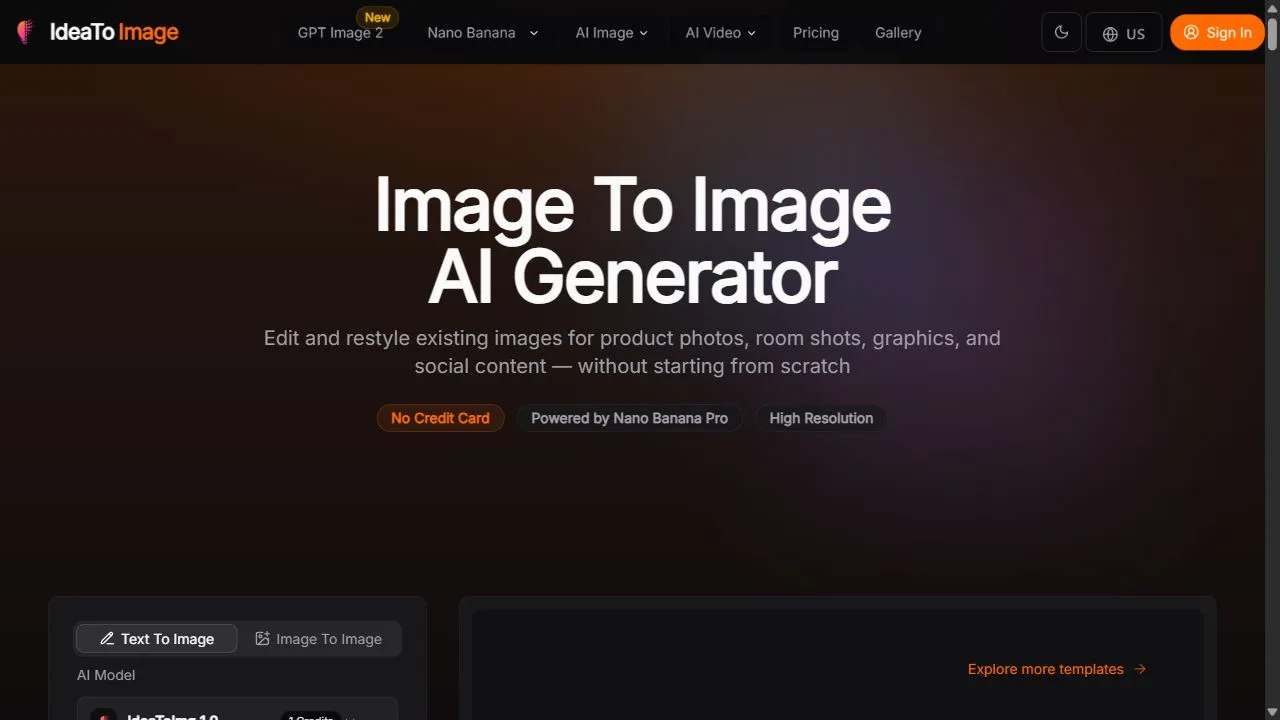
Editly Interface


Pros & Cons Comparison
IdeaToImg Pros & Cons
Strengths
- Fast and intuitive restyling
- High-quality output generation
Limitations
- Requires subscription for advanced features
Editly Pros & Cons
Real Community Feedback
Verified user reviews from GetAiTools community
IdeaToImg Reviews0
No community reviews yet for IdeaToImg.
Editly Reviews3
"I use it to quickly check grammar on my phone."
"Quite helpful."
"Improved team efficiency significantly."
About IdeaToImg
IdeaToImg is a powerful AI-powered image-to-image platform designed to help users transform, restyle, and enhance existing visual content effortlessly by leveraging artificial intelligence, automation, and intelligent workflows . The tool addresses the common challenge of traditional image editing, where modifying the style, composition, or mood of a photo typically requires advanced technical skills and hours of manual labor in complex software. By utilizing sophisticated AI models, IdeaToImg allows creators to upload a source image and apply transformative changes that maintain the structural integrity of the original while completely altering its aesthetic properties. The platform is specifically engineered for designers, digital marketers, and social media managers who require professional-grade visual assets without the overhead of manual retouching. By implementing AI image-to-image technology , the tool bridges the gap between a raw conceptual image and a polished, final product. It enables users to iterate rapidly, experimenting with different artistic styles and visual directions in a fraction of the time it would take using traditional methods. This makes it an essential utility for those operating in fast-paced digital environments where visual quality and speed of production are critical for engagement. At its core, IdeaToImg leverages deep learning architectures that analyze the spatial relationships and contours of an input image to generate a new version based on specific parameters. This process ensures that the resulting output is not just a random generation, but a calculated evolution of the original input. Whether the goal is to turn a simple sketch into a photorealistic render or to transition a photograph into a specific artistic medium, the tool provides a seamless interface that prioritizes creative flexibility. By removing the technical barriers associated with professional imagery, IdeaToImg empowers users to focus on the creative vision rather than the mechanical process of editing. Key Features of IdeaToImg Advanced AI image-to-image transformation capabilities. Automated artistic style transfer for diverse visual aesthetics. Precise modification of image compositions and structural elements. Intelligent optimization of visuals for various digital contexts and platforms. Rapid iterative processing for fast concept development. High-resolution output generation for professional use. Intuitive image-based input system for streamlined workflows. Capability to transform raw sketches into refined digital imagery. Seamless integration of AI-driven restyling parameters. Efficient processing speeds for high-volume image manipulation. Why People Use IdeaToImg The primary motivation for using IdeaToImg is the desire to eliminate the friction inherent in traditional image manipulation. In conventional workflows, changing the style of an image—such as turning a daytime photo into a nighttime scene or a realistic portrait into a digital painting—requires an extensive knowledge of layers, masking, and blending modes in software like Adobe Photoshop. IdeaToImg replaces this tedious process with an AI-driven approach, allowing users to achieve the same or superior results in seconds rather than hours. Furthermore, professionals use this tool to achieve scalability that is impossible through manual editing. For a marketing agency managing dozens of social media accounts, creating unique visual variations for each platform is a daunting task. IdeaToImg enables these users to take a single core asset and generate multiple stylistic variations, ensuring that the content remains fresh and tailored to different audiences without requiring multiple photoshoots. The tool is also highly valued for its ability to facilitate rapid prototyping. Concept artists and designers often struggle to communicate a visual idea using only words or rough sketches. By using IdeaToImg, they can upload a basic layout and instantly see it rendered in various professional styles, allowing them to validate a concept before committing significant resources to a final production. This shift from manual execution to AI-assisted curation significantly increases the overall productivity of the creative process. Popular Use Cases Graphic Designers: Transforming rough hand-drawn sketches into polished, high-fidelity digital concepts for client presentations. Social Media Managers: Restyling a single product photograph into various aesthetic themes to match different seasonal campaigns or platform trends. Digital Marketers: Generating multiple versions of an ad creative to perform A/B testing on which visual style drives the highest conversion rate. Concept Artists: Rapidly exploring different environmental moods and lighting setups for game or film pre-visualization. E-commerce Store Owners: Updating the background style or overall mood of product images to align with new branding guidelines without re-shooting the inventory. Content Creators: Converting standard photographs into unique artistic styles, such as anime, oil painting, or 3D renders, to create distinctive thumbnails and channel art. Architects and Interior Designers: Taking a basic 3D block-out or a photo of a room and applying different material and lighting styles to visualize various design options. Benefits of IdeaToImg Significant Time Reduction: Drastically cuts down the hours spent on manual image editing and stylistic adjustments. Lower Technical Barrier: Enables individuals without formal training in graphic design to produce professional-grade visual content. Enhanced Creative Exploration: Allows users to experiment with an unlimited number of styles and variations without the fear of ruining the original asset. Increased Production Scalability: Facilitates the creation of large volumes of visually diverse assets from a small set of source images. Improved Workflow Efficiency: Streamlines the path from initial conceptualization to final delivery by automating the most labor-intensive parts of the editing process. Consistency Across Assets: Helps maintain a cohesive visual language across different images by applying the same AI style transfers consistently. Cost-Efficiency: Reduces the need for frequent, expensive photoshoots by maximizing the utility of existing visual assets through AI transformation. Higher Output Quality: Leverages state-of-the-art AI models to ensure that transformed images maintain a level of polish and detail expected in professional environments.
About Editly
Editly is an innovative AI-powered image editing platform that enables users to effortlessly enhance and transform their visuals using advanced artificial intelligence algorithms. It addresses the challenges of complex image manipulation, offering a streamlined and accessible solution for both professional designers and casual users. By leveraging AI, Editly simplifies tasks like background removal, image upscaling, and stylistic adjustments, making high-quality image editing available to everyone. This tool is particularly valuable for content creators, marketers, and individuals seeking to improve their visual content without requiring extensive technical skills or expensive software. Key Features of Editly Removes image backgrounds with AI precision. Upscales images to higher resolutions without significant quality loss. Offers a range of AI-powered stylistic filters and effects. Provides tools for object removal and inpainting. Allows for image enhancement, including brightness, contrast, and color adjustments. Supports batch processing for efficient editing of multiple images. Features an intuitive and user-friendly interface. Enables users to generate variations of existing images. Offers AI-driven image restoration capabilities. Provides tools for adding and manipulating text within images. Why People Use Editly Individuals and professionals alike utilize Editly to overcome the limitations of traditional image editing software. Conventional methods often require significant time, technical expertise, and potentially costly subscriptions to achieve desired results. Editly democratizes access to powerful image editing capabilities by automating complex processes through artificial intelligence. Users can accomplish tasks that previously demanded hours of manual effort in a matter of seconds, significantly boosting productivity. The platform’s AI algorithms ensure accuracy and consistency, reducing the risk of errors and delivering professional-looking results. Furthermore, Editly’s accessibility makes it an ideal solution for those without formal design training, empowering them to create compelling visuals for various purposes. The platform’s speed and efficiency are key drivers for users who need to quickly generate high-quality images for social media, marketing materials, or personal projects. Popular Use Cases E-commerce: Enhancing product images for online stores to improve visual appeal and increase sales. Social Media Marketing: Creating engaging visuals for social media posts, stories, and advertisements. Content Creation: Producing high-quality images for blog posts, articles, and website content. Real Estate: Improving property photos to showcase listings in the best possible light. Graphic Design: Streamlining the initial stages of design projects, such as background removal and image preparation. Photography: Restoring old or damaged photos and enhancing image quality. Marketing & Advertising: Generating visually appealing marketing materials and advertisements. Personal Use: Enhancing personal photos for sharing with friends and family or creating personalized gifts. Print on Demand: Preparing images for print-on-demand products, such as t-shirts and posters. Virtual Assistants: Providing image editing services to clients as part of a broader virtual assistant offering. Benefits of Editly Increased Efficiency: Significantly reduces the time and effort required for image editing tasks. Improved Image Quality: Enhances the visual appeal of images, making them more engaging and professional. Cost Savings: Eliminates the need for expensive software subscriptions or professional design services. Enhanced Productivity: Allows users to focus on creative tasks rather than tedious manual editing. Accessibility: Makes powerful image editing tools available to users of all skill levels. Streamlined Workflow: Simplifies the image editing process, from basic adjustments to complex manipulations. Consistent Results: Ensures accuracy and consistency in image editing, reducing the risk of errors. Scalability: Enables users to efficiently process large volumes of images. Creative Freedom: Provides a range of stylistic filters and effects to explore different visual aesthetics. Professional Output: Delivers high-quality images suitable for a wide range of applications.
More AI Competitors to Compare
Nano Banana Pro / Gemini 3 Pro Image Generation
Ai Image generator
AI Image Generator
Ai Image generator
Craiyon
Ai Image generator

AI Image to Image.io
Ai Image generator
Evoke AI
Ai Image generator

Crano AI
Ai Image generator
Frequently Asked Questions
Most questions answered in under 30 seconds — but if you still have one, write to us at contactgetaitool@gmail.com and we reply within a few hours.
Which is better in 2026, IdeaToImg or Editly?
How does the pricing compare between IdeaToImg and Editly?
Can I use IdeaToImg and Editly for free?
What input and output formats do IdeaToImg and Editly support?
What are the key advantages of IdeaToImg?
What are the key advantages of Editly?
What are top alternative competitors to IdeaToImg and Editly?
Ready to Choose Your AI Tool?
Try both platforms or explore thousands of other curated artificial intelligence tools on GetAiTools.
Tags & Core Competencies
Specific tags and feature capabilities