LivedocsvsTaskade
Side-by-side battle & analysis. Compare features, pricing, real community ratings, and pros & cons in 2026.

Livedocs
An AI-powered data scientist for collaborative teams to analyze internal data.
Taskade is a versatile AI-powered productivity and collaboration platform that empowers users to streamline workflows, enhance team coordination, and boost overall efficiency.
Quick Verdict & Takeaway
Head-to-head summary recommendation
Both Livedocs and Taskade provide high-performance solutions in the Ai Productivity & Automation ecosystem. Both platforms are top-rated in their respective categories.
Choose Livedocs if:
You need a mixed tool optimized for Ai Productivity & Automation with TEXT, OTHERS input formats.
Choose Taskade if:
You prefer a free platform geared towards Ai Productivity & Automation with TEXT output options.
Specification & Feature Matrix
Direct technical comparison between Livedocs and Taskade
| Feature / Spec | Livedocs | Taskade |
|---|---|---|
| Pricing Model | MIXED | FREE |
| Starting Price | $65/mo | Free / Not Listed |
| Category | Ai Productivity & Automation | Ai Productivity & Automation |
| Subcategory | Ai Productivity & Automation | Ai Productivity & Automation |
| Supported Inputs | TEXT, OTHERS | TEXT |
| Generated Outputs | TEXT | TEXT |
| User Rating | ★ 4.0 / 5.0 (0) | ★ 4.0 / 5.0 (0) |
| Verified Status | Unverified | Unverified |
Interface & UI Showcase
Visual previews and interface screenshots
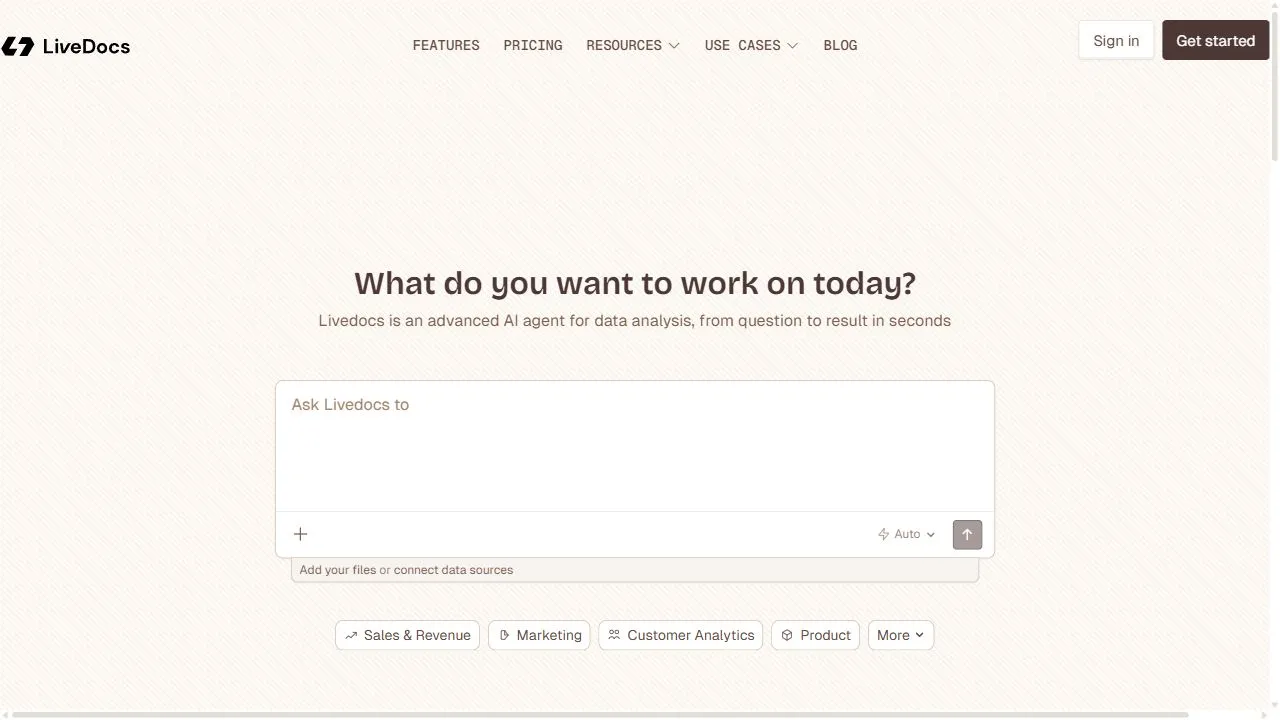
Livedocs Interface
Taskade Interface

Video Walkthroughs & Demos
Watch official video demos and workflow tutorials
Taskade Demo
Pros & Cons Comparison
Livedocs Pros & Cons
Strengths
- Reduces manual data analysis time
- Natural language query support
Limitations
- Requires data integration
- Higher price point for premium features
Taskade Pros & Cons
Real Community Feedback
Verified user reviews from GetAiTools community
Livedocs Reviews0
No community reviews yet for Livedocs.
Taskade Reviews1
"I think Taskade is a bit overhyped, but it’s still a decent product."
About Livedocs
Livedocs is a powerful AI-powered data science platform designed to help professional teams analyze internal data and derive actionable insights by leveraging artificial intelligence, automation, and intelligent workflows . By functioning as a digital data scientist, the platform integrates directly into a team's existing workspace to ingest, process, and analyze a wide array of internal data sources. It effectively eliminates the barriers between raw information and strategic execution, allowing users to transform fragmented data silos into a cohesive, intelligent knowledge base. The primary problem Livedocs solves is the technical gap between the possession of data and the ability to extract meaningful value from it. In many organizational settings, critical business intelligence is locked within complex spreadsheets, PDF documents, and disparate text files, requiring specialized knowledge of querying languages like SQL or advanced data manipulation skills to analyze. Livedocs utilizes advanced natural language processing (NLP) and machine learning algorithms to allow users to interact with their data using plain English. This democratization of data analysis ensures that stakeholders at all levels of an organization—regardless of their technical proficiency—can obtain immediate answers to complex business questions. Designed for modern teams that prioritize speed, accuracy, and scalability, Livedocs is particularly beneficial for startups and enterprises that manage large volumes of proprietary information. By automating the ingestion and interpretation of data, the tool allows teams to identify hidden trends, spot anomalies, and recognize patterns that would typically be missed during manual review. This shift from manual auditing to AI-driven synthesis enables organizations to make data-backed decisions with greater confidence and significantly reduced lead times. Key Features of Livedocs Natural language querying for immediate interaction with spreadsheets and documents. Automated ingestion and processing of internal proprietary datasets. Integration capabilities that allow the tool to reside directly within professional workspaces. Intelligent trend detection and anomaly identification within private data streams. Automated synthesis of fragmented information into ready-to-use business insights. Scalable architecture designed to support both small startups and large-scale enterprises. Conversion of unstructured text and tabular data into structured, queryable knowledge. Collaborative data environment that ensures team alignment on key performance metrics. Elimination of the need for complex data querying languages or manual coding. Rapid processing of internal documents to identify strategic growth opportunities. Why People Use Livedocs The core motivation for adopting Livedocs is the desire to eliminate the friction associated with traditional data analysis. In a conventional business environment, retrieving a specific insight from a collection of spreadsheets often requires a multi-step process: exporting data, cleaning it, building pivot tables, or submitting a request to a data analyst who may have a significant backlog of tasks. This manual approach is not only time-consuming but also prone to human error and communication delays. Livedocs replaces this linear, manual workflow with a conversational interface, allowing users to go from a question to an answer in seconds. Furthermore, organizations use Livedocs to overcome the challenge of data silos. Often, different departments hold critical pieces of information in separate documents, making it nearly impossible to see the "big picture" without an exhaustive manual effort. By aggregating this data into a single AI-driven platform, teams can maintain a unified source of truth. This scalability is crucial for growing companies that find their existing data management methods becoming unsustainable as the volume of information increases. The shift toward an AI-driven data scientist also reduces the cognitive load on management and operational teams. Instead of spending hours scanning documents for patterns, users can rely on the AI to highlight the most relevant anomalies and trends. This transition from reactive data searching to proactive insight generation allows professionals to focus their energy on high-level strategy and execution rather than the tedious mechanics of data retrieval. Popular Use Cases Financial Analysis and Audit: Finance teams use the platform to upload quarterly reports and expense spreadsheets to identify spending anomalies or forecast budget variances using natural language prompts. Sales Operations Management: Sales leaders analyze pipeline data and customer interaction logs to identify which lead sources are converting at the highest rate without needing to build complex dashboards. Human Resources and People Ops: HR departments process employee feedback surveys and performance reviews to detect common themes in workplace sentiment or identify gaps in professional development. Product Management: Product teams ingest user feedback documents and feature request lists to synthesize the most requested improvements and prioritize the development roadmap based on data. Executive Strategic Planning: CEOs and stakeholders utilize the tool to get quick, summarized insights from multiple internal reports to guide high-stakes decision-making during board meetings. Operational Efficiency Auditing: Operations managers analyze workflow logs and process documentation to find bottlenecks and inefficiencies in the company's internal supply chain or service delivery. Market Intelligence Synthesis: Business development teams ingest internal research documents and competitor analysis files to quickly recall specific data points during client pitches. Benefits of Livedocs Significant Time Savings: By replacing manual data sorting and complex querying with natural language interactions, teams drastically reduce the time spent on the "discovery" phase of analysis. Increased Data Accessibility: The tool democratizes business intelligence, empowering non-technical staff to perform high-level data science tasks without requiring a degree in statistics or computer science. Enhanced Decision Accuracy: AI-driven anomaly detection reduces the likelihood of human oversight, ensuring that critical trends or errors in the data are caught and addressed promptly. Improved Team Collaboration: By creating a shared, intelligent interface for internal data, teams reduce misalignment and ensure that everyone is operating from the same set of facts. Operational Scalability: The platform's ability to handle increasing volumes of data ensures that the company's analytical capabilities grow in tandem with its data footprint. Reduced Dependency on Technical Specialists: Organizations can reduce the bottleneck created by relying on a limited number of data analysts for every minor report or query. Faster Strategic Pivot Capability: The ability to rapidly query internal data allows companies to respond to market changes or internal crises with agility, backed by real-time evidence. Higher Productivity: Employees spend less time on repetitive data entry and cleaning tasks and more time on the creative and strategic application of the insights provided.
About Taskade
Taskade is a versatile AI-powered productivity and collaboration platform that empowers users to streamline workflows, enhance team coordination, and boost overall efficiency. It addresses the challenges of fragmented work, disorganized information, and inefficient project management by offering a unified workspace with integrated AI capabilities. Leveraging artificial intelligence , Taskade automates tasks, generates content, and provides intelligent suggestions to improve productivity. This tool is designed for individuals, remote teams, students, and businesses seeking a comprehensive solution for project planning, task management, and collaborative work. Key Features of Taskade AI-powered task creation and prioritization. Real-time collaborative editing and brainstorming. Automated workflow templates for various project types. AI writing assistant for content generation and summarization. Integrated video conferencing and chat functionality. Customizable project views including lists, boards, and mind maps. Seamless integration with popular tools like Slack and Google Workspace. Advanced search and filtering capabilities. Version history and task assignment features. AI-driven meeting agendas and note-taking assistance. Automated progress tracking and reporting. Secure data encryption and access controls. Why People Use Taskade Individuals and teams adopt Taskade to overcome the limitations of traditional, siloed productivity tools. Managing projects often involves juggling multiple applications for task lists, note-taking, communication, and file sharing, leading to wasted time and potential errors. Taskade consolidates these functions into a single, intuitive platform, fostering seamless collaboration and reducing context switching. The integration of AI further enhances efficiency by automating repetitive tasks, providing intelligent suggestions, and accelerating content creation. Unlike static project management software, Taskade’s flexible workspace adapts to diverse workflows, promoting creativity and agility. Users experience significant time savings, improved organization, and enhanced team alignment, ultimately leading to better project outcomes. Popular Use Cases Project Management: Teams utilize Taskade to plan, track, and manage projects of all sizes, from simple to-do lists to complex initiatives. Remote Team Collaboration: Distributed teams leverage Taskade’s real-time collaboration features to stay connected and productive, regardless of location. Meeting Management: Taskade facilitates efficient meeting planning, agenda creation, note-taking, and action item tracking. Brainstorming and Ideation: Individuals and teams use Taskade’s mind mapping and brainstorming tools to generate ideas and explore concepts. Content Creation: The AI writing assistant helps users draft outlines, generate content, and summarize information for reports, presentations, and marketing materials. Student Note-Taking and Study Groups: Students benefit from Taskade’s collaborative note-taking features and organizational tools for effective study sessions. Personal Productivity: Individuals use Taskade to manage personal tasks, goals, and projects, improving time management and focus. Agile Sprint Planning: Development teams can utilize Taskade for sprint planning, backlog management, and daily stand-ups. Event Planning: Taskade assists in organizing events, managing tasks, and coordinating with team members. Customer Onboarding: Businesses use Taskade to streamline customer onboarding processes and ensure a smooth experience. Benefits of Taskade Increased Productivity: Automation and AI-powered features significantly reduce the time spent on repetitive tasks, allowing users to focus on higher-value work. Improved Collaboration: Real-time collaboration and integrated communication tools foster seamless teamwork and enhance team alignment. Enhanced Organization: A unified workspace and flexible project views provide a clear overview of tasks, projects, and information. Streamlined Workflows: Customizable templates and automated workflows simplify complex processes and improve efficiency. Better Communication: Integrated chat and video conferencing facilitate clear and concise communication within teams. Reduced Errors: Centralized information and automated task management minimize the risk of errors and omissions. Greater Flexibility: Taskade adapts to diverse workflows and project types, providing a versatile solution for various needs. Faster Decision-Making: Real-time data and collaborative insights enable faster and more informed decision-making. Improved Project Outcomes: Enhanced organization, collaboration, and productivity contribute to successful project completion. Simplified Task Management: Intuitive task creation, assignment, and tracking features make task management effortless. Boosted Creativity: Brainstorming tools and mind mapping features stimulate creativity and innovation. Centralized Knowledge Base: Taskade serves as a central repository for all project-related information, ensuring easy access and knowledge sharing.
More AI Competitors to Compare
Trello AI(Automation)
Ai Productivity & Automation

Granola
Ai Productivity & Automation

Memorae
Ai Productivity & Automation

OnSpace.AI - No Code App Builder
Ai Productivity & Automation
First Book AI
Ai Productivity & Automation
Renamer.ai
Ai Productivity & Automation
Frequently Asked Questions
Most questions answered in under 30 seconds — but if you still have one, write to us at contactgetaitool@gmail.com and we reply within a few hours.
Which is better in 2026, Livedocs or Taskade?
How does the pricing compare between Livedocs and Taskade?
Can I use Livedocs and Taskade for free?
What input and output formats do Livedocs and Taskade support?
What are the key advantages of Livedocs?
What are the key advantages of Taskade?
What are top alternative competitors to Livedocs and Taskade?
Ready to Choose Your AI Tool?
Try both platforms or explore thousands of other curated artificial intelligence tools on GetAiTools.
Tags & Core Competencies
Specific tags and feature capabilities