pausevsMemorae
Side-by-side battle & analysis. Compare features, pricing, real community ratings, and pros & cons in 2026.
Think before you send with an AI-powered pause tool for your messages.

Productivity and memory made simple with Whatsapp Agentive AI
Quick Verdict & Takeaway
Head-to-head summary recommendation
Both pause and Memorae provide high-performance solutions in the Ai Productivity & Automation ecosystem. Both platforms are top-rated in their respective categories.
Choose pause if:
You need a mixed tool optimized for Ai Productivity & Automation with TEXT input formats.
Choose Memorae if:
You prefer a free platform geared towards Ai Productivity & Automation with TEXT output options.
Specification & Feature Matrix
Direct technical comparison between pause and Memorae
| Feature / Spec | pause | Memorae |
|---|---|---|
| Pricing Model | MIXED | FREE |
| Starting Price | $4.99/mo | Free / Not Listed |
| Category | Ai Productivity & Automation | Ai Productivity & Automation |
| Subcategory | Ai Productivity & Automation | Ai Productivity & Automation |
| Supported Inputs | TEXT | TEXT |
| Generated Outputs | TEXT | TEXT |
| User Rating | ★ 4.0 / 5.0 (0) | ★ 4.0 / 5.0 (0) |
| Verified Status | Unverified | Unverified |
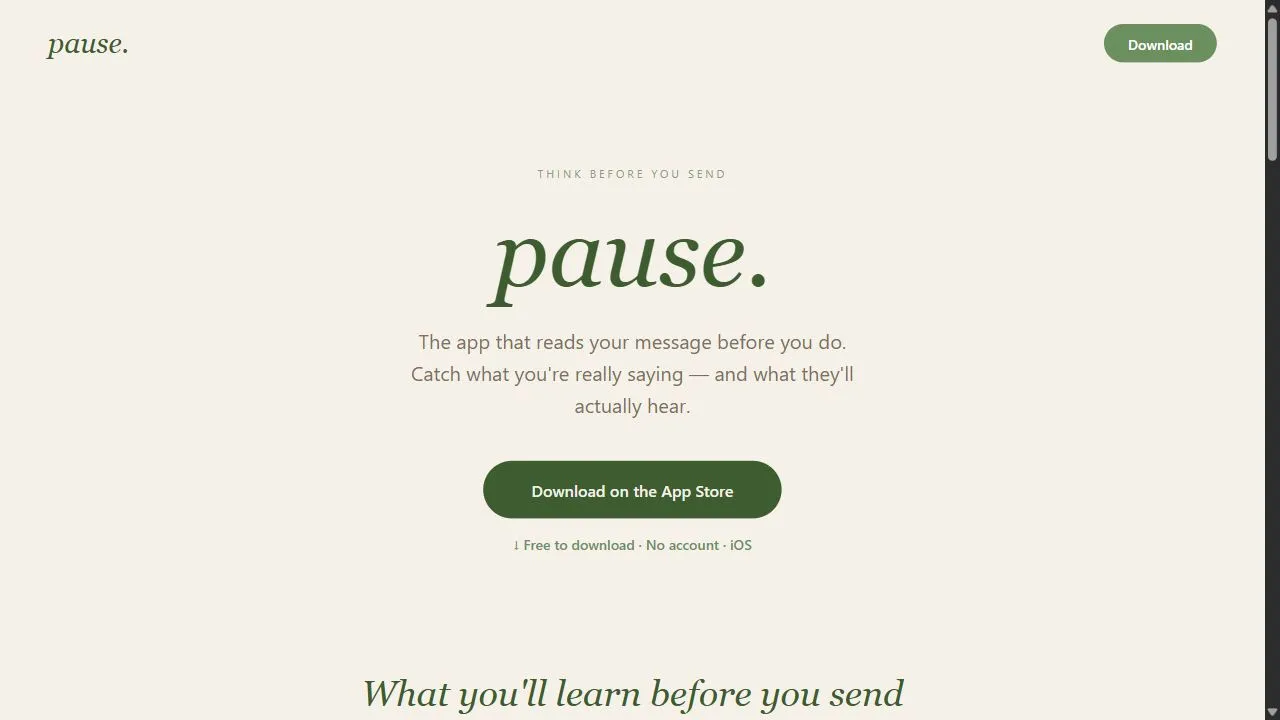
Interface & UI Showcase
Visual previews and interface screenshots
pause Interface
Memorae Interface


Pros & Cons Comparison
pause Pros & Cons
Strengths
- Improves professional communication
- Reduces impulsive mistakes
Limitations
- Requires deep integration access
- Might slow down high-velocity chats
Memorae Pros & Cons
Strengths
- Agentive AI acts as memory layer across all apps
- Captures, organizes, and recalls information via Whatsapp
- Unifies fragmented digital data into a cohesive knowledge base
- Boosts productivity and reduces information overload
Limitations
- Reliance on Whatsapp as primary interaction channel
- May require time for AI to learn individual memory patterns
Real Community Feedback
Verified user reviews from GetAiTools community
pause Reviews0
No community reviews yet for pause.
Memorae Reviews1
"我会继续使用。"
About pause
pause. is an AI-powered mindful communication tool designed to help users maintain professional composure and emotional intelligence by leveraging artificial intelligence, sentiment analysis, and intelligent digital buffers . The tool addresses the common problem of reactive communication, where high-stress environments or emotional triggers lead individuals to send messages, emails, or chat responses that are impulsive, unprofessional, or potentially damaging to professional relationships. By intervening in the split second between drafting a message and hitting the send button, pause. ensures that users have the necessary mental space to reflect on their tone and intent. The tool utilizes advanced Natural Language Processing (NLP) to scan outbound text for sentiment, urgency, and volatility. When the AI detects language that suggests frustration, anger, or an inappropriately reactive tone, it prompts the user to pause and think critically about the message. This AI-driven intervention acts as a cognitive circuit breaker, preventing the "send-and-regret" cycle that often occurs in fast-paced corporate settings. It is specifically engineered for professionals, executives, and teams operating in high-pressure environments where clear, empathetic, and composed communication is critical for operational success and workplace harmony. By integrating directly with existing communication workflows, pause. transforms the act of digital messaging from an impulsive reaction into a mindful action. It provides a scalable way to implement emotional intelligence into daily digital interactions, ensuring that the quality of professional communication remains high regardless of the user's current stress level. Through the use of AI-driven tone detection , the tool helps users bridge the gap between their immediate emotional response and their long-term professional goals. Key Features of pause. Real-time sentiment analysis of drafted messages and emails. Integration with a variety of professional communication and chat applications. Automated "cool-down" prompts triggered by detected volatility in text. Intelligent tone scanning to ensure alignment with professional standards. Digital buffering system that prevents immediate transmission of reactive content. Contextual nudges that encourage empathetic and clear communication. Sentiment-based flagging of aggressive or unprofessional language patterns. Non-intrusive intervention design to maintain workflow without causing significant disruption. Why People Use pause. The primary motivation for using pause. is the mitigation of risk associated with impulsive digital communication. In traditional communication settings, face-to-face interactions provide non-verbal cues and natural pauses that allow individuals to regulate their emotions. However, the immediacy of modern chat and email tools removes these safeguards, often leading users to send messages during a state of heightened emotion—a phenomenon often referred to as an "amygdala hijack." Traditional methods of preventing this, such as manually setting a timer or stepping away from the desk, are often forgotten in the heat of a stressful moment. Users turn to pause. because it provides an objective, AI-driven layer of oversight that does not rely on the user's own self-regulation skills during a crisis. By automating the "pause" process, the tool removes the cognitive burden of remembering to be mindful. This is particularly valuable in high-velocity environments where the pressure to respond quickly often overrides the desire to respond thoughtfully. Furthermore, the tool offers a level of consistency that manual review cannot match. While a person might overlook their own passive-aggressive tone due to confirmation bias, the AI analyzes the text based on linguistic patterns and sentiment data, providing an unbiased assessment of how the message will likely be perceived by the recipient. This results in significant time savings by reducing the need for "damage control" conversations, apologies, and conflict resolution meetings that typically follow a poorly worded email. Popular Use Cases Corporate Management: Executives and managers use the tool to handle difficult conversations with subordinates or stakeholders, ensuring that feedback is delivered constructively rather than reactively. Customer Support Escalations: Support agents utilize the tool when dealing with hostile or frustrated customers to ensure their responses remain professional and empathetic, preventing further escalation of the conflict. High-Pressure Startup Environments: Founders and early-stage employees in fast-paced settings use the buffer to maintain a positive team culture despite the inherent stress of rapid scaling and tight deadlines. Remote Team Collaboration: Distributed teams use the tool to compensate for the lack of non-verbal cues in text-based communication, reducing the likelihood of misunderstandings and perceived aggression. Client Relations and Account Management: Account managers use the tool to maintain a polished and professional demeanor when dealing with demanding clients or challenging project pivots. Human Resources and Conflict Mediation: HR professionals use the tool to draft sensitive communications regarding disciplinary actions or organizational changes, ensuring the tone is neutral and fair. Benefits of pause. Enhanced Professional Reputation: Users maintain a consistent image of composure and leadership by eliminating impulsive and emotional outbursts from their digital footprint. Reduction in Workplace Conflict: By filtering out volatility and encouraging mindful phrasing, the tool directly reduces the frequency of misunderstandings and interpersonal friction. Increased Emotional Intelligence (EQ): Over time, the tool's prompts help users become more aware of their own linguistic triggers, effectively training them to communicate more mindfully. Prevention of Career-Damaging Errors: The digital buffer prevents the transmission of "bridge-burning" messages that could lead to disciplinary action or ruined professional networks. Improved Communication Quality: Messages become more clear, concise, and empathetic, leading to better collaboration and more effective outcomes in team projects. Stress Mitigation: By providing a structured way to handle reactive urges, the tool reduces the anxiety associated with high-stakes digital correspondence. Scalable Professionalism: Organizations can ensure a baseline level of communication etiquette across their entire workforce without requiring constant manual oversight.
About Memorae
Memorae is an innovative AI-powered memory management platform designed to help users capture, organize, and recall information effortlessly by leveraging artificial intelligence, natural language processing, and agentive AI technology . It addresses the growing problem of digital information overload and the difficulty of effectively managing personal knowledge across numerous applications. This tool is particularly valuable for professionals, students, researchers, and anyone seeking to improve their personal knowledge management and productivity . It offers a unique approach to AI-assisted memory , moving beyond simple note-taking to create a dynamic, interconnected knowledge base. Key Features of Memorae Captures information from various digital sources. Organizes data into a searchable and interconnected knowledge base. Provides recall of information via a conversational interface. Utilizes agentive AI to proactively manage and surface relevant information. Integrates with WhatsApp for convenient access and interaction. Offers a unified view of fragmented digital data. Supports natural language queries for efficient information retrieval. Learns user patterns to improve recall accuracy over time. Enables users to create connections between disparate pieces of information. Functions as a ‘second brain’ to augment memory and cognitive abilities. Why People Use Memorae Individuals and professionals are increasingly overwhelmed by the sheer volume of information they encounter daily. Traditional methods of note-taking, bookmarking, and file organization often prove insufficient for effectively managing this data. Memorae offers a solution by automating the process of capturing, organizing, and recalling information. Unlike manual systems that require constant effort and maintenance, Memorae’s AI-driven approach proactively builds and maintains a user’s knowledge base. This results in significant time savings , improved information accessibility , and a reduction in the cognitive load associated with remembering and retrieving details. The platform’s agentive AI anticipates user needs, surfacing relevant information at the right time, thereby enhancing productivity and decision-making. Popular Use Cases Researchers: Consolidating research papers, notes, and findings into a single, searchable repository. Students: Managing lecture notes, readings, and assignments for improved learning and exam preparation. Professionals: Tracking client interactions, project details, and industry news for enhanced performance. Writers & Content Creators: Organizing research, ideas, and drafts for streamlined content creation. Project Managers: Centralizing project documentation, communications, and task updates for better team collaboration. Personal Knowledge Management: Building a personal knowledge base for lifelong learning and self-improvement. Meeting Note Summarization: Capturing key takeaways and action items from meetings and making them easily accessible. Travel Planning: Organizing travel itineraries, booking confirmations, and local information in one place. Event Planning: Managing event details, guest lists, and vendor information efficiently. Legal Professionals: Organizing case files, legal research, and client communications. Benefits of Memorae Enhanced Productivity: Streamlines information management, freeing up time for more important tasks. Improved Recall: Facilitates quick and accurate retrieval of information when needed. Reduced Information Overload: Consolidates fragmented data into a cohesive and manageable knowledge base. Increased Efficiency: Automates the process of capturing, organizing, and recalling information. Better Decision-Making: Provides access to relevant information, supporting informed decisions. Strengthened Knowledge Retention: Reinforces learning through interconnected knowledge representation. Simplified Collaboration: Enables easy sharing of information with colleagues and collaborators. Proactive Information Delivery: Agentive AI surfaces relevant information without explicit requests. Seamless Integration: Works across multiple applications and platforms, unifying digital data. Cognitive Augmentation: Functions as an extension of memory, enhancing cognitive abilities.
More AI Competitors to Compare

Trello AI(Automation)
Ai Productivity & Automation

Granola
Ai Productivity & Automation

OnSpace.AI - No Code App Builder
Ai Productivity & Automation
First Book AI
Ai Productivity & Automation
Renamer.ai
Ai Productivity & Automation

Bubbles Notetaker
Ai Productivity & Automation
Frequently Asked Questions
Most questions answered in under 30 seconds — but if you still have one, write to us at contactgetaitool@gmail.com and we reply within a few hours.
Which is better in 2026, pause or Memorae?
How does the pricing compare between pause and Memorae?
Can I use pause and Memorae for free?
What input and output formats do pause and Memorae support?
What are the key advantages of pause?
What are the key advantages of Memorae?
What are top alternative competitors to pause and Memorae?
Ready to Choose Your AI Tool?
Try both platforms or explore thousands of other curated artificial intelligence tools on GetAiTools.
Tags & Core Competencies
Specific tags and feature capabilities