PhotoGPTvsYolly AI
Side-by-side battle & analysis. Compare features, pricing, real community ratings, and pros & cons in 2026.

PhotoGPT
A versatile AI suite for generating high-quality images, videos, and custom characters from text.
Yolly AI
Yolly AI is a comprehensive AI-powered video and image generator designed to help users create professional-quality visual content by leveraging artificial intelligence, machine learning, and generative AI models .
Quick Verdict & Takeaway
Head-to-head summary recommendation
Both PhotoGPT and Yolly AI provide high-performance solutions in the Ai Content Creation ecosystem. Both platforms are top-rated in their respective categories.
Choose PhotoGPT if:
You need a mixed tool optimized for Ai Content Creation with TEXT, IMAGE input formats.
Choose Yolly AI if:
You prefer a mixed platform geared towards Ai Content Creation with TEXT output options.
Specification & Feature Matrix
Direct technical comparison between PhotoGPT and Yolly AI
| Feature / Spec | PhotoGPT | Yolly AI |
|---|---|---|
| Pricing Model | MIXED | MIXED |
| Starting Price | $17.99/mo | $4.95/mo |
| Category | Ai Content Creation | Ai Content Creation |
| Subcategory | Ai Content Creation | Ai Content Creation |
| Supported Inputs | TEXT, IMAGE | TEXT |
| Generated Outputs | IMAGE, VIDEO | TEXT |
| User Rating | ★ 4.0 / 5.0 (0) | ★ 4.0 / 5.0 (0) |
| Verified Status | Unverified | Unverified |
Interface & UI Showcase
Visual previews and interface screenshots
PhotoGPT Interface
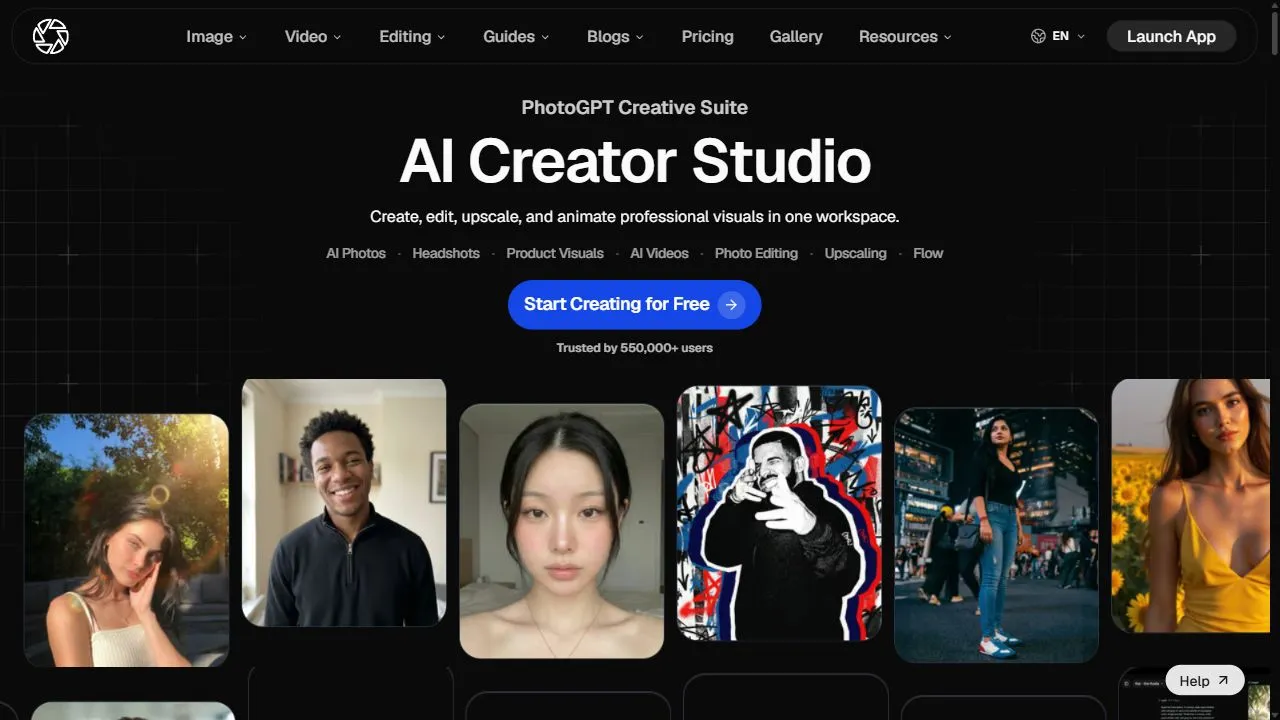
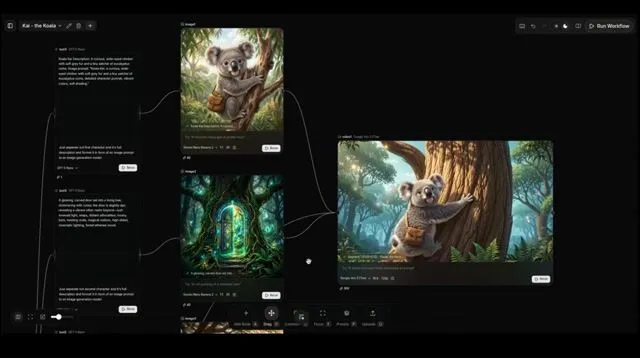
Yolly AI Interface


Pros & Cons Comparison
PhotoGPT Pros & Cons
Strengths
- All-in-one suite for images and video
- Excellent character consistency
- Professional-grade generation quality
Limitations
- Steep learning curve for advanced settings
- Higher subscription cost for pro features
Yolly AI Pros & Cons
Real Community Feedback
Verified user reviews from GetAiTools community
PhotoGPT Reviews0
No community reviews yet for PhotoGPT.
Yolly AI Reviews1
"Finally, an AI that doesn't feel like a chatbot from 2010."
About PhotoGPT
Opening Overview PhotoGPT is a powerful AI-powered creative suite designed to help users generate high-fidelity visual content by leveraging artificial intelligence, automation, and intelligent workflows . The platform solves the common problem of fragmentation in the digital art pipeline, where creators often have to switch between multiple disparate tools to generate a static image, maintain character consistency, and then animate that image into a video. By unifying these processes, PhotoGPT allows for a seamless transition from a conceptual text prompt to a fully realized motion asset. The tool utilizes advanced generative AI models to transform text-based descriptions into realistic, professional-grade images and dynamic videos. This capability is specifically engineered for content creators, digital artists, marketing agencies, and brand managers who require a high volume of consistent visual assets without the time-consuming overhead of traditional manual design and video production. Through the use of sophisticated neural networks, the AI interprets complex prompts to produce visuals that adhere to specific aesthetic requirements, lighting conditions, and composition rules. Beyond simple generation, PhotoGPT integrates an ecosystem of editing tools that allow users to modify elements, adjust visual aesthetics, and enhance resolution in real-time. This ensures that the output is not only creative but also functional for high-resolution commercial applications. By bridging the gap between static imagery and cinematic motion, the platform empowers users to build immersive visual experiences and cohesive brand narratives from simple text-driven inputs. Key Features of PhotoGPT Text-to-image generation for creating high-fidelity, realistic visuals. AI video generation capabilities to turn prompts into cinematic motion. Custom AI character creation tools to maintain visual consistency across different scenes. Image-to-video animation that transforms static photos into high-quality video clips. Real-time image editing for modifying specific elements within a generated piece. AI-driven resolution enhancement and upscaling for professional print or web use. Advanced prompt processing for precise control over lighting, style, and composition. Multi-modal input support allowing for both text and image-based guidance. Comprehensive creative workspace for managing both static and motion assets. Intelligent aesthetic adjustment tools to unify the look and feel of a project. Why People Use PhotoGPT The primary motivation for using PhotoGPT is the elimination of the technical and temporal barriers associated with traditional content creation. In a manual workflow, producing a consistent set of images and then animating them would require a combination of professional photography, graphic design software, and complex video editing suites. This process is not only expensive but requires a high level of specialized skill. PhotoGPT replaces these fragmented steps with an integrated AI workflow, allowing a single user to act as an art director, illustrator, and animator simultaneously. Character consistency has historically been one of the greatest challenges in generative AI. Most tools generate a new version of a subject every time a prompt is entered, making it impossible to tell a cohesive story. People turn to PhotoGPT specifically for its ability to craft and lock in custom AI characters. This ensures that a character looks identical across various environments, angles, and emotional states, which is critical for storytelling, branding, and sequential art. Furthermore, the transition from static to motion media is often a point of friction for creators. By offering a unified ecosystem where an image can be generated and then immediately animated within the same platform, PhotoGPT drastically reduces the time spent on exporting, importing, and re-formatting files between different software. This scalability allows businesses to produce high-quality social media campaigns or conceptual prototypes in a fraction of the time it would take using legacy methods. Popular Use Cases Social Media Marketing: Agencies use the tool to generate eye-catching visuals and short-form AI videos for platforms like Instagram, TikTok, and LinkedIn to increase engagement rates. Game Development and Concept Art: Indie developers utilize the platform to quickly iterate on character designs and environment concepts, creating mood boards and cinematic teasers. E-commerce Product Visualization: Online retailers generate realistic lifestyle images of products in various settings without the need for expensive physical photo shoots. Film Storyboarding: Directors and screenwriters transform scripts into visual storyboards and animatics to communicate their vision to production crews more effectively. Brand Identity and Mascot Design: Companies create consistent AI-generated brand mascots that can be used across various marketing materials while maintaining a uniform appearance. Digital Storytelling and Webcomics: Authors use the character consistency tools to create sequential narratives where the protagonist remains visually stable across different panels and scenes. Architectural and Interior Visualization: Designers generate photorealistic renders of spaces and animate walkthroughs to help clients visualize final designs. Benefits of PhotoGPT Increased Production Speed: Drastically reduces the time from conceptualization to final output by automating the generation of images and videos. Cost Efficiency: Minimizes the need for expensive equipment, studio rentals, and large teams of specialized designers for early-stage creative work. Professional Visual Consistency: Ensures that characters and art styles remain uniform across a project, eliminating the "randomness" often associated with AI art. Lowered Technical Barrier: Allows individuals without formal training in CGI or video editing to produce professional-grade motion graphics. Enhanced Creative Iteration: Enables users to experiment with hundreds of visual variations in minutes, leading to more refined and innovative final results. High-Resolution Output: Provides the ability to upscale and enhance visuals, ensuring that AI-generated content meets industry standards for clarity and detail. Unified Workflow: Streamlines the entire creative pipeline by combining image generation, editing, and animation into a single, cohesive interface.
About Yolly AI
Yolly AI is a comprehensive AI-powered video and image generator designed to help users create professional-quality visual content by leveraging artificial intelligence, machine learning, and generative AI models . Yolly AI addresses the challenges of time-consuming and expensive content creation by providing an accessible platform for generating videos and images from text prompts. It solves the problem of needing specialized design skills or expensive software, making visual content creation available to a wider audience. This tool is particularly valuable for marketers, social media managers, educators, and anyone needing engaging visuals for their projects. It streamlines the creative process, allowing users to quickly produce high-quality content for various applications, including social media, advertising, presentations, and educational materials. The platform utilizes advanced AI algorithms to interpret user input and generate unique and compelling visuals. Yolly AI stands out as a versatile solution for individuals and businesses looking to enhance their visual communication. It democratizes content creation, empowering users to bring their ideas to life without the barriers of traditional methods. By automating the generation of videos and images, Yolly AI significantly reduces production time and costs, making it an invaluable asset in today’s fast-paced digital landscape. The platform’s intuitive interface and powerful AI capabilities make it a leading choice for those seeking to elevate their visual content strategy. Key Features of Yolly AI Generates images from text prompts using advanced AI models. Creates videos from text descriptions and prompts. Offers a range of video styles and formats. Provides image editing tools for refining generated visuals. Supports style transfer to apply different artistic styles to images. Allows for customization of video length and resolution. Includes a user-friendly interface for easy navigation. Offers a library of pre-designed templates for quick content creation. Enables batch processing for generating multiple images or videos simultaneously. Provides options for downloading content in various formats. Why People Use Yolly AI Users adopt Yolly AI to overcome the limitations of traditional video and image creation processes. Historically, producing high-quality visuals required significant investment in software, skilled designers, and considerable time. Yolly AI disrupts this model by offering an accessible, affordable, and efficient alternative. The platform empowers users to generate compelling content quickly, without the need for extensive technical expertise. Compared to manual methods, Yolly AI significantly reduces production time, allowing for faster turnaround on projects. It also eliminates the costs associated with hiring designers or purchasing expensive software licenses. The AI-driven approach ensures consistency and scalability, making it ideal for businesses that require a large volume of visual content. Ultimately, Yolly AI enables users to focus on their core objectives ΓÇô whether it’s marketing, education, or personal expression ΓÇô while streamlining the creation of engaging visuals. Popular Use Cases Social Media Marketing: Generating eye-catching images and short videos for platforms like Instagram, TikTok, and Facebook. Content Marketing: Creating visuals for blog posts, articles, and website content to increase engagement. Advertising Campaigns: Producing compelling ad creatives for online and social media advertising. Educational Materials: Developing engaging visuals for presentations, lectures, and online courses. E-commerce Product Visualization: Generating images showcasing products in different settings and styles. Personal Art Creation: Exploring artistic expression and creating unique artwork using AI-powered tools. Prototyping and Storyboarding: Quickly visualizing ideas and concepts for video projects. Creating Animated Explainer Videos: Developing simple, informative videos to explain complex topics. Generating Visuals for Newsletters: Enhancing email marketing campaigns with engaging images and videos. Developing Visual Content for Internal Communications: Creating presentations and materials for company-wide announcements. Benefits of Yolly AI Increased Efficiency: Significantly reduces the time and effort required to create visual content. Cost Savings: Eliminates the need for expensive software, designers, and equipment. Enhanced Creativity: Empowers users to explore new ideas and generate unique visuals. Improved Engagement: Creates compelling content that captures attention and drives interaction. Scalability: Enables the rapid production of large volumes of visual content. Accessibility: Makes professional-grade content creation available to users of all skill levels. Consistency: Ensures a consistent visual style across all content. Versatility: Supports a wide range of applications, from social media to education. Streamlined Workflow: Simplifies the content creation process, from ideation to publication. Rapid Prototyping: Allows for quick visualization and iteration of ideas.
More AI Competitors to Compare
PixVerse
Ai Content Creation

Revid.Ai
Ai Content Creation

Repurpose.ai
Ai Content Creation
Jasper
Ai Content Creation
Memoir Maker
Ai Content Creation
Ferndesk
Ai Content Creation
Frequently Asked Questions
Most questions answered in under 30 seconds — but if you still have one, write to us at contactgetaitool@gmail.com and we reply within a few hours.
Which is better in 2026, PhotoGPT or Yolly AI?
How does the pricing compare between PhotoGPT and Yolly AI?
Can I use PhotoGPT and Yolly AI for free?
What input and output formats do PhotoGPT and Yolly AI support?
What are the key advantages of PhotoGPT?
What are the key advantages of Yolly AI?
What are top alternative competitors to PhotoGPT and Yolly AI?
Ready to Choose Your AI Tool?
Try both platforms or explore thousands of other curated artificial intelligence tools on GetAiTools.
Tags & Core Competencies
Specific tags and feature capabilities