SnaploidvsTapEdit
Side-by-side battle & analysis. Compare features, pricing, real community ratings, and pros & cons in 2026.

Snaploid
Turn your modern digital photos into authentic, retro-styled Polaroid images and animated cards using AI-powered vintage effects.

TapEdit
An intuitive AI-powered online photo editor that makes professional image retouching and enhancement easy and accessible for everyone.
Quick Verdict & Takeaway
Head-to-head summary recommendation
Both Snaploid and TapEdit provide high-performance solutions in the Free tools ecosystem. Both platforms are top-rated in their respective categories.
Choose Snaploid if:
You need a mixed tool optimized for Free Image Tools with IMAGE input formats.
Choose TapEdit if:
You prefer a mixed platform geared towards Free Image Tools with IMAGE output options.
Specification & Feature Matrix
Direct technical comparison between Snaploid and TapEdit
| Feature / Spec | Snaploid | TapEdit |
|---|---|---|
| Pricing Model | MIXED | MIXED |
| Starting Price | $11.9/mo | $2.99/mo |
| Category | Free tools | Free tools |
| Subcategory | Free Image Tools | Free Image Tools |
| Supported Inputs | IMAGE | IMAGE |
| Generated Outputs | IMAGE | IMAGE |
| User Rating | ★ 4.0 / 5.0 (0) | ★ 4.0 / 5.0 (0) |
| Verified Status | Unverified | Unverified |
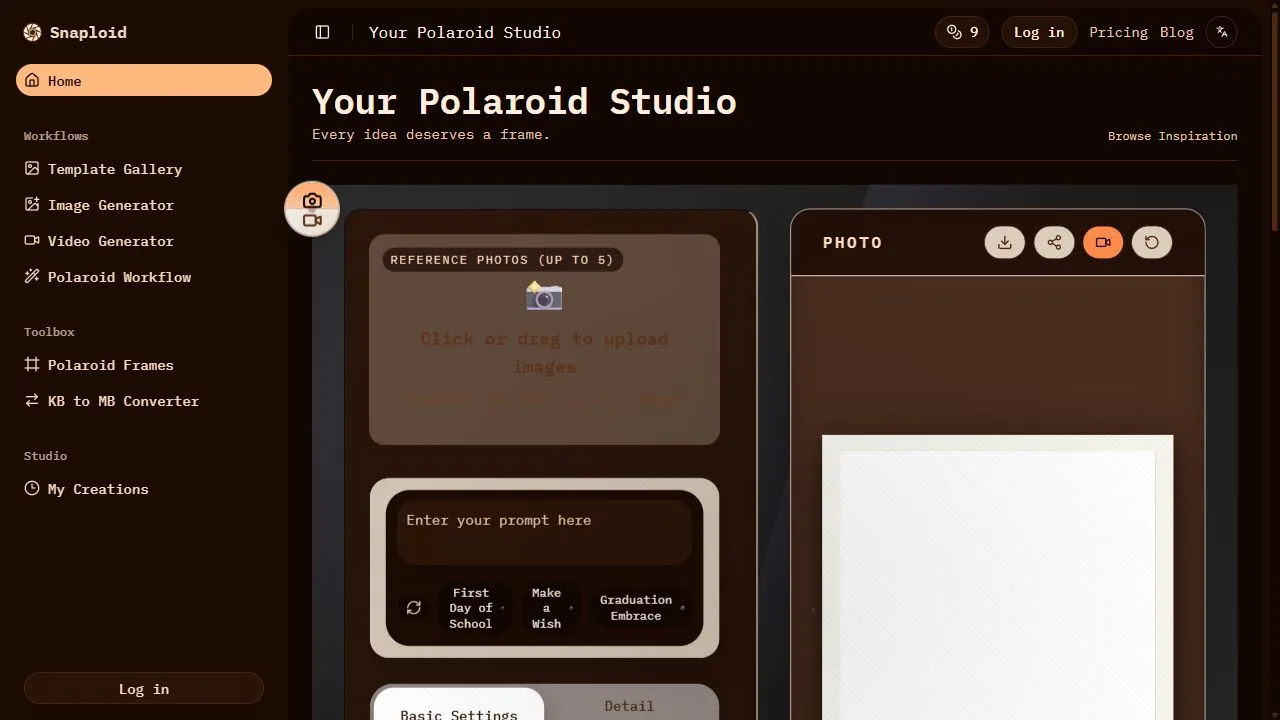
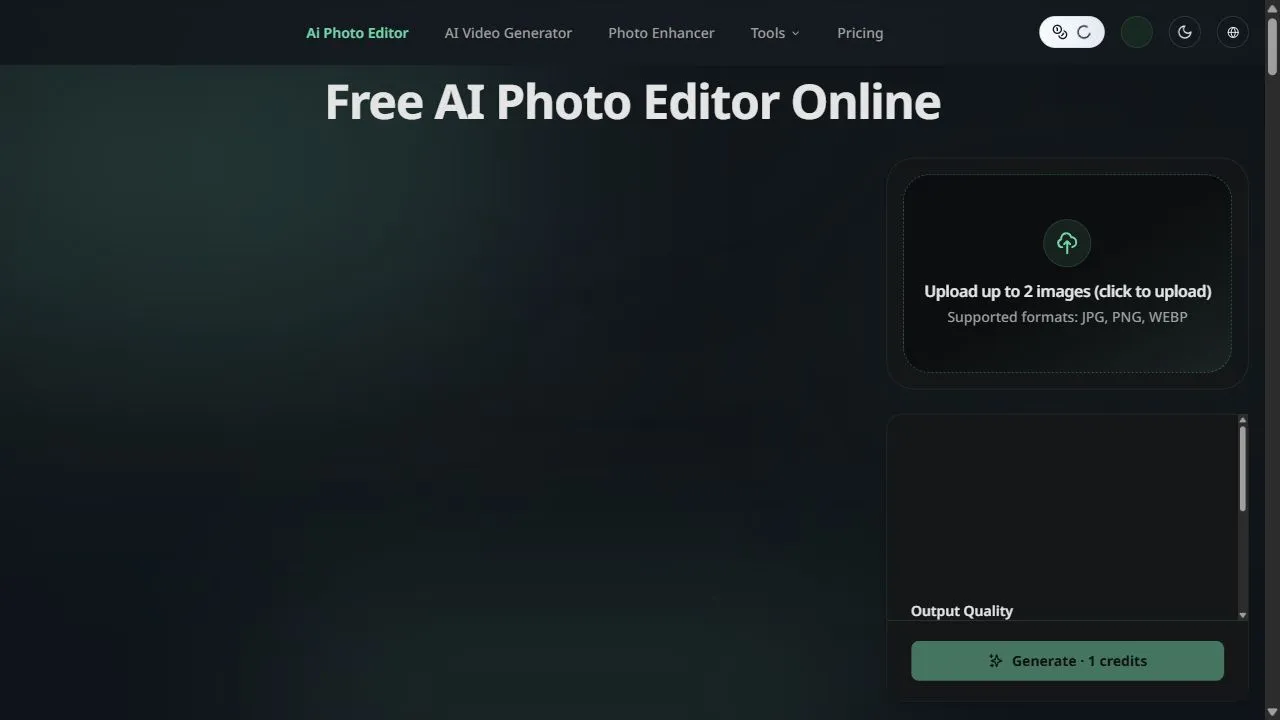
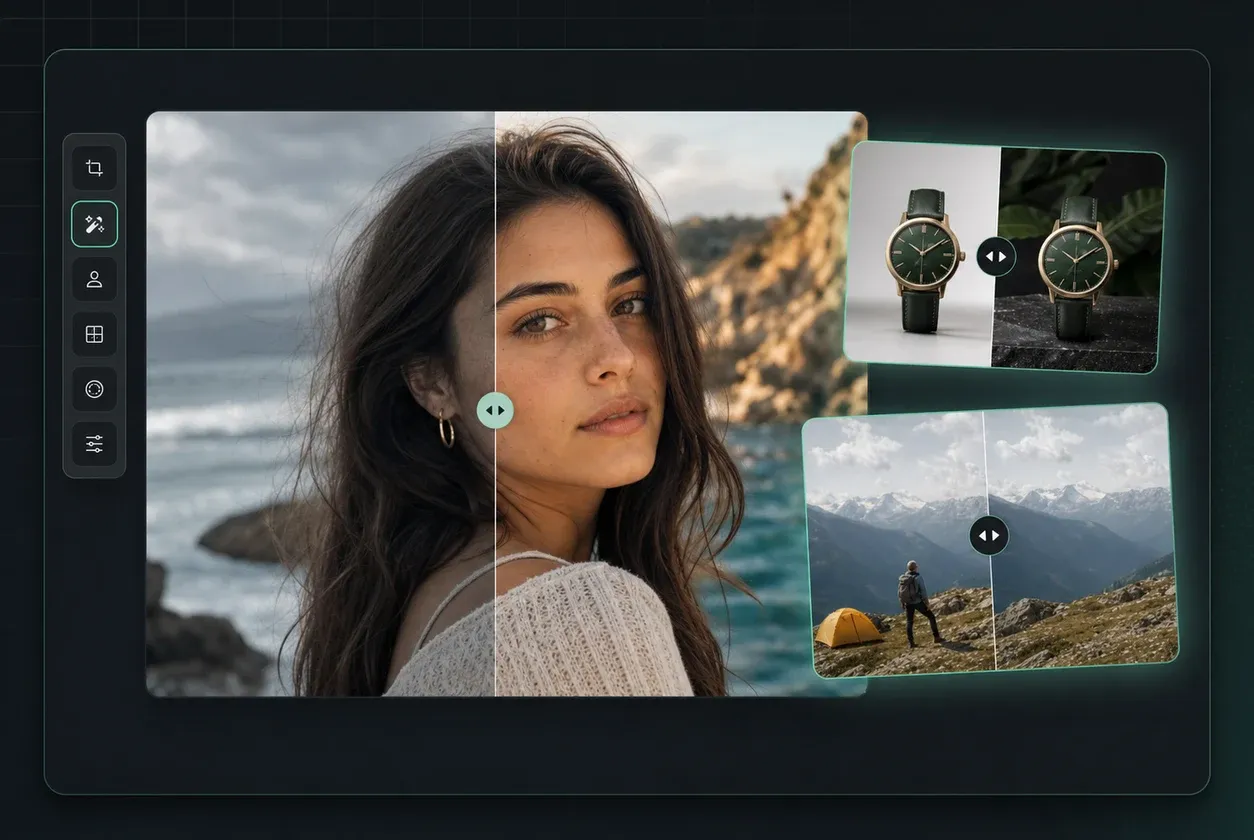
Interface & UI Showcase
Visual previews and interface screenshots
Snaploid Interface
TapEdit Interface
Pros & Cons Comparison
Snaploid Pros & Cons
Strengths
- Authentic film look
- Very unique niche
- Easy to use
Limitations
- Subscription price is relatively high
- Niche appeal
TapEdit Pros & Cons
Strengths
- User-friendly interface
- High-quality AI results
Limitations
- Limited free features
- Requires account for advanced tools
About Snaploid
Opening Overview Snaploid is a powerful AI-powered vintage photography platform designed to help users transform modern digital images into authentic, retro-style Polaroid cards by leveraging artificial intelligence, automated image processing, and intelligent visual workflows . In an era of ultra-high-definition imagery and sterile digital perfection, Snaploid addresses the growing demand for nostalgia and organic warmth in visual storytelling. By replicating the chemical imperfections and unique aesthetic of instant film, the tool allows users to inject character and emotional depth into their digital photo libraries. The platform solves the common problem of digital fatigue, where standard filters often feel superficial or artificial. Unlike basic overlay tools, Snaploid utilizes artificial intelligence to analyze the lighting, contrast, and composition of an uploaded image, ensuring that the applied vintage effects are integrated seamlessly into the scene. This AI-driven approach prevents the "stamped-on" look of traditional filters, instead creating a cohesive image that mimics the physical properties of a real Polaroid photograph, including specific color shifts and light leaks. This tool is specifically engineered for social media influencers, digital content creators, event planners, and sentimental users who require a consistent, retro aesthetic for their branding or personal archives. By automating the complex process of analog emulation, Snaploid enables the creation of high-engagement visual content that stands out in a crowded digital landscape, providing a bridge between the convenience of modern smartphone photography and the timeless appeal of 20th-century instant film. Key Features of Snaploid AI-driven lighting optimization to ensure vintage effects blend naturally with the original image. Automated composition adjustments that mimic the framing of classic instant cameras. A diverse library of retro-themed filters designed to emulate various eras of film stock. Advanced film grain synthesis to replicate the organic texture of analog photography. Animated frame layouts that simulate the physical experience of holding or flipping a Polaroid card. High-resolution output options suitable for both digital sharing and physical printing. Intelligent color grading that adjusts shadows and highlights for a warm, nostalgic tone. Instant conversion of standard digital formats into classic white-border Polaroid templates. Automated noise reduction and blending to maintain image clarity while adding vintage textures. Why People Use Snaploid The primary motivation for using Snaploid is the desire for authenticity in a digital world. For many users, modern photography has become too precise, removing the "soul" and imperfection that characterized early photography. Traditionally, achieving a truly convincing Polaroid look required expensive analog equipment, physical film, and a level of unpredictability that is not always practical for professional content creation. Alternatively, manual digital editing in complex software involves tedious tasks such as layering grain, adjusting color curves, and manually masking borders—a process that is time-consuming and difficult to scale. Snaploid replaces these manual hurdles with an AI-powered workflow that delivers professional results in seconds. Users gravitate toward the tool because it provides a scalable way to maintain a specific visual identity without needing a degree in graphic design. The efficiency gained by automating the "analog look" allows creators to focus on the narrative of their photos rather than the technicalities of post-processing. Furthermore, the addition of animated frames provides a layer of interactivity that traditional static filters cannot offer, making the content more engaging for audiences accustomed to short-form video and dynamic social feeds. By shifting the burden of lighting and composition analysis to an AI engine, Snaploid ensures that the output remains high-quality regardless of the original photo's quality. This consistency is critical for brands and influencers who need their feed to look cohesive and curated. The transition from high-definition sterility to nostalgic warmth is achieved with minimal effort, providing a level of simplicity that empowers non-technical users to produce art-house quality imagery. Popular Use Cases Social Media Branding: Influencers on Instagram and TikTok use the tool to create a "lo-fi" aesthetic that feels more personal and less curated than standard high-res photography. Event Planning and Management: Wedding and party planners generate digital Polaroid previews of event photos to share with clients, adding a sentimental touch to digital galleries. Digital Scrapbooking: Individuals use the platform to archive family memories in a format that evokes nostalgia, creating digital albums that feel like physical keepsakes. Retro Marketing Campaigns: Small businesses and e-commerce brands apply vintage effects to lifestyle product shots to evoke feelings of trust, tradition, and timelessness. Portfolio Diversification for Photographers: Professional photographers use the tool to offer "instant film" style deliverables to clients as a creative add-on to their standard digital packages. Content Creation for Blogs: Bloggers focusing on travel, history, or lifestyle use the AI-generated cards to break up text-heavy layouts with visually interesting, retro-style imagery. Animated Storytelling: Creators utilize the animated frame layouts to create "reveal" style posts on social media, increasing viewer retention through motion. Benefits of Snaploid Enhanced Visual Engagement: The unique retro aesthetic captures attention more effectively than standard digital photos, leading to higher interaction rates on social platforms. Significant Time Savings: Eliminates the need for manual layering and complex editing in professional software, reducing post-production time from hours to seconds. Professional Grade Consistency: Ensures that every image follows the same vintage logic, providing a unified look across entire galleries or brand campaigns. Emotional Resonance: Leverages the psychology of nostalgia to create a stronger emotional connection between the viewer and the imagery. Accessibility of Analog Art: Allows users to experiment with the look of instant film without the recurring cost of expensive physical film and specialized cameras. Improved Composition: The AI's ability to optimize lighting and framing helps salvage mediocre photos by turning them into stylistically intentional pieces of art. Versatility of Output: Provides files that are equally effective for high-impact digital displays and high-quality physical printing for tangible memories. Ease of Integration: The simple image-in, image-out workflow allows users to integrate the tool into their existing content creation pipeline without a steep learning curve.
About TapEdit
TapEdit is a powerful AI-powered photo editing platform designed to help users simplify complex image manipulation tasks by leveraging artificial intelligence, automation, and intelligent workflows . The platform addresses the common challenge of high-end photo editing, which traditionally requires expensive software and years of technical training to master. By utilizing advanced machine learning algorithms, TapEdit automates the most tedious aspects of image retouching, allowing users to achieve professional-grade results without the steep learning curve associated with desktop-grade editing suites. The tool is specifically engineered for a wide range of users, including social media content creators, e-commerce entrepreneurs, digital marketers, and hobbyists who require high-quality visuals but lack the time or expertise for manual editing. By integrating AI-driven capabilities such as automated object removal and intelligent clarity enhancement, TapEdit transforms the editing process from a manual, pixel-by-pixel chore into a streamlined, intent-based experience. This makes it an ideal solution for those operating in fast-paced digital environments where the speed of content production is just as critical as the quality of the output. Through the application of neural networks and computer vision, TapEdit analyzes image compositions to identify edges, textures, and lighting patterns. This allows the AI to apply filters and enhancements that feel natural rather than synthetic. Whether the goal is to clean up a product photo for a web store or to enhance the aesthetic appeal of a portrait for a professional profile, the tool provides a seamless bridge between raw imagery and polished, commercial-ready assets. Key Features of TapEdit AI-driven object removal for eliminating unwanted elements from backgrounds. Automated image clarity enhancement to sharpen blurry or low-resolution photos. Intelligent AI filters that adapt to the lighting and composition of the image. One-click background manipulation and cleaning tools. Advanced noise reduction algorithms to remove grain from low-light photography. Web-based architecture that enables editing without software installation. Automated color correction and balance adjustments. High-resolution image exporting for professional print and digital use. Intuitive user interface designed for rapid navigation and execution. Seamless image upload and processing workflows. Why People Use TapEdit The primary motivation for using TapEdit lies in the democratization of professional image editing. In the past, achieving a "studio look" required a combination of expensive hardware and a deep understanding of complex tools like layers, masking, and frequency separation. For many modern creators, these manual methods are prohibitively time-consuming and inefficient. TapEdit replaces these labor-intensive processes with AI automation, allowing users to perform tasks in seconds that would otherwise take hours of manual brushing and cloning. Furthermore, the shift toward a "mobile-first" and "web-first" content strategy has created a demand for tools that are accessible from any device. Traditional desktop software often ties a creator to a single workstation, whereas TapEdit's browser-based approach provides flexibility and scalability. Users choose this platform because it offers a compromise between the oversimplified nature of basic mobile filters and the overwhelming complexity of professional software. The drive for accuracy and consistency also plays a significant role. When managing a brand's visual identity across multiple platforms, maintaining a consistent look and feel is essential. TapEdit allows users to apply a standardized level of quality to their imagery, ensuring that every upload meets a professional benchmark regardless of the original photo's quality. This reliability in output reduces the need for constant revisions and allows for a more scalable content production pipeline. Popular Use Cases E-commerce Product Photography : Removing distracting background elements or dust particles from product shots to create a clean, white-background aesthetic for online storefronts. Social Media Influence : Enhancing portraits and lifestyle images with AI filters to maintain a high-end visual brand on platforms like Instagram and TikTok. Real Estate Marketing : Improving the clarity and lighting of property photos to make spaces appear brighter, sharper, and more inviting to potential buyers. Digital Advertising : Rapidly iterating on ad creatives by cleaning up imagery and enhancing focal points to increase click-through rates. Personal Archiving : Restoring old or slightly blurry family photographs by utilizing AI clarity and sharpening tools. Corporate Branding : Professionalizing employee headshots by removing background distractions and balancing skin tones for LinkedIn or company directories. Blogging and Journalism : Quickly preparing accompanying images for articles to ensure they are visually engaging and free of distracting artifacts. Benefits of TapEdit Significant Time Reduction : Automation of masking and retouching eliminates the need for tedious manual labor. Lowered Technical Barrier : Enables users without graphic design degrees to produce professional-level imagery. Increased Content Velocity : Accelerates the pipeline from capturing a photo to publishing it, allowing for more frequent posting. Cost Efficiency : Reduces the reliance on expensive monthly subscriptions for high-end desktop software or the need to hire freelance retouchers for simple tasks. Improved Visual Engagement : High-clarity, polished images typically lead to higher user retention and engagement rates in digital environments. Hardware Independence : Since the processing happens in the cloud, users do not need a high-performance computer with a powerful GPU to edit complex images. Consistent Quality Control : Ensures that all images produced maintain a professional standard, regardless of the user's skill level. Streamlined Workflow : Integrates the upload, edit, and download process into a single, cohesive web experience.
More AI Competitors to Compare
Boredhumans
Free tools

VectoSolve
Free tools
AI Animate Image
Free tools
AILab Tools
Free tools

AIVector
Free tools
EaseUS Online Video Repair
Free tools
Frequently Asked Questions
Most questions answered in under 30 seconds — but if you still have one, write to us at contactgetaitool@gmail.com and we reply within a few hours.
Which is better in 2026, Snaploid or TapEdit?
How does the pricing compare between Snaploid and TapEdit?
Can I use Snaploid and TapEdit for free?
What input and output formats do Snaploid and TapEdit support?
What are the key advantages of Snaploid?
What are the key advantages of TapEdit?
What are top alternative competitors to Snaploid and TapEdit?
Ready to Choose Your AI Tool?
Try both platforms or explore thousands of other curated artificial intelligence tools on GetAiTools.
Tags & Core Competencies
Specific tags and feature capabilities