ToneMatchvsRightHair
Side-by-side battle & analysis. Compare features, pricing, real community ratings, and pros & cons in 2026.
ToneMatch
Instantly discover your perfect color palette from selfies.

RightHair
Try on 200+ hairstyles instantly with AI before committing to your next haircut.
Quick Verdict & Takeaway
Head-to-head summary recommendation
Both ToneMatch and RightHair provide high-performance solutions in the Outfit ecosystem. Both platforms are top-rated in their respective categories.
Choose ToneMatch if:
You need a subscription tool optimized for Fashion advice with IMAGE input formats.
Choose RightHair if:
You prefer a mixed platform geared towards Hairstyle with IMAGE output options.
Specification & Feature Matrix
Direct technical comparison between ToneMatch and RightHair
| Feature / Spec | ToneMatch | RightHair |
|---|---|---|
| Pricing Model | SUBSCRIPTION | MIXED |
| Starting Price | $2.99/mo | $9.9/mo |
| Category | Outfit | Outfit |
| Subcategory | Fashion advice | Hairstyle |
| Supported Inputs | IMAGE | IMAGE |
| Generated Outputs | TEXT, IMAGE | IMAGE |
| User Rating | ★ 4.0 / 5.0 (0) | ★ 4.0 / 5.0 (0) |
| Verified Status | Unverified | Unverified |
Interface & UI Showcase
Visual previews and interface screenshots
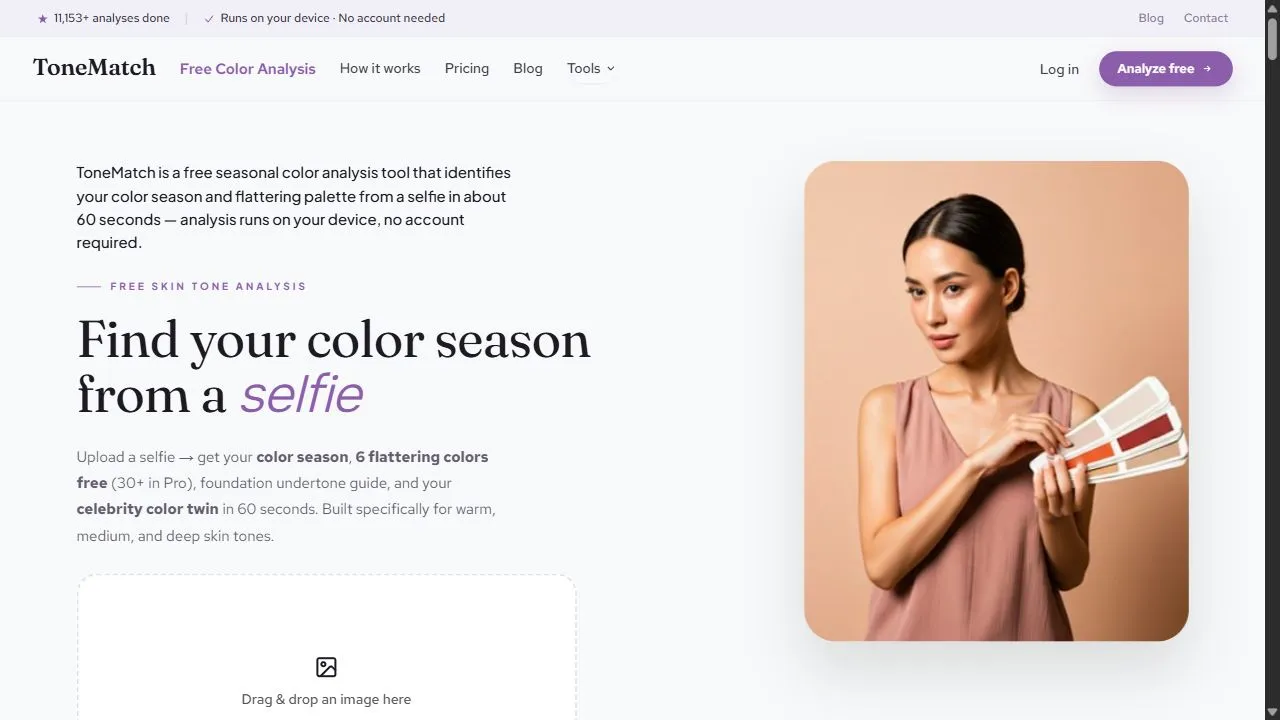
ToneMatch Interface
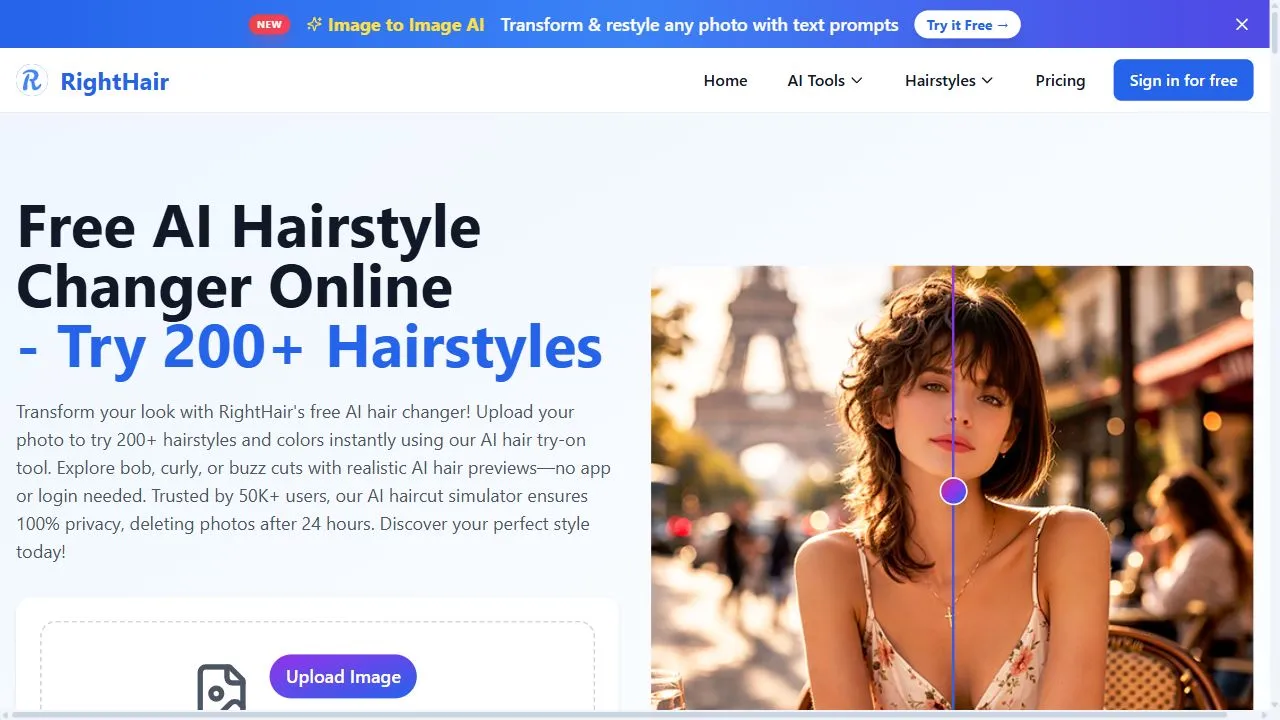
RightHair Interface

Pros & Cons Comparison
ToneMatch Pros & Cons
Strengths
- Highly personalized results
- Affordable subscription
Limitations
- Result dependent on lighting in selfie
- Niche utility
RightHair Pros & Cons
Strengths
- Huge library of styles
- Highly accurate mapping
Limitations
- Pricing is subscription-based
- Advanced features locked behind paywall
About ToneMatch
Opening Overview ToneMatch is a powerful AI-powered personal style assistant designed to help users discover their ideal color palette by leveraging artificial intelligence, computer vision, and advanced color theory . By analyzing a simple selfie, the platform identifies the unique undertones of a user's skin, hair, and eyes to determine their specific seasonal color profile. This eliminates the guesswork often associated with fashion and grooming, providing a science-backed approach to personal aesthetics. The tool solves a common problem faced by many: the difficulty of identifying which colors enhance one's natural features and which ones make them appear washed out or fatigued. Traditionally, achieving this level of insight required expensive, time-consuming in-person consultations with professional color analysts who used physical fabric drapes. ToneMatch digitizes this process, using AI color analysis to provide instant, accurate results that guide users in making informed decisions regarding clothing, cosmetics, and accessories. Designed for fashion enthusiasts, professional image-conscious individuals, and anyone looking to simplify their shopping experience, ToneMatch leverages intelligent image processing to extract precise color data from photographs. By automating the analysis of skin temperature and saturation, the tool ensures that users can curate a wardrobe that maximizes their natural beauty, ultimately leading to greater confidence and a more cohesive personal brand. Key Features of ToneMatch AI-driven selfie scanning for immediate physiological color extraction. Automated detection of skin, hair, and eye undertones. Generation of personalized seasonal color palettes based on color theory. Precision analysis of skin temperature to distinguish between warm and cool tones. Digital recommendations for flattering clothing colors. Guidance on compatible cosmetic shades and makeup palettes. Instant processing of image data to provide real-time style insights. Analysis of natural beauty markers to suggest complementary accessory colors. Why People Use ToneMatch The primary motivation for using ToneMatch is the desire for aesthetic harmony and the removal of uncertainty during the shopping process. For many, selecting the right clothing color is a matter of trial and error, often leading to "wardrobe clutter"—a collection of garments that were purchased on impulse but are rarely worn because they do not suit the wearer's complexion. ToneMatch replaces this manual, inefficient process with an AI-driven framework that provides a definitive answer on which shades are most flattering. Compared to traditional methods, such as visiting a professional stylist or relying on generic online quizzes, ToneMatch offers a level of personalization that is both scalable and affordable. Manual color analysis is often prohibitively expensive and geographically limited. By using artificial intelligence , ToneMatch democratizes access to professional-grade style guidance, allowing anyone with a smartphone to receive a detailed analysis of their color profile. Furthermore, users turn to ToneMatch to overcome decision fatigue. The modern consumer is overwhelmed by an infinite array of color options in fast fashion and cosmetics. By narrowing down the "correct" palette, the tool simplifies the decision-making process, allowing users to shop with purpose. This transition from guesswork to data-driven selection results in significant time savings and a higher success rate when purchasing new items. Popular Use Cases Capsule Wardrobe Creation: Users utilize the tool to identify a core set of complementary colors, ensuring that every piece of clothing they buy works seamlessly with others in their closet. Cosmetic and Makeup Selection: Individuals use their AI-generated palette to choose foundations, lipsticks, and eyeshadows that align with their skin's undertone, avoiding colors that clash or look unnatural. Professional Image Branding: Corporate professionals and public speakers use the tool to select attire for high-stakes presentations or headshots to ensure they look vibrant and authoritative. Hair Color Transformation: Before committing to a dye, users refer to their color analysis to determine whether warm, cool, or neutral hair tones would best complement their skin. Event Planning and Formal Wear: People planning outfits for weddings or galas use ToneMatch to pick gown or suit colors that enhance their complexion under various lighting conditions. Sustainable Shopping: Environmentally conscious consumers use the tool to reduce waste by only purchasing items they know they will love and wear long-term. Benefits of ToneMatch Increased Financial Efficiency: By preventing the purchase of unflattering clothing and makeup, users save significant amounts of money over time. Enhanced Self-Confidence: Wearing colors that naturally complement the skin and eyes creates a more radiant appearance, which boosts the user's overall confidence and presence. Streamlined Shopping Experience: The tool removes the stress of browsing through hundreds of shades, allowing users to filter their choices based on their specific seasonal palette. Professional-Grade Accuracy: The use of AI ensures that the analysis is based on objective color data rather than subjective opinion, providing a consistent and reliable result. Time Optimization: Users receive a comprehensive color profile in seconds, bypassing the need for appointment scheduling and travel associated with human stylists. Improved Aesthetic Cohesion: The output ensures a balanced look across different categories of style, from jewelry and accessories to primary apparel. Accessibility to Style Expertise: It brings high-end fashion consulting to the general public, making the science of color analysis available to everyone regardless of budget.
About RightHair
RightHair is a professional-grade AI-powered hairstyle changer designed to help users visualize new looks by leveraging artificial intelligence, computer vision, and advanced image mapping . The tool solves the common problem of "haircut regret" by allowing individuals to virtually test a wide array of hairstyles before committing to a permanent physical change. By utilizing AI to analyze facial structures and seamlessly blend new hair textures onto a user's uploaded photo, the platform removes the guesswork associated with visiting a salon. This tool is primarily designed for individuals seeking a style transformation, professional hairstylists wanting to provide visual consultations, and fashion-conscious users who wish to experiment with their appearance in a risk-free digital environment. The integration of artificial intelligence within the platform allows for a level of precision that traditional photo editing software cannot achieve. Instead of simply overlaying a static image of hair, the AI examines the contours of the user's head, the position of their features, and the lighting of the original photo to ensure the virtual hairstyle looks natural and proportionate. This high-intent approach to virtual hair try-on technology ensures that the resulting images serve as a reliable reference for both the client and the stylist, reducing the likelihood of communication errors during the actual haircutting process. By providing a comprehensive digital library of styles, the platform caters to a diverse global audience with varying hair textures, face shapes, and aesthetic preferences. The core value proposition lies in its ability to empower users through visualization, transforming the decision-making process from a leap of faith into a data-driven choice. Whether a user is considering a subtle trim, a bold color change, or a complete structural overhaul of their hair, the tool provides the necessary visual evidence to proceed with confidence. Key Features of RightHair Extensive library featuring over 200 distinct hairstyles and cuts. AI-driven image mapping that aligns hairstyles to the user's specific face shape. High-resolution image upload system for personalized hairstyle simulation. Support for diverse hair textures including straight, wavy, and curly options. Integrated color and shade variations for comprehensive look experimentation. Instant rendering capabilities for real-time style switching. Natural blending technology to ensure a seamless transition between the AI hair and the original photo. User-friendly interface designed for quick navigation through style categories. Exportable image outputs to be used as references for professional stylists. Why People Use RightHair The primary motivation for using RightHair is the elimination of uncertainty. Traditionally, choosing a new hairstyle involved showing a stylist a photograph of a celebrity or a model and hoping the result would look similar. However, because face shapes, forehead heights, and hair densities vary significantly between individuals, a style that looks excellent on one person may be unflattering on another. RightHair replaces this speculative process with a personalized visual simulation , allowing users to see exactly how a specific cut interacts with their own unique facial features. Furthermore, the tool offers a level of scalability in experimentation that is impossible through manual methods. In a traditional setting, a person might only consider two or three options before settling on one. With AI automation, users can cycle through dozens of different lengths, volumes, and colors in a matter of minutes. This efficiency saves users from the emotional stress of a failed haircut and the subsequent time and money required to fix a mistake. The shift toward AI-driven beauty tools also reflects a growing demand for precision and customization. People use this platform because it provides a safe space for creativity. The ability to experiment with radical changes—such as moving from very long hair to a pixie cut—without any immediate risk encourages users to explore their identity and aesthetic preferences more deeply. Popular Use Cases Pre-Salon Planning: Individuals use the tool to create a visual "mood board" of their favorite AI-generated looks to show their barber or stylist, ensuring clear communication of the desired outcome. Drastic Style Transitions: Users planning a significant change, such as shaving their head or cutting off several inches of length, use the tool to gauge whether the new proportions suit their face shape. Color Experimentation: People wanting to try bold colors or subtle highlights use the platform to see how different shades complement their skin tone before applying chemical dyes. Professional Image Rebranding: Corporate professionals seeking a more polished or authoritative look use the tool to find a conservative yet modern hairstyle that aligns with their career goals. Seasonal Updates: Fashion enthusiasts who update their look according to seasonal trends use the platform to quickly test the latest hairstyles without committing to a permanent change. Bridal and Event Prep: Individuals preparing for weddings or high-profile events use the AI to visualize various updos or styles that would best complement their formal attire. Benefits of RightHair Increased Decision Confidence: Users move from a state of hesitation to certainty by seeing a realistic preview of their potential new look. Reduction in Financial Waste: By avoiding haircuts that do not suit them, users save money on corrective salon visits and expensive hair treatments. Improved Stylist Communication: Providing a photo of oneself with the desired hair is far more effective than providing a photo of a stranger, leading to better results in the salon. Time Efficiency: The ability to test hundreds of styles instantly removes the need for hours of browsing through galleries and guessing. Risk-Free Exploration: Users can experiment with unconventional styles and colors that they would otherwise be too intimidated to try. Personalized Aesthetic Discovery: The tool helps users identify which specific hair lengths and volumes actually flatter their unique facial geometry. Enhanced User Experience: The seamless integration of AI mapping ensures that the visualization is realistic, making the tool a practical utility rather than a simple novelty filter.
More AI Competitors to Compare
Paul & Ty's Clothes on the Fly
Outfit
FashionLabs
Outfit

Hair-style.ai
Outfit
FashionAdvice.ai
Outfit
Frequently Asked Questions
Most questions answered in under 30 seconds — but if you still have one, write to us at contactgetaitool@gmail.com and we reply within a few hours.
Which is better in 2026, ToneMatch or RightHair?
How does the pricing compare between ToneMatch and RightHair?
Can I use ToneMatch and RightHair for free?
What input and output formats do ToneMatch and RightHair support?
What are the key advantages of ToneMatch?
What are the key advantages of RightHair?
What are top alternative competitors to ToneMatch and RightHair?
Ready to Choose Your AI Tool?
Try both platforms or explore thousands of other curated artificial intelligence tools on GetAiTools.
Tags & Core Competencies
Specific tags and feature capabilities