
Notebook lm

Overview
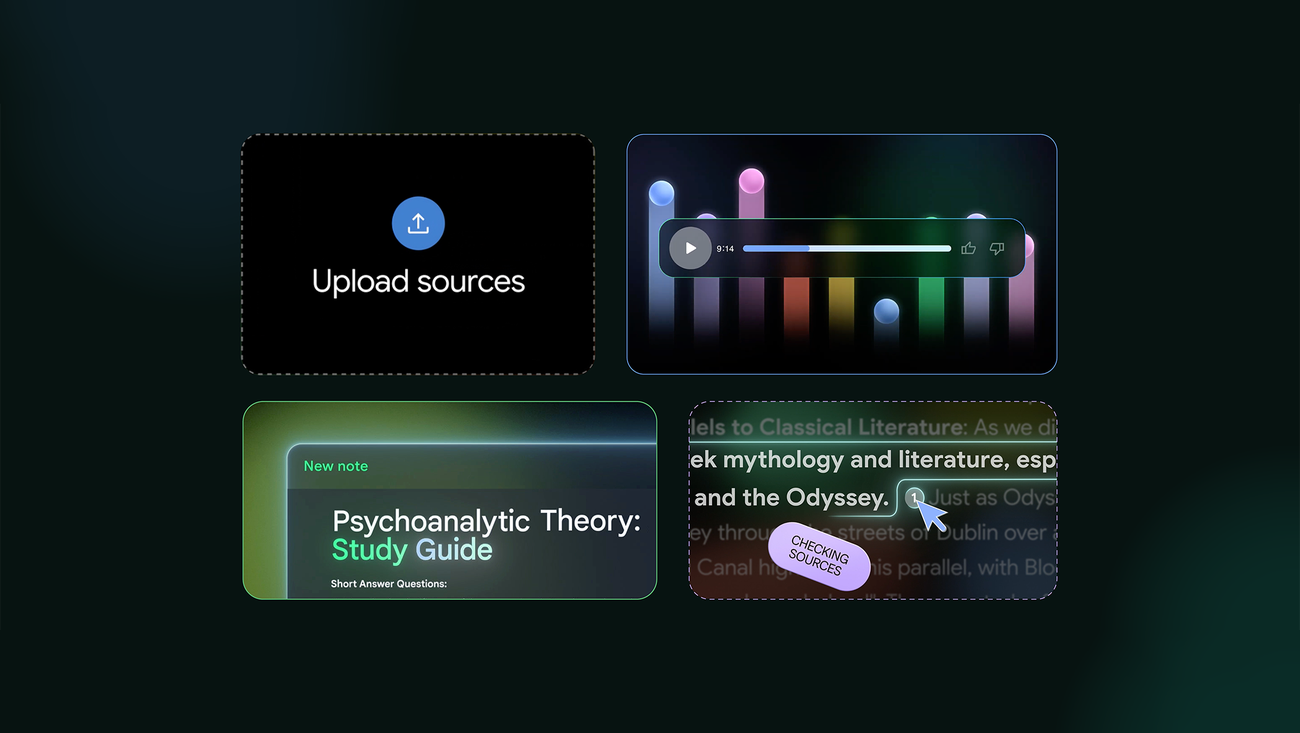
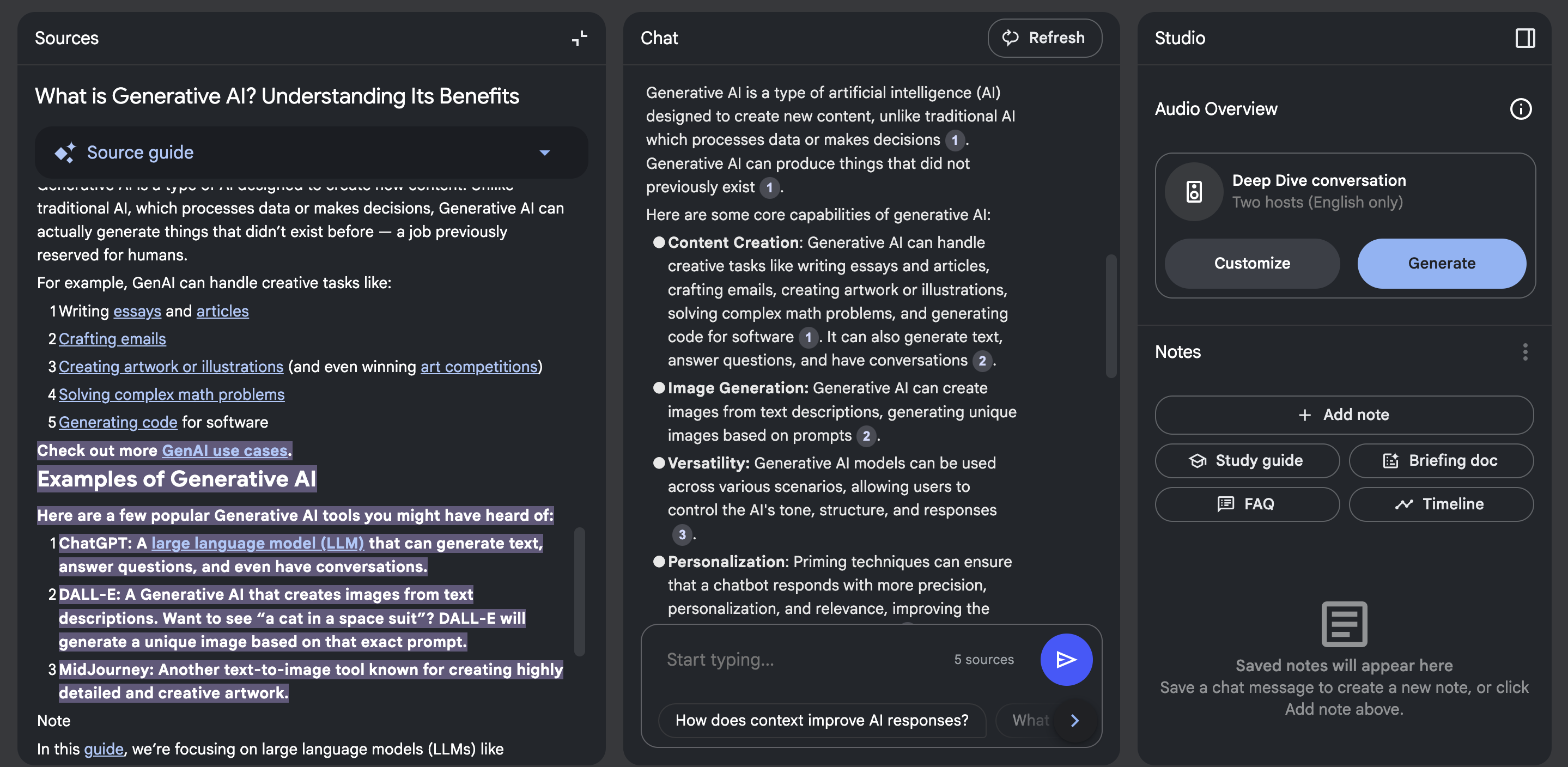
NotebookLM is an AI-powered research and note-taking tool designed to help users understand, analyze, summarize, and work with information from their own sources. Instead of relying only on general web knowledge, NotebookLM is designed around the documents and reference materials provided by the user.
Students, researchers, writers, professionals, educators, and knowledge workers can use NotebookLM to interact with their source material, ask questions, generate summaries, organize information, and explore complex topics more efficiently.
NotebookLM can be useful for working with research papers, study materials, reports, notes, documents, and other supported sources.
What Is NotebookLM?
NotebookLM is an AI research assistant and digital notebook developed by Google.
The core concept is simple: users provide source material, and the AI helps them understand and work with that information.
Instead of starting with a blank chatbot conversation, users can create notebook around a specific topic or project and relevant sources.
This makes NotebookLM useful for source-based research and learning workflows.
For example, a student studying for an examination could add lecture notes, PDFs, study materials, and other relevant documents to a notebook and then ask questions about those sources.
A researcher could use it to explore a collection of papers or documents, while a professional could use it to analyze reports and internal reference material.
NotebookLM AI Research Assistant
NotebookLM can function as an AI research assistant for source-based tasks.
Users can interact with their uploaded or connected reference material and ask questions in natural language.
Common tasks can include:
- Summarizing documents
- Asking questions about sources
- Finding important information
- Understanding complex topics
- Comparing information
- Creating study materials
- Organizing research
- Generating notes
- Extracting key ideas
- Exploring relationships between concepts
The usefulness of the output depends on the quality and relevance of the source material provided.
NotebookLM for Students
Students can use NotebookLM as an AI study assistant for working with course materials.
Potential use cases include:
- Lecture notes
- Textbooks
- Research papers
- Study guides
- Class documents
- Exam preparation
- Assignment research
- Revision material
A student can provide relevant source material and ask questions about the content instead of manually searching through every document.
NotebookLM can also help turn complex source material into easier-to-review notes and study resources.
Students should still verify important information against their original materials and follow their institution's policies regarding AI-assisted academic work.
NotebookLM for Research
Researchers often need to process large amounts of information from multiple sources.
NotebookLM can help organize research materials into a focused workspace and provide an AI interface for exploring those materials.
For example, a researcher could create a notebook for a specific project and add relevant documents.
They could then ask questions such as:
- What are the main arguments across these sources?
- How do the sources differ?
- What evidence supports a particular conclusion?
- What are the major themes?
- What concepts appear repeatedly?
- Can these documents be summarized?
This source-centered approach can make it easier to navigate a large collection of information.
NotebookLM for PDFs and Documents
One of the important use cases for NotebookLM is working with documents and other supported source types.
Instead of reading every document from beginning to end before asking questions, users can interact with the material through an AI-assisted interface.
Possible workflows include:
Upload Sources → Analyze → Ask Questions → Summarize → Create Notes → Review
This can be useful when dealing with lengthy reports, academic material, business documents, or research resources.
AI Document Analysis
NotebookLM can be used as an AI document analysis assistant.
Users can provide source material and ask the system to identify important information within those sources.
For example, a business professional might use a notebook to analyze reports, while a student might use it to understand course documents.
The source-based workflow can help keep research focused around the materials relevant to a specific project.
NotebookLM for Note Taking
NotebookLM combines AI capabilities with a notebook-style organization system.
Rather than treating every AI conversation as an isolated interaction, users can organize information around particular notebooks or topics.
This can be useful for:
- Research projects
- Courses
- Business projects
- Writing projects
- Personal learning
- Knowledge management
- Topic exploration
AI-assisted note-taking can reduce the amount of manual work required to organize and revisit information.
NotebookLM for Learning
NotebookLM can support learning by turning source material into an interactive study environment.
Instead of simply reading a document, users can ask questions about it and explore concepts through conversation.
For example, learners can use source material to explore:
- Definitions
- Concepts
- Key arguments
- Important facts
- Relationships between topics
- Examples
- Summaries
This can make long or complicated learning materials easier to navigate.
NotebookLM Audio Features
NotebookLM has also become known for AI-generated audio experiences based on source material.
Depending on the current capabilities available to users, audio features can transform information from a notebook into a conversational audio format.
This can provide another way to review information, particularly for users who prefer listening over reading.
Audio-based learning can be useful when reviewing notes while commuting, walking, exercising, or performing other activities.
Users should still refer to the original sources when accuracy is important.
NotebookLM for Professionals
Professionals can use NotebookLM to work with business and project-related information.
Potential applications include:
- Project documentation
- Business reports
- Research
- Meeting materials
- Product documentation
- Training resources
- Internal knowledge
- Industry research
- Strategy documents
A dedicated notebook can provide a focused environment for interacting with the source material associated with a specific project.
NotebookLM for Writers
Writers can use NotebookLM to organize research and reference material before or during the writing process.
For example, a writer working on a long-form article could collect:
- Research documents
- Interviews
- Reports
- Reference notes
- Background material
The AI can then help the writer explore the collected information and identify relevant details.
This can be particularly useful during the research and outlining stages.
NotebookLM for Business Research
Businesses often need to process information from multiple documents.
NotebookLM can provide an AI interface for exploring a focused collection of business sources.
Possible use cases include:
- Market research
- Competitor research
- Product research
- Industry reports
- Business documentation
- Internal knowledge
- Research summaries
Organizations should evaluate their own privacy, security, and data-handling requirements before adding sensitive information to any AI service.
NotebookLM Features
Depending on the current version and account availability, NotebookLM may provide features designed around source-based research and AI-assisted knowledge work.
These can include:
- Source-based AI conversations
- Document analysis
- Summarization
- Question answering
- Note organization
- Research assistance
- Study assistance
- AI-generated learning resources
- Audio-based content
- Source citations or references
Google may change NotebookLM's features and availability over time, so users should check the current product documentation for the latest capabilities.
NotebookLM vs Traditional Note Taking
Traditional note-taking requires users to manually read, understand, organize, and summarize information.
NotebookLM adds an AI layer to this workflow.
Traditional Workflow
Read → Highlight → Write Notes → Organize → Review
AI-Assisted Workflow
Add Sources → Ask Questions → Analyze → Generate Notes → Review
AI does not eliminate the need for human understanding. Instead, it can help users navigate and process information more efficiently.
NotebookLM vs General AI Chatbots
NotebookLM is designed around source-based workflows, while general AI chatbots can support a much broader range of tasks.
A general AI chatbot may be useful for:
- Brainstorming
- Creative writing
- Coding
- General questions
- Conversation
- Content generation
NotebookLM is particularly useful when the user's workflow revolves around a defined collection of source materials.
This distinction makes source organization an important part of the NotebookLM experience.
NotebookLM Alternatives
Users looking for similar functionality may also explore other AI research assistants, document analysis tools, AI note-taking applications, and knowledge-management platforms.
When comparing NotebookLM alternatives, consider:
- Supported source types
- AI model capabilities
- Document limits
- Research features
- Citation support
- Collaboration
- Privacy controls
- Audio features
- Note organization
- Pricing
- Integrations
The right choice depends on the user's specific research and knowledge-management workflow.
Benefits of NotebookLM
NotebookLM can be useful because it combines source organization and AI assistance in one workflow.
Potential benefits include:
- Easier document exploration
- Faster information retrieval
- AI-assisted summarization
- Source-based question answering
- Research organization
- Study assistance
- Structured note-taking
- Knowledge exploration
- Audio-based learning
- Focused project work
The quality of the results still depends on the sources, prompts, AI capabilities, and human review.
Who Can Use NotebookLM?
NotebookLM can be useful for a wide range of users.
Students
For studying notes, research material, and educational documents.
Researchers
For exploring collections of papers, reports, and reference material.
Professionals
For analyzing business documents and project information.
Writers
For organizing research and reference sources.
Educators
For working with educational resources and preparing learning materials.
Knowledge Workers
For organizing and interacting with information-heavy projects.
How to Use NotebookLM
A basic NotebookLM workflow can look like this:
Step 1: Create a Notebook
Start a notebook for a specific subject, project, or research topic.
Step 2: Add Sources
Provide the documents or other supported source material relevant to your project.
Step 3: Explore the Sources
Review the available material and identify the topics you want to investigate.
Step 4: Ask Questions
Use natural-language questions to explore information from the sources.
Step 5: Generate Summaries or Notes
Use available AI features to organize important information.
Step 6: Verify Important Information
Review the original sources before relying on important facts, especially for academic, professional, legal, financial, or other high-impact work.
NotebookLM on GetAiTool
GetAiTool helps users discover AI software across research, productivity, education, writing, business, development, and other categories.
The NotebookLM listing provides users with a focused overview of the tool, its capabilities, use cases, and relevance for AI-assisted research and note-taking.
Users interested in AI research assistants, AI note-taking tools, document analysis software, study assistants, and knowledge-management tools can explore NotebookLM alongside other AI solutions on GetAiTool.
The Future of AI Research and Note Taking
AI-powered research tools are becoming increasingly focused on helping people work with their own information.
Instead of simply generating generic answers, source-based AI systems can provide a more focused environment for interacting with documents, notes, research materials, and knowledge collections.
Future AI note-taking platforms may combine document analysis, research, search, audio learning, collaboration, knowledge management, and personalized AI assistance into increasingly integrated workflows.
NotebookLM represents this broader shift toward AI systems that help users understand and interact with their information rather than simply generating standalone answers.
Frequently Asked Questions
What is NotebookLM?
NotebookLM is an AI-powered research and note-taking tool from Google that helps users understand and interact with their own source materials.
Is NotebookLM an AI tool?
Yes. NotebookLM uses AI to help users analyze, summarize, and ask questions about their provided sources.
What can NotebookLM be used for?
NotebookLM can be used for research, studying, document analysis, note-taking, summarization, learning, and working with collections of source material.
Is NotebookLM useful for students?
Yes. Students can use it to explore lecture notes, study materials, research papers, and other educational sources.
Can NotebookLM summarize documents?
Yes. NotebookLM can help users summarize and explore information contained in supported source materials.
Can NotebookLM answer questions about PDFs?
It can work with supported document sources and answer questions based on the information available in those sources.
What is the difference between NotebookLM and ChatGPT?
NotebookLM is particularly focused on interacting with user-provided sources and research materials, while general-purpose AI assistants can support a broader range of tasks.
Is NotebookLM free?
NotebookLM has offered access at no cost, with features and usage limits subject to Google's current plans and availability. Check the current product terms for the latest details.
What are NotebookLM alternatives?
Alternatives include other AI research assistants, document-analysis tools, AI note-taking applications, and knowledge-management platforms. Their features and workflows vary.
Where can I discover NotebookLM and similar AI tools?
You can discover NotebookLM and other AI research, note-taking, document-analysis, and productivity tools on GetAiTool.
Key use cases and capabilities
Page Insights
Related AIs
Featured


Compare with Alternatives
All VS
GetAi
@getai
Professional Ai Chatbots tools for creators.
Pricing Details
More Related AIs
View All
Perplexity
Perplexity is an AI-powered answer engine that delivers concise, sourced responses to user querie

 Mehar Kumar4.0 stars
AITextTune
AITextTune is an innovative AI-powered text rewriting tool designed to help users refine and opti

 Dimitri Fontai3.0 stars
ChatOne
ChatOne is an innovative multimodal AI chatbot that empowers users to access and compare response

ChatOne is an innovative multimodal AI chatbot that empowers users to access and compare responses from leading large language models – including ChatGPT, Claude Sonnet, and Gemini – within a unified chat interface. ChatOne addresses the challenge of fragmented access to powerful AI tools. Previo

Grammarly
In the fast-evolving landscape of 2025, Grammarly has transitioned from a simple spell-checker into
 فاطمه سلطانی نژاد4.0 stars
Lutia
Lutia is an innovative AI-powered generative AI toolkit designed to help users create content, b

 V. Narayanan2.0 stars
AccuChats
AccuChats is a powerful AI-powered chatbot platform designed to help users build highly reliable

 Jonathan Lorenzo5.0 stars
Meta Ai
Meta AI is an advanced artificial intelligence assistant and generative AI platform developed to
 Arttu Takala2.0 stars
.png)
GPT4 Vision Chatbot
GPT4 Vision Chatbot is an AI-powered chatbot platform that enables users to create sophisticated
 V. Narayanan1.0 stars
CallGPT 6X
CallGPT 6X is an innovative AI-powered platform that streamlines access to multiple large languag

CallGPT 6X is an innovative AI-powered platform that streamlines access to multiple large language models (LLMs), intelligently routing user prompts to the optimal AI for the task. It solves the problem of needing to manually select between different AI models, offering a unified interface and ma

ChatBetter
ChatBetter is an innovative AI chat platform that provides unified access to multiple large langu

 Gustavo Santana3.0 stars
Inception Chat
Inception Chat is an innovative AI chatbot platform that delivers exceptionally fast and efficien

 Henriette Gaillard5.0 stars
Vizard.ai
Vizard.ai is an innovative AI video generation platform that transforms text prompts into engagin
 Henriette Gaillard3.0 stars
WidgetVox
WidgetVox is an AI-powered voice agent integration platform designed to help website owners incre

WidgetVox is an AI-powered voice agent integration platform designed to help website owners increase user engagement and streamline customer communication by leveraging artificial intelligence, automation, and natural language processing . The tool solves the common problem of static, impersonal

Chaindesk
Chaindesk is an AI-powered chatbot platform that enables businesses to create and deploy customiz

 Modesto Tapia5.0 stars
Pairaphrase
Pairaphrase is an advanced AI Translation Management System (TMS) that enables enterprises to str

Pairaphrase is an advanced AI Translation Management System (TMS) that enables enterprises to streamline and automate their translation workflows, ensuring accuracy, security, and brand consistency across global markets. Pairaphrase addresses the challenges of managing large volumes of multilingu

Narrot
Narrot is an advanced AI customer support automation agent designed to revolutionize how business

 Lolit Shevchenko5.0 stars


