Forget the Mac Mini: Run This OpenClaw Alternative for Just $10
Today, thanks to API-first AI infrastructure and low-cost cloud computing.
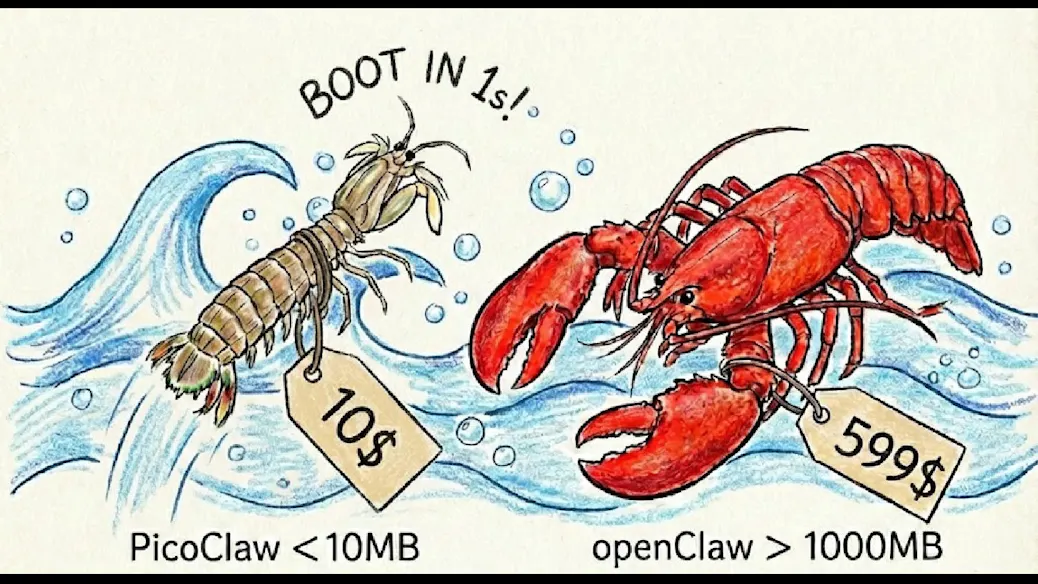
For years, the go-to recommendation for running autonomous AI agents locally was simple: get a powerful desktop — often something compact and reliable like Apple’s
Today, thanks to API-first AI infrastructure and low-cost cloud computing, you can run an OpenClaw-style autonomous agent environment for as little as $10 per month — without buying any hardware at all.
If you’re an indie hacker, startup founder, AI enthusiast, or student experimenting with agentic systems, this shift changes everything. Let’s break down why.
The Old Way: Hardware-First AI Experimentation

Not long ago, running AI frameworks locally required:
- A strong multi-core CPU
- 16GB+ RAM
- Sometimes a dedicated GPU
- Stable power and cooling
- Persistent uptime
The Mac Mini became a favorite because it was:
- Compact
- Energy-efficient
- Quiet
- Reliable for development workflows
For early OpenClaw users, running agents locally meant installing dependencies, managing Python environments, configuring Docker containers, and ensuring enough compute to handle browser automation and reasoning loops.
But here’s the truth most new builders don’t realize:
The machine isn’t doing the heavy thinking anymore.
The Big Shift: AI Is Now API-First

Modern agent frameworks rarely run large language models locally. Instead, they:
- Send prompts to cloud-based LLM APIs
- Receive structured responses
- Execute instructions locally
- Loop through reasoning cycles
This means:
- The real compute happens on OpenAI, Anthropic, or similar servers
- Your system only orchestrates workflows
- GPU power is mostly unnecessary
- Memory requirements are modest
An OpenClaw-style system typically handles:
- Task decomposition
- Tool calling
- Browser automation
- Code execution
- API interaction
None of these tasks require a high-end desktop when inference runs remotely.
The $10 Cloud Alternative Explained
Instead of buying hardware, developers are now spinning up low-cost cloud instances such as:
- Budget VPS servers
- Entry-level cloud compute instances
- Spot-priced VMs
- Minimal containerized environments
For roughly $10 per month, you can typically get:
- 2–4 virtual CPUs
- 4–8GB RAM
- 40–80GB SSD storage
- Linux preinstalled
- Full Docker support
That’s more than enough to run:
- Autonomous coding agents
- Browser-based automation systems
- Scraping bots
- Lightweight backend dashboards
- Task orchestration frameworks
Because the LLM calls happen externally, the server mostly coordinates logic rather than performs heavy AI computation.
Cost Comparison: Hardware vs Cloud
Let’s compare:
Option 1: Buy a Mac Mini
- $500–$800 upfront
- Electricity costs
- Physical maintenance
- Limited scalability
- Fixed compute capacity
Option 2: $10 Cloud Instance
- $10/month subscription
- No upfront investment
- Scale up anytime
- Cancel anytime
- Accessible from anywhere
Over one year:
- Mac Mini: $500–$800 + power
- Cloud VPS: ~$120
For experimentation and MVP development, cloud wins decisively on capital efficiency.
Accessibility: Build From Anywhere

Another major advantage of the cloud setup is flexibility.
With a local Mac Mini:
- You must physically access the device
- Remote setup requires additional configuration
- It’s tied to one location
With a VPS:
- Access via SSH from anywhere
- Deploy from laptop, tablet, or coworking space
- Easy backups and snapshots
- Simplified collaboration
For global teams and digital nomads, this flexibility matters.
What You Can Actually Run on $10
Here’s what a $10 setup comfortably supports:
1. Autonomous Coding Agents
Agents that:
- Read GitHub repos
- Modify code
- Run tests
- Push updates
2. Browser Automation
Using tools like:
- Headless Chrome
- Puppeteer
- Playwright
3. Workflow Orchestration
Multi-step AI pipelines:
- Prompt → parse → execute → validate → repeat
4. AI Task Bots
Examples:
- Lead generation bots
- Data extraction pipelines
- Content drafting agents
- API-connected assistants
The only real limitation is heavy local inference or GPU training — which most builders don’t need.
Who Should Choose This Approach?
This cloud-first model is ideal for:
- Indie hackers building SaaS tools
- Students learning agent frameworks
- Startup founders testing MVPs
- Automation enthusiasts
- AI tool creators
It may not be suitable for:
- Researchers training custom models
- GPU-heavy fine-tuning
- Large-scale production infrastructure
For 80% of builders experimenting with agents, however, this is more than enough.
Step-by-Step Setup Overview
Setting up takes less than an hour:
- Rent a low-cost VPS
- Install Docker and Python
- Clone your OpenClaw alternative repository
- Configure environment variables
- Add LLM API keys
- Launch the agent service
That’s it.
No hardware purchases.
No delivery wait time.
No physical setup.
The Bigger Trend: Compute Is Becoming Commodity
This shift reflects a broader transformation in AI infrastructure:
- Models are centralized
- APIs are standardized
- Agent frameworks are modular
- Infrastructure is elastic
Owning hardware is becoming optional for orchestration-based AI systems.
In the past, power meant owning GPUs.
Today, power means smart architecture.
Performance Expectations
Will it be slower than a Mac Mini?
Not necessarily.
Most latency in agent systems comes from:
- LLM API response time
- Network requests
- External service calls
The orchestration layer typically uses minimal CPU resources.
For lightweight workloads, performance difference is negligible.
Risk and Security Considerations
When using a cloud VPS, keep in mind:
- Secure SSH access
- Firewall configuration
- API key protection
- Regular backups
While cloud is convenient, it requires responsible configuration.
Final Thoughts
The era of needing expensive hardware to experiment with AI agents is ending.
If your workflow depends primarily on external LLM APIs and lightweight orchestration, a $10/month cloud instance can replace a Mac Mini for most use cases.
For indie developers and early-stage founders, this dramatically reduces the barrier to entry.
Instead of investing hundreds upfront, you can:
- Deploy instantly
- Iterate quickly
- Scale when needed
- Cancel anytime
AI experimentation has never been more accessible.
The future of agent development isn’t about bigger desktops.
It’s about smarter infrastructure.
Mentioned in this article
Tools
ChatGPT Atlas
ChatGPT Atlas is a next-generation AI-powered intelligence platform designed to map, organize, an

ChatGPT Atlas is a next-generation AI-powered intelligence platform designed to map, organize, and generate knowledge at scale. Built on advanced natural language processing (NLP) and large language models , ChatGPT Atlas helps users research faster, create high-quality content, analyze comple

DocGPT
Opening Overview DocGPT is a powerful AI-powered Google Sheets integration designed to help users

Opening Overview DocGPT is a powerful AI-powered Google Sheets integration designed to help users automate bulk content generation and data enrichment by leveraging artificial intelligence, automation, and intelligent workflows . By embedding leading large language models (LLMs) directly into

OpenAI Codex
OpenAI Codex is an advanced artificial intelligence model designed to understand natural language an
OpenAI Codex is an advanced artificial intelligence model designed to understand natural language and generate computer code across multiple programming languages. It helps developers write, edit, debug, and explain code using simple instructions, making software development faster and more accessib

EmergentlabsNew
Emergent is an AI-driven development platform that allows users to build full-stack web and mobile
Emergent is an AI-driven development platform that allows users to build full-stack web and mobile applications using natural language prompts instead of code . The platform uses conversational AI agents to design, generate, and deploy complete applications — including backend logic, frontend UI, a


