Dadan is an AI-powered online video creation platform designed to simplify the process of recording, editing, and sharing professional-quality videos. It addresses the challenges of creating engaging and informative video content for various purposes, including education, training, and internal communications. Dadan leverages artificial intelligence to automate tasks like transcription, captioning, and summarization, making video production accessible to a wider audience. This tool is particularly valuable for educators, trainers, remote teams, and content creators seeking efficient video creation and management solutions . Key Features of Dadan Flexible recording options for screen, webcam, or combined recordings in up to 4K resolution. Web-based video editing tools for trimming, cutting, blurring, adding text, and stitching clips. AI-powered automatic generation of video chapters for improved navigation. Automatic transcription services to convert speech to text. Multilingual caption generation supporting over 30 languages. AI-driven video summarization for concise content overviews. Interactive elements such as quizzes, polls, forms, and feedback fields. Secure video hosting with custom link and public profile sharing options. Timestamped feedback collection from viewers and team members. Integrations with popular platforms like Dropbox, Slack, LinkedIn, YouTube, and Google Classroom. Multi-platform support for Windows, macOS, Chrome, and Edge browsers. Why People Use Dadan Individuals and organizations utilize Dadan to overcome the complexities and time constraints associated with traditional video production workflows. Historically, creating professional videos required specialized software, extensive editing skills, and significant time investment. Dadan streamlines this process by offering an all-in-one, web-based platform with AI-powered automation. This allows users to focus on content creation rather than technical intricacies. The platformΓÇÖs emphasis on asynchronous communication also addresses the need for flexible knowledge sharing in remote and hybrid work environments, reducing reliance on live meetings and improving information retention. Dadan empowers users to create and distribute impactful video content efficiently and effectively. Popular Use Cases Educational Institutions: Creating online courses, lecture recordings, and student tutorials. Corporate Training: Developing employee onboarding materials, product demonstrations, and internal knowledge base videos. Software Companies: Producing software tutorials, feature walkthroughs, and customer support videos. Marketing Teams: Generating product demos, explainer videos, and social media content. Internal Communications: Sharing company updates, announcements, and training materials with employees. Remote Teams: Facilitating asynchronous communication, project updates, and team meetings. Customer Support: Providing visual guides and troubleshooting assistance to customers. Content Creators: Producing engaging video content for platforms like YouTube and LinkedIn. Benefits of Dadan Increased Efficiency: Significantly reduces the time and effort required to create and edit videos. Enhanced Collaboration: Facilitates seamless video sharing and feedback collection among team members. Improved Accessibility: Multilingual captions and transcriptions broaden the reach of video content. Greater Engagement: Interactive elements encourage viewer participation and knowledge retention. Simplified Knowledge Sharing: Enables clear and concise communication of complex information. Reduced Meeting Fatigue: Provides an alternative to live meetings for asynchronous updates and training. Centralized Video Management: Offers a unified platform for recording, editing, hosting, and analyzing video content. Scalable Content Creation: Empowers organizations to produce a high volume of video content without compromising quality. Data-Driven Insights: Analytics provide valuable data on viewer engagement and content performance. Cost-Effective Solution: Eliminates the need for expensive video editing software and specialized expertise.

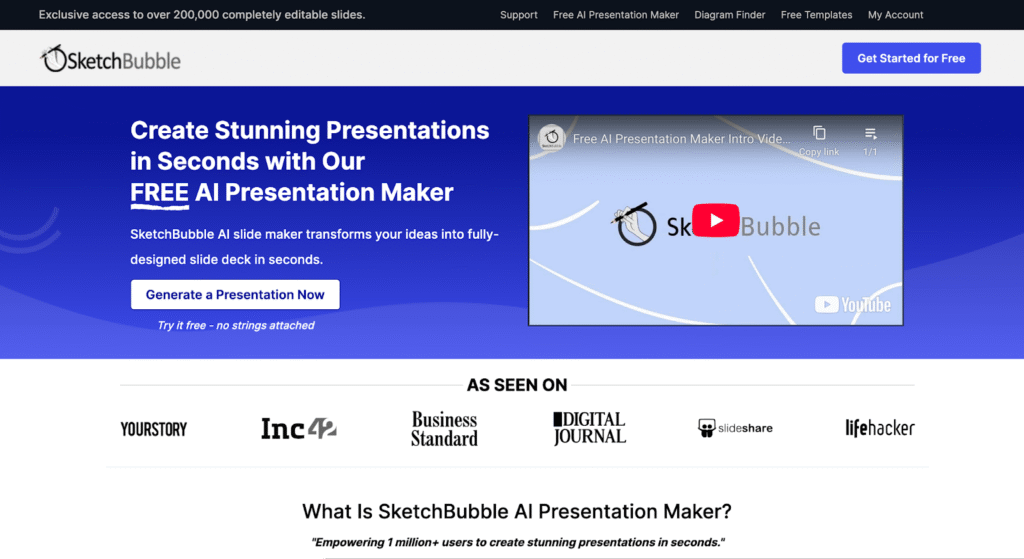
SketchBubble AI Presentation Maker is an innovative AI-powered presentation tool designed to help users generate complete slide decks quickly and easily by leveraging artificial intelligence and natural language processing . This tool addresses the common challenge of time-consuming presentation creation, often requiring significant effort in design, content structuring, and visual layout. SketchBubble automates this process, allowing individuals to focus on their message rather than the mechanics of slide design. It is particularly valuable for professionals, educators, and students who need to create compelling presentations efficiently. The core technology utilizes AI algorithms to transform text prompts into visually appealing and informative presentations, streamlining the workflow from concept to delivery. SketchBubble is ideal for anyone seeking a rapid and accessible solution for creating presentations without needing extensive design skills or software expertise. It offers a free and efficient alternative to traditional presentation methods, empowering users to communicate their ideas effectively. The tool is optimized for keywords such as AI presentation maker , AI slide generator , and automatic presentation tool . Key Features of SketchBubble AI Presentation Maker Generates complete presentations from text prompts. Creates presentations with relevant content and structure. Offers visually appealing slide layouts and designs. Allows for easy downloading in PowerPoint format. Enables opening and editing in Google Slides. Requires no prior design experience. Provides a fast and efficient presentation creation process. Supports a wide range of presentation topics. Automatically structures content into logical slide sequences. Offers a user-friendly interface for prompt input. Why People Use SketchBubble AI Presentation Maker Individuals and organizations utilize SketchBubble to overcome the hurdles associated with traditional presentation development. Manually creating presentations often involves hours of work, including research, content writing, design, and formatting. SketchBubble significantly reduces this time investment by automating the majority of these tasks. The tool empowers users to quickly transform their ideas into polished presentations, even without design expertise. This is particularly beneficial for those who prioritize content and delivery over aesthetic details. By streamlining the presentation creation process, SketchBubble allows users to focus on refining their message and engaging their audience, ultimately improving communication effectiveness. It offers a scalable solution for generating presentations, making it suitable for both individual projects and large-scale initiatives. Popular Use Cases Business Professionals: Creating pitch decks, sales presentations, and internal reports. Educators: Developing lecture slides, course materials, and student presentations. Students: Preparing class presentations, project reports, and thesis defenses. Marketing Teams: Generating presentations for webinars, product launches, and marketing campaigns. Trainers & Consultants: Developing training materials and workshop presentations. Project Managers: Creating project status updates and stakeholder presentations. Public Speakers: Crafting engaging presentations for conferences and events. Content Creators: Visualizing blog posts or articles into presentation format. Researchers: Presenting findings and data in a clear and concise manner. Startups: Quickly building pitch decks to attract investors. Benefits of SketchBubble AI Presentation Maker Significant Time Savings: Reduces presentation creation time from hours to minutes. Increased Productivity: Enables users to create more presentations with less effort. Enhanced Content Quality: Generates well-structured and informative slide decks. Improved Visual Appeal: Creates visually engaging presentations with professional designs. Accessibility for All Users: Requires no prior design skills or software expertise. Cost-Effective Solution: Offers a free alternative to expensive presentation software or design services. Streamlined Workflow: Simplifies the presentation creation process from start to finish. Greater Focus on Message: Allows users to concentrate on content and delivery. Easy Customization: Enables easy editing and refinement in PowerPoint or Google Slides. Scalable Presentation Creation: Supports the generation of presentations for various needs and audiences.








 Android
 IOS
IOS Mini Tools
 Software
 Web
Web