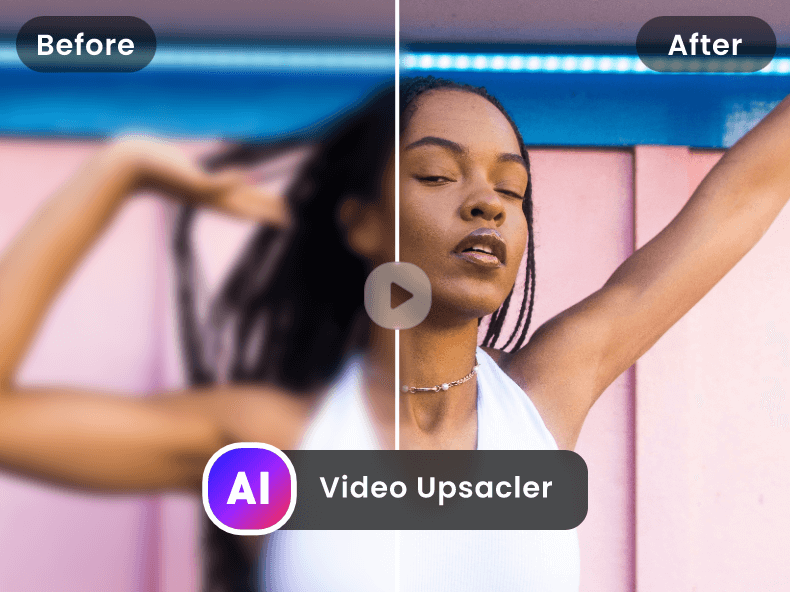
Free AI Video Upscaler is a web-based application that enhances the resolution of videos using artificial intelligence, transforming low-quality footage into high-definition visuals. It addresses the common problem of blurry or pixelated videos, offering a solution for improving video clarity without requiring complex software or extensive technical expertise. The tool utilizes deep learning algorithms to intelligently upscale video content, making it suitable for a wide range of users seeking to improve their video quality. It is a valuable resource for anyone looking for an AI video enhancer , video upscaling , or video quality improvement solution. Key Features of Free AI Video Upscaler Upscales video resolution up to 4K. Supports various video formats. Offers a user-friendly, web-based interface. Utilizes AI algorithms for intelligent upscaling. Provides fast processing speeds. Allows users to enhance video quality without watermarks. Requires no software download or installation. Offers batch processing capabilities for multiple files. Enhances details and reduces noise in videos. Provides a simple upload and download process. Why People Use Free AI Video Upscaler Individuals and professionals alike often find themselves with video footage that lacks the desired clarity. This can stem from older recordings, low-resolution source material, or the need to repurpose content for higher-resolution displays. Traditionally, improving video quality involved expensive software, significant processing power, and a steep learning curve. Free AI Video Upscaler simplifies this process dramatically. By leveraging the power of artificial intelligence , the tool automatically analyzes and enhances video footage, restoring details and reducing artifacts. This results in a noticeably sharper and more visually appealing final product. Users can avoid the time-consuming and often unsatisfactory results of manual editing techniques. The platform’s accessibility and ease of use make it a compelling alternative to traditional video editing workflows, offering a quick and effective solution for video enhancement and resolution upscaling . It empowers users to breathe new life into existing video content, making it suitable for modern viewing platforms and applications. Popular Use Cases Restoring Old Family Videos: Individuals can improve the quality of cherished memories captured on older cameras or formats. Enhancing Surveillance Footage: Security professionals can clarify blurry security camera recordings for better identification and analysis. Improving Online Course Videos: Educators can enhance the visual quality of their online learning materials for a more engaging student experience. Preparing Videos for Social Media: Content creators can upscale videos to meet the resolution requirements of platforms like YouTube, TikTok, and Instagram. Revitalizing Archived Footage: Filmmakers and archivists can restore and preserve historical video content. Upscaling Gameplay Recordings: Gamers can improve the quality of their gameplay videos for streaming or sharing. Enhancing Drone Footage: Aerial videographers can clarify footage captured by drones, often limited by camera resolution or distance. Improving Video Conferencing Recordings: Professionals can enhance the quality of recordings from video conferences and webinars. Preparing Videos for Presentations: Users can upscale videos to ensure clear visibility during presentations and meetings. Enhancing Low-Resolution Stock Footage: Video editors can improve the quality of stock footage for use in projects. Benefits of Free AI Video Upscaler Enhanced Video Clarity: Users experience a significant improvement in video sharpness and detail. Time Savings: The automated AI-powered process eliminates the need for manual editing, saving valuable time and effort. Cost-Effectiveness: As a free tool, it provides a budget-friendly solution for video enhancement. Ease of Use: The intuitive web interface requires no technical expertise or software installation. Improved Visual Appeal: Enhanced videos are more engaging and professional-looking. Wider Compatibility: Upscaled videos are suitable for a broader range of devices and platforms. Preservation of Memories: Old or damaged videos can be restored and enjoyed for years to come. Increased Content Value: Improved video quality can enhance the perceived value of content. Accessibility: The web-based nature of the tool allows access from any device with an internet connection. No Watermarks: Enhanced videos are delivered without any intrusive watermarks.

Remover.bg is an AI-powered background removal tool that instantly eliminates backgrounds from images with a single click, providing users with high-resolution transparent PNGs or the option to add new backgrounds. It solves the common problem of time-consuming and often imperfect manual background removal in photo editing, offering a streamlined and automated solution. The tool leverages artificial intelligence and deep learning algorithms to accurately detect and isolate subjects within an image. Remover.bg is designed for a wide range of users, including e-commerce businesses, marketers, designers, photographers, and individuals who need quick and easy background removal for various applications. It’s a valuable resource for anyone seeking efficient image editing , product photo enhancement , or graphic design solutions. Key Features of Remover.bg Automatically removes backgrounds from images. Provides high-resolution output images. Offers instant results with a single click. Supports various image formats. Allows downloading in PNG, JPG, or SVG formats. Enables automatic API integration for bulk processing. Offers a simple and intuitive user interface. Provides options to edit the removed background. Allows users to add a new background to the image. Offers a desktop application for offline use. Why People Use Remover.bg Individuals and businesses alike utilize Remover.bg to significantly reduce the time and effort associated with background removal. Traditional methods, such as using complex software like Adobe Photoshop, require manual selection and masking, which can be tedious and demand a high level of skill. Remover.bg automates this process, delivering professional-quality results in seconds without the need for specialized expertise. This efficiency is particularly valuable for tasks involving large volumes of images, such as updating e-commerce product listings , creating marketing materials , or preparing images for social media . The tool’s accuracy minimizes the need for post-editing touch-ups, further streamlining workflows and boosting productivity. It provides a scalable solution for businesses needing consistent and reliable image background removal services. Popular Use Cases E-commerce: Removing backgrounds from product photos to create clean, professional images for online stores. Marketing & Advertising: Creating visually appealing marketing materials and advertisements with transparent or customized backgrounds. Graphic Design: Isolating subjects for use in composite images, illustrations, and other design projects. Real Estate: Removing backgrounds from property photos to enhance visual appeal and focus on key features. Social Media: Creating engaging profile pictures, posts, and stories with transparent or customized backgrounds. Print on Demand: Preparing images for print-on-demand products like t-shirts, mugs, and posters. Headshots & Portraits: Creating professional-looking headshots and portraits with clean backgrounds. Document Processing: Removing backgrounds from scanned documents to improve readability and clarity. Virtual Reality/Augmented Reality: Preparing assets for use in VR/AR applications. Photo Restoration: Isolating subjects in damaged or old photographs for restoration purposes. Benefits of Remover.bg Significant Time Savings: Automates a traditionally time-consuming task, freeing up valuable time for other priorities. Increased Productivity: Enables users to process large volumes of images quickly and efficiently. Cost-Effectiveness: Eliminates the need for expensive software subscriptions or outsourcing to professional editors. High-Quality Results: Delivers professional-looking background removal with accurate subject isolation. Ease of Use: Requires no technical skills or prior experience in photo editing. Scalability: Easily handles both small and large-scale image processing needs. Improved Visual Appeal: Enhances the visual impact of images by removing distracting backgrounds. Streamlined Workflows: Integrates seamlessly into existing workflows, simplifying image editing processes. Versatility: Suitable for a wide range of applications across various industries and use cases. Accessibility: Available as a web-based tool and desktop application, providing flexibility and convenience.


Free AI Video Upscaler is a web-based application that enhances the resolution of videos using artificial intelligence, transforming low-quality footage into high-definition visuals. It addresses the common problem of blurry or pixelated videos, offering a solution for improving video clarity without requiring complex software or extensive technical expertise. The tool utilizes deep learning algorithms to intelligently upscale video content, making it suitable for a wide range of users seeking to improve their video quality. It is a valuable resource for anyone looking for an AI video enhancer , video upscaling , or video quality improvement solution. Key Features of Free AI Video Upscaler Upscales video resolution up to 4K. Supports various video formats. Offers a user-friendly, web-based interface. Utilizes AI algorithms for intelligent upscaling. Provides fast processing speeds. Allows users to enhance video quality without watermarks. Requires no software download or installation. Offers batch processing capabilities for multiple files. Enhances details and reduces noise in videos. Provides a simple upload and download process. Why People Use Free AI Video Upscaler Individuals and professionals alike often find themselves with video footage that lacks the desired clarity. This can stem from older recordings, low-resolution source material, or the need to repurpose content for higher-resolution displays. Traditionally, improving video quality involved expensive software, significant processing power, and a steep learning curve. Free AI Video Upscaler simplifies this process dramatically. By leveraging the power of artificial intelligence , the tool automatically analyzes and enhances video footage, restoring details and reducing artifacts. This results in a noticeably sharper and more visually appealing final product. Users can avoid the time-consuming and often unsatisfactory results of manual editing techniques. The platform’s accessibility and ease of use make it a compelling alternative to traditional video editing workflows, offering a quick and effective solution for video enhancement and resolution upscaling . It empowers users to breathe new life into existing video content, making it suitable for modern viewing platforms and applications. Popular Use Cases Restoring Old Family Videos: Individuals can improve the quality of cherished memories captured on older cameras or formats. Enhancing Surveillance Footage: Security professionals can clarify blurry security camera recordings for better identification and analysis. Improving Online Course Videos: Educators can enhance the visual quality of their online learning materials for a more engaging student experience. Preparing Videos for Social Media: Content creators can upscale videos to meet the resolution requirements of platforms like YouTube, TikTok, and Instagram. Revitalizing Archived Footage: Filmmakers and archivists can restore and preserve historical video content. Upscaling Gameplay Recordings: Gamers can improve the quality of their gameplay videos for streaming or sharing. Enhancing Drone Footage: Aerial videographers can clarify footage captured by drones, often limited by camera resolution or distance. Improving Video Conferencing Recordings: Professionals can enhance the quality of recordings from video conferences and webinars. Preparing Videos for Presentations: Users can upscale videos to ensure clear visibility during presentations and meetings. Enhancing Low-Resolution Stock Footage: Video editors can improve the quality of stock footage for use in projects. Benefits of Free AI Video Upscaler Enhanced Video Clarity: Users experience a significant improvement in video sharpness and detail. Time Savings: The automated AI-powered process eliminates the need for manual editing, saving valuable time and effort. Cost-Effectiveness: As a free tool, it provides a budget-friendly solution for video enhancement. Ease of Use: The intuitive web interface requires no technical expertise or software installation. Improved Visual Appeal: Enhanced videos are more engaging and professional-looking. Wider Compatibility: Upscaled videos are suitable for a broader range of devices and platforms. Preservation of Memories: Old or damaged videos can be restored and enjoyed for years to come. Increased Content Value: Improved video quality can enhance the perceived value of content. Accessibility: The web-based nature of the tool allows access from any device with an internet connection. No Watermarks: Enhanced videos are delivered without any intrusive watermarks.

Remover.bg is an AI-powered background removal tool that instantly eliminates backgrounds from images with a single click, providing users with high-resolution transparent PNGs or the option to add new backgrounds. It solves the common problem of time-consuming and often imperfect manual background removal in photo editing, offering a streamlined and automated solution. The tool leverages artificial intelligence and deep learning algorithms to accurately detect and isolate subjects within an image. Remover.bg is designed for a wide range of users, including e-commerce businesses, marketers, designers, photographers, and individuals who need quick and easy background removal for various applications. It’s a valuable resource for anyone seeking efficient image editing , product photo enhancement , or graphic design solutions. Key Features of Remover.bg Automatically removes backgrounds from images. Provides high-resolution output images. Offers instant results with a single click. Supports various image formats. Allows downloading in PNG, JPG, or SVG formats. Enables automatic API integration for bulk processing. Offers a simple and intuitive user interface. Provides options to edit the removed background. Allows users to add a new background to the image. Offers a desktop application for offline use. Why People Use Remover.bg Individuals and businesses alike utilize Remover.bg to significantly reduce the time and effort associated with background removal. Traditional methods, such as using complex software like Adobe Photoshop, require manual selection and masking, which can be tedious and demand a high level of skill. Remover.bg automates this process, delivering professional-quality results in seconds without the need for specialized expertise. This efficiency is particularly valuable for tasks involving large volumes of images, such as updating e-commerce product listings , creating marketing materials , or preparing images for social media . The tool’s accuracy minimizes the need for post-editing touch-ups, further streamlining workflows and boosting productivity. It provides a scalable solution for businesses needing consistent and reliable image background removal services. Popular Use Cases E-commerce: Removing backgrounds from product photos to create clean, professional images for online stores. Marketing & Advertising: Creating visually appealing marketing materials and advertisements with transparent or customized backgrounds. Graphic Design: Isolating subjects for use in composite images, illustrations, and other design projects. Real Estate: Removing backgrounds from property photos to enhance visual appeal and focus on key features. Social Media: Creating engaging profile pictures, posts, and stories with transparent or customized backgrounds. Print on Demand: Preparing images for print-on-demand products like t-shirts, mugs, and posters. Headshots & Portraits: Creating professional-looking headshots and portraits with clean backgrounds. Document Processing: Removing backgrounds from scanned documents to improve readability and clarity. Virtual Reality/Augmented Reality: Preparing assets for use in VR/AR applications. Photo Restoration: Isolating subjects in damaged or old photographs for restoration purposes. Benefits of Remover.bg Significant Time Savings: Automates a traditionally time-consuming task, freeing up valuable time for other priorities. Increased Productivity: Enables users to process large volumes of images quickly and efficiently. Cost-Effectiveness: Eliminates the need for expensive software subscriptions or outsourcing to professional editors. High-Quality Results: Delivers professional-looking background removal with accurate subject isolation. Ease of Use: Requires no technical skills or prior experience in photo editing. Scalability: Easily handles both small and large-scale image processing needs. Improved Visual Appeal: Enhances the visual impact of images by removing distracting backgrounds. Streamlined Workflows: Integrates seamlessly into existing workflows, simplifying image editing processes. Versatility: Suitable for a wide range of applications across various industries and use cases. Accessibility: Available as a web-based tool and desktop application, providing flexibility and convenience.

SUNO AI is an innovative AI music generation platform that empowers users to create complete songs with vocals and music using simple text prompts. It addresses the challenge of music creation accessibility, removing the need for musical expertise or expensive studio equipment. SUNO AI utilizes advanced artificial intelligence and deep learning models to translate textual descriptions into fully produced musical tracks. This tool is designed for musicians, content creators, hobbyists, and anyone looking to quickly and easily generate original music for various purposes. Key Features of SUNO AI Generates complete songs, including vocals and music, from text prompts. Offers a user-friendly interface for creating and customizing music. Allows users to specify genre, mood, and lyrical themes. Provides options for controlling song length and complexity. Enables the creation of original music without requiring musical training. Supports the generation of music in various styles and languages. Offers a collaborative environment for sharing and remixing creations. Provides tools for refining and iterating on generated songs. Allows users to download and use generated music for personal or commercial projects (subject to licensing terms). Continuously updates its AI models to improve music quality and creative possibilities. Why People Use SUNO AI Individuals and organizations are increasingly turning to SUNO AI as a solution to overcome the traditional barriers to music creation. Historically, producing high-quality music required significant investment in time, resources, and specialized skills. SUNO AI democratizes this process, enabling anyone to bring their musical ideas to life with minimal effort. Unlike conventional methods that involve composing, arranging, recording, and mixing, SUNO AI streamlines the entire workflow into a single, intuitive platform. This results in substantial time savings and allows users to rapidly prototype musical concepts, create soundtracks for videos, or simply explore their creative potential without the constraints of technical expertise. The platform’s ability to generate unique, royalty-free music also appeals to content creators seeking to avoid copyright issues and enhance their projects with original audio. Popular Use Cases Content Creation: Generating background music for YouTube videos, podcasts, and social media content. Game Development: Creating original soundtracks and sound effects for indie games. Advertising & Marketing: Producing custom jingles and musical scores for advertisements and promotional materials. Personal Projects: Composing songs for personal enjoyment, gifts, or special occasions. Music Prototyping: Quickly sketching out musical ideas and arrangements for further development. Educational Purposes: Exploring music theory and composition through AI-assisted experimentation. Storytelling: Creating musical accompaniment for audiobooks, narratives, and immersive experiences. Therapeutic Applications: Utilizing music generation as a creative outlet for emotional expression and well-being. Rapid Prototyping for Musicians: Quickly generating variations on themes or exploring new musical directions. Generating Music for Virtual Events: Creating unique audio experiences for online conferences, webinars, and virtual gatherings. Benefits of SUNO AI Increased Creativity: Empowers users to explore musical ideas without technical limitations. Time Efficiency: Significantly reduces the time required to create complete songs. Cost Savings: Eliminates the need for expensive studio equipment, musicians, and producers. Accessibility: Makes music creation accessible to individuals with no prior musical training. Originality: Generates unique, royalty-free music tailored to specific requirements. Rapid Prototyping: Facilitates quick experimentation and iteration on musical concepts. Enhanced Content: Elevates the quality and engagement of videos, podcasts, and other content. Streamlined Workflow: Simplifies the music creation process from concept to completion. Creative Exploration: Opens up new avenues for musical expression and innovation. Scalability: Enables the creation of large volumes of music for diverse applications.