 Android
 IOS
IOS Mini Tools
 Software
 Web
WebTop matches

CapCut AI Video Editor
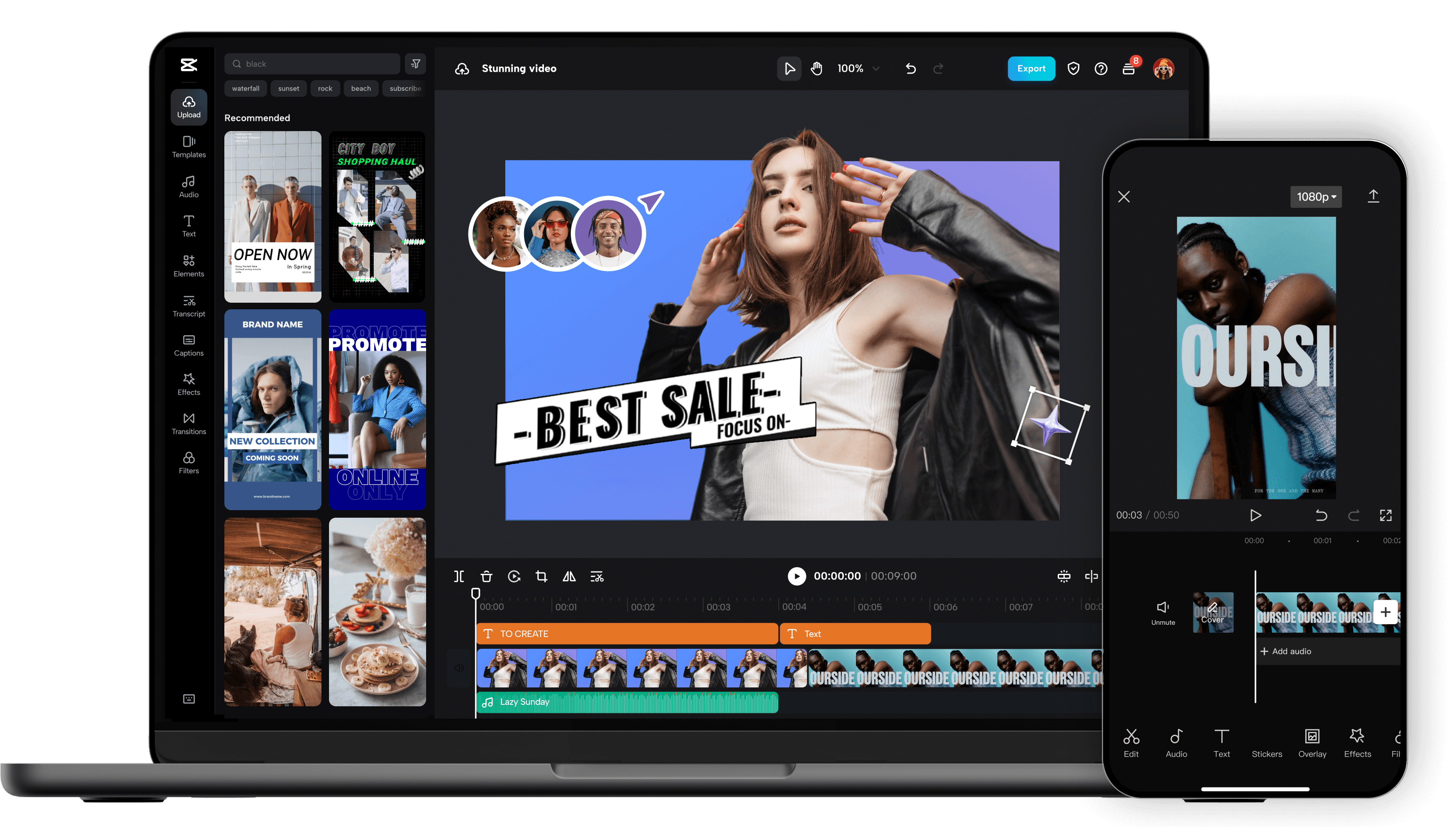
Unleash your creativity and transform your videos with CapCut AI Video Editor, the ultimate all-in-one mobile editing suite designed for creators, influencers, and anyone looking to make their content shine. Whether you're a seasoned pro or just starting out, CapCut's intuitive interface and powerful AI-driven features make professional-quality video editing accessible to everyone, right from your smartphone. Experience the Magic of AI-Powered Editing: CapCut's intelligent AI tools take the heavy lifting out of video production. Effortlessly remove backgrounds with a single tap, creating seamless green-screen effects or isolating subjects for dynamic visual storytelling. Our advanced auto-captions feature transcribes your audio with remarkable accuracy, saving you hours of manual work and making your videos more accessible to a wider audience. Dive into a world of creative possibilities with AI text-to-video , allowing you to generate stunning visuals from simple text prompts. Need to clean up your audio? CapCut's AI audio enhancer intelligently refines your sound, reducing background noise and boosting clarity for a professional finish. Edit Like a Pro, Effortlessly: Beyond its AI prowess, CapCut offers a comprehensive suite of traditional editing tools. Trim, split, merge, and reorder your clips with precision. Enhance your visuals with a vast library of filters, effects, and transitions that will captivate your viewers. Add personality and polish with a wide selection of royalty-free music, sound effects, and voiceovers . Experiment with keyframe animation to bring your elements to life with smooth, dynamic movement. Fine-tune your footage with color correction and adjustment tools to achieve the perfect mood and aesthetic. Elevate Your Content with Premium Features: CapCut empowers you to create engaging and professional content for all your favorite platforms. Speed ramping allows for dramatic slow-motion or exhilarating fast-forward effects. Chroma keying (green screen) opens up endless possibilities for background replacement. Utilize picture-in-picture to layer videos and create dynamic compositions. Explore strobe effects, zoom effects, and motion blur to add visual flair and keep your audience hooked. Why Choose CapCut AI Video Editor? User-Friendly Interface: Designed for ease of use, making complex editing simple. Powerful AI Tools: Automate tedious tasks and unlock new creative avenues with intelligent features. Extensive Feature Set: From basic cuts to advanced effects, CapCut has everything you need. Vast Asset Library: Access a wealth of music, effects, and templates to enhance your videos. No Watermarks (Free Version): Create and export your videos without unwanted branding. Regular Updates: Benefit from continuous improvements and new features. Cross-Platform Sync (with Pro): Seamlessly work across devices. Perfect for Social Media: Optimize your videos for TikTok, Instagram Reels, YouTube Shorts, and more. Who is CapCut for? Social Media Influencers: Create captivating content that drives engagement. Content Creators: Produce professional-looking videos for YouTube, Twitch, and other platforms. Small Business Owners: Craft compelling promotional videos to showcase your products and services. Educators: Develop engaging video lessons and presentations. Hobbyists & Enthusiasts: Bring your passion projects to life with stunning visuals. Anyone! If you have a story to tell, CapCut is your tool. Download CapCut AI Video Editor today and experience the future of mobile video editing. Transform ordinary moments into extraordinary stories. Join millions of creators worldwide and discover how easy it is to make your videos stand out. Your next viral video starts here!
Ai Video generator
Visit Website
Unleash your creativity and transform your videos with CapCut AI Video Editor, the ultimate all-in-one mobile editing suite designed for creators, influencers, and anyone looking to make their content shine. Whether you're a seasoned pro or just starting out, CapCut's intuitive interface and powerful AI-driven features make professional-quality video editing accessible to everyone, right from your smartphone. Experience the Magic of AI-Powered Editing: CapCut's intelligent AI tools take the heavy lifting out of video production. Effortlessly remove backgrounds with a single tap, creating seamless green-screen effects or isolating subjects for dynamic visual storytelling. Our advanced auto-captions feature transcribes your audio with remarkable accuracy, saving you hours of manual work and making your videos more accessible to a wider audience. Dive into a world of creative possibilities with AI text-to-video , allowing you to generate stunning visuals from simple text prompts. Need to clean up your audio? CapCut's AI audio enhancer intelligently refines your sound, reducing background noise and boosting clarity for a professional finish. Edit Like a Pro, Effortlessly: Beyond its AI prowess, CapCut offers a comprehensive suite of traditional editing tools. Trim, split, merge, and reorder your clips with precision. Enhance your visuals with a vast library of filters, effects, and transitions that will captivate your viewers. Add personality and polish with a wide selection of royalty-free music, sound effects, and voiceovers . Experiment with keyframe animation to bring your elements to life with smooth, dynamic movement. Fine-tune your footage with color correction and adjustment tools to achieve the perfect mood and aesthetic. Elevate Your Content with Premium Features: CapCut empowers you to create engaging and professional content for all your favorite platforms. Speed ramping allows for dramatic slow-motion or exhilarating fast-forward effects. Chroma keying (green screen) opens up endless possibilities for background replacement. Utilize picture-in-picture to layer videos and create dynamic compositions. Explore strobe effects, zoom effects, and motion blur to add visual flair and keep your audience hooked. Why Choose CapCut AI Video Editor? User-Friendly Interface: Designed for ease of use, making complex editing simple. Powerful AI Tools: Automate tedious tasks and unlock new creative avenues with intelligent features. Extensive Feature Set: From basic cuts to advanced effects, CapCut has everything you need. Vast Asset Library: Access a wealth of music, effects, and templates to enhance your videos. No Watermarks (Free Version): Create and export your videos without unwanted branding. Regular Updates: Benefit from continuous improvements and new features. Cross-Platform Sync (with Pro): Seamlessly work across devices. Perfect for Social Media: Optimize your videos for TikTok, Instagram Reels, YouTube Shorts, and more. Who is CapCut for? Social Media Influencers: Create captivating content that drives engagement. Content Creators: Produce professional-looking videos for YouTube, Twitch, and other platforms. Small Business Owners: Craft compelling promotional videos to showcase your products and services. Educators: Develop engaging video lessons and presentations. Hobbyists & Enthusiasts: Bring your passion projects to life with stunning visuals. Anyone! If you have a story to tell, CapCut is your tool. Download CapCut AI Video Editor today and experience the future of mobile video editing. Transform ordinary moments into extraordinary stories. Join millions of creators worldwide and discover how easy it is to make your videos stand out. Your next viral video starts here!
0
Rytr: Free AI Writer, Content Generator & Writing Assistant
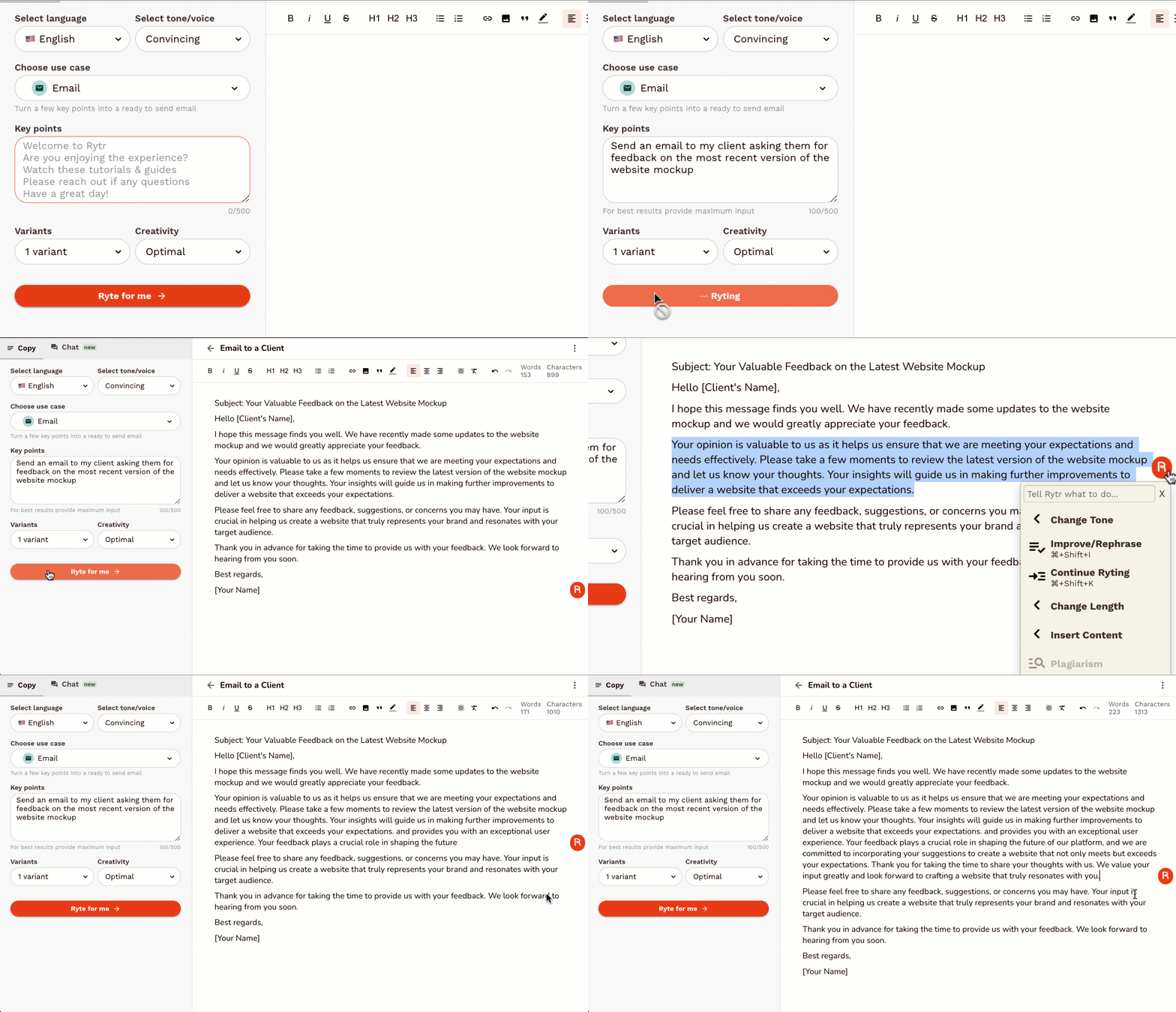
Rytr is an AI-powered writing assistant designed to help users generate high-quality, short-form content quickly and efficiently . It addresses the challenge of content creation by automating the writing process, leveraging artificial intelligence to produce compelling copy for various marketing and communication needs. This tool is ideal for marketers, entrepreneurs, bloggers, social media managers, and anyone requiring fast and effective content generation . Rytr streamlines the writing workflow, offering a solution for overcoming writerΓÇÖs block and scaling content output. Key Features of Rytr Generates content in 40+ use cases. Offers 20+ tones of voice to tailor content style. Supports 30+ languages for global content creation. Includes a built-in plagiarism checker. Provides a user-friendly interface for easy navigation. Offers various output variants for diverse content options. Features a magic command functionality for specific content requests. Allows users to define content length and creativity levels. Integrates with SEO tools to optimize content for search engines. Provides a Chrome extension for writing directly within other applications. Why People Use Rytr Individuals and businesses utilize Rytr to overcome the time-consuming and often challenging process of writing compelling content. Traditional content creation methods often require significant time investment, research, and editing. Rytr drastically reduces this effort by automating the initial drafting process, allowing users to focus on refining and optimizing the generated text. The toolΓÇÖs ability to produce multiple variations of content ensures users can quickly explore different angles and find the most effective messaging. Unlike manual writing, Rytr provides consistent quality and speed, making it a valuable asset for maintaining a strong online presence and engaging target audiences. It empowers users to scale their content creation efforts without compromising on quality or originality. Popular Use Cases Social Media Marketing: Generating engaging captions, posts, and ad copy for platforms like Facebook, Instagram, Twitter, and LinkedIn. Digital Advertising: Creating compelling ad headlines and descriptions for Google Ads, Facebook Ads, and other advertising platforms. Email Marketing: Drafting persuasive email subject lines, body copy, and call-to-actions for marketing campaigns. Product Descriptions: Writing detailed and attractive product descriptions for e-commerce stores and online marketplaces. Blog Content: Generating ideas, outlines, and introductory paragraphs for blog posts. Website Copy: Crafting concise and impactful website headlines, taglines, and call-to-action buttons. Video Scriptwriting: Developing short scripts for explainer videos, social media videos, and advertisements. Business Idea Generation: Brainstorming business names, taglines, and value propositions. Content Summarization: Condensing lengthy articles or documents into concise summaries. Creative Writing: Assisting with brainstorming and drafting short stories, poems, and other creative content. Benefits of Rytr Increased Productivity: Significantly reduces the time spent on writing tasks, allowing users to focus on other critical business activities. Enhanced Content Quality: Generates well-written, grammatically correct, and engaging content that captures audience attention. Cost Savings: Eliminates the need to hire expensive copywriters or content agencies for short-form content creation. Improved Marketing Results: Creates compelling marketing copy that drives conversions, increases brand awareness, and generates leads. Overcome WriterΓÇÖs Block: Provides a constant source of inspiration and ideas, helping users overcome creative hurdles. Scalable Content Creation: Enables businesses to quickly and easily scale their content output to meet growing demands. Versatile Application: Suitable for a wide range of content types and industries, offering a flexible solution for diverse needs. Accessibility and Convenience: Available as a web application and Chrome extension, providing access from any device. Multilingual Support: Facilitates content creation for global audiences with support for over 30 languages. Originality Assurance: Includes a built-in plagiarism checker to ensure content is unique and original.
Ai Content Creation
Visit Website
Rytr is an AI-powered writing assistant designed to help users generate high-quality, short-form content quickly and efficiently . It addresses the challenge of content creation by automating the writing process, leveraging artificial intelligence to produce compelling copy for various marketing and communication needs. This tool is ideal for marketers, entrepreneurs, bloggers, social media managers, and anyone requiring fast and effective content generation . Rytr streamlines the writing workflow, offering a solution for overcoming writerΓÇÖs block and scaling content output. Key Features of Rytr Generates content in 40+ use cases. Offers 20+ tones of voice to tailor content style. Supports 30+ languages for global content creation. Includes a built-in plagiarism checker. Provides a user-friendly interface for easy navigation. Offers various output variants for diverse content options. Features a magic command functionality for specific content requests. Allows users to define content length and creativity levels. Integrates with SEO tools to optimize content for search engines. Provides a Chrome extension for writing directly within other applications. Why People Use Rytr Individuals and businesses utilize Rytr to overcome the time-consuming and often challenging process of writing compelling content. Traditional content creation methods often require significant time investment, research, and editing. Rytr drastically reduces this effort by automating the initial drafting process, allowing users to focus on refining and optimizing the generated text. The toolΓÇÖs ability to produce multiple variations of content ensures users can quickly explore different angles and find the most effective messaging. Unlike manual writing, Rytr provides consistent quality and speed, making it a valuable asset for maintaining a strong online presence and engaging target audiences. It empowers users to scale their content creation efforts without compromising on quality or originality. Popular Use Cases Social Media Marketing: Generating engaging captions, posts, and ad copy for platforms like Facebook, Instagram, Twitter, and LinkedIn. Digital Advertising: Creating compelling ad headlines and descriptions for Google Ads, Facebook Ads, and other advertising platforms. Email Marketing: Drafting persuasive email subject lines, body copy, and call-to-actions for marketing campaigns. Product Descriptions: Writing detailed and attractive product descriptions for e-commerce stores and online marketplaces. Blog Content: Generating ideas, outlines, and introductory paragraphs for blog posts. Website Copy: Crafting concise and impactful website headlines, taglines, and call-to-action buttons. Video Scriptwriting: Developing short scripts for explainer videos, social media videos, and advertisements. Business Idea Generation: Brainstorming business names, taglines, and value propositions. Content Summarization: Condensing lengthy articles or documents into concise summaries. Creative Writing: Assisting with brainstorming and drafting short stories, poems, and other creative content. Benefits of Rytr Increased Productivity: Significantly reduces the time spent on writing tasks, allowing users to focus on other critical business activities. Enhanced Content Quality: Generates well-written, grammatically correct, and engaging content that captures audience attention. Cost Savings: Eliminates the need to hire expensive copywriters or content agencies for short-form content creation. Improved Marketing Results: Creates compelling marketing copy that drives conversions, increases brand awareness, and generates leads. Overcome WriterΓÇÖs Block: Provides a constant source of inspiration and ideas, helping users overcome creative hurdles. Scalable Content Creation: Enables businesses to quickly and easily scale their content output to meet growing demands. Versatile Application: Suitable for a wide range of content types and industries, offering a flexible solution for diverse needs. Accessibility and Convenience: Available as a web application and Chrome extension, providing access from any device. Multilingual Support: Facilitates content creation for global audiences with support for over 30 languages. Originality Assurance: Includes a built-in plagiarism checker to ensure content is unique and original.
0
Related Categories
Related Topics

All results





Sponsored



Top 10 Trending AI Tools

Comet
Agentic AiAutonomous AI Agents
★4.0

Invideo ai
Ai Video generator
★4.0

D-ID.com
Ai Avatar
★4.0

Kera ai
Ai Video generator
★4.0

Kimi Slides
Ai PresentationPresentation
★4.0

Haiper Ai
Ai Video generator
★4.0

Chrome Webstore
UnCategorized
★4.0
Toki Ai
Ai Avatar
★4.0

ChatGPT
Ai Chatbots
★5.0

Dream Hentai
Hentai & NSFWHentai Character18+
★4.0