 Android
 IOS
IOS Mini Tools
 Software
 Web
WebTop matches
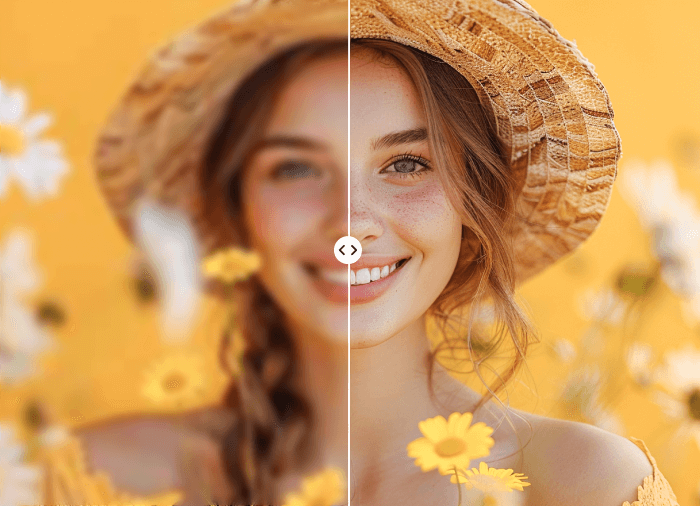
Image enhancer Ai
Image Enhancer Ai is an AI-powered image enhancement tool designed to help users improve the quality of their images quickly and easily by leveraging artificial intelligence and deep learning algorithms . This tool addresses the common problem of low-resolution, blurry, or poorly lit images that often result from mobile phone cameras, older digital cameras, or simply unfavorable shooting conditions. Image Enhancer Ai utilizes advanced AI models to automatically analyze and enhance images, restoring details, sharpening edges, and optimizing colors. It is intended for anyone who wants to improve the visual appeal of their photos, including social media users, photographers, marketers, and individuals looking to restore old or damaged pictures. The tool focuses on providing a simple, accessible solution for AI image upscaling , photo restoration , and overall image quality enhancement . Image Enhancer Ai stands out by offering a user-friendly interface and powerful AI capabilities without requiring any specialized skills or software. It provides a convenient alternative to complex photo editing software, allowing users to achieve professional-looking results with minimal effort. The core technology relies on generative adversarial networks (GANs) and other cutting-edge AI techniques to intelligently enhance images while preserving their natural look and feel. This makes it a valuable asset for anyone seeking to improve their visual content and make a lasting impression. Key Features of Image Enhancer Ai Enhances image resolution and clarity. Sharpens blurry images automatically. Removes noise and artifacts from photos. Brightens and adjusts colors for optimal visual appeal. Restores details in old or damaged images. Supports various image formats. Offers a simple and intuitive user interface. Provides fast processing speeds. Improves image quality without significant file size increases. Operates entirely online, requiring no software installation. Why People Use Image Enhancer Ai Individuals and professionals alike utilize Image Enhancer Ai to overcome the limitations of their original image sources. Traditional methods of image enhancement often require significant time, technical expertise, and manual adjustments using complex software like Adobe Photoshop. These methods can be time-consuming and may not always yield satisfactory results, especially for users without extensive photo editing experience. Image Enhancer Ai offers a streamlined and efficient alternative. By automating the enhancement process with AI, it drastically reduces the time and effort required to achieve high-quality images. The tool’s AI algorithms are trained on vast datasets of images, enabling them to intelligently identify and correct common image imperfections. This results in sharper, clearer, and more visually appealing images with minimal user intervention, making it ideal for users who need to quickly and easily improve their photos without the complexities of manual editing. The accessibility of the tool allows for widespread use, democratizing access to professional-level image enhancement capabilities. Popular Use Cases Social Media Marketing: Enhancing product photos for increased engagement and conversions. E-commerce: Improving the visual appeal of product listings to attract more customers. Real Estate: Enhancing property photos to showcase listings in the best possible light. Photography: Restoring and improving the quality of old or damaged photographs. Genealogy: Enhancing historical photos for family archives and research. Content Creation: Improving the visual quality of images for blog posts, articles, and presentations. Personal Use: Enhancing family photos, vacation snapshots, and other personal images. Printing: Preparing low-resolution images for high-quality printing. Law Enforcement: Clarifying images for investigative purposes. Medical Imaging: Improving the clarity of medical scans for diagnostic purposes (with appropriate validation and professional oversight). Benefits of Image Enhancer Ai Time Savings: Significantly reduces the time required to enhance images compared to manual methods. Improved Image Quality: Delivers sharper, clearer, and more visually appealing images. Ease of Use: Requires no technical skills or photo editing experience. Accessibility: Available online, eliminating the need for software installation. Cost-Effectiveness: Offers a free solution for basic image enhancement needs. Enhanced Visual Appeal: Improves the overall aesthetic quality of images, making them more engaging. Increased Engagement: Higher-quality images can lead to increased engagement on social media and other platforms. Professional Results: Achieves professional-looking results without the need for expensive software or expertise. Preservation of Memories: Restores and enhances old or damaged photos, preserving cherished memories. Scalability: Easily process large volumes of images quickly and efficiently.
Ai Image enhancer

Visit Website
Image Enhancer Ai is an AI-powered image enhancement tool designed to help users improve the quality of their images quickly and easily by leveraging artificial intelligence and deep learning algorithms . This tool addresses the common problem of low-resolution, blurry, or poorly lit images that often result from mobile phone cameras, older digital cameras, or simply unfavorable shooting conditions. Image Enhancer Ai utilizes advanced AI models to automatically analyze and enhance images, restoring details, sharpening edges, and optimizing colors. It is intended for anyone who wants to improve the visual appeal of their photos, including social media users, photographers, marketers, and individuals looking to restore old or damaged pictures. The tool focuses on providing a simple, accessible solution for AI image upscaling , photo restoration , and overall image quality enhancement . Image Enhancer Ai stands out by offering a user-friendly interface and powerful AI capabilities without requiring any specialized skills or software. It provides a convenient alternative to complex photo editing software, allowing users to achieve professional-looking results with minimal effort. The core technology relies on generative adversarial networks (GANs) and other cutting-edge AI techniques to intelligently enhance images while preserving their natural look and feel. This makes it a valuable asset for anyone seeking to improve their visual content and make a lasting impression. Key Features of Image Enhancer Ai Enhances image resolution and clarity. Sharpens blurry images automatically. Removes noise and artifacts from photos. Brightens and adjusts colors for optimal visual appeal. Restores details in old or damaged images. Supports various image formats. Offers a simple and intuitive user interface. Provides fast processing speeds. Improves image quality without significant file size increases. Operates entirely online, requiring no software installation. Why People Use Image Enhancer Ai Individuals and professionals alike utilize Image Enhancer Ai to overcome the limitations of their original image sources. Traditional methods of image enhancement often require significant time, technical expertise, and manual adjustments using complex software like Adobe Photoshop. These methods can be time-consuming and may not always yield satisfactory results, especially for users without extensive photo editing experience. Image Enhancer Ai offers a streamlined and efficient alternative. By automating the enhancement process with AI, it drastically reduces the time and effort required to achieve high-quality images. The tool’s AI algorithms are trained on vast datasets of images, enabling them to intelligently identify and correct common image imperfections. This results in sharper, clearer, and more visually appealing images with minimal user intervention, making it ideal for users who need to quickly and easily improve their photos without the complexities of manual editing. The accessibility of the tool allows for widespread use, democratizing access to professional-level image enhancement capabilities. Popular Use Cases Social Media Marketing: Enhancing product photos for increased engagement and conversions. E-commerce: Improving the visual appeal of product listings to attract more customers. Real Estate: Enhancing property photos to showcase listings in the best possible light. Photography: Restoring and improving the quality of old or damaged photographs. Genealogy: Enhancing historical photos for family archives and research. Content Creation: Improving the visual quality of images for blog posts, articles, and presentations. Personal Use: Enhancing family photos, vacation snapshots, and other personal images. Printing: Preparing low-resolution images for high-quality printing. Law Enforcement: Clarifying images for investigative purposes. Medical Imaging: Improving the clarity of medical scans for diagnostic purposes (with appropriate validation and professional oversight). Benefits of Image Enhancer Ai Time Savings: Significantly reduces the time required to enhance images compared to manual methods. Improved Image Quality: Delivers sharper, clearer, and more visually appealing images. Ease of Use: Requires no technical skills or photo editing experience. Accessibility: Available online, eliminating the need for software installation. Cost-Effectiveness: Offers a free solution for basic image enhancement needs. Enhanced Visual Appeal: Improves the overall aesthetic quality of images, making them more engaging. Increased Engagement: Higher-quality images can lead to increased engagement on social media and other platforms. Professional Results: Achieves professional-looking results without the need for expensive software or expertise. Preservation of Memories: Restores and enhances old or damaged photos, preserving cherished memories. Scalability: Easily process large volumes of images quickly and efficiently.
0
AutoDraw
AutoDraw is a free AI-powered drawing tool that transforms simple doodles into polished illustrations, making graphic creation accessible to everyone. It solves the problem of needing advanced artistic skills to create visually appealing graphics by leveraging the power of artificial intelligence to interpret and refine user sketches. This tool is designed for anyone needing quick and clean visuals, including students, educators, content creators, and designers seeking a streamlined design process. Users searching for AI drawing tools , free online graphic design , or easy sketch-to-image conversion will find AutoDraw a valuable resource. Key Features of AutoDraw Recognizes rough sketches and suggests corresponding illustrations. Offers a library of pre-designed clipart and icons. Allows users to switch between drawing and suggestion modes. Provides a simple, intuitive interface for quick learning. Functions directly within a web browser ΓÇô no software installation needed. Supports exporting drawings in SVG and PNG formats. Enables users to save and share creations easily. Offers a prediction feature that anticipates the intended drawing. Allows for customization of suggested illustrations with colors and edits. Provides a search function to quickly find specific illustrations. Why People Use AutoDraw Individuals and professionals alike utilize AutoDraw to overcome the barriers associated with traditional drawing methods. Creating graphics from scratch often requires significant time, skill, and specialized software. AutoDraw bypasses these requirements by employing machine learning to understand the user’s intent, even with rudimentary sketches. This results in a dramatically reduced creation time and eliminates the need for extensive artistic training. Unlike conventional graphic design tools with steep learning curves, AutoDraw is remarkably user-friendly, enabling anyone to produce professional-looking visuals quickly and efficiently. The tool’s ability to convert basic doodles into refined illustrations makes it ideal for rapid prototyping, brainstorming, and creating visual content on the fly. Popular Use Cases Educational Materials: Teachers can quickly create diagrams, illustrations, and visual aids for lessons. Presentations: Professionals can enhance presentations with custom graphics and icons without relying on stock images. Social Media Content: Content creators can generate engaging visuals for social media posts and stories. Prototyping & Wireframing: Designers can rapidly sketch and visualize ideas for websites and applications. Logo Design: Entrepreneurs and small businesses can create simple logos and branding elements. Infographics: Users can develop visually appealing infographics to present data and information. Storyboarding: Animators and filmmakers can quickly sketch out storyboards for projects. Personal Projects: Individuals can create custom artwork, invitations, or greeting cards. Creating Visual Notes: Students and professionals can visually represent concepts and ideas. Developing Learning Resources: Educators can design interactive learning materials for students of all ages. Benefits of AutoDraw Increased Efficiency: Significantly reduces the time required to create graphics compared to manual methods. Accessibility: Empowers users without artistic skills to produce professional-looking visuals. Simplified Design Process: Streamlines the graphic creation workflow with an intuitive interface. Enhanced Visual Communication: Enables clearer and more engaging communication through custom illustrations. Cost-Effectiveness: Provides a free alternative to expensive graphic design software. Improved Creativity: Facilitates rapid prototyping and exploration of visual ideas. Broad Applicability: Suitable for a wide range of projects and industries. Ease of Use: Requires minimal training and is accessible to users of all ages and skill levels. Platform Independence: Works seamlessly in any web browser, eliminating compatibility issues. Quick Iteration: Allows for rapid experimentation and refinement of visual concepts.
Ai Graphic Design

Visit Website
AutoDraw is a free AI-powered drawing tool that transforms simple doodles into polished illustrations, making graphic creation accessible to everyone. It solves the problem of needing advanced artistic skills to create visually appealing graphics by leveraging the power of artificial intelligence to interpret and refine user sketches. This tool is designed for anyone needing quick and clean visuals, including students, educators, content creators, and designers seeking a streamlined design process. Users searching for AI drawing tools , free online graphic design , or easy sketch-to-image conversion will find AutoDraw a valuable resource. Key Features of AutoDraw Recognizes rough sketches and suggests corresponding illustrations. Offers a library of pre-designed clipart and icons. Allows users to switch between drawing and suggestion modes. Provides a simple, intuitive interface for quick learning. Functions directly within a web browser ΓÇô no software installation needed. Supports exporting drawings in SVG and PNG formats. Enables users to save and share creations easily. Offers a prediction feature that anticipates the intended drawing. Allows for customization of suggested illustrations with colors and edits. Provides a search function to quickly find specific illustrations. Why People Use AutoDraw Individuals and professionals alike utilize AutoDraw to overcome the barriers associated with traditional drawing methods. Creating graphics from scratch often requires significant time, skill, and specialized software. AutoDraw bypasses these requirements by employing machine learning to understand the user’s intent, even with rudimentary sketches. This results in a dramatically reduced creation time and eliminates the need for extensive artistic training. Unlike conventional graphic design tools with steep learning curves, AutoDraw is remarkably user-friendly, enabling anyone to produce professional-looking visuals quickly and efficiently. The tool’s ability to convert basic doodles into refined illustrations makes it ideal for rapid prototyping, brainstorming, and creating visual content on the fly. Popular Use Cases Educational Materials: Teachers can quickly create diagrams, illustrations, and visual aids for lessons. Presentations: Professionals can enhance presentations with custom graphics and icons without relying on stock images. Social Media Content: Content creators can generate engaging visuals for social media posts and stories. Prototyping & Wireframing: Designers can rapidly sketch and visualize ideas for websites and applications. Logo Design: Entrepreneurs and small businesses can create simple logos and branding elements. Infographics: Users can develop visually appealing infographics to present data and information. Storyboarding: Animators and filmmakers can quickly sketch out storyboards for projects. Personal Projects: Individuals can create custom artwork, invitations, or greeting cards. Creating Visual Notes: Students and professionals can visually represent concepts and ideas. Developing Learning Resources: Educators can design interactive learning materials for students of all ages. Benefits of AutoDraw Increased Efficiency: Significantly reduces the time required to create graphics compared to manual methods. Accessibility: Empowers users without artistic skills to produce professional-looking visuals. Simplified Design Process: Streamlines the graphic creation workflow with an intuitive interface. Enhanced Visual Communication: Enables clearer and more engaging communication through custom illustrations. Cost-Effectiveness: Provides a free alternative to expensive graphic design software. Improved Creativity: Facilitates rapid prototyping and exploration of visual ideas. Broad Applicability: Suitable for a wide range of projects and industries. Ease of Use: Requires minimal training and is accessible to users of all ages and skill levels. Platform Independence: Works seamlessly in any web browser, eliminating compatibility issues. Quick Iteration: Allows for rapid experimentation and refinement of visual concepts.
0
All results































Sponsored



Top 10 Trending AI Tools

Nano Banana Pro / Gemini 3 Pro Image Generation
Ai Image generator
★5.0

Soundraw
Ai Background MusicBackground music
★4.0

Invideo ai
Ai Video generator
★4.0

Grok
Ai Chatbots
★5.0
6

ChatGPT
Ai Chatbots
★5.0

Pine Script Wizard AI
Ai Writing Generation
★4.0

Invideo ai
Ai ShortsAi Video enhancer
★4.0
10

Craiyon
Ai Image generator
★4.5

Manychat
Ai Content Creation
★3.5

Kimi Slides
Ai PresentationPresentation
★4.0