
Flowstep
Ai Tool Screenshots & Usage
Overview
Opening Overview
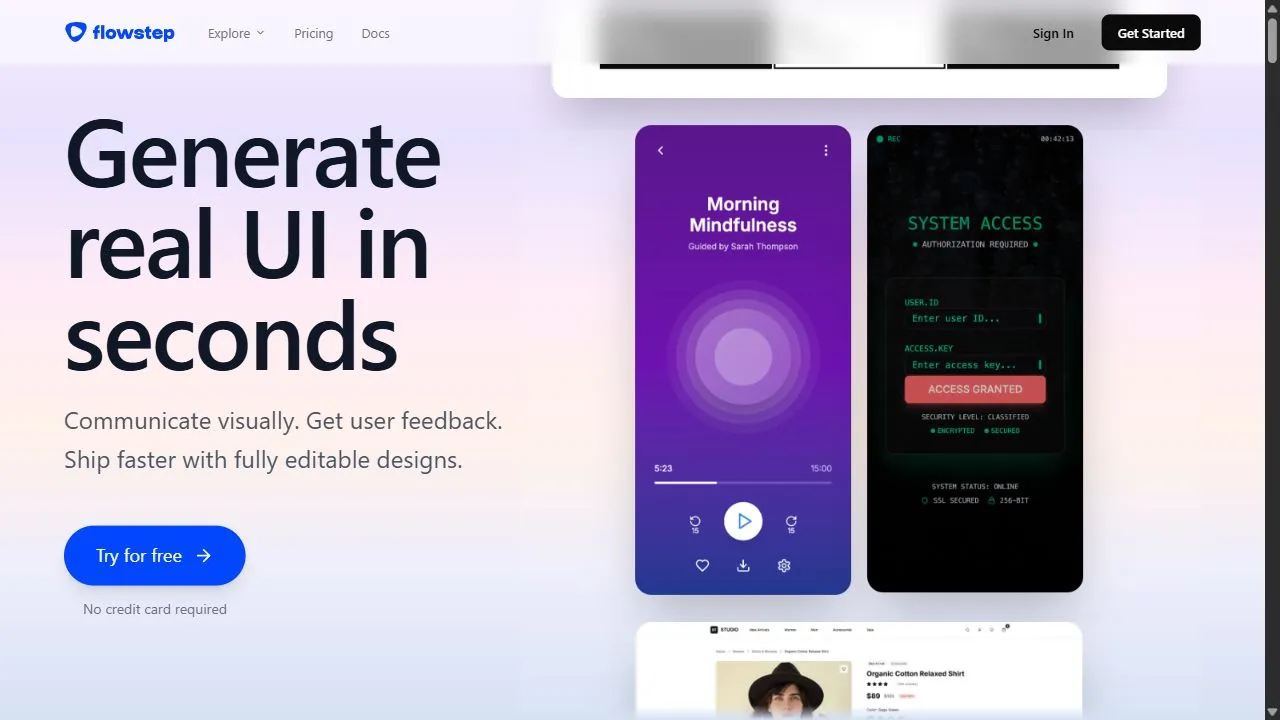
Flowstep is a powerful AI-powered design assistant designed to help developers and UI designers build functional interfaces in record time by leveraging artificial intelligence, automation, and intelligent workflows. By transforming conceptual requirements into real, responsive UI components instantly, the tool addresses the persistent bottleneck found in the traditional software development lifecycle: the gap between a static design mockup and a fully functioning frontend interface.
The platform utilizes advanced generative AI to interpret text-based requirements and translate them into structural layout, styling, and interactive elements. Instead of spending hours manually writing CSS and HTML or tweaking component properties in a design tool, users can describe the desired outcome, and Flowstep generates the corresponding code and visual structure. This automation effectively removes the repetitive nature of frontend coding, allowing professional teams to focus on high-level architecture and user experience rather than boilerplate styling.
Flowstep is primarily engineered for frontend engineers, UI/UX designers, and product managers who need to move from a wireframe to a high-fidelity prototype with minimal friction. By providing a collaborative environment where design logic meets executable code, it ensures that the final output is not only visually appealing but also structurally sound and compatible with modern development stacks. Whether the goal is to build a complex enterprise dashboard or a streamlined mobile application, Flowstep serves as an accelerated bridge between an initial idea and an interactive design.
Key Features of Flowstep
- Generates real, responsive UI components based on text-based conceptual requirements.
- Automates the creation of structural layouts and styling elements to reduce manual coding.
- Transforms high-level descriptions into functional frontend interfaces in seconds.
- Provides compatibility with modern development stacks for seamless integration into existing projects.
- Supports the rapid generation of interactive design elements for prototyping.
- Produces responsive layouts that adapt automatically to various screen sizes and devices.
- Streamlines the transition from initial wireframes to fully realized interactive prototypes.
- Facilitates a design-to-logic workflow that ensures structural integrity in the output.
- Reduces the development lifecycle by automating repetitive UI building tasks.
- Enables iterative design through quick AI-driven adjustments to existing components.
Why People Use Flowstep
The primary motivation for using Flowstep lies in the desire to eliminate the tedious and time-consuming process of manual frontend development. In a traditional workflow, a designer creates a visual mockup in a tool like Figma or Adobe XD, which a developer must then manually translate into code. This "handoff" process is often fraught with inconsistencies, requiring multiple rounds of revisions to ensure the final product matches the original design intent. Flowstep bypasses this friction by generating the functional UI components directly, ensuring that the design and the code are aligned from the start.
Furthermore, the demand for responsive design has increased the complexity of frontend work. Developers are no longer building for a single screen size but must ensure a seamless experience across desktops, tablets, and smartphones. Manually writing media queries and flexible grid systems is a repetitive task that consumes a significant portion of a project's timeline. Users turn to Flowstep because its AI natively understands responsiveness, producing layouts that are inherently flexible and compatible with various viewport dimensions without requiring manual intervention for every element.
Scalability and speed are also driving factors. For startups and agile teams, the ability to pivot a design or test a new feature quickly is a competitive advantage. Manual coding of new interfaces can slow down the iteration cycle. Flowstep allows these teams to generate a functional prototype in a fraction of the time typically required, enabling them to validate ideas with stakeholders and users much faster. By automating the "heavy lifting" of UI construction, the tool allows developers to spend more time on complex business logic and less time on the minutiae of padding, margins, and color hex codes.
Popular Use Cases
- SaaS MVP Development: Startup founders and early-stage developers use Flowstep to quickly build Minimum Viable Products, allowing them to move from a concept to a functional interface for investor demos without hiring a full design team.
- Rapid Prototyping for UI/UX Designers: Designers use the tool to create high-fidelity, interactive prototypes that behave like real applications, providing a more accurate representation of the user journey than static screens.
- Enterprise Dashboard Creation: Product teams in corporate environments leverage Flowstep to generate complex data tables, sidebars, and analytics widgets for internal administrative tools.
- Frontend Framework Acceleration: Frontend engineers use the tool to generate the initial scaffolding of a UI, which they then refine and integrate into frameworks like React, Vue, or Angular.
- Freelance Web Development: Independent contractors use Flowstep to provide clients with rapid visual proofs-of-concept, reducing the time spent on initial design approvals.
- Mobile-First Interface Design: Developers focused on mobile web applications use the tool to ensure that every component generated is optimized for touch interfaces and small screens.
- Design System Expansion: Teams looking to expand their internal component libraries use Flowstep to brainstorm and generate new UI patterns that adhere to their existing structural logic.
Benefits of Flowstep
- Drastic Reduction in Time-to-Market: By automating the UI generation process, teams can move through the design and development phases significantly faster, accelerating the overall product launch.
- Enhanced Design Consistency: The AI ensures that generated components follow a logical structural pattern, reducing the likelihood of visual inconsistencies across different pages of an application.
- Increased Developer Productivity: Engineers are freed from the burden of writing repetitive boilerplate CSS and HTML, allowing them to focus on critical application logic and performance optimization.
- Seamless Responsive Integration: The ability to generate inherently responsive components eliminates the need for extensive manual testing and tweaking across multiple device types.
- Lowered Technical Barrier for Designers: UI/UX designers can generate functional components that are closer to the final production code, reducing the gap between their vision and the technical implementation.
- Improved Iteration Speed: The ability to modify interfaces through text-based prompts allows for near-instantaneous updates to the UI, making the feedback loop between stakeholders and developers much tighter.
- Higher Quality Structural Output: Because the tool focuses on building "real" components rather than just images of designs, the resulting interfaces are more stable and easier for developers to maintain.
Flowstep is an AI-powered design assistant that generates real, responsive UI components and interfaces in seconds.
Key use cases and capabilities
Page Insights
Pros & Cons
Pros
- Accelerates development time
- Generates real UI elements
- Great for rapid prototyping
Cons
- Requires some technical understanding
- High starting price
Frequently Asked Questions (FAQ)
What kind of outputs does Flowstep generate?
It generates real UI components and interactive design elements.
Related AIs
Featured


Compare with Alternatives
All VS
GetAi
@getai
Professional UX Design tools for creators.
Pricing Details
More Related AIs
View All
Alle
Alle is an innovative AI-powered style organization tool designed to help users capture, categor

 امیر سالاری5.0 stars
ColoringStore
ColoringStore is an innovative AI Coloring Page Generator designed to help users create custom,

 Denise Rose4.0 stars
MockMe.ai
MockMe.ai is an innovative AI-powered system design interview practice platform that helps softwa
 امیر سالاری2.0 stars
Chance AI: Visual Intelligence
Chance AI is an AI-powered visual intelligence tool that empowers users to generate unique and in

 Marta Guerin5.0 stars
AirBrush AI Background Remover
AirBrush AI Background Remover is an AI-powered image editing tool designed to help users remove

 Arttu Takala5.0 stars
Rast.AI
Rast.AI is an innovative AI-powered graphic design tool that empowers users to effortlessly gener

Rast.AI is an innovative AI-powered graphic design tool that empowers users to effortlessly generate captivating posters and professional logos. It solves the problem of needing extensive design skills or expensive professional services to create high-quality visual branding and marketing materia

Plugger
Plugger is an innovative AI-powered design tool that enables users to generate high-quality, cust

 Rai Ferreira4.0 stars
SuperCraft
SuperCraft is an AI-powered product design platform that enables creators and entrepreneurs to rapi

 Gül Tahincioğlu5.0 stars
Workflow.Design
Workflow.Design is an innovative AI-powered design feedback platform that streamlines the review

 Abdurrahman Foolen2.0 stars
Fashion Diffusion
Opening Overview Fashion Diffusion is a powerful AI-powered fashion design generator designed to

Opening Overview Fashion Diffusion is a powerful AI-powered fashion design generator designed to help users create, visualize, and test apparel designs by leveraging artificial intelligence, automation, and intelligent workflows . The platform addresses the significant bottlenecks found in the
ModaMind
ModaMind is an innovative AI fashion design tool that empowers users to generate unique clothing

 Sascha Garnier2.0 stars
Vizcom AI
Vizcom AI is a powerful AI-powered design visualization tool designed to help users transform ro

Vizcom AI is a powerful AI-powered design visualization tool designed to help users transform rough sketches into photorealistic renders by leveraging artificial intelligence, automation, and intelligent workflows . By bridging the gap between initial conceptualization and high-fidelity visual
Lovart
Opening Overview Lovart is a powerful AI-powered design agent designed to help users transform t

 Verica Perić5.0 stars
MiriCanvas
MiriCanvas is an innovative AI-powered design tool that enables users to create stunning visuals

 Bruno Santillán5.0 stars
Sadako
Sadako is a comprehensive AI-powered SEO content and image creation platform designed to help use

 سپهر گلشن5.0 stars
LookSky
LookSky is a powerful AI-powered personal shopping assistant designed to help users curate a ward

LookSky is a powerful AI-powered personal shopping assistant designed to help users curate a wardrobe that feels effortlessly authentic by leveraging artificial intelligence, automation, and intelligent style-decoding workflows . By analyzing a user's unique preferences, historical choices, and


