Muddy


Muddy
Ai Tool Screenshots & Usage
Overview
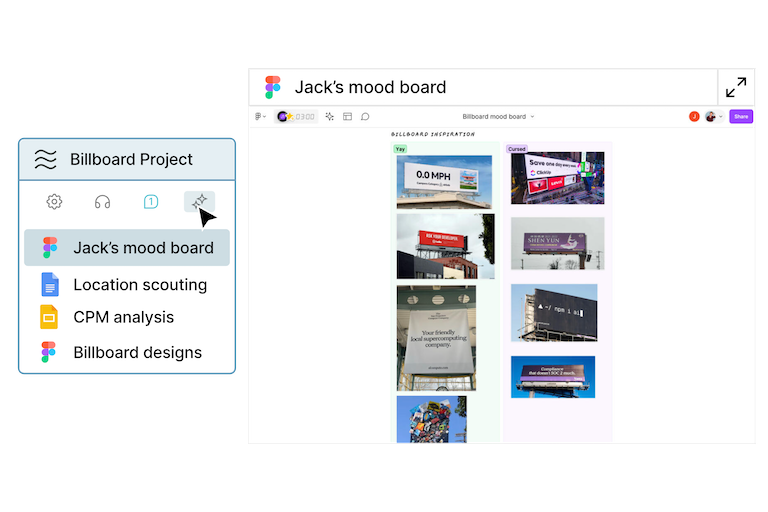
Muddy Browser is a collaborative browser designed specifically for product design teams, enabling real-time co-creation, feedback, and iteration on designs.
Muddy Browser addresses the challenges of fragmented workflows and communication silos often experienced by design teams using disparate tools. It leverages a specialized browser environment to provide a unified workspace for designers, product managers, and developers. This innovative approach streamlines the product design process, fostering better teamwork and accelerating time to market. The tool is intended for UX/UI designers, product managers, developers, and any team involved in the collaborative creation of digital products, offering a free alternative to traditional design collaboration methods. It is a valuable resource for those seeking collaborative design tools, real-time design collaboration, and product design software.
Key Features of Muddy Browser
- Provides a dedicated browser environment for product design collaboration.
- Enables real-time co-browsing and synchronized viewing of designs.
- Facilitates instant sharing of design mockups and prototypes.
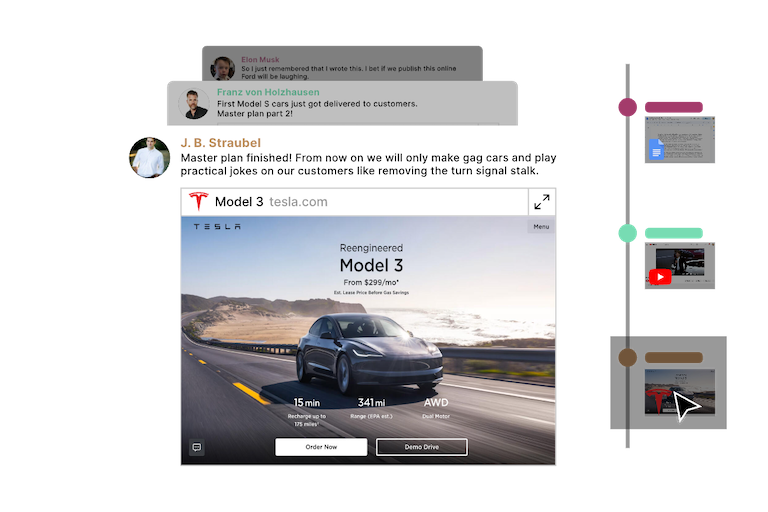
- Offers integrated annotation and commenting features.
- Supports seamless communication within the design workspace.
- Allows for synchronized scrolling and interaction with design elements.
- Provides a shared visual workspace for all team members.
- Supports multiple users working on the same design simultaneously.
- Offers a distraction-free environment focused on design collaboration.
- Is completely free to use, removing cost barriers to collaboration.
Why People Use Muddy Browser
Teams adopt Muddy Browser to overcome the inefficiencies of traditional product design workflows. Historically, design collaboration has relied on sending screenshots, exporting files, and scheduling meetings to gather feedback. This process is often slow, prone to miscommunication, and creates version control issues. Muddy Browser offers a significant improvement by providing a live, shared environment where team members can experience designs together in real-time. This eliminates the need for constant file sharing and reduces the risk of misunderstandings. The browser’s focus on synchronized interaction and immediate feedback accelerates the design process, allowing teams to iterate faster and deliver better products. It streamlines design review processes, improves team alignment, and enhances the overall product development lifecycle.
Popular Use Cases
- UX/UI Design Collaboration: Designers can co-create and refine user interfaces in real-time, ensuring a consistent and user-friendly experience.
- Product Design Reviews: Product managers and stakeholders can review designs directly within the browser, providing immediate feedback and approvals.
- Remote Design Teams: Teams working remotely can collaborate seamlessly as if they were in the same room, fostering a sense of connection and shared ownership.
- Usability Testing: Teams can conduct remote usability testing sessions, observing how users interact with designs in a shared environment.
- Design System Maintenance: Teams can collaboratively maintain and update design systems, ensuring consistency across all products.
- Cross-Functional Alignment: Developers, designers, and product managers can align on design details, reducing the risk of implementation errors.
- Client Presentations: Designers can present designs to clients in a collaborative setting, gathering feedback and making adjustments in real-time.
- Prototyping Feedback: Quickly gather feedback on interactive prototypes with stakeholders directly within the browser.
- Design Workshops: Facilitate remote design workshops with interactive co-creation capabilities.
- Educational Purposes: Design students and educators can use Muddy Browser to learn and practice collaborative design techniques.
Benefits of Muddy Browser
- Enhanced Team Collaboration: Fosters a more collaborative and connected design process, leading to better outcomes.
- Accelerated Design Iteration: Enables faster feedback loops and quicker design iterations, reducing time to market.
- Improved Communication: Eliminates communication silos and ensures everyone is on the same page.
- Reduced Errors: Minimizes misunderstandings and reduces the risk of implementation errors.
- Increased Efficiency: Streamlines the design workflow, saving time and resources.
- Cost Savings: Offers a free alternative to expensive design collaboration tools.
- Simplified Workflow: Provides a unified workspace for all design-related activities.
- Greater Transparency: Increases transparency throughout the design process, fostering trust and accountability.
- Improved Design Quality: Leads to higher-quality designs through collaborative refinement and feedback.
- Accessibility: Being browser-based, it offers accessibility from any device with a web connection, promoting inclusivity.
Page Insights
Related AIs
Featured



GetAi
@getai
Professional Extensions tools for creators.
Pricing Details
More Related AIs
View All
GPTAnywhere
GPTAnywhere is an incredibly user-friendly Chrome extension designed to provide super easy and insta

 Josefa Gallego2.0 stars
I don't care about cookies
I Don't Care About Cookies is a browser extension designed to automatically manage and dismiss cook

 Devansh Saniel5.0 stars
MYNT: Material You New Tab
MYNT: Material You New Tab is a customizable browser extension that transforms the new tab page int

 William Christensen3.0 stars
TabMate
TabMate is an AI-powered browser tab manager that helps users overcome tab overload and improve o

 Gabriel Knight5.0 stars
Magictool.AI Chrome Extension
Magictool.AI Chrome Extension is a versatile AI-powered productivity tool designed to enhance use

 Gül Tahincioğlu2.0 stars
GptGO extension
GptGO is a versatile AI-powered browser extension that provides users with instant access to Chat

 Draga Stanojević5.0 stars
AI Blaze
AI Blaze is an advanced AI writing and editing tool designed to help users create, refine, and o

 Charlie Soto4.0 stars
ChatGPT Chrome Extension
ChatGPT Chrome Extension is a versatile AI-powered browser extension that provides users with ins

ChatGPT Chrome Extension is a versatile AI-powered browser extension that provides users with instant access to OpenAI’s ChatGPT directly within their Chrome browser, streamlining workflows and enhancing online productivity. This extension addresses the challenge of information overload and the t

Wawplus for Whatsapp
Wawplus for WhatsApp is a versatile Chrome extension designed to enhance the WhatsApp Web experie

 Necati Sarıoğlu3.0 stars
MemSync
MemSync is an innovative AI memory management tool designed to unify and share context across mul

MemSync is an innovative AI memory management tool designed to unify and share context across multiple AI applications, enhancing the consistency and intelligence of user interactions. It addresses the challenge of fragmented information and lost context when switching between different AI tools,
GPTMagicPrompts
GPTMagicPrompts is a specialized AI-powered prompt generator designed to help users maximize the

 Marta Guerin5.0 stars
ChatGPT for Google
ChatGPT for Google is a free AI-powered Chrome extension that enhances Google Search by displayin

 Isabella Murray3.0 stars
SummarizeYT
SummarizeYT is an AI-powered YouTube summarization tool that distills lengthy video content into

 Kaylee Appels5.0 stars
MaxAI.me
MaxAI.me is an innovative AI browser extension that streamlines access to leading large language

 Jeremy Slawa5.0 stars
BrowseGPT
BrowseGPT is an innovative AI-powered browser automation extension that empowers users to automat

BrowseGPT is an innovative AI-powered browser automation extension that empowers users to automate complex web tasks through simple, natural language commands. It addresses the challenge of repetitive and time-consuming online activities by translating user instructions into automated browser act