The ToothPaste Dongle Lets You Paste Your Passwords From a Trusted to an Untrusted Machine
Whether it’s a shared work computer, a conference kiosk, a hotel business center PC,
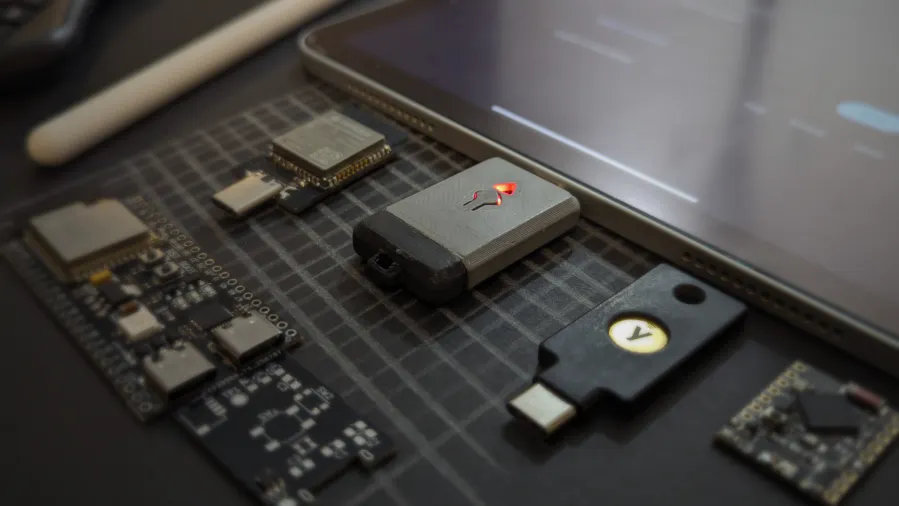

A new hardware gadget called the ToothPaste Dongle is promising a surprisingly simple solution to a common security dilemma: how do you safely enter passwords on a machine you don’t fully trust?
Whether it’s a shared work computer, a conference kiosk, a hotel business center PC, or even a temporarily borrowed laptop, typing sensitive credentials directly into an unfamiliar system can expose users to keyloggers, clipboard sniffers, and malware.
The ToothPaste Dongle aims to solve that problem by acting as a secure bridge between a trusted device and an untrusted machine — letting you “paste” passwords without actually typing them.
The Core Problem: Trust Boundaries

When you log into an account on your personal device, you likely rely on:
- A password manager
- Two-factor authentication
- Biometric unlock
- Encrypted storage
But when using an unfamiliar machine, risks increase dramatically:
- Hidden keyloggers may capture keystrokes
- Clipboard history tools can store pasted passwords
- Malware could record screen or input activity
- Browser extensions may intercept credentials
Even pasting from a password manager isn’t always safe if the host system is compromised.
What Is the ToothPaste Dongle?

The ToothPaste Dongle is a small USB hardware device that:
- Connects to a trusted device (like your personal laptop or phone)
- Stores or receives encrypted credentials
- Connects to the untrusted machine as a standard USB keyboard
- “Types” the password directly into the login field
Because it emulates a keyboard rather than transferring clipboard data, the password never lives in the untrusted machine’s clipboard or browser memory in traditional form.
In simple terms:
It acts like a robotic typist that you control from a secure environment.
How It Works

Here’s a simplified workflow:
- You unlock the dongle using your trusted device.
- You select the password you want to send.
- The dongle connects to the target computer via USB.
- It identifies itself as a standard HID (Human Interface Device).
- It “types” the password automatically into the login field.
From the untrusted system’s perspective, it looks like a keyboard entering text.
No copy-paste.
No password file transfer.
No password manager installation required.
Why This Matters

Security experts often emphasize minimizing exposure to compromised systems. The ToothPaste Dongle addresses several real-world threats:
- Prevents clipboard scraping
- Avoids typing sensitive credentials manually
- Reduces reliance on browser password storage
- Limits digital trace on the untrusted device
While it cannot prevent all forms of malware (such as screen recorders), it significantly reduces common attack vectors.
Comparison to Traditional Password Managers

| Feature | Password Manager | ToothPaste Dongle |
|---|---|---|
| Requires installation | Yes | No |
| Uses clipboard | Often | No |
| Works offline | Depends | Yes |
| Exposes data to host OS | Sometimes | Minimal |
| Physical control | No | Yes |
The key advantage is physical separation between trusted and untrusted environments.
Potential Use Cases

The dongle may be useful in scenarios such as:
- Business travel
- Conference demo machines
- Shared office systems
- IT maintenance terminals
- Academic lab computers
- Secure facility kiosks
For cybersecurity professionals, journalists, or executives, minimizing credential exposure is critical.
Limitations and Risks

Despite its benefits, the device is not a silver bullet.
It does not protect against:
- Screen capture malware
- Session hijacking
- Network-level interception
- Physical shoulder surfing
Additionally:
- Lost hardware could pose risk if not secured
- Sophisticated malware could still record typed input
Security remains layered — hardware tools reduce risk but do not eliminate it.
The Bigger Security Trend
The ToothPaste Dongle reflects a broader movement toward:
- Hardware-based authentication
- Physical security separation
- Zero-trust computing models
- Minimizing attack surfaces
As cyber threats grow more sophisticated, users are increasingly combining:
- Password managers
- Hardware security keys
- Multi-factor authentication
- Physical credential bridges
The dongle fits into that expanding toolkit.
Final Thoughts
The ToothPaste Dongle offers a clever, practical solution to a common digital security challenge: entering passwords safely on machines you don’t fully trust.
While it doesn’t eliminate all risks, it meaningfully reduces exposure by removing clipboard and typing vulnerabilities from the equation. For high-risk users or frequent travelers, it could become a valuable addition to a broader security strategy.
In a world where digital trust boundaries are increasingly blurred, small hardware innovations like this can make a meaningful difference.
FAQ
What does the ToothPaste Dongle do?
It securely “types” passwords from a trusted device into an untrusted machine via USB.
Is it safer than copy-paste?
Yes, because it avoids clipboard exposure on the host system.
Can it stop all malware?
No. It reduces some risks but doesn’t prevent screen recording or advanced attacks.
Does it replace a password manager?
No — it works alongside password managers.
Who should consider using it?
Travelers, cybersecurity professionals, journalists, and anyone accessing sensitive accounts on shared machines.
Is physical hardware more secure?
Often yes, because it separates credentials from potentially compromised software environments.
Mentioned in this article
Tools

Api4ai
Api4ai is a comprehensive AI-powered image processing API platform that enables developers and bu

Api4ai is a comprehensive AI-powered image processing API platform that enables developers and businesses to integrate advanced computer vision capabilities into their applications. It addresses the challenge of building and maintaining complex AI vision infrastructure by providing pre-trained mo

AI/ML API
AIMLAPI.com is a comprehensive AI model API platform that provides developers and businesses with

AIMLAPI.com is a comprehensive AI model API platform that provides developers and businesses with unified access to over 200 pre-trained artificial intelligence and machine learning models. It solves the problem of fragmented AI integration by offering a single API endpoint for diverse AI functio

timeMaster
Opening Overview timeMaster is an AI-powered time tracking and productivity platform designed to

Opening Overview timeMaster is an AI-powered time tracking and productivity platform designed to help users optimize their professional workflows by leveraging artificial intelligence, automation, and intelligent behavioral analysis . Unlike traditional time-tracking software that merely records
Scopy.me
Scopy.me is an AI-powered business strategy platform that empowers users to develop comprehensive

Scopy.me is an AI-powered business strategy platform that empowers users to develop comprehensive and actionable strategic plans in minutes. It solves the problem of lengthy, complex, and often inefficient traditional strategic planning processes. By leveraging artificial intelligence and machi

Arcads AI
Arcads AI is the premier AI-powered platform for creating professional User-Generated Content (UGC)
Arcads AI is the premier AI-powered platform for creating professional User-Generated Content (UGC) style advertising videos that convert. As a cutting-edge generative AI solution specifically designed for marketing teams, Arcads AI enables brands to produce high-quality, authentic-looking video adv


