Estimatic AI - Winning Estimates For Contractors


Overview
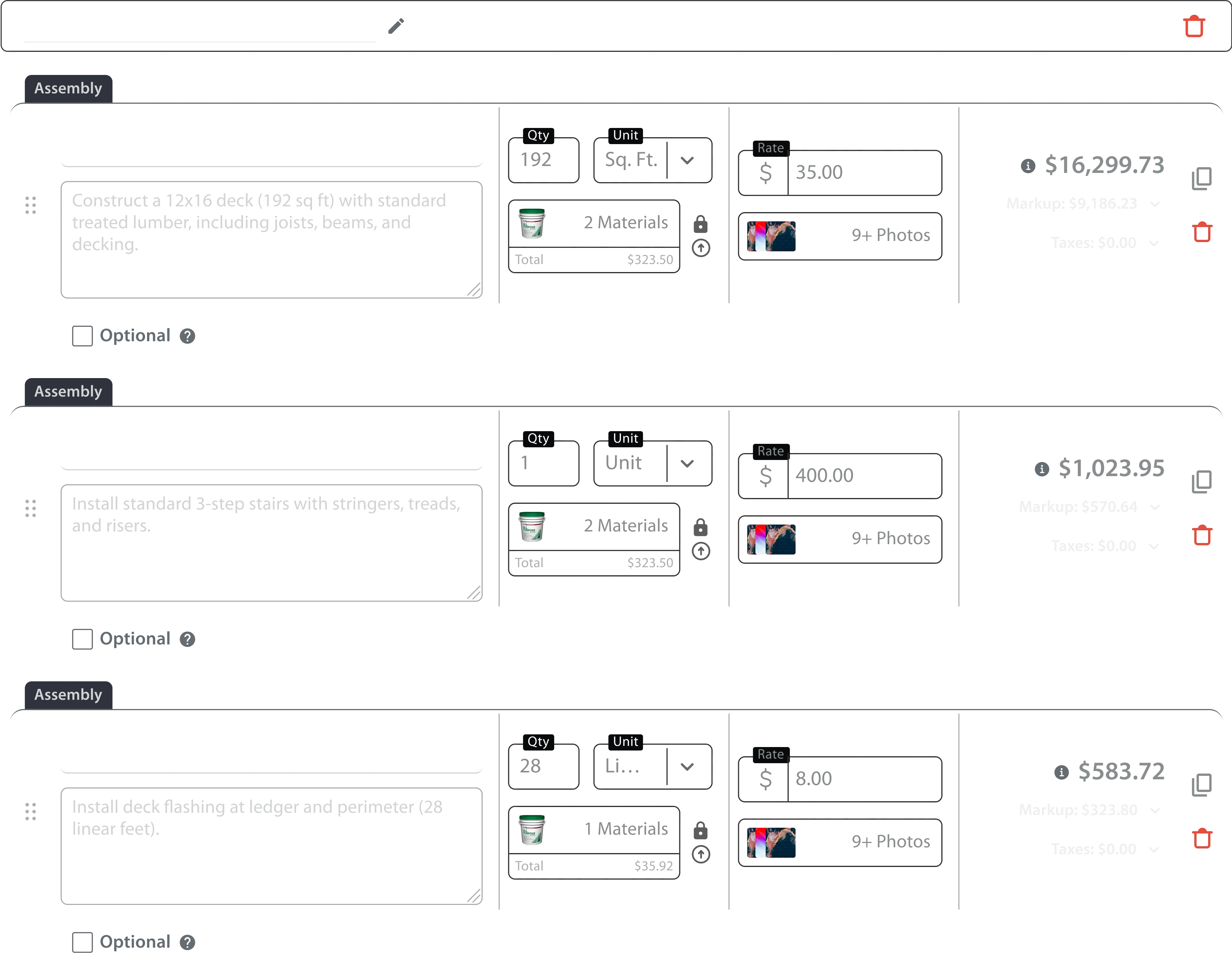
Estimatic AI is an AI-powered estimating software specifically designed to help contractors generate accurate and detailed project estimates rapidly. It addresses the common challenges contractors face in accurately pricing projects, a process traditionally burdened by manual calculations and potential errors. By leveraging artificial intelligence and a comprehensive database of construction costs, Estimatic AI streamlines the estimating process, enabling contractors to bid with confidence and improve profitability. This tool is ideal for general contractors, subcontractors, and construction professionals seeking to modernize their estimating workflows and gain a competitive edge in the construction industry.
Key Features of Estimatic AI
- Automates labor cost calculations based on project scope and location.
- Provides accurate material cost estimates using real-time pricing data.
- Calculates overhead and profit margins for comprehensive bid pricing.
- Generates professional, detailed estimate reports.
- Offers customizable estimate templates for various project types.
- Integrates with the broader Contractor+ ecosystem for streamlined operations.
- Allows users to input project details via text input.
- Provides quick estimate generation, reducing time spent on manual calculations.
- Supports a wide range of construction project types and specialties.
- Enables contractors to easily adjust estimates based on changing conditions.
Why People Use Estimatic AI
Contractors often rely on spreadsheets, outdated pricing guides, or manual calculations to create project estimates. These traditional methods are time-consuming, prone to errors, and can lead to underbidding or missed opportunities. Estimatic AI offers a significant improvement by automating these processes and providing access to current, localized cost data. The platform’s core value lies in its ability to deliver accurate estimates quickly, allowing contractors to spend more time focusing on project execution and business development. Unlike manual methods, Estimatic AI minimizes the risk of costly errors and ensures that bids are competitive and profitable. It empowers contractors to make data-driven decisions and confidently pursue a higher volume of projects.
Popular Use Cases
- Residential Remodeling: Generating estimates for kitchen renovations, bathroom remodels, and whole-house renovations.
- Commercial Construction: Creating bids for office build-outs, retail space improvements, and tenant finishes.
- New Home Construction: Estimating costs for building new residential properties, including materials, labor, and permits.
- Roofing Projects: Quickly calculating estimates for roof replacements, repairs, and installations.
- Painting Services: Generating accurate bids for interior and exterior painting projects.
- Landscaping Projects: Estimating costs for landscape design, installation, and maintenance.
- Electrical Work: Providing estimates for electrical installations, repairs, and upgrades.
- Plumbing Services: Generating bids for plumbing installations, repairs, and maintenance.
- HVAC Installations: Estimating costs for heating, ventilation, and air conditioning systems.
- General Contracting: Managing estimates for a wide variety of construction projects across different sectors.
Benefits of Estimatic AI
- Increased Accuracy: Minimizes errors in estimating, leading to more profitable projects.
- Time Savings: Reduces the time spent on manual calculations and estimate preparation.
- Improved Profitability: Enables contractors to bid competitively while maintaining healthy profit margins.
- Enhanced Competitiveness: Allows contractors to respond quickly to bidding opportunities.
- Reduced Risk: Minimizes the risk of underbidding and financial losses.
- Streamlined Workflow: Integrates seamlessly with other Contractor+ tools for efficient project management.
- Professional Presentation: Generates polished, detailed estimate reports that impress clients.
- Data-Driven Decisions: Provides access to real-time cost data for informed bidding strategies.
- Scalability: Supports contractors of all sizes, from small businesses to large enterprises.
- Simplified Operations: Modernizes the estimating process, making it easier to manage and control.
Key use cases and capabilities
- ai estimating
- construction estimates
- contractor software
- project estimation
- construction productivity
- bid automation
- estimate accuracy
- construction technology
- ai for contractors
- time management
- free estimating tool
- construction management
- labor cost estimation
- material cost estimation
- overhead calculation
- competitive bidding
- construction business
- job winning
- profitability
- contractor+ ecosystem
- estimate generation
- construction estimating
Page Insights

GetAi
@getai
Professional Time Management tools for creators.
Pricing Details
More Related AIs
View AllPitchBreeze
PitchBreeze positions itself as the ultimate AI Sales Detective, providing an advanced platform for businesses to conduct AI-powered cold outreach on autopilot. This sophisticated tool is designed to revolutionize sales prospecting by intelligently identifying high-potential leads and automating personalized outreach campaigns. Sales teams can significantly enhance their efficiency and effectiveness, freeing up valuable time to focus on closing deals rather than manual lead generation and initial contact. Leveraging cutting-edge artificial intelligence, PitchBreeze analyzes vast datasets to pinpoint ideal customer profiles, crafts hyper-personalized messages, and manages multi-channel communication sequences. It ensures that every cold outreach is not only tailored but also optimized for maximum engagement and response rates. Transform your sales pipeline with PitchBreeze, achieving consistent lead generation and driving substantial growth through intelligent automation and strategic insights.

ChatGPT for Gmail
ChatGPT for Gmail is a versatile AI-powered email assistant designed to help users streamline their Gmail experience by leveraging large language models for email drafting, summarization, and response generation. This tool addresses the common problem of email overload and the time-consuming nature of composing effective messages. It utilizes artificial intelligence to automate repetitive tasks, improve writing quality, and accelerate communication workflows. ChatGPT for Gmail is particularly valuable for professionals, customer support teams, sales representatives, and anyone who spends a significant portion of their day managing email correspondence. It’s a solution for those seeking to enhance email productivity , improve communication efficiency , and reduce the cognitive load associated with constant inbox management. Key Features of ChatGPT for Gmail Draft new emails with AI-generated content. Summarize lengthy email threads for quick comprehension. Generate instant replies to incoming messages. Adjust the tone of emails (e.g., professional, friendly, concise). Rewrite emails for clarity and improved grammar. Access AI features directly within the Gmail interface. Customize AI prompts to tailor responses to specific needs. Support for multiple languages. Ability to generate different email variations. Seamless integration with existing Gmail workflows. Why People Use ChatGPT for Gmail Users adopt ChatGPT for Gmail to overcome the inefficiencies of traditional email management. Manually drafting each email, especially complex or lengthy ones, can be incredibly time-consuming. Similarly, sifting through long email chains to understand the context requires significant effort. This tool offers a substantial improvement over these manual processes by automating content creation and providing concise summaries. The core motivation is to reclaim valuable time and focus on more strategic tasks. By automating routine email tasks, users can significantly increase their productivity and responsiveness. ChatGPT for Gmail allows for faster turnaround times, more consistent messaging, and a reduction in the mental fatigue associated with constant email communication. It empowers users to handle a higher volume of emails without sacrificing quality or efficiency. Popular Use Cases Customer Support: Quickly respond to customer inquiries with accurate and helpful replies. Sales & Marketing: Draft personalized outreach emails and follow-up messages. Project Management: Summarize project updates and communicate progress to stakeholders. Executive Communication: Compose professional and concise emails for internal and external audiences. Recruiting: Draft job descriptions and respond to applicant inquiries. Daily Correspondence: Efficiently manage personal and professional email communication. Content Creation: Generate email newsletters or promotional content. Team Collaboration: Summarize email threads to keep team members informed. Legal Professionals: Draft initial email responses for client communication. Students & Educators: Compose professional emails for academic purposes. Benefits of ChatGPT for Gmail Increased Productivity: Significantly reduce the time spent on email composition and management. Improved Communication Quality: Enhance clarity, grammar, and tone in all email correspondence. Enhanced Responsiveness: Provide faster replies to important messages, improving customer satisfaction and building stronger relationships. Reduced Cognitive Load: Minimize the mental effort required to manage a high volume of emails. Streamlined Workflow: Integrate AI assistance directly into the existing Gmail interface for seamless operation. Consistent Messaging: Maintain a consistent brand voice and messaging across all email communications. Time Savings: Reclaim valuable time for more strategic and impactful tasks. Better Email Summarization: Quickly grasp the key information from lengthy email threads. Personalized Communication: Tailor email responses to individual recipients for a more engaging experience. Accessibility: Empower users with varying writing skills to communicate effectively.

ChatGPT for Gmail is a versatile AI-powered email assistant designed to help users streamline their Gmail experience by leveraging large language models for email drafting, summarization, and response generation. This tool addresses the common problem of email overload and the time-consuming nature of composing effective messages. It utilizes artificial intelligence to automate repetitive tasks, improve writing quality, and accelerate communication workflows. ChatGPT for Gmail is particularly valuable for professionals, customer support teams, sales representatives, and anyone who spends a significant portion of their day managing email correspondence. It’s a solution for those seeking to enhance email productivity , improve communication efficiency , and reduce the cognitive load associated with constant inbox management. Key Features of ChatGPT for Gmail Draft new emails with AI-generated content. Summarize lengthy email threads for quick comprehension. Generate instant replies to incoming messages. Adjust the tone of emails (e.g., professional, friendly, concise). Rewrite emails for clarity and improved grammar. Access AI features directly within the Gmail interface. Customize AI prompts to tailor responses to specific needs. Support for multiple languages. Ability to generate different email variations. Seamless integration with existing Gmail workflows. Why People Use ChatGPT for Gmail Users adopt ChatGPT for Gmail to overcome the inefficiencies of traditional email management. Manually drafting each email, especially complex or lengthy ones, can be incredibly time-consuming. Similarly, sifting through long email chains to understand the context requires significant effort. This tool offers a substantial improvement over these manual processes by automating content creation and providing concise summaries. The core motivation is to reclaim valuable time and focus on more strategic tasks. By automating routine email tasks, users can significantly increase their productivity and responsiveness. ChatGPT for Gmail allows for faster turnaround times, more consistent messaging, and a reduction in the mental fatigue associated with constant email communication. It empowers users to handle a higher volume of emails without sacrificing quality or efficiency. Popular Use Cases Customer Support: Quickly respond to customer inquiries with accurate and helpful replies. Sales & Marketing: Draft personalized outreach emails and follow-up messages. Project Management: Summarize project updates and communicate progress to stakeholders. Executive Communication: Compose professional and concise emails for internal and external audiences. Recruiting: Draft job descriptions and respond to applicant inquiries. Daily Correspondence: Efficiently manage personal and professional email communication. Content Creation: Generate email newsletters or promotional content. Team Collaboration: Summarize email threads to keep team members informed. Legal Professionals: Draft initial email responses for client communication. Students & Educators: Compose professional emails for academic purposes. Benefits of ChatGPT for Gmail Increased Productivity: Significantly reduce the time spent on email composition and management. Improved Communication Quality: Enhance clarity, grammar, and tone in all email correspondence. Enhanced Responsiveness: Provide faster replies to important messages, improving customer satisfaction and building stronger relationships. Reduced Cognitive Load: Minimize the mental effort required to manage a high volume of emails. Streamlined Workflow: Integrate AI assistance directly into the existing Gmail interface for seamless operation. Consistent Messaging: Maintain a consistent brand voice and messaging across all email communications. Time Savings: Reclaim valuable time for more strategic and impactful tasks. Better Email Summarization: Quickly grasp the key information from lengthy email threads. Personalized Communication: Tailor email responses to individual recipients for a more engaging experience. Accessibility: Empower users with varying writing skills to communicate effectively.

devlo
devlo is an AI-powered software platform that simplifies the development and deployment of artificial intelligence applications for developers and businesses. It addresses the complexities of integrating machine learning models into existing systems, lowering the technical hurdles associated with AI implementation. Leveraging artificial intelligence , machine learning , and a robust API infrastructure, devlo is designed for developers, data scientists, and businesses seeking to build and scale AI-driven solutions efficiently. Key Features of devlo Provides a user-friendly interface for building AI applications. Offers a suite of pre-built AI models and APIs. Supports integration with popular AI frameworks like TensorFlow and PyTorch. Enables rapid prototyping and iteration of AI solutions. Facilitates seamless deployment to various cloud environments. Offers tools for managing and monitoring AI models in production. Provides collaborative features for team-based AI development. Supports custom model training and fine-tuning. Includes robust data processing and transformation capabilities. Offers scalable infrastructure for handling large datasets and high traffic. Why People Use devlo devlo is utilized by individuals and organizations aiming to accelerate their AI initiatives and reduce the time and resources required for development. Traditionally, building and deploying AI applications demanded significant expertise in machine learning, data engineering, and cloud infrastructure. This often involved complex coding, extensive model training, and intricate deployment processes. devlo streamlines this process by providing a comprehensive platform with pre-built tools and APIs, allowing users to focus on the core logic of their applications rather than the underlying infrastructure. The platform’s emphasis on simplicity and scalability makes it an attractive alternative to building AI solutions from scratch, offering a faster path to market and reduced operational costs. It empowers teams to experiment with different AI models and quickly iterate on their designs, fostering innovation and accelerating the adoption of AI technologies. Popular Use Cases Chatbot Development: Building intelligent chatbots for customer service, sales, and support applications. Predictive Analytics: Creating models to forecast future trends, optimize business processes, and improve decision-making. Image and Video Analysis: Developing applications for object detection, image classification, and video processing. Natural Language Processing (NLP): Implementing solutions for sentiment analysis, text summarization, and language translation. Fraud Detection: Building systems to identify and prevent fraudulent activities in financial transactions and online interactions. Personalized Recommendations: Creating recommendation engines for e-commerce, content streaming, and other personalized experiences. Automated Data Processing: Automating repetitive data tasks, such as data cleaning, transformation, and validation. Supply Chain Optimization: Developing AI-powered solutions to optimize logistics, inventory management, and demand forecasting. Healthcare Diagnostics: Assisting medical professionals with image analysis and disease detection. Financial Modeling: Building sophisticated models for risk assessment, portfolio management, and investment strategies. Benefits of devlo Accelerated Development: Significantly reduces the time required to build and deploy AI applications. Reduced Complexity: Simplifies the integration of machine learning models into existing workflows. Increased Efficiency: Automates repetitive tasks and streamlines the AI development process. Enhanced Scalability: Provides a robust infrastructure for handling large datasets and high traffic volumes. Lower Costs: Reduces the need for specialized expertise and expensive infrastructure. Improved Accuracy: Enables the use of pre-trained models and custom training for optimal performance. Greater Flexibility: Supports a wide range of AI frameworks and cloud environments. Faster Innovation: Empowers teams to experiment with different AI models and iterate quickly. Simplified Deployment: Streamlines the deployment process, making it easier to get AI applications into production. Enhanced Collaboration: Facilitates team-based AI development with collaborative features and tools.

devlo is an AI-powered software platform that simplifies the development and deployment of artificial intelligence applications for developers and businesses. It addresses the complexities of integrating machine learning models into existing systems, lowering the technical hurdles associated with AI implementation. Leveraging artificial intelligence , machine learning , and a robust API infrastructure, devlo is designed for developers, data scientists, and businesses seeking to build and scale AI-driven solutions efficiently. Key Features of devlo Provides a user-friendly interface for building AI applications. Offers a suite of pre-built AI models and APIs. Supports integration with popular AI frameworks like TensorFlow and PyTorch. Enables rapid prototyping and iteration of AI solutions. Facilitates seamless deployment to various cloud environments. Offers tools for managing and monitoring AI models in production. Provides collaborative features for team-based AI development. Supports custom model training and fine-tuning. Includes robust data processing and transformation capabilities. Offers scalable infrastructure for handling large datasets and high traffic. Why People Use devlo devlo is utilized by individuals and organizations aiming to accelerate their AI initiatives and reduce the time and resources required for development. Traditionally, building and deploying AI applications demanded significant expertise in machine learning, data engineering, and cloud infrastructure. This often involved complex coding, extensive model training, and intricate deployment processes. devlo streamlines this process by providing a comprehensive platform with pre-built tools and APIs, allowing users to focus on the core logic of their applications rather than the underlying infrastructure. The platform’s emphasis on simplicity and scalability makes it an attractive alternative to building AI solutions from scratch, offering a faster path to market and reduced operational costs. It empowers teams to experiment with different AI models and quickly iterate on their designs, fostering innovation and accelerating the adoption of AI technologies. Popular Use Cases Chatbot Development: Building intelligent chatbots for customer service, sales, and support applications. Predictive Analytics: Creating models to forecast future trends, optimize business processes, and improve decision-making. Image and Video Analysis: Developing applications for object detection, image classification, and video processing. Natural Language Processing (NLP): Implementing solutions for sentiment analysis, text summarization, and language translation. Fraud Detection: Building systems to identify and prevent fraudulent activities in financial transactions and online interactions. Personalized Recommendations: Creating recommendation engines for e-commerce, content streaming, and other personalized experiences. Automated Data Processing: Automating repetitive data tasks, such as data cleaning, transformation, and validation. Supply Chain Optimization: Developing AI-powered solutions to optimize logistics, inventory management, and demand forecasting. Healthcare Diagnostics: Assisting medical professionals with image analysis and disease detection. Financial Modeling: Building sophisticated models for risk assessment, portfolio management, and investment strategies. Benefits of devlo Accelerated Development: Significantly reduces the time required to build and deploy AI applications. Reduced Complexity: Simplifies the integration of machine learning models into existing workflows. Increased Efficiency: Automates repetitive tasks and streamlines the AI development process. Enhanced Scalability: Provides a robust infrastructure for handling large datasets and high traffic volumes. Lower Costs: Reduces the need for specialized expertise and expensive infrastructure. Improved Accuracy: Enables the use of pre-trained models and custom training for optimal performance. Greater Flexibility: Supports a wide range of AI frameworks and cloud environments. Faster Innovation: Empowers teams to experiment with different AI models and iterate quickly. Simplified Deployment: Streamlines the deployment process, making it easier to get AI applications into production. Enhanced Collaboration: Facilitates team-based AI development with collaborative features and tools.

Smarter ChatGPT by Athena AI
Smarter ChatGPT by Athena AI is an advanced AI chatbot that empowers users to accomplish complex tasks and unlock creative potential through a unified conversational interface. This tool addresses the limitations of conventional chatbots by integrating task management, diagram generation, website building, and image creation capabilities. It leverages artificial intelligence and natural language processing to provide more intelligent and contextual responses, streamlining workflows and boosting productivity. Smarter ChatGPT by Athena AI is designed for professionals, students, and anyone seeking a versatile AI assistant to enhance their daily operations and creative endeavors. It stands out as a solution for those needing more than just text-based interactions, offering a comprehensive suite of tools within a single platform. Key Features of Smarter ChatGPT by Athena AI Engages in natural language conversations for intuitive interaction. Automates complex tasks through AI-driven workflows. Generates detailed diagrams and visualizations from text prompts. Builds functional websites with customizable templates. Creates high-quality images based on user descriptions. Offers a user-friendly interface for seamless navigation. Provides contextual awareness for more relevant responses. Supports a wide range of input formats and output types. Integrates with various tools and platforms for enhanced functionality. Allows for iterative refinement of outputs through conversational feedback. Why People Use Smarter ChatGPT by Athena AI Users adopt Smarter ChatGPT by Athena AI to overcome the limitations of traditional chatbots and streamline their workflows. Conventional chatbots often struggle with complex tasks or require users to switch between multiple applications to achieve desired outcomes. This tool consolidates a diverse range of functionalities into a single, conversational interface, eliminating the need for constant context switching and simplifying project management. The platform’s ability to automate tasks, generate visuals, and build websites directly within the chat environment significantly reduces the time and effort required to complete projects. Unlike manual methods that demand specialized skills and dedicated software, Smarter ChatGPT by Athena AI empowers users of all technical levels to accomplish sophisticated tasks with ease. This results in increased efficiency, improved accuracy, and a more streamlined creative process. Popular Use Cases Project Management: Automating task assignment, tracking progress, and generating reports for project teams. Content Creation: Generating blog posts, articles, social media updates, and marketing copy. Website Development: Building landing pages, personal portfolios, and simple websites without coding knowledge. Data Analysis: Summarizing data, identifying trends, and creating visualizations from datasets. Educational Support: Assisting students with research, writing assignments, and complex problem-solving. Business Automation: Automating customer support inquiries, scheduling appointments, and managing email campaigns. Diagramming & Visualization: Creating flowcharts, mind maps, and other visual representations of information. Graphic Design: Generating images for presentations, social media, and marketing materials. Brainstorming & Ideation: Exploring new ideas, generating creative concepts, and overcoming creative blocks. Code Generation: Assisting developers with code snippets, debugging, and documentation. Benefits of Smarter ChatGPT by Athena AI Increased Productivity: Automates repetitive tasks and streamlines workflows, freeing up time for more strategic initiatives. Enhanced Creativity: Provides a platform for exploring new ideas and generating innovative content. Improved Efficiency: Consolidates multiple tools and functionalities into a single, user-friendly interface. Reduced Costs: Eliminates the need for expensive software and specialized skills. Greater Accessibility: Empowers users of all technical levels to accomplish complex tasks. Faster Turnaround Times: Accelerates project completion by automating key processes. Higher Quality Outputs: Generates accurate, well-structured, and visually appealing results. Streamlined Collaboration: Facilitates seamless communication and collaboration among team members. Simplified Project Management: Provides a centralized platform for managing tasks, tracking progress, and generating reports. Enhanced Problem-Solving: Offers a powerful tool for analyzing data, identifying trends, and developing effective solutions.

Smarter ChatGPT by Athena AI is an advanced AI chatbot that empowers users to accomplish complex tasks and unlock creative potential through a unified conversational interface. This tool addresses the limitations of conventional chatbots by integrating task management, diagram generation, website building, and image creation capabilities. It leverages artificial intelligence and natural language processing to provide more intelligent and contextual responses, streamlining workflows and boosting productivity. Smarter ChatGPT by Athena AI is designed for professionals, students, and anyone seeking a versatile AI assistant to enhance their daily operations and creative endeavors. It stands out as a solution for those needing more than just text-based interactions, offering a comprehensive suite of tools within a single platform. Key Features of Smarter ChatGPT by Athena AI Engages in natural language conversations for intuitive interaction. Automates complex tasks through AI-driven workflows. Generates detailed diagrams and visualizations from text prompts. Builds functional websites with customizable templates. Creates high-quality images based on user descriptions. Offers a user-friendly interface for seamless navigation. Provides contextual awareness for more relevant responses. Supports a wide range of input formats and output types. Integrates with various tools and platforms for enhanced functionality. Allows for iterative refinement of outputs through conversational feedback. Why People Use Smarter ChatGPT by Athena AI Users adopt Smarter ChatGPT by Athena AI to overcome the limitations of traditional chatbots and streamline their workflows. Conventional chatbots often struggle with complex tasks or require users to switch between multiple applications to achieve desired outcomes. This tool consolidates a diverse range of functionalities into a single, conversational interface, eliminating the need for constant context switching and simplifying project management. The platform’s ability to automate tasks, generate visuals, and build websites directly within the chat environment significantly reduces the time and effort required to complete projects. Unlike manual methods that demand specialized skills and dedicated software, Smarter ChatGPT by Athena AI empowers users of all technical levels to accomplish sophisticated tasks with ease. This results in increased efficiency, improved accuracy, and a more streamlined creative process. Popular Use Cases Project Management: Automating task assignment, tracking progress, and generating reports for project teams. Content Creation: Generating blog posts, articles, social media updates, and marketing copy. Website Development: Building landing pages, personal portfolios, and simple websites without coding knowledge. Data Analysis: Summarizing data, identifying trends, and creating visualizations from datasets. Educational Support: Assisting students with research, writing assignments, and complex problem-solving. Business Automation: Automating customer support inquiries, scheduling appointments, and managing email campaigns. Diagramming & Visualization: Creating flowcharts, mind maps, and other visual representations of information. Graphic Design: Generating images for presentations, social media, and marketing materials. Brainstorming & Ideation: Exploring new ideas, generating creative concepts, and overcoming creative blocks. Code Generation: Assisting developers with code snippets, debugging, and documentation. Benefits of Smarter ChatGPT by Athena AI Increased Productivity: Automates repetitive tasks and streamlines workflows, freeing up time for more strategic initiatives. Enhanced Creativity: Provides a platform for exploring new ideas and generating innovative content. Improved Efficiency: Consolidates multiple tools and functionalities into a single, user-friendly interface. Reduced Costs: Eliminates the need for expensive software and specialized skills. Greater Accessibility: Empowers users of all technical levels to accomplish complex tasks. Faster Turnaround Times: Accelerates project completion by automating key processes. Higher Quality Outputs: Generates accurate, well-structured, and visually appealing results. Streamlined Collaboration: Facilitates seamless communication and collaboration among team members. Simplified Project Management: Provides a centralized platform for managing tasks, tracking progress, and generating reports. Enhanced Problem-Solving: Offers a powerful tool for analyzing data, identifying trends, and developing effective solutions.

Voiset
Voiset is an innovative AI voice typing and speech-to-text platform that transforms spoken words into written text with remarkable speed and accuracy. It addresses the common challenges of slow typing speeds, repetitive strain injuries, and the need for efficient content creation. Voiset utilizes advanced artificial intelligence and natural language processing (NLP) to deliver a seamless and reliable dictation experience. This tool is designed for professionals, students, writers, and anyone who frequently works with text and seeks a faster, more ergonomic input method. It’s a powerful solution for voice recognition , dictation software , and speech-to-text conversion . Key Features of Voiset Real-time voice typing with high accuracy. Support for over 100 languages and dialects. Automatic punctuation and capitalization. Custom vocabulary for specialized terminology. Integration with popular applications like Google Docs, Microsoft Word, and email clients. Voice commands for editing and formatting text. Cloud-based operation for accessibility across devices. Offline mode for dictation without an internet connection. Noise cancellation to improve accuracy in challenging environments. User-friendly interface for easy navigation and customization. Secure data encryption to protect user privacy. Ability to create and manage multiple user profiles. API access for developers to integrate Voiset into custom applications. Continuous learning and improvement through AI algorithms. Option to export transcriptions in various formats (TXT, DOCX, PDF). Why People Use Voiset Individuals and organizations are increasingly adopting Voiset as a superior alternative to traditional typing and manual transcription methods. Traditional typing can be time-consuming and physically demanding, leading to fatigue and potential repetitive strain injuries. Manual transcription is even more laborious and prone to errors. Voiset offers a significant advantage by enabling users to create text content up to three times faster than typing, simply by speaking. The AI-powered engine ensures a high degree of accuracy, minimizing the need for extensive editing and proofreading. This translates to substantial time savings, increased productivity, and reduced operational costs. Furthermore, Voiset’s accessibility features empower individuals with disabilities to interact with technology more effectively. The platform’s cloud-based nature allows for seamless collaboration and access to transcriptions from anywhere with an internet connection, fostering greater flexibility and efficiency in workflows. Popular Use Cases Journalists and Writers: Quickly draft articles, reports, and manuscripts through voice dictation. Legal Professionals: Transcribe interviews, depositions, and court proceedings with accuracy and efficiency. Medical Professionals: Create patient notes, medical reports, and documentation hands-free. Students: Take lecture notes, write essays, and complete assignments more efficiently. Business Professionals: Dictate emails, memos, and presentations while multitasking. Content Creators: Generate scripts, blog posts, and social media content using voice commands. Customer Service Representatives: Document customer interactions and create support tickets in real-time. Researchers: Transcribe interviews, focus groups, and research data for analysis. Accessibility for Individuals with Disabilities: Enable individuals with motor impairments to communicate and create text content independently. Transcription Services: Scale transcription operations and reduce turnaround times. Podcasters and Video Editors: Generate transcripts for podcasts and videos to improve accessibility and SEO. Remote Workers: Maintain productivity and efficiency while working from home or on the go. Benefits of Voiset Increased Productivity: Users can create text content significantly faster than traditional typing methods. Enhanced Accuracy: The AI-powered engine delivers highly accurate transcriptions, minimizing errors and reducing editing time. Reduced Physical Strain: Voice typing eliminates the need for repetitive hand movements, reducing the risk of carpal tunnel syndrome and other repetitive strain injuries. Improved Accessibility: Voiset empowers individuals with disabilities to interact with technology more effectively. Cost Savings: Automating transcription tasks reduces the need for manual labor, leading to significant cost savings. Seamless Integration: Voiset integrates with popular applications, streamlining workflows and enhancing compatibility. Greater Flexibility: Cloud-based access allows users to dictate from anywhere with an internet connection. Enhanced Collaboration: Shared transcriptions facilitate seamless collaboration among team members. Time Efficiency: Quickly convert spoken thoughts into written documents, saving valuable time. Multilingual Support: The platform supports over 100 languages, catering to a diverse user base. Customization Options: Users can customize the platform to suit their specific needs and preferences. Improved Workflow: Streamline content creation processes and enhance overall efficiency. Hands-Free Operation: Dictate text while multitasking, increasing productivity and convenience. Secure Data Protection: Encryption and privacy features ensure the confidentiality of user data.

TalkPilot
TalkPilot is an innovative AI meeting assistant designed to help users reclaim time and enhance productivity by automating meeting note-taking, summarization, and action item identification. It addresses the common problem of inefficient meetings and the time-consuming task of manually documenting discussions. TalkPilot utilizes natural language processing (NLP) and machine learning (ML) to transcribe, analyze, and synthesize meeting content, providing concise summaries and actionable insights. This tool is particularly valuable for professionals, teams, and organizations seeking to improve meeting effectiveness and streamline workflows. It is a powerful solution for anyone looking to leverage AI for meeting management , automated transcription , and meeting summarization . Key Features of TalkPilot Records and transcribes meetings in real-time. Automatically generates meeting summaries. Identifies and extracts key action items. Highlights important decisions made during meetings. Offers speaker identification for clear attribution. Integrates with popular calendar applications like Google Calendar. Provides a searchable meeting archive. Allows for collaborative editing of meeting summaries. Supports multiple languages for transcription. Offers customizable summary length and detail. Enables exporting summaries in various formats (e.g., text, docx). Provides a Chrome extension for easy access. Offers team collaboration features for shared meeting access. Allows users to define key topics to focus the summarization. Provides sentiment analysis to gauge meeting tone. Why People Use TalkPilot Individuals and teams often struggle with the inefficiency of meetings. Traditional methods of note-taking are prone to inaccuracies, require significant time investment, and often fail to capture the full context of the discussion. TalkPilot offers a solution by automating these processes, freeing up participants to focus on the conversation itself. By leveraging AI, TalkPilot delivers accurate transcriptions and concise summaries far more quickly than manual methods. This results in significant time savings, improved information retention, and enhanced accountability. The tool’s ability to automatically identify action items ensures that important tasks don’t fall through the cracks, leading to increased productivity and better project outcomes. Unlike relying on individual recollections or hastily scribbled notes, TalkPilot provides a reliable and comprehensive record of every meeting, fostering transparency and informed decision-making. It’s a shift from reactive note-taking to proactive meeting management. Popular Use Cases Sales Teams: Summarizing client calls to identify key needs, objections, and follow-up actions. Project Management: Documenting project meetings to track progress, assign tasks, and manage risks. Marketing Teams: Capturing brainstorming sessions and campaign planning meetings to ensure alignment and clarity. HR Departments: Recording employee performance reviews and disciplinary meetings for accurate documentation. Executive Leadership: Summarizing board meetings and strategic planning sessions to facilitate informed decision-making. Customer Support Teams: Analyzing customer feedback calls to identify trends and improve service quality. Educational Institutions: Transcribing lectures and seminars for students to review and study. Legal Professionals: Documenting client interviews and depositions for accurate record-keeping. Remote Teams: Facilitating effective communication and collaboration among geographically dispersed team members. Consultants: Capturing client meetings to create detailed reports and recommendations. Researchers: Transcribing interviews and focus groups for qualitative data analysis. Startups: Documenting key decisions and progress during rapid growth phases. Benefits of TalkPilot Increased Productivity: Reclaim valuable time by automating meeting note-taking and summarization. Improved Information Retention: Ensure accurate and comprehensive documentation of all meeting discussions. Enhanced Accountability: Clearly identify and track action items to ensure tasks are completed. Streamlined Collaboration: Facilitate seamless information sharing and collaboration among team members. Better Decision-Making: Access concise summaries and key insights to make more informed decisions. Reduced Errors: Minimize inaccuracies associated with manual note-taking. Simplified Meeting Management: Centralize meeting recordings, transcripts, and summaries in one convenient location. Improved Team Alignment: Ensure everyone is on the same page with clear and concise meeting documentation. Enhanced Accessibility: Provide searchable meeting archives for easy access to past discussions. Greater Efficiency: Reduce the time spent on post-meeting follow-up and administrative tasks. Scalable Solution: Easily adapt to the changing needs of growing teams and organizations. Cost Savings: Reduce the need for dedicated note-takers or transcription services. Actionable Insights: Quickly identify key takeaways and action items to drive progress. Focus on Participation: Allows meeting attendees to fully engage in the discussion rather than focusing on note-taking.

TalkPilot is an innovative AI meeting assistant designed to help users reclaim time and enhance productivity by automating meeting note-taking, summarization, and action item identification. It addresses the common problem of inefficient meetings and the time-consuming task of manually documenting discussions. TalkPilot utilizes natural language processing (NLP) and machine learning (ML) to transcribe, analyze, and synthesize meeting content, providing concise summaries and actionable insights. This tool is particularly valuable for professionals, teams, and organizations seeking to improve meeting effectiveness and streamline workflows. It is a powerful solution for anyone looking to leverage AI for meeting management , automated transcription , and meeting summarization . Key Features of TalkPilot Records and transcribes meetings in real-time. Automatically generates meeting summaries. Identifies and extracts key action items. Highlights important decisions made during meetings. Offers speaker identification for clear attribution. Integrates with popular calendar applications like Google Calendar. Provides a searchable meeting archive. Allows for collaborative editing of meeting summaries. Supports multiple languages for transcription. Offers customizable summary length and detail. Enables exporting summaries in various formats (e.g., text, docx). Provides a Chrome extension for easy access. Offers team collaboration features for shared meeting access. Allows users to define key topics to focus the summarization. Provides sentiment analysis to gauge meeting tone. Why People Use TalkPilot Individuals and teams often struggle with the inefficiency of meetings. Traditional methods of note-taking are prone to inaccuracies, require significant time investment, and often fail to capture the full context of the discussion. TalkPilot offers a solution by automating these processes, freeing up participants to focus on the conversation itself. By leveraging AI, TalkPilot delivers accurate transcriptions and concise summaries far more quickly than manual methods. This results in significant time savings, improved information retention, and enhanced accountability. The tool’s ability to automatically identify action items ensures that important tasks don’t fall through the cracks, leading to increased productivity and better project outcomes. Unlike relying on individual recollections or hastily scribbled notes, TalkPilot provides a reliable and comprehensive record of every meeting, fostering transparency and informed decision-making. It’s a shift from reactive note-taking to proactive meeting management. Popular Use Cases Sales Teams: Summarizing client calls to identify key needs, objections, and follow-up actions. Project Management: Documenting project meetings to track progress, assign tasks, and manage risks. Marketing Teams: Capturing brainstorming sessions and campaign planning meetings to ensure alignment and clarity. HR Departments: Recording employee performance reviews and disciplinary meetings for accurate documentation. Executive Leadership: Summarizing board meetings and strategic planning sessions to facilitate informed decision-making. Customer Support Teams: Analyzing customer feedback calls to identify trends and improve service quality. Educational Institutions: Transcribing lectures and seminars for students to review and study. Legal Professionals: Documenting client interviews and depositions for accurate record-keeping. Remote Teams: Facilitating effective communication and collaboration among geographically dispersed team members. Consultants: Capturing client meetings to create detailed reports and recommendations. Researchers: Transcribing interviews and focus groups for qualitative data analysis. Startups: Documenting key decisions and progress during rapid growth phases. Benefits of TalkPilot Increased Productivity: Reclaim valuable time by automating meeting note-taking and summarization. Improved Information Retention: Ensure accurate and comprehensive documentation of all meeting discussions. Enhanced Accountability: Clearly identify and track action items to ensure tasks are completed. Streamlined Collaboration: Facilitate seamless information sharing and collaboration among team members. Better Decision-Making: Access concise summaries and key insights to make more informed decisions. Reduced Errors: Minimize inaccuracies associated with manual note-taking. Simplified Meeting Management: Centralize meeting recordings, transcripts, and summaries in one convenient location. Improved Team Alignment: Ensure everyone is on the same page with clear and concise meeting documentation. Enhanced Accessibility: Provide searchable meeting archives for easy access to past discussions. Greater Efficiency: Reduce the time spent on post-meeting follow-up and administrative tasks. Scalable Solution: Easily adapt to the changing needs of growing teams and organizations. Cost Savings: Reduce the need for dedicated note-takers or transcription services. Actionable Insights: Quickly identify key takeaways and action items to drive progress. Focus on Participation: Allows meeting attendees to fully engage in the discussion rather than focusing on note-taking.
Hoop
Hoop is an intelligent AI-powered platform designed to save up to 80% of your time on support tasks by automatically capturing actionable tasks from meetings and chats. In today’s collaborative work environments, critical decisions and action items often get buried in lengthy discussions or chat logs, leading to missed follow-ups and reduced efficiency. Hoop addresses this challenge by leveraging advanced artificial intelligence to listen in on conversations (with permission), identify commitments, extract tasks, and assign them, ensuring that no important action item is overlooked. It’s an indispensable tool for teams striving for heightened accountability and streamlined project management.The platform seamlessly integrates with popular meeting and communication tools, acting as a smart assistant that not only transcribes discussions but also understands their context to pinpoint specific tasks. By automating the process of task capture and assignment, Hoop frees up team members from manual note-taking and follow-up emails, allowing them to focus on execution. This dramatically improves productivity, ensures better project outcomes, and fosters a culture of accountability. Embrace Hoop to transform your meetings and chats into powerful task generation engines, saving significant time and boosting your team's operational efficiency with intelligent AI support.


Echonote
Echonote is an innovative AI-powered note-taking application designed to help users organize, connect, and synthesize information more effectively. It addresses the common problem of information overload and fragmented knowledge by leveraging artificial intelligence to build a networked thought system. This tool is particularly valuable for students, researchers, writers, and anyone seeking to improve their personal knowledge management. Echonote utilizes AI to facilitate a more intuitive and powerful note-taking experience, moving beyond traditional linear note-taking methods. Key Features of Echonote Creates bi-directional links between notes automatically. Offers AI-powered summarization of notes. Provides a graph view to visualize connections between ideas. Supports markdown formatting for rich text editing. Enables tagging and categorization of notes. Allows for embedding of images and other media. Features a daily note function for journaling and tracking thoughts. Offers a clean and distraction-free writing interface. Includes AI-assisted backlinking suggestions. Provides customizable themes and appearance options. Supports local-first storage for data privacy and control. Enables easy export of notes in markdown format. Why People Use Echonote Individuals adopt Echonote to overcome the limitations of conventional note-taking applications. Traditional methods often result in isolated notes that are difficult to connect and synthesize into meaningful insights. Echonote solves this by automatically creating links between related ideas, fostering a more interconnected understanding of information. Unlike simple text editors or basic note apps, Echonote employs artificial intelligence to actively assist in knowledge organization. This proactive approach saves users significant time and effort, allowing them to focus on thinking and creating rather than manually managing their notes. The platform’s graph view provides a visual representation of the user’s knowledge base, revealing patterns and connections that might otherwise remain hidden. This is particularly useful for complex projects or research endeavors where maintaining a holistic overview is crucial. Echonote empowers users to build a second brain, a personal knowledge management system that grows and evolves with their learning and experiences. Popular Use Cases Students: Organizing lecture notes, research papers, and study materials, and creating interconnected knowledge maps for exam preparation. Researchers: Managing research findings, identifying connections between different studies, and synthesizing information for publications. Writers: Brainstorming ideas, outlining stories, and developing characters with interconnected notes and plot points. Software Developers: Documenting code, tracking project requirements, and managing technical knowledge. Project Managers: Organizing project tasks, tracking progress, and managing team communication. Personal Knowledge Management: Building a personal wiki of interests, hobbies, and life experiences. Journaling and Reflection: Using the daily note feature to track thoughts, feelings, and experiences over time. Content Creators: Developing content calendars, researching topics, and organizing ideas for blog posts, articles, and videos. Legal Professionals: Organizing case files, tracking legal precedents, and managing client information. Medical Professionals: Managing patient data, tracking medical research, and staying up-to-date on the latest advancements. Benefits of Echonote Enhanced Knowledge Retention: The interconnected nature of notes promotes deeper understanding and improved recall of information. Increased Productivity: Automated linking and AI-powered summarization save time and effort, allowing users to focus on higher-level tasks. Improved Creativity: The graph view and bi-directional linking facilitate the discovery of new connections and insights, sparking creativity. Streamlined Organization: Tagging, categorization, and a clean interface help users keep their notes organized and easily accessible. Greater Clarity of Thought: The process of connecting ideas and synthesizing information leads to a more coherent and well-structured understanding of complex topics. Reduced Information Overload: Echonote helps users manage and make sense of large amounts of information, preventing them from feeling overwhelmed. Empowered Personal Learning: The platform supports lifelong learning by providing a flexible and adaptable system for capturing and connecting knowledge. Data Privacy and Control: Local-first storage ensures that users have complete control over their data and privacy. Flexible Note-Taking: Markdown support allows for rich text formatting and customization. Visual Knowledge Representation: The graph view offers a unique and intuitive way to visualize the relationships between ideas. Seamless Integration: Exporting notes in markdown format allows for easy integration with other tools and platforms. Accessible Innovation: As a free tool, Echonote democratizes access to advanced knowledge management capabilities.

Echonote is an innovative AI-powered note-taking application designed to help users organize, connect, and synthesize information more effectively. It addresses the common problem of information overload and fragmented knowledge by leveraging artificial intelligence to build a networked thought system. This tool is particularly valuable for students, researchers, writers, and anyone seeking to improve their personal knowledge management. Echonote utilizes AI to facilitate a more intuitive and powerful note-taking experience, moving beyond traditional linear note-taking methods. Key Features of Echonote Creates bi-directional links between notes automatically. Offers AI-powered summarization of notes. Provides a graph view to visualize connections between ideas. Supports markdown formatting for rich text editing. Enables tagging and categorization of notes. Allows for embedding of images and other media. Features a daily note function for journaling and tracking thoughts. Offers a clean and distraction-free writing interface. Includes AI-assisted backlinking suggestions. Provides customizable themes and appearance options. Supports local-first storage for data privacy and control. Enables easy export of notes in markdown format. Why People Use Echonote Individuals adopt Echonote to overcome the limitations of conventional note-taking applications. Traditional methods often result in isolated notes that are difficult to connect and synthesize into meaningful insights. Echonote solves this by automatically creating links between related ideas, fostering a more interconnected understanding of information. Unlike simple text editors or basic note apps, Echonote employs artificial intelligence to actively assist in knowledge organization. This proactive approach saves users significant time and effort, allowing them to focus on thinking and creating rather than manually managing their notes. The platform’s graph view provides a visual representation of the user’s knowledge base, revealing patterns and connections that might otherwise remain hidden. This is particularly useful for complex projects or research endeavors where maintaining a holistic overview is crucial. Echonote empowers users to build a second brain, a personal knowledge management system that grows and evolves with their learning and experiences. Popular Use Cases Students: Organizing lecture notes, research papers, and study materials, and creating interconnected knowledge maps for exam preparation. Researchers: Managing research findings, identifying connections between different studies, and synthesizing information for publications. Writers: Brainstorming ideas, outlining stories, and developing characters with interconnected notes and plot points. Software Developers: Documenting code, tracking project requirements, and managing technical knowledge. Project Managers: Organizing project tasks, tracking progress, and managing team communication. Personal Knowledge Management: Building a personal wiki of interests, hobbies, and life experiences. Journaling and Reflection: Using the daily note feature to track thoughts, feelings, and experiences over time. Content Creators: Developing content calendars, researching topics, and organizing ideas for blog posts, articles, and videos. Legal Professionals: Organizing case files, tracking legal precedents, and managing client information. Medical Professionals: Managing patient data, tracking medical research, and staying up-to-date on the latest advancements. Benefits of Echonote Enhanced Knowledge Retention: The interconnected nature of notes promotes deeper understanding and improved recall of information. Increased Productivity: Automated linking and AI-powered summarization save time and effort, allowing users to focus on higher-level tasks. Improved Creativity: The graph view and bi-directional linking facilitate the discovery of new connections and insights, sparking creativity. Streamlined Organization: Tagging, categorization, and a clean interface help users keep their notes organized and easily accessible. Greater Clarity of Thought: The process of connecting ideas and synthesizing information leads to a more coherent and well-structured understanding of complex topics. Reduced Information Overload: Echonote helps users manage and make sense of large amounts of information, preventing them from feeling overwhelmed. Empowered Personal Learning: The platform supports lifelong learning by providing a flexible and adaptable system for capturing and connecting knowledge. Data Privacy and Control: Local-first storage ensures that users have complete control over their data and privacy. Flexible Note-Taking: Markdown support allows for rich text formatting and customization. Visual Knowledge Representation: The graph view offers a unique and intuitive way to visualize the relationships between ideas. Seamless Integration: Exporting notes in markdown format allows for easy integration with other tools and platforms. Accessible Innovation: As a free tool, Echonote democratizes access to advanced knowledge management capabilities.
RewriteSomething
RewriteSomething is an AI-powered e-commerce copywriting tool designed to help users generate high-converting product descriptions quickly and efficiently. This tool addresses the significant challenge of creating unique, engaging, and SEO-optimized content for large product catalogs. Many e-commerce businesses struggle with the time and expense associated with manually writing thousands of product descriptions, often resulting in duplicated content or poorly written copy that fails to capture customer attention. RewriteSomething leverages artificial intelligence and natural language processing (NLP) to automate this process, producing compelling descriptions tailored to specific products and brand voices. It is primarily intended for e-commerce store owners, marketing professionals, and content creators seeking to improve their online sales and search engine rankings. The platform is a valuable asset for anyone looking to streamline their content creation workflow and enhance their product presentation. Key Features of RewriteSomething Generates unique product descriptions from basic product information. Offers a variety of writing tones to match brand identity (e.g., luxury, casual, technical). Optimizes descriptions for relevant keywords to improve SEO. Allows users to rewrite existing product descriptions for improved clarity and engagement. Supports bulk generation of descriptions for large product catalogs. Provides options to adjust the length and style of generated content. Offers a user-friendly interface for easy navigation and content management. Enables users to refine and customize AI-generated descriptions. Facilitates A/B testing of different description variations. Integrates seamlessly into existing e-commerce workflows. Why People Use RewriteSomething Users adopt RewriteSomething to overcome the bottlenecks associated with traditional product description writing. Manually crafting compelling copy for each item in a large inventory is incredibly time-consuming and often requires hiring expensive copywriters. RewriteSomething offers a scalable and cost-effective alternative, enabling businesses to populate their online stores with high-quality content without significant investment. The tool’s AI algorithms ensure consistency in brand voice and messaging across all product pages, enhancing the overall customer experience. Unlike manual methods prone to errors and inconsistencies, RewriteSomething delivers accurate, persuasive descriptions that are optimized for search engines, ultimately driving more traffic and conversions. The platform empowers businesses to focus on core operations while maintaining a professional and engaging online presence. Popular Use Cases E-commerce Businesses: Generating product descriptions for online stores selling a wide range of goods, from apparel and electronics to home goods and accessories. Dropshipping Stores: Quickly creating unique content for products sourced from multiple suppliers, avoiding duplicate content penalties. Marketing Agencies: Providing product description writing services to e-commerce clients as part of a broader digital marketing strategy. Small Business Owners: Enhancing product listings on platforms like Etsy, eBay, and Amazon with compelling descriptions. Content Creators: Refreshing and optimizing existing product descriptions to improve SEO and conversion rates. Retailers Expanding Product Lines: Rapidly adding descriptions for new products to maintain a consistent and informative online catalog. Businesses Launching New E-commerce Stores: Populating a new online store with a complete set of product descriptions before launch. Updating Seasonal Product Lines: Quickly rewriting descriptions to reflect current promotions and seasonal themes. Benefits of RewriteSomething Increased Sales: Compelling product descriptions drive higher conversion rates and boost revenue. Time Savings: Automate the content creation process, freeing up valuable time for other tasks. Improved SEO: Keyword-optimized descriptions enhance search engine rankings and attract more organic traffic. Enhanced Brand Consistency: Maintain a consistent brand voice and messaging across all product pages. Reduced Costs: Eliminate the need to hire expensive copywriters or spend hours writing descriptions manually. Scalability: Easily generate descriptions for large product catalogs without compromising quality. Increased Efficiency: Streamline the content creation workflow and accelerate time to market. Better Customer Engagement: Engaging descriptions capture customer attention and encourage purchases. Reduced Bounce Rates: Informative and persuasive descriptions keep visitors on product pages longer. Improved Product Visibility: Optimized descriptions increase the likelihood of products appearing in search results.

JobJette
JobJette is an innovative AI-powered job description generator designed to help recruiters, HR professionals, and business owners create compelling and effective job postings quickly and efficiently. It solves the common problem of writing engaging job descriptions that attract qualified candidates, a task often hampered by time constraints and the need for specific keyword optimization. JobJette leverages natural language processing (NLP) and machine learning (ML) to analyze job titles and responsibilities, generating tailored descriptions that accurately reflect the role and company culture. This tool is particularly valuable for those seeking to streamline their recruitment process and improve the quality of applicants. JobJette aims to revolutionize how companies approach job postings. Traditionally, crafting a job description requires significant time and effort, often involving multiple revisions and a deep understanding of industry-specific language. This process can be especially challenging for smaller businesses or those without dedicated HR staff. JobJette automates much of this work, providing a user-friendly interface and intelligent suggestions to create professional-grade job descriptions in minutes. By utilizing AI, JobJette ensures descriptions are not only well-written but also optimized for search engines and applicant tracking systems (ATS), increasing visibility and attracting a wider pool of talent. This tool is ideal for recruiters, hiring managers, HR departments, small business owners, and anyone responsible for creating job postings. It caters to a diverse range of industries and roles, offering customizable options to ensure the generated descriptions align with specific company needs and branding. JobJette is a valuable asset for organizations looking to improve their recruitment efficiency, reduce time-to-hire, and attract top talent in a competitive job market. It’s a powerful solution for anyone looking to improve their job posting , recruitment process , or talent acquisition strategies. Key Features of JobJette Generates complete job descriptions from a single job title. Offers customizable sections for company overview, responsibilities, and qualifications. Provides options to adjust the tone of the job description (e.g., formal, informal). Includes suggested keywords to optimize for search and ATS compatibility. Allows users to refine and edit generated content to match specific requirements. Supports a wide range of industries and job functions. Offers a user-friendly interface for easy navigation and content creation. Provides options to specify experience level (entry-level, mid-level, senior-level). Generates descriptions that are free from bias and inclusive language. Allows for quick generation of multiple job description variations. Why People Use JobJette Individuals and organizations utilize JobJette to overcome the challenges associated with traditional job description writing. Manually crafting these descriptions is often a time-consuming process, requiring significant effort to ensure accuracy, clarity, and appeal to potential candidates. JobJette drastically reduces this time investment, generating high-quality descriptions in a matter of seconds. Unlike relying on generic templates or starting from scratch, JobJette’s AI-driven approach ensures each description is tailored to the specific role and company. The tool’s ability to optimize for keywords and ATS compatibility is a significant advantage, increasing the visibility of job postings and improving the chances of attracting qualified applicants. Furthermore, JobJette helps maintain consistency in branding and messaging across all job postings, strengthening the company’s employer brand. By automating the initial drafting process, JobJette frees up recruiters and HR professionals to focus on more strategic tasks, such as candidate sourcing and interviewing. Popular Use Cases Recruitment Agencies: Quickly generate job descriptions for a variety of client roles, saving time and improving efficiency. Small Businesses: Create professional job postings without the need for dedicated HR staff or expensive copywriting services. Corporate HR Departments: Streamline the job description creation process for high-volume recruitment needs. Startups: Develop compelling job descriptions to attract top talent in a competitive market. Marketing Teams: Collaborate with HR to ensure job postings align with the company’s overall branding and messaging. Freelance Recruiters: Efficiently manage multiple job postings for different clients. Internal Mobility Programs: Create clear and concise job descriptions for internal candidates seeking new opportunities. Rapid Company Growth: Quickly generate job descriptions to support a rapidly expanding workforce. Replacing Outdated Job Descriptions: Easily update and refresh existing job postings to reflect current roles and responsibilities. Creating Job Descriptions for New Roles: Quickly define the requirements and responsibilities for newly created positions. Benefits of JobJette Increased Efficiency: Significantly reduces the time and effort required to create job descriptions. Improved Quality: Generates well-written, professional-grade descriptions that attract qualified candidates. Enhanced Visibility: Optimizes descriptions for search engines and ATS compatibility, increasing job posting visibility. Reduced Costs: Eliminates the need for expensive copywriting services or dedicated HR staff. Consistent Branding: Ensures consistent messaging and branding across all job postings. Wider Talent Pool: Attracts a larger and more diverse pool of applicants. Streamlined Recruitment: Simplifies the recruitment process, allowing recruiters to focus on strategic tasks. Reduced Time-to-Hire: Accelerates the hiring process by quickly generating effective job descriptions. Improved Employer Branding: Strengthens the company’s employer brand by showcasing a professional and engaging recruitment process. Data-Driven Insights: Provides insights into effective job description language and keywords.

JobJette is an innovative AI-powered job description generator designed to help recruiters, HR professionals, and business owners create compelling and effective job postings quickly and efficiently. It solves the common problem of writing engaging job descriptions that attract qualified candidates, a task often hampered by time constraints and the need for specific keyword optimization. JobJette leverages natural language processing (NLP) and machine learning (ML) to analyze job titles and responsibilities, generating tailored descriptions that accurately reflect the role and company culture. This tool is particularly valuable for those seeking to streamline their recruitment process and improve the quality of applicants. JobJette aims to revolutionize how companies approach job postings. Traditionally, crafting a job description requires significant time and effort, often involving multiple revisions and a deep understanding of industry-specific language. This process can be especially challenging for smaller businesses or those without dedicated HR staff. JobJette automates much of this work, providing a user-friendly interface and intelligent suggestions to create professional-grade job descriptions in minutes. By utilizing AI, JobJette ensures descriptions are not only well-written but also optimized for search engines and applicant tracking systems (ATS), increasing visibility and attracting a wider pool of talent. This tool is ideal for recruiters, hiring managers, HR departments, small business owners, and anyone responsible for creating job postings. It caters to a diverse range of industries and roles, offering customizable options to ensure the generated descriptions align with specific company needs and branding. JobJette is a valuable asset for organizations looking to improve their recruitment efficiency, reduce time-to-hire, and attract top talent in a competitive job market. It’s a powerful solution for anyone looking to improve their job posting , recruitment process , or talent acquisition strategies. Key Features of JobJette Generates complete job descriptions from a single job title. Offers customizable sections for company overview, responsibilities, and qualifications. Provides options to adjust the tone of the job description (e.g., formal, informal). Includes suggested keywords to optimize for search and ATS compatibility. Allows users to refine and edit generated content to match specific requirements. Supports a wide range of industries and job functions. Offers a user-friendly interface for easy navigation and content creation. Provides options to specify experience level (entry-level, mid-level, senior-level). Generates descriptions that are free from bias and inclusive language. Allows for quick generation of multiple job description variations. Why People Use JobJette Individuals and organizations utilize JobJette to overcome the challenges associated with traditional job description writing. Manually crafting these descriptions is often a time-consuming process, requiring significant effort to ensure accuracy, clarity, and appeal to potential candidates. JobJette drastically reduces this time investment, generating high-quality descriptions in a matter of seconds. Unlike relying on generic templates or starting from scratch, JobJette’s AI-driven approach ensures each description is tailored to the specific role and company. The tool’s ability to optimize for keywords and ATS compatibility is a significant advantage, increasing the visibility of job postings and improving the chances of attracting qualified applicants. Furthermore, JobJette helps maintain consistency in branding and messaging across all job postings, strengthening the company’s employer brand. By automating the initial drafting process, JobJette frees up recruiters and HR professionals to focus on more strategic tasks, such as candidate sourcing and interviewing. Popular Use Cases Recruitment Agencies: Quickly generate job descriptions for a variety of client roles, saving time and improving efficiency. Small Businesses: Create professional job postings without the need for dedicated HR staff or expensive copywriting services. Corporate HR Departments: Streamline the job description creation process for high-volume recruitment needs. Startups: Develop compelling job descriptions to attract top talent in a competitive market. Marketing Teams: Collaborate with HR to ensure job postings align with the company’s overall branding and messaging. Freelance Recruiters: Efficiently manage multiple job postings for different clients. Internal Mobility Programs: Create clear and concise job descriptions for internal candidates seeking new opportunities. Rapid Company Growth: Quickly generate job descriptions to support a rapidly expanding workforce. Replacing Outdated Job Descriptions: Easily update and refresh existing job postings to reflect current roles and responsibilities. Creating Job Descriptions for New Roles: Quickly define the requirements and responsibilities for newly created positions. Benefits of JobJette Increased Efficiency: Significantly reduces the time and effort required to create job descriptions. Improved Quality: Generates well-written, professional-grade descriptions that attract qualified candidates. Enhanced Visibility: Optimizes descriptions for search engines and ATS compatibility, increasing job posting visibility. Reduced Costs: Eliminates the need for expensive copywriting services or dedicated HR staff. Consistent Branding: Ensures consistent messaging and branding across all job postings. Wider Talent Pool: Attracts a larger and more diverse pool of applicants. Streamlined Recruitment: Simplifies the recruitment process, allowing recruiters to focus on strategic tasks. Reduced Time-to-Hire: Accelerates the hiring process by quickly generating effective job descriptions. Improved Employer Branding: Strengthens the company’s employer brand by showcasing a professional and engaging recruitment process. Data-Driven Insights: Provides insights into effective job description language and keywords.
Informly
Informly is an AI-powered business intelligence platform that enables users to gain actionable insights from their business data through automated analysis and visualization. It addresses the challenge of slow, manual data analysis and the difficulty of identifying key trends, ultimately helping businesses make more informed decisions. Informly leverages artificial intelligence and machine learning to connect to various data sources, providing real-time dashboards and reports. This tool is designed for business owners, managers, analysts, and anyone seeking to improve their data-driven decision-making process and enhance business intelligence . Key Features of Informly Connects to multiple data sources including Google Analytics, Google Ads, Facebook Ads, and more. Provides automated KPI tracking and reporting. Offers customizable dashboards for visualizing key business metrics. Identifies trends and anomalies in data automatically. Enables data exploration through an intuitive interface. Supports data filtering and segmentation for targeted analysis. Allows for the creation of custom alerts based on data changes. Facilitates data sharing and collaboration among team members. Offers a natural language query interface for asking questions about data. Provides data export options in various formats. Why People Use Informly Informly is utilized by individuals and teams who recognize the limitations of traditional data analysis methods. Manually compiling reports and searching for insights across multiple platforms is time-consuming and prone to errors. Informly automates these processes, delivering a comprehensive view of business performance in real-time. The platform’s AI-driven capabilities go beyond simple data aggregation; it proactively identifies patterns and anomalies that might otherwise go unnoticed. This allows users to react quickly to changing market conditions, optimize campaigns, and improve overall business strategy. By democratizing access to data insights, Informly empowers all stakeholders to contribute to data-driven decision-making, fostering a more agile and responsive organization. It moves organizations away from relying on intuition and towards a more objective, data-backed approach to growth. Popular Use Cases Marketing Performance Analysis: Track key marketing metrics like website traffic, conversion rates, and ad spend ROI across multiple channels. Sales Pipeline Management: Monitor sales performance, identify bottlenecks in the sales process, and forecast future revenue. Customer Behavior Analysis: Understand customer demographics, purchasing patterns, and engagement levels to improve customer targeting and personalization. Financial Performance Monitoring: Track revenue, expenses, and profitability to identify areas for cost optimization and revenue growth. E-commerce Analytics: Analyze sales data, product performance, and customer behavior to optimize online store operations. Startup Growth Tracking: Monitor key growth metrics and identify areas for improvement in early-stage businesses. Project Performance Reporting: Track project milestones, resource allocation, and budget adherence to ensure successful project delivery. Operational Efficiency Improvement: Identify areas where processes can be streamlined and optimized to reduce costs and improve productivity. Competitive Analysis: Monitor competitor performance and identify market trends to inform strategic decision-making. Content Performance Evaluation: Analyze the performance of blog posts, articles, and other content assets to optimize content strategy. Benefits of Informly Improved Decision-Making: Gain access to accurate, real-time data insights that support informed business decisions. Increased Efficiency: Automate data analysis and reporting tasks, freeing up valuable time for strategic initiatives. Enhanced Visibility: Obtain a comprehensive view of business performance across all key metrics. Proactive Problem Solving: Identify trends and anomalies early on, allowing for timely intervention and mitigation of risks. Data-Driven Culture: Foster a data-driven culture within the organization, empowering all stakeholders to contribute to informed decision-making. Optimized Resource Allocation: Identify areas where resources can be allocated more effectively to maximize ROI. Improved Campaign Performance: Optimize marketing campaigns based on real-time data insights, leading to higher conversion rates and lower acquisition costs. Increased Revenue Growth: Identify opportunities for revenue growth by understanding customer behavior and market trends. Reduced Costs: Identify areas for cost optimization and streamline operations to improve profitability. Greater Agility: Respond quickly to changing market conditions and adapt business strategies accordingly.

KeywordSearch
KeywordSearch is a free AI-powered keyword research tool designed to help users discover relevant search terms and analyze their potential for SEO and content marketing . It addresses the challenge of identifying high-volume, low-competition keywords, a critical component of successful online visibility. The tool utilizes artificial intelligence to analyze vast datasets of search queries, providing insights into search volume, trends, and related keywords. It is intended for SEO specialists, content creators, digital marketers, and anyone seeking to improve their online search rankings. KeywordSearch distinguishes itself by offering a completely free suite of keyword research tools, eliminating the barriers to entry often associated with premium SEO software. It leverages AI algorithms to go beyond simple keyword suggestions, providing data-driven insights that inform content strategy and optimize website performance. The platform’s core functionality centers around understanding searcher intent and identifying opportunities to rank for relevant keywords. This makes it a valuable resource for both beginners and experienced professionals in the digital marketing space. This tool provides a comprehensive approach to keyword discovery, offering a range of features designed to streamline the research process. By analyzing search data and identifying emerging trends, KeywordSearch empowers users to create content that resonates with their target audience and achieves higher rankings in search engine results pages. It’s a valuable asset for anyone looking to enhance their online presence and drive organic traffic. Key Features of KeywordSearch Provides free keyword suggestions based on user input. Displays search volume data for keywords. Offers related keyword ideas to expand research. Analyzes keyword trends over time. Identifies long-tail keyword opportunities. Supports multiple search languages and regions. Allows users to filter keywords by search volume and relevance. Provides a user-friendly interface for easy navigation. Offers a keyword grouping feature for content organization. Displays keyword difficulty scores (though not a primary focus). Includes a SERP overview to analyze competitor rankings. Offers a “People Also Ask” section for content ideas. Why People Use KeywordSearch Users adopt KeywordSearch as a solution to the complexities and costs associated with traditional keyword research. Manual keyword research is often time-consuming, relying on guesswork and limited data. Premium SEO tools, while powerful, can be expensive and require a significant learning curve. KeywordSearch offers a compelling alternative by providing a robust set of keyword research capabilities entirely free of charge. The tool’s AI-driven approach streamlines the process, quickly identifying relevant keywords and providing valuable data insights. This allows users to focus on creating high-quality content rather than spending hours sifting through irrelevant search terms. The platform’s accessibility and ease of use make it an ideal choice for individuals and small businesses with limited resources. It empowers users to make informed decisions about their SEO strategy, ultimately improving their online visibility and driving organic traffic. Popular Use Cases Bloggers and Content Creators: Discovering relevant topics and keywords to attract readers and improve search engine rankings for blog posts. Small Business Owners: Identifying local keywords to target potential customers in their geographic area. SEO Specialists: Supplementing existing keyword research with free data and identifying new opportunities. Digital Marketing Agencies: Conducting preliminary keyword research for clients before investing in premium tools. Affiliate Marketers: Finding low-competition keywords to promote affiliate products and drive traffic to their websites. E-commerce Businesses: Identifying product-related keywords to optimize product descriptions and improve search visibility. Academic Researchers: Exploring search trends and identifying relevant keywords for research topics. Social Media Managers: Discovering trending keywords to inform social media content strategy. Copywriters: Generating ideas for compelling headlines and ad copy based on keyword research. Website Developers: Optimizing website content and meta descriptions for improved search engine rankings. Benefits of KeywordSearch Cost Savings: Access to comprehensive keyword research tools without any subscription fees. Time Efficiency: Streamlined research process powered by AI algorithms. Improved SEO: Identification of relevant keywords to enhance website rankings. Increased Organic Traffic: Attracting more visitors through targeted content. Enhanced Content Strategy: Data-driven insights to inform content creation. Competitive Advantage: Discovering opportunities to outrank competitors. Accessibility: User-friendly interface suitable for all skill levels. Scalability: Ability to research a large number of keywords quickly and efficiently. Data-Driven Decisions: Making informed choices based on search volume and trends. Expanded Keyword Reach: Identifying long-tail keywords and related terms. Better Understanding of Searcher Intent: Creating content that addresses user needs. Improved Online Visibility: Increasing brand awareness and reaching a wider audience.

KeywordSearch is a free AI-powered keyword research tool designed to help users discover relevant search terms and analyze their potential for SEO and content marketing . It addresses the challenge of identifying high-volume, low-competition keywords, a critical component of successful online visibility. The tool utilizes artificial intelligence to analyze vast datasets of search queries, providing insights into search volume, trends, and related keywords. It is intended for SEO specialists, content creators, digital marketers, and anyone seeking to improve their online search rankings. KeywordSearch distinguishes itself by offering a completely free suite of keyword research tools, eliminating the barriers to entry often associated with premium SEO software. It leverages AI algorithms to go beyond simple keyword suggestions, providing data-driven insights that inform content strategy and optimize website performance. The platform’s core functionality centers around understanding searcher intent and identifying opportunities to rank for relevant keywords. This makes it a valuable resource for both beginners and experienced professionals in the digital marketing space. This tool provides a comprehensive approach to keyword discovery, offering a range of features designed to streamline the research process. By analyzing search data and identifying emerging trends, KeywordSearch empowers users to create content that resonates with their target audience and achieves higher rankings in search engine results pages. It’s a valuable asset for anyone looking to enhance their online presence and drive organic traffic. Key Features of KeywordSearch Provides free keyword suggestions based on user input. Displays search volume data for keywords. Offers related keyword ideas to expand research. Analyzes keyword trends over time. Identifies long-tail keyword opportunities. Supports multiple search languages and regions. Allows users to filter keywords by search volume and relevance. Provides a user-friendly interface for easy navigation. Offers a keyword grouping feature for content organization. Displays keyword difficulty scores (though not a primary focus). Includes a SERP overview to analyze competitor rankings. Offers a “People Also Ask” section for content ideas. Why People Use KeywordSearch Users adopt KeywordSearch as a solution to the complexities and costs associated with traditional keyword research. Manual keyword research is often time-consuming, relying on guesswork and limited data. Premium SEO tools, while powerful, can be expensive and require a significant learning curve. KeywordSearch offers a compelling alternative by providing a robust set of keyword research capabilities entirely free of charge. The tool’s AI-driven approach streamlines the process, quickly identifying relevant keywords and providing valuable data insights. This allows users to focus on creating high-quality content rather than spending hours sifting through irrelevant search terms. The platform’s accessibility and ease of use make it an ideal choice for individuals and small businesses with limited resources. It empowers users to make informed decisions about their SEO strategy, ultimately improving their online visibility and driving organic traffic. Popular Use Cases Bloggers and Content Creators: Discovering relevant topics and keywords to attract readers and improve search engine rankings for blog posts. Small Business Owners: Identifying local keywords to target potential customers in their geographic area. SEO Specialists: Supplementing existing keyword research with free data and identifying new opportunities. Digital Marketing Agencies: Conducting preliminary keyword research for clients before investing in premium tools. Affiliate Marketers: Finding low-competition keywords to promote affiliate products and drive traffic to their websites. E-commerce Businesses: Identifying product-related keywords to optimize product descriptions and improve search visibility. Academic Researchers: Exploring search trends and identifying relevant keywords for research topics. Social Media Managers: Discovering trending keywords to inform social media content strategy. Copywriters: Generating ideas for compelling headlines and ad copy based on keyword research. Website Developers: Optimizing website content and meta descriptions for improved search engine rankings. Benefits of KeywordSearch Cost Savings: Access to comprehensive keyword research tools without any subscription fees. Time Efficiency: Streamlined research process powered by AI algorithms. Improved SEO: Identification of relevant keywords to enhance website rankings. Increased Organic Traffic: Attracting more visitors through targeted content. Enhanced Content Strategy: Data-driven insights to inform content creation. Competitive Advantage: Discovering opportunities to outrank competitors. Accessibility: User-friendly interface suitable for all skill levels. Scalability: Ability to research a large number of keywords quickly and efficiently. Data-Driven Decisions: Making informed choices based on search volume and trends. Expanded Keyword Reach: Identifying long-tail keywords and related terms. Better Understanding of Searcher Intent: Creating content that addresses user needs. Improved Online Visibility: Increasing brand awareness and reaching a wider audience.
YouKeywordTool.com
YouKeywordTool is a free AI-powered keyword research tool designed to help users discover relevant keywords and analyze search volume by leveraging artificial intelligence and data analysis . It addresses the challenge of identifying high-potential keywords for content creation, SEO, and marketing campaigns. This tool is particularly valuable for bloggers, content marketers, SEO specialists, and businesses seeking to improve their online visibility. It provides a streamlined approach to keyword research , offering insights that can inform content strategy and drive organic traffic. Key Features of YouKeywordTool Generates keyword suggestions based on user input. Displays search volume data for suggested keywords. Provides related keyword ideas for broader research. Offers keyword suggestions from multiple search engines including Google, Bing, and YouTube. Supports multiple languages and regions for localized keyword research. Analyzes keyword trends to identify emerging opportunities. Provides a user-friendly interface for easy navigation. Offers a free tier with unlimited keyword searches. Allows users to copy keyword lists for export. Identifies long-tail keyword variations. Why People Use YouKeywordTool Individuals and organizations utilize YouKeywordTool to streamline the often-complex process of keyword research . Traditional keyword research methods often involve manual brainstorming, reliance on limited data sources, and significant time investment. YouKeywordTool automates much of this process, providing a comprehensive and rapidly updated database of keyword suggestions and associated search volume data. This allows users to quickly identify relevant keywords, understand their potential reach, and prioritize their content creation efforts. The tool’s efficiency translates to significant time savings and a more data-driven approach to SEO and content marketing . Unlike paid tools that often require subscriptions, YouKeywordTool offers a robust free tier, making it accessible to a wider range of users, including small businesses and individual bloggers. The ability to quickly generate keyword ideas across multiple search engines and languages provides a competitive advantage in reaching diverse audiences. Popular Use Cases Bloggers: Discovering relevant topics and keywords to attract readers and improve search engine rankings for blog posts. Content Marketers: Identifying keywords to target in articles, infographics, and other content formats to drive organic traffic and generate leads. SEO Specialists: Conducting comprehensive keyword research to inform on-page optimization strategies and build effective link-building campaigns. Small Businesses: Finding keywords to target in website content and online advertising to reach potential customers. Affiliate Marketers: Identifying low-competition keywords with high search volume to promote affiliate products. YouTube Creators: Discovering keywords to optimize video titles, descriptions, and tags to improve video discoverability. Social Media Managers: Identifying trending keywords to incorporate into social media content and hashtags. Market Researchers: Analyzing keyword trends to understand consumer interests and identify emerging market opportunities. E-commerce Businesses: Finding relevant keywords to optimize product descriptions and category pages for improved search visibility. Academic Researchers: Identifying keywords related to their research topics to discover relevant publications and data sources. Benefits of YouKeywordTool Increased Organic Traffic: By targeting relevant keywords with high search volume, users can improve their website's ranking in search results and attract more organic traffic. Improved Content Relevance: Keyword research helps users create content that aligns with user search intent, leading to higher engagement and better conversion rates. Enhanced SEO Performance: The tool provides valuable insights that can inform on-page optimization strategies, such as keyword placement, meta descriptions, and title tags. Time Savings: Automating the keyword research process saves users significant time and effort compared to manual methods. Cost-Effectiveness: The free tier makes YouKeywordTool an accessible and affordable solution for individuals and businesses of all sizes. Data-Driven Decision Making: The tool provides data-backed insights that enable users to make informed decisions about their content strategy and marketing campaigns. Competitive Advantage: Identifying emerging keyword trends and long-tail keywords can help users gain a competitive edge in their niche. Broader Reach: Support for multiple languages and search engines allows users to reach a wider audience. Simplified Workflow: The user-friendly interface makes keyword research easy and intuitive, even for beginners. Increased Content Ideas: The tool generates a wealth of keyword suggestions, sparking new content ideas and helping users overcome writer's block.

YouKeywordTool is a free AI-powered keyword research tool designed to help users discover relevant keywords and analyze search volume by leveraging artificial intelligence and data analysis . It addresses the challenge of identifying high-potential keywords for content creation, SEO, and marketing campaigns. This tool is particularly valuable for bloggers, content marketers, SEO specialists, and businesses seeking to improve their online visibility. It provides a streamlined approach to keyword research , offering insights that can inform content strategy and drive organic traffic. Key Features of YouKeywordTool Generates keyword suggestions based on user input. Displays search volume data for suggested keywords. Provides related keyword ideas for broader research. Offers keyword suggestions from multiple search engines including Google, Bing, and YouTube. Supports multiple languages and regions for localized keyword research. Analyzes keyword trends to identify emerging opportunities. Provides a user-friendly interface for easy navigation. Offers a free tier with unlimited keyword searches. Allows users to copy keyword lists for export. Identifies long-tail keyword variations. Why People Use YouKeywordTool Individuals and organizations utilize YouKeywordTool to streamline the often-complex process of keyword research . Traditional keyword research methods often involve manual brainstorming, reliance on limited data sources, and significant time investment. YouKeywordTool automates much of this process, providing a comprehensive and rapidly updated database of keyword suggestions and associated search volume data. This allows users to quickly identify relevant keywords, understand their potential reach, and prioritize their content creation efforts. The tool’s efficiency translates to significant time savings and a more data-driven approach to SEO and content marketing . Unlike paid tools that often require subscriptions, YouKeywordTool offers a robust free tier, making it accessible to a wider range of users, including small businesses and individual bloggers. The ability to quickly generate keyword ideas across multiple search engines and languages provides a competitive advantage in reaching diverse audiences. Popular Use Cases Bloggers: Discovering relevant topics and keywords to attract readers and improve search engine rankings for blog posts. Content Marketers: Identifying keywords to target in articles, infographics, and other content formats to drive organic traffic and generate leads. SEO Specialists: Conducting comprehensive keyword research to inform on-page optimization strategies and build effective link-building campaigns. Small Businesses: Finding keywords to target in website content and online advertising to reach potential customers. Affiliate Marketers: Identifying low-competition keywords with high search volume to promote affiliate products. YouTube Creators: Discovering keywords to optimize video titles, descriptions, and tags to improve video discoverability. Social Media Managers: Identifying trending keywords to incorporate into social media content and hashtags. Market Researchers: Analyzing keyword trends to understand consumer interests and identify emerging market opportunities. E-commerce Businesses: Finding relevant keywords to optimize product descriptions and category pages for improved search visibility. Academic Researchers: Identifying keywords related to their research topics to discover relevant publications and data sources. Benefits of YouKeywordTool Increased Organic Traffic: By targeting relevant keywords with high search volume, users can improve their website's ranking in search results and attract more organic traffic. Improved Content Relevance: Keyword research helps users create content that aligns with user search intent, leading to higher engagement and better conversion rates. Enhanced SEO Performance: The tool provides valuable insights that can inform on-page optimization strategies, such as keyword placement, meta descriptions, and title tags. Time Savings: Automating the keyword research process saves users significant time and effort compared to manual methods. Cost-Effectiveness: The free tier makes YouKeywordTool an accessible and affordable solution for individuals and businesses of all sizes. Data-Driven Decision Making: The tool provides data-backed insights that enable users to make informed decisions about their content strategy and marketing campaigns. Competitive Advantage: Identifying emerging keyword trends and long-tail keywords can help users gain a competitive edge in their niche. Broader Reach: Support for multiple languages and search engines allows users to reach a wider audience. Simplified Workflow: The user-friendly interface makes keyword research easy and intuitive, even for beginners. Increased Content Ideas: The tool generates a wealth of keyword suggestions, sparking new content ideas and helping users overcome writer's block.

CXassist
CXassist is an innovative AI Email Assistant designed to revolutionize your inbox by putting it on autopilot, transforming chaotic email management into a seamless and efficient process. This intelligent tool leverages advanced artificial intelligence to sort, prioritize, summarize, and even draft contextually relevant responses to your emails, significantly reducing the time you spend on correspondence. It's an indispensable solution for customer service teams, sales professionals, and anyone dealing with a high volume of emails seeking to boost productivity and improve response times. By integrating seamlessly with your email client, CXassist learns from your communication patterns and preferences, providing personalized assistance that evolves with your needs. It helps you quickly identify urgent messages, automate routine replies, and maintain a consistent brand voice, ensuring that every customer interaction is prompt and professional. With CXassist, you can free yourself from the endless cycle of inbox management, allowing you to focus on strategic initiatives and deliver exceptional customer experiences with intelligent, AI-driven email automation.

CXassist is an innovative AI Email Assistant designed to revolutionize your inbox by putting it on autopilot, transforming chaotic email management into a seamless and efficient process. This intelligent tool leverages advanced artificial intelligence to sort, prioritize, summarize, and even draft contextually relevant responses to your emails, significantly reducing the time you spend on correspondence. It's an indispensable solution for customer service teams, sales professionals, and anyone dealing with a high volume of emails seeking to boost productivity and improve response times. By integrating seamlessly with your email client, CXassist learns from your communication patterns and preferences, providing personalized assistance that evolves with your needs. It helps you quickly identify urgent messages, automate routine replies, and maintain a consistent brand voice, ensuring that every customer interaction is prompt and professional. With CXassist, you can free yourself from the endless cycle of inbox management, allowing you to focus on strategic initiatives and deliver exceptional customer experiences with intelligent, AI-driven email automation.

Cal.AI
Cal.AI offers an advanced AI-powered scheduling assistant that revolutionizes how individuals and teams manage their appointments and meetings through automated phone calls. This innovative platform eliminates the back-and-forth emails and manual coordination typically associated with scheduling, allowing the AI to intelligently communicate with participants, find optimal times, and confirm arrangements on your behalf. It's designed to save significant time and reduce administrative burden, boosting productivity for busy professionals. By leveraging sophisticated artificial intelligence, Cal.AI understands natural language, handles complex scheduling constraints, and seamlessly integrates with your calendar to ensure accuracy. Whether you're coordinating multiple attendees, managing different time zones, or dealing with last-minute changes, Cal.AI acts as your tireless personal assistant, making sure your schedule is always perfectly organized. Experience the future of intelligent scheduling and reclaim countless hours with Cal.AI's automated, AI-driven phone call capabilities.

Cal.AI offers an advanced AI-powered scheduling assistant that revolutionizes how individuals and teams manage their appointments and meetings through automated phone calls. This innovative platform eliminates the back-and-forth emails and manual coordination typically associated with scheduling, allowing the AI to intelligently communicate with participants, find optimal times, and confirm arrangements on your behalf. It's designed to save significant time and reduce administrative burden, boosting productivity for busy professionals. By leveraging sophisticated artificial intelligence, Cal.AI understands natural language, handles complex scheduling constraints, and seamlessly integrates with your calendar to ensure accuracy. Whether you're coordinating multiple attendees, managing different time zones, or dealing with last-minute changes, Cal.AI acts as your tireless personal assistant, making sure your schedule is always perfectly organized. Experience the future of intelligent scheduling and reclaim countless hours with Cal.AI's automated, AI-driven phone call capabilities.
GPTfy
GPTfy is a Salesforce-native AI agent platform designed to empower businesses to integrate generative AI directly into their Salesforce clouds , streamlining workflows and enhancing customer interactions. It addresses the challenge of siloed data and inefficient processes within CRM systems by bringing the power of artificial intelligence directly to the point of work. GPTfy is intended for sales, support, and operations teams within organizations already utilizing Salesforce, seeking to improve productivity and unlock deeper insights from their customer data. This tool is a key solution for companies focused on Salesforce AI integration , CRM automation , and generative AI for sales . Key Features of GPTfy Seamlessly integrates with Salesforce Sales Cloud, Service Cloud, and other Salesforce products. Offers a no-code interface for building and deploying AI agents. Provides pre-built AI agents for common sales and support tasks. Enables the creation of custom AI agents tailored to specific business needs. Supports multiple large language models (LLMs) including OpenAI’s GPT models. Automates tasks such as email drafting, lead qualification, and case summarization. Generates personalized content for customer communication. Provides real-time insights and recommendations within Salesforce. Offers robust data security and compliance features. Includes comprehensive analytics and reporting on AI agent performance. Allows for the creation of AI-powered chatbots for customer self-service. Supports multi-language capabilities for global teams. Why People Use GPTfy Organizations adopt GPTfy to overcome the limitations of traditional CRM systems and manual processes. Manually updating records, crafting personalized emails, and summarizing customer interactions are time-consuming and prone to errors. GPTfy automates these tasks, freeing up valuable time for sales and support teams to focus on higher-value activities. Unlike relying on complex integrations or external AI tools, GPTfy’s native Salesforce integration ensures data security and ease of use. The platform’s no-code interface empowers users to build and deploy AI agents without requiring extensive technical expertise, accelerating the adoption of AI in CRM . This results in increased efficiency, improved data accuracy, and a more streamlined customer experience. Businesses leverage GPTfy to transform their Salesforce investment into an intelligent platform capable of driving significant business impact. Popular Use Cases Sales Teams: Automating lead qualification, generating personalized sales emails, and creating compelling sales proposals. Customer Support Teams: Summarizing support cases, drafting responses to common inquiries, and routing cases to the appropriate agents. Marketing Teams: Generating personalized marketing content, segmenting customer lists, and analyzing campaign performance. Operations Teams: Automating data entry, cleaning and enriching customer data, and generating reports. Account Management: Providing account managers with AI-powered insights into customer health and potential opportunities. Service Cloud Implementation: Enhancing Service Cloud functionality with AI-driven automation and intelligent workflows. Sales Cloud Optimization: Improving Sales Cloud efficiency through AI-powered lead scoring and opportunity management. Contact Center Automation: Deploying AI-powered chatbots to handle routine customer inquiries and reduce wait times. Data Analysis & Reporting: Utilizing AI to identify trends and patterns in customer data for improved decision-making. Personalized Customer Journeys: Creating tailored customer experiences based on AI-driven insights and recommendations. Benefits of GPTfy Increased Sales Productivity: Automating repetitive tasks allows sales teams to focus on closing deals. Improved Customer Satisfaction: Personalized communication and faster response times lead to happier customers. Enhanced Data Accuracy: AI-powered data enrichment and validation reduce errors and improve data quality. Streamlined Workflows: Automating processes eliminates bottlenecks and improves overall efficiency. Deeper Customer Insights: AI-driven analytics reveal valuable insights into customer behavior and preferences. Reduced Operational Costs: Automating tasks reduces the need for manual labor and lowers operational expenses. Faster Time to Value: The no-code interface and pre-built agents enable rapid deployment and quick results. Scalable AI Solutions: The platform can easily scale to accommodate growing business needs. Enhanced Salesforce ROI: Maximizes the value of existing Salesforce investments by adding AI-powered capabilities. Empowered Business Users: Enables non-technical users to build and deploy AI solutions without coding. Improved Lead Conversion Rates: AI-powered lead scoring and qualification help prioritize the most promising leads. Better Case Resolution Times: AI-driven case summarization and routing accelerate the resolution of customer issues.