TabMate

TabMate
Ai Tool Screenshots & Usage
Overview
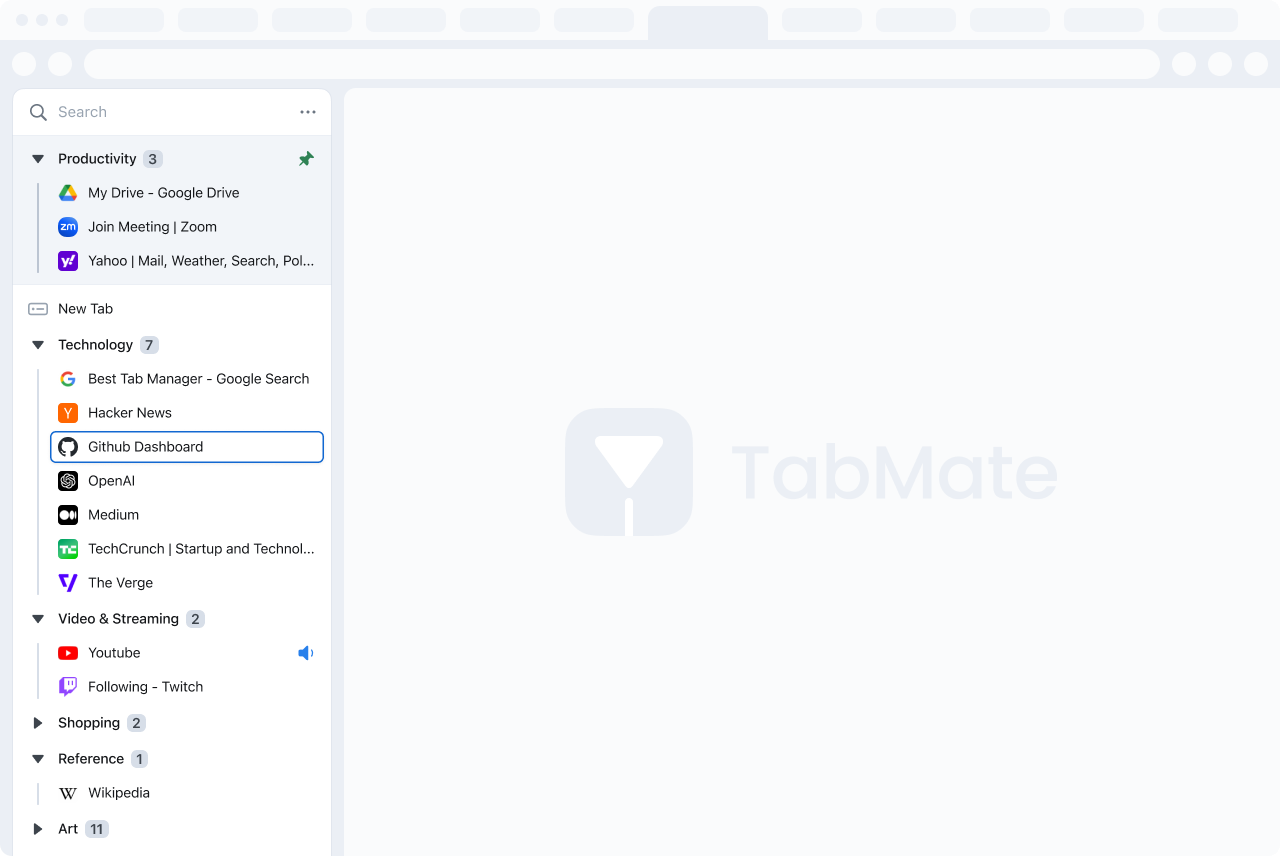
TabMate is an AI-powered browser tab manager that helps users overcome tab overload and improve online productivity through intelligent organization and automation.
TabMate addresses the common problem of having too many browser tabs open, leading to disorganization, reduced focus, and decreased efficiency. It utilizes artificial intelligence to automatically categorize, group, and prioritize open tabs, creating a streamlined browsing experience. This tool is particularly valuable for individuals who conduct extensive online research, manage multiple projects, or simply struggle with keeping their browser tabs under control. By intelligently managing tabs, TabMate empowers users to quickly locate information, reduce cognitive load, and enhance overall digital workflow. It’s a solution for anyone seeking a more organized and productive web browsing experience, leveraging AI tab management and browser automation.
Key Features of TabMate
- Automatically categorizes open browser tabs using AI.
- Groups related tabs together for easy navigation.
- Prioritizes tabs based on usage and relevance.
- Offers a visual overview of all open tabs.
- Allows users to search for specific tabs quickly.
- Provides tab hibernation to reduce browser memory usage.
- Enables saving and restoring tab groups for later use.
- Supports multiple browsers through extensions.
- Offers customizable categorization rules.
- Provides insights into browsing habits and tab usage.
Why People Use TabMate
Users adopt TabMate to reclaim control over their increasingly chaotic browsing sessions. Traditional tab management relies on manual organization, which becomes unsustainable with a large number of open tabs. This often leads to important information being lost in a sea of clutter, and significant time wasted searching for specific pages. TabMate automates this process, leveraging AI to intelligently organize tabs in a way that mirrors how users think and work.
Unlike manual methods, TabMate continuously learns from browsing behavior, refining its categorization and prioritization over time. This results in a dynamic and personalized tab management experience that adapts to individual needs. The tool significantly reduces the cognitive burden associated with managing numerous tabs, allowing users to focus on their tasks rather than struggling with browser organization. It offers a substantial improvement in efficiency and productivity for anyone who spends a significant amount of time online.
Popular Use Cases
- Academic Research: Students and researchers can efficiently manage numerous research papers, articles, and sources open in their browser.
- Software Development: Developers can organize tabs related to different projects, documentation, and code repositories.
- Content Creation: Writers, bloggers, and marketers can keep track of research materials, drafts, and reference websites.
- Project Management: Professionals can group tabs related to specific projects, tasks, and clients.
- Online Shopping: Users can organize tabs for comparing products, tracking orders, and managing wishlists.
- Travel Planning: Travelers can keep track of flight information, hotel bookings, and itinerary details.
- News and Information Gathering: Individuals can categorize news articles, blog posts, and other online content by topic.
- Data Analysis: Analysts can manage tabs containing datasets, reports, and analytical tools.
- E-commerce Businesses: Managing multiple product listings, competitor analysis, and marketing campaigns.
- Remote Workers: Staying organized with various work-related tabs open throughout the day.
Benefits of TabMate
- Increased Productivity: Spend less time searching for tabs and more time focusing on tasks.
- Reduced Cognitive Load: Minimize mental clutter and improve concentration.
- Improved Organization: Maintain a clean and structured browsing environment.
- Enhanced Efficiency: Quickly access relevant information and streamline workflows.
- Better Browser Performance: Reduce memory usage and improve browser speed through tab hibernation.
- Time Savings: Eliminate the frustration of endlessly scrolling through tabs.
- Simplified Research: Easily manage and navigate complex research projects.
- Streamlined Workflows: Integrate tab management seamlessly into daily routines.
- Reduced Stress: Alleviate the anxiety associated with tab overload.
- Improved Focus: Create a more conducive environment for deep work.
Page Insights
Related AIs
Featured



Compare with Alternatives
All VS
GetAi
@getai
Professional Extensions tools for creators.
Pricing Details
More Related AIs
View All
Query Kitty
Opening Overview Query Kitty is a powerful AI-powered chatbox and productivity assistant designed

 Kuzey Taşlı3.0 stars
Email Finder by Snov.io
Email Finder by Snov.io is a Chrome extension designed to help users quickly locate and verify prof

Email Finder by Snov.io is a Chrome extension designed to help users quickly locate and verify professional email addresses directly from websites and LinkedIn profiles. It solves the problem of time-consuming manual email research, a common challenge for sales, marketing, and recruitment professio
Magictool.AI Chrome Extension
Magictool.AI Chrome Extension is a versatile AI-powered productivity tool designed to enhance use

 Gül Tahincioğlu2.0 stars
Cotyper
Opening Overview Cotyper is a powerful AI-powered development tool designed to help users build

 Đurađ Trajković5.0 stars
AI Blaze
AI Blaze is an advanced AI writing and editing tool designed to help users create, refine, and o

 Jenny Grant4.0 stars
ChatGPT Chrome Extension
ChatGPT Chrome Extension is a versatile AI-powered browser extension that provides users with ins

ChatGPT Chrome Extension is a versatile AI-powered browser extension that provides users with instant access to OpenAI’s ChatGPT directly within their Chrome browser, streamlining workflows and enhancing online productivity. This extension addresses the challenge of information overload and the t
Termzy AI
Opening Overview Termzy AI is a sophisticated AI-powered browser extension designed to protect di

Opening Overview Termzy AI is a sophisticated AI-powered browser extension designed to protect digital rights by instantly analyzing complex Privacy Policies and Terms & Conditions. In a digital ecosystem where legal agreements are intentionally dense and lengthy, this tool serves as an automated
Mink
Opening Overview Mink is a sophisticated AI-powered browser co-pilot designed to drastically enha

 Luukas Saarela5.0 stars
MaxFocus
MaxFocus is a specialized AI-driven link preview extension designed to enhance digital productivi

 Jean Robin5.0 stars
Claude in Chrome
Claude in Chrome is an AI-powered browser extension that provides seamless access to Anthropic’s

Claude in Chrome is an AI-powered browser extension that provides seamless access to Anthropic’s Claude AI model directly within the Chrome browser, enabling users to enhance their online experience with intelligent assistance. This tool addresses the challenge of fragmented workflows by bringing

Read Something
Opening Overview ReadLite is a sophisticated AI-powered browser extension designed to transform t
Opening Overview ReadLite is a sophisticated AI-powered browser extension designed to transform the modern web browsing experience by simplifying complex web pages into a clean, distraction-free reading format. By leveraging intelligent content extraction and automated layout optimization, the to
MaxAI.me
MaxAI.me is an innovative AI browser extension that streamlines access to leading large language

 Jeremy Slawa5.0 stars
GPTMagicPrompts
GPTMagicPrompts is a specialized AI-powered prompt generator designed to help users maximize the

 Marta Guerin5.0 stars
Tweeter
Tweeter is an AI-powered X (formerly Twitter) content creation tool designed to help users strea

 امیر سالاری3.0 stars
ChatGPT for Google
ChatGPT for Google is a free AI-powered Chrome extension that enhances Google Search by displayin

 Isabella Murray3.0 stars